
Explorer not opening folders


dreamof3d

Member
Local time
5:52 PM
Posts
3
OS
Windows 11
The other day I saw a message saying Panther bar has been updated, upon reboot, I cannot open any folders on my machine, been checked with SpyHunter and Malwarebytes for viruses.... negative. In the Taskbar, It has a history of every folder I double clicked but can't open a folder window.

Last night I installed Explorer ++ just to have temporary access.

Any help would be greatly appreciated.
Thanks in advance
 
Windows Build/Version
Windows 11 Pro for Workstations 21H2 OS Build: 22000.593

My Computer My Computer

At a glance

Windows 11AMD Ryzen Threadripper 3970X 32-Core, 64-ThreadCorsair Vengeance LPX 256GB (8x32GB) DDR4 320...Asus Rog Strix RTX 3090, EVGA RTX 2080 Ti
OS
Windows 11
Computer type
PC/Desktop
Manufacturer/Model
Custom build
CPU
AMD Ryzen Threadripper 3970X 32-Core, 64-Thread
Motherboard
Gigabyte Trx40 Xtreme
Memory
Corsair Vengeance LPX 256GB (8x32GB) DDR4 3200 (PC4-25600)
Graphics Card(s)
Asus Rog Strix RTX 3090, EVGA RTX 2080 Ti
Sound Card
Gigabyte Trx40 Xtreme has it's own DAC
Monitor(s) Displays
2 x Samsung 28"
Screen Resolution
3480 x 2160
Hard Drives
(4) Sabrent 1TB Rocket Nvme PCIe 4.0 M.2 2280 Internal SSD, 4 TB HDD SATA, 1 TB Samsung Evo SSD, 512 GB Samsung Evo SSD
PSU
EVGA SuperNOVA 1600 T2, 80+ TITANIUM 1600W
Case
Corsair CC-9011063-WW Graphite Series 780T Full Tower PC Case - Black
Cooling
IceGiant ProSiphon Cooler
Keyboard
Logitech MX Keys wireless
Mouse
Logitech M510
Internet Speed
360 mbps down 8 Mbps up
Browser
Brave
Antivirus
Malwarebytes, SpyHunter
Other Info
Dual boot with Kubuntu 21 LTS, 32 core macOS Big Sur VM
If you haven't done it already, restart your computer and make sure explorer is still messed up.

The first thing I would do is open a command prompt as administrator. Type sfc /scannow
If system file checker find corrupt files and is able to repair them, restart.
If system file checker finds anything that it is unable to repair, also in command prompt type dism /online /cleanup-image /restorehealth
Note the spaces in the command.
If that doesn't fix explorer a repair install would be next. Repair Install Windows 11 with an In-place Upgrade Tutorial
 

My Computers My Computers

  • At a glance

    Windows 11 Pro 25H2 26200.9168i9-10900 10 core 20 threads32 gbnone-Intel UHD Graphics 630
    OS
    Windows 11 Pro 25H2 26200.9168
    Computer type
    PC/Desktop
    Manufacturer/Model
    Dell Optiplex 7080
    CPU
    i9-10900 10 core 20 threads
    Motherboard
    DELL 0J37VM
    Memory
    32 gb
    Graphics Card(s)
    none-Intel UHD Graphics 630
    Sound Card
    Integrated Realtek
    Monitor(s) Displays
    Benq 27
    Screen Resolution
    2560x1440
    Hard Drives
    2x1tb Solidigm m.2 nvme /External drives 512gb Samsung m.2 sata+2tb Kingston m2.nvme
    PSU
    500w
    Case
    MT
    Cooling
    Dell Premium
    Keyboard
    Logitech wired
    Mouse
    Logitech wireless
    Internet Speed
    so slow I'm too embarrassed to tell
    Browser
    #1 Edge #2 Firefox
    Antivirus
    Defender+MWB Premium
  • At a glance

    Windows 11 Pro 24H2 26200.9168AMD Ryzen 7 6800U32 gbintegrated
    Operating System
    Windows 11 Pro 24H2 26200.9168
    Computer type
    PC/Desktop
    Manufacturer/Model
    Beelink Mini PC SER5
    CPU
    AMD Ryzen 7 6800U
    Memory
    32 gb
    Graphics card(s)
    integrated
    Sound Card
    integrated
    Monitor(s) Displays
    Benq 27
    Screen Resolution
    2560x1440
    Hard Drives
    1TB Crucial nvme
    Keyboard
    Logitech wired
    Mouse
    Logitech wireless
    Internet Speed
    still too embarrassed to tell
    Browser
    Firefox
    Antivirus
    Defender
  • System 3 is non compliant Dell 9020 i7-4770/24gb ram Win11 PRO 26200.9168
Thanks, looks clean:

Beginning verification phase of system scan.
Verification 100% complete.

Windows Resource Protection did not find any integrity violations.

Deployment Image Servicing and Management tool
Version: 10.0.22000.1

Image Version: 10.0.22000.593

[==========================100.0%==========================] The restore operation completed successfully.
The operation completed successfully.

Rebooting :)
 

My Computer My Computer

At a glance

Windows 11AMD Ryzen Threadripper 3970X 32-Core, 64-ThreadCorsair Vengeance LPX 256GB (8x32GB) DDR4 320...Asus Rog Strix RTX 3090, EVGA RTX 2080 Ti
OS
Windows 11
Computer type
PC/Desktop
Manufacturer/Model
Custom build
CPU
AMD Ryzen Threadripper 3970X 32-Core, 64-Thread
Motherboard
Gigabyte Trx40 Xtreme
Memory
Corsair Vengeance LPX 256GB (8x32GB) DDR4 3200 (PC4-25600)
Graphics Card(s)
Asus Rog Strix RTX 3090, EVGA RTX 2080 Ti
Sound Card
Gigabyte Trx40 Xtreme has it's own DAC
Monitor(s) Displays
2 x Samsung 28"
Screen Resolution
3480 x 2160
Hard Drives
(4) Sabrent 1TB Rocket Nvme PCIe 4.0 M.2 2280 Internal SSD, 4 TB HDD SATA, 1 TB Samsung Evo SSD, 512 GB Samsung Evo SSD
PSU
EVGA SuperNOVA 1600 T2, 80+ TITANIUM 1600W
Case
Corsair CC-9011063-WW Graphite Series 780T Full Tower PC Case - Black
Cooling
IceGiant ProSiphon Cooler
Keyboard
Logitech MX Keys wireless
Mouse
Logitech M510
Internet Speed
360 mbps down 8 Mbps up
Browser
Brave
Antivirus
Malwarebytes, SpyHunter
Other Info
Dual boot with Kubuntu 21 LTS, 32 core macOS Big Sur VM
I reread your post. Have you installed an extension from the Microsoft store called Snipdo. That is the new name for an old app called Panther Bar.
 

My Computers My Computers

  • At a glance

    Windows 11 Pro 25H2 26200.9168i9-10900 10 core 20 threads32 gbnone-Intel UHD Graphics 630
    OS
    Windows 11 Pro 25H2 26200.9168
    Computer type
    PC/Desktop
    Manufacturer/Model
    Dell Optiplex 7080
    CPU
    i9-10900 10 core 20 threads
    Motherboard
    DELL 0J37VM
    Memory
    32 gb
    Graphics Card(s)
    none-Intel UHD Graphics 630
    Sound Card
    Integrated Realtek
    Monitor(s) Displays
    Benq 27
    Screen Resolution
    2560x1440
    Hard Drives
    2x1tb Solidigm m.2 nvme /External drives 512gb Samsung m.2 sata+2tb Kingston m2.nvme
    PSU
    500w
    Case
    MT
    Cooling
    Dell Premium
    Keyboard
    Logitech wired
    Mouse
    Logitech wireless
    Internet Speed
    so slow I'm too embarrassed to tell
    Browser
    #1 Edge #2 Firefox
    Antivirus
    Defender+MWB Premium
  • At a glance

    Windows 11 Pro 24H2 26200.9168AMD Ryzen 7 6800U32 gbintegrated
    Operating System
    Windows 11 Pro 24H2 26200.9168
    Computer type
    PC/Desktop
    Manufacturer/Model
    Beelink Mini PC SER5
    CPU
    AMD Ryzen 7 6800U
    Memory
    32 gb
    Graphics card(s)
    integrated
    Sound Card
    integrated
    Monitor(s) Displays
    Benq 27
    Screen Resolution
    2560x1440
    Hard Drives
    1TB Crucial nvme
    Keyboard
    Logitech wired
    Mouse
    Logitech wireless
    Internet Speed
    still too embarrassed to tell
    Browser
    Firefox
    Antivirus
    Defender
  • System 3 is non compliant Dell 9020 i7-4770/24gb ram Win11 PRO 26200.9168
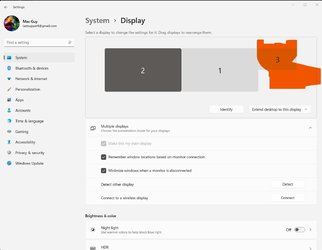
I figured it out.... I dual boot with Linux, could not get sound out of my optical port so I hooked up the Rtx 3090 HDMI into my Denon receiver. This in turn added a ghost monitor to my displays. I just swapped the Denon to the right, found my window and dragged it to the center of my main monitor, the put the Denon monitor back. They were gust off my screen since the Denon has no screen. Happy camper, thanks for trying to help :)
 

Attachments

  • TsmxmpZ.jpg
    TsmxmpZ.jpg
    68.8 KB · Views: 1

My Computer My Computer

At a glance

Windows 11AMD Ryzen Threadripper 3970X 32-Core, 64-ThreadCorsair Vengeance LPX 256GB (8x32GB) DDR4 320...Asus Rog Strix RTX 3090, EVGA RTX 2080 Ti
OS
Windows 11
Computer type
PC/Desktop
Manufacturer/Model
Custom build
CPU
AMD Ryzen Threadripper 3970X 32-Core, 64-Thread
Motherboard
Gigabyte Trx40 Xtreme
Memory
Corsair Vengeance LPX 256GB (8x32GB) DDR4 3200 (PC4-25600)
Graphics Card(s)
Asus Rog Strix RTX 3090, EVGA RTX 2080 Ti
Sound Card
Gigabyte Trx40 Xtreme has it's own DAC
Monitor(s) Displays
2 x Samsung 28"
Screen Resolution
3480 x 2160
Hard Drives
(4) Sabrent 1TB Rocket Nvme PCIe 4.0 M.2 2280 Internal SSD, 4 TB HDD SATA, 1 TB Samsung Evo SSD, 512 GB Samsung Evo SSD
PSU
EVGA SuperNOVA 1600 T2, 80+ TITANIUM 1600W
Case
Corsair CC-9011063-WW Graphite Series 780T Full Tower PC Case - Black
Cooling
IceGiant ProSiphon Cooler
Keyboard
Logitech MX Keys wireless
Mouse
Logitech M510
Internet Speed
360 mbps down 8 Mbps up
Browser
Brave
Antivirus
Malwarebytes, SpyHunter
Other Info
Dual boot with Kubuntu 21 LTS, 32 core macOS Big Sur VM

Latest Support Threads

Back
Top Bottom




