
Explorer Patcher / Bringing back quick launch


woldsweather

Well-known member
Member
VIP
Local time
8:14 PM
Posts
319
OS
Windows 10 PRO
There are a lot of links showing you cant install explorer patcher on a 24H2 Windows PC. However before I reinstalled Windows 11 a week ago I did have my quick launch toolbar.

I have installed the current explore patcher from github but right clicking on the task bar doesn't show the option for new toolbar. Right click properties shows explorer patcher installed.

How do I get my quick launch toolbar back as I know I did it once!
 
Windows Build/Version
W11 24H2

My Computer My Computer

At a glance

Windows 10 PROIntel(R) Core(TM) i7-8700 CPU @ 3.20GHz 3.20 GHz64 GBNVIDIA GeForce GTX 1070
OS
Windows 10 PRO
Computer type
PC/Desktop
Manufacturer/Model
HP Omen
CPU
Intel(R) Core(TM) i7-8700 CPU @ 3.20GHz 3.20 GHz
Motherboard
Board: HP 8437 1.3 Serial Number: PGUCR0HP1B90LD Bus Clock: 100 megahertz UEFI: AMI F.53 10/23/2020
Memory
64 GB
Graphics Card(s)
NVIDIA GeForce GTX 1070
Sound Card
NVIDIA High Definition Audio Realtek High Definition Audio
Monitor(s) Displays
AOC 2778X [Monitor] (27.2"vis, s/n GJGJ7HA027112, July 2018) DELL U2412M [Monitor] (24.0"vis, s/n XX-00FFXD-XXXXX-529-64AS, February 2015)
Hard Drives
c: (NTFS on drive 0) * 999.21 GB 857.61 GB free
d: (NTFS on drive 1) 1984.45 GB 741.65 GB free
e: (NTFS on drive 1) 15.95 GB 1.78 GB free
h: (NTFS on drive 2) 239.93 GB 231.23 GB free
i: (NTFS on drive 2) 14.81 GB 1.71 GB free
Keyboard
Omoton
Mouse
Omoton
Internet Speed
9Gbps
Browser
Chrome Edge and Firefox
Antivirus
Kaspersky
Other Info
Have discovered 31/01/2022 Internet speed at router 41 mbps. At this PC 9. Internet is via wired ethernet.
In EP Settings, make sure Taskbar Style is set to: Windows 10: Explorer Patcher
 

My Computer My Computer

At a glance

W11
OS
W11
Computer type
PC/Desktop
Manufacturer/Model
2 HP Desktops, 1 Dell Desktop, 2 Dell XPS Laptops, 1 HP Laptop
Keyboard
Logitech
Mouse
Logitech MX Master 4 & 3
Internet Speed
500 mps
Browser
Firefox
Antivirus
Bitdefender
Yes it is but no option for new toolbar.
In EP Settings, make sure Taskbar Style is set to: Windows 10: Explorer Patcher
 

My Computer My Computer

At a glance

Windows 10 PROIntel(R) Core(TM) i7-8700 CPU @ 3.20GHz 3.20 GHz64 GBNVIDIA GeForce GTX 1070
OS
Windows 10 PRO
Computer type
PC/Desktop
Manufacturer/Model
HP Omen
CPU
Intel(R) Core(TM) i7-8700 CPU @ 3.20GHz 3.20 GHz
Motherboard
Board: HP 8437 1.3 Serial Number: PGUCR0HP1B90LD Bus Clock: 100 megahertz UEFI: AMI F.53 10/23/2020
Memory
64 GB
Graphics Card(s)
NVIDIA GeForce GTX 1070
Sound Card
NVIDIA High Definition Audio Realtek High Definition Audio
Monitor(s) Displays
AOC 2778X [Monitor] (27.2"vis, s/n GJGJ7HA027112, July 2018) DELL U2412M [Monitor] (24.0"vis, s/n XX-00FFXD-XXXXX-529-64AS, February 2015)
Hard Drives
c: (NTFS on drive 0) * 999.21 GB 857.61 GB free
d: (NTFS on drive 1) 1984.45 GB 741.65 GB free
e: (NTFS on drive 1) 15.95 GB 1.78 GB free
h: (NTFS on drive 2) 239.93 GB 231.23 GB free
i: (NTFS on drive 2) 14.81 GB 1.71 GB free
Keyboard
Omoton
Mouse
Omoton
Internet Speed
9Gbps
Browser
Chrome Edge and Firefox
Antivirus
Kaspersky
Other Info
Have discovered 31/01/2022 Internet speed at router 41 mbps. At this PC 9. Internet is via wired ethernet.
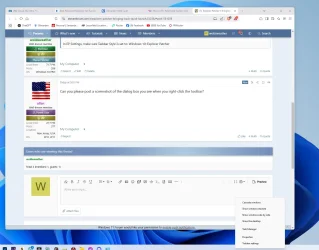
Can you please post a screenshot of the dialog box you see when you right-click the toolbar?
 

My Computer My Computer

At a glance

W11
OS
W11
Computer type
PC/Desktop
Manufacturer/Model
2 HP Desktops, 1 Dell Desktop, 2 Dell XPS Laptops, 1 HP Laptop
Keyboard
Logitech
Mouse
Logitech MX Master 4 & 3
Internet Speed
500 mps
Browser
Firefox
Antivirus
Bitdefender
Attaching
 

Attachments

  • Clipboard01.webp
    Clipboard01.webp
    100.6 KB · Views: 11

My Computer My Computer

At a glance

Windows 10 PROIntel(R) Core(TM) i7-8700 CPU @ 3.20GHz 3.20 GHz64 GBNVIDIA GeForce GTX 1070
OS
Windows 10 PRO
Computer type
PC/Desktop
Manufacturer/Model
HP Omen
CPU
Intel(R) Core(TM) i7-8700 CPU @ 3.20GHz 3.20 GHz
Motherboard
Board: HP 8437 1.3 Serial Number: PGUCR0HP1B90LD Bus Clock: 100 megahertz UEFI: AMI F.53 10/23/2020
Memory
64 GB
Graphics Card(s)
NVIDIA GeForce GTX 1070
Sound Card
NVIDIA High Definition Audio Realtek High Definition Audio
Monitor(s) Displays
AOC 2778X [Monitor] (27.2"vis, s/n GJGJ7HA027112, July 2018) DELL U2412M [Monitor] (24.0"vis, s/n XX-00FFXD-XXXXX-529-64AS, February 2015)
Hard Drives
c: (NTFS on drive 0) * 999.21 GB 857.61 GB free
d: (NTFS on drive 1) 1984.45 GB 741.65 GB free
e: (NTFS on drive 1) 15.95 GB 1.78 GB free
h: (NTFS on drive 2) 239.93 GB 231.23 GB free
i: (NTFS on drive 2) 14.81 GB 1.71 GB free
Keyboard
Omoton
Mouse
Omoton
Internet Speed
9Gbps
Browser
Chrome Edge and Firefox
Antivirus
Kaspersky
Other Info
Have discovered 31/01/2022 Internet speed at router 41 mbps. At this PC 9. Internet is via wired ethernet.

My Computer My Computer

At a glance

W11
OS
W11
Computer type
PC/Desktop
Manufacturer/Model
2 HP Desktops, 1 Dell Desktop, 2 Dell XPS Laptops, 1 HP Laptop
Keyboard
Logitech
Mouse
Logitech MX Master 4 & 3
Internet Speed
500 mps
Browser
Firefox
Antivirus
Bitdefender

My Computer My Computer

At a glance

Windows 10 PROIntel(R) Core(TM) i7-8700 CPU @ 3.20GHz 3.20 GHz64 GBNVIDIA GeForce GTX 1070
OS
Windows 10 PRO
Computer type
PC/Desktop
Manufacturer/Model
HP Omen
CPU
Intel(R) Core(TM) i7-8700 CPU @ 3.20GHz 3.20 GHz
Motherboard
Board: HP 8437 1.3 Serial Number: PGUCR0HP1B90LD Bus Clock: 100 megahertz UEFI: AMI F.53 10/23/2020
Memory
64 GB
Graphics Card(s)
NVIDIA GeForce GTX 1070
Sound Card
NVIDIA High Definition Audio Realtek High Definition Audio
Monitor(s) Displays
AOC 2778X [Monitor] (27.2"vis, s/n GJGJ7HA027112, July 2018) DELL U2412M [Monitor] (24.0"vis, s/n XX-00FFXD-XXXXX-529-64AS, February 2015)
Hard Drives
c: (NTFS on drive 0) * 999.21 GB 857.61 GB free
d: (NTFS on drive 1) 1984.45 GB 741.65 GB free
e: (NTFS on drive 1) 15.95 GB 1.78 GB free
h: (NTFS on drive 2) 239.93 GB 231.23 GB free
i: (NTFS on drive 2) 14.81 GB 1.71 GB free
Keyboard
Omoton
Mouse
Omoton
Internet Speed
9Gbps
Browser
Chrome Edge and Firefox
Antivirus
Kaspersky
Other Info
Have discovered 31/01/2022 Internet speed at router 41 mbps. At this PC 9. Internet is via wired ethernet.

Then it sounds as though something else may be at play. I recently did an in-place upgrade on two systems and it fixed a number of minor issues I was having. No harm in trying. Although no settings or installed programs will be effected, it always makes sense to create a disc image first.

Running a in-place upgrade:
 

My Computer My Computer

At a glance

W11
OS
W11
Computer type
PC/Desktop
Manufacturer/Model
2 HP Desktops, 1 Dell Desktop, 2 Dell XPS Laptops, 1 HP Laptop
Keyboard
Logitech
Mouse
Logitech MX Master 4 & 3
Internet Speed
500 mps
Browser
Firefox
Antivirus
Bitdefender
I only reinstalled windows a few days ago.
 

My Computer My Computer

At a glance

Windows 10 PROIntel(R) Core(TM) i7-8700 CPU @ 3.20GHz 3.20 GHz64 GBNVIDIA GeForce GTX 1070
OS
Windows 10 PRO
Computer type
PC/Desktop
Manufacturer/Model
HP Omen
CPU
Intel(R) Core(TM) i7-8700 CPU @ 3.20GHz 3.20 GHz
Motherboard
Board: HP 8437 1.3 Serial Number: PGUCR0HP1B90LD Bus Clock: 100 megahertz UEFI: AMI F.53 10/23/2020
Memory
64 GB
Graphics Card(s)
NVIDIA GeForce GTX 1070
Sound Card
NVIDIA High Definition Audio Realtek High Definition Audio
Monitor(s) Displays
AOC 2778X [Monitor] (27.2"vis, s/n GJGJ7HA027112, July 2018) DELL U2412M [Monitor] (24.0"vis, s/n XX-00FFXD-XXXXX-529-64AS, February 2015)
Hard Drives
c: (NTFS on drive 0) * 999.21 GB 857.61 GB free
d: (NTFS on drive 1) 1984.45 GB 741.65 GB free
e: (NTFS on drive 1) 15.95 GB 1.78 GB free
h: (NTFS on drive 2) 239.93 GB 231.23 GB free
i: (NTFS on drive 2) 14.81 GB 1.71 GB free
Keyboard
Omoton
Mouse
Omoton
Internet Speed
9Gbps
Browser
Chrome Edge and Firefox
Antivirus
Kaspersky
Other Info
Have discovered 31/01/2022 Internet speed at router 41 mbps. At this PC 9. Internet is via wired ethernet.
I understand. But there seem to be a couple of issues that may be explained by a corrupt installation. There's no harm in doing the in place upgrade. Either it will help or it won't, but it won't do any harm or cause any hardship.
 

My Computer My Computer

At a glance

W11
OS
W11
Computer type
PC/Desktop
Manufacturer/Model
2 HP Desktops, 1 Dell Desktop, 2 Dell XPS Laptops, 1 HP Laptop
Keyboard
Logitech
Mouse
Logitech MX Master 4 & 3
Internet Speed
500 mps
Browser
Firefox
Antivirus
Bitdefender
I see that you have Kaspersky listed in your specs. Maybe it does not want to play nice with EP?

In EP settings > Advanced, you can enable Console. Then when you run the command
%windir%\System32\rundll32.exe "%windir%\dxgi.dll",ZZRestartExplorer
it will restart explorer gracefully, but will do so in a more failsafe manner (IME anyway) than when you simply click on the Restart File Explorer link in the bottom left corner of the EP settings window panel. Wait for explorer and EP to reload itself next, and, in the Explorer console window, you should now be able to verify that the symbols are loaded, and that EP really is using the "Windows 10 (ExplorerPatcher)" taskbar style (currently, that would be the file ep_taskbar.5.dll).

Running on Windows 11, OS Build 10.0.26100.3037.
Loaded symbols
...
[TB] Using 'ep_taskbar.5.dll'

Still in EP settings > Advanced, don't forget to disable Console again before you close the window.

In several cases I have found that it's best to reboot after you have installed/updated EP, updated Windows to a new build number (that would trigger EP to download new symbols) or applied some certain changes in EP settings (that would require explorer to be restarted). Only rarely have I found the need to uninstall/reinstall EP to fix an issue with it, and, that was a very very long time ago.

I agree with @allan that doing a Windows repair with an in-place upgrade could turn out to be the easiest way to eliminate the potential risk that your Windows installation got currupted somehow, as the usual-old
dism /cleanup-image /online /restorehealth immediately followed by sfc /scannow does not always solve all problems in that regard.
(The reason why this risk is not worth taking IMO is because the resulting problems tend to let you drive around in circles either until you do the in-place upgrade anyway still after all or until they finally drive you nuts...)
 

My Computers My Computers

  • At a glance

    11 Homei7 13650HX16GB DDR5GeForce RTX 4060 Mobile
    OS
    11 Home
    Computer type
    Laptop
    Manufacturer/Model
    Asus TUF Gaming F16 (2024)
    CPU
    i7 13650HX
    Memory
    16GB DDR5
    Graphics Card(s)
    GeForce RTX 4060 Mobile
    Sound Card
    Eastern Electric MiniMax DAC Supreme; Emotiva UMC-200; Astell & Kern AK240
    Monitor(s) Displays
    Sony Bravia XR-55X90J
    Screen Resolution
    3840×2160
    Hard Drives
    512GB SSD internal
    37TB external
    PSU
    Li-ion
    Cooling
    2× Arc Flow Fans, 4× exhaust vents, 5× heatpipes
    Keyboard
    Logitech K800
    Mouse
    Logitech G402
    Internet Speed
    30Mbit/s up, 500Mbit/s down
    Browser
    FF
    Antivirus
    What's an antivirus?
  • At a glance

    11 Homei5 1135G716GB DDR4Intel Iris Xe
    Operating System
    11 Home
    Computer type
    Laptop
    Manufacturer/Model
    Medion S15450
    CPU
    i5 1135G7
    Memory
    16GB DDR4
    Graphics card(s)
    Intel Iris Xe
    Sound Card
    Eastern Electric MiniMax DAC Supreme; Emotiva UMC-200; Astell & Kern AK240
    Monitor(s) Displays
    Sony Bravia XR-55X90J
    Screen Resolution
    3840×2160
    Hard Drives
    2TB SSD internal
    37TB external
    PSU
    Li-ion
    Keyboard
    Logitech K800
    Mouse
    Logitech G402
    Internet Speed
    30Mbit/s up, 500Mbit/s down
    Browser
    FF
I uninstall ed Kadpefsky a year ago. Now rely on Defender. Have had to reinstall Windows for 2nd time in a week so maybe ep will work now.
 

My Computer My Computer

At a glance

Windows 10 PROIntel(R) Core(TM) i7-8700 CPU @ 3.20GHz 3.20 GHz64 GBNVIDIA GeForce GTX 1070
OS
Windows 10 PRO
Computer type
PC/Desktop
Manufacturer/Model
HP Omen
CPU
Intel(R) Core(TM) i7-8700 CPU @ 3.20GHz 3.20 GHz
Motherboard
Board: HP 8437 1.3 Serial Number: PGUCR0HP1B90LD Bus Clock: 100 megahertz UEFI: AMI F.53 10/23/2020
Memory
64 GB
Graphics Card(s)
NVIDIA GeForce GTX 1070
Sound Card
NVIDIA High Definition Audio Realtek High Definition Audio
Monitor(s) Displays
AOC 2778X [Monitor] (27.2"vis, s/n GJGJ7HA027112, July 2018) DELL U2412M [Monitor] (24.0"vis, s/n XX-00FFXD-XXXXX-529-64AS, February 2015)
Hard Drives
c: (NTFS on drive 0) * 999.21 GB 857.61 GB free
d: (NTFS on drive 1) 1984.45 GB 741.65 GB free
e: (NTFS on drive 1) 15.95 GB 1.78 GB free
h: (NTFS on drive 2) 239.93 GB 231.23 GB free
i: (NTFS on drive 2) 14.81 GB 1.71 GB free
Keyboard
Omoton
Mouse
Omoton
Internet Speed
9Gbps
Browser
Chrome Edge and Firefox
Antivirus
Kaspersky
Other Info
Have discovered 31/01/2022 Internet speed at router 41 mbps. At this PC 9. Internet is via wired ethernet.
I uninstall ed Kadpefsky a year ago. Now rely on Defender. Have had to reinstall Windows for 2nd time in a week so maybe ep will work now.
Still no new toolbar setting in right click on task bar in fact I only get task manager and task bar settings now.
 

My Computer My Computer

At a glance

Windows 10 PROIntel(R) Core(TM) i7-8700 CPU @ 3.20GHz 3.20 GHz64 GBNVIDIA GeForce GTX 1070
OS
Windows 10 PRO
Computer type
PC/Desktop
Manufacturer/Model
HP Omen
CPU
Intel(R) Core(TM) i7-8700 CPU @ 3.20GHz 3.20 GHz
Motherboard
Board: HP 8437 1.3 Serial Number: PGUCR0HP1B90LD Bus Clock: 100 megahertz UEFI: AMI F.53 10/23/2020
Memory
64 GB
Graphics Card(s)
NVIDIA GeForce GTX 1070
Sound Card
NVIDIA High Definition Audio Realtek High Definition Audio
Monitor(s) Displays
AOC 2778X [Monitor] (27.2"vis, s/n GJGJ7HA027112, July 2018) DELL U2412M [Monitor] (24.0"vis, s/n XX-00FFXD-XXXXX-529-64AS, February 2015)
Hard Drives
c: (NTFS on drive 0) * 999.21 GB 857.61 GB free
d: (NTFS on drive 1) 1984.45 GB 741.65 GB free
e: (NTFS on drive 1) 15.95 GB 1.78 GB free
h: (NTFS on drive 2) 239.93 GB 231.23 GB free
i: (NTFS on drive 2) 14.81 GB 1.71 GB free
Keyboard
Omoton
Mouse
Omoton
Internet Speed
9Gbps
Browser
Chrome Edge and Firefox
Antivirus
Kaspersky
Other Info
Have discovered 31/01/2022 Internet speed at router 41 mbps. At this PC 9. Internet is via wired ethernet.
Attaching
I see from your screenshot that Taskbars is missing from the top of the dialog when you right click on the taskbar. If you then click on Properties, is it also missing from the Properties dialog? If it's not there, it seems there has to be something on your system that's blocking it.

I'm also using Defender, and just upgraded to 24H2. I did have to set to Windows 10 (Explorer Patcher) to get my beloved task bar back, but it’s all looking good so far. I remember dire predictions that 24H2 would kill EP, but it lives on--at least on my machine.
 

My Computer My Computer

At a glance

Windows 11 Pro 24H213th Gen Intel(R) Core(TM) i5-13600K 3.50 GHz32GB DDR4GeForce GT 1030 2GB
OS
Windows 11 Pro 24H2
Computer type
PC/Desktop
Manufacturer/Model
Custom
CPU
13th Gen Intel(R) Core(TM) i5-13600K 3.50 GHz
Motherboard
GIGABYTE B660M DS3H , DDR4, Dual M.2, PCIe 4.0,2.5GB LAN, USB 3.2, USB C
Memory
32GB DDR4
Graphics Card(s)
GeForce GT 1030 2GB
Sound Card
Realtek
Monitor(s) Displays
HP
Screen Resolution
1920 x 1080
Hard Drives
2 X 2TB Samsung 980 Pro
PSU
APEVIA Prestige Series 800W
Case
Fractal Design Focus G
Cooling
Air 3 x fans
Keyboard
WASD V2, Realforce 103U-UW
Internet Speed
950 Mbps down, 25 Mbps up
Browser
Edge, Firefox
Antivirus
Windows Defender
This is what I get. Is there a way to get new taskbar?
 

Attachments

  • Clipboard01.webp
    Clipboard01.webp
    40.1 KB · Views: 5

My Computer My Computer

At a glance

Windows 10 PROIntel(R) Core(TM) i7-8700 CPU @ 3.20GHz 3.20 GHz64 GBNVIDIA GeForce GTX 1070
OS
Windows 10 PRO
Computer type
PC/Desktop
Manufacturer/Model
HP Omen
CPU
Intel(R) Core(TM) i7-8700 CPU @ 3.20GHz 3.20 GHz
Motherboard
Board: HP 8437 1.3 Serial Number: PGUCR0HP1B90LD Bus Clock: 100 megahertz UEFI: AMI F.53 10/23/2020
Memory
64 GB
Graphics Card(s)
NVIDIA GeForce GTX 1070
Sound Card
NVIDIA High Definition Audio Realtek High Definition Audio
Monitor(s) Displays
AOC 2778X [Monitor] (27.2"vis, s/n GJGJ7HA027112, July 2018) DELL U2412M [Monitor] (24.0"vis, s/n XX-00FFXD-XXXXX-529-64AS, February 2015)
Hard Drives
c: (NTFS on drive 0) * 999.21 GB 857.61 GB free
d: (NTFS on drive 1) 1984.45 GB 741.65 GB free
e: (NTFS on drive 1) 15.95 GB 1.78 GB free
h: (NTFS on drive 2) 239.93 GB 231.23 GB free
i: (NTFS on drive 2) 14.81 GB 1.71 GB free
Keyboard
Omoton
Mouse
Omoton
Internet Speed
9Gbps
Browser
Chrome Edge and Firefox
Antivirus
Kaspersky
Other Info
Have discovered 31/01/2022 Internet speed at router 41 mbps. At this PC 9. Internet is via wired ethernet.
Your properties dialog shows a line saying Win10 taskbar is unavailable for this version of Windows which I’m not seeing.

I just installed 24H2 on a 2d pc (laptop in this case). Windows paused the update until I uninstalled EP. Once I did that, the update completed. I then downloaded and ran EP and my Win10 taskbar is back.

Maybe try uninstalling EP, and then re-installing following the instructions at GitHub - valinet/ExplorerPatcher: This project aims to enhance the working environment on Windows

Might not help, but it only takes a couple of minutes, so worth a try.


Screenshot 2025-02-12 143257.webp
 

My Computer My Computer

At a glance

Windows 11 Pro 24H213th Gen Intel(R) Core(TM) i5-13600K 3.50 GHz32GB DDR4GeForce GT 1030 2GB
OS
Windows 11 Pro 24H2
Computer type
PC/Desktop
Manufacturer/Model
Custom
CPU
13th Gen Intel(R) Core(TM) i5-13600K 3.50 GHz
Motherboard
GIGABYTE B660M DS3H , DDR4, Dual M.2, PCIe 4.0,2.5GB LAN, USB 3.2, USB C
Memory
32GB DDR4
Graphics Card(s)
GeForce GT 1030 2GB
Sound Card
Realtek
Monitor(s) Displays
HP
Screen Resolution
1920 x 1080
Hard Drives
2 X 2TB Samsung 980 Pro
PSU
APEVIA Prestige Series 800W
Case
Fractal Design Focus G
Cooling
Air 3 x fans
Keyboard
WASD V2, Realforce 103U-UW
Internet Speed
950 Mbps down, 25 Mbps up
Browser
Edge, Firefox
Antivirus
Windows Defender
Thanks for your support here. I ran the instructions in powershell to add exclusions at least I think I did I didn't get any message that it did or didn't run. After uninstalling and reinstalling I still get the same as before.
Annoying because I had this working a couple of weeks back.
 

My Computer My Computer

At a glance

Windows 10 PROIntel(R) Core(TM) i7-8700 CPU @ 3.20GHz 3.20 GHz64 GBNVIDIA GeForce GTX 1070
OS
Windows 10 PRO
Computer type
PC/Desktop
Manufacturer/Model
HP Omen
CPU
Intel(R) Core(TM) i7-8700 CPU @ 3.20GHz 3.20 GHz
Motherboard
Board: HP 8437 1.3 Serial Number: PGUCR0HP1B90LD Bus Clock: 100 megahertz UEFI: AMI F.53 10/23/2020
Memory
64 GB
Graphics Card(s)
NVIDIA GeForce GTX 1070
Sound Card
NVIDIA High Definition Audio Realtek High Definition Audio
Monitor(s) Displays
AOC 2778X [Monitor] (27.2"vis, s/n GJGJ7HA027112, July 2018) DELL U2412M [Monitor] (24.0"vis, s/n XX-00FFXD-XXXXX-529-64AS, February 2015)
Hard Drives
c: (NTFS on drive 0) * 999.21 GB 857.61 GB free
d: (NTFS on drive 1) 1984.45 GB 741.65 GB free
e: (NTFS on drive 1) 15.95 GB 1.78 GB free
h: (NTFS on drive 2) 239.93 GB 231.23 GB free
i: (NTFS on drive 2) 14.81 GB 1.71 GB free
Keyboard
Omoton
Mouse
Omoton
Internet Speed
9Gbps
Browser
Chrome Edge and Firefox
Antivirus
Kaspersky
Other Info
Have discovered 31/01/2022 Internet speed at router 41 mbps. At this PC 9. Internet is via wired ethernet.
Is your version 24H2, Build 26100.3194?
 

My Computer My Computer

At a glance

Windows 11 Pro 24H213th Gen Intel(R) Core(TM) i5-13600K 3.50 GHz32GB DDR4GeForce GT 1030 2GB
OS
Windows 11 Pro 24H2
Computer type
PC/Desktop
Manufacturer/Model
Custom
CPU
13th Gen Intel(R) Core(TM) i5-13600K 3.50 GHz
Motherboard
GIGABYTE B660M DS3H , DDR4, Dual M.2, PCIe 4.0,2.5GB LAN, USB 3.2, USB C
Memory
32GB DDR4
Graphics Card(s)
GeForce GT 1030 2GB
Sound Card
Realtek
Monitor(s) Displays
HP
Screen Resolution
1920 x 1080
Hard Drives
2 X 2TB Samsung 980 Pro
PSU
APEVIA Prestige Series 800W
Case
Fractal Design Focus G
Cooling
Air 3 x fans
Keyboard
WASD V2, Realforce 103U-UW
Internet Speed
950 Mbps down, 25 Mbps up
Browser
Edge, Firefox
Antivirus
Windows Defender
Yes thats it
 

My Computer My Computer

At a glance

Windows 10 PROIntel(R) Core(TM) i7-8700 CPU @ 3.20GHz 3.20 GHz64 GBNVIDIA GeForce GTX 1070
OS
Windows 10 PRO
Computer type
PC/Desktop
Manufacturer/Model
HP Omen
CPU
Intel(R) Core(TM) i7-8700 CPU @ 3.20GHz 3.20 GHz
Motherboard
Board: HP 8437 1.3 Serial Number: PGUCR0HP1B90LD Bus Clock: 100 megahertz UEFI: AMI F.53 10/23/2020
Memory
64 GB
Graphics Card(s)
NVIDIA GeForce GTX 1070
Sound Card
NVIDIA High Definition Audio Realtek High Definition Audio
Monitor(s) Displays
AOC 2778X [Monitor] (27.2"vis, s/n GJGJ7HA027112, July 2018) DELL U2412M [Monitor] (24.0"vis, s/n XX-00FFXD-XXXXX-529-64AS, February 2015)
Hard Drives
c: (NTFS on drive 0) * 999.21 GB 857.61 GB free
d: (NTFS on drive 1) 1984.45 GB 741.65 GB free
e: (NTFS on drive 1) 15.95 GB 1.78 GB free
h: (NTFS on drive 2) 239.93 GB 231.23 GB free
i: (NTFS on drive 2) 14.81 GB 1.71 GB free
Keyboard
Omoton
Mouse
Omoton
Internet Speed
9Gbps
Browser
Chrome Edge and Firefox
Antivirus
Kaspersky
Other Info
Have discovered 31/01/2022 Internet speed at router 41 mbps. At this PC 9. Internet is via wired ethernet.
We have the same version of Win11, so if it's not the OS, there must be a setting in some software. Have you tried the recommended settings in Defender:

Please include the following files and folders in your antivirus' exclusion list to prevent issues due to antivirus detections:

  • C:\Program Files\ExplorerPatcher
  • %APPDATA%\ExplorerPatcher
  • C:\Windows\dxgi.dll
  • C:\Windows\SystemApps\Microsoft.Windows.StartMenuExperienceHost_cw5n1h2txyewy
  • C:\Windows\SystemApps\ShellExperienceHost_cw5n1h2txyewy
For Defender, you can run the following script in PowerShell as an administrator:

Add-MpPreference -ExclusionPath "C:\Program Files\ExplorerPatcher"
Add-MpPreference -ExclusionPath "$env:APPDATA\ExplorerPatcher"
Add-MpPreference -ExclusionPath "C:\Windows\dxgi.dll"
Add-MpPreference -ExclusionPath "C:\Windows\SystemApps\Microsoft.Windows.StartMenuExperienceHost_cw5n1h2txyewy"
Add-MpPreference -ExclusionPath "C:\Windows\SystemApps\ShellExperienceHost_cw5n1h2txyewy"
 

My Computer My Computer

At a glance

Windows 11 Pro 24H213th Gen Intel(R) Core(TM) i5-13600K 3.50 GHz32GB DDR4GeForce GT 1030 2GB
OS
Windows 11 Pro 24H2
Computer type
PC/Desktop
Manufacturer/Model
Custom
CPU
13th Gen Intel(R) Core(TM) i5-13600K 3.50 GHz
Motherboard
GIGABYTE B660M DS3H , DDR4, Dual M.2, PCIe 4.0,2.5GB LAN, USB 3.2, USB C
Memory
32GB DDR4
Graphics Card(s)
GeForce GT 1030 2GB
Sound Card
Realtek
Monitor(s) Displays
HP
Screen Resolution
1920 x 1080
Hard Drives
2 X 2TB Samsung 980 Pro
PSU
APEVIA Prestige Series 800W
Case
Fractal Design Focus G
Cooling
Air 3 x fans
Keyboard
WASD V2, Realforce 103U-UW
Internet Speed
950 Mbps down, 25 Mbps up
Browser
Edge, Firefox
Antivirus
Windows Defender

Latest Support Threads

Back
Top Bottom




