Explorer


globalatacado

Well-known member
Local time
5:33 AM
Posts
18
OS
Windows 11 Pro -build 21996.1
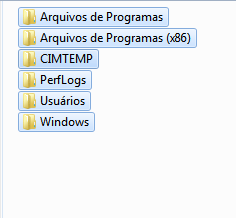
In windows 7 the selection is adjusted by each folder, in windows 10 and windows 11 is adjusted by the largest name of the folder, is there any way to leave the adjustment as in windows 7, it also worked in windows 10 ltsb.
 
Windows Build/Version
Windows 11 pro 21996.1

Attachments

  • Capturar.PNG
    Capturar.PNG
    3.5 KB · Views: 6
  • Screenshot_9.png
    Screenshot_9.png
    22 KB · Views: 6

My Computer My Computer

At a glance

Windows 11 Pro -build 21996.1

OS
Windows 11 Pro -build 21996.1

In windows 7 the selection is adjusted by each folder, in windows 10 and windows 11 is adjusted by the largest name of the folder, is there any way to leave the adjustment as in windows 7, it also worked in windows 10 ltsb.
There. English.
Are you asking how to sort by size, name, etc?
 

My Computer My Computer

At a glance

Windows 11 Pro
OS
Windows 11 Pro
notice that I selected several folders, and the selection in windows 7 is marked by the folder name, whereas in windows 10 and 11 it is selected by the larger name, then all the marking is the same, I would like it to be like in windows 7
 

My Computer My Computer

At a glance

Windows 11 Pro -build 21996.1

OS
Windows 11 Pro -build 21996.1

selected several folders on the left side (windows 7) on the right side selected several folders windows 10 and 11, I would like to leave the mark as in windows 7.
 

Attachments

  • Screenshot_1.png
    Screenshot_1.png
    19.8 KB · Views: 3

My Computer My Computer

At a glance

Windows 11 Pro -build 21996.1

OS
Windows 11 Pro -build 21996.1
notice that I selected several folders, and the selection in windows 7 is marked by the folder name, whereas in windows 10 and 11 it is selected by the larger name, then all the marking is the same, I would like it to be like in windows 7
Oh.. you're referring to the translucent selection rectangle. I don't know if that is possible to change. Perhaps someone here will know. Sorry.
 

My Computer My Computer

At a glance

Windows 11 Pro
OS
Windows 11 Pro
well that's right, I believe it is through Regedit
 

My Computer My Computer

At a glance

Windows 11 Pro -build 21996.1
OS
Windows 11 Pro -build 21996.1

Latest Support Threads

Back
Top Bottom