
File Explorer problem


izzyforeal

I hate peer pressure and you should too.
Member
Local time
12:34 AM
Posts
118
Location
Ohio
OS
Windows 11 Home
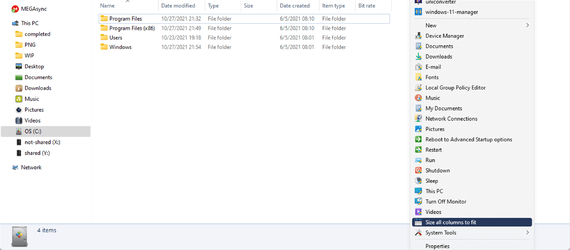
Hello helpful people! Every time I open File Explorer I have to size the columns to fit. Is there any way for that to be the default every time File Explorer is opened? Thank you in advance for the help.
 
Windows Build/Version
22000.258

My Computer My Computer

At a glance

Windows 11 HomeAMD Ryzen 7 8840HSKingston FURY Impact 32GB (2x16GB) 5600MT/s DDR5AMD Radeon 780M Graphics
OS
Windows 11 Home
Computer type
Laptop
Manufacturer/Model
Dell Inspiron 7445 2in1
CPU
AMD Ryzen 7 8840HS
Motherboard
0MT90K
Memory
Kingston FURY Impact 32GB (2x16GB) 5600MT/s DDR5
Graphics Card(s)
AMD Radeon 780M Graphics
Sound Card
AMD High Definition Audio Device
Monitor(s) Displays
Dell 27"
Screen Resolution
2560x1440
Hard Drives
EG6 KIOXIA 1TB (NVMe)
PSU
6-Cell 97WHr Integrated
Case
Platinum Silver
Keyboard
Arteck 5.1
Mouse
Logitech M650
Internet Speed
1000 | 25
Browser
Google Chrome
Antivirus
Windows Defender
Other Info
If you listen cartefully, you can hear me not caring.
In Explorer under Folder Options you can click "Apply current view to Folders" or so (same as in W7 or 10)
 

My Computers My Computers

  • At a glance

    W10 Enterprise LTSCi7-2700K24GBMSI GeForce RTX2060 Super
    OS
    W10 Enterprise LTSC
    Computer type
    PC/Desktop
    Manufacturer/Model
    custom
    CPU
    i7-2700K
    Motherboard
    Gigabyte GA-P67A-D3-B3
    Memory
    24GB
    Graphics Card(s)
    MSI GeForce RTX2060 Super
    Sound Card
    onboard
    Monitor(s) Displays
    Samsung curved
    Screen Resolution
    FHD
    Hard Drives
    Samsung EVO870 SSD 1TB
    Seagate Barracuda HDD 8TB
    PSU
    be quiet 550W
    Case
    CoolerMaster
    Cooling
    be quiet PURE ROCK SLIM BK008
    Keyboard
    KLIM Domination k852
    Mouse
    Logitech standard cordless
    Internet Speed
    10/1 DSL (the fastest line speed available here...)
    Browser
    Mozilla FF 91.2.0esr
    Antivirus
    Defender
    Other Info
    W10 GUI heavily modified with Stardock Blinds "7 for 10" skin and Startmenu.
    No MS Account and no MS apps.
    I upgraded to W10 only for gaming purposes, otherwise I'd kept my beloved W7 Ultimate x64
  • At a glance

    W11 ProIntel Core i5-25004GBMSI Geforce 1050Ti
    Operating System
    W11 Pro
    Computer type
    PC/Desktop
    Manufacturer/Model
    custom
    CPU
    Intel Core i5-2500
    Motherboard
    Gigabyte PH67A-D3-B3
    Memory
    4GB
    Graphics card(s)
    MSI Geforce 1050Ti
    Sound Card
    onboard
    Monitor(s) Displays
    FujitsuSiemens 19"
    Screen Resolution
    1280x1024 (oldschool 4:3)
    Hard Drives
    Samsung EVO850 SSD 250GB + Samsung 1TB HDD
    PSU
    be quiet 550W
    Case
    Mars MCNW ATX Gaming
    Cooling
    be quiet PURE ROCK SLIM BK008
    Keyboard
    Dell German 102
    Mouse
    oldschool Dell optical wired
    Internet Speed
    slow DSL, 10/1Mbps, but thats the best offer here
    Browser
    Mozilla 91.2.0esr
    Antivirus
    Defender
    Other Info
    This is an older PC for testing new OS,
    Furthermore: 4 Dell/HP laptops on Win7 Ultimate x64, used for NAS, Media server, browsing, workshop and sound studio
Hey thanks for the reply, maybe I wasn't clear. I want every folder, even newly created ones to be "Size all columns to fit." I want it to be the always default view.
 

My Computer My Computer

At a glance

Windows 11 HomeAMD Ryzen 7 8840HSKingston FURY Impact 32GB (2x16GB) 5600MT/s DDR5AMD Radeon 780M Graphics
OS
Windows 11 Home
Computer type
Laptop
Manufacturer/Model
Dell Inspiron 7445 2in1
CPU
AMD Ryzen 7 8840HS
Motherboard
0MT90K
Memory
Kingston FURY Impact 32GB (2x16GB) 5600MT/s DDR5
Graphics Card(s)
AMD Radeon 780M Graphics
Sound Card
AMD High Definition Audio Device
Monitor(s) Displays
Dell 27"
Screen Resolution
2560x1440
Hard Drives
EG6 KIOXIA 1TB (NVMe)
PSU
6-Cell 97WHr Integrated
Case
Platinum Silver
Keyboard
Arteck 5.1
Mouse
Logitech M650
Internet Speed
1000 | 25
Browser
Google Chrome
Antivirus
Windows Defender
Other Info
If you listen cartefully, you can hear me not caring.
Hey thanks for the reply, maybe I wasn't clear. I want every folder, even newly created ones to be "Size all columns to fit." I want it to be the always default view.
his answer should be correct for your request. one side note, to make it take effect on all folders, browse to %systemdrive% , set your visual preferences, then go to folder options > apply current to all folders.
 

My Computer My Computer

At a glance

Windows 11 Pro
OS
Windows 11 Pro
Hello helpful people! Every time I open File Explorer I have to size the columns to fit. Is there any way for that to be the default every time File Explorer is opened? Thank you in advance for the help.
Your title is not funny - Alzheimers is the saddest of all illnesses.
 

My Computer My Computer

At a glance

Windows 11 Pro + Win11 Canary VM.I9 13th gen i9-13900H 2.60 GHZ16 GB solderedIntegrated Intel Iris XE
OS
Windows 11 Pro + Win11 Canary VM.
Computer type
Laptop
Manufacturer/Model
ASUS Zenbook 14
CPU
I9 13th gen i9-13900H 2.60 GHZ
Motherboard
Yep, Laptop has one.
Memory
16 GB soldered
Graphics Card(s)
Integrated Intel Iris XE
Sound Card
Realtek built in
Monitor(s) Displays
laptop OLED screen
Screen Resolution
2880x1800 touchscreen
Hard Drives
1 TB NVME SSD (only weakness is only one slot)
PSU
Internal + 65W thunderbolt USB4 charger
Case
Yep, got one
Cooling
Stella Artois (UK pint cans - 568 ml) - extra cost.
Keyboard
Built in UK keybd
Mouse
Bluetooth , wireless dongled, wired
Internet Speed
900 mbs (ethernet), wifi 6 typical 350-450 mb/s both up and down
Browser
Edge
Antivirus
Defender
Other Info
TPM 2.0, 2xUSB4 thunderbolt, 1xUsb3 (usb a), 1xUsb-c, hdmi out, 3.5 mm audio out/in combo, ASUS backlit trackpad (inc. switchable number pad)

Macrium Reflect Home V8
Office 365 Family (6 users each 1TB onedrive space)
Hyper-V (a vm runs almost as fast as my older laptop)
Do you mean right click in the bar that has name, date modified and size etc. and select from the sizing options
 

My Computers My Computers

  • At a glance

    Windows 11 Pro13th Gen Core i9 13900HX32GB DDR5 @4800MHz 2x16GBGeforce RTX 4090HX 16GB
    OS
    Windows 11 Pro
    Computer type
    Laptop
    Manufacturer/Model
    Alienware M18 R1
    CPU
    13th Gen Core i9 13900HX
    Memory
    32GB DDR5 @4800MHz 2x16GB
    Graphics Card(s)
    Geforce RTX 4090HX 16GB
    Sound Card
    Nvidia HD / Realtek ALC3254
    Monitor(s) Displays
    18" QHD+
    Screen Resolution
    25660 X 1600
    Hard Drives
    C: KIOXIA (Toshiba) 2TB KXG80ZNV2T04 NVMe PCIe M.2 SSD
    D: KIOXIA (Toshiba) 2TB KXG80ZNV2T04 NVMe PCIe M.2 SSD
    Case
    Dark Metallic Moon
    Keyboard
    Alienware M Series per-key AlienFX RGB
    Mouse
    Alienware AW610M
    Browser
    Chrome and Firefox
    Antivirus
    Norton
    Other Info
    Killer E3000 Ethernet Controller
    Killer Killer AX1690 Wi-Fi Network Adaptor Wi-Fi 6E
    Bluetooth 5.2
    Alienware Z01G Graphic Amplifier
  • At a glance

    Windows 11 Pro10th Gen i-9 10900 K32Gb Dual Channel DDR4 @ 8843MHzNvidia RTX 2080 Super
    Operating System
    Windows 11 Pro
    Computer type
    Laptop
    Manufacturer/Model
    Alienware Area 51m R2
    CPU
    10th Gen i-9 10900 K
    Memory
    32Gb Dual Channel DDR4 @ 8843MHz
    Graphics card(s)
    Nvidia RTX 2080 Super
    Sound Card
    Nvidia
    Screen Resolution
    1920 x 1080
    Hard Drives
    Hard Drive C: Samsung 2TB SSD PM981a NVMe
    Hard Drive D:Samsung 2TB SSD 970 EVO Plus
    Mouse
    Alienware 610M
    Browser
    Chrome
    Antivirus
    Norton
Your title is not funny - Alzheimers is the saddest of all illnesses.
Lol, I don't think the question was intentionally being funny ... My mother has alzheimers and she had to give up using computers because everyday she switched ON, she forgot how to use it - even if she had tutorials in front of her, she would still forget. That is the way it is. But thanks for sticking up for sufferers, just in case :) .

EDIT: I am not offended. The crux of the question is, does File Explorer have memory? If so, should it remember it's settings, and is there a tutorial to do that?
 
Last edited:

My Computers My Computers

  • At a glance

    Windows 11AMD Ryzen 5 560016 GBSapphire Radeon RX 6500XT (8 GB version)
    OS
    Windows 11
    Computer type
    PC/Desktop
    CPU
    AMD Ryzen 5 5600
    Motherboard
    MSI B550-A Pro
    Memory
    16 GB
    Graphics Card(s)
    Sapphire Radeon RX 6500XT (8 GB version)
    Monitor(s) Displays
    BenQ Mobuiz EX2710Q QHD, Iiyama ProLite X23377HDS
    Hard Drives
    MSI Spatium M461 4TB
  • At a glance

    Windows 11Intel Celeron N4020
    Operating System
    Windows 11
    Computer type
    Laptop
    Manufacturer/Model
    Acer A114
    CPU
    Intel Celeron N4020
I can verify that the "Apply To Folders" Option does not apply the "Size All Columns to Fit" change to existing or new folders on Windows. I'm not aware of a solution for the OP myself.
 

My Computer My Computer

At a glance

Windows 11 Proi7-10700K64GB DDR4NVIDIA Geforce RTX 2070 Super
OS
Windows 11 Pro
Computer type
PC/Desktop
Manufacturer/Model
PowerSpec G435
CPU
i7-10700K
Motherboard
ASRock Z490 Phantom Gaming 4/ax
Memory
64GB DDR4
Graphics Card(s)
NVIDIA Geforce RTX 2070 Super
Monitor(s) Displays
Dell S3220DGF
Screen Resolution
2560x1440
Hard Drives
1TB WDC .M2 Nvme SSD
4TB Samsung 870 SSD
PSU
750 Watt Gold
Case
Lian Li ATX 205
Cooling
Thermal-Take Water Cooled CPU
Keyboard
Corsair K70 RGB
Mouse
Razer Basilisk X
Internet Speed
Gigabit
Browser
Brave
Antivirus
Windows Defender
his answer should be correct for your request. one side note, to make it take effect on all folders, browse to %systemdrive% , set your visual preferences, then go to folder options > apply current to all folders.
Hey thanks for the replay. When I go to %systemdrive% and put the folders in "Details" view, I select "Size all columns to fit" I open file explorer options and "Apply to all folders" is greyed out.
 

My Computer My Computer

At a glance

Windows 11 HomeAMD Ryzen 7 8840HSKingston FURY Impact 32GB (2x16GB) 5600MT/s DDR5AMD Radeon 780M Graphics
OS
Windows 11 Home
Computer type
Laptop
Manufacturer/Model
Dell Inspiron 7445 2in1
CPU
AMD Ryzen 7 8840HS
Motherboard
0MT90K
Memory
Kingston FURY Impact 32GB (2x16GB) 5600MT/s DDR5
Graphics Card(s)
AMD Radeon 780M Graphics
Sound Card
AMD High Definition Audio Device
Monitor(s) Displays
Dell 27"
Screen Resolution
2560x1440
Hard Drives
EG6 KIOXIA 1TB (NVMe)
PSU
6-Cell 97WHr Integrated
Case
Platinum Silver
Keyboard
Arteck 5.1
Mouse
Logitech M650
Internet Speed
1000 | 25
Browser
Google Chrome
Antivirus
Windows Defender
Other Info
If you listen cartefully, you can hear me not caring.
Lol, I don't think the question was intentionally being funny ... My mother has alzheimers and she had to give up using computers because everyday she switched ON, she forgot how to use it - even if she had tutorials in front of her, she would still forget. That is the way it is. But thanks for sticking up for sufferers, just in case :) .

EDIT: I am not offended. The crux of the question is, does File Explorer have memory? If so, should it remember it's settings, and is there a tutorial to do that?
I'm a smart*ss but meant to insult to you or anyone suffering from that horrible disease.
 

My Computer My Computer

At a glance

Windows 11 HomeAMD Ryzen 7 8840HSKingston FURY Impact 32GB (2x16GB) 5600MT/s DDR5AMD Radeon 780M Graphics
OS
Windows 11 Home
Computer type
Laptop
Manufacturer/Model
Dell Inspiron 7445 2in1
CPU
AMD Ryzen 7 8840HS
Motherboard
0MT90K
Memory
Kingston FURY Impact 32GB (2x16GB) 5600MT/s DDR5
Graphics Card(s)
AMD Radeon 780M Graphics
Sound Card
AMD High Definition Audio Device
Monitor(s) Displays
Dell 27"
Screen Resolution
2560x1440
Hard Drives
EG6 KIOXIA 1TB (NVMe)
PSU
6-Cell 97WHr Integrated
Case
Platinum Silver
Keyboard
Arteck 5.1
Mouse
Logitech M650
Internet Speed
1000 | 25
Browser
Google Chrome
Antivirus
Windows Defender
Other Info
If you listen cartefully, you can hear me not caring.
I can verify that the "Apply To Folders" Option does not apply the "Size All Columns to Fit" change to existing or new folders on Windows. I'm not aware of a solution for the OP myself.
Agreed
 

My Computer My Computer

At a glance

Windows 11 HomeAMD Ryzen 7 8840HSKingston FURY Impact 32GB (2x16GB) 5600MT/s DDR5AMD Radeon 780M Graphics
OS
Windows 11 Home
Computer type
Laptop
Manufacturer/Model
Dell Inspiron 7445 2in1
CPU
AMD Ryzen 7 8840HS
Motherboard
0MT90K
Memory
Kingston FURY Impact 32GB (2x16GB) 5600MT/s DDR5
Graphics Card(s)
AMD Radeon 780M Graphics
Sound Card
AMD High Definition Audio Device
Monitor(s) Displays
Dell 27"
Screen Resolution
2560x1440
Hard Drives
EG6 KIOXIA 1TB (NVMe)
PSU
6-Cell 97WHr Integrated
Case
Platinum Silver
Keyboard
Arteck 5.1
Mouse
Logitech M650
Internet Speed
1000 | 25
Browser
Google Chrome
Antivirus
Windows Defender
Other Info
If you listen cartefully, you can hear me not caring.

Attachments

  • 2021-10-27_23h10_07.png
    2021-10-27_23h10_07.png
    237.5 KB · Views: 2

My Computer My Computer

At a glance

Windows 11 HomeAMD Ryzen 7 8840HSKingston FURY Impact 32GB (2x16GB) 5600MT/s DDR5AMD Radeon 780M Graphics
OS
Windows 11 Home
Computer type
Laptop
Manufacturer/Model
Dell Inspiron 7445 2in1
CPU
AMD Ryzen 7 8840HS
Motherboard
0MT90K
Memory
Kingston FURY Impact 32GB (2x16GB) 5600MT/s DDR5
Graphics Card(s)
AMD Radeon 780M Graphics
Sound Card
AMD High Definition Audio Device
Monitor(s) Displays
Dell 27"
Screen Resolution
2560x1440
Hard Drives
EG6 KIOXIA 1TB (NVMe)
PSU
6-Cell 97WHr Integrated
Case
Platinum Silver
Keyboard
Arteck 5.1
Mouse
Logitech M650
Internet Speed
1000 | 25
Browser
Google Chrome
Antivirus
Windows Defender
Other Info
If you listen cartefully, you can hear me not caring.
What's worse is that the "Size all columns to fit" option only resizes the items you can currently see in the Explorer window. If you scroll up or down to where the items in the visible columns are different in size and then repeat the option, the columns will resize for the visible items only. Truly not a very useful command.
 

My Computer My Computer

At a glance

Windows 11 Proi7-10700K64GB DDR4NVIDIA Geforce RTX 2070 Super
OS
Windows 11 Pro
Computer type
PC/Desktop
Manufacturer/Model
PowerSpec G435
CPU
i7-10700K
Motherboard
ASRock Z490 Phantom Gaming 4/ax
Memory
64GB DDR4
Graphics Card(s)
NVIDIA Geforce RTX 2070 Super
Monitor(s) Displays
Dell S3220DGF
Screen Resolution
2560x1440
Hard Drives
1TB WDC .M2 Nvme SSD
4TB Samsung 870 SSD
PSU
750 Watt Gold
Case
Lian Li ATX 205
Cooling
Thermal-Take Water Cooled CPU
Keyboard
Corsair K70 RGB
Mouse
Razer Basilisk X
Internet Speed
Gigabit
Browser
Brave
Antivirus
Windows Defender
Izzy, I just found a shortcut: Ctrl+[NumPadPlus]
That is the Control Key and the NumPad + key. That resizes all columns. Not only in Explorer but also in RegEdit:

Secret Key to Resize All Columns

Apparently, it's been around since Windows 8!

Note you must select an item (any item) in the window for this shortcut key to work.
 

My Computer My Computer

At a glance

Windows 11 Proi7-10700K64GB DDR4NVIDIA Geforce RTX 2070 Super
OS
Windows 11 Pro
Computer type
PC/Desktop
Manufacturer/Model
PowerSpec G435
CPU
i7-10700K
Motherboard
ASRock Z490 Phantom Gaming 4/ax
Memory
64GB DDR4
Graphics Card(s)
NVIDIA Geforce RTX 2070 Super
Monitor(s) Displays
Dell S3220DGF
Screen Resolution
2560x1440
Hard Drives
1TB WDC .M2 Nvme SSD
4TB Samsung 870 SSD
PSU
750 Watt Gold
Case
Lian Li ATX 205
Cooling
Thermal-Take Water Cooled CPU
Keyboard
Corsair K70 RGB
Mouse
Razer Basilisk X
Internet Speed
Gigabit
Browser
Brave
Antivirus
Windows Defender
The crux of the question is, does File Explorer have memory? If so, should it remember it's settings...
Yes, and no. Explorer remembers the layouts for each folder individually. Once you have adjusted the layout of a particular folder it should always open that folder with your chosen layout. There is a limit though, by default it only remembers your first 5000 folder layout choices.
 

My Computers My Computers

  • At a glance

    Windows 11 HomeAMD Athlon Silver 3050U8GBRadeon Graphics
    OS
    Windows 11 Home
    Computer type
    Laptop
    Manufacturer/Model
    Acer Aspire 3 A315-23-R9VY
    CPU
    AMD Athlon Silver 3050U
    Memory
    8GB
    Graphics Card(s)
    Radeon Graphics
    Monitor(s) Displays
    laptop screen
    Screen Resolution
    1366x768 native resolution, up to 2560x1440 with Radeon Virtual Super Resolution
    Hard Drives
    1TB Samsung EVO 870 SSD (from April 2026: 250GB EVO 850)
    Internet Speed
    150 Mbps
    Browser
    Edge, Firefox
    Antivirus
    Defender
    Other Info
    UPDATE - 11 April 2026: due to lid hinges starting to break up this laptop has been retired from active duty. The OS with all software and files has been migrated to my System Seven in 'Other systems' to carry on as my general purpose 'main machine'.

    I've now clean installed 25H2 and used Garlin's scripts to update Secure Boot to CA 2023 and revoke the PCA 2011 certificates. It's new role is to test secure boot issues.

    Info for 2021-2026:
    fully 'Windows 11 ready' laptop. Windows 10 C: partition migrated from my old unsupported 'main machine' then upgraded to 11. A test migration ran Insider builds for 2 months. When 11 was released on 5th October 2021 it was re-imaged back to 10 and was offered the upgrade in Windows Update on 20th October. Windows Update offered the 22H2 Feature Update on 20th September 2022. It got the 23H2 Feature Update on 4th November 2023 through Windows Update, 24H2 on 3rd October 2024 through Windows Update by setting the Target Release Version for 24H2, and 25H2 on 30th September 2025 through Windows Update by setting the Target Release Version for 25H2.
  • At a glance

    Windows 11 ProIntel® Core™ i5-520M8GB(integrated graphics) Intel HD Graphics
    Operating System
    Windows 11 Pro
    Computer type
    Laptop
    Manufacturer/Model
    Dell Latitude E4310
    CPU
    Intel® Core™ i5-520M
    Motherboard
    0T6M8G
    Memory
    8GB
    Graphics card(s)
    (integrated graphics) Intel HD Graphics
    Screen Resolution
    1366x768
    Hard Drives
    500GB Crucial MX500 SSD
    Browser
    Firefox, Edge
    Antivirus
    Defender
    Other Info
    unsupported machine: Legacy bios, MBR, TPM 1.2, upgraded from W10 to W11 using W10/W11 hybrid install media workaround.

    In-place upgrade to 22H2 using ISO and a workaround.
    Feature Update to 23H2 by manually installing the Enablement Package.
    In-place upgrade to 24H2 using hybrid 23H2/24H2 install media.
    Upgraded to 25H2 by Enablement Package.

    Also running Insider Experimental 263xx and 29xxx builds and Windows 10 as native boot .vhdx.
  • My SYSTEM THREE is a Dell Latitude 5410, i7-10610U, 32GB RAM, 512GB NVMe ssd, supported device running Windows 11 Pro.

    My SYSTEM FOUR was a 2-in-1 convertible Lenovo Yoga 11e (1st gen) type 20DA, Celeron N2930, 8GB RAM, 256GB ssd. Unsupported device. This has now been sold. It has been replaced by my System Eight.

    My SYSTEM FIVE is a Dell Latitude 3190 2-in-1, Pentium Silver N5030, 8GB RAM, 1TB NVMe ssd, supported device running Windows 11 Pro, plus Insider Beta, Experimental 263xx and 29xxx builds (and a few others) as a native boot .vhdx.

    My SYSTEM SIX is a Dell Latitude 5550, Core Ultra 7 165H, 64GB RAM, 1TB NVMe SSD, supported device, Windows 11 Pro, Hyper-V host machine. Updated to 25H2 on 30th September 2025.

    My SYSTEM SEVEN is a Lenovo Thinkpad T580, 1920x1080 touchscreen, Intel Core i7-8650U, 16GB RAM, 512GB NVMe SSD + 2nd 512GB NVMe SSD, a supported device for Windows 11. This is my current general purpose 'main machine'. The installed Windows 11 Home from my System One has been migrated to this machine. As its new home has an existing digital licence for Pro I've been able to upgrade the migrated OS from Home to Pro.

    My SYSTEM EIGHT is a 2-in-1 convertible Lenovo Yoga 11e (5th gen) type 20LN, Celeron N4120, 8GB RAM, 512GB NVMe ssd, a supported device for Windows 11. Currently running Windows 11 Pro, plus Insider Beta, Experimental 263xx and 29xxx builds as native boot vhdx.
Yes, and no. Explorer remembers the layouts for each folder individually. Once you have adjusted the layout of a particular folder it should always open that folder with your chosen layout. There is a limit though, by default it only remembers your first 5000 folder layout choices.
Well, it appears there is no solution to my issue other than clicking the stupid button every time. Oh well, I thank each of you for your contributions and insight.
 

My Computer My Computer

At a glance

Windows 11 HomeAMD Ryzen 7 8840HSKingston FURY Impact 32GB (2x16GB) 5600MT/s DDR5AMD Radeon 780M Graphics
OS
Windows 11 Home
Computer type
Laptop
Manufacturer/Model
Dell Inspiron 7445 2in1
CPU
AMD Ryzen 7 8840HS
Motherboard
0MT90K
Memory
Kingston FURY Impact 32GB (2x16GB) 5600MT/s DDR5
Graphics Card(s)
AMD Radeon 780M Graphics
Sound Card
AMD High Definition Audio Device
Monitor(s) Displays
Dell 27"
Screen Resolution
2560x1440
Hard Drives
EG6 KIOXIA 1TB (NVMe)
PSU
6-Cell 97WHr Integrated
Case
Platinum Silver
Keyboard
Arteck 5.1
Mouse
Logitech M650
Internet Speed
1000 | 25
Browser
Google Chrome
Antivirus
Windows Defender
Other Info
If you listen cartefully, you can hear me not caring.
Latest Support Threads

Back
Top Bottom




