
File Explorer


Mathuselah

New member
Local time
5:08 PM
Posts
1
OS
Windows 11
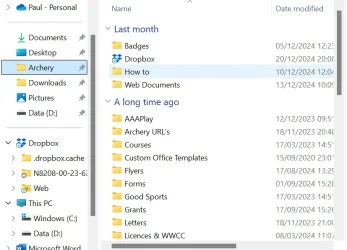
I have set file explorer not to show recently used files and directories, and there is no issue, the files and directories are shown in the correct order. The problem arises when accessing a file via an app such as Word. Under these circumstances, when the app opens file explorer, the files and directories once again are shown in latest used order. Is there any way to correct this.
 
Windows Build/Version
Ver 22H2 (OS Build 22621.4317

Attachments
  • Via Word.webp
    Via Word.webp
    50.2 KB · Views: 2
  • File Explorer.webp
    File Explorer.webp
    88.3 KB · Views: 2

My Computer My Computer

At a glance

Windows 11
OS
Windows 11
Computer type
Laptop
Manufacturer/Model
Infinity
You can set the view for the file dialog as you like and it should be remembered, but are you asking how to set all file dialogs to be the same as your Explorer view without having to set them one at a time? If so, you can use WinSetView to do that.
 

My Computer My Computer

At a glance

Windows 10/11
OS
Windows 10/11
Computer type
Laptop
Manufacturer/Model
Acer
The Via Word.webp photo shows a OneDrive cloud icon at top-left? This means you are viewing the OneDrive UI not your local D: drive via File Explorer UI. Whether you can get OneDrive to display the same layout as File Explorer I don't know but I doubt it because they are two different engines.
Maybe you are saving files to OneDrive without realising it? If so then change your Word 'Save to' location to your local computer 'Documents' folder or wherever you want them stored.
If you don't want OneDrive involved then uninstall OneDrive after making sure that you have downloaded any files saved there.

Good luck.
 

My Computers My Computers

  • At a glance

    Windows 11 ProAMD Ryzen 9 8945HS32GB DDR5 SO-DIMMIntegrated AMD Radeon 780M (4.00 GHz)
    OS
    Windows 11 Pro
    Computer type
    PC/Desktop
    Manufacturer/Model
    GMKtec K11
    CPU
    AMD Ryzen 9 8945HS
    Memory
    32GB DDR5 SO-DIMM
    Graphics Card(s)
    Integrated AMD Radeon 780M (4.00 GHz)
    Monitor(s) Displays
    Benq 2250HM
    Screen Resolution
    1920 x 1080
    Hard Drives
    1 TB PCIe 4.0 NVMe M.2 SSD
  • At a glance

    Windows 11 HomeIntel® Core™ Ultra 7 - 255H processor16 GB LPDDR5 SDRAMIntel Arc 140T onboard graphics
    Operating System
    Windows 11 Home
    Computer type
    Laptop
    Manufacturer/Model
    ASUS Zenbook 14 OLED 14" Laptop - UX3405CA-QL192W
    CPU
    Intel® Core™ Ultra 7 - 255H processor
    Memory
    16 GB LPDDR5 SDRAM
    Graphics card(s)
    Intel Arc 140T onboard graphics
    Screen Resolution
    1920 x 1200 (16:10 WUXGA resolution) OLED Touchscreen
    Hard Drives
    1TB SSD
Open your OneDrive Account > go to your OneDrive folders or Personal Vault folder/files and click on the Name column heading > tick A to Z.
 

My Computer My Computer

At a glance

Windows 11
OS
Windows 11
The Via Word.webp photo shows a OneDrive cloud icon at top-left? This means you are viewing the OneDrive UI not your local D: drive via File Explorer UI.

It does not mean that. OneDrive just happens to be at the top of the scrolled folder list, but it's not expanded or selected.
 

My Computer My Computer

At a glance

Windows 11
OS
Windows 11
Computer type
Laptop
Back
Top Bottom




