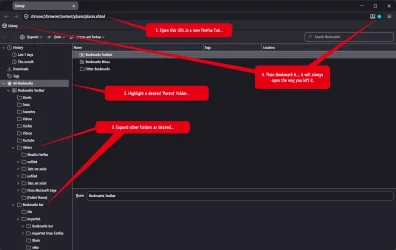
I recently had to reinstall most of my apps, but now have a problem with Firefox bookmarks.
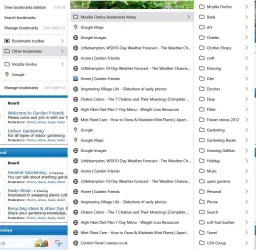
Before, when I clicked the bookmark icon on toolbar the favourites automatically appeared in a column. Now I have to click on 'Other Bookmarks', then 'Bookmarks Menu' to see all the folders.
How do I get back to seeing the folders when I click the bookmarks icon?
Thank you for any help.
Before, when I clicked the bookmark icon on toolbar the favourites automatically appeared in a column. Now I have to click on 'Other Bookmarks', then 'Bookmarks Menu' to see all the folders.
How do I get back to seeing the folders when I click the bookmarks icon?
Thank you for any help.
Attachments
My Computers
-
At a glance
Windows11intel i12- OS
- Windows11
- Computer type
- Laptop
- Manufacturer/Model
- Asus
- CPU
- intel i12
-
At a glance
W11i5-124008GB- Operating System
- W11
- Computer type
- PC/Desktop
- Manufacturer/Model
- HP
- CPU
- i5-12400
- Motherboard
- HP
- Memory
- 8GB
- Internet Speed
- 30mbps
- Browser
- Edge
- Antivirus
- Defender