Firefox Bookmarks


modelman

Well-known member
Member
VIP
Local time
7:06 PM
Posts
113
OS
Windows11
I recently had to reinstall most of my apps, but now have a problem with Firefox bookmarks.

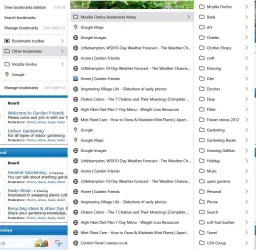
Before, when I clicked the bookmark icon on toolbar the favourites automatically appeared in a column. Now I have to click on 'Other Bookmarks', then 'Bookmarks Menu' to see all the folders.

How do I get back to seeing the folders when I click the bookmarks icon?

Thank you for any help.
 

Attachments
  • bhaepakffbpmkajn.webp
    bhaepakffbpmkajn.webp
    113.3 KB · Views: 1

My Computers

System One System Two

  • OS
    Windows11
    Computer type
    Laptop
    Manufacturer/Model
    Asus
    CPU
    intel i12
  • Operating System
    W11
    Computer type
    PC/Desktop
    Manufacturer/Model
    HP
    CPU
    i5-12400
    Motherboard
    HP
    Memory
    8GB
    Internet Speed
    30mbps
    Browser
    Edge
    Antivirus
    Defender
With FF open > Ctrl+Shift+O > open Other Bookmarks folder > Ctrl+A (to select all) - right click and Cut (or Copy) - and paste them in the "Bookmark Toolbar (to appear in the toolbar)".
 

My Computer

System One

  • OS
    WinDOS 25H2
    Computer type
    Laptop
    CPU
    Intel & AMD
    Memory
    SO-DIMM SK Hynix 15.8 GB Dual-Channel DDR4-2666 (2 x 8 GB) 1329MHz (19-19-19-43)
    Graphics Card(s)
    nVidia RTX 2060 6GB Mobile GPU (TU106M)
    Sound Card
    Onbord Realtek ALC1220
    Screen Resolution
    1920 x 1080
    Hard Drives
    1x Samsung PM981 NVMe PCIe M.2 512GB / 1x Seagate Expansion ST1000LM035 1TB
Before, when I clicked the bookmark icon on toolbar
Please would you post a screenshot to ensure readers know exactly what you are referring to.


Denis
 

My Computer

System One

  • OS
    Windows 11 Home x64 Version 25H2 Build 26200.8037
Brilliant, All copied to Bookmark Toolbar. Thank you for your help.

Only slight problem, I still have to click Bookmark Toolbar to access folders. Is there any way to see them by just clicking bookmarks on the menu bar?
 

My Computers

System One System Two

  • OS
    Windows11
    Computer type
    Laptop
    Manufacturer/Model
    Asus
    CPU
    intel i12
  • Operating System
    W11
    Computer type
    PC/Desktop
    Manufacturer/Model
    HP
    CPU
    i5-12400
    Motherboard
    HP
    Memory
    8GB
    Internet Speed
    30mbps
    Browser
    Edge
    Antivirus
    Defender
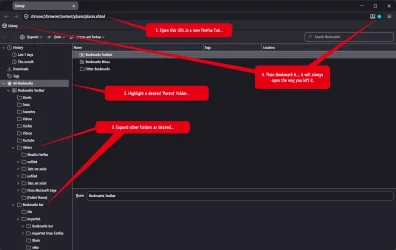
Something else you could try:

11112.webp
 

My Computers

System One System Two

  • OS
    Windows 11 Pro
    Computer type
    PC/Desktop
    Manufacturer/Model
    ASUS ROG Strix
  • Operating System
    Windows 11 Pro
    Computer type
    Laptop
    Manufacturer/Model
    ASUS VivoBook

Latest Support Threads

Back
Top Bottom