My Computer
At a glance
Windows 11
- OS
- Windows 11
Follow along with the video below to see how to install our site as a web app on your home screen.
Note: This feature may not be available in some browsers.
Restarting Firefox doesn't release the memory?What can be the reason for Firefox taking all the memory?
It crashes my computer session pushing me to the logon screen several times a day by taking all the memory (of the 16GB total). It's the recently updated ESR version 140.9.1esr.
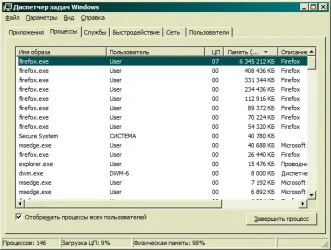
View attachment 169209
www.elevenforum.com
test thisWhat can be the reason for Firefox taking all the memory?
It crashes my computer session pushing me to the logon screen several times a day by taking all the memory (of the 16GB total). It's the recently updated ESR version 140.9.1esr.
View attachment 169209
Right, 32-bit version technically cannot consume more than 4 Gb. If FF approaches this limit, it may crash itself, but not OS.I'm also using the 32bit version which also caps out any memory loss.
Type about: processes, (without the space), into the address bar and find out.What can be the reason for Firefox taking all the memory?
Right, 32-bit version technically cannot consume more than 4 Gb. If FF approaches this limit, it may crash itself, but not OS.
As for thread starter, I'd suggest to temporarily disable all extensions, clear cache and see the result. Similar way is to start FF in the safe mode:
That is the problem with using ESR now as it is getting further and further behind the public release.
ESR is at 140.9.1 and public is now at 149.0.2
The picture can be seen better if you right-click it and select "open image in a new tab". This works in many places.Kind of a sh*tty rendering of the OP's Task Manager, but..., over 6 million KB of memory being hogged..., sumthin mighty suspicious goin on there!!!
It's not that! It's the fact that many of the most useful columns are missing or truncated..., plus the language barrier!The picture can be seen better if you right-click it and select "open image in a new tab". This works in many places.
Plus the fact that the picture shows a very ancient version of Windows. Unless that setup was deliberately chosen via some tweaking app, it might point at use of Windows XP (or something around that version, even could be Windows95)! In the case of a tweaking app, that might be a reason for problems...It's not that! It's the fact that many of the most useful columns are missing or truncated..., plus the language barrier!
Yeah..., I think it's a theme.Unless that setup was deliberately chosen via some tweaking app, it might point at use of Windows XP