'Fix problems using Windows Update' Question


LanceD

New member
Local time
6:00 PM
Posts
23
OS
Windows 11

Hi everyone.

So, I have an issue with a laptop that I got a little over half a year ago (came with Windows 11 Home). Lately, it occasionally, not always, fails to boot, getting some stop code error. When it does boot, which is most of the time, there are no problems it runs perfectly fine.

I've tried sfc /scannow and DISM, both of which turned up fine. I've also tried Startup Repair, and Quick Machine Recovery, which supposedly found something but wasn't able to repair it, according to the output. I'm not sure. This leaves me with two options: Reset PC, or Fix problems using Windows Update. I'm having trouble deciding which route to take.

I know Reset will basically restore the factory image, essentially returning the laptop to its initial state of when I first got it, including apps and drivers pre-installed by the manufacturer. While 'Fix problems using Windows Update' will reinstall the current version of Windows (25H2 in this case). However, before making a decision of how to proceed, I have some questions regarding the latter procedure.

1. Will it replace the current (manufacturer's) reset image with a new one, so that if I perform a reset in the future it will no longer be the original factory image that gets restored? Or will it leave the manufacturer's reset image in tact?

2. How does it affect drivers? Does it leave the drivers in Device Manager alone, or will it replace them with potentially older ones, or more generic Microsoft ones, requiring me to download and reinstall the proper manufacturer drivers again afterwards?

Knowing the answers to the above two questions would help me better understand this (to me) relatively new recovery option, allowing me to make a more informed decision between this and a Reset.

Any insights would be greatly appreciated. Thanks!
 

My Computer

System One

  • OS
    Windows 11

I did "Fix problems using Windows Update" last month because WU was giving me an installation error with the December cumulative update. It updated the drivers to the latest version and fixed a lot of issues, sometimes ones I didn't even know I had (for example in the Realtek and Intel SST audio drivers).
Minor complications:
Some Explorer customizations disappeared (hide arrow on links, folder customization).
Some new DCOM errors in EventViewer.
All my network adapters appears as #2 in Device Manager.
Resetted my network connection customized name in the Control Panel.
Plus a few minor issues I don't remember now, but nothing that can't be fixed.
 

My Computer

System One

  • OS
    Windows 11 22H2 22621.2215

    Computer type
    Laptop
    Manufacturer/Model
    HP OMEN 17''
    CPU
    Intel Core i7-11800H
    Motherboard
    HP 88F7 - Intel HM570 (Tiger Lake PCH-H) chipset
    Memory
    64 GB
    Graphics Card(s)
    Intel Tiger Lake-H - GT1 Integrated Graphics [Hewlett-Packard] + NVIDIA GeForce RTX 3070
    Screen Resolution
    2560x1440
    Hard Drives
    Crucial nvme (CT2000P5PSSD8+CT2000P3SSD8) with Intel RST WMD controller
What was the stop code error? Did you try running a disk check?


Random Windows stop code errors at boot are usually because of outdated drivers, or failing hardware like RAM or the sdd/hard drive

I would use your manufactures tool (hp, dell etc.) that came with your laptop to check for updates and install any of them. You didn't provide your computer specs, so I cannot direct you to the right place.

I would just do a repair install using option 2, which is like Fix problems using Windows Update. Repair install keeps everything intact the way it was.

You can see both tutorials here:

 
Last edited:

My Computers

System One System Two

  • OS
    Windows 11 Pro

    Computer type
    PC/Desktop
    Manufacturer/Model
    Custom Built
    CPU
    Ryzen 7 5700 X3D
    Motherboard
    MSI MPG B550 GAMING PLUS
    Memory
    64 GB DDR4 3600mhz Gskill Ripjaws V
    Graphics Card(s)
    RTX 4070 Super , 12GB VRAM Asus EVO Overclock
    Monitor(s) Displays
    Gigabyte M27Q (rev. 2.0) 2560 x 1440 @ 170hz HDR
    Hard Drives
    2TB Samsung nvme ssd
    4TB Western Digital nvme ssd
    PSU
    CORSAIR RMx SHIFT Series™ RM750x 80 PLUS Gold Fully Modular ATX Power Supply
    Case
    CORSAIR 3500X ARGB Mid-Tower ATX PC Case – Black
    Cooling
    ID-COOLING FROSTFLOW X 240 CPU Water Cooler
    Keyboard
    Logitech G213
    Mouse
    Logitech G203
    Internet Speed
    1.2gbps Fiber 😎
  • Operating System
    Chrome OS
    Computer type
    Laptop
    Manufacturer/Model
    HP Chromebook
    CPU
    Intel Pentium Quad Core
    Memory
    4GB LPDDR4
    Monitor(s) Displays
    14 Inch HD SVA anti glare micro edge display
    Hard Drives
    64 GB emmc
I did "Fix problems using Windows Update" last month because WU was giving me an installation error with the December cumulative update. It updated the drivers to the latest version and fixed a lot of issues, sometimes ones I didn't even know I had (for example in the Realtek and Intel SST audio drivers).
Minor complications:
Some Explorer customizations disappeared (hide arrow on links, folder customization).
Some new DCOM errors in EventViewer.
All my network adapters appears as #2 in Device Manager.
Resetted my network connection customized name in the Control Panel.
Plus a few minor issues I don't remember now, but nothing that can't be fixed.

What are DCOM errors?

How did you solve the network adapters? Just reinstalling network drivers?

What was the stop code error? Did you try running a disk check?


Random Windows stop code errors at boot are usually because of outdated drivers, or failing hardware like RAM or the sdd/hard drive

I would use your manufactures tool (hp, dell etc.) that came with your laptop to check for updates and install any of them. You didn't provide your computer specs, so I cannot direct you to the right place.

I would just do a repair install using option 2, which is like Fix problems using Windows Update. Repair install keeps everything intact the way it was.

You can see both tutorials here:


The stop code is 'BAD_SYSTEM_CONFIG_INFO (0x74)'. Yesterday, I got a different code, though: FATAL_UNHANDLED_HARD_ERROR (0x4c).

The laptop in question is an Acer Aspire A517-58GM-75A6 (i7 1355U, 32GB (2x16) DDR4, RTX 2050, 2x 1TB SSDs.
 

My Computer

System One

  • OS
    Windows 11
Please run the V2 log collector > post a share link


My Computer

System One

  • OS
    Windows 10
    Computer type
    Laptop
    Manufacturer/Model
    HP
    CPU
    Intel(R) Core(TM) i7-4800MQ CPU @ 2.70GHz
    Motherboard
    Product : 190A Version : KBC Version 94.56
    Memory
    16 GB Total: Manufacturer : Samsung MemoryType : DDR3 FormFactor : SODIMM Capacity : 8GB Speed : 1600
    Graphics Card(s)
    NVIDIA Quadro K3100M; Intel(R) HD Graphics 4600
    Sound Card
    IDT High Definition Audio CODEC; PNP Device ID HDAUDIO\FUNC_01&VEN_111D&DEV_76E0
    Hard Drives
    Model Hitachi HTS727575A9E364
    Antivirus
    Microsoft Defender
    Other Info
    Mobile Workstation
The "Fix problems using Windows Update" feature does the exact same thing as a manual repair install (ie: in-place upgrade).
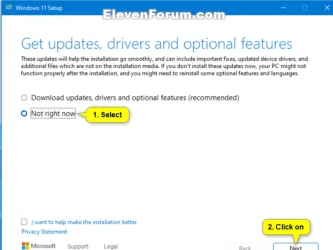
Except in a manual in-place upgrade, the user is given an option to choose whether or not to include updated drivers. The Fix Problems using Window Update feature does not provide this option. Since I always have a copy of the latest iso, I prefer this method because it is faster and more under my control as I so not want to use driver updates thru WU. I manage my own drivers directly from the OEM.
Screenshot 2026-01-27 085122.webp
 

My Computers

System One System Two

  • OS
    Windows 11 Pro 25H2 26200.8655
    Computer type
    PC/Desktop
    Manufacturer/Model
    Dell Optiplex 7080
    CPU
    i9-10900 10 core 20 threads
    Motherboard
    DELL 0J37VM
    Memory
    32 gb
    Graphics Card(s)
    none-Intel UHD Graphics 630
    Sound Card
    Integrated Realtek
    Monitor(s) Displays
    Benq 27
    Screen Resolution
    2560x1440
    Hard Drives
    2x1tb Solidigm m.2 nvme /External drives 512gb Samsung m.2 sata+2tb Kingston m2.nvme
    PSU
    500w
    Case
    MT
    Cooling
    Dell Premium
    Keyboard
    Logitech wired
    Mouse
    Logitech wireless
    Internet Speed
    so slow I'm too embarrassed to tell
    Browser
    #1 Edge #2 Firefox
    Antivirus
    Defender+MWB Premium
  • Operating System
    Windows 11 Pro 24H2 26200.8457
    Computer type
    PC/Desktop
    Manufacturer/Model
    Beelink Mini PC SER5
    CPU
    AMD Ryzen 7 6800U
    Memory
    32 gb
    Graphics card(s)
    integrated
    Sound Card
    integrated
    Monitor(s) Displays
    Benq 27
    Screen Resolution
    2560x1440
    Hard Drives
    1TB Crucial nvme
    Keyboard
    Logitech wired
    Mouse
    Logitech wireless
    Internet Speed
    still too embarrassed to tell
    Browser
    Firefox
    Antivirus
    Defender
    Other Info
    System 3 is non compliant Dell 9020 i7-4770/24gb ram Win11 PRO 26200.8457
You may have a drive logical issue.

Open a CMD window as administrator and type:
chkdsk c: /f
It will say your disk is in use and ask if you want to schedule to next start = yes
Restart
 

My Computers

System One System Two

  • OS
    Windows 11 Pro - Windows 7 HP 64 - Lubuntu
    Computer type
    PC/Desktop
    Manufacturer/Model
    custom build
    CPU
    i5 6600K - 800MHz to 4400MHz
    Motherboard
    GA-Z170-HD3P
    Memory
    4+4G GSkill DDR4 3000
    Graphics Card(s)
    IG - Intel 530
    Monitor(s) Displays
    Samsung 226BW
    Screen Resolution
    1680x1050
    Hard Drives
    (1) -1 SM951 – 128GB M.2 AHCI PCIe SSD drive for Win 11
    (2) -1 WD SATA 3 - 1T for Data
    (3) -1 WD SATA 3 - 1T for backup
    (4) -1 BX500 SSD - 256G for Windows 7 and Lubuntu
    PSU
    Thermaltake 450W TR2 gold
    Keyboard
    Old and good Chicony mechanical keyboard
    Mouse
    Logitech mX performance - 9 buttons (had to disable some)
    Internet Speed
    500 Mb/s
    Browser
    Firefox 64
  • Operating System
    Windows 11 Pro
    Computer type
    Laptop
    Manufacturer/Model
    Asus Q550LF
    CPU
    i7-4500U 800- 3000MHz
    Motherboard
    Asus Q550LF
    Memory
    (4+4)G DDR3 1600
    Graphics card(s)
    IG intel 4400 + NVIDIA GeForce GT 745M
    Sound Card
    Realtek
    Monitor(s) Displays
    LG Display LP156WF4-SPH1
    Screen Resolution
    1920 x 1080
    Hard Drives
    BX500 120G SSD for Windows and programs
    & 1T HDD for data
    Internet Speed
    500 Mb/s
    Browser
    Firefox 64
Please run the V2 log collector > post a share link


I've attached the resulting file to my post. Thanks.

You may have a drive logical issue.

Open a CMD window as administrator and type:
chkdsk c: /f
It will say your disk is in use and ask if you want to schedule to next start = yes
Restart

I ran option one of Brink's tutorial - through File Explorer. I returned no errors.
 

Attachments

My Computer

System One

  • OS
    Windows 11
The "Fix problems using Windows Update" feature does the exact same thing as a manual repair install (ie: in-place upgrade).
Except in a manual in-place upgrade, the user is given an option to choose whether or not to include updated drivers. The Fix Problems using Window Update feature does not provide this option. Since I always have a copy of the latest iso, I prefer this method because it is faster and more under my control as I so not want to use driver updates thru WU. I manage my own drivers directly from the OEM.
View attachment 161266

I see. Even so, might it replace some manufacturer drivers with generic Windows/Microsoft drivers that are on the ISO, requiring me to download and reinstall the proper drivers from the manufacturer's website after the In-Place Upgrade process? If that's the case, I might have to go with a Reset.
 

My Computer

System One

  • OS
    Windows 11
Please modify the default language to English during the troubleshooting so that log files can be scanned and read.


Code:
Event[6418]
  Log Name: System
  Source: volmgr
  Date: 2026-01-26T19:41:19.5920000Z
  Event ID: 161
  Task: Geen
  Level: Fout
  Opcode: N/A
  Keyword: Klassiek,
  User: N/A
  User Name: N/A
  Computer: LAPTOP-9JG2CL7F
  Description:
Kan het dumpbestand niet maken vanwege een fout tijdens het maken van de dump. BugCheckProgress is: 0x00020005


Code:
Event[6077]
  Log Name: System
  Source: volmgr
  Date: 2026-01-26T18:47:03.5460000Z
  Event ID: 161
  Task: Geen
  Level: Fout
  Opcode: N/A
  Keyword: Klassiek,
  User: N/A
  User Name: N/A
  Computer: LAPTOP-9JG2CL7F
  Description:
Kan het dumpbestand niet maken vanwege een fout tijdens het maken van de dump. BugCheckProgress is: 0x00020005


Code:
Event[3575]
  Log Name: System
  Source: volmgr
  Date: 2026-01-23T14:07:56.4400000Z
  Event ID: 161
  Task: Geen
  Level: Fout
  Opcode: N/A
  Keyword: Klassiek,
  User: N/A
  User Name: N/A
  Computer: LAPTOP-9JG2CL7F
  Description:
Kan het dumpbestand niet maken vanwege een fout tijdens het maken van de dump. BugCheckProgress is: 0x00020005


Code:
Event[3141]
  Log Name: System
  Source: volmgr
  Date: 2026-01-21T14:27:26.4190000Z
  Event ID: 161
  Task: Geen
  Level: Fout
  Opcode: N/A
  Keyword: Klassiek,
  User: N/A
  User Name: N/A
  Computer: LAPTOP-9JG2CL7F
  Description:
Kan het dumpbestand niet maken vanwege een fout tijdens het maken van de dump. BugCheckProgress is: 0x00020005
 
Last edited:

My Computer

System One

  • OS
    Windows 10
    Computer type
    Laptop
    Manufacturer/Model
    HP
    CPU
    Intel(R) Core(TM) i7-4800MQ CPU @ 2.70GHz
    Motherboard
    Product : 190A Version : KBC Version 94.56
    Memory
    16 GB Total: Manufacturer : Samsung MemoryType : DDR3 FormFactor : SODIMM Capacity : 8GB Speed : 1600
    Graphics Card(s)
    NVIDIA Quadro K3100M; Intel(R) HD Graphics 4600
    Sound Card
    IDT High Definition Audio CODEC; PNP Device ID HDAUDIO\FUNC_01&VEN_111D&DEV_76E0
    Hard Drives
    Model Hitachi HTS727575A9E364
    Antivirus
    Microsoft Defender
    Other Info
    Mobile Workstation
Please modify the default language to English during the troubleshooting so that log files can be scanned and read.


Code:
Event[6418]
  Log Name: System
  Source: volmgr
  Date: 2026-01-26T19:41:19.5920000Z
  Event ID: 161
  Task: Geen
  Level: Fout
  Opcode: N/A
  Keyword: Klassiek,
  User: N/A
  User Name: N/A
  Computer: LAPTOP-9JG2CL7F
  Description:
Kan het dumpbestand niet maken vanwege een fout tijdens het maken van de dump. BugCheckProgress is: 0x00020005


Code:
Event[6077]
  Log Name: System
  Source: volmgr
  Date: 2026-01-26T18:47:03.5460000Z
  Event ID: 161
  Task: Geen
  Level: Fout
  Opcode: N/A
  Keyword: Klassiek,
  User: N/A
  User Name: N/A
  Computer: LAPTOP-9JG2CL7F
  Description:
Kan het dumpbestand niet maken vanwege een fout tijdens het maken van de dump. BugCheckProgress is: 0x00020005


Code:
Event[3575]
  Log Name: System
  Source: volmgr
  Date: 2026-01-23T14:07:56.4400000Z
  Event ID: 161
  Task: Geen
  Level: Fout
  Opcode: N/A
  Keyword: Klassiek,
  User: N/A
  User Name: N/A
  Computer: LAPTOP-9JG2CL7F
  Description:
Kan het dumpbestand niet maken vanwege een fout tijdens het maken van de dump. BugCheckProgress is: 0x00020005


Code:
Event[3141]
  Log Name: System
  Source: volmgr
  Date: 2026-01-21T14:27:26.4190000Z
  Event ID: 161
  Task: Geen
  Level: Fout
  Opcode: N/A
  Keyword: Klassiek,
  User: N/A
  User Name: N/A
  Computer: LAPTOP-9JG2CL7F
  Description:
Kan het dumpbestand niet maken vanwege een fout tijdens het maken van de dump. BugCheckProgress is: 0x00020005

Oops, sorry. Re-ran with Display Language set to English.
 

Attachments

My Computer

System One

  • OS
    Windows 11
fails to boot, getting some stop code error
The stop error is important. IMO you may be jumping the gun assuming it's a windows problem when it can just as easily be hardware related or even software you have installed. That is why @zbook asked for your logs so he can analyze them. To automatically think it's a windows problem without using proper troubleshooting is pre-mature.

That said, to answer you last question
might it replace some manufacturer drivers with generic Windows/Microsoft drivers
With an in-place upgrade there is always that possibility considering that windows update has been known to replace newer drivers with older ones. That's why I always disable "include drivers with windows update" in my systems as well as others I manage. I have done a number of repair installs and checking that box (in the screenshot above) during the repair install, it has never messed with the existing drivers.

Know that a "reset and keep my files" will result in the removal of 3rd party apps.. Repair Install Windows 11 with an In-place Upgrade
 

My Computers

System One System Two

  • OS
    Windows 11 Pro 25H2 26200.8655
    Computer type
    PC/Desktop
    Manufacturer/Model
    Dell Optiplex 7080
    CPU
    i9-10900 10 core 20 threads
    Motherboard
    DELL 0J37VM
    Memory
    32 gb
    Graphics Card(s)
    none-Intel UHD Graphics 630
    Sound Card
    Integrated Realtek
    Monitor(s) Displays
    Benq 27
    Screen Resolution
    2560x1440
    Hard Drives
    2x1tb Solidigm m.2 nvme /External drives 512gb Samsung m.2 sata+2tb Kingston m2.nvme
    PSU
    500w
    Case
    MT
    Cooling
    Dell Premium
    Keyboard
    Logitech wired
    Mouse
    Logitech wireless
    Internet Speed
    so slow I'm too embarrassed to tell
    Browser
    #1 Edge #2 Firefox
    Antivirus
    Defender+MWB Premium
  • Operating System
    Windows 11 Pro 24H2 26200.8457
    Computer type
    PC/Desktop
    Manufacturer/Model
    Beelink Mini PC SER5
    CPU
    AMD Ryzen 7 6800U
    Memory
    32 gb
    Graphics card(s)
    integrated
    Sound Card
    integrated
    Monitor(s) Displays
    Benq 27
    Screen Resolution
    2560x1440
    Hard Drives
    1TB Crucial nvme
    Keyboard
    Logitech wired
    Mouse
    Logitech wireless
    Internet Speed
    still too embarrassed to tell
    Browser
    Firefox
    Antivirus
    Defender
    Other Info
    System 3 is non compliant Dell 9020 i7-4770/24gb ram Win11 PRO 26200.8457
The computer has been having BSODs.


Please perform the following steps:


1) Add WMIC:

Code:
DISM /Online /Add-Capability /CapabilityName:WMIC~~~~


2) Run Tuneup plus > post a share link into the newest post


3) Enable regback:


4) Create a new restore point:


5) Open administrative command prompt and type or copy and paste:

fltmc

Post a share link


6) The BIOS Version/Date INSYDE Corp. V1.61, 8/5/2024

Upgrade the BIOS: 1.61 > 1.65


7) Run Memtest86+ for 8 or more passes > take pictures > post images or share links

Memtest86+ | The Open-Source Memory Testing Tool

Just 1 error is a test fail and testing can be aborted.

The more the passes the better the testing conditions.

It sometimes takes passes into the 20's to detect malfunctioning RAM.

The RAM can be tested all at one time or one at a time in the same DIMM.

Memtest86+ | The Open-Source Memory Testing Tool

MemTest86+ - Test RAM


8) Run HD Sentinel (all drives) > post images or share links

Hard Disk Sentinel - HDD health and temperature monitoring
a) Overview
b) Temperature
c) SMART


9) Download to a new desktop folder:


10) For any BSOD post a new V2 share link into the newest post


11) Run administrative command prompt: > post share links

wevtutil epl Application %userprofile%\Desktop\application.evtx

wevtutil epl System %userprofile%\Desktop\system.evtx


11) More to follow per the above results


Code:
Event[7032]
  Log Name: System
  Source: Microsoft-Windows-TPM-WMI
  Date: 2026-01-27T18:54:38.1920000Z
  Event ID: 1801
  Task: N/A
  Level: Error
  Opcode: Info 
  Keyword: N/A
  User: S-1-5-18
  User Name: NT AUTHORITY\SYSTEM
  Computer: LAPTOP-9JG2CL7F
  Description:
Secure Boot certificates have been updated but are not yet applied to the device firmware. Review the published guidance to complete the update and ensure full protection. This device signature information is included here.
DeviceAttributes: FirmwareManufacturer:INSYDE Corp.;FirmwareVersion:V1.61;OEMModelNumber:Aspire A517-58GM;OEMModelBaseBoard:JypsiereG_RTU;OEMManufacturerName:Acer;OSArchitecture:amd64;
BucketId: 145c4e8913cce234f4f8699af78a5a9a10c42baa7680957f3b9ef15f734f7fb7
BucketConfidenceLevel:
UpdateType:
For more information, please see https://go.microsoft.com/fwlink/?linkid=2301018.


Code:
Event[6913]
  Log Name: System
  Source: volmgr
  Date: 2026-01-27T18:49:23.3810000Z
  Event ID: 161
  Task: None
  Level: Error
  Opcode: N/A
  Keyword: Classic,
  User: N/A
  User Name: N/A
  Computer: LAPTOP-9JG2CL7F
  Description:
Dump file creation failed due to error during dump creation. BugCheckProgress was: 0x00020005
 

My Computer

System One

  • OS
    Windows 10
    Computer type
    Laptop
    Manufacturer/Model
    HP
    CPU
    Intel(R) Core(TM) i7-4800MQ CPU @ 2.70GHz
    Motherboard
    Product : 190A Version : KBC Version 94.56
    Memory
    16 GB Total: Manufacturer : Samsung MemoryType : DDR3 FormFactor : SODIMM Capacity : 8GB Speed : 1600
    Graphics Card(s)
    NVIDIA Quadro K3100M; Intel(R) HD Graphics 4600
    Sound Card
    IDT High Definition Audio CODEC; PNP Device ID HDAUDIO\FUNC_01&VEN_111D&DEV_76E0
    Hard Drives
    Model Hitachi HTS727575A9E364
    Antivirus
    Microsoft Defender
    Other Info
    Mobile Workstation
The stop error is important. IMO you may be jumping the gun assuming it's a windows problem when it can just as easily be hardware related or even software you have installed. That is why @zbook asked for your logs so he can analyze them. To automatically think it's a windows problem without using proper troubleshooting is pre-mature.

That said, to answer you last question

With an in-place upgrade there is always that possibility considering that windows update has been known to replace newer drivers with older ones. That's why I always disable "include drivers with windows update" in my systems as well as others I manage. I have done a number of repair installs and checking that box (in the screenshot above) during the repair install, it has never messed with the existing drivers.

Know that a "reset and keep my files" will result in the removal of 3rd party apps.. Repair Install Windows 11 with an In-place Upgrade

Yeah, I know a Reset will remove the programs I installed myself that didn't come with the computer. I don't have many things installed, though; I just use this laptop for everyday internet stuff and that's really it.

The computer has been having BSODs.


Please perform the following steps:

I don't understand. This laptop is relatively new (8 or 9 months or so), and the issue started happening only recently. Yet, in the months I've had it, I've really only been using Chrome on it (for my everyday internet needs), and that's basically it, not really doing anything else. I think it started shortly after the last round of updates it did, near the end of December. I currently have updates paused, so I don't have the infamous January update yet, either.
 

My Computer

System One

  • OS
    Windows 11
I'd be very surprised if the underlying issue is just Windows Update playing up. There is almost certainly something else more serious at play here.
 

My Computers

System One System Two

  • OS
    Windows 11 Pro 25H2
    Computer type
    PC/Desktop
    Manufacturer/Model
    Homebuilt
    CPU
    Intel Core i9 13900K
    Motherboard
    Asus ProArt Z790 Creator WiFi - Bios 3107
    Memory
    Corsair Dominator Platinum 64gb 5600MT/s DDR5 Dual Channel
    Graphics Card(s)
    Sapphire NITRO+ AMD Radeon RX 7900 XTX Vapor-X 24GB
    Sound Card
    External DAC: Cambridge Audio DACMagic200M - Headphone Amp: Topping L50
    Monitor(s) Displays
    Panasonic MX950 Mini LED 55" TV 120hz
    Screen Resolution
    3840 x 2160 120hz
    Hard Drives
    Samsung 980 Pro 2TB (OS)
    Samsung 980 Pro 1TB (Files)
    Lexar NZ790 4TB
    LaCie d2 Professional 6TB external - USB 3.1
    Seagate Expansion 16TB external - USB 3.2
    Seagate One Touch 18TB external HD - USB 3.0
    PSU
    Corsair RM1200x Shift
    Case
    Corsair RGB Smart Case 5000x (white)
    Cooling
    Corsair iCue H150i Elite Capellix XT
    Keyboard
    Incase Ergonomic USB (Microsoft clone)
    Mouse
    Logitech MX Master 3S
    Internet Speed
    Fibre 900/500 Mbps
    Browser
    Microsoft Edge Chromium
    Antivirus
    Bitdefender Total Security
    Other Info
    AMD Radeon Software & Drivers 26.1.1
    Hasleo Backup Suite
    Dashlane password manager
    Kensington Verimark fingerprint reader
    Logitech Brio 4K webcam
    Orico 10-port powered USB 3.0 hub
  • Operating System
    Windows 11 Pro 25H2
    Computer type
    Laptop
    Manufacturer/Model
    Asus Vivobook X1605VA
    CPU
    Intel® Core™ i9-13900H
    Motherboard
    Asus X1605VA bios 309
    Memory
    32GB DDR4-3200 Dual channel
    Graphics card(s)
    *Intel Iris Xᵉ Graphics G7
    Sound Card
    Realtek | Intel SST Bluetooth & USB
    Monitor(s) Displays
    16.0-inch, WUXGA 16:10 aspect ratio, IPS-level Panel
    Screen Resolution
    1920 x 1200 60hz
    Hard Drives
    512GB M.2 NVMe™ PCIe® 3.0 SSD
    Mouse
    Logitech MX Ergo Trackball
    Antivirus
    Bitdefender Total Security
    Other Info
    720p Webcam
    WiFi & USB to ethernet
so I don't have the infamous January update yet, either.
Most folks had no problem with that update. Anyway MS issued an OOB update to fix it for those that did.
 

My Computers

System One System Two

  • OS
    Windows 11 Pro 25H2 26200.8655
    Computer type
    PC/Desktop
    Manufacturer/Model
    Dell Optiplex 7080
    CPU
    i9-10900 10 core 20 threads
    Motherboard
    DELL 0J37VM
    Memory
    32 gb
    Graphics Card(s)
    none-Intel UHD Graphics 630
    Sound Card
    Integrated Realtek
    Monitor(s) Displays
    Benq 27
    Screen Resolution
    2560x1440
    Hard Drives
    2x1tb Solidigm m.2 nvme /External drives 512gb Samsung m.2 sata+2tb Kingston m2.nvme
    PSU
    500w
    Case
    MT
    Cooling
    Dell Premium
    Keyboard
    Logitech wired
    Mouse
    Logitech wireless
    Internet Speed
    so slow I'm too embarrassed to tell
    Browser
    #1 Edge #2 Firefox
    Antivirus
    Defender+MWB Premium
  • Operating System
    Windows 11 Pro 24H2 26200.8457
    Computer type
    PC/Desktop
    Manufacturer/Model
    Beelink Mini PC SER5
    CPU
    AMD Ryzen 7 6800U
    Memory
    32 gb
    Graphics card(s)
    integrated
    Sound Card
    integrated
    Monitor(s) Displays
    Benq 27
    Screen Resolution
    2560x1440
    Hard Drives
    1TB Crucial nvme
    Keyboard
    Logitech wired
    Mouse
    Logitech wireless
    Internet Speed
    still too embarrassed to tell
    Browser
    Firefox
    Antivirus
    Defender
    Other Info
    System 3 is non compliant Dell 9020 i7-4770/24gb ram Win11 PRO 26200.8457
The "In-Place Upgrade" (Option Two), is safer and a lot less problematic.

Use Option Two (ISO method)...


And always DISABLE "Include drivers with Windows Update", on any computer...


My Computers

System One System Two

  • OS
    Win 11 Home ♦♦♦26200.8655 ♦♦♦♦♦♦♦25H2
    Computer type
    PC/Desktop
    Manufacturer/Model
    Built by Ghot® [May 2020]
    CPU
    AMD Ryzen 7 3700X
    Motherboard
    Asus Pro WS X570-ACE (BIOS 5302)
    Memory
    G.Skill (F4-3200C14D-16GTZKW)
    Graphics Card(s)
    EVGA RTX 2070 (08G-P4-2171-KR)
    Sound Card
    Realtek ALC1220P / ALC S1220A
    Monitor(s) Displays
    Dell U3011 30"
    Screen Resolution
    2560 x 1600
    Hard Drives
    2x Samsung 860 EVO 500GB,
    WD 4TB Black FZBX - SATA III,
    WD 8TB Black FZBX - SATA III,
    DRW-24B1ST CD/DVD Burner
    PSU
    PC Power & Cooling 750W Quad EPS12V
    Case
    Cooler Master ATCS 840 Tower
    Cooling
    CM Hyper 212 EVO (push/pull)
    Keyboard
    Ducky DK9008 Shine II Blue LED
    Mouse
    Logitech Optical M-100
    Internet Speed
    300/300
    Browser
    Firefox (latest)
    Antivirus
    Bitdefender Total Security
    Other Info
    Speakers: Klipsch Pro Media 2.1
  • Operating System
    Windows XP Pro 32bit w/SP3
    Computer type
    PC/Desktop
    Manufacturer/Model
    Built by Ghot® (not in use)
    CPU
    AMD Athlon 64 X2 5000+ (OC'd @ 3.2Ghz)
    Motherboard
    ASUS M2N32-SLI Deluxe Wireless Edition
    Memory
    TWIN2X2048-6400C4DHX (2 x 1GB, DDR2 800)
    Graphics card(s)
    EVGA 256-P2-N758-TR GeForce 8600GT SSC
    Sound Card
    Onboard
    Monitor(s) Displays
    ViewSonic G90FB Black 19" Professional (CRT)
    Screen Resolution
    up to 2048 x 1536
    Hard Drives
    WD 36GB 10,000rpm Raptor SATA
    Seagate 80GB 7200rpm SATA
    Lite-On LTR-52246S CD/RW
    Lite-On LH-18A1P CD/DVD Burner
    PSU
    PC Power & Cooling Silencer 750 Quad EPS12V
    Case
    Generic Beige case, 80mm fans
    Cooling
    ZALMAN 9500A 92mm CPU Cooler
    Keyboard
    Logitech Classic Keybooard 200
    Mouse
    Logitech Optical M-BT96a
    Internet Speed
    300/300
    Browser
    Firefox 3.x ??
    Antivirus
    Symantec (Norton)
    Other Info
    Still assembled, still runs. Haven't turned it on for 15 years?
I don't understand. This laptop is relatively new (8 or 9 months or so), and the issue started happening only recently. Yet, in the months I've had it, I've really only been using Chrome on it (for my everyday internet needs), and that's basically it, not really doing anything else. I think it started shortly after the last round of updates it did, near the end of December. I currently have updates paused, so I don't have the infamous January update yet, either.


Possible causes of BSODs are typically: drivers, hardware, BIOS, Windows

We all rely on Microsoft to monitor and update Windows to make Windows the most unlikely source.


The steps in post #13 are to:

a) reduce the likelihood of missed BSODs

b) if BSODs create dump files to have the optimal file types

c) upgrade the BIOS

d) check some hardware

e) view the longer term status (V2 typically looks back approximately 30 days)

f) check the status of the operating system , component store and drive file system


Resolved:

Code:
Compatibility issues with Intel Smart Sound Technology drivers
Windows 11, version 24H2 devices with the affected Intel SST driver might receive an error with a blue screen.
N/A

Resolved External
2025-09-26
10:10 PT

Code:
Some ASUS devices might fail to install Windows 11, version 24H2
Affected devices encounter a blue screen with an error message during the update process
N/A

Resolved
2025-02-14
11:26 PT

Code:
Devices with apps using sprotect.sys driver might stop responding

Status    Originating update    History
Resolved    N/A

Resolved: 2025-10-16, 19:01 PT
Opened: 2025-04-04, 12:04 PT
Microsoft is working with SenseShield Technology Co on a compatibility issue between Windows 11, version 24H2 and the sprotect.sys driver. This issue causes affected devices to become unresponsive and display a blue or black screen error. The sprotect.sys driver provides encryption protection and is used by specialized security software and enterprise solutions. This driver can be automatically introduced into a system as part of the installation process of many different applications. The issue impacts devices with any version of the sprotect.sys driver (1.0.2.372 and 1.0.3.48903).

To safeguard your update experience, we have applied a compatibility hold on devices running the incompatible sprotect.sys driver. These devices will not be offered to install Windows 11, version 24H2 via the Windows Update release channel.


Code:
Some devices using Easy Anti-Cheat stop responding and receive a blue screen

Status    Originating update    History
Resolved    N/A

Resolved: 2025-07-24, 17:42 PT
Opened: 2024-09-30, 16:51 PT
Microsoft is working with Easy Anti-Cheat on an incompatibility issue between Window 11, version 24H2 and the Easy Anti-Cheat application. This software is automatically installed with some games as part of security and cheat-prevention measures used in multiplayer online PC games. Only devices with Intel’s Alder Lake+ processors and vPro platform are affected. In rare cases, when users open or play certain games, this issue causes affected devices to stop responding and to show a blue screen with the error “MEMORY_MANAGEMENT”. Most devices experiencing this issue use Easy Anti-Cheat drivers released before April 2024.


Last edited:

My Computer

System One

  • OS
    Windows 10
    Computer type
    Laptop
    Manufacturer/Model
    HP
    CPU
    Intel(R) Core(TM) i7-4800MQ CPU @ 2.70GHz
    Motherboard
    Product : 190A Version : KBC Version 94.56
    Memory
    16 GB Total: Manufacturer : Samsung MemoryType : DDR3 FormFactor : SODIMM Capacity : 8GB Speed : 1600
    Graphics Card(s)
    NVIDIA Quadro K3100M; Intel(R) HD Graphics 4600
    Sound Card
    IDT High Definition Audio CODEC; PNP Device ID HDAUDIO\FUNC_01&VEN_111D&DEV_76E0
    Hard Drives
    Model Hitachi HTS727575A9E364
    Antivirus
    Microsoft Defender
    Other Info
    Mobile Workstation
Let me take a moment to thank everyone who chimed in so far. I really appreciate it.

And always DISABLE "Include drivers with Windows Update", on any computer...


I may just do that from now on. Thanks.

Possible causes of BSODs are typically: drivers, hardware, BIOS, Windows

We all rely on Microsoft to monitor and update Windows to make Windows the most unlikely source.


The steps in post #13 are to:

a) reduce the likelihood of missed BSODs

b) if BSODs create dump files to have the optimal file types

c) upgrade the BIOS

d) check some hardware

e) view the longer term status (V2 typically looks back approximately 30 days)

f) check the status of the operating system , component store and drive file system

I'm a bit apprehensive about updating the BIOS. I hear it can be problematic and mess up the system.
 

My Computer

System One

  • OS
    Windows 11
Let me take a moment to thank everyone who chimed in so far. I really appreciate it.


I may just do that from now on. Thanks.


I'm a bit apprehensive about updating the BIOS. I hear it can be problematic and mess up the system.
Updating the bios nowadays is pretty necessary, not just for security but stability as well. Every major brand has a bios recovery feature now that allows you to rollback should something go amiss. But it is usually a very straightforward process.
 

My Computers

System One System Two

  • OS
    Windows 11 Pro
    Computer type
    PC/Desktop
    Manufacturer/Model
    Custom Built
    CPU
    Ryzen 7 5700 X3D
    Motherboard
    MSI MPG B550 GAMING PLUS
    Memory
    64 GB DDR4 3600mhz Gskill Ripjaws V
    Graphics Card(s)
    RTX 4070 Super , 12GB VRAM Asus EVO Overclock
    Monitor(s) Displays
    Gigabyte M27Q (rev. 2.0) 2560 x 1440 @ 170hz HDR
    Hard Drives
    2TB Samsung nvme ssd
    4TB Western Digital nvme ssd
    PSU
    CORSAIR RMx SHIFT Series™ RM750x 80 PLUS Gold Fully Modular ATX Power Supply
    Case
    CORSAIR 3500X ARGB Mid-Tower ATX PC Case – Black
    Cooling
    ID-COOLING FROSTFLOW X 240 CPU Water Cooler
    Keyboard
    Logitech G213
    Mouse
    Logitech G203
    Internet Speed
    1.2gbps Fiber 😎
  • Operating System
    Chrome OS
    Computer type
    Laptop
    Manufacturer/Model
    HP Chromebook
    CPU
    Intel Pentium Quad Core
    Memory
    4GB LPDDR4
    Monitor(s) Displays
    14 Inch HD SVA anti glare micro edge display
    Hard Drives
    64 GB emmc
Back
Top Bottom