'Fix problems using Windows Update' Question


@zbook

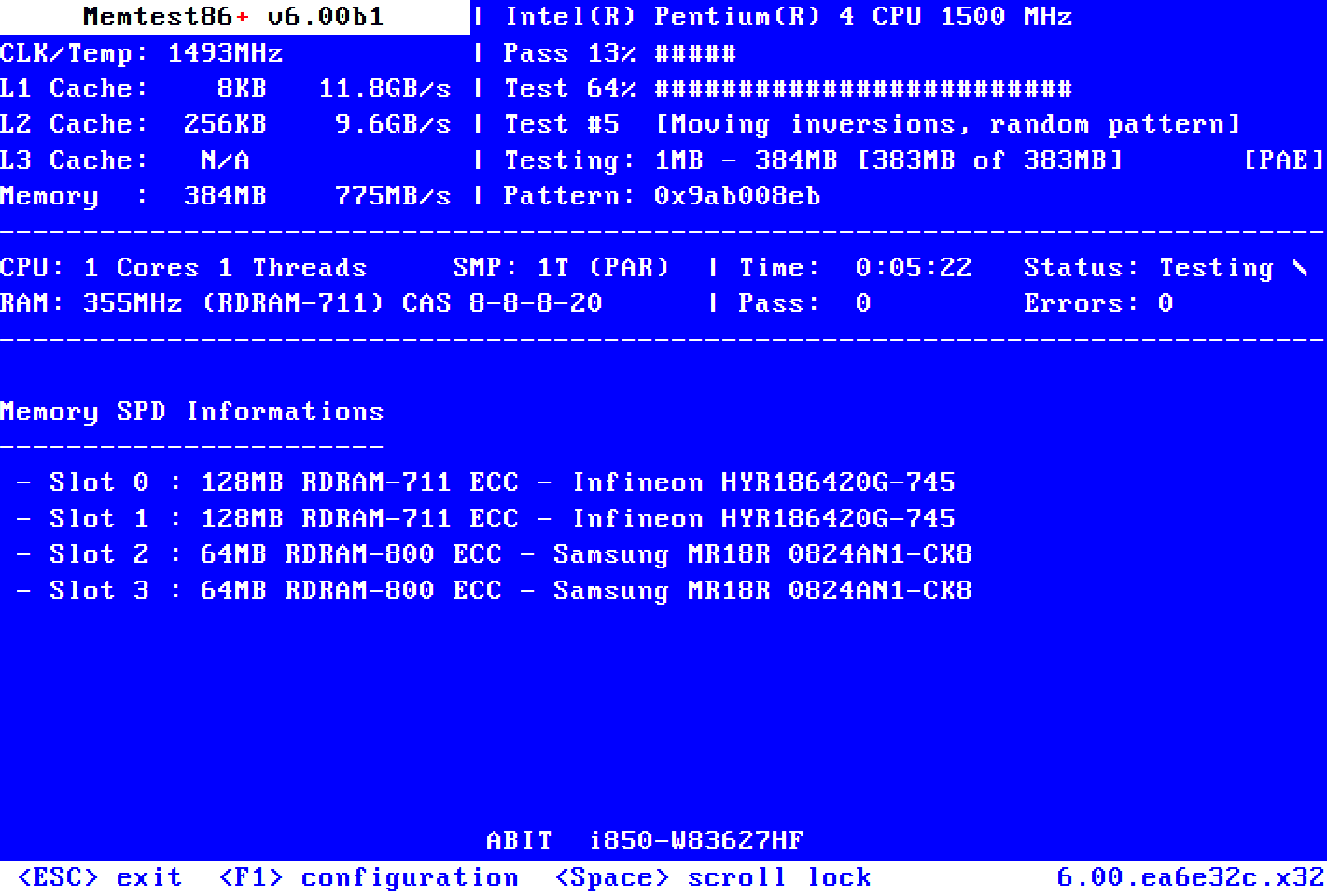
Apologies for the delay, I've been pretty busy lately. I finally managed to get around to performing the tests you proposed in post #13. Minus the Memtest86+, that one still to follow later. I've attached what I have so far.

Thanks for bearing with me!

The final log was too big so uploaded to OneDrive: wevtutil_log_system
 

Attachments
My Computer

System One

  • OS
    Windows 11
When available please update the progress with post #13 steps #3, 4, 6, 7.


Code:
Event[6913]
  Log Name: System
  Source: volmgr
  Date: 2026-01-27T18:49:23.3810000Z
  Event ID: 161
  Task: None
  Level: Error
  Opcode: N/A
  Keyword: Classic,
  User: N/A
  User Name: N/A
  Computer: LAPTOP-9JG2CL7F
  Description:
Dump file creation failed due to error during dump creation. BugCheckProgress was: 0x00020005


Code:
Event[6418]
  Log Name: System
  Source: volmgr
  Date: 2026-01-26T19:41:19.5920000Z
  Event ID: 161
  Task: None
  Level: Error
  Opcode: N/A
  Keyword: Classic,
  User: N/A
  User Name: N/A
  Computer: LAPTOP-9JG2CL7F
  Description:
Dump file creation failed due to error during dump creation. BugCheckProgress was: 0x00020005


Code:
Event[6077]
  Log Name: System
  Source: volmgr
  Date: 2026-01-26T18:47:03.5460000Z
  Event ID: 161
  Task: None
  Level: Error
  Opcode: N/A
  Keyword: Classic,
  User: N/A
  User Name: N/A
  Computer: LAPTOP-9JG2CL7F
  Description:
Dump file creation failed due to error during dump creation. BugCheckProgress was: 0x00020005


Code:
Log Name:      System
Source:        volmgr
Date:          1/29/2026 11:51:14 AM
Event ID:      161
Task Category: None
Level:         Error
Keywords:      Classic
User:          N/A
Computer:      LAPTOP-9JG2CL7F
Description:
Dump file creation failed due to error during dump creation.


Code:
Log Name:      System
Source:        volmgr
Date:          1/30/2026 4:15:02 AM
Event ID:      161
Task Category: None
Level:         Error
Keywords:      Classic
User:          N/A
Computer:      LAPTOP-9JG2CL7F
Description:
Dump file creation failed due to error during dump creation.


Code:
Log Name:      System
Source:        volmgr
Date:          2/1/2026 6:22:29 AM
Event ID:      161
Task Category: None
Level:         Error
Keywords:      Classic
User:          N/A
Computer:      LAPTOP-9JG2CL7F
Description:
Dump file creation failed due to error during dump creation.


Code:
Event[3575]
  Log Name: System
  Source: volmgr
  Date: 2026-01-23T14:07:56.4400000Z
  Event ID: 161
  Task: None
  Level: Error
  Opcode: N/A
  Keyword: Classic,
  User: N/A
  User Name: N/A
  Computer: LAPTOP-9JG2CL7F
  Description:
Dump file creation failed due to error during dump creation. BugCheckProgress was: 0x00020005


Code:
Event[3141]
  Log Name: System
  Source: volmgr
  Date: 2026-01-21T14:27:26.4190000Z
  Event ID: 161
  Task: None
  Level: Error
  Opcode: N/A
  Keyword: Classic,
  User: N/A
  User Name: N/A
  Computer: LAPTOP-9JG2CL7F
  Description:
Dump file creation failed due to error during dump creation. BugCheckProgress was: 0x00020005


Code:
Event[1927]
  Log Name: System
  Source: volmgr
  Date: 2026-01-16T15:56:08.5310000Z
  Event ID: 161
  Task: None
  Level: Error
  Opcode: N/A
  Keyword: Classic,
  User: N/A
  User Name: N/A
  Computer: LAPTOP-9JG2CL7F
  Description:
Dump file creation failed due to error during dump creation. BugCheckProgress was: 0x00020005


Code:
Event[865]
  Log Name: System
  Source: volmgr
  Date: 2026-01-04T14:02:44.4680000Z
  Event ID: 161
  Task: None
  Level: Error
  Opcode: N/A
  Keyword: Classic,
  User: N/A
  User Name: N/A
  Computer: LAPTOP-9JG2CL7F
  Description:
Dump file creation failed due to error during dump creation. BugCheckProgress was: 0x00020005
 

My Computer

System One

  • OS
    Windows 10
    Computer type
    Laptop
    Manufacturer/Model
    HP
    CPU
    Intel(R) Core(TM) i7-4800MQ CPU @ 2.70GHz
    Motherboard
    Product : 190A Version : KBC Version 94.56
    Memory
    16 GB Total: Manufacturer : Samsung MemoryType : DDR3 FormFactor : SODIMM Capacity : 8GB Speed : 1600
    Graphics Card(s)
    NVIDIA Quadro K3100M; Intel(R) HD Graphics 4600
    Sound Card
    IDT High Definition Audio CODEC; PNP Device ID HDAUDIO\FUNC_01&VEN_111D&DEV_76E0
    Hard Drives
    Model Hitachi HTS727575A9E364
    Antivirus
    Microsoft Defender
    Other Info
    Mobile Workstation
Which version of Memtest is the most reliable? Do I just use the latest?
 

My Computer

System One

  • OS
    Windows 11
This is the link for Memtest86+:


Code:
Memtest86+ is a unified, free, open-source memory testing tool, released under GNU GPL v2.0. The new v6 code base (originally called PCMemTest) was provided by Martin Whitaker, based on Memtest86+ v5, developed by Sam Demeulemeester. Both are now working on Memtest86+.

Memtest86+ is not an edition of Memtest86, which since 2013 has been closed-source `Freemium` software owned by PassMark Software Pty Ltd.

Make sure that 8 or more continuous passes are performed during the testing.

Take pictures > post images or share links.
 

My Computer

System One

  • OS
    Windows 10
    Computer type
    Laptop
    Manufacturer/Model
    HP
    CPU
    Intel(R) Core(TM) i7-4800MQ CPU @ 2.70GHz
    Motherboard
    Product : 190A Version : KBC Version 94.56
    Memory
    16 GB Total: Manufacturer : Samsung MemoryType : DDR3 FormFactor : SODIMM Capacity : 8GB Speed : 1600
    Graphics Card(s)
    NVIDIA Quadro K3100M; Intel(R) HD Graphics 4600
    Sound Card
    IDT High Definition Audio CODEC; PNP Device ID HDAUDIO\FUNC_01&VEN_111D&DEV_76E0
    Hard Drives
    Model Hitachi HTS727575A9E364
    Antivirus
    Microsoft Defender
    Other Info
    Mobile Workstation
@zbook

I ran Memtest86+ (for 11 passes), then re-ran everything else as well, but with Secure Boot still turned off (I had to disable Secure Boot for Memtest, and left it disabled afterwards). I put everything in a ZIP and put it up on OneDrive.

Note:
- The V2 Log I attached directly to this post was one I ran a few days ago after another boot failure. This was before I had run Memtest86+, and Secure Boot was still turned on then.
- Everything in the archive on OneDrive was run with Secure Boot OFF.
 

Attachments

My Computer

System One

  • OS
    Windows 11
1) Please read this link on Windows Driver Verifier (WDV):

Enable and Disable Driver Verifier in Windows 10


2) Create a new restore point

Create System Restore Point in Windows 10


3) Learn the methods to recover from BSOD caused by WDV by booting into safe mode and running one or more of these commands:

verifier /reset

verifier /bootmode resetonbootfail


(option nine and seven)


4) Plan to run the tool with various customized test settings.

a) Test all non-Microsoft drivers

b) Test no Microsoft drivers

c) For the first run of WDV select the 3 customized tests displayed in the TF tutorial


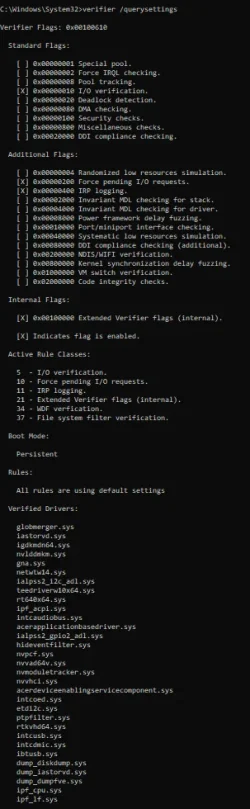
5) Whenever the WDV tool is started if there is no immediate BSOD then open administrative command prompt and copy and paste:

verifier /querysettings

Post a share link.


Customized tests will then be posted for the next run of WDV.


WDV can run continuously during the testing.


For any BSOD post a new V2 share link into the newest post.
 

My Computer

System One

  • OS
    Windows 10
    Computer type
    Laptop
    Manufacturer/Model
    HP
    CPU
    Intel(R) Core(TM) i7-4800MQ CPU @ 2.70GHz
    Motherboard
    Product : 190A Version : KBC Version 94.56
    Memory
    16 GB Total: Manufacturer : Samsung MemoryType : DDR3 FormFactor : SODIMM Capacity : 8GB Speed : 1600
    Graphics Card(s)
    NVIDIA Quadro K3100M; Intel(R) HD Graphics 4600
    Sound Card
    IDT High Definition Audio CODEC; PNP Device ID HDAUDIO\FUNC_01&VEN_111D&DEV_76E0
    Hard Drives
    Model Hitachi HTS727575A9E364
    Antivirus
    Microsoft Defender
    Other Info
    Mobile Workstation
@zbook Is there any context you can give me? Like, did you get any the wiser from the stuff I uploaded?
 

My Computer

System One

  • OS
    Windows 11
The next step is to test drivers using the WDV tool.


There were 11 BSODs recorded between 01/04 and 02/04
These have passed:
Tuneup plus
Memtest86+
HDS
 

My Computer

System One

  • OS
    Windows 10
    Computer type
    Laptop
    Manufacturer/Model
    HP
    CPU
    Intel(R) Core(TM) i7-4800MQ CPU @ 2.70GHz
    Motherboard
    Product : 190A Version : KBC Version 94.56
    Memory
    16 GB Total: Manufacturer : Samsung MemoryType : DDR3 FormFactor : SODIMM Capacity : 8GB Speed : 1600
    Graphics Card(s)
    NVIDIA Quadro K3100M; Intel(R) HD Graphics 4600
    Sound Card
    IDT High Definition Audio CODEC; PNP Device ID HDAUDIO\FUNC_01&VEN_111D&DEV_76E0
    Hard Drives
    Model Hitachi HTS727575A9E364
    Antivirus
    Microsoft Defender
    Other Info
    Mobile Workstation
I dunno if it was one of the updates or one of the update fixes or even one of those scripts I tried for MS boot keys
but my product key for Windows 11 got removed/deleted. I re-entered the key and all was fine.
 

My Computer

System One

  • OS
    windows 11
    Computer type
    PC/Desktop
    Manufacturer/Model
    Antec/Case
    CPU
    Intel i5-10600kf
    Motherboard
    GIGABYTE Z590 UD AC
    Memory
    32gb corsair vengerance pro
    Graphics Card(s)
    AMD RX 6500XT
    Sound Card
    onboard
    Monitor(s) Displays
    40" Hisense
    Hard Drives
    Samsung 850
    Samsung 870
    Seagate 2TB
    PSU
    EVGA GQ 750
@zbook Just ran WDV with the 3 test settings from the tutorial selected, for all non-Microsoft drivers. No BSOD.

Had a boot failure earlier today, before the WDV test. Attached V2.
 

Attachments

Last edited:

My Computer

System One

  • OS
    Windows 11
Please restart WDV with these groups of customized tests:


Group a:
Code:
    [ ] 0x00000010 I/O verification.
    [ ] 0x00000200 Force pending I/O requests.
    [ ] 0x00000400 IRP logging.
    [ ] 0x00002000 Invariant MDL checking for stack.
    [ ] 0x00004000 Invariant MDL checking for driver.
    [ ] 0x00000002 Force IRQL checking.


Group b:
Code:
    [ ] 0x00000001 Special pool.
    [ ] 0x00000008 Pool tracking.
    [ ] 0x00200000 NDIS/WIFI verification.
    [ ] 0x00800000 Kernel synchronization delay fuzzing.
    [ ] 0x01000000 VM switch verification.


Group c:
Code:
    [ ] 0x00000020 Deadlock detection.
    [ ] 0x00000080 DMA checking.
    [ ] 0x00000100 Security checks.
    [ ] 0x00000800 Miscellaneous checks.
    [ ] 0x02000000 Code integrity checks.


Group d:
Code:
    [ ] 0x00008000 Power framework delay fuzzing.
    [ ] 0x00010000 Port/miniport interface checking.
    [ ] 0x00040000 Systematic low resources simulation.
    [ ] 0x00020000 DDI compliance checking.
    [ ] 0x00080000 DDI compliance checking (additional).


If there is no immediate BSOD then open administrative command prompt and copy and paste:

verifier /querysettings

(If possible save to notepad)

Post a share link.


For any BSOD post a new V2 share link into the newest post.
 

My Computer

System One

  • OS
    Windows 10
    Computer type
    Laptop
    Manufacturer/Model
    HP
    CPU
    Intel(R) Core(TM) i7-4800MQ CPU @ 2.70GHz
    Motherboard
    Product : 190A Version : KBC Version 94.56
    Memory
    16 GB Total: Manufacturer : Samsung MemoryType : DDR3 FormFactor : SODIMM Capacity : 8GB Speed : 1600
    Graphics Card(s)
    NVIDIA Quadro K3100M; Intel(R) HD Graphics 4600
    Sound Card
    IDT High Definition Audio CODEC; PNP Device ID HDAUDIO\FUNC_01&VEN_111D&DEV_76E0
    Hard Drives
    Model Hitachi HTS727575A9E364
    Antivirus
    Microsoft Defender
    Other Info
    Mobile Workstation
1) Please restart WDV with all customized tests except:

Code:
    [ ] 0x00000004 Randomized low resources simulation.

Run continuously for 48 hours.


2) If there is no BSOD then open administrative command prompt and copy and paste:

verifier /querysettings

(If possible save to notepad)

Post a share link.


3) For any BSOD post a new V2 share link into the newest post.


4) After the 48 hours run V2 before turning off the WDV tool


5) And run administrative command prompt: > post share links into the newest post (system and application share links)

a) wevtutil epl Application %userprofile%\Desktop\application.evtx

b) wevtutil epl System %userprofile%\Desktop\system.evtx
 
Last edited:

My Computer

System One

  • OS
    Windows 10
    Computer type
    Laptop
    Manufacturer/Model
    HP
    CPU
    Intel(R) Core(TM) i7-4800MQ CPU @ 2.70GHz
    Motherboard
    Product : 190A Version : KBC Version 94.56
    Memory
    16 GB Total: Manufacturer : Samsung MemoryType : DDR3 FormFactor : SODIMM Capacity : 8GB Speed : 1600
    Graphics Card(s)
    NVIDIA Quadro K3100M; Intel(R) HD Graphics 4600
    Sound Card
    IDT High Definition Audio CODEC; PNP Device ID HDAUDIO\FUNC_01&VEN_111D&DEV_76E0
    Hard Drives
    Model Hitachi HTS727575A9E364
    Antivirus
    Microsoft Defender
    Other Info
    Mobile Workstation
Run continuously for 48 hours.

Letting it run for 48 hours, won't that put a huge amount of strain on the hardware, decreasing the laptop's lifespan?
 
Last edited:

My Computer

System One

  • OS
    Windows 11
Not seen lifespan changes reported in testing reports.

The goal is to stress test the non-Windows drivers and rule them out as a cause of the computer's instability.


Code:
It is not advised to run Driver Verifier for more than 48 hours at a time. 

Disable Driver Verifier after 48 hours or after receiving a BSOD, whichever happens soonest.


Last edited:

My Computer

System One

  • OS
    Windows 10
    Computer type
    Laptop
    Manufacturer/Model
    HP
    CPU
    Intel(R) Core(TM) i7-4800MQ CPU @ 2.70GHz
    Motherboard
    Product : 190A Version : KBC Version 94.56
    Memory
    16 GB Total: Manufacturer : Samsung MemoryType : DDR3 FormFactor : SODIMM Capacity : 8GB Speed : 1600
    Graphics Card(s)
    NVIDIA Quadro K3100M; Intel(R) HD Graphics 4600
    Sound Card
    IDT High Definition Audio CODEC; PNP Device ID HDAUDIO\FUNC_01&VEN_111D&DEV_76E0
    Hard Drives
    Model Hitachi HTS727575A9E364
    Antivirus
    Microsoft Defender
    Other Info
    Mobile Workstation
Surely this is the awful update from mid January .. sounds like many of the issues that MS are trying to address. Google windows 11 January update problems and you';ll get a huge response database!!!
They've issued some fixes but admit that they still haven't fixed everything.
 

My Computer

System One

  • OS
    windows 11 Pro 25H2 build 26200.7462
    Computer type
    PC/Desktop
    Manufacturer/Model
    custom
    CPU
    13th Gen Intel(R) Core(TM) i7-13700K (3.40 GHz), Raptor
    Motherboard
    Gigabyte B760M DS3H DDR4 (U3E1)
    Memory
    16GB DDR4
    Graphics Card(s)
    NVIDIA GeForce GT 710
    Sound Card
    Realtek High Definition Audio, NVIDIA High Definition Audio
    Monitor(s) Displays
    ASUS VZ279HE
    Screen Resolution
    1920 x 1080
    Hard Drives
    (1) Disc drive WD_BLACK SN850X 1000GB,
    (2) SSD CT1000MX500SSD1,
    (3) ASUS DRW-24D5MT
    PSU
    n/n
    Case
    n/n
    Cooling
    n/n (it's very quiet)
    Keyboard
    Logitech wireless desktop Mk30 model Y-R0002
    Mouse
    Logitech pebble M350
    Internet Speed
    down typically 130 Mbps, up typically 30 Mbps
    Browser
    Chrome Version 144.0.7559.110 (Official Build) (64-bit)
    Antivirus
    win11 AV/firewall + Malwarebytes
    Other Info
    AIRHUG 21 microphone on external USB; occasional use of Logitech webcam C920HD connected through external USB; printer (WIFI) Kyocera Ecosys M5526cdw
@zbook I'm not sure what happened but, about an hour or so into the test, give or take, I think the system crashed. Not sure. The screen wouldn't come back on, and the keyboard didn't seem to respond anymore. I forced a shutdown, and then turned it back on, and ran V2.

I left WDV running for a second attempt, and it's still going now.
 

Attachments

My Computer

System One

  • OS
    Windows 11
Please perform the following steps:


1) Search for these large files > zip > post share links

2/12/2026 1:37:43 PM 2140.72 C:\Windows\MEMORY.DMP
2/12/2026 2:07:35 PM 3345.57 C:\Windows\LiveKernelReports\WATCHDOG-20260212-1407.dmp


2) Reinstall the Intel GPU driver from the Acer website:


3) Create a new restore point


4) Restart WDV with all customized tests except

Code:
    [ ] 0x00000004 Randomized low resources simulation.

Run continuously for 48 hours.


5) If there is no immediate BSOD then open administrative command prompt and copy and paste:

verifier /querysettings

(If possible save to notepad)

Post a share link.


6) For any BSOD post a new V2 share link into the newest post.


7) See the many active EF threads on secure boot:


Frequently asked questions about the Secure Boot update process - Microsoft Support
Secure Boot playbook for certificates expiring in 2026
Windows Secure Boot Key Creation and Management Guidance
Registry key updates for Secure Boot: Windows devices with IT-managed updates - Microsoft Support
Updating Microsoft Secure Boot keys before expiration in June 2026 | Windows 11 Forum
Secure boot update HowTo | Windows 11 Forum


Code:
igfxn    igfxn    c:\windows\system32\driverstore\filerepository\iigd_dch.inf_amd64_77a6955e88bce373\igdkmdn64.sys

Code:
Name    Intel(R) Iris(R) Xe Graphics
PNP Device ID    PCI\VEN_8086&DEV_A7A1&SUBSYS_16941025&REV_04\3&11583659&0&10
Adapter Type    Intel(R) Iris(R) Xe Graphics Family, Intel Corporation compatible
Adapter Description    Intel(R) Iris(R) Xe Graphics
Adapter RAM    2.00 GB (2,147,479,552 bytes)
Installed Drivers    C:\Windows\System32\DriverStore\FileRepository\iigd_dch.inf_amd64_77a6955e88bce373\igdumdim64.dll,C:\Windows\System32\DriverStore\FileRepository\iigd_dch.inf_amd64_77a6955e88bce373\igd10iumd64.dll,C:\Windows\System32\DriverStore\FileRepository\iigd_dch.inf_amd64_77a6955e88bce373\igd10iumd64.dll,C:\Windows\System32\DriverStore\FileRepository\iigd_dch.inf_amd64_77a6955e88bce373\igd12umd64.dll
Driver Version    32.0.101.5768
INF File    oem17.inf (iRPLPD_w10_DS section)
Driver    C:\WINDOWS\SYSTEM32\DRIVERSTORE\FILEREPOSITORY\IIGD_DCH.INF_AMD64_77A6955E88BCE373\IGDKMDN64.SYS (32.0.101.5768, 50.90 MB (53,373,472 bytes), 8/28/2024 12:42 PM)

Code:
 igdkmdn64.sys Wed Jul 24 15:30:58 2024 (66A16482)


Code:
Event[13430]
  Log Name: System
  Source: Microsoft-Windows-TPM-WMI
  Date: 2026-02-12T13:42:56.7110000Z
  Event ID: 1801
  Task: N/A
  Level: Error
  Opcode: Info
  Keyword: N/A
  User: S-1-5-18
  User Name: NT AUTHORITY\SYSTEM
  Computer: LAPTOP-9JG2CL7F
  Description:
Secure Boot certificates have been updated but are not yet applied to the device firmware. Review the published guidance to complete the update and ensure full protection. This device signature information is included here.
DeviceAttributes: FirmwareManufacturer:INSYDE Corp.;FirmwareVersion:V1.65;OEMModelNumber:Aspire A517-58GM;OEMModelBaseBoard:JypsiereG_RTU;OEMManufacturerName:Acer;OSArchitecture:amd64;
BucketId: 1d3c82cd60841bd46db8c66f8404ed9b8c9c34517574c9a5d96f9541975662ce
BucketConfidenceLevel:
UpdateType:
For more information, please see https://go.microsoft.com/fwlink/?linkid=2301018.
 
Last edited:

My Computer

System One

  • OS
    Windows 10
    Computer type
    Laptop
    Manufacturer/Model
    HP
    CPU
    Intel(R) Core(TM) i7-4800MQ CPU @ 2.70GHz
    Motherboard
    Product : 190A Version : KBC Version 94.56
    Memory
    16 GB Total: Manufacturer : Samsung MemoryType : DDR3 FormFactor : SODIMM Capacity : 8GB Speed : 1600
    Graphics Card(s)
    NVIDIA Quadro K3100M; Intel(R) HD Graphics 4600
    Sound Card
    IDT High Definition Audio CODEC; PNP Device ID HDAUDIO\FUNC_01&VEN_111D&DEV_76E0
    Hard Drives
    Model Hitachi HTS727575A9E364
    Antivirus
    Microsoft Defender
    Other Info
    Mobile Workstation
System became unresponsive again, this time after almost 6 hours. Uploaded V2 to OneDrive. Then disabled WDV.

Also uploaded memory and watchdog files.
 
Last edited:

My Computer

System One

  • OS
    Windows 11
Back
Top Bottom