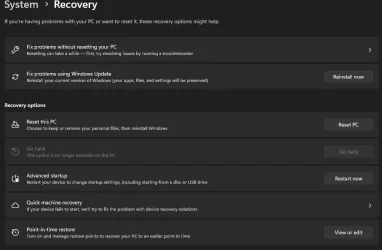
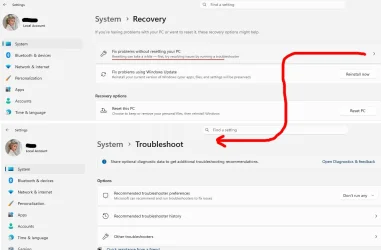
I want to do a repair update on my Windows 11 Pro system. According to Microsoft's instructions, the procedure is: go to Settings>System>Recovery, find the "Fix problems without resetting your PC," and click the Reinstall now button.
Thee is no "Fix problems without resetting your PC," and no Reinstall now button.
The instructions have advice for this case: "Fix problems using Windows Update isn't displayed."
"If your PC is managed by your work or school, Fix problems using Windows Update might be unavailable."
Nope. I'm retired and not in school. I'm the only person this Windows installation is responsible to.
"The option might also be missing if you’re running a version of Windows that’s earlier than Windows 11 with the 2022 annual update. You'll also need the February 2024 optional update, or a later update installed on the PC."
Settings>System>Windows Update says it last checked for updates 10 hours ago, so I don't think it's that.
And that's all the instructions say.
What else could be wrong?
Thee is no "Fix problems without resetting your PC," and no Reinstall now button.
The instructions have advice for this case: "Fix problems using Windows Update isn't displayed."
"If your PC is managed by your work or school, Fix problems using Windows Update might be unavailable."
Nope. I'm retired and not in school. I'm the only person this Windows installation is responsible to.
"The option might also be missing if you’re running a version of Windows that’s earlier than Windows 11 with the 2022 annual update. You'll also need the February 2024 optional update, or a later update installed on the PC."
Settings>System>Windows Update says it last checked for updates 10 hours ago, so I don't think it's that.
And that's all the instructions say.
What else could be wrong?
My Computer
At a glance
Windows 11i7-10875SH32 GBNVIDIA Quadro RTX 3000
- OS
- Windows 11
- Computer type
- Laptop
- Manufacturer/Model
- Dell Precision 5750
- CPU
- i7-10875SH
- Memory
- 32 GB
- Graphics Card(s)
- NVIDIA Quadro RTX 3000
- Screen Resolution
- 2x 1920x1200
- Hard Drives
- 1 TB SSD
- Browser
- Firefox