Solved Fluent Cleaner vs. CCleaner vs. Windows Disk Cleanup?


Alexey2912

Well-known member
Member
VIP
Local time
9:42 AM
Posts
2,144
Location
Aiea, Honolulu HI
OS
Windows 11 Pro 25H2 (26200.8457).
Hi there,

How do you rate Fluent Cleaner cleaner compared to CCleaner or Windows Disk Cleanup?

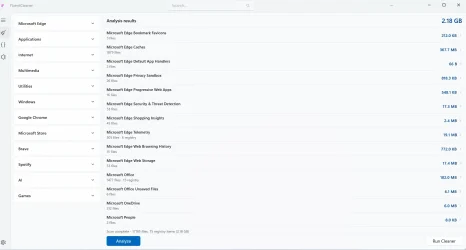
I installed it, and upon analysis, it shows 2.20 GB of files to be removed.

Hoping to hear from the experts.

Thanks.
 
Windows Build/Version
25H2 (26200.8457)

My Computers

System One System Two

  • OS
    Windows 11 Pro 25H2 (26200.8457).
    Computer type
    Laptop
    Manufacturer/Model
    Dell Inspiron i5 5510
    CPU
    core i7 11th gen
    Memory
    16 GB DDR4 @3200 MHz
    Hard Drives
    1 TB SSD M.2 NVMe
    Keyboard
    Dell Premier Multi-Device Wireless Keyboard and Mouse – KM7321W
    Browser
    Brave.
    Other Info
    Edifier speakers. (Thanks to @Edwin).
  • Operating System
    W11 25H2 (26200.7840)
    Computer type
    PC/Desktop
    Manufacturer/Model
    XPS Special Edition
    CPU
    11th Gen Intel® Core i7-11700 processor
    Memory
    32 GB, 2 x 16 GB, DDR4, 2933 MHz, dual channel
    Graphics card(s)
    NVIDIA GeForce RTX 3060 12GB GDDR6
    Hard Drives
    2TB M.2 PCIe NVMe SSD
Fluent Cleaner.webp
 

My Computers

System One System Two

  • OS
    Windows 11 Pro 25H2 (26200.8457).
    Computer type
    Laptop
    Manufacturer/Model
    Dell Inspiron i5 5510
    CPU
    core i7 11th gen
    Memory
    16 GB DDR4 @3200 MHz
    Hard Drives
    1 TB SSD M.2 NVMe
    Keyboard
    Dell Premier Multi-Device Wireless Keyboard and Mouse – KM7321W
    Browser
    Brave.
    Other Info
    Edifier speakers. (Thanks to @Edwin).
  • Operating System
    W11 25H2 (26200.7840)
    Computer type
    PC/Desktop
    Manufacturer/Model
    XPS Special Edition
    CPU
    11th Gen Intel® Core i7-11700 processor
    Memory
    32 GB, 2 x 16 GB, DDR4, 2933 MHz, dual channel
    Graphics card(s)
    NVIDIA GeForce RTX 3060 12GB GDDR6
    Hard Drives
    2TB M.2 PCIe NVMe SSD
@Alexey2912

No need to be an expert to review third party cleaners.
About your screenshot:
I really can't tell how it gets to 2.18 GB , if you add up total down the list, it is not even half that.
It might include shadow copies/restore points ; in any case that should be listed.
In most cases, cleaners are really another form of bloat to advertise other products.
You do not need them as Windows has all the tools you need.
 

My Computers

System One System Two

  • OS
    All Branches but Release
    Computer type
    Laptop
    Manufacturer/Model
    Acer Nitro ANV15-51
    CPU
    AMD Ryzen 7 7735HS 3200-4500 Mhz 8 cores x 2
    Motherboard
    Sportage_RBH
    Memory
    32 GB DDR5
    Graphics Card(s)
    Radeon Graphic / NVIDIA GeForce RTX 4060 8 GB GDDR6
    Sound Card
    AMD/Realtek(R) Audio
    Monitor(s) Displays
    Integrated Monitor (15.3"vis)
    Screen Resolution
    FHD 1920X1080 16:9 144Hz
    Hard Drives
    KINGSTON OM8SEP4512Q-AA 1TB
    Western Digital 256GB
    PSU
    19V DC 6.32 A 120 W
    Cooling
    Dual Fans
    Mouse
    MS Bluetooth
    Internet Speed
    Fiber 1GB Cox -us & 1GB Orange-fr
    Browser
    Edge Canary- Firefox Nightly-Chrome Dev-Chrome Dev
    Antivirus
    Windows Defender
  • Operating System
    Windows 11 Beta
    Computer type
    Laptop
    Manufacturer/Model
    Asus X751BP
    CPU
    AMD A9-9420
    Memory
    8 GB of DDR4
    Graphics card(s)
    AMD Radeon R5
    Screen Resolution
    1600x900
    Hard Drives
    Seagate 1 TB

My Computer

System One

  • OS
    Windows 11 Pro 23H2, OS build: 22631.6199
    Computer type
    Laptop
BleachBit is also a good alternative:


If you want a Portable:
 

My Computer

System One

  • OS
    Win 10 Pro 19045.6937 Win 11 25H2 VM
    Computer type
    Laptop
    Manufacturer/Model
    Dell Precicion 15 Workstation
    CPU
    Xeon W-10885M
    Motherboard
    Dell
    Memory
    64GB ECC DDR4 128GB max
    Graphics Card(s)
    Intel 1080p + Quadro RTX 5000 Max-Q 16GB 4K
    Sound Card
    onboard Realtec
    Monitor(s) Displays
    NA
    Screen Resolution
    1080p to 4k
    Hard Drives
    1 TB Samsung 9100 M2 SSD main
    2 TB Samsung 9100 M2 SSD storage
    500 GB Corsair T500 storage M2 SSD (6 TB max)
    PSU
    NA
    Case
    NA
    Cooling
    NA
    Keyboard
    backlit
    Mouse
    Logitec M720 Bluetooth Free scroll
    Internet Speed
    slow
    Browser
    Pale Moon 33.9.x.x - x64 AVX2 build
    Antivirus
    Windows Defender
Thanks @OAT , @giftwrapped and @billmcct ,for sharing your thoughts. I just read about Fluent on Windows news about it being an open source etc., thought why not give it a try. Haven't run delete, just analyze. I usually run windows Disk cleanup, no issues.

Thanks again.
 

My Computers

System One System Two

  • OS
    Windows 11 Pro 25H2 (26200.8457).
    Computer type
    Laptop
    Manufacturer/Model
    Dell Inspiron i5 5510
    CPU
    core i7 11th gen
    Memory
    16 GB DDR4 @3200 MHz
    Hard Drives
    1 TB SSD M.2 NVMe
    Keyboard
    Dell Premier Multi-Device Wireless Keyboard and Mouse – KM7321W
    Browser
    Brave.
    Other Info
    Edifier speakers. (Thanks to @Edwin).
  • Operating System
    W11 25H2 (26200.7840)
    Computer type
    PC/Desktop
    Manufacturer/Model
    XPS Special Edition
    CPU
    11th Gen Intel® Core i7-11700 processor
    Memory
    32 GB, 2 x 16 GB, DDR4, 2933 MHz, dual channel
    Graphics card(s)
    NVIDIA GeForce RTX 3060 12GB GDDR6
    Hard Drives
    2TB M.2 PCIe NVMe SSD
  • Like
Reactions: OAT
Wise Disk Cleaner is also one you can try.


Remember if you use the reg cleaner on CCleaner, it gives you the option to make a backup of the reg files you're about to delete, make sure you do that.
 

My Computer

System One

  • OS
    Win 11 Pro, Win 10 pro, Win 13.7 Pro Chinese Ver
    Computer type
    PC/Desktop
    Manufacturer/Model
    It's a Dell Dude
    CPU
    12th Gen Intel(R) Core(TM) i9-12900 2.40 GHz
    Motherboard
    Father is bored too...
    Memory
    64.0 GB of transcendental dimensional RAM
    Graphics Card(s)
    NVIDIA GeForce RTX 3070 Ti
    Sound Card
    N/A
    Monitor(s) Displays
    27" Samsung Monitor/Alternative Dimensional Viewing Portal
    Screen Resolution
    Fuzzy after a couple drinks
    Hard Drives
    2 or 3, depending on if it's a night they're arguing about having a "split personality crisis" because I partitioned the drive.
    PSU
    Shockingly active
    Case
    Don't get on my case....man
    Cooling
    Scotch on the rocks on the weekends.
    Keyboard
    Steel Series Lighted Glow in the dark something or another
    Mouse
    Currently being stalked by the cat...
    Internet Speed
    DSL
    Browser
    Defeated by Mario...wait...OH...BRowser...
    Antivirus
    Yep
Wise Disk Cleaner is also one you can try.


Remember if you use the reg cleaner on CCleaner, it gives you the option to make a backup of the reg files you're about to delete, make sure you do that.

Thanks @Borg 386 , when I used CCleaner I never used the reg. clean option. I found it being a bloat and switched to Windows Disk cleanup.
 

My Computers

System One System Two

  • OS
    Windows 11 Pro 25H2 (26200.8457).
    Computer type
    Laptop
    Manufacturer/Model
    Dell Inspiron i5 5510
    CPU
    core i7 11th gen
    Memory
    16 GB DDR4 @3200 MHz
    Hard Drives
    1 TB SSD M.2 NVMe
    Keyboard
    Dell Premier Multi-Device Wireless Keyboard and Mouse – KM7321W
    Browser
    Brave.
    Other Info
    Edifier speakers. (Thanks to @Edwin).
  • Operating System
    W11 25H2 (26200.7840)
    Computer type
    PC/Desktop
    Manufacturer/Model
    XPS Special Edition
    CPU
    11th Gen Intel® Core i7-11700 processor
    Memory
    32 GB, 2 x 16 GB, DDR4, 2933 MHz, dual channel
    Graphics card(s)
    NVIDIA GeForce RTX 3060 12GB GDDR6
    Hard Drives
    2TB M.2 PCIe NVMe SSD

Latest Support Threads

Back
Top Bottom