
FlyOobe / Flyby11


FlyOOBE 2.4.854​

Changelog​

“We need to get beyond the arguments of slop vs sophistication…” - Satya Nadella
Agreed, but users still deserve a choice!!! The AI OOBE control has been refined and is now officially called Slopilot.
Slopilot isnt anti-AI - it's pro user choice
  • This update improves detection of AI-related (Slopilot) features across Windows 11 and adds optional deep cleanup capabilities via external tooling such as RemoveWindowsAI.
    Users can now better understand, review, and disable AI components they dont want, transparently and on their own terms
  • Improved browser detection in the Browser OOBE
  • Updated Extensions engine for better coverage and accuracy
  • Global search functionality expanded and refined across all sections
  • Improved theme detection in the Personalization OOBE
  • Minor core optimizations and internal cleanups
 

My Computer My Computer

At a glance

Windows 11 ProIntel Core i9 12900KFCorsair 64GB DDR5 Vengeance C40 5200MhzASUS GeForce RTX 3090 ROG Strix OC 24GB
OS
Windows 11 Pro
Computer type
PC/Desktop
Manufacturer/Model
Custom Build
CPU
Intel Core i9 12900KF
Motherboard
ASUS ROG Maximus Z690 Hero
Memory
Corsair 64GB DDR5 Vengeance C40 5200Mhz
Graphics Card(s)
ASUS GeForce RTX 3090 ROG Strix OC 24GB
Sound Card
OnBoard
Monitor(s) Displays
Acer Predator XB323UGP 32" QHD G-SYNC-C 144Hz 1MS IPS LED
Screen Resolution
2560 x 1440
Hard Drives
1x Samsung 980 Pro Series Gen4 250GB M.2 NVMe
1x Samsung 980 Pro Series Gen4 500GB M.2 NVMe
2x Samsung 980 Pro Series Gen4 2TB M.2 NVMe
PSU
Corsair AX1200i 1200W 80PLUS Titanium Modular
Case
Corsair 4000D Black Case w/ Tempered Glass Side Panel
Cooling
Noctua NH-U12A Chromax Black CPU Cooler, 4x Noctua 120mm Fans
Keyboard
Logitech MK545
Mouse
Logitech MX Master 3
Internet Speed
Fixed Wireless 150mbps/75mbps
Browser
Firefox
Antivirus
Kaspersky
Other Info
Thrustmaster TS-PC RACER
Fanatec CSL Elite Pedals with the Load Cell Kit
Yamaha Amp with Bose Speakers
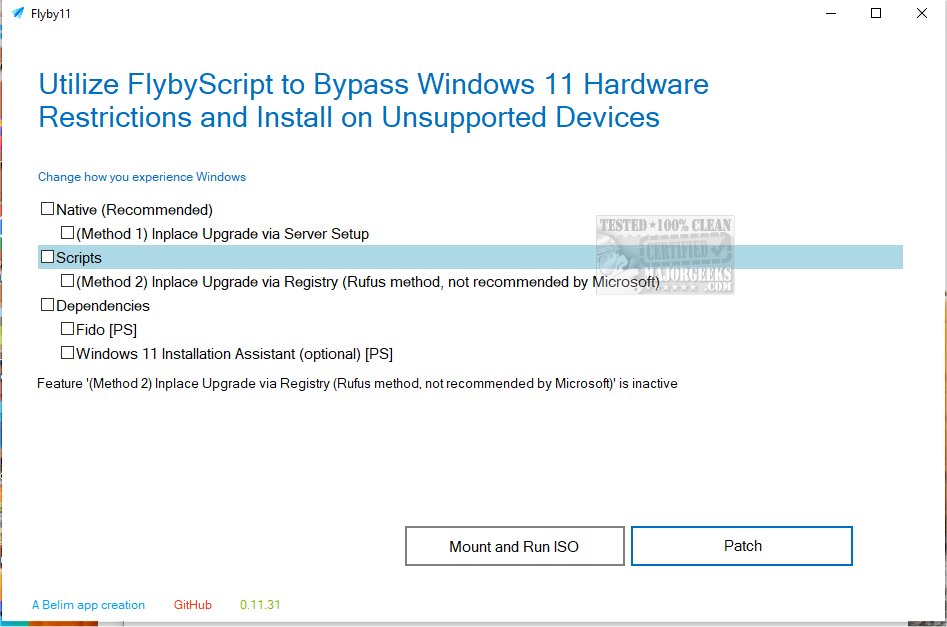
Is there a step-by-step guide with pictures on how to use FlyOOBE?
 

My Computer My Computer

At a glance

Windows 11 Home Single Language 24H2 26100.289412
OS
Windows 11 Home Single Language 24H2 26100.2894
Computer type
PC/Desktop
Manufacturer/Model
Casper
Memory
12
Internet Speed
100 Mbpz
Browser
Vivaldi Firefox Crome
Antivirus
Defender
Is there a step-by-step guide with pictures on how to use FlyOOBE?


My Computer My Computer

At a glance

Windows 11 ProIntel Core i9 12900KFCorsair 64GB DDR5 Vengeance C40 5200MhzASUS GeForce RTX 3090 ROG Strix OC 24GB
OS
Windows 11 Pro
Computer type
PC/Desktop
Manufacturer/Model
Custom Build
CPU
Intel Core i9 12900KF
Motherboard
ASUS ROG Maximus Z690 Hero
Memory
Corsair 64GB DDR5 Vengeance C40 5200Mhz
Graphics Card(s)
ASUS GeForce RTX 3090 ROG Strix OC 24GB
Sound Card
OnBoard
Monitor(s) Displays
Acer Predator XB323UGP 32" QHD G-SYNC-C 144Hz 1MS IPS LED
Screen Resolution
2560 x 1440
Hard Drives
1x Samsung 980 Pro Series Gen4 250GB M.2 NVMe
1x Samsung 980 Pro Series Gen4 500GB M.2 NVMe
2x Samsung 980 Pro Series Gen4 2TB M.2 NVMe
PSU
Corsair AX1200i 1200W 80PLUS Titanium Modular
Case
Corsair 4000D Black Case w/ Tempered Glass Side Panel
Cooling
Noctua NH-U12A Chromax Black CPU Cooler, 4x Noctua 120mm Fans
Keyboard
Logitech MK545
Mouse
Logitech MX Master 3
Internet Speed
Fixed Wireless 150mbps/75mbps
Browser
Firefox
Antivirus
Kaspersky
Other Info
Thrustmaster TS-PC RACER
Fanatec CSL Elite Pedals with the Load Cell Kit
Yamaha Amp with Bose Speakers


FlyOobe 3.0.0.1

New Features​

  • [Added] A completely new overview showing Windows settings, apps, personalization, bloatware and system tasks in one place.
  • [Added] Signature-driven Windows configuration powered by the editable Flyoobe.ini
  • [Added] Portable FlyOOBE recipes that can save, import, review and apply a complete setup on another PC
  • [Added] Recipe review mode with a visible summary and the option to discard staged changes
  • [Added] Individual Apply and Restore default actions for every supported Windows setting
  • [Added] A searchable winget app installer powered by the editable Apps.ini
  • [Added] Detection and optional removal of matching preinstalled Windows apps using Bloatware.ini
  • [Added] Browser setup with installed-browser detection and quick access to Windows default-app settings
  • [Added] Native personalization controls for Windows mode, app mode, taskbar alignment, transparency and wallpaper
  • [Added] Quick access to account, device, network and Windows Update workflows without rebuilding Windows Settings.
  • [Added] The isolated Flyby11 upgrade path for Windows 10 PCs that do not meet every Windows 11 requirement
  • [Added] Read-only checks for TPM, Secure Boot, memory, architecture, storage and Windows version before an upgrade
  • [Added] Optional AI explanations for individual settings. AI can explain a rule, but it cannot apply one
  • [Added] JSON-based localization with English and German included. More languages can be dropped into the localization folder

Improvements​

  • [Improved] The whole app now uses a much simpler native WinForms interface
  • [Improved] Navigation no longer opens a collection of separate windows; views stay inside the main window
  • [Improved] The overview now separates recommendations from personal choices instead of rating everything as good or bad
  • [Improved] Bloatware matches are scanned automatically, counted in the overview and clearly marked for review
  • [Improved] The result summary is shorter and easier to read at a glance
  • [Improved] Theme changes are sent to Windows immediately without requiring an Explorer restart
  • [Improved] Better scaling and layouts for high-DPI displays and longer translated text
  • [Improved] The codebase is split into small views and services, while the configuration stays outside the executable wherever possible

Bug Fixes​

  • [Changed] FlyOOBE no longer tries to become another giant Windows optimizer
  • [Changed] Heavy features already handled well by Windows now open the matching native Windows workflow
  • [Changed] Recommendations, app catalogs, bloatware signatures and upgrade limits live in separate editable data files
  • [Changed] Imported recipes stage their choices first, so they can be reviewed before anything is applied
  • [Fixed] Several designer, localization and navigation issues found during the FlyOOBE 3.0 rebuild

 
Last edited:

My Computer My Computer

At a glance

Windows 11 ProIntel Core i9 12900KFCorsair 64GB DDR5 Vengeance C40 5200MhzASUS GeForce RTX 3090 ROG Strix OC 24GB
OS
Windows 11 Pro
Computer type
PC/Desktop
Manufacturer/Model
Custom Build
CPU
Intel Core i9 12900KF
Motherboard
ASUS ROG Maximus Z690 Hero
Memory
Corsair 64GB DDR5 Vengeance C40 5200Mhz
Graphics Card(s)
ASUS GeForce RTX 3090 ROG Strix OC 24GB
Sound Card
OnBoard
Monitor(s) Displays
Acer Predator XB323UGP 32" QHD G-SYNC-C 144Hz 1MS IPS LED
Screen Resolution
2560 x 1440
Hard Drives
1x Samsung 980 Pro Series Gen4 250GB M.2 NVMe
1x Samsung 980 Pro Series Gen4 500GB M.2 NVMe
2x Samsung 980 Pro Series Gen4 2TB M.2 NVMe
PSU
Corsair AX1200i 1200W 80PLUS Titanium Modular
Case
Corsair 4000D Black Case w/ Tempered Glass Side Panel
Cooling
Noctua NH-U12A Chromax Black CPU Cooler, 4x Noctua 120mm Fans
Keyboard
Logitech MK545
Mouse
Logitech MX Master 3
Internet Speed
Fixed Wireless 150mbps/75mbps
Browser
Firefox
Antivirus
Kaspersky
Other Info
Thrustmaster TS-PC RACER
Fanatec CSL Elite Pedals with the Load Cell Kit
Yamaha Amp with Bose Speakers

Never got it to work for an In-Place Upgrade on an unsupported machine.

That was a few months ago.
 

My Computer My Computer

At a glance

Windows 11 Pro 25H2
OS
Windows 11 Pro 25H2
Computer type
Laptop
Manufacturer/Model
Toshiba

Flyoobe (Flyby11) 3.00.44 [Update]

Changelog:

New Features

  • New spelling, same bee: The app is now styled Flyoobe instead of FlyOOBE and pronounced “Fly-oh-bee.”
  • [Added] A completely new overview showing Windows settings, apps, personalization, bloatware and system tasks in one place.
  • [Added] Signature-driven Windows configuration powered by the editable Flyoobe.ini
  • [Added] Portable FlyOOBE recipes that can save, import, review and apply a complete setup on another PC
  • [Added] Recipe review mode with a visible summary and the option to discard staged changes
  • [Added] Individual Apply and Restore default actions for every supported Windows setting
  • [Added] A searchable winget app installer powered by the editable Apps.ini
  • [Added] Detection and optional removal of matching preinstalled Windows apps using Bloatware.ini
  • [Added] Browser setup with installed-browser detection and quick access to Windows default-app settings
  • [Added] Native personalization controls for Windows mode, app mode, taskbar alignment, transparency and wallpaper
  • [Added] Quick access to account, device, network and Windows Update workflows without rebuilding Windows Settings.
  • [Added] The isolated Flyby11 upgrade path for Windows 10 PCs that do not meet every Windows 11 requirement
  • [Added] Read-only checks for TPM, Secure Boot, memory, architecture, storage and Windows version before an upgrade
  • [Added] Optional AI explanations for individual settings. AI can explain a rule, but it cannot apply one
  • [Added] JSON-based localization with English and German included. More languages can be dropped into the localization folder
Improvements
  • The whole app now uses a much simpler native WinForms interface
  • Navigation no longer opens a collection of separate windows; views stay inside the main window
  • The overview now separates recommendations from personal choices instead of rating everything as good or bad
  • Bloatware matches are scanned automatically, counted in the overview and clearly marked for review
  • The result summary is shorter and easier to read at a glance
  • Theme changes are sent to Windows immediately without requiring an Explorer restart
  • Better scaling and layouts for high-DPI displays and longer translated text
  • The codebase is split into small views and services, while the configuration stays outside the executable wherever possible
Bug Fixes
  • Flyoobe no longer tries to become another giant Windows optimizer
  • Heavy features already handled well by Windows now open the matching native Windows workflow
  • Recommendations, app catalogs, bloatware signatures and upgrade limits live in separate editable data files
  • Imported recipes stage their choices first, so they can be reviewed before anything is applied
  • Several designer, localization and navigation issues found during the Flyoobe 3.0 rebuild


My Computer My Computer

At a glance

Windows 11 ProIntel Core i9 12900KFCorsair 64GB DDR5 Vengeance C40 5200MhzASUS GeForce RTX 3090 ROG Strix OC 24GB
OS
Windows 11 Pro
Computer type
PC/Desktop
Manufacturer/Model
Custom Build
CPU
Intel Core i9 12900KF
Motherboard
ASUS ROG Maximus Z690 Hero
Memory
Corsair 64GB DDR5 Vengeance C40 5200Mhz
Graphics Card(s)
ASUS GeForce RTX 3090 ROG Strix OC 24GB
Sound Card
OnBoard
Monitor(s) Displays
Acer Predator XB323UGP 32" QHD G-SYNC-C 144Hz 1MS IPS LED
Screen Resolution
2560 x 1440
Hard Drives
1x Samsung 980 Pro Series Gen4 250GB M.2 NVMe
1x Samsung 980 Pro Series Gen4 500GB M.2 NVMe
2x Samsung 980 Pro Series Gen4 2TB M.2 NVMe
PSU
Corsair AX1200i 1200W 80PLUS Titanium Modular
Case
Corsair 4000D Black Case w/ Tempered Glass Side Panel
Cooling
Noctua NH-U12A Chromax Black CPU Cooler, 4x Noctua 120mm Fans
Keyboard
Logitech MK545
Mouse
Logitech MX Master 3
Internet Speed
Fixed Wireless 150mbps/75mbps
Browser
Firefox
Antivirus
Kaspersky
Other Info
Thrustmaster TS-PC RACER
Fanatec CSL Elite Pedals with the Load Cell Kit
Yamaha Amp with Bose Speakers
Latest Support Threads

Back
Top Bottom


