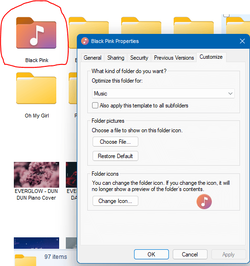
Folder icons and Folder thumbnails


Silverfish2910

Well-known member
Local time
1:46 PM
Posts
4
OS
Windows 11 Pro 21H2 22000.51
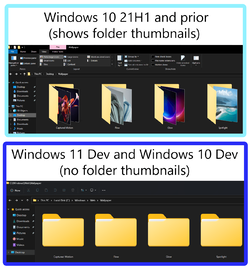
Ever since Windows 10 debuted the new icon set, File Explorer no longer reads the folder.jpg file. Does anyone know if it will come back? I have a lot of music albums and not having a thumbnail to ease finding what I want is time consuming. Do they expect me to type in the seach box for everything? Thanks.
 

My Computer My Computer

At a glance

Windows 11 Pro 21H2 22000.51
OS
Windows 11 Pro 21H2 22000.51
1626949512229.png
 

My Computer My Computer

At a glance

Windows 11 x64 v23H2 Build 22631.3958
OS
Windows 11 x64 v23H2 Build 22631.3958
Computer type
PC/Desktop
Manufacturer/Model
Acer
I think the OP means this...

0001178.png

... instead of this...

000727.png

... or worse...

0001179.png
 

My Computers My Computers

  • At a glance

    Windows 11 Pro
    OS
    Windows 11 Pro
    Computer type
    PC/Desktop
    Manufacturer/Model
    ASUS ROG Strix
  • At a glance

    Windows 11 Pro
    Operating System
    Windows 11 Pro
    Computer type
    Laptop
    Manufacturer/Model
    ASUS VivoBook
  • ASUS VivoBook 'Lite' ~ Windows 11 Home
Not ideal but the best it has been so far:


Screenshot 2021-07-23 002400.png


My Computer My Computer

At a glance

Windows 10Intel i7-4790k @ 5GHZ32GB Corsair Dominator Platinum 2400Mhz @ 10-...Nvidia RTX 3090FE @ Core 2200 MHZ / Memory 21...
OS
Windows 10
Computer type
PC/Desktop
Manufacturer/Model
Self Built
CPU
Intel i7-4790k @ 5GHZ
Motherboard
Asus Maximus VI Extreme
Memory
32GB Corsair Dominator Platinum 2400Mhz @ 10-12-11-27-1T
Graphics Card(s)
Nvidia RTX 3090FE @ Core 2200 MHZ / Memory 21 GHZ
Sound Card
Creative SoundBlaster ZxR
Monitor(s) Displays
LG 32GN600 (G-Sync Comp)
Screen Resolution
1440p
Hard Drives
C: Primary SSD > Samsung 860 PRO 512GB
G: Gaming SSD > Samsung 860 PRO 1TB
S: Storage SSD > Samsung 860 EVO 4TB x2 (Windows Storage Spaces = 8TB)
X: Ext Backup > IcyBox+WD Red 4TB x4 (Raid 10)
PSU
Corsair AX1600i
Case
NZXT Phantom 630 (Black)
Cooling
Noctua NH-D15S Chromax Black
Keyboard
Logitech G613
Mouse
Logitech G903 LS (Hero)+PowerPlay Wireless Charge Pad
Internet Speed
VM 1Gb/s
Browser
Edge
Antivirus
Eset

My Computers My Computers

  • At a glance

    Windows 11 Pro
    OS
    Windows 11 Pro
    Computer type
    PC/Desktop
    Manufacturer/Model
    ASUS ROG Strix
  • At a glance

    Windows 11 Pro
    Operating System
    Windows 11 Pro
    Computer type
    Laptop
    Manufacturer/Model
    ASUS VivoBook
  • ASUS VivoBook 'Lite' ~ Windows 11 Home
thumbnails folder?
 

My Computer My Computer

At a glance

windows 11
OS
windows 11
how covert folder windows 11 like windows 10?
d15nvk8mca871.png
 

My Computer My Computer

At a glance

windows 11
OS
windows 11
Hi,

it is because since some time, Microsoft sets the attributes of all MAIN & preinstalled Folders (not the subfolders and not those you created yourself) to "Read only". Rightclick the folder, open Properties, Rider "General" and you will see ! You can remove the tick, but it will automatically come back. You can change this attitude, but it is very complicated.

But there is a more simple help: the only programm I know which can change the icons of these MAIN folders is "Folder Marker Free". You can put your custom icons into "User icons" within Folder Marker and then change the icon of (nearly) any folder, even the "Windows" folder. For some folders, you need to run Folder Marker as an Administrator (rightclick on the .exe file or the shortcut and run as Administrator).
 

My Computer My Computer

At a glance

WIN 11 / WIN 10 dual bootIntel Pentium G 4400 (Skylake)DDR4 12 GBinternal (Intel HD 510)
OS
WIN 11 / WIN 10 dual boot
Computer type
PC/Desktop
Manufacturer/Model
No clue (x64 based) from 2016
CPU
Intel Pentium G 4400 (Skylake)
Motherboard
MS 7971, Bios: American Megatrend C.E0 (2018)
Memory
DDR4 12 GB
Graphics Card(s)
internal (Intel HD 510)
Hard Drives
2x Western Digital (no SSD)
Is there no way to go back to the Windows 10 explorer then with thumbnails? I've been looking ever since I stupidly 'upgraded' and the only thing we have is Windows Thumbnail Generator, which hasn't been updated since W11 went public.
 

My Computer My Computer

At a glance

Windows 11AMD Ryzen 3700x16GBMSI GTX 1660 SUPER™ VENTUS XS OC
OS
Windows 11
Computer type
PC/Desktop
CPU
AMD Ryzen 3700x
Motherboard
Gigabyte B550I Aorus Pro AX
Memory
16GB
Graphics Card(s)
MSI GTX 1660 SUPER™ VENTUS XS OC
Monitor(s) Displays
Acer ProDesigner BM320 32 Inch
Screen Resolution
4K
this is my question too, is there any way to change icons and thumbnails to be look like Win10's explorer?
lack of this thumbnail feature in win11 and many other bad changes prevent me to upgrade.

no body asked for these bad changes and downgrades.
 
Last edited:

My Computer My Computer

At a glance

Windows 10
OS
Windows 10
this is my question too, is there any way to change icons and thumbnails to be look like Win10's explorer?
lack of this thumbnail feature in win11 and many other bad changes prevent me to upgrade.

no body asked for this bad changes and downgrades.
Just keep using win 10. If theres so many bad changes and downgrades then maybe win 10 is for you :) You have til 2025 anyway :D
 

My Computer My Computer

At a glance

11[email protected]Viper Steelseries 32gb@ 3600mhzGigabyte 2070 Super 8GB, +200 core + 600 memory
OS
11
Computer type
PC/Desktop
Manufacturer/Model
Custom
CPU
[email protected]
Motherboard
Gigabyte Gaming X Z490
Memory
Viper Steelseries 32gb@ 3600mhz
Graphics Card(s)
Gigabyte 2070 Super 8GB, +200 core + 600 memory
Monitor(s) Displays
ASUS 4k HDR, Two 1080p Benq and Samsung
Screen Resolution
3840x2160/2560x1440/1920x1080
Hard Drives
Adata XPG SX8200 PRO 1tb
Samsung EVO 870 500GB
PSU
Corsair RX 650
Case
NZXT h510
Cooling
CM HYPER 212 RGB
Keyboard
Razer Ornata Chroma
Mouse
Steelseries Rival 710
Just keep using win 10. If theres so many bad changes and downgrades then maybe win 10 is for you :) You have til 2025 anyway :D
Will Do! I posted in a another thread that I would be going forward with Windows 11. This is a deal breaker for me though. I have album art, movie posters, and thumbs on ALL of my multimedia and graphic folders. Even though I put Windows 11 on my graphics rig, I just now tried to assign a folder.jpg file. I am NOT going to go through literally thousands of folders and change everything because MS severely DOWNGRADED the UI. The sheer apathy toward their users and their wishes is staggering. I'm done with the downgrades. Back to Windows 10 for me! Why Microsoft had to take so many useful features out of the UI is beyond me. EVERYONE in my circle where I live that has tried Win 11 has complaints. It is clear now, that MS does NOT listen to users or care. I'm pretty sure there are people out there that don't use, or don't care these features were removed and like Win 11 right out of the box. To those people; I'm glad. Carry on. As for me, this new UI is crippled beyond redemption. MS needs to PUT BACK the features they stole away from us. Not just this one either! This was just the last nail in the coffin for the latest Microsoft DOWNGRADE!

(Yeah, I'm a little upset.)
 
Last edited:

My Computer My Computer

At a glance

WIn 10
OS
WIn 10
Yes, agree ! Its only possible to watch my photo-folders in pictograms , instead of miniatures !!
While its been set in the folder-options ; miniatures NO PICTOGRAMS !!
Will wait some time for a working solution/update , or I have to go back to 10 ...............in 10 these crazy bugs are not present anyway !
 

My Computers My Computers

  • At a glance

    Windows11 Pro 25H2i732GBnVidia
    OS
    Windows11 Pro 25H2
    Computer type
    PC/Desktop
    Manufacturer/Model
    Asus
    CPU
    i7
    Motherboard
    z97k
    Memory
    32GB
    Graphics Card(s)
    nVidia
    Sound Card
    Realtek
    Hard Drives
    3
    Cooling
    air
    Browser
    Edge
    Antivirus
    ESET
  • At a glance

    Windows11 ProIntel i516GBIntel
    Operating System
    Windows11 Pro
    Computer type
    PC/Desktop
    Manufacturer/Model
    ASUS
    CPU
    Intel i5
    Motherboard
    ASUS Basic
    Memory
    16GB
    Graphics card(s)
    Intel
    Sound Card
    Realtek
    Monitor(s) Displays
    Samsung
    Hard Drives
    one intern , 0ne extern, OS on SSD
    Cooling
    air
    Keyboard
    wireless Logitech
    Mouse
    wireless Logitech
    Internet Speed
    1GB
    Browser
    Edge
    Antivirus
    ESET

Latest Support Threads

Back
Top Bottom