- Local time
- 2:30 PM
- Posts
- 187
- OS
- Windows 11
Hello
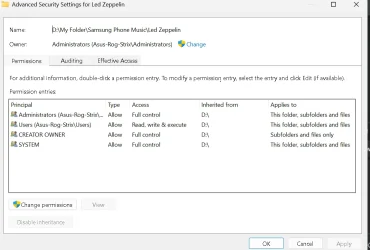
On my portable 2TB HD, I have a folder with 3 sub folders, 2 of which open fine....however when I open the third folder, which has 2 sub folders CD1 & CD2, neither open, explorer simply whirs then says not responding.
I have copied the main folder to an SD card and all folders open correctly. I then copied this back to my HDD after deleting the original folder, but the issue is the same. I then created all new folders on the SD card CD1 & CD2 and copied the music files to these new folders, then again copied to the HDD, but the issue remains. I then checked properties on CD1 & CD2 folders and untucked read only and turned off indexing, made no difference, any thoughts...checked several other folders on the HDD which open correctly.
Any thoughts please
On my portable 2TB HD, I have a folder with 3 sub folders, 2 of which open fine....however when I open the third folder, which has 2 sub folders CD1 & CD2, neither open, explorer simply whirs then says not responding.
I have copied the main folder to an SD card and all folders open correctly. I then copied this back to my HDD after deleting the original folder, but the issue is the same. I then created all new folders on the SD card CD1 & CD2 and copied the music files to these new folders, then again copied to the HDD, but the issue remains. I then checked properties on CD1 & CD2 folders and untucked read only and turned off indexing, made no difference, any thoughts...checked several other folders on the HDD which open correctly.
Any thoughts please
My Computer
At a glance
Windows 11Ryzen 78+16 total 24GB
- OS
- Windows 11
- Computer type
- Laptop
- Manufacturer/Model
- Asus
- CPU
- Ryzen 7
- Memory
- 8+16 total 24GB
- Other Info
- Asus Vivobook 15 M513U