

Navigation
Install the app
How to install the app on iOS
Follow along with the video below to see how to install our site as a web app on your home screen.
Note: This feature may not be available in some browsers.
More options
Style variation
System
Light
Dark
You are using an out of date browser. It may not display this or other websites correctly.
You should upgrade or use an alternative browser.
You should upgrade or use an alternative browser.
FolderThumbnailFix
- Thread starter LesFerch
- Start date
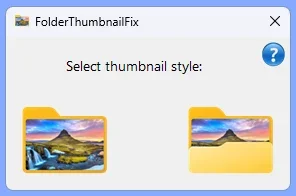
But make it portrait! 
Just a FYI -- Your security software might flag the included Resource Hacker tool as malware. It's not, but many of them are overly paranoid.
Just a FYI -- Your security software might flag the included Resource Hacker tool as malware. It's not, but many of them are overly paranoid.
My Computer
System One
-
- OS
- Windows 7

Hm, Seems to have no effect here. I've unblocked all executables. I'm using the windows 10 style explorer if that's relevant.
My Computers
System One System Two
-
- OS
- Windows 11 Enterprise 25H2 26200 7462
- Computer type
- PC/Desktop
- Manufacturer/Model
- Custom Build
- CPU
- Intel XEON E5-2699 v3
- Motherboard
- ASUS X99-A
- Memory
- 64GB Teamgroup UD4-3600
- Graphics Card(s)
- NVIDIA GeForce GTX 1080 Ti
- Sound Card
- Integrated
- Monitor(s) Displays
- ACER X34 Predator
- Screen Resolution
- 3440 x 1440
- Hard Drives
- Crucial CT1000P 3P SSD8 1TB
Crucial CT1000 BX500 SSD 1TB
- PSU
- GameMax Pro
- Case
- Fractal Design
- Cooling
- Corsair H110iGT + 6 140mm Fans
- Keyboard
- Corsair K4
- Mouse
- G-Skill G502
- Internet Speed
- 300MBs
- Browser
- Chrome
- Antivirus
- OEM
- Other Info
- ASUS RT-AC87U Router
-
- Operating System
- 25H2 26200.5074
- Computer type
- Laptop
- Manufacturer/Model
- ASUS X555LA
- Memory
- 8GB
- Browser
- Chrome
- Antivirus
- OEM

- Local time
- 10:31 PM
- Posts
- 4,641
- OS
- Windows 11 Pro

I forgot to ensure it would work when run from a path that includes a space (fixed now).Hm, Seems to have no effect here.
But I see another issue. After downloading, both the main exe and ResourceHacker.exe are blocked. I'll have to add code to the main exe to unblock Resource Hacker. Ultimately, I'd like to eliminate the need for Resource Hacker, but coding an icon replacement in a mun file is... difficult.
Last edited:
My Computer
System One
-
- OS
- Windows 10/11
- Computer type
- Laptop
- Manufacturer/Model
- Acer
Works exactly as it say's on the package now, thankyou.I forgot to ensure it would work when run from a path that includes a space (fixed now).
But I see another issue. After downloading, both the main exe and ResourceHacker.exe are blocked. I'll have to add code to the main exe to unblock Resource Hacker. Ultimately, I'd like to eliminate the need for Resource Hacker, but coding an icon replacement in a mun file is... difficult.
My Computers
System One System Two
-
- OS
- Windows 11 Enterprise 25H2 26200 7462
- Computer type
- PC/Desktop
- Manufacturer/Model
- Custom Build
- CPU
- Intel XEON E5-2699 v3
- Motherboard
- ASUS X99-A
- Memory
- 64GB Teamgroup UD4-3600
- Graphics Card(s)
- NVIDIA GeForce GTX 1080 Ti
- Sound Card
- Integrated
- Monitor(s) Displays
- ACER X34 Predator
- Screen Resolution
- 3440 x 1440
- Hard Drives
- Crucial CT1000P 3P SSD8 1TB
Crucial CT1000 BX500 SSD 1TB
- PSU
- GameMax Pro
- Case
- Fractal Design
- Cooling
- Corsair H110iGT + 6 140mm Fans
- Keyboard
- Corsair K4
- Mouse
- G-Skill G502
- Internet Speed
- 300MBs
- Browser
- Chrome
- Antivirus
- OEM
- Other Info
- ASUS RT-AC87U Router
-
- Operating System
- 25H2 26200.5074
- Computer type
- Laptop
- Manufacturer/Model
- ASUS X555LA
- Memory
- 8GB
- Browser
- Chrome
- Antivirus
- OEM
Version 1.0.4 is now available for download. It fixes the issue where sometimes the icon was not replaced due to the target file being in use. It was a simple matter of killing Explorer before attempting to replace the icon.
My Computer
System One
-
- OS
- Windows 10/11
- Computer type
- Laptop
- Manufacturer/Model
- Acer
Back to not working for me  I renamed the folder to Folder Thumbnail Fix to fix my OCD if that's relevant, full path is "C:\Program Files\Folder Thumbnail Fix"
I renamed the folder to Folder Thumbnail Fix to fix my OCD if that's relevant, full path is "C:\Program Files\Folder Thumbnail Fix"My Computers
System One System Two
-
- OS
- Windows 11 Enterprise 25H2 26200 7462
- Computer type
- PC/Desktop
- Manufacturer/Model
- Custom Build
- CPU
- Intel XEON E5-2699 v3
- Motherboard
- ASUS X99-A
- Memory
- 64GB Teamgroup UD4-3600
- Graphics Card(s)
- NVIDIA GeForce GTX 1080 Ti
- Sound Card
- Integrated
- Monitor(s) Displays
- ACER X34 Predator
- Screen Resolution
- 3440 x 1440
- Hard Drives
- Crucial CT1000P 3P SSD8 1TB
Crucial CT1000 BX500 SSD 1TB
- PSU
- GameMax Pro
- Case
- Fractal Design
- Cooling
- Corsair H110iGT + 6 140mm Fans
- Keyboard
- Corsair K4
- Mouse
- G-Skill G502
- Internet Speed
- 300MBs
- Browser
- Chrome
- Antivirus
- OEM
- Other Info
- ASUS RT-AC87U Router
-
- Operating System
- 25H2 26200.5074
- Computer type
- Laptop
- Manufacturer/Model
- ASUS X555LA
- Memory
- 8GB
- Browser
- Chrome
- Antivirus
- OEM
I just saw the same issue. Spaces in the path are fine and Explorer is first being closed, but sometimes the imageres.dll.mun file is still in use.Back to not working for me
What works for me is to sign out / sign in and try again (don't reboot).
My Computer
System One
-
- OS
- Windows 10/11
- Computer type
- Laptop
- Manufacturer/Model
- Acer
Working fine after a logout /In, i didn't try that because previously it worked straight out of the box.I just saw the same issue. Spaces in the path are fine and Explorer is first being closed, but sometimes the imageres.dll.mun file is still in use.
What works for me is to sign out / sign in and try again (don't reboot).
My Computers
System One System Two
-
- OS
- Windows 11 Enterprise 25H2 26200 7462
- Computer type
- PC/Desktop
- Manufacturer/Model
- Custom Build
- CPU
- Intel XEON E5-2699 v3
- Motherboard
- ASUS X99-A
- Memory
- 64GB Teamgroup UD4-3600
- Graphics Card(s)
- NVIDIA GeForce GTX 1080 Ti
- Sound Card
- Integrated
- Monitor(s) Displays
- ACER X34 Predator
- Screen Resolution
- 3440 x 1440
- Hard Drives
- Crucial CT1000P 3P SSD8 1TB
Crucial CT1000 BX500 SSD 1TB
- PSU
- GameMax Pro
- Case
- Fractal Design
- Cooling
- Corsair H110iGT + 6 140mm Fans
- Keyboard
- Corsair K4
- Mouse
- G-Skill G502
- Internet Speed
- 300MBs
- Browser
- Chrome
- Antivirus
- OEM
- Other Info
- ASUS RT-AC87U Router
-
- Operating System
- 25H2 26200.5074
- Computer type
- Laptop
- Manufacturer/Model
- ASUS X555LA
- Memory
- 8GB
- Browser
- Chrome
- Antivirus
- OEM
Out of interest would the application of this utility cause SFC failures?
My Computers
System One System Two
-
- OS
- Windows 11 Enterprise 25H2 26200 7462
- Computer type
- PC/Desktop
- Manufacturer/Model
- Custom Build
- CPU
- Intel XEON E5-2699 v3
- Motherboard
- ASUS X99-A
- Memory
- 64GB Teamgroup UD4-3600
- Graphics Card(s)
- NVIDIA GeForce GTX 1080 Ti
- Sound Card
- Integrated
- Monitor(s) Displays
- ACER X34 Predator
- Screen Resolution
- 3440 x 1440
- Hard Drives
- Crucial CT1000P 3P SSD8 1TB
Crucial CT1000 BX500 SSD 1TB
- PSU
- GameMax Pro
- Case
- Fractal Design
- Cooling
- Corsair H110iGT + 6 140mm Fans
- Keyboard
- Corsair K4
- Mouse
- G-Skill G502
- Internet Speed
- 300MBs
- Browser
- Chrome
- Antivirus
- OEM
- Other Info
- ASUS RT-AC87U Router
-
- Operating System
- 25H2 26200.5074
- Computer type
- Laptop
- Manufacturer/Model
- ASUS X555LA
- Memory
- 8GB
- Browser
- Chrome
- Antivirus
- OEM

Not a failure per se, but it would repair the modified file.Out of interest would the application of this utility cause SFC failures?
My Computers
System One System Two
-
- OS
- All Branches but Release
- Computer type
- Laptop
- Manufacturer/Model
- Acer Nitro ANV15-51
- CPU
- AMD Ryzen 7 7735HS 3200-4500 Mhz 8 cores x 2
- Motherboard
- Sportage_RBH
- Memory
- 32 GB DDR5
- Graphics Card(s)
- Radeon Graphic / NVIDIA GeForce RTX 4060 8 GB GDDR6
- Sound Card
- AMD/Realtek(R) Audio
- Monitor(s) Displays
- Integrated Monitor (15.3"vis)
- Screen Resolution
- FHD 1920X1080 16:9 144Hz
- Hard Drives
- KINGSTON OM8SEP4512Q-AA 1TB
Western Digital 256GB
- PSU
- 19V DC 6.32 A 120 W
- Cooling
- Dual Fans
- Mouse
- MS Bluetooth
- Internet Speed
- Fiber 1GB Cox -us & 1GB Orange-fr
- Browser
- Edge Canary- Firefox Nightly-Chrome Dev-Chrome Dev
- Antivirus
- Windows Defender
-
- Operating System
- Windows 11 Beta
- Computer type
- Laptop
- Manufacturer/Model
- Asus X751BP
- CPU
- AMD A9-9420
- Memory
- 8 GB of DDR4
- Graphics card(s)
- AMD Radeon R5
- Screen Resolution
- 1600x900
- Hard Drives
- Seagate 1 TB
Which you can then re-apply the changes after SFC is done. That's the tradeoff with these modified DLL or MUN files.
My Computer
System One
-
- OS
- Windows 7
I guessed as much. Thanks.Not a failure per se, but it would repair the modified file.
My Computers
System One System Two
-
- OS
- Windows 11 Enterprise 25H2 26200 7462
- Computer type
- PC/Desktop
- Manufacturer/Model
- Custom Build
- CPU
- Intel XEON E5-2699 v3
- Motherboard
- ASUS X99-A
- Memory
- 64GB Teamgroup UD4-3600
- Graphics Card(s)
- NVIDIA GeForce GTX 1080 Ti
- Sound Card
- Integrated
- Monitor(s) Displays
- ACER X34 Predator
- Screen Resolution
- 3440 x 1440
- Hard Drives
- Crucial CT1000P 3P SSD8 1TB
Crucial CT1000 BX500 SSD 1TB
- PSU
- GameMax Pro
- Case
- Fractal Design
- Cooling
- Corsair H110iGT + 6 140mm Fans
- Keyboard
- Corsair K4
- Mouse
- G-Skill G502
- Internet Speed
- 300MBs
- Browser
- Chrome
- Antivirus
- OEM
- Other Info
- ASUS RT-AC87U Router
-
- Operating System
- 25H2 26200.5074
- Computer type
- Laptop
- Manufacturer/Model
- ASUS X555LA
- Memory
- 8GB
- Browser
- Chrome
- Antivirus
- OEM
I guessed as much as i'd be repairing what i intentionally broke and be chasing my own tail. In future i'll check /repair the image and then re-apply the thumbnail fix.Which you can then re-apply the changes after SFC is done. That's the tradeoff with these modified DLL or MUN files.
My Computers
System One System Two
-
- OS
- Windows 11 Enterprise 25H2 26200 7462
- Computer type
- PC/Desktop
- Manufacturer/Model
- Custom Build
- CPU
- Intel XEON E5-2699 v3
- Motherboard
- ASUS X99-A
- Memory
- 64GB Teamgroup UD4-3600
- Graphics Card(s)
- NVIDIA GeForce GTX 1080 Ti
- Sound Card
- Integrated
- Monitor(s) Displays
- ACER X34 Predator
- Screen Resolution
- 3440 x 1440
- Hard Drives
- Crucial CT1000P 3P SSD8 1TB
Crucial CT1000 BX500 SSD 1TB
- PSU
- GameMax Pro
- Case
- Fractal Design
- Cooling
- Corsair H110iGT + 6 140mm Fans
- Keyboard
- Corsair K4
- Mouse
- G-Skill G502
- Internet Speed
- 300MBs
- Browser
- Chrome
- Antivirus
- OEM
- Other Info
- ASUS RT-AC87U Router
-
- Operating System
- 25H2 26200.5074
- Computer type
- Laptop
- Manufacturer/Model
- ASUS X555LA
- Memory
- 8GB
- Browser
- Chrome
- Antivirus
- OEM

ITK1000
New member
- Local time
- 10:31 PM
- Posts
- 5
- OS
- Windows 11
I have a Windows 11 laptop and Windows 11 PC. I got FolderThumbnailFix to work on the laptop, but it still won't take on the PC. I've tried it multiple times, tried it in safe mode, ran both DISM /Online /Cleanup-Image /RestoreHealth & sfc /scannow, but still nothing. Any ideas why it's not working?
Note: It didn't work the first few times I tried it on the laptop either, but it finally took when I applied it right after a restart.
Also I never unblocked the executable. The option simply isn't there for me under properties. Is that a part of the problem?
Note: It didn't work the first few times I tried it on the laptop either, but it finally took when I applied it right after a restart.
Also I never unblocked the executable. The option simply isn't there for me under properties. Is that a part of the problem?
My Computer
System One
-
- OS
- Windows 11
- Computer type
- PC/Desktop
- Manufacturer/Model
- Dell
Typically, it fails because something is holding imageres.dll.mun open. That's usually solved by running in safe mode. Since that didn't work, I wonder if it's an AV or security issue. Do you have any security software installed other than Windows Defender?
Don't worry about the unblock step. If the Exe isn't blocked, then that's fine. That can happen if your download folder is on a non-NTFS volume or maybe if your web browser doesn't apply the block, although all major browsers do, AFAIK.
Don't worry about the unblock step. If the Exe isn't blocked, then that's fine. That can happen if your download folder is on a non-NTFS volume or maybe if your web browser doesn't apply the block, although all major browsers do, AFAIK.
My Computer
System One
-
- OS
- Windows 10/11
- Computer type
- Laptop
- Manufacturer/Model
- Acer
ITK1000
New member
- Local time
- 10:31 PM
- Posts
- 5
- OS
- Windows 11
Nope. Only Windows Defender. I turned WD off briefly and ran the process again, but still nothing changed.Typically, it fails because something is holding imageres.dll.mun open. That's usually solved by running in safe mode. Since that didn't work, I wonder if it's an AV or security issue. Do you have any security software installed other than Windows Defender?
Don't worry about the unblock step. If the Exe isn't blocked, then that's fine. That can happen if your download folder is on a non-NTFS volume or maybe if your web browser doesn't apply the block, although all major browsers do, AFAIK.
My Computer
System One
-
- OS
- Windows 11
- Computer type
- PC/Desktop
- Manufacturer/Model
- Dell
Strange. Did you try it after doing a sign out / sign in (without restarting)?
My Computer
System One
-
- OS
- Windows 10/11
- Computer type
- Laptop
- Manufacturer/Model
- Acer
ITK1000
New member
- Local time
- 10:31 PM
- Posts
- 5
- OS
- Windows 11
I just ran the process with WD turned off and did a sign out/in. Nothing.Strange. Did you try it after doing a sign out / sign in (without restarting)?
My Computer
System One
-
- OS
- Windows 11
- Computer type
- PC/Desktop
- Manufacturer/Model
- Dell
Similar threads

- Replies
- 6
- Views
- 371


- Replies
- 2
- Views
- 303
- Replies
- 19
- Views
- 1K


- Replies
- 2
- Views
- 616
- Replies
- 7
- Views
- 2K
Latest Support Threads
-
home network shares invisible after upgrading from win10 to win11.
- Started by johnhoh
- Replies: 17
-
Clean win11 install - "a media driver your computer needs is missing"
- Started by Fred Bolivar
- Replies: 7
-
 Solved Has Microsoft Ever Learned That Some Users Want "Open Maximized" as a Default
- Started by baumgrenze
- Replies: 6
-
 Optional Features -- Max at one time seems 6
- Started by jimbo45
- Replies: 0
-
 Looking for suggestions for partitioning software, preferably free
- Started by hsehestedt
- Replies: 17
Latest Tutorials
-
 System Change Keyboard Backlight Percentage when using Energy Saver in Windows 11
- Started by Brink
- Replies: 0
-
 System Enable or Disable Dim Keyboard Backlight when using Energy Saver in Windows 11
- Started by Brink
- Replies: 0
-
 Devices Enable or Disable Keyboard Backlight Autobrightness in Windows 11
- Started by Brink
- Replies: 0
-
 Privacy and Security See Passkeys Recent Activity by Apps in Windows 11
- Started by Brink
- Replies: 0
-
 Browsers and Mail Allow or Block Website Access to Local Network in Microsoft Edge on Windows 11
- Started by Brink
- Replies: 0