Solved garlin's PowerShell scripts for updating Secure Boot CA 2023


It will finish the process, so there aren't any more REQUIRED ACTIONS. Some folks are are hesistant if you do the fully revocation without their approval. Others are comfortable doing it right away. I try to keep both parties satisfied.
 

My Computer

System One

  • OS
    Windows 7
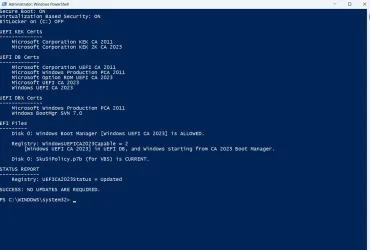
I finally got brave and ran the revoke. Does look OK ? I rebooted twice and nothing blew up yet:


PS C:\WINDOWS\system32> powershell -nop -ep bypass -f C:\temp1\check_uefi-ca2023.ps1
Secure Boot: ON
Virtualization Based Security: ON
BitLocker on (C:) OFF

UEFI KEK Certs
--------------
Microsoft Corporation KEK CA 2011
Microsoft Corporation KEK 2K CA 2023

UEFI DB Certs
-------------
Microsoft Corporation UEFI CA 2011
Microsoft Windows Production PCA 2011
Microsoft Option ROM UEFI CA 2023
Microsoft UEFI CA 2023
Windows UEFI CA 2023

UEFI DBX Certs
--------------
Microsoft Windows Production PCA 2011
Windows BootMgr SVN 7.0

EFI Files
---------
Disk 0: Windows Boot Manager [Windows UEFI CA 2023] is ALLOWED.

Registry: WindowsUEFICA2023Capable = 2
[Windows UEFI CA 2023] in UEFI DB, and Windows starting from CA 2023 Boot Manager.

Disk 0: SkuSiPolicy.p7b (for VBS) is CURRENT.

STATUS REPORT
-------------
Registry: UEFICA2023Status = Updated
 

My Computer

System One

  • OS
    Windows 11 Intel i5 10400 HD630 graphics chip
    Computer type
    PC/Desktop
    Manufacturer/Model
    HP
    CPU
    i5-10400
    Memory
    12 gb
    Graphics Card(s)
    HD630 chipset
    Monitor(s) Displays
    LG 24inch
    Hard Drives
    SSD, external usb drive 1tb for files/backups
    Keyboard
    wireless Logi
    Mouse
    ms 4000 wireless mouse
    Internet Speed
    10meg
    Browser
    Firefox
    Antivirus
    Defender
    Other Info
    Win11 Home 25h2 26200.8524 05/26/2026
Hi Garlin I decided to test your script on my wife's Laptop. It's a 2021 ThinkBook 14 G2 ITL Laptop - Type 20VD
Running Windows 11 Pro and latest BIOS update available was in early 2024.

I had not done any secure boot updates on this machine so I started from the beginning.

I ran the check script and I was missing a whole bunch of things. Next I ran the Update_UEFI-CA2023 It was easy able to follow and I was able to do all the things to script told me. However I did get stuck on the ".\Update_UEFI-CA2023.ps1" -SkuSiPolicy which would not work but followed your instructions in post #69 which fixed that. This whole process took about 10 - 15 minutes.

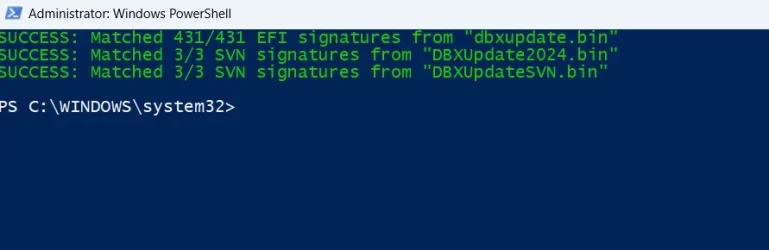
Here is the output for this Machine. Is this the last time I will need to update this secure boot stuff?

boot1.webpboot2.webp
 

My Computers

System One System Two

  • OS
    Windows 11 Pro
    Computer type
    PC/Desktop
    Manufacturer/Model
    Self built PC by me.
    CPU
    Intel Core i5-12600K 3.7 GHz 10-Core Processor
    Motherboard
    Gigabyte B760M H DDR4 Micro ATX LGA1700 Motherboard
    Memory
    Corsair Vengeance LPX 64 GB (2 x 32 GB) DDR4-3200 CL16 Memory
    Graphics Card(s)
    Integrated Intel UHD Graphics 770
    Sound Card
    Realtek
    Monitor(s) Displays
    LG
    Hard Drives
    Samsung 990 Pro 1 TB M.2-2280 PCIe 4.0 X4 NVME Solid State Drive
    Samsung 990 Pro 2 TB M.2-2280 PCIe 4.0 X4 NVME Solid State Drive
    PSU
    NZXT 850w ATX 3.1 Gold Fully Modular Power Supply
    Case
    Thermaltake Versa H25 ATX Mid Tower Case
    Cooling
    CPU Cooler Thermalright Assassin Spirit 120 EVO ARGB (ARGB Disabled) - Case Fans BlackThermalright TL-C12C-S X3 66.17 CFM 120 mm Fans 3-Pack (ARGB disabled)
    Internet Speed
    1 Gbps
    Other Info
    I hate ARGB.
  • Operating System
    Windows 11 Pro
    Computer type
    Laptop
    Manufacturer/Model
    Lenovo ThinkBook 14 G2 ITL
Meanwhile, where I should have left things well alone (because all that was missing were DBX entries) I deleted everything from my BIOS.
I’ve not been well and wasn’t focusing, I have no excuse and don’t know what I have done.

No PK
No KEK
No DB
No DBX

Can’t boot unless I change BIOS to “Other OS”
Can’t restore defaults or I am told I have to change to “Other OS”

I can manually add stuff, but I don’t know which files to add or restore.
The Github link has so many

Restoring the BIOS from a 2014 BIOS update (last one available) did nothing to replace the defaults.

Asus Maximus VI Formula
 

My Computers

System One System Two

  • OS
    Windows 11 Pro 25H2 Build 26200.8524
    Computer type
    PC/Desktop
    Manufacturer/Model
    Sin-built 2013
    CPU
    Intel(R) Core(TM) i7-4770K CPU @ 3.50GHz
    Motherboard
    ASUS ROG Maximus VI Formula
    Memory
    32.0 GB of I forget and the box is in storage.
    Graphics Card(s)
    Gigabyte nVidia GeForce GTX 1660 Super OC 6GB
    Sound Card
    Onboard thingy
    Monitor(s) Displays
    5 x LG 25MS500-B - 1 x 24MK430H-B - 1 x Wacom Pro 22" Touch Screen Tablet
    Screen Resolution
    All over the place
    Hard Drives
    Too many to list.
    OS on Samsung 1TB 870 QVO SATA
    PSU
    Silverstone 1500
    Case
    NZXT Phantom 820 Full-Tower Case
    Cooling
    Noctua NH-D15 Elite Class Dual Tower CPU Cooler / 6 x EziDIY 120mm / 2 x Corsair 140mm somethings / 1 x 140mm Thermaltake something / 2 x 200mm Corsair.
    Keyboard
    Corsair K95 / Logitech diNovo Edge Wireless
    Mouse
    Logitech: G402 / G502 / Mx Masters / Mx Air Cordless
    Internet Speed
    2000/500Mbps
    Browser
    All sorts
    Antivirus
    Kaspersky Premium
    Other Info
    ㅤㅤㅤㅤㅤㅤㅤㅤㅤㅤㅤㅤㅤㅤㅤㅤㅤㅤㅤㅤㅤㅤㅤㅤㅤㅤㅤㅤㅤㅤㅤㅤㅤㅤㅤㅤㅤㅤㅤㅤ⠀⠀⠀⠀⠀⠀⠀⠀⠀⠀
    TP-Link BE9300 WiFi 7 Bluetooth 5.4 (Archer TBE550E)
    TP-Link TX201 V1 2.5GB Lan

    Grandstream HT812 - VoIP
    ASUS DSL-AX82U - Mesh
    ASUS RT-AC68U - Mesh
    ASUS RT-BE88U Router

    Brother MFC-L2880DW Printer

    I’m on a horse.
  • Operating System
    Windows 11 Pro 25H2 Build 26200.8524
    Computer type
    Laptop
    Manufacturer/Model
    LENOVO Yoga 7 14IRL8 - 7i EVO OLED 14" Touchscreen i5 12 Core 16GB/512GB
    CPU
    Intel Core 12th Gen i5-1240P Processor (1.7 - 4.4GHz)
    Memory
    16GB LPDDR5 RAM
    Graphics card(s)
    Intel Iris Xe Graphics Processor
    Sound Card
    Optimized with Dolby Atmos®
    Screen Resolution
    QHD 2880 x 1800 OLED
    Hard Drives
    M.2 512GB
    Antivirus
    Defender / Malwarebytes
    Other Info
    …still on a horse.
If you've deleted everything from your UEFI, then it's in Setup Mode. You should be able to use the Update_UEFI-CA2023.ps1 script to convert the UEFI to use the generic "Windows OEM Devices PK".
 

My Computer

System One

  • OS
    Windows 7

My Computers

System One System Two

  • OS
    Windows 11 Pro
    Computer type
    PC/Desktop
    Manufacturer/Model
    Self built PC by me.
    CPU
    Intel Core i5-12600K 3.7 GHz 10-Core Processor
    Motherboard
    Gigabyte B760M H DDR4 Micro ATX LGA1700 Motherboard
    Memory
    Corsair Vengeance LPX 64 GB (2 x 32 GB) DDR4-3200 CL16 Memory
    Graphics Card(s)
    Integrated Intel UHD Graphics 770
    Sound Card
    Realtek
    Monitor(s) Displays
    LG
    Hard Drives
    Samsung 990 Pro 1 TB M.2-2280 PCIe 4.0 X4 NVME Solid State Drive
    Samsung 990 Pro 2 TB M.2-2280 PCIe 4.0 X4 NVME Solid State Drive
    PSU
    NZXT 850w ATX 3.1 Gold Fully Modular Power Supply
    Case
    Thermaltake Versa H25 ATX Mid Tower Case
    Cooling
    CPU Cooler Thermalright Assassin Spirit 120 EVO ARGB (ARGB Disabled) - Case Fans BlackThermalright TL-C12C-S X3 66.17 CFM 120 mm Fans 3-Pack (ARGB disabled)
    Internet Speed
    1 Gbps
    Other Info
    I hate ARGB.
  • Operating System
    Windows 11 Pro
    Computer type
    Laptop
    Manufacturer/Model
    Lenovo ThinkBook 14 G2 ITL
@garlin

One more thing.

We started with (from my Log):

REQUIRED ACTION
===============

To revoke the [PCA 2011] cert, run the commands, run the commands:

manage-bde -Protectors -Disable C: -RebootCount 1
reg add HKEY_LOCAL_MACHINE\SYSTEM\CurrentControlSet\Control\Secureboot /v AvailableUpdates /t REG_DWORD /d 0x280 /f
powershell Start-ScheduledTask -TaskName "\Microsoft\Windows\PI\Secure-Boot-Update"

To install SkuSiPolicy.p7b, run the command:
Update_UEFI-CA2023.ps1 -SkuSiPolicy


We ended with:

If you want to perform both halves of the revocation process (block CA 2011 and update the VBS policy), you can run the update script:

Code:
powershell -ep bypass -f .\Update_UEFI-CA2023.ps1 -revoke

My question is:

Are the following x02 lines still required before running the all-in "powershell -ep bypass -f .\Update_UEFI-CA2023.ps1 -revoke":

manage-bde -Protectors -Disable C: -RebootCount 1
reg add HKEY_LOCAL_MACHINE\SYSTEM\CurrentControlSet\Control\Secureboot /v AvailableUpdates /t REG_DWORD /d 0x280 /f

Sorry for any bother...
 

My Computer

System One

  • OS
    Windows 11
    Computer type
    PC/Desktop
    Manufacturer/Model
    Gigabyte Z390 AORUS PRO WIFI (rev.1.0)
    CPU
    Intel(R) Core(TM) i9-9900 CPU @ 3.10GHz, 3096
    Motherboard
    Z390 I AORUS PRO WIFI-CF
    Memory
    64.0 GB
    Graphics Card(s)
    NVIDIA GeForce RTX 2060 SUPER
    Sound Card
    USB Audio Device
    Monitor(s) Displays
    AW3423DW
    Screen Resolution
    3440x1440, 60Hz
    Hard Drives
    Seagate FireCuda 510 SSD (1TB); WD_BLACK SN770 (1TB)
    PSU
    Corsair SF Series, SF600, SFX Form Factor, 600 Watt (600W)
    Case
    NCASE
If you've deleted everything from your UEFI, then it's in Setup Mode. You should be able to use the Update_UEFI-CA2023.ps1 script to convert the UEFI to use the generic "Windows OEM Devices PK".

OK, thank you. It's much better. But after I deleted everything, I already ran that so not sure what happened.

Also...

Check_UEFI-CA2023.ps1

Code:
PowerShell 7.5.4
Secure Boot: ON
Virtualization Based Security: OFF
BitLocker on (C:) OFF

UEFI KEK Certs
--------------
    Microsoft Corporation KEK CA 2011
    Microsoft Corporation KEK 2K CA 2023

UEFI DB Certs
-------------
    Microsoft Corporation UEFI CA 2011
    Microsoft Windows Production PCA 2011
    Microsoft Option ROM UEFI CA 2023
    Microsoft UEFI CA 2023
    Windows UEFI CA 2023

UEFI DBX Certs
--------------
    (NONE)
MethodInvocationException: C:\Check_UEFI-CA2023.ps1:441
Line |
 441 |      $SVN = '{0}.{1}' -f [int]::Parse($SignatureData.Substring(36,4),  …
     |      ~~~~~~~~~~~~~~~~~~~~~~~~~~~~~~~~~~~~~~~~~~~~~~~~~~~~~~~~~~~~~~~~~
     | Exception calling "Substring" with "2" argument(s): "startIndex cannot be larger than length of string. (Parameter 'startIndex')"

EFI Files
---------
    Disk 2: Windows Boot Manager [Windows UEFI CA 2023] is ALLOWED.

    Registry: WindowsUEFICA2023Capable = 2
        [Windows UEFI CA 2023] in UEFI DB, and Windows starting from CA 2023 Boot Manager.
MethodInvocationException: C:\Check_UEFI-CA2023.ps1:441
Line |
 441 |      $SVN = '{0}.{1}' -f [int]::Parse($SignatureData.Substring(36,4),  …
     |      ~~~~~~~~~~~~~~~~~~~~~~~~~~~~~~~~~~~~~~~~~~~~~~~~~~~~~~~~~~~~~~~~~
     | Exception calling "Substring" with "2" argument(s): "startIndex cannot be larger than length of string. (Parameter 'startIndex')"


REQUIRED ACTION
===============

To revoke the [PCA 2011] cert, run the commands, run the commands:

    reg add HKEY_LOCAL_MACHINE\SYSTEM\CurrentControlSet\Control\Secureboot /v AvailableUpdates /t REG_DWORD /d 0x282 /f
    powershell Start-ScheduledTask -TaskName "\Microsoft\Windows\PI\Secure-Boot-Update"

PS C:\Windows\System32>

P.S.
Garlin, this isn't in my EFI partition

- Browse the system drive's EFI partition
- Enter the <EFI> folder
- Enter the <Updates> sub-folder

Check_DBXUpdate.bin


Code:
PowerShell 7.5.4
FAILED: Missing 431/431 SVN signatures from "dbxupdate.bin"
MethodInvocationException: C:\SecureBoot-CA-2023-Updates\Check_DBXUpdate.bin.ps1:279
Line |
 279 |      $SVN = '{0}.{1}' -f [int]::Parse($SignatureData.Substring(36,4),  …
     |      ~~~~~~~~~~~~~~~~~~~~~~~~~~~~~~~~~~~~~~~~~~~~~~~~~~~~~~~~~~~~~~~~~
     | Exception calling "Substring" with "2" argument(s): "startIndex cannot be larger than length of string.
     | (Parameter 'startIndex')"
MethodInvocationException: C:\SecureBoot-CA-2023-Updates\Check_DBXUpdate.bin.ps1:279
Line |
 279 |      $SVN = '{0}.{1}' -f [int]::Parse($SignatureData.Substring(36,4),  …
     |      ~~~~~~~~~~~~~~~~~~~~~~~~~~~~~~~~~~~~~~~~~~~~~~~~~~~~~~~~~~~~~~~~~
     | Exception calling "Substring" with "2" argument(s): "startIndex cannot be larger than length of string.
     | (Parameter 'startIndex')"
MethodInvocationException: C:\SecureBoot-CA-2023-Updates\Check_DBXUpdate.bin.ps1:279
Line |
 279 |      $SVN = '{0}.{1}' -f [int]::Parse($SignatureData.Substring(36,4),  …
     |      ~~~~~~~~~~~~~~~~~~~~~~~~~~~~~~~~~~~~~~~~~~~~~~~~~~~~~~~~~~~~~~~~~
     | Exception calling "Substring" with "2" argument(s): "startIndex cannot be larger than length of string.
     | (Parameter 'startIndex')"
FAILED: Missing 3/3 SVN signatures from "DBXUpdate2024.bin"
MethodInvocationException: C:\SecureBoot-CA-2023-Updates\Check_DBXUpdate.bin.ps1:279
Line |
 279 |      $SVN = '{0}.{1}' -f [int]::Parse($SignatureData.Substring(36,4),  …
     |      ~~~~~~~~~~~~~~~~~~~~~~~~~~~~~~~~~~~~~~~~~~~~~~~~~~~~~~~~~~~~~~~~~
     | Exception calling "Substring" with "2" argument(s): "startIndex cannot be larger than length of string.
     | (Parameter 'startIndex')"
MethodInvocationException: C:\SecureBoot-CA-2023-Updates\Check_DBXUpdate.bin.ps1:279
Line |
 279 |      $SVN = '{0}.{1}' -f [int]::Parse($SignatureData.Substring(36,4),  …
     |      ~~~~~~~~~~~~~~~~~~~~~~~~~~~~~~~~~~~~~~~~~~~~~~~~~~~~~~~~~~~~~~~~~
     | Exception calling "Substring" with "2" argument(s): "startIndex cannot be larger than length of string.
     | (Parameter 'startIndex')"
MethodInvocationException: C:\SecureBoot-CA-2023-Updates\Check_DBXUpdate.bin.ps1:279
Line |
 279 |      $SVN = '{0}.{1}' -f [int]::Parse($SignatureData.Substring(36,4),  …
     |      ~~~~~~~~~~~~~~~~~~~~~~~~~~~~~~~~~~~~~~~~~~~~~~~~~~~~~~~~~~~~~~~~~
     | Exception calling "Substring" with "2" argument(s): "startIndex cannot be larger than length of string.
     | (Parameter 'startIndex')"
FAILED: Missing 3/3 SVN signatures from "DBXUpdateSVN.bin"

PS C:\Windows\System32>

 

My Computers

System One System Two

  • OS
    Windows 11 Pro 25H2 Build 26200.8524
    Computer type
    PC/Desktop
    Manufacturer/Model
    Sin-built 2013
    CPU
    Intel(R) Core(TM) i7-4770K CPU @ 3.50GHz
    Motherboard
    ASUS ROG Maximus VI Formula
    Memory
    32.0 GB of I forget and the box is in storage.
    Graphics Card(s)
    Gigabyte nVidia GeForce GTX 1660 Super OC 6GB
    Sound Card
    Onboard thingy
    Monitor(s) Displays
    5 x LG 25MS500-B - 1 x 24MK430H-B - 1 x Wacom Pro 22" Touch Screen Tablet
    Screen Resolution
    All over the place
    Hard Drives
    Too many to list.
    OS on Samsung 1TB 870 QVO SATA
    PSU
    Silverstone 1500
    Case
    NZXT Phantom 820 Full-Tower Case
    Cooling
    Noctua NH-D15 Elite Class Dual Tower CPU Cooler / 6 x EziDIY 120mm / 2 x Corsair 140mm somethings / 1 x 140mm Thermaltake something / 2 x 200mm Corsair.
    Keyboard
    Corsair K95 / Logitech diNovo Edge Wireless
    Mouse
    Logitech: G402 / G502 / Mx Masters / Mx Air Cordless
    Internet Speed
    2000/500Mbps
    Browser
    All sorts
    Antivirus
    Kaspersky Premium
    Other Info
    ㅤㅤㅤㅤㅤㅤㅤㅤㅤㅤㅤㅤㅤㅤㅤㅤㅤㅤㅤㅤㅤㅤㅤㅤㅤㅤㅤㅤㅤㅤㅤㅤㅤㅤㅤㅤㅤㅤㅤㅤ⠀⠀⠀⠀⠀⠀⠀⠀⠀⠀
    TP-Link BE9300 WiFi 7 Bluetooth 5.4 (Archer TBE550E)
    TP-Link TX201 V1 2.5GB Lan

    Grandstream HT812 - VoIP
    ASUS DSL-AX82U - Mesh
    ASUS RT-AC68U - Mesh
    ASUS RT-BE88U Router

    Brother MFC-L2880DW Printer

    I’m on a horse.
  • Operating System
    Windows 11 Pro 25H2 Build 26200.8524
    Computer type
    Laptop
    Manufacturer/Model
    LENOVO Yoga 7 14IRL8 - 7i EVO OLED 14" Touchscreen i5 12 Core 16GB/512GB
    CPU
    Intel Core 12th Gen i5-1240P Processor (1.7 - 4.4GHz)
    Memory
    16GB LPDDR5 RAM
    Graphics card(s)
    Intel Iris Xe Graphics Processor
    Sound Card
    Optimized with Dolby Atmos®
    Screen Resolution
    QHD 2880 x 1800 OLED
    Hard Drives
    M.2 512GB
    Antivirus
    Defender / Malwarebytes
    Other Info
    …still on a horse.
OK, thank you. It's much better. But after I deleted everything, I already ran that so not sure what happened.

Also...

Check_UEFI-CA2023.ps1

Code:
PowerShell 7.5.4
Secure Boot: ON
Virtualization Based Security: OFF
BitLocker on (C:) OFF

UEFI KEK Certs
--------------
    Microsoft Corporation KEK CA 2011
    Microsoft Corporation KEK 2K CA 2023

UEFI DB Certs
-------------
    Microsoft Corporation UEFI CA 2011
    Microsoft Windows Production PCA 2011
    Microsoft Option ROM UEFI CA 2023
    Microsoft UEFI CA 2023
    Windows UEFI CA 2023
[/QUOTE]
Short answer:  This part went well.

[QUOTE="antspants, post: 704375, member: 19604"]

UEFI DBX Certs
--------------
    (NONE)
MethodInvocationException: C:\Check_UEFI-CA2023.ps1:441
Line |
 441 |      $SVN = '{0}.{1}' -f [int]::Parse($SignatureData.Substring(36,4),  …
     |      ~~~~~~~~~~~~~~~~~~~~~~~~~~~~~~~~~~~~~~~~~~~~~~~~~~~~~~~~~~~~~~~~~
     | Exception calling "Substring" with "2" argument(s): "startIndex cannot be larger than length of string. (Parameter 'startIndex')"
[/QUOTE]
This part failed.  The script is trying to read your DBX entries (which are blank, or supposedly blank).  I've have to do a manual test to see if the script's at fault, or you have a funky messed up UEFI.

The checking is trying to extract data from the DBX's bytes, but it's malformed so it can't make sense of it.
 

My Computer

System One

  • OS
    Windows 7

My Computers

System One System Two

  • OS
    Windows 11 Pro 25H2 Build 26200.8524
    Computer type
    PC/Desktop
    Manufacturer/Model
    Sin-built 2013
    CPU
    Intel(R) Core(TM) i7-4770K CPU @ 3.50GHz
    Motherboard
    ASUS ROG Maximus VI Formula
    Memory
    32.0 GB of I forget and the box is in storage.
    Graphics Card(s)
    Gigabyte nVidia GeForce GTX 1660 Super OC 6GB
    Sound Card
    Onboard thingy
    Monitor(s) Displays
    5 x LG 25MS500-B - 1 x 24MK430H-B - 1 x Wacom Pro 22" Touch Screen Tablet
    Screen Resolution
    All over the place
    Hard Drives
    Too many to list.
    OS on Samsung 1TB 870 QVO SATA
    PSU
    Silverstone 1500
    Case
    NZXT Phantom 820 Full-Tower Case
    Cooling
    Noctua NH-D15 Elite Class Dual Tower CPU Cooler / 6 x EziDIY 120mm / 2 x Corsair 140mm somethings / 1 x 140mm Thermaltake something / 2 x 200mm Corsair.
    Keyboard
    Corsair K95 / Logitech diNovo Edge Wireless
    Mouse
    Logitech: G402 / G502 / Mx Masters / Mx Air Cordless
    Internet Speed
    2000/500Mbps
    Browser
    All sorts
    Antivirus
    Kaspersky Premium
    Other Info
    ㅤㅤㅤㅤㅤㅤㅤㅤㅤㅤㅤㅤㅤㅤㅤㅤㅤㅤㅤㅤㅤㅤㅤㅤㅤㅤㅤㅤㅤㅤㅤㅤㅤㅤㅤㅤㅤㅤㅤㅤ⠀⠀⠀⠀⠀⠀⠀⠀⠀⠀
    TP-Link BE9300 WiFi 7 Bluetooth 5.4 (Archer TBE550E)
    TP-Link TX201 V1 2.5GB Lan

    Grandstream HT812 - VoIP
    ASUS DSL-AX82U - Mesh
    ASUS RT-AC68U - Mesh
    ASUS RT-BE88U Router

    Brother MFC-L2880DW Printer

    I’m on a horse.
  • Operating System
    Windows 11 Pro 25H2 Build 26200.8524
    Computer type
    Laptop
    Manufacturer/Model
    LENOVO Yoga 7 14IRL8 - 7i EVO OLED 14" Touchscreen i5 12 Core 16GB/512GB
    CPU
    Intel Core 12th Gen i5-1240P Processor (1.7 - 4.4GHz)
    Memory
    16GB LPDDR5 RAM
    Graphics card(s)
    Intel Iris Xe Graphics Processor
    Sound Card
    Optimized with Dolby Atmos®
    Screen Resolution
    QHD 2880 x 1800 OLED
    Hard Drives
    M.2 512GB
    Antivirus
    Defender / Malwarebytes
    Other Info
    …still on a horse.
Can I just add one manually?
If yes, there are at least 10 DBX files at Github. Some are bin and some are json.
If I knew which one to append, I would.
 

My Computers

System One System Two

  • OS
    Windows 11 Pro 25H2 Build 26200.8524
    Computer type
    PC/Desktop
    Manufacturer/Model
    Sin-built 2013
    CPU
    Intel(R) Core(TM) i7-4770K CPU @ 3.50GHz
    Motherboard
    ASUS ROG Maximus VI Formula
    Memory
    32.0 GB of I forget and the box is in storage.
    Graphics Card(s)
    Gigabyte nVidia GeForce GTX 1660 Super OC 6GB
    Sound Card
    Onboard thingy
    Monitor(s) Displays
    5 x LG 25MS500-B - 1 x 24MK430H-B - 1 x Wacom Pro 22" Touch Screen Tablet
    Screen Resolution
    All over the place
    Hard Drives
    Too many to list.
    OS on Samsung 1TB 870 QVO SATA
    PSU
    Silverstone 1500
    Case
    NZXT Phantom 820 Full-Tower Case
    Cooling
    Noctua NH-D15 Elite Class Dual Tower CPU Cooler / 6 x EziDIY 120mm / 2 x Corsair 140mm somethings / 1 x 140mm Thermaltake something / 2 x 200mm Corsair.
    Keyboard
    Corsair K95 / Logitech diNovo Edge Wireless
    Mouse
    Logitech: G402 / G502 / Mx Masters / Mx Air Cordless
    Internet Speed
    2000/500Mbps
    Browser
    All sorts
    Antivirus
    Kaspersky Premium
    Other Info
    ㅤㅤㅤㅤㅤㅤㅤㅤㅤㅤㅤㅤㅤㅤㅤㅤㅤㅤㅤㅤㅤㅤㅤㅤㅤㅤㅤㅤㅤㅤㅤㅤㅤㅤㅤㅤㅤㅤㅤㅤ⠀⠀⠀⠀⠀⠀⠀⠀⠀⠀
    TP-Link BE9300 WiFi 7 Bluetooth 5.4 (Archer TBE550E)
    TP-Link TX201 V1 2.5GB Lan

    Grandstream HT812 - VoIP
    ASUS DSL-AX82U - Mesh
    ASUS RT-AC68U - Mesh
    ASUS RT-BE88U Router

    Brother MFC-L2880DW Printer

    I’m on a horse.
  • Operating System
    Windows 11 Pro 25H2 Build 26200.8524
    Computer type
    Laptop
    Manufacturer/Model
    LENOVO Yoga 7 14IRL8 - 7i EVO OLED 14" Touchscreen i5 12 Core 16GB/512GB
    CPU
    Intel Core 12th Gen i5-1240P Processor (1.7 - 4.4GHz)
    Memory
    16GB LPDDR5 RAM
    Graphics card(s)
    Intel Iris Xe Graphics Processor
    Sound Card
    Optimized with Dolby Atmos®
    Screen Resolution
    QHD 2880 x 1800 OLED
    Hard Drives
    M.2 512GB
    Antivirus
    Defender / Malwarebytes
    Other Info
    …still on a horse.
I can:

Delete DBX file
Load default (fails)
Append (with what file?)

There is no folder in the EFI with any files.
 

My Computers

System One System Two

  • OS
    Windows 11 Pro 25H2 Build 26200.8524
    Computer type
    PC/Desktop
    Manufacturer/Model
    Sin-built 2013
    CPU
    Intel(R) Core(TM) i7-4770K CPU @ 3.50GHz
    Motherboard
    ASUS ROG Maximus VI Formula
    Memory
    32.0 GB of I forget and the box is in storage.
    Graphics Card(s)
    Gigabyte nVidia GeForce GTX 1660 Super OC 6GB
    Sound Card
    Onboard thingy
    Monitor(s) Displays
    5 x LG 25MS500-B - 1 x 24MK430H-B - 1 x Wacom Pro 22" Touch Screen Tablet
    Screen Resolution
    All over the place
    Hard Drives
    Too many to list.
    OS on Samsung 1TB 870 QVO SATA
    PSU
    Silverstone 1500
    Case
    NZXT Phantom 820 Full-Tower Case
    Cooling
    Noctua NH-D15 Elite Class Dual Tower CPU Cooler / 6 x EziDIY 120mm / 2 x Corsair 140mm somethings / 1 x 140mm Thermaltake something / 2 x 200mm Corsair.
    Keyboard
    Corsair K95 / Logitech diNovo Edge Wireless
    Mouse
    Logitech: G402 / G502 / Mx Masters / Mx Air Cordless
    Internet Speed
    2000/500Mbps
    Browser
    All sorts
    Antivirus
    Kaspersky Premium
    Other Info
    ㅤㅤㅤㅤㅤㅤㅤㅤㅤㅤㅤㅤㅤㅤㅤㅤㅤㅤㅤㅤㅤㅤㅤㅤㅤㅤㅤㅤㅤㅤㅤㅤㅤㅤㅤㅤㅤㅤㅤㅤ⠀⠀⠀⠀⠀⠀⠀⠀⠀⠀
    TP-Link BE9300 WiFi 7 Bluetooth 5.4 (Archer TBE550E)
    TP-Link TX201 V1 2.5GB Lan

    Grandstream HT812 - VoIP
    ASUS DSL-AX82U - Mesh
    ASUS RT-AC68U - Mesh
    ASUS RT-BE88U Router

    Brother MFC-L2880DW Printer

    I’m on a horse.
  • Operating System
    Windows 11 Pro 25H2 Build 26200.8524
    Computer type
    Laptop
    Manufacturer/Model
    LENOVO Yoga 7 14IRL8 - 7i EVO OLED 14" Touchscreen i5 12 Core 16GB/512GB
    CPU
    Intel Core 12th Gen i5-1240P Processor (1.7 - 4.4GHz)
    Memory
    16GB LPDDR5 RAM
    Graphics card(s)
    Intel Iris Xe Graphics Processor
    Sound Card
    Optimized with Dolby Atmos®
    Screen Resolution
    QHD 2880 x 1800 OLED
    Hard Drives
    M.2 512GB
    Antivirus
    Defender / Malwarebytes
    Other Info
    …still on a horse.
Meanwhile, where I should have left things well alone (because all that was missing were DBX entries) I deleted everything from my BIOS.
I’ve not been well and wasn’t focusing, I have no excuse and don’t know what I have done.

No PK
No KEK
No DB
No DBX

Can’t boot unless I change BIOS to “Other OS”
Can’t restore defaults or I am told I have to change to “Other OS”

I can manually add stuff, but I don’t know which files to add or restore.
The Github link has so many

Restoring the BIOS from a 2014 BIOS update (last one available) did nothing to replace the defaults.

Asus Maximus VI Formula
Can you go into the secureboot setup and load defaults?
 

My Computers

System One System Two

  • OS
    Windows 11 Enterprise 25H2 26200 7462
    Computer type
    PC/Desktop
    Manufacturer/Model
    Custom Build
    CPU
    Intel XEON E5-2699 v3
    Motherboard
    ASUS X99-A
    Memory
    64GB Teamgroup UD4-3600
    Graphics Card(s)
    NVIDIA GeForce GTX 1080 Ti
    Sound Card
    Integrated
    Monitor(s) Displays
    ACER X34 Predator
    Screen Resolution
    3440 x 1440
    Hard Drives
    Crucial CT1000P 3P SSD8 1TB
    Crucial CT1000 BX500 SSD 1TB
    PSU
    GameMax Pro
    Case
    Fractal Design
    Cooling
    Corsair H110iGT + 6 140mm Fans
    Keyboard
    Corsair K4
    Mouse
    G-Skill G502
    Internet Speed
    300MBs
    Browser
    Chrome
    Antivirus
    OEM
    Other Info
    ASUS RT-AC87U Router
  • Operating System
    25H2 26200.5074
    Computer type
    Laptop
    Manufacturer/Model
    ASUS X555LA
    Memory
    8GB
    Browser
    Chrome
    Antivirus
    OEM
There is no folder in the EFI with any files.
In there, I have 2 folders “Microsoft” and “Boot”
Can you go into the secureboot setup and load defaults?

Not unless I want to screw stuff up.
I’ve not been well and wasn’t focusing, I have no excuse and don’t know what I have done.

No PK
No KEK
No DB
No DBX

Can’t boot unless I change BIOS to “Other OS”
Can’t restore defaults or I am told I have to change to “Other OS”

I can manually add stuff, but I don’t know which files to add or restore.
The Github link has so many

Restoring the BIOS from a 2014 BIOS update (last one available) did nothing to replace the defaults.

Asus Maximus VI Formula
 

My Computers

System One System Two

  • OS
    Windows 11 Pro 25H2 Build 26200.8524
    Computer type
    PC/Desktop
    Manufacturer/Model
    Sin-built 2013
    CPU
    Intel(R) Core(TM) i7-4770K CPU @ 3.50GHz
    Motherboard
    ASUS ROG Maximus VI Formula
    Memory
    32.0 GB of I forget and the box is in storage.
    Graphics Card(s)
    Gigabyte nVidia GeForce GTX 1660 Super OC 6GB
    Sound Card
    Onboard thingy
    Monitor(s) Displays
    5 x LG 25MS500-B - 1 x 24MK430H-B - 1 x Wacom Pro 22" Touch Screen Tablet
    Screen Resolution
    All over the place
    Hard Drives
    Too many to list.
    OS on Samsung 1TB 870 QVO SATA
    PSU
    Silverstone 1500
    Case
    NZXT Phantom 820 Full-Tower Case
    Cooling
    Noctua NH-D15 Elite Class Dual Tower CPU Cooler / 6 x EziDIY 120mm / 2 x Corsair 140mm somethings / 1 x 140mm Thermaltake something / 2 x 200mm Corsair.
    Keyboard
    Corsair K95 / Logitech diNovo Edge Wireless
    Mouse
    Logitech: G402 / G502 / Mx Masters / Mx Air Cordless
    Internet Speed
    2000/500Mbps
    Browser
    All sorts
    Antivirus
    Kaspersky Premium
    Other Info
    ㅤㅤㅤㅤㅤㅤㅤㅤㅤㅤㅤㅤㅤㅤㅤㅤㅤㅤㅤㅤㅤㅤㅤㅤㅤㅤㅤㅤㅤㅤㅤㅤㅤㅤㅤㅤㅤㅤㅤㅤ⠀⠀⠀⠀⠀⠀⠀⠀⠀⠀
    TP-Link BE9300 WiFi 7 Bluetooth 5.4 (Archer TBE550E)
    TP-Link TX201 V1 2.5GB Lan

    Grandstream HT812 - VoIP
    ASUS DSL-AX82U - Mesh
    ASUS RT-AC68U - Mesh
    ASUS RT-BE88U Router

    Brother MFC-L2880DW Printer

    I’m on a horse.
  • Operating System
    Windows 11 Pro 25H2 Build 26200.8524
    Computer type
    Laptop
    Manufacturer/Model
    LENOVO Yoga 7 14IRL8 - 7i EVO OLED 14" Touchscreen i5 12 Core 16GB/512GB
    CPU
    Intel Core 12th Gen i5-1240P Processor (1.7 - 4.4GHz)
    Memory
    16GB LPDDR5 RAM
    Graphics card(s)
    Intel Iris Xe Graphics Processor
    Sound Card
    Optimized with Dolby Atmos®
    Screen Resolution
    QHD 2880 x 1800 OLED
    Hard Drives
    M.2 512GB
    Antivirus
    Defender / Malwarebytes
    Other Info
    …still on a horse.
There ought to be a factory reset mode for UEFI variables, even if you can't edit individual keys. The update script will only copy files to the EFI partition under \Cert folders, if it detects you have an unsupported BIOS.

Unsupported means the BIOS thumbprint doesn't appear on MS's GitHub list of supported BIOS'es. The DBX situation is separate, I have one other report of a "funky" UEFI where the DBX was balky (from kelper).
 

My Computer

System One

  • OS
    Windows 7
There ought to be a factory reset mode for UEFI variables, even if you can't edit individual keys. The update script will only copy files to the EFI partition under \Cert folders, if it detects you have an unsupported BIOS.

Unsupported means the BIOS thumbprint doesn't appear on MS's GitHub list of supported BIOS'es. The DBX situation is separate, I have one other report of a "funky" UEFI where the DBX was balky (from kelper).


REPUBLIC OF GAMERS UEFI BIOS Utility - Advanced Mode


Boot \ Secure Boot menu \ Key Management >
Clear Secure Boot​
Save Secure Boot Keys​

PK Management
Delete PK​
Load PK from File​

KEK Management
Delete the KEK​
Load KEK from File​
Append KEK from File​

DB Management
Delete the db​
Load db from File​
Append db from File​


DBX Management
Delete the dbx​
Load dbx from File​
Append dbx from File​

Loading defaults on any of them causes the following:

The system found unauthorised changes on the firmware, operating system or UEFI drivers.

Press [N] (does nothing) to run the next boot device, or enter directly to the BIOS setup if there are no other boot devices installed.
Go to BIOS setup > Advanced > Boot and change the current boot device into "Other secured boot devices"

in fact, doing anything with DBX results in the above
 

My Computers

System One System Two

  • OS
    Windows 11 Pro 25H2 Build 26200.8524
    Computer type
    PC/Desktop
    Manufacturer/Model
    Sin-built 2013
    CPU
    Intel(R) Core(TM) i7-4770K CPU @ 3.50GHz
    Motherboard
    ASUS ROG Maximus VI Formula
    Memory
    32.0 GB of I forget and the box is in storage.
    Graphics Card(s)
    Gigabyte nVidia GeForce GTX 1660 Super OC 6GB
    Sound Card
    Onboard thingy
    Monitor(s) Displays
    5 x LG 25MS500-B - 1 x 24MK430H-B - 1 x Wacom Pro 22" Touch Screen Tablet
    Screen Resolution
    All over the place
    Hard Drives
    Too many to list.
    OS on Samsung 1TB 870 QVO SATA
    PSU
    Silverstone 1500
    Case
    NZXT Phantom 820 Full-Tower Case
    Cooling
    Noctua NH-D15 Elite Class Dual Tower CPU Cooler / 6 x EziDIY 120mm / 2 x Corsair 140mm somethings / 1 x 140mm Thermaltake something / 2 x 200mm Corsair.
    Keyboard
    Corsair K95 / Logitech diNovo Edge Wireless
    Mouse
    Logitech: G402 / G502 / Mx Masters / Mx Air Cordless
    Internet Speed
    2000/500Mbps
    Browser
    All sorts
    Antivirus
    Kaspersky Premium
    Other Info
    ㅤㅤㅤㅤㅤㅤㅤㅤㅤㅤㅤㅤㅤㅤㅤㅤㅤㅤㅤㅤㅤㅤㅤㅤㅤㅤㅤㅤㅤㅤㅤㅤㅤㅤㅤㅤㅤㅤㅤㅤ⠀⠀⠀⠀⠀⠀⠀⠀⠀⠀
    TP-Link BE9300 WiFi 7 Bluetooth 5.4 (Archer TBE550E)
    TP-Link TX201 V1 2.5GB Lan

    Grandstream HT812 - VoIP
    ASUS DSL-AX82U - Mesh
    ASUS RT-AC68U - Mesh
    ASUS RT-BE88U Router

    Brother MFC-L2880DW Printer

    I’m on a horse.
  • Operating System
    Windows 11 Pro 25H2 Build 26200.8524
    Computer type
    Laptop
    Manufacturer/Model
    LENOVO Yoga 7 14IRL8 - 7i EVO OLED 14" Touchscreen i5 12 Core 16GB/512GB
    CPU
    Intel Core 12th Gen i5-1240P Processor (1.7 - 4.4GHz)
    Memory
    16GB LPDDR5 RAM
    Graphics card(s)
    Intel Iris Xe Graphics Processor
    Sound Card
    Optimized with Dolby Atmos®
    Screen Resolution
    QHD 2880 x 1800 OLED
    Hard Drives
    M.2 512GB
    Antivirus
    Defender / Malwarebytes
    Other Info
    …still on a horse.
I hate this part. Some UEFI's will allow for custom key management, but you have to change another Secure Boot setting. Don't know what it's called on your ASUS, but try exploring the other Secure Boot options. I know HP does the same thing.
 

My Computer

System One

  • OS
    Windows 7
Back
Top Bottom