Solved garlin's PowerShell scripts for updating Secure Boot CA 2023


I ran the two commands the "reg" one said it was added
the powershell one didn't do anything,, did the override PS command then ran Check_UEFI-CA2023.ps1 same results as the first time still need to revoke 2011 key
Can you post the script's current output?
 

My Computer

System One

  • OS
    Windows 7
Can you post the script's current output?
sure
UEFI KEK Certs
--------------
Microsoft Corporation KEK CA 2011
Microsoft Corporation KEK 2K CA 2023

UEFI DB Certs
-------------
Microsoft Corporation UEFI CA 2011
Microsoft Windows Production PCA 2011
Microsoft Option ROM UEFI CA 2023
Microsoft UEFI CA 2023
Windows UEFI CA 2023

UEFI DBX Certs
--------------
Microsoft Windows Production PCA 2011
Windows BootMgr SVN 7.0

EFI Files
---------
Disk 3: Windows Boot Manager [Windows UEFI CA 2023] is ALLOWED.

Registry: WindowsUEFICA2023Capable = 2
[Windows UEFI CA 2023] in UEFI DB, and Windows starting from CA 2023 Boot Manager.

STATUS REPORT
-------------
Registry: UEFICA2023Status = Updated

SUCCESS: NO UPDATES ARE REQUIRED.
 

My Computer

System One

  • OS
    windows 11
    Computer type
    PC/Desktop
    Manufacturer/Model
    Antec/Case
    CPU
    Intel i5-10600kf
    Motherboard
    GIGABYTE Z590 UD AC
    Memory
    32gb corsair vengerance pro
    Graphics Card(s)
    AMD RX 6500XT
    Sound Card
    onboard
    Monitor(s) Displays
    40" Hisense
    Hard Drives
    Samsung 850
    Samsung 870
    Seagate 2TB
    PSU
    EVGA GQ 750

My Computer

System One

  • OS
    windows 11
    Computer type
    PC/Desktop
    Manufacturer/Model
    Antec/Case
    CPU
    Intel i5-10600kf
    Motherboard
    GIGABYTE Z590 UD AC
    Memory
    32gb corsair vengerance pro
    Graphics Card(s)
    AMD RX 6500XT
    Sound Card
    onboard
    Monitor(s) Displays
    40" Hisense
    Hard Drives
    Samsung 850
    Samsung 870
    Seagate 2TB
    PSU
    EVGA GQ 750

My Computer

System One

  • OS
    windows 11
    Computer type
    PC/Desktop
    Manufacturer/Model
    Antec/Case
    CPU
    Intel i5-10600kf
    Motherboard
    GIGABYTE Z590 UD AC
    Memory
    32gb corsair vengerance pro
    Graphics Card(s)
    AMD RX 6500XT
    Sound Card
    onboard
    Monitor(s) Displays
    40" Hisense
    Hard Drives
    Samsung 850
    Samsung 870
    Seagate 2TB
    PSU
    EVGA GQ 750
Thanks Garlin for your very helpful Powershell Cert execs and the 2023 Microsoft certs you provided from Github. Like other users on this thread I was nervous about deleting my old certs but others were able to successfully update after deleting. I was also successful in updating after using this suggested method. You can add my Intel Nuc8i5beh and Nuc8i7beh to the updated list. The Intel Visual bios is pretty easy to work with and has the required option to customize and delete certs.
 

My Computer

System One

  • OS
    Windows 11 & Zorin Pro
    Computer type
    Laptop
    Manufacturer/Model
    Asus Rog Strix G16
    CPU
    Intel® Core™ Ultra 9 Processor 275HX 2.7 GHz
    Motherboard
    AsusteK Computer
    Memory
    32 gb
    Graphics Card(s)
    NVIDIA® GeForce RTX™ 5060 Laptop GPU
    Sound Card
    Realtek High Definition Audio
    Monitor(s) Displays
    Laptop 16 inch
    Screen Resolution
    2560 X 1600
    Hard Drives
    Boot: Samsung 9100 NVME 2 TB Microsoft Storage Controller: Standard NVM Express Driver: Microsoft 6/21/2006. No SATA/AHCI on my motherboard or in bios
    Mouse
    Pad
    Browser
    Google Chrome
    Antivirus
    Microsoft
    Other Info
    Printer: HP Color LaserJet MFP M477dw
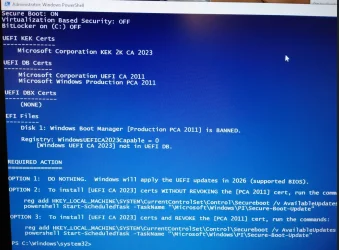
My brother has a Win 10 PC with a MSI Z87-G43 mother board and Check_UEFI-CA2023.ps1 output this:
Can the certs be install while out of secure boot?
image.webp
 

My Computer

System One

  • OS
    win 11
    Computer type
    Laptop
    Manufacturer/Model
    Dell Precision M4800
    CPU
    Intell Core i7 4900 MQ
    Motherboard
    Dell QT3YTY A00
    Memory
    DDR3 16 GB
My brother has a Win 10 PC with a MSI Z87-G43 mother board and Check_UEFI-CA2023.ps1 output this:
Can the certs be install while out of secure boot
The last BIOS was from Dec 2015, so it's really out of date. If there's a Custom mode in BIOS where you can reset or clear the current certs, then an update can be possible in Setup Mode (no certs).
 

My Computer

System One

  • OS
    Windows 7
Just updated my ASUS TUF GAMING B650-PLUS with the last BIOS that was spit out tonight, (Not BETA!) and I ran into something funny with the 1808 event:

Asutuf_NewBios.webp

Hadnt seen that one yet! But anyhow you know how it goes after a BIOS update, reset to default and decided to go factory Default with the boot-key's. Ok booted into 25H2 and done the registry punch and Powershell command as that was all I needed, rebooted and to my suprise "FirmwareSVN : 2.0" showed up again! HA_! So went back to the BIOS and Factory defaulted the boot key.' again and this time I run the modified "Update_UEFI-CA2023.ps1 -Revoke" script (had to remove the bitlocker script out as it was not working with me), anyhow rebooted and BAM
---------------------------
FirmwareSVN : 7.0
BootManagerSVN : 7.0
StagedSVN : 7.0
ComplianceStatus : Compliant (Boot Manager SVN meets staged SVN)
BootManagerPath : \\.\HarddiskVolume1\EFI\Microsoft\Boot\bootmgfw.efi
-----------
PS C:\Users\jwdav> powershell -nop -ep bypass -f C:\Temp\Check_UEFI-CA2023.ps1 -verbose
Windows 11 25H2 (26200.8037)

Secure Boot: ON
Virtualization Based Security: ON
BitLocker on (C:) OFF

BIOS Firmware
-------------
ASUS System Product Name
Version: 3842
Date: 2026-03-11

Factory Default UEFI PK Cert
----------------------------
ASUSTeK MotherBoard PK Certificate

UEFI PK Cert
------------
ASUSTeK MotherBoard PK Certificate

Factory Default UEFI KEK Certs
------------------------------
Microsoft Corporation KEK CA 2011
Microsoft Corporation KEK 2K CA 2023
ASUSTeK MotherBoard KEK Certificate

UEFI KEK Certs
--------------
Microsoft Corporation KEK CA 2011
Microsoft Corporation KEK 2K CA 2023
ASUSTeK MotherBoard KEK Certificate

Factory Default UEFI DB Certs
-----------------------------
Microsoft Corporation UEFI CA 2011
Microsoft Windows Production PCA 2011
Microsoft Option ROM UEFI CA 2023
Microsoft UEFI CA 2023
Windows UEFI CA 2023
ASUSTeK MotherBoard SW Key Certificate
ASUSTeK Notebook SW Key Certificate

UEFI DB Certs
-------------
Microsoft Corporation UEFI CA 2011
Microsoft Windows Production PCA 2011
Microsoft Option ROM UEFI CA 2023
Microsoft UEFI CA 2023
Windows UEFI CA 2023
ASUSTeK MotherBoard SW Key Certificate
ASUSTeK Notebook SW Key Certificate

Factory Default UEFI DBX Certs
------------------------------
(NONE)
EFI_CERT_SHA256_GUID Signatures: 430

UEFI DBX Certs
--------------
Microsoft Windows Production PCA 2011
Windows BootMgr SVN 7.0
EFI_CERT_SHA256_GUID Signatures: 437

EFI Files
---------
Windows Boot Manager [Windows UEFI CA 2023] is ALLOWED.
\\.\HarddiskVolume1\EFI\Microsoft\Boot\bootmgfw.efi
File Version: 26100.30227, SVN 7.0

Registry: WindowsUEFICA2023Capable = 2
[Windows UEFI CA 2023] in UEFI DB, and Windows starting from CA 2023 Boot Manager.

SkuSiPolicy.p7b is CURRENT.
\\.\HarddiskVolume1\EFI\Microsoft\Boot\SkuSiPolicy.p7b
Version: 33284.17421.33440.335

STATUS REPORT
-------------
Registry: UEFICA2023Status = Updated

SUCCESS: NO UPDATES ARE REQUIRED.

So all is back to "normal" I assume, just wanted to share that 1808 with you as that was new to me ! :-)

btw. on both machine's I have strange errors in the Registry:
[Computer\HKEY_LOCAL_MACHINE\SYSTEM\ControlSet001\Enum\ACPI_HAL\PNP0C08\0\Control]
AllocConfig / FilteredConfigVector and a couple below there show "invalid BS" prob. just another flaw in wonderfull Windows 11 .... ?

 

My Computer

System One

  • OS
    Win11 24H2 IOT LTSC / Win11 Pro 25H2
    Computer type
    PC/Desktop
    Manufacturer/Model
    Gigabyte / Asus Home build
    CPU
    AMD Ryzen 7 8700G / AMD Ryzen 7 8700G
    Motherboard
    Gigabyte B650 AORUS ELITE AX V2 / ASUS TUF GAMING B650-PLUS
    Memory
    F5-6000J3636F16GX2-FX5 32GB / Lexar Ares RGB LD5BU016G-R6000GDLA 32GB
    Graphics Card(s)
    internal
    Sound Card
    Realtec
    Monitor(s) Displays
    BenQ 27 L EW2780
    Screen Resolution
    1920x1080
    Hard Drives
    Many M.2's
    Internet Speed
    400 mbs
    Browser
    Vivaldi
    Antivirus
    Eset
So all is back to "normal" I assume, just wanted to share that 1808 with you as that was new to me ! :-)
It's not necessary to pay attention to tje Confidence Bucket events logged under TPM-WMI.

Those are created by the Secure Boot task for telemetry, and are designed to control whether the task begins automated updates of your certs. Since you've finished the process, it doesn't matter if MS hasn't decided it's safe for this PC model to begin adding the new certs.

Data will be collected into Confidence Buckets even if you're done with updates, it's just for reporting purposes.
 

My Computer

System One

  • OS
    Windows 7
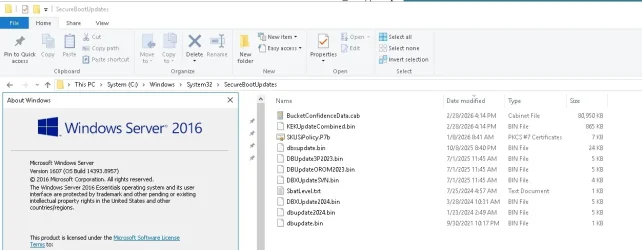
Do the scripts work with Windows 2016 Server?
Maybe. Check_UEFI-CA2023.ps1 can run on any Windows, where the PowerShell SecureBoot module exists.

But for confirming your DBX EFI signature hashes and actually updating certs, it would need a copy of "C:\Windows\System32\SecureBootUpdates\". Which doesn't exist on Server 2016, unless they added that to extended support since those files started appearing on normal Windows after the summer of 2025.

For Check_DBXUpdate.bin.ps1, it has the option for you to provide a list of local DBX .bin files to check the current DBX variable against. If you don't have a SecureBootUpdates folder, those files can be copied from a 24H2/25H2 system.

For Update_UEFI-CA2023.ps1, it has an -UpdatesFolder option to grab the update cert files from another folder. Copy the SecureBootUpdates folder from a 24H2/25H2 system.

As Server 2016 reached end-of-life in 2022, normal support wouldn't give you the SecureBootUpdates folder. Extended support expires next January; but I'm not a customer, so I can't tell you if MS is supporting Secure Boot updates for those users.

If you're running an obsolete Server release, it will continue working past this summer. Just because the CA 2011 certs expire doesn't mean your system stops working, it's just that no new boot manager files can be signed with the CA 2011 cert. For a retired Windows, they're not going to give you a newer boot manager anyway, so you're stuck with the last updated boot file that was released for Server 2016.

If you decide to switch to a modern Server release, you can always temporarily disable Secure Boot, install Windows and then update the certs.
 

My Computer

System One

  • OS
    Windows 7
But for confirming your DBX EFI signature hashes and actually updating certs, it would need a copy of "C:\Windows\System32\SecureBootUpdates\". Which doesn't exist on Server 2016, unless they added that to extended support since those files started appearing on normal Windows after the summer of 2025.

Server 2016 has support til 01/2027, so I think they just had to do this... (That pic is stock, didn't add or change anything manually)

Clipboard_03-31-2026_02.webp
 

My Computer

System One

  • OS
    W10
I just finished comparing the file list CSV's for KB5078938 (Server 2016) & KB5079473 (24H2/25H2), and the update files are in sync.

@TooMuchCaffeine, please use these versions of the scripts. I've added Server 2016 (Oct 2025 and later) to the Windows builds check.
 

Attachments

Last edited:

My Computer

System One

  • OS
    Windows 7
I just finished comparing the file list CSV's for KB5078938 (Server 2016) & KB5079473 (24H2/25H2), and the update files are in sync.

@TooMuchCaffeine, please use these versions of the scripts. I've added Server 2016 (Oct 2025 and later) to the Windows builds check.
Wow! Thank you so much!
 

My Computer

System One

  • OS
    WIndows 11
    Computer type
    PC/Desktop
    Manufacturer/Model
    Dell
My brother has a Win 10 PC with a MSI Z87-G43 mother board and Check_UEFI-CA2023.ps1 output this:
Can the certs be install while out of secure boot?
View attachment 166937
So this PC was quite challenging due to the fact that once put into secure boot mode the PC would no longer boot. The GPU had to have its power diconnected then the on board video would allow BIOS entry. I have to set the Secure boot mode to custom and if I recall correctly add keys that were no existant. Once done it would boot again and I get this output. If I run either Reg entry it indicates success, however upon running Check_UEFI-CA2023 I get the same thing.
 

Attachments

  • Screenshot 2026-04-01 095626.webp
    Screenshot 2026-04-01 095626.webp
    180 KB · Views: 3

My Computer

System One

  • OS
    win 11
    Computer type
    Laptop
    Manufacturer/Model
    Dell Precision M4800
    CPU
    Intell Core i7 4900 MQ
    Motherboard
    Dell QT3YTY A00
    Memory
    DDR3 16 GB
So this PC was quite challenging due to the fact that once put into secure boot mode the PC would no longer boot. The GPU had to have its power diconnected then the on board video would allow BIOS entry. I have to set the Secure boot mode to custom and if I recall correctly add keys that were no existant. Once done it would boot again and I get this output. If I run either Reg entry it indicates success, however upon running Check_UEFI-CA2023 I get the same thing.
Something went wrong here. You have a KEK CA 2023 cert, but missing the KEK CA 2011.

Without a KEK CA 2011, then your DB's CA 2011 certs are invalid. And therefore Secure Boot fails.

The normal Windows update process assumes it's only adding CA 2023 certs, so there's no method to re-apply the CA 2011 certs because they're supposed to be part of the current variables. What you need to do is:

1. Disable Secure Boot mode. This step is always recommended for older BIOS'es, since a weird accident like this might happen.

2. Find the UEFI setup menu's option for Delete All Keys, or Setup mode. You might have to first select Custom mode.

3. Restart Windows. Run the Update_UEFI-CA2023.ps1 script. It should detect you're in Setup mode and add both CA 2011 & CA 2023 certs in one pass.

4. Run the check script again. You should have (2) KEK and (5) DB certs.
 

My Computer

System One

  • OS
    Windows 7

My Computer

System One

  • OS
    Windows 11

Latest Support Threads

Back
Top Bottom