Solved garlin's PowerShell scripts for updating Secure Boot CA 2023


What am I doing wrong with the latest version of the scripts? I am not an expert at any of this stuff (most of my command-line familiarity is with Linux/Unix), but I can usually fumble my way through. I have several 2017-vintage Dell and HP machines that are running Windows 11 (they meet all official requirements except that they have 6th/7th generation processors) and I'm trying to update the Secure Boot keys.

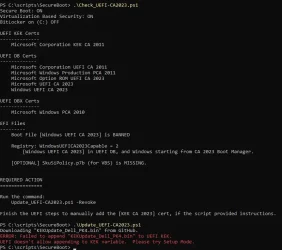
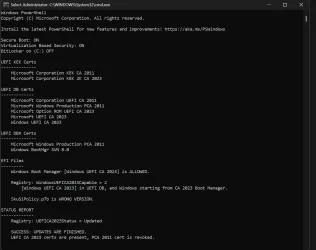
I was able to get the 2026.04.08 scripts working on this Dell machine (Latitude E5470). The check script produces this output:
SecureBoot script 4-8-2026 version.webp

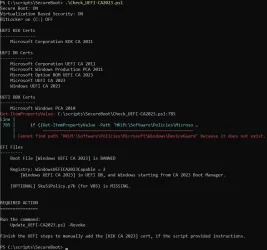
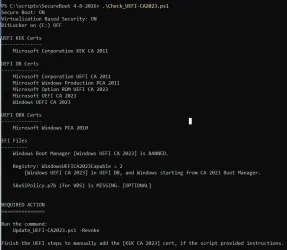
But the 2026.04.24 script produces the following error:
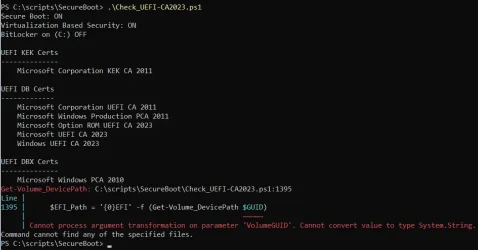
SecureBoot script 4-24-2026 version.webp
 

My Computer

System One

  • OS
    Windows 11
    Computer type
    Laptop
    Manufacturer/Model
    Dell Latitude E5470
    CPU
    Core i7-6820HQ
    Motherboard
    Dell 06DNG5 version A00
    Memory
    16GB DDR4
    Graphics Card(s)
    Intel HD Graphics 530
What am I doing wrong with the latest version of the scripts? I am not an expert at any of this stuff (most of my command-line familiarity is with Linux/Unix), but I can usually fumble my way through. I have several 2017-vintage Dell and HP machines that are running Windows 11 (they meet all official requirements except that they have 6th/7th generation processors) and I'm trying to update the Secure Boot keys.

I was able to get the 2026.04.08 scripts working on this Dell machine (Latitude E5470). The check script produces this output:
This Dell doesn't have a KEK CA 2023, which needs to be provided by Dell.

BIOS'es from 2017 would be unsupported. You can update this PC by entering the UEFI menu and select "Custom Mode". Then look for "delete all Secure Boot keys". The UEFI is now in Setup Mode (no certs).

Run the update script, it should download and install the Windows OEM Devices keys as a direct replacement (since Dell's not offering a KEK CA 2023 for anything this old).

But the 2026.04.24 script produces the following error:
Does this PC have a Dynamic Disk for booting? I added a recent change to see if we can get the volume GUID (identifier) for a Dynamic Disk.

Can you run two different PS commands for me?
Code:
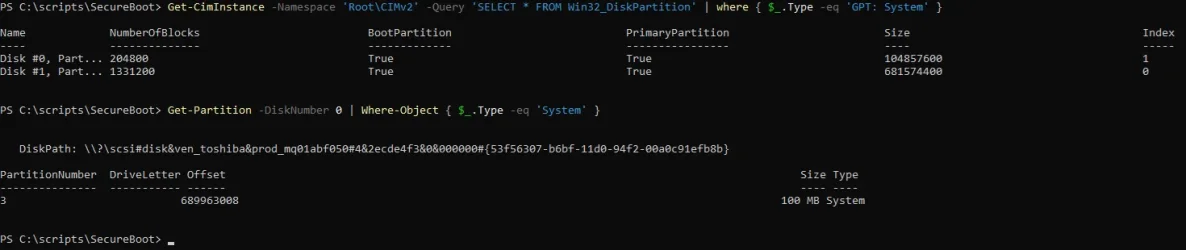
Get-CimInstance -Namespace 'Root\CIMv2' -Query 'SELECT * FROM Win32_DiskPartition' | where { $_.Type -eq 'GPT: System' }

Get-Partition -DiskNumber 0 | Where-Object { $_.Type -eq 'System' }
 

My Computer

System One

  • OS
    Windows 7
garlin, thank you very much for your quick reply!

After we get past this script issue, when I try to actually update the keys: Should I turn off Secure Boot before doing that? I tried using the Custom Mode once before (on a different Dell machine that doesn't have this weird disk configuration) and I think I made the mistake of choosing to "reset" instead of "delete" the keys. I had to create a special bootable USB drive to recover from that and haven't tried again since.

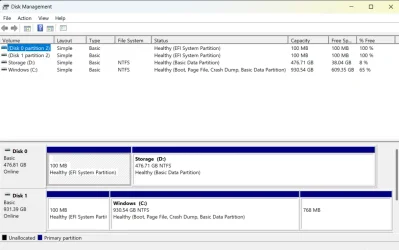
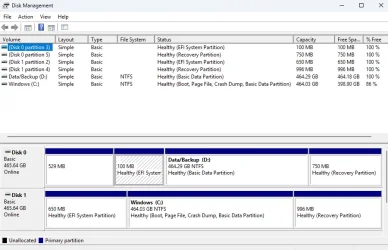
No, this machine does not use a Dynamic Disk for booting but does have a strange disk configuration. The main/boot drive is a standard M.2 PCIe SSD, but it also has a cheap M.2 SATA SSD (for extra storage of photos/videos) in a multipurpose expansion slot.

Attached are the outputs produced by the two commands you supplied and a Disk Management screenshot showing the configuration.

Command output for garlin.webp
 

Attachments

  • Disk Management for garlin.webp
    Disk Management for garlin.webp
    49.6 KB · Views: 3

My Computer

System One

  • OS
    Windows 11
    Computer type
    Laptop
    Manufacturer/Model
    Dell Latitude E5470
    CPU
    Core i7-6820HQ
    Motherboard
    Dell 06DNG5 version A00
    Memory
    16GB DDR4
    Graphics Card(s)
    Intel HD Graphics 530
Reset is reset back to the factory defaults, which gives you the same outdated Secure Boot keys as before. Due to the UEFI security model, you can't replace existing keys when they already exist. Therefore delete all keys is required.

Did you forget to copy the output?
 

My Computer

System One

  • OS
    Windows 7
The output is there now. I didn't like the formatting and edited my reply.

And thank you again! Your point about resetting keys will be useful on its own to future readers.
 

My Computer

System One

  • OS
    Windows 11
    Computer type
    Laptop
    Manufacturer/Model
    Dell Latitude E5470
    CPU
    Core i7-6820HQ
    Motherboard
    Dell 06DNG5 version A00
    Memory
    16GB DDR4
    Graphics Card(s)
    Intel HD Graphics 530
OK. That output is kinda what I imagined. You have two System disks, and we need to determine which one has the active EFI partition.

Let me rethink how to approach this problem, since I've been trying to carefully not update the wrong partition (and have the required changes be missed on the proper partition).
 

My Computer

System One

  • OS
    Windows 7
Thank you. This may be a useful example for you, but I have no need for the second disk to be a system disk.

Perhaps I should just get rid of the EFI partition on the second disk -- or would you like me to not do that for now so you can use my system to test a new version of the script?
 

My Computer

System One

  • OS
    Windows 11
    Computer type
    Laptop
    Manufacturer/Model
    Dell Latitude E5470
    CPU
    Core i7-6820HQ
    Motherboard
    Dell 06DNG5 version A00
    Memory
    16GB DDR4
    Graphics Card(s)
    Intel HD Graphics 530
Try this updated version. There should be NO NEED to delete your other EFI partition. The burden of carefully discovering which one is active is mine. I need to handle when other folks (not you) have really messed up their disks.

If you've ever seen some of the other ElevenForum threads where someone's tried cloning or copying their disk volumes outside of Macrium or another tool, and they ended up with spaghetti partitions... My script has to deal with them.
 

Attachments

My Computer

System One

  • OS
    Windows 7
Attached is the output of your updated script. It still reports an error but runs through instead of terminating early.

I was thinking about why my second disk has an EFI partition and figured it out. I bought this machine used; it came with a small M.2 SATA SSD in the M.2 2280 slot. I bought two new drives, a 1TB M.2 PCIe SSD to use as my main/boot disk and a 512GB M.2 (2242, I think) SATA SSD to put in the extra slot. I first cloned the original boot disk onto the new M.2 SATA SSD, then swapped in the new M.2 PCIe SSD and cloned onto that, and finally reformatted the new M.2 SATA SSD to be an extra storage drive (but I probably did a quick format, leaving the EFI partition there although it was no longer a boot drive).

I know enough to always clone disks correctly, using Macrium or Acronis True Image (which I find easier to use; I have a free edition for WD drives).
 

Attachments

  • Output of updated script for garlin.webp
    Output of updated script for garlin.webp
    67.7 KB · Views: 2

My Computer

System One

  • OS
    Windows 11
    Computer type
    Laptop
    Manufacturer/Model
    Dell Latitude E5470
    CPU
    Core i7-6820HQ
    Motherboard
    Dell 06DNG5 version A00
    Memory
    16GB DDR4
    Graphics Card(s)
    Intel HD Graphics 530
Cloned disks are great for a quick system recovery, but are almost never updated so you can tell them apart. I do need to solve the problem of detecting which is the currently booted disk and update its EFI partition.

We can't update the EFI partitions that live on other disks, because the script doesn't have any knowledge of the PC's prior history and your intentions for each of the drives. If you do finish a Secure Boot update, it's a good idea to re-clone the drive since the UEFI will be updated, but your older clone will now be banned from booting. As it has the previous boot files.
 

My Computer

System One

  • OS
    Windows 7
Thank you once again!

Both of those new scripts run without reporting any errors. The output of the check script is essentially the same as the 2026.04.08 release except for:
1. Repositioning of the word [OPTIONAL] before instead of after "SkuSiPolicy.p7b (for VBS) is MISSING."
2. A change from "Windows Boot Manager [Windows UEFI CA 2023] is BANNED" to "Boot File [Windows UEFI CA 2023] is BANNED"

What does "Boot File is BANNED" mean? If I go through the steps you described to use Custom Mode and update the keys, will that be fixed?
 

My Computer

System One

  • OS
    Windows 11
    Computer type
    Laptop
    Manufacturer/Model
    Dell Latitude E5470
    CPU
    Core i7-6820HQ
    Motherboard
    Dell 06DNG5 version A00
    Memory
    16GB DDR4
    Graphics Card(s)
    Intel HD Graphics 530
The Secure Boot security model works like this:
Dell's Platform Key (PK) validates the KEK key, which in turn validates a DB key, which validates your boot file.

Without a KEK CA 2023, those new UEFI CA 2023 certs aren't validated. And by inference, a CA 2023-signed boot file isn't either.

The only method to install a KEK CA 2023 on these Dells is to wipe their certs (keys). When the PK is removed, UEFI security is disabled and we're allowed to replace the certs and install a reference KEK CA 2023 signed by MS. This process is still secure, because the only method for deleting all keys is to be physically in front of the PC at the BIOS screen. When the replacement PK is installed, normal security is restored.

1. Shutdown Windows.
2. Disable Secure Boot mode.
3. Chose Custom Mode.
4. Delete all Secure Boot keys.
5. Restart Windows. Secure Boot is ready to be configured by the update script.
6. Assuming we're successfully, you can re-enable Secure Boot mode.
 

My Computer

System One

  • OS
    Windows 7
If you have the latest ZIP file (from today), then you can use the update script to copy the new boot manager and reach SVN 8.0.
Code:
Update_UEFI-CA2023.ps1 -Revoke

To update the boot files on your USB drives:
Code:
Update_UEFI-CA2023.ps1 -BootMedia

Powershell:
Windows 11 25H2 (26200.7922)

Secure Boot: ON
Virtualization Based Security: OFF
BitLocker on (C:) OFF

BIOS Firmware
-------------
    HP HP Pavilion Laptop 15-eh3xxx
    Version: F.09
    Date: 2025-11-24

Factory Default UEFI PK Cert
----------------------------
    HP UEFI Secure Boot PK 2017

UEFI PK Cert
------------
    HP UEFI Secure Boot PK 2017

Factory Default UEFI KEK Certs
------------------------------
    Microsoft Corporation KEK CA 2011
    HP UEFI Secure Boot KEK 2017
    Microsoft Corporation KEK 2K CA 2023

UEFI KEK Certs
--------------
    Microsoft Corporation KEK CA 2011
    HP UEFI Secure Boot KEK 2017
    Microsoft Corporation KEK 2K CA 2023

Factory Default UEFI DB Certs
-----------------------------
    Microsoft Corporation UEFI CA 2011
    Microsoft Windows Production PCA 2011
    HP UEFI Secure Boot DB 2017
    Microsoft Option ROM UEFI CA 2023
    Microsoft UEFI CA 2023
    Windows UEFI CA 2023

UEFI DB Certs
-------------
    Microsoft Corporation UEFI CA 2011
    Microsoft Windows Production PCA 2011
    HP UEFI Secure Boot DB 2017
    Microsoft Option ROM UEFI CA 2023
    Microsoft UEFI CA 2023
    Windows UEFI CA 2023

Factory Default UEFI DBX Certs
------------------------------
    Debian Secure Boot Signer
    Canonical Ltd. Secure Boot Signing
    EFI_CERT_SHA256_GUID Signatures: 190

UEFI DBX Certs
--------------
    Microsoft Windows Production PCA 2011
    Windows BootMgr SVN 7.0
    EFI_CERT_SHA256_GUID Signatures: 478

EFI Files
---------
    Windows Boot Manager [Windows UEFI CA 2023] is ALLOWED.
        \\.\HarddiskVolume1\EFI\Microsoft\Boot\bootmgfw.efi
        File Version: 28000.317, SVN 7.0

    Registry: WindowsUEFICA2023Capable = 2
        [Windows UEFI CA 2023] in UEFI DB, and Windows starting from CA 2023 Boot Manager.


AUDIT REPORT
============
1.  Update W11 25H2 to KB5083769 (Apr 2026) or later

STATUS REPORT
-------------
    Registry: UEFICA2023Status = Updated

    SUCCESS: UPDATES ARE FINISHED.
    UEFI CA 2023 certs are present, PCA 2011 cert is revoked.

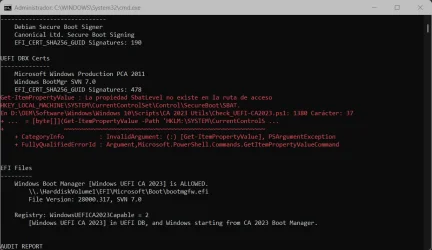
Seems I need to update to any April cumulative update so it updates the SVN to 8.0... welp, I'll see if any update is stable enough to risk it lol.
EDIT: Forget it, the thing is plaged with bugs as usual, bitlocker and RDP, and I happen to use RDP to manage my PC's when I can't be physically there... I'll have to see if they launch an optional update that fixes this, or wait for this week's update...

The thing that caught my attention is the SBAT error, I appied that reg thing to make SBAT optional... maybe is that?
 

Attachments

  • Captura de pantalla 2026-04-27 203138.webp
    Captura de pantalla 2026-04-27 203138.webp
    71.2 KB · Views: 2
Last edited:

My Computers

System One System Two

  • OS
    Windows 11 Pro 25H2
    Computer type
    PC/Desktop
    Manufacturer/Model
    Built PC
    CPU
    AMD Ryzen 5 5600G @ 3.9/4.4Ghz
    Motherboard
    MSI B550M-PRO-WiFi Ver. 1.4
    Memory
    2 x 16 GB DDR4 Kingston Fury Beast 3200 Mhz
    Graphics Card(s)
    AMD Radeon RX 6600 XT MSI Mech 2X OC Edition 8 GB
    Sound Card
    Realtek High Definition Audio (Integrated)
    Monitor(s) Displays
    Samsung C50Rx 27" LED / HP S2031 20" LCD
    Screen Resolution
    1920 x 1080 px / 1600 x 900 px
    Hard Drives
    WD Blue SN570 NVME M.2 SSD [1 TB] -- External Drives: - WD Scorpion Blue 250 GB 5400 RPM (Data Backup) - Hitachi 500 GB 5400 RPM (Software / ISOs Backup) - Toshiba MQ01ABD100 1 TB 5400 RPM (OS Images) - HGST TravelStar 7K1000 1 TB, 7200 RPM USB 3.0 - ADATA SU800 2TB SSD USB 3.0
    PSU
    Corsair RM750e 750W Fully Modular
    Case
    Naceb Hydra NA-1602
    Cooling
    Naceb Orpheus x 3 (Front) + Naceb Cepheus 1200 RPM Max (Rear) + ThemalRight Assasin X 90 SE (CPU)
    Keyboard
    Logitech MK470 Wireless
    Mouse
    Logitech MK470 Wireless
    Internet Speed
    120 MB Symetrical
    Browser
    Firefox / Brave / Edge
    Antivirus
    Windows Defender
    Other Info
    - VMs: WMware Player - Windows 8.1 Pro x64 / Windows 11 Pro
    - Wacom Intuos Pro Small Tablet PTH-460
  • Operating System
    Windows 11 Pro 25H2
    Computer type
    Laptop
    Manufacturer/Model
    HP Pavilion 15-eh3000la (80M53LA)
    CPU
    AMD Ryzen 7 7730U @ 2.0/4.5 Ghz
    Motherboard
    HP 8BC7
    Memory
    2 x 16 GB Kingston Fury Impact DDR4 3200 Mhz
    Graphics card(s)
    Radeon (tm) Graphics Vega 8 (512 MB)
    Sound Card
    Realtek High Definition Audio (Integrated)
    Monitor(s) Displays
    AU Optronics
    Screen Resolution
    1920 x 1080 px (125% size)
    Hard Drives
    WD Blue SN570 1TB NVME M.2 Drive
    PSU
    45 Watt Charger
    Cooling
    Laptop Cooling Pad
    Keyboard
    Free Wolf Foldable Portable Keyboard
    Mouse
    Free Wolf Wireless Mouse
    Internet Speed
    120 MB Symetrical
    Browser
    Firefox / Brave / Edge
    Antivirus
    Windows Defender
    Other Info
    - 41mWh battery.
    - Wacom Intuos Pro Small Tablet PTH-460
Windows 11 25H2 (26200.7922)
Seems I need to update to any April cumulative update so it updates the SVN to 8.0... welp, I'll see if any update is stable enough to risk it lol.
EDIT: Forget it, the thing is plaged with bugs as usual, bitlocker and RDP, and I happen to use RDP to manage my PC's when I can't be physically there... I'll have to see if they launch an optional update that fixes this, or wait for this week's update...

The thing that caught my attention is the SBAT error, I appied that reg thing to make SBAT optional... maybe is that?

After you install the April 2026 update, you can re-run the update script. If the script finds any differences, it will update the boot manager and SVN for you.
Code:
Update_UEFI-CA2023.ps1 -Revoke

I've fixed the error for reading the SBAT variable. SBAT is only need for Linux systems, but Windows likes to install it. My update script doesn't force the SBAT variable, because MS hasn't made it clear if it's mandatory for everyone.
 

Attachments

My Computer

System One

  • OS
    Windows 7
garlin, thank you so much for your help earlier today!

I've tried the 2026.04.24 release along with your updated scripts from earlier today on a different Dell machine (OptiPlex 5050 from 2018 with 7th-gen processor) that also has two disks, each with an EFI partition and the boot disk again being disk 1 rather than disk 0.

On this machine, the Update script fails with a different error. I also observed the same problem with the 2026.04.08 release.

Here are the Check and Update script outputs:

Check and Update script outputs for garlin.webp

On the machine I was using earlier today, the Update script does not produce that error; its only output without the -Audit option is
REQUIRED ACTION
---------------
Please follow the README_UEFI.TXT instructions, for installing the [KEK CA 2023] cert from BIOS.

Restart Windows, for UEFI updates to take effect.
(Note that the output did not include anything about downloading a KEK update.)

On the machine with the Update error, here are the outputs from the two commands you supplied for diagnostic purposes earlier today:

Command outputs for garlin.webp

And attached is another Disk Management screenshot.
 

Attachments

  • Disk Management for garlin.webp
    Disk Management for garlin.webp
    52 KB · Views: 1
Last edited:

My Computer

System One

  • OS
    Windows 11
    Computer type
    Laptop
    Manufacturer/Model
    Dell Latitude E5470
    CPU
    Core i7-6820HQ
    Motherboard
    Dell 06DNG5 version A00
    Memory
    16GB DDR4
    Graphics Card(s)
    Intel HD Graphics 530
On this machine, the Update script fails with a different error. I also observed the same problem with the 2026.04.08 release.
If the KEK append fails (and it does for a number of Dell models), it means the BIOS doesn't allow a new cert to be installed from Windows. This is a specific problem with the BIOS version that was used in old models.

You will have to follow the instructions (from my previous posts to you), and enter Setup Mode by clearing the existing certs (keys) from the UEFI menu. Then re-run the update script. One of the problems is we cannot predict which PC's will have this problem. Except the older the model, the more likely you have a "problem" BIOS.

The UEFI update process is independent of the disk number. Where the disk number becomes important is the later steps of the update process, where we switch the boot manager to a CA 2023-signed version.

I would focus on getting Setup Mode squared away, and running the script. At that point, we can worry about if we're identifying the right system drive or not.
 

My Computer

System One

  • OS
    Windows 7
After you install the April 2026 update, you can re-run the update script. If the script finds any differences, it will update the boot manager and SVN for you.
Code:
Update_UEFI-CA2023.ps1 -Revoke

I've fixed the error for reading the SBAT variable. SBAT is only need for Linux systems, but Windows likes to install it. My update script doesn't force the SBAT variable, because MS hasn't made it clear if it's mandatory for everyone.
Godsend. Will do mate. Thanks
 

My Computers

System One System Two

  • OS
    Windows 11 Pro 25H2
    Computer type
    PC/Desktop
    Manufacturer/Model
    Built PC
    CPU
    AMD Ryzen 5 5600G @ 3.9/4.4Ghz
    Motherboard
    MSI B550M-PRO-WiFi Ver. 1.4
    Memory
    2 x 16 GB DDR4 Kingston Fury Beast 3200 Mhz
    Graphics Card(s)
    AMD Radeon RX 6600 XT MSI Mech 2X OC Edition 8 GB
    Sound Card
    Realtek High Definition Audio (Integrated)
    Monitor(s) Displays
    Samsung C50Rx 27" LED / HP S2031 20" LCD
    Screen Resolution
    1920 x 1080 px / 1600 x 900 px
    Hard Drives
    WD Blue SN570 NVME M.2 SSD [1 TB] -- External Drives: - WD Scorpion Blue 250 GB 5400 RPM (Data Backup) - Hitachi 500 GB 5400 RPM (Software / ISOs Backup) - Toshiba MQ01ABD100 1 TB 5400 RPM (OS Images) - HGST TravelStar 7K1000 1 TB, 7200 RPM USB 3.0 - ADATA SU800 2TB SSD USB 3.0
    PSU
    Corsair RM750e 750W Fully Modular
    Case
    Naceb Hydra NA-1602
    Cooling
    Naceb Orpheus x 3 (Front) + Naceb Cepheus 1200 RPM Max (Rear) + ThemalRight Assasin X 90 SE (CPU)
    Keyboard
    Logitech MK470 Wireless
    Mouse
    Logitech MK470 Wireless
    Internet Speed
    120 MB Symetrical
    Browser
    Firefox / Brave / Edge
    Antivirus
    Windows Defender
    Other Info
    - VMs: WMware Player - Windows 8.1 Pro x64 / Windows 11 Pro
    - Wacom Intuos Pro Small Tablet PTH-460
  • Operating System
    Windows 11 Pro 25H2
    Computer type
    Laptop
    Manufacturer/Model
    HP Pavilion 15-eh3000la (80M53LA)
    CPU
    AMD Ryzen 7 7730U @ 2.0/4.5 Ghz
    Motherboard
    HP 8BC7
    Memory
    2 x 16 GB Kingston Fury Impact DDR4 3200 Mhz
    Graphics card(s)
    Radeon (tm) Graphics Vega 8 (512 MB)
    Sound Card
    Realtek High Definition Audio (Integrated)
    Monitor(s) Displays
    AU Optronics
    Screen Resolution
    1920 x 1080 px (125% size)
    Hard Drives
    WD Blue SN570 1TB NVME M.2 Drive
    PSU
    45 Watt Charger
    Cooling
    Laptop Cooling Pad
    Keyboard
    Free Wolf Foldable Portable Keyboard
    Mouse
    Free Wolf Wireless Mouse
    Internet Speed
    120 MB Symetrical
    Browser
    Firefox / Brave / Edge
    Antivirus
    Windows Defender
    Other Info
    - 41mWh battery.
    - Wacom Intuos Pro Small Tablet PTH-460
It seems that the SKUSiPolicy is the wrong one.Every else is ok. Please see attachment. Anything I need to do?
 

Attachments

  • Capture.webp
    Capture.webp
    82.7 KB · Views: 2

My Computers

System One System Two

  • OS
    Win 11 Pro 25H2
    Computer type
    PC/Desktop
    Manufacturer/Model
    User Built
    CPU
    Intel Ultra i7 270K Plus
    Motherboard
    Asrock Taichi Z890 OCF
    Memory
    Kingston Fury Renegrade 2x24 8400 M/tu
    Graphics Card(s)
    MSI - GeForce RTX 5070 12 GB GAMING TRIO OC
    Sound Card
    Headphone DAC
    Monitor(s) Displays
    AOC QD OLED 4K 32" + Eizo 32" FlexScan 4K
    Screen Resolution
    3840x2160
    Hard Drives
    1x 9100 Pro 2TB Nvme 1x 990 Pro 2TB 1X 1TB 990 Pro
    PSU
    Be Quiet Pure Power 13 1K Watt ATX 3.1
    Case
    Corsair 5000T Air Flow
    Cooling
    Arctic Freezer 3 360 Pro
    Keyboard
    Cherry G80-3000N
    Mouse
    Corsair
    Internet Speed
    500Mbps
    Browser
    Firefox x64
    Antivirus
    Defender
    Other Info
    Backup software MR ver 10
  • Operating System
    Win 11 Pro 25H2
    Computer type
    PC/Desktop
    Manufacturer/Model
    User Built
    CPU
    Ultra i7 270K Plus
    Motherboard
    Asus Z890 Strix - F
    Memory
    Kingston Fury 2x16 7200 M/tu
    Graphics card(s)
    MSI RTX 4070 Super OC 12 GB
    Sound Card
    Onboard
    Monitor(s) Displays
    KVM switch to AOC 4K 32" QD OLED
    Screen Resolution
    3840x2160
    Hard Drives
    Samsung 990 Pro 4TB+990 Pro 2TB +990 Pro 1TB
    PSU
    Super Flower Ledex 3 ATX 3.1 850 Watts
    Case
    Corsair 500d
    Cooling
    Noctua D15 Cromax
Back
Top Bottom