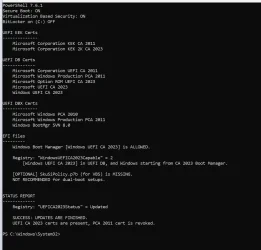
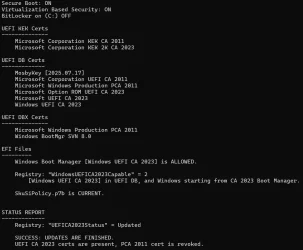
Solved garlin's PowerShell scripts for updating Secure Boot CA 2023


It depends on what kind of boot drive type, WinPE or WinRE.

WinRE should be updated using bcdboot. WinPE should have a new bootx64.efi copied over. If your \EFI\Microsoft\Boot only has a handful of files, then it's WInPE style.
I must be asking the wrong way...

Can I patch the USB boot drive with bcdboot on different computer then the computer on whichi it will be used ?

PS: Assuming both computers are fully updated and at same build number and using WinRE like mentioned previously
 

My Computer

System One

  • OS
    Windows 11
Assuming two PC's have the same Windows build number (patch level), they should be sharing the same Secure Boot settings and SVN in the UEFI. Then a boot drive which works on the first PC should boot on the second PC.

When booting from USB, the drive doesn't check the existing Windows on the system drive (if any), but the current Secure Boot settings. Assume the second PC is up to date (it updated Secure Boot locally), it would allow this USB drive to boot.
 

My Computer

System One

  • OS
    Windows 7
Assuming two PC's have the same Windows build number (patch level), they should be sharing the same Secure Boot settings and SVN in the UEFI. Then a boot drive which works on the first PC should boot on the second PC.

When booting from USB, the drive doesn't check the existing Windows on the system drive (if any), but the current Secure Boot settings. Assume the second PC is up to date (it updated Secure Boot locally), it would allow this USB drive to boot.
Understood
Thanks !
 

My Computer

System One

  • OS
    Windows 11
So your disk setup is exactly the situation my script needs to be concerned about. A lot of over-simplified advice for determining your EFI partition is simply take partitions marked SYSTEM (or EFI), and arbitrarily select the lowest one. That assumes your UEFI's boot order (which an user can change in the BIOS menu) goes the same ascending order as the physical drive numbering.

Without knowing your PC's history, or even what was the intent behind this setup, it's possible to pick the wrong EFI partition and update its boot manager. And we end up not fixing it for Secure Boot purposes.

The "HarddiskVolume" notation doesn't represent a physical drive, but a numbering scheme for disk volumes. Windows boots up and inventories all of the drives it sees, and all recognizable volumes (ignoring volumes which aren't Windows). Based on the arbitrary order collected by the list, Windows assigns each volume an increasing number. HarddiskVolume1 is the always lowest (or first) volume, but it might not represent the EFI you booted from. Say you have a dual-boot system, and recently booted from a higher numbered drive.

I don't provide the HarddiskVolume address as a means to identifying where the active EFI partition. But it's a working folder address. If you didn't want to mount the EFI volume before reading it (mountvol S: /s) or assign a drive letter from diskpart, then you can see the EFI's files using:
Code:
dir \\.\HarddiskVolume1\EFI\

This is a folder pathname shortcut that Windows provides. Mounting the EFI to read it might disturb something you have already done with drive letters, or confuse a tool because now the EFI has changed its mount state.

If you were given the disk and partition number of the EFI, would that make it easier to know where the boot manager lives? Not really. "mountvol /s" doesn't take any disk or partition numbers. If you're using diskpart, you can only assign drive letters to a volume so disk/partition is not always a direct mapping to the right volume.

My goal isn't to figure out all the possible EFI's to be found, or what's in them. Who knows, some of them might be "empty" of boot files or you don't want me tampering with them because they have a specific purpose for staying on that version. I'm trying to report the current boot manager's status, and gently identify where it can be found (by an accessible folder name, and not by disk/partition).

Thanks Garlin for the detailed explanation. So just to be sure I understand ...

Can I assume that your CHECK script output (ie, I only need to revoke PCA 2011) means that the Boot process being used on my system correctly access the latest 2023 certificates?

Also, if Macrium calls the 100 Mb partition on the SSD the "EFI system partition", and given the output of your CHECK script, will this partition be the location of the certificates which your CHECK script tested, as well as the certificates which were used when booting?

[from what Celery said, looks like the Seagate usb hub came with a 200 Mb FAT32 partition on it ... which hopefully isn't being used for anything on my system]

[the Seagate and Lacie usb drives were added to the existing system for backup storage]

Thanks
 

My Computer

System One

  • OS
    Windows 11
Can I assume that your CHECK script output (ie, I only need to revoke PCA 2011) means that the Boot process being used on my system correctly access the latest 2023 certificates?

Also, if Macrium calls the 100 Mb partition on the SSD the "EFI system partition", and given the output of your CHECK script, will this partition be the location of the certificates which your CHECK script tested, as well as the certificates which were used when booting?

[from what Celery said, looks like the Seagate usb hub came with a 200 Mb FAT32 partition on it ... which hopefully isn't being used for anything on my system]

[the Seagate and Lacie usb drives were added to the existing system for backup storage]
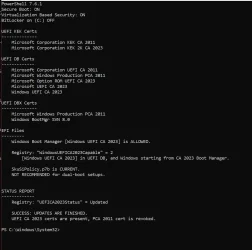
The reporting block which contains the "EFI Files" documents what the script believes is the active EFI partition. Files here are used for the booting of normal Windows.

If you insert an USB boot drive, then "Check_UEFI-CA2023.ps1 -BootMedia" will additionally report the status of all removable USB drives with some form of boot files (WinPE or WinRE format).
 

My Computer

System One

  • OS
    Windows 7
Thanks Garlin.
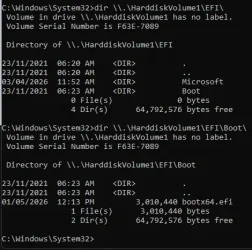
Here's what I get ... not sure what this is telling me.

1778478402435.webp

Is this what you might expect ?
Looks like this is where the MS System lives, which would be the internal SSD, or "C", I assume ?
Should I be able to see the EFI files / Certificate files somewhere in here ?

Can I run some cmd to identify where (physically) the Certificate files which the CHECK script interrogated are located?

Or maybe the CHECK script doesn't actually access the Certificates, but instead looks at information gathered by BIOS or MS during booting ???

Thanks again

Apologies for all the questions ...
 

My Computer

System One

  • OS
    Windows 11
OK, so I shutdown, removed the Seagate usb disk (with the extra EFI partition), and restarted ... and Windows 11 booted OK.

I assume this means it used the 100 Mb EFI partition on the internal SSD C drive when booting (which Macrium calls the "EFI system partition"), and ignored the Seagate EFI partition ?

Which sounds good ... and suggests are no problems.
 

My Computer

System One

  • OS
    Windows 11
OK, so I shutdown, removed the Seagate usb disk (with the extra EFI partition), and restarted ... and Windows 11 booted OK.

I assume this means it used the 100 Mb EFI partition on the internal SSD C drive when booting (which Macrium calls the "EFI system partition"), and ignored the Seagate EFI partition ?

Which sounds good ... and suggests are no problems.

By default, the Seagate One Touch Hub uses an EFI partition and exFAT formatting to ensure out-of-the-box compatibility with macOS. Windows does not normally use the EFI partition on the external drive during the Windows boot process.

If you only use Windows computers, you may prefer to reformat the external drive as NTFS before storing files on it.

Seagate: "Optimized performance for Windows: NTFS (New Technology File System) is a proprietary journaling file system for Windows. macOS can read NTFS volumes, but it can't natively write to them."

The EFI System Partition (ESP)

For a GPT disk to be bootable, it must contain an EFI system partition. This is a small partition, typically 100-500 MB, formatted as FAT32. The UEFI firmware can read FAT32 natively, allowing it to browse the files on the drive before any operating system is loaded.

Windows Setup stores boot-related files there, including:
Code:
\EFI\Microsoft\Boot\bootmgfw.efi - Windows Boot Manager
\EFI\Microsoft\Boot\BCD          - boot configuration database
\EFI\Boot\bootx64.efi            - fallback boot path (same file as bootmgfw.efi but with a different name)

Edit:

Google Gemini:

To provide the most value to the forum, you might consider this subtle distinction:
  • \EFI\Microsoft\Boot\bootmgfw.efi: This is the registered boot application. Under normal conditions, the UEFI NVRAM points directly to this file.
  • \EFI\Boot\bootx64.efi: This is the removable media or fallback boot path. It is essential for booting from USB drives or recovering a system where the NVRAM has been cleared or corrupted.
 
Last edited:

My Computers

System One System Two

  • OS
    Windows 11 Pro
    Computer type
    PC/Desktop
    CPU
    AMD Ryzen 9 9950X3D
    Motherboard
    ASRock B650E Taichi Lite
    Memory
    Kingston FURY Beast 64GB (2x32GB) DDR5 6000MT/s
    Graphics Card(s)
    ASUS TUF Gaming Radeon RX 9070 OC Edition 16GB GDDR6
    Hard Drives
    Solidigm P44 Pro 2TB M.2 NVMe SSD
  • Operating System
    Windows 11 Home
    Computer type
    Laptop
    Manufacturer/Model
    Lenovo Legion Pro 7i Gen 10 16"
    CPU
    Intel Core Ultra 9 275HX
    Memory
    64GB (2x 32GB) DDR5-6400
    Graphics card(s)
    NVIDIA GeForce RTX 5080 16GB GDDR7 Laptop GPU
    Hard Drives
    2x 1TB M.2 NVMe SSD (SK Hynix)
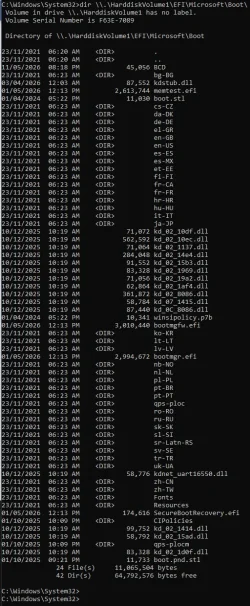
Oops ... I omitted Microsoft in the dir ... here's the correct result:

1778504293871.webp

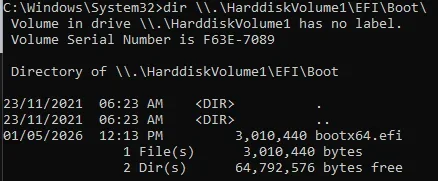
Interesting that omitting "Microsoft" still identifies a Boot dir, with just one file in it,
the bootx64.efi from the above dir, which I assume was copied or linked into this directory:

1778504581383.webp

Big learning curve, but thanks Garlin and Celery for your patience
 

My Computer

System One

  • OS
    Windows 11
Will your next GitHub upgrade include an updated script to address the error I'm getting? Not sure why the most recent script suddenly started doing this, before the check were error-free. I didn't move anything AFAIK, maybe Microsoft did. :lmao:

1778527146137.webp
 

My Computers

System One System Two

  • OS
    Win 11 Pro 25H2, Build 26200.8524
    Computer type
    PC/Desktop
    Manufacturer/Model
    Home Brew
    CPU
    Intel Core i5 14500
    Motherboard
    Gigabyte B760M G P WIFI
    Memory
    64GB DDR4
    Graphics Card(s)
    GeForce RTX 4060
    Sound Card
    Chipset Realtek
    Monitor(s) Displays
    LG 45" Ultragear, Acer 24" 1080p
    Screen Resolution
    5120x1440, 1920x1080
    Hard Drives
    Crucial P310 2TB 2280 PCIe Gen4 3D NAND NVMe M.2 SSD (O/S)
    Silicon Power 2TB US75 NVMe PCIe Gen4 M.2 2280 SSD (backup)
    Crucial BX500 2TB 3D NAND (2nd backup)
    Seagate 4TB Ironwolf, rotating HDD archive files
    External off-line backup Drives: 2 NVMe 4TB drives in external enclosures
    PSU
    Thermaltake Toughpower GF3 750W
    Case
    LIAN LI LANCOOL 216 E-ATX PC Case
    Cooling
    Lots of fans!
    Keyboard
    Microsoft Comfort Curve 2000
    Mouse
    Logitech G305
    Internet Speed
    Verizon FiOS 1GB
    Browser
    Firefox
    Antivirus
    Malware Bytes & Windows Defender Security
  • Operating System
    Win 11 Pro 25H2, Build 26200.8524
    Computer type
    PC/Desktop
    Manufacturer/Model
    Home Brew
    CPU
    Intel Core i5 14400
    Motherboard
    Gigabyte B760M DS3H AX
    Memory
    32GB DDR5
    Graphics card(s)
    Intel 700 Embedded GPU
    Sound Card
    Realtek Embedded
    Monitor(s) Displays
    27" HP 1080p
    Screen Resolution
    1920x1080
    Hard Drives
    Crucial P310 2TB 2280 PCIe Gen4 eD NAND PCIe SSD
    Samsung EVO 990 2TB NVMe Gen4 SSD
    Samsung 2TB SATA SSD
    PSU
    Thermaltake Smart BM3 650W
    Case
    Okinos Micro ATX Case
    Cooling
    Fans
    Keyboard
    Microsoft Comfort Curve 2000
    Mouse
    Logitech G305
    Internet Speed
    Verizon FiOS 1GB
    Browser
    Firefox
    Antivirus
    Malware Bytes & Windows Defender Security
UPDATE: 2026-05-11

Latest fix for the EFI partition not being found ("Command cannot find any of the specified files"). Should work better on multi-boot and multi-partitioned systems.

Download from post #1 or on GitHub.
Thanks.
The one from 5/11/2026 fixed the problem I had with the one from 5/8/2026. I can now run it on a multiboot system without getting the red error messages.

1778532270543.webp

On this one I removed SkuSipolicy.p7b to allow booting of WinRE on build 28020.2075 and also allow booting from 29585.1000 USB installation media.
1778532411980.webp

1778532688665.webp
 

My Computer

System One

  • OS
    Windows 11 Pro 25H2
    Computer type
    PC/Desktop
    Manufacturer/Model
    Dell XPS 8930
    CPU
    Intel I9-9900K
    Memory
    64GB
    Graphics Card(s)
    NVIDIA RTX 2060
    Sound Card
    NVIDIA High Definition Audio
    Monitor(s) Displays
    4k Samsung
    Screen Resolution
    3840 x 2160
    Hard Drives
    512GB NVMe, ADATA SU 800, 2TB HDD
On this one I removed SkuSipolicy.p7b to allow booting of WinRE on build 28020.2075 and also allow booting from 29585.1000 USB installation media.
My current project is a winload.efi scanner that will compare a selected SkuSiPolicy against a set of Windows volumes and boot media.

But I need to strip down Matt Graeber's 3300 line parser to something more compact. He wrote a general purpose function to extract XML from a SkuSiPolicy.p7b, but I only need the osloader.exe version rules and nothing else from it. Sometimes when I rip out something, it stops working..
 

My Computer

System One

  • OS
    Windows 7
Just for you? Sure.
WOW, I'm honored! 😁 As a special bonus, it worked just fine on my system! 👌

1778533443732.webp

Once again, a great big THANK YOU! :hug:
 

My Computers

System One System Two

  • OS
    Win 11 Pro 25H2, Build 26200.8524
    Computer type
    PC/Desktop
    Manufacturer/Model
    Home Brew
    CPU
    Intel Core i5 14500
    Motherboard
    Gigabyte B760M G P WIFI
    Memory
    64GB DDR4
    Graphics Card(s)
    GeForce RTX 4060
    Sound Card
    Chipset Realtek
    Monitor(s) Displays
    LG 45" Ultragear, Acer 24" 1080p
    Screen Resolution
    5120x1440, 1920x1080
    Hard Drives
    Crucial P310 2TB 2280 PCIe Gen4 3D NAND NVMe M.2 SSD (O/S)
    Silicon Power 2TB US75 NVMe PCIe Gen4 M.2 2280 SSD (backup)
    Crucial BX500 2TB 3D NAND (2nd backup)
    Seagate 4TB Ironwolf, rotating HDD archive files
    External off-line backup Drives: 2 NVMe 4TB drives in external enclosures
    PSU
    Thermaltake Toughpower GF3 750W
    Case
    LIAN LI LANCOOL 216 E-ATX PC Case
    Cooling
    Lots of fans!
    Keyboard
    Microsoft Comfort Curve 2000
    Mouse
    Logitech G305
    Internet Speed
    Verizon FiOS 1GB
    Browser
    Firefox
    Antivirus
    Malware Bytes & Windows Defender Security
  • Operating System
    Win 11 Pro 25H2, Build 26200.8524
    Computer type
    PC/Desktop
    Manufacturer/Model
    Home Brew
    CPU
    Intel Core i5 14400
    Motherboard
    Gigabyte B760M DS3H AX
    Memory
    32GB DDR5
    Graphics card(s)
    Intel 700 Embedded GPU
    Sound Card
    Realtek Embedded
    Monitor(s) Displays
    27" HP 1080p
    Screen Resolution
    1920x1080
    Hard Drives
    Crucial P310 2TB 2280 PCIe Gen4 eD NAND PCIe SSD
    Samsung EVO 990 2TB NVMe Gen4 SSD
    Samsung 2TB SATA SSD
    PSU
    Thermaltake Smart BM3 650W
    Case
    Okinos Micro ATX Case
    Cooling
    Fans
    Keyboard
    Microsoft Comfort Curve 2000
    Mouse
    Logitech G305
    Internet Speed
    Verizon FiOS 1GB
    Browser
    Firefox
    Antivirus
    Malware Bytes & Windows Defender Security

My Computers

System One System Two

  • OS
    Win 11 Pro 25H2, Build 26200.8524
    Computer type
    PC/Desktop
    Manufacturer/Model
    Home Brew
    CPU
    Intel Core i5 14500
    Motherboard
    Gigabyte B760M G P WIFI
    Memory
    64GB DDR4
    Graphics Card(s)
    GeForce RTX 4060
    Sound Card
    Chipset Realtek
    Monitor(s) Displays
    LG 45" Ultragear, Acer 24" 1080p
    Screen Resolution
    5120x1440, 1920x1080
    Hard Drives
    Crucial P310 2TB 2280 PCIe Gen4 3D NAND NVMe M.2 SSD (O/S)
    Silicon Power 2TB US75 NVMe PCIe Gen4 M.2 2280 SSD (backup)
    Crucial BX500 2TB 3D NAND (2nd backup)
    Seagate 4TB Ironwolf, rotating HDD archive files
    External off-line backup Drives: 2 NVMe 4TB drives in external enclosures
    PSU
    Thermaltake Toughpower GF3 750W
    Case
    LIAN LI LANCOOL 216 E-ATX PC Case
    Cooling
    Lots of fans!
    Keyboard
    Microsoft Comfort Curve 2000
    Mouse
    Logitech G305
    Internet Speed
    Verizon FiOS 1GB
    Browser
    Firefox
    Antivirus
    Malware Bytes & Windows Defender Security
  • Operating System
    Win 11 Pro 25H2, Build 26200.8524
    Computer type
    PC/Desktop
    Manufacturer/Model
    Home Brew
    CPU
    Intel Core i5 14400
    Motherboard
    Gigabyte B760M DS3H AX
    Memory
    32GB DDR5
    Graphics card(s)
    Intel 700 Embedded GPU
    Sound Card
    Realtek Embedded
    Monitor(s) Displays
    27" HP 1080p
    Screen Resolution
    1920x1080
    Hard Drives
    Crucial P310 2TB 2280 PCIe Gen4 eD NAND PCIe SSD
    Samsung EVO 990 2TB NVMe Gen4 SSD
    Samsung 2TB SATA SSD
    PSU
    Thermaltake Smart BM3 650W
    Case
    Okinos Micro ATX Case
    Cooling
    Fans
    Keyboard
    Microsoft Comfort Curve 2000
    Mouse
    Logitech G305
    Internet Speed
    Verizon FiOS 1GB
    Browser
    Firefox
    Antivirus
    Malware Bytes & Windows Defender Security
Thank you very much for those scripts. It allowed me to put the new secure boot certificates on an old Lenovo C340 All-in-One computer (with a UEFI from 2012). All previous attempts with other scripts had failed.
 

My Computer

System One

  • OS
    windows 11
May 2026 Monthly Update probably fixed the Get-SecureBootSVN bug (which sometimes reported a lower SVN than the highest SVN).

I haven't installed the update yet, but it looks like MS snuck in some features into the SecureBoot library:
Code:
5079473.csv:"Microsoft.SecureBoot.Commands.dll","10.0.26100.7920","06-Mar-2026","14:59","50,176"
5079473.csv:"Microsoft.SecureBoot.Commands.dll","10.0.26100.7920","06-Mar-2026","15:04","50,176"
5083769.csv:"Microsoft.SecureBoot.Commands.dll","10.0.26100.8246","11-Apr-2026","22:08","50,176"
5083769.csv:"Microsoft.SecureBoot.Commands.dll","10.0.26100.7920","11-Apr-2026","22:08","50,176"
5083769.csv:"Microsoft.SecureBoot.Commands.dll","10.0.26100.8246","11-Apr-2026","21:53","50,176"
5083769.csv:"Microsoft.SecureBoot.Commands.dll","10.0.26100.7920","11-Apr-2026","21:53","50,176"
5089549.csv:"Microsoft.SecureBoot.Commands.dll","10.0.26100.8328","07-May-2026","03:36","241,152"  <-- it's a big boy
5089549.csv:"Microsoft.SecureBoot.Commands.dll","10.0.26100.8328","07-May-2026","03:33","241,152"
 

My Computer

System One

  • OS
    Windows 7
Well it would be nice to see Microsoft fix stuff instead of break it. 😊
 

My Computers

System One System Two

  • OS
    Win 11 Pro 25H2, Build 26200.8524
    Computer type
    PC/Desktop
    Manufacturer/Model
    Home Brew
    CPU
    Intel Core i5 14500
    Motherboard
    Gigabyte B760M G P WIFI
    Memory
    64GB DDR4
    Graphics Card(s)
    GeForce RTX 4060
    Sound Card
    Chipset Realtek
    Monitor(s) Displays
    LG 45" Ultragear, Acer 24" 1080p
    Screen Resolution
    5120x1440, 1920x1080
    Hard Drives
    Crucial P310 2TB 2280 PCIe Gen4 3D NAND NVMe M.2 SSD (O/S)
    Silicon Power 2TB US75 NVMe PCIe Gen4 M.2 2280 SSD (backup)
    Crucial BX500 2TB 3D NAND (2nd backup)
    Seagate 4TB Ironwolf, rotating HDD archive files
    External off-line backup Drives: 2 NVMe 4TB drives in external enclosures
    PSU
    Thermaltake Toughpower GF3 750W
    Case
    LIAN LI LANCOOL 216 E-ATX PC Case
    Cooling
    Lots of fans!
    Keyboard
    Microsoft Comfort Curve 2000
    Mouse
    Logitech G305
    Internet Speed
    Verizon FiOS 1GB
    Browser
    Firefox
    Antivirus
    Malware Bytes & Windows Defender Security
  • Operating System
    Win 11 Pro 25H2, Build 26200.8524
    Computer type
    PC/Desktop
    Manufacturer/Model
    Home Brew
    CPU
    Intel Core i5 14400
    Motherboard
    Gigabyte B760M DS3H AX
    Memory
    32GB DDR5
    Graphics card(s)
    Intel 700 Embedded GPU
    Sound Card
    Realtek Embedded
    Monitor(s) Displays
    27" HP 1080p
    Screen Resolution
    1920x1080
    Hard Drives
    Crucial P310 2TB 2280 PCIe Gen4 eD NAND PCIe SSD
    Samsung EVO 990 2TB NVMe Gen4 SSD
    Samsung 2TB SATA SSD
    PSU
    Thermaltake Smart BM3 650W
    Case
    Okinos Micro ATX Case
    Cooling
    Fans
    Keyboard
    Microsoft Comfort Curve 2000
    Mouse
    Logitech G305
    Internet Speed
    Verizon FiOS 1GB
    Browser
    Firefox
    Antivirus
    Malware Bytes & Windows Defender Security
I would like to update the secure boot certificates of an older HP Z440 workstation. It has a bios password on it, and the password can only be removed by removing a jumper on the mainboard. So a pain in the neck. Do I need to remove the password first for those scripts to work? I assume so, but I am not certain.
 

My Computer

System One

  • OS
    windows 11
Back
Top Bottom