Solved garlin's PowerShell scripts for updating Secure Boot CA 2023


You got a problem there. :(

"device" is supposed to be a disk device or assigned drive letter. The old method (2026.04.24) of locating the EFI isn't reliable on some Windows setups, so the new method is preferred. I would have to think if a fallback method should be allowed when "unknown" happens.

This command tells you where Windows thinks the boot manager lives:
Code:
C:\Windows\System32>powershell Get-CimInstance -ClassName Win32_BootConfiguration

BootDirectory Name              SettingID Caption
------------- ----              --------- -------
C:\Windows    BootConfiguration           \Device\Harddisk0\Partition1

Code:
C:\Windows\System32>bcdedit /enum {bootmgr}

Windows Boot Manager
--------------------
identifier              {bootmgr}
device                  partition=\Device\HarddiskVolume1  <-- assumes disk 0, partition 1
path                    \EFI\Microsoft\Boot\bootmgfw.efi
description             Windows Boot Manager
locale                  en-us
inherit                 {globalsettings}
default                 {current}
resumeobject            {043a7025-3f9e-11f1-bd72-000c2907b188}
displayorder            {current}
toolsdisplayorder       {memdiag}
timeout                 30
Ok, I'll be the elephant in the room... Anything I can do about this?
 

My Computer

System One

  • OS
    win 11
    Computer type
    Laptop
    Manufacturer/Model
    Dell Precision M4800
    CPU
    Intell Core i7 4900 MQ
    Motherboard
    Dell QT3YTY A00
    Memory
    DDR3 16 GB
Yeah you could try fixing the BCD store.

1. Run diskpart, assign a drive letter to what you think is the EFI (System) partition.
Code:
select disk 0
list part
select part N   <-- your guess based on "list", something 100MB or 260MB in size
assign letter=s
exit

2. Update the BCD store
Code:
bcdedit /set {bootmgr} device partition=S:

3. Go back into diskpart and remove the drive letter
Code:
select disk 0
select part N
remove letter=S
exit

4. Confirm BCD store has switched to a device, instead of "unknown"
Code:
bcdedit /enum '{bootmgr}'
 

My Computer

System One

  • OS
    Windows 7
Yeah you could try fixing the BCD store.

1. Run diskpart, assign a drive letter to what you think is the EFI (System) partition.
Code:
select disk 0
list part
select part N   <-- your guess based on "list", something 100MB or 260MB in size
assign letter=s
exit

2. Update the BCD store
Code:
bcdedit /set {bootmgr} device partition=S:

3. Go back into diskpart and remove the drive letter
Code:
select disk 0
select part N
remove letter=S
exit

4. Confirm BCD store has switched to a device, instead of "unknown"
Code:
bcdedit /enum '{bootmgr}'
So I'm a little nervouse about doing this so bear with me... So I shold select partition 2 since it's the System?
DISKPART> select disk 0

Disk 0 is now the selected disk.

DISKPART> list part

Partition ### Type Size Offset
------------- ---------------- ------- -------
Partition 1 Reserved 128 MB 1024 KB
Partition 2 System 99 MB 129 MB
Partition 3 Primary 1861 GB 230 MB
Partition 4 Recovery 888 MB 1862 GB

DISKPART>
 

My Computer

System One

  • OS
    win 11
    Computer type
    Laptop
    Manufacturer/Model
    Dell Precision M4800
    CPU
    Intell Core i7 4900 MQ
    Motherboard
    Dell QT3YTY A00
    Memory
    DDR3 16 GB
Partition 2 is your System (or EFI) partition.
Partition 1 is a placeholder for Reserved space. Nothing actually lives there, it's empty disk space which a volume tool can steal a tiny bit of overhead from.

select disk 0
select part 2
assign letter=s
 

My Computer

System One

  • OS
    Windows 7
So I'm a little nervouse about doing this so bear with me... So I shold select partition 2 since it's the System?
DISKPART> select disk 0

Disk 0 is now the selected disk.

DISKPART> list part

Partition ### Type Size Offset
------------- ---------------- ------- -------
Partition 1 Reserved 128 MB 1024 KB
Partition 2 System 99 MB 129 MB
Partition 3 Primary 1861 GB 230 MB
Partition 4 Recovery 888 MB 1862 GB

DISKPART>
The last part fails?????
DISKPART> list disk

Disk ### Status Size Free Dyn Gpt
-------- ------------- ------- ------- --- ---
Disk 0 Online 1863 GB 0 B *
Disk 1 Online 3726 GB 0 B *
Disk 2 Online 3726 GB 0 B *
Disk 3 Online 3726 GB 0 B *
Disk 4 Online 3726 GB 1024 KB *

DISKPART> select disk 0

Disk 0 is now the selected disk.

DISKPART> list part

Partition ### Type Size Offset
------------- ---------------- ------- -------
Partition 1 Reserved 128 MB 1024 KB
Partition 2 System 99 MB 129 MB
Partition 3 Primary 1861 GB 230 MB
Partition 4 Recovery 888 MB 1862 GB

DISKPART> select part 2

Partition 2 is now the selected partition.

DISKPART> assign letter=s

DiskPart successfully assigned the drive letter or mount point.

DISKPART> exit

Leaving DiskPart...
PS C:\SecureBoot-CA-2023-Updates 5-14-26> bcdedit /set {bootmgr} device partition=S:
The set command specified is not valid.
Run "bcdedit /?" for command line assistance.
The parameter is incorrect.
PS C:\SecureBoot-CA-2023-Updates 5-14-26>
 

My Computer

System One

  • OS
    win 11
    Computer type
    Laptop
    Manufacturer/Model
    Dell Precision M4800
    CPU
    Intell Core i7 4900 MQ
    Motherboard
    Dell QT3YTY A00
    Memory
    DDR3 16 GB
You're inside PS (and not CMD). PS has "greedy parsing" which means the { braces } have special meaning to PS.

Wrap it in quotes.
Code:
bcdedit /set "{bootmgr}" device partition=S:
 

My Computer

System One

  • OS
    Windows 7
Maybe your PC re-enabled that HP security feature that looks for "unauthorized" cert updates. HP Smart Start is a big selling point for a certain class of workstations.
Looking at this link https://support.hp.com/us-en/document/ish_9642671-9641393-16 my HP Z440 workstation is not on the list of HP machines with Sure Start security. So, something else seems to be going on.

Before I ran your scripts on the Z440, the device security in the settings of win 11 did say: secure boot is on, but secure boot certificate updates paused because of a known Issue .............
Could it be related to this? I have not been able to find out what the known Issue is. I will continue to search for it.
 
Last edited:

My Computer

System One

  • OS
    windows 11
Looking at this link https://support.hp.com/us-en/document/ish_9642671-9641393-16 my HP Z440 workstation is not on the list of HP machines with Sure Start security. So, something else seems to be going on.

Before I ran your scripts on the Z440, the device security in the settings of win 11 did say: secure boot is on, but secure boot certificate updates paused because of a known Issue .............
Could it be related to this? I have not been able to find out what the known Issue is. I will continue to search for it.
One article I read suggested turning on the optional Diagnostics and Feedback under privacy section, ie so MS are alerted and talking to your computer (kind of) and also turning on "Get the latest updates as soon as they're available". My Lenovo one had all kinds of negative messages initially, but they gradually changed after turning those on, running WU, restarting and just leaving it switched on all day and checking back now and then.
 

My Computers

System One System Two

  • OS
    Windows 11 Home 25H2
    Computer type
    Laptop
    Manufacturer/Model
    HP Pavilion 14-ce3606sa
    CPU
    Core i5-1035G1
    Memory
    32gb
    Hard Drives
    Samsung 870 evo sata ssd
    Cooling
    Could be better
    Internet Speed
    50 mbps Starlink
    Browser
    Firefox
    Other Info
    Originally came installed with a 500gb H10 Optane ssd
  • Operating System
    Windows 11 Home
    Computer type
    Laptop
    Manufacturer/Model
    HP Pavilion ce3606sa
    CPU
    Intel Core i5-1035G1
    Memory
    16gb
    Hard Drives
    Hynix Gold P31 2TB
    Internet Speed
    200mbps Starlink
    Browser
    Firefox
    Antivirus
    Defender
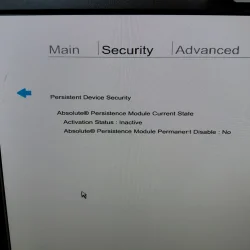
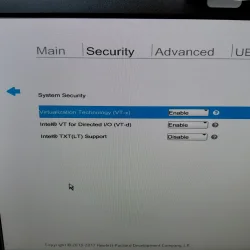
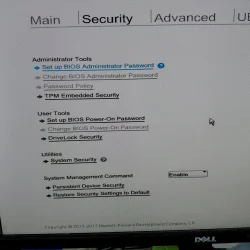
Concerning my HP Z440 workstation: Looking at the document L49253-001 from HP, labelled HP Sure Start Technical white paper, it states that the entry for Sure Start can be found in the UEFI under Security. I have no entry there for Sure Start nor anywhere else in the BIOS. So I am pretty certain I have no Sure Start on my machine. Also see my pictures of the UEFI settings.

Hazel123: I will try that. Thanks.
 

Attachments

  • 20260516_124853.webp
    20260516_124853.webp
    1.6 MB · Views: 3
  • 20260516_124808.webp
    20260516_124808.webp
    1.7 MB · Views: 2
  • 20260516_124551.webp
    20260516_124551.webp
    1.5 MB · Views: 3

My Computer

System One

  • OS
    windows 11
Looking at this link https://support.hp.com/us-en/document/ish_9642671-9641393-16 my HP Z440 workstation is not on the list of HP machines with Sure Start security. So, something else seems to be going on.

Before I ran your scripts on the Z440, the device security in the settings of win 11 did say: secure boot is on, but secure boot certificate updates paused because of a known Issue .............
Could it be related to this? I have not been able to find out what the known Issue is. I will continue to search for it.
Just been reading about yiyr Z440. And saw somehing that might help? It said to successfully use Secure Boot you must use a UEFI compatible graphics card (presumably you have the original one and its not been changed ).

Anyway this is @garlin 's thread and about his script so apologies for butting in there :-)
 

My Computers

System One System Two

  • OS
    Windows 11 Home 25H2
    Computer type
    Laptop
    Manufacturer/Model
    HP Pavilion 14-ce3606sa
    CPU
    Core i5-1035G1
    Memory
    32gb
    Hard Drives
    Samsung 870 evo sata ssd
    Cooling
    Could be better
    Internet Speed
    50 mbps Starlink
    Browser
    Firefox
    Other Info
    Originally came installed with a 500gb H10 Optane ssd
  • Operating System
    Windows 11 Home
    Computer type
    Laptop
    Manufacturer/Model
    HP Pavilion ce3606sa
    CPU
    Intel Core i5-1035G1
    Memory
    16gb
    Hard Drives
    Hynix Gold P31 2TB
    Internet Speed
    200mbps Starlink
    Browser
    Firefox
    Antivirus
    Defender
Concerning my HP Z440 workstation: Looking at the document L49253-001 from HP, labelled HP Sure Start Technical white paper, it states that the entry for Sure Start can be found in the UEFI under Security. I have no entry there for Sure Start nor anywhere else in the BIOS. So I am pretty certain I have no Sure Start on my machine. Also see my pictures of the UEFI settings.

Hazel123: I will try that. Thanks.
I'm not sure what you mean by Sure Start, but it should list "Secure Boot" under the security tab in bios. Are you in UEFI mode and have the latest bios? If it's yes to those, then I read something about clearing the CMOS to make it appear. What does it say under "Device Security" in Windows settings (Garlin kindly told me how to check that). Settings - search bar - type "Device Security" - select - scroll down to Secure Boot. That is where I kept checking after waiting, refreshing WU, restarting, and turning on diagnostics, and the message would gradually change.
 

My Computers

System One System Two

  • OS
    Windows 11 Home 25H2
    Computer type
    Laptop
    Manufacturer/Model
    HP Pavilion 14-ce3606sa
    CPU
    Core i5-1035G1
    Memory
    32gb
    Hard Drives
    Samsung 870 evo sata ssd
    Cooling
    Could be better
    Internet Speed
    50 mbps Starlink
    Browser
    Firefox
    Other Info
    Originally came installed with a 500gb H10 Optane ssd
  • Operating System
    Windows 11 Home
    Computer type
    Laptop
    Manufacturer/Model
    HP Pavilion ce3606sa
    CPU
    Intel Core i5-1035G1
    Memory
    16gb
    Hard Drives
    Hynix Gold P31 2TB
    Internet Speed
    200mbps Starlink
    Browser
    Firefox
    Antivirus
    Defender
If you go to "Advanced" in bios and select Boot Options, Legacy support should show as disabled and UEFI boot mode should show as enabled. If it's still on Legacy it won't have/show Secure Boot. If you want to keep it on legacy then you just don't have secure boot. If you change it to UEFI boot mode then secure boot should show up. If it doesn't you can "load HP factory default keys" and then turn it on.

But before you do anything like that, I'll wait for someone else to post, as I'm not entirely sure if switching from Legacy to UEFI might wipe your drive or not. I don't think so. From what I've read, Sure Start is somehting else.

I have a couple of older machines from 2013 and 2014 that only have legacy bios so they don't have secure boot. No secure boot, no certificates.
 

My Computers

System One System Two

  • OS
    Windows 11 Home 25H2
    Computer type
    Laptop
    Manufacturer/Model
    HP Pavilion 14-ce3606sa
    CPU
    Core i5-1035G1
    Memory
    32gb
    Hard Drives
    Samsung 870 evo sata ssd
    Cooling
    Could be better
    Internet Speed
    50 mbps Starlink
    Browser
    Firefox
    Other Info
    Originally came installed with a 500gb H10 Optane ssd
  • Operating System
    Windows 11 Home
    Computer type
    Laptop
    Manufacturer/Model
    HP Pavilion ce3606sa
    CPU
    Intel Core i5-1035G1
    Memory
    16gb
    Hard Drives
    Hynix Gold P31 2TB
    Internet Speed
    200mbps Starlink
    Browser
    Firefox
    Antivirus
    Defender
Edit @Capricornus. Sorry I just read back and saw you do have UEFI and had already checked in Device Security settings. I would just keep waiting and refreshing. Mine took about an hour or two before the secure boot info changed in Device Security. It changed two or three times. Not sure why Secure boot doesn't show up in bios though, but if it says it's "On" then just try turning on the Diagnostics thing and waiting.
 

My Computers

System One System Two

  • OS
    Windows 11 Home 25H2
    Computer type
    Laptop
    Manufacturer/Model
    HP Pavilion 14-ce3606sa
    CPU
    Core i5-1035G1
    Memory
    32gb
    Hard Drives
    Samsung 870 evo sata ssd
    Cooling
    Could be better
    Internet Speed
    50 mbps Starlink
    Browser
    Firefox
    Other Info
    Originally came installed with a 500gb H10 Optane ssd
  • Operating System
    Windows 11 Home
    Computer type
    Laptop
    Manufacturer/Model
    HP Pavilion ce3606sa
    CPU
    Intel Core i5-1035G1
    Memory
    16gb
    Hard Drives
    Hynix Gold P31 2TB
    Internet Speed
    200mbps Starlink
    Browser
    Firefox
    Antivirus
    Defender
Hazel123: the secure boot is on in the bios. It just shows up in another part of the bios, and I did not take a picture of that. Everything went well, just an error when trying to revoke the old certs. And I am trying to solve that error.
I have had my machine running with Optional diagnostics on for several hours, and one reboot, but no luck. Trying to revoke still gives an error.
 

My Computer

System One

  • OS
    windows 11
I would just keep waiting and refreshing. Mine took about an hour or two before the secure boot info changed in Device Security. It changed two or three times. Not sure why Secure boot doesn't show up in bios though, but if it says it's "On" then just try turning on the Diagnostics thing and waiting.
The Secure Boot task mostly works but can be pokey, but that's how MS designed it. Slow and cautious.

My update script just does everything in one pass, and you can check the results immediately afterwards. I do all the sanity checking, so faster isn't less safe. There's a lot of careful thought in the script. In the end, I can only offer it as an easier method.
 

My Computer

System One

  • OS
    Windows 7
One article I read suggested turning on the optional Diagnostics and Feedback under privacy section, ie so MS are alerted and talking to your computer (kind of) and also turning on "Get the latest updates as soon as they're available". My Lenovo one had all kinds of negative messages initially, but they gradually changed after turning those on, running WU, restarting and just leaving it switched on all day and checking back now and then.
Enabling telemetry in the Privacy settings isn't going to make a difference. But "Get the latest updates" can be helpful.

The Secure Boot files that get applied to your UEFI's NVRAM are bundled inside the Monthly Updates. Every month, there's an opportunity for MS to include more files from the different OEM's, and also replace the confidence bucket file that decided your PC was in "More Data Needed" vs. "High Confidence".

For scaling reasons, they don't have a network API so each PC phones home to MS and asks permission to update. So the files which determine how your update will go are pushed out in the Monthly Update. Over time, a few extra models might be supported. But most of the work's already been done and not a whole lot of PC's will be added.

Ironically if you had tried to update some PC's months ago, it could have failed and then worked in a later Monthly Update. A lot of older PC's are trapped because MS hasn't given them the "green light".
 

My Computer

System One

  • OS
    Windows 7
You're inside PS (and not CMD). PS has "greedy parsing" which means the { braces } have special meaning to PS.

Wrap it in quotes.
Code:
bcdedit /set "{bootmgr}" device partition=S:
It worked! This PC is happy once again! Thank you Garlin! So here's the full history if anyone wants to see.

DISKPART> list disk

Disk ### Status Size Free Dyn Gpt
-------- ------------- ------- ------- --- ---
Disk 0 Online 1863 GB 0 B *
Disk 1 Online 3726 GB 0 B *
Disk 2 Online 3726 GB 0 B *
Disk 3 Online 3726 GB 0 B *
Disk 4 Online 3726 GB 1024 KB *

DISKPART> select disk 0

Disk 0 is now the selected disk.

DISKPART> list part

Partition ### Type Size Offset
------------- ---------------- ------- -------
Partition 1 Reserved 128 MB 1024 KB
Partition 2 System 99 MB 129 MB
Partition 3 Primary 1861 GB 230 MB
Partition 4 Recovery 888 MB 1862 GB

DISKPART> select part 2

Partition 2 is now the selected partition.

DISKPART> assign letter=s

DiskPart successfully assigned the drive letter or mount point.

DISKPART> exit
Leaving DiskPart...

PS C:\SecureBoot-CA-2023-Updates 5-14-26> bcdedit /set "{bootmgr}" device partition=S:
The operation completed successfully.

PS C:\SecureBoot-CA-2023-Updates 5-14-26> diskpart

Microsoft DiskPart version 10.0.26100.1150

Copyright (C) Microsoft Corporation.
On computer: PLEX

DISKPART> select disk 0

Disk 0 is now the selected disk.

DISKPART> select part 2

Partition 2 is now the selected partition.

DISKPART> remove letter=S

DiskPart successfully removed the drive letter or mount point.

DISKPART> exit

Leaving DiskPart...
PS C:\SecureBoot-CA-2023-Updates 5-14-26> bcdedit /enum '{bootmgr}'

Windows Boot Manager
--------------------
identifier {bootmgr}
device partition=\Device\HarddiskVolume2
path \EFI\Microsoft\Boot\bootmgfw.efi
description Windows Boot Manager
locale en-US
inherit {globalsettings}
flightsigning Yes
default {current}
resumeobject {c9e37ee1-b681-11f0-a20e-60a44c601701}
displayorder {current}
toolsdisplayorder {memdiag}
timeout 30
PS C:\SecureBoot-CA-2023-Updates 5-14-26>

Secure Boot: ON
Virtualization Based Security: OFF
BitLocker on (C:) OFF

UEFI KEK Certs
--------------
Microsoft Corporation KEK CA 2011
Microsoft Corporation KEK 2K CA 2023

UEFI DB Certs
-------------
Microsoft Corporation UEFI CA 2011
Microsoft Windows Production PCA 2011
Microsoft Option ROM UEFI CA 2023
Microsoft UEFI CA 2023
Windows UEFI CA 2023

UEFI DBX Certs
--------------
Microsoft Windows Production PCA 2011
Windows BootMgr SVN 8.0

EFI Files
---------
Windows Boot Manager [Windows UEFI CA 2023] is ALLOWED.
Registry: "WindowsUEFICA2023Capable" = 2
[Windows UEFI CA 2023] in UEFI DB, and Windows starting from CA 2023 Boot Manager.


STATUS REPORT
-------------
Registry: "UEFICA2023Status" = Updated

SUCCESS: UPDATES ARE FINISHED.
UEFI CA 2023 certs are present, PCA 2011 cert is revoked.

PS C:\SecureBoot-CA-2023-Updates 5-14-26>

 

My Computer

System One

  • OS
    win 11
    Computer type
    Laptop
    Manufacturer/Model
    Dell Precision M4800
    CPU
    Intell Core i7 4900 MQ
    Motherboard
    Dell QT3YTY A00
    Memory
    DDR3 16 GB
I revoke this ( [PCA 2011] ) once but for some reason it returned, is it okay to just leave it

Secure Boot: ON
Virtualization Based Security: OFF
BitLocker on (C:) OFF

UEFI KEK Certs
--------------
Microsoft Corporation KEK CA 2011
Microsoft Corporation KEK 2K CA 2023

UEFI DB Certs
-------------
Microsoft Corporation UEFI CA 2011
Microsoft Windows Production PCA 2011
Microsoft Option ROM UEFI CA 2023
Microsoft UEFI CA 2023
Windows UEFI CA 2023

UEFI DBX Certs
--------------
Microsoft Windows Production PCA 2011
Windows BootMgr SVN 7.0

EFI Files
---------
Disk 3: Windows Boot Manager [Windows UEFI CA 2023] is ALLOWED.

Registry: WindowsUEFICA2023Capable = 2
[Windows UEFI CA 2023] in UEFI DB, and Windows starting from CA 2023 Boot Manager.

REQUIRED ACTION
===============

To revoke the [PCA 2011] cert, run the commands, run the commands:

reg add HKEY_LOCAL_MACHINE\SYSTEM\CurrentControlSet\Control\Secureboot /v AvailableUpdates /t REG_DWORD /d 0x200 /f
powershell Start-ScheduledTask -TaskName "\Microsoft\Windows\PI\Secure-Boot-Update"


My Computer

System One

  • OS
    windows 11
    Computer type
    PC/Desktop
    Manufacturer/Model
    Antec/Case
    CPU
    Intel i5-10600kf
    Motherboard
    GIGABYTE Z590 UD AC
    Memory
    32gb corsair vengerance pro
    Graphics Card(s)
    AMD RX 6500XT
    Sound Card
    onboard
    Monitor(s) Displays
    40" Hisense
    Hard Drives
    Samsung 850
    Samsung 870
    Seagate 2TB
    PSU
    EVGA GQ 750
I revoke this ( [PCA 2011] ) once but for some reason it returned, is it okay to just leave it
UEFI DBX Certs

--------------
Microsoft Windows Production PCA 2011
Windows BootMgr SVN 7.0
To revoke the [PCA 2011] cert, run the commands, run the commands:

reg add HKEY_LOCAL_MACHINE\SYSTEM\CurrentControlSet\Control\Secureboot /v AvailableUpdates /t REG_DWORD /d 0x200 /f
powershell Start-ScheduledTask -TaskName "\Microsoft\Windows\PI\Secure-Boot-Update"
April 2026's Monthly Update bumped the SVN from 7.0 to 8.0

I can tell you're using an older version of the check script (please download the latest from post #1).

When the SVN needs updating, "AvailableUpdates = 0x200" is correct. What's wrong is the description "To revoke the [PCA 2011] cert". This was fixed a month ago not report "PCA 2011 cert" when it really should mention the SVN needs updating.
 

My Computer

System One

  • OS
    Windows 7

Latest Support Threads

Back
Top Bottom