Solved garlin's PowerShell scripts for updating Secure Boot CA 2023


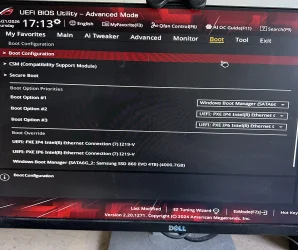
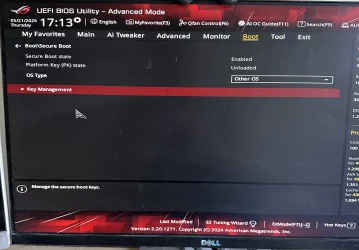
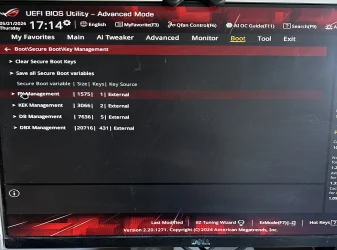
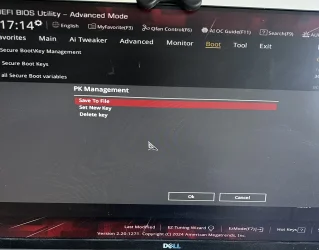
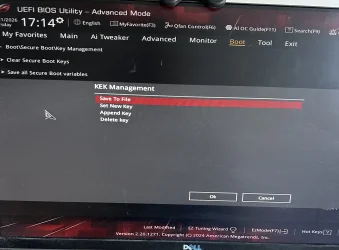
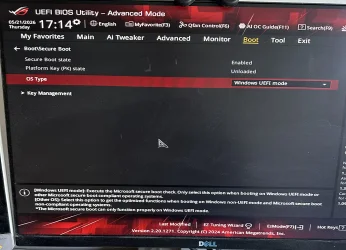
Thanks for your replies. Appreciate your time. I've attached the screenshots requested. I do have the option to Append in all but the PK key management. But I'm not sure if I need to do that. The check script seems to show that the keys were successfully installed, does it not?

As for the BIOS I think the previous version was 19xx before I updated to 2101. It was probably a good couple of years as I didn't have any problems or need to update until version 25H2 of Windows 11 got particular on me (previously on Win 11 23H2).IMG_1846.webpIMG_1847.webpIMG_1848.webpIMG_1849.webpIMG_1850.webpIMG_1851.webp
 

My Computer

System One

  • OS
    Windows 11
    Computer type
    PC/Desktop
    Manufacturer/Model
    Asus
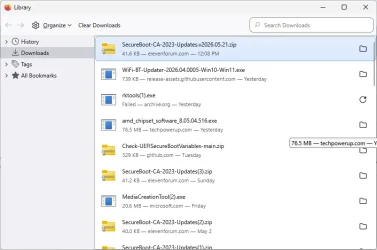
@garlin: thanks for changing your ZIP file naming convention.
1779383397663.webp
As you can see from my Firefox downloads page, it works quite nicely and doesn't incur the (n) suffix at the end of the filename, as the (3) and (2) instances showing illustrate.
Thanks again,
--Ed--
 

My Computers

System One System Two

  • OS
    Windows 11
    Computer type
    Laptop
    Manufacturer/Model
    Lenovo X380 Yoga
    CPU
    i7-8650U (8th Gen/Kaby Lake)
    Motherboard
    20LH000MUS (U3E1)
    Memory
    16 GB
    Graphics Card(s)
    Intel UHD Graphics 620
    Sound Card
    Integrated Conexant SmartAudio HD
    Monitor(s) Displays
    FlexView Display
    Screen Resolution
    1920x1080
    Hard Drives
    Toshiba 1 TB PCIe x3 NVMe SSD
    external 5TB Seagate USB-C attached HDD
    PSU
    Lenovo integrated 65W power brick
    Case
    Laptop
    Cooling
    Laptop
    Keyboard
    Integrated Lenovo ThinkPad keyboard
    Mouse
    touchscreen, touchpad
    Internet Speed
    GbE (Spectrum/Charter)
    Browser
    all of em
    Antivirus
    Defender
    Other Info
    Purchased early 2019 as Windows Insider test PC
  • Operating System
    Windows 11
    Computer type
    PC/Desktop
    Manufacturer/Model
    DIY
    CPU
    Ryzen 5800X
    Motherboard
    Asrock B550 Extreme4
    Memory
    128 GB (4x32 DDR5-5600)
    Graphics card(s)
    NVIDIA 3070Ti
    Sound Card
    built-in
    Monitor(s) Displays
    2xDell 2707
    Screen Resolution
    1980x1200
    Hard Drives
    2XNVMe, multiple HDDs from 3 to 12 TB
    PSU
    Seasonic 650
    Case
    NZXT Flo 6
    Cooling
    dual-fan air cooler
    Keyboard
    Logitech Wave
    Mouse
    Logitech Logi
    Internet Speed
    GbE
    Browser
    all of 'em
    Antivirus
    Defender
    Other Info
    temperamental UEFI
Thanks for your replies. Appreciate your time. I've attached the screenshots requested. I do have the option to Append in all but the PK key management. But I'm not sure if I need to do that. The check script seems to show that the keys were successfully installed, does it not?
Maybe this explains the problem:

ASUS ROG Secure Boot Settings Confusion
I also thought that if I choose “Windows UEFI mode”, it would load the Microsoft keys, so my keys would be overwritten.

It turned out that I am totally wrong, or I could say that ASUS made it extremely confusing.

The real meaning of “Windows UEFI mode” is to enable Secure Boot, and “Other OS” means to disable Secure Boot, and they have absolutely nothing to do with keys. This is why lots of articles online ask you to turn it into “Windows UEFI mode”, and reset the keys in the “Keys Management” submenu to use Microsoft Keys.

That’s how it goes. After turning the OS Type to “Microsoft UEFI mode”, it starts loading my self-signed Linux binary.

What a shame on you, ASUS, of making the prompts so confusing? “Enable” and “Disable” are much better choices.
 

My Computer

System One

  • OS
    Windows 7

Ho well, thanks Asus !!!

1779393884507.webp

@garlin based on this, I would assume PK is not installed and probably why Secure Boot On (Windows UEFI mode) cannot boot, it has nothing to validate the certs with
If @hottroc goes in each one, PK, KEK, DB, DBX and deletes everything, wouldn't your update script install all of them ?
That would do the same as when ask them to be in Setup mode so you can push the certs... no ?

Otherwise, @suatcini54 suggested in post #1877 of getting the certs on a USB key and installing them manually like you also suggest in the README.
He would probably need to get the certs from the EFI partition, but I woudn't know how/where to get them
I also have no idea if the PK is on the EFI partition...
 

My Computer

System One

  • OS
    Windows 11
One screen reports "Platform (PK) state = Unloaded", but the other lists one PK is installed. Total confusion.

Based on the screens, we're not talking about a really primitive BIOS, since it has a fancy GUI. In theory, we could Reset to factory defaults and manually Add the KEK CA 2023 key from a file. Which would allow the rest of the update to proceed.
 

My Computer

System One

  • OS
    Windows 7
One screen reports "Platform (PK) state = Unloaded", but the other lists one PK is installed. Total confusion.

Based on the screens, we're not talking about a really primitive BIOS, since it has a fancy GUI. In theory, we could Reset to factory defaults and manually Add the KEK CA 2023 key from a file. Which would allow the rest of the update to proceed.
Yup, @hottroc BIOS factory reset it is...!
Then you can start with a BIOS NVRAM that didn't carry over any old settings from the previous firmware version and have a more predictable behavior 🙏
 

My Computer

System One

  • OS
    Windows 11
One screen reports "Platform (PK) state = Unloaded", but the other lists one PK is installed. Total confusion.

Based on the screens, we're not talking about a really primitive BIOS, since it has a fancy GUI. In theory, we could Reset to factory defaults and manually Add the KEK CA 2023 key from a file. Which would allow the rest of the update to proceed.
I'm happy to try, but doesn't the ("AFTER") check script prove that the update has already been successful?
 

My Computer

System One

  • OS
    Windows 11
    Computer type
    PC/Desktop
    Manufacturer/Model
    Asus
I'm happy to try, but doesn't the ("AFTER") check script prove that the update has already been successful?

Yes, but I think your BIOS has carried over some part of the config from the previous firmware version and you can't fix it anymore.
I have seen this happen when multiple version of firmware were skipped between updates.
If every firmware is installed, over the years, OEM will change some of the settings in the BIOS making sure that it works with the version just before it.
If multiple firmware versions are skipped that's where some OEM BIOS firmware get messed up

And Garlin also, from is Secure Boot expertise, sees something weird about your compouter behavior.
 

My Computer

System One

  • OS
    Windows 11
Yup, @hottroc BIOS factory reset it is...!
Then you can start with a BIOS NVRAM that didn't carry over any old settings from the previous firmware version and have a more predictable behavior 🙏
Ah I see what you mean. I'll have a look and see what options there are for a factory reset. Note though I have already done a "Load Optimized Defaults" and also a full CMOS reset with the button battery removed for an hour before that.
 

My Computer

System One

  • OS
    Windows 11
    Computer type
    PC/Desktop
    Manufacturer/Model
    Asus
@hottroc
Based on what I can find online, it would be in the "Exit " menu
And you would have something like "Load Optimized Defaults", "Load Setup Defaults", or similar

Just saw in your previous post you've already done it
After BIOS firmware upgrade I assume ?
Probably, do it once more and clear all certs again
And then try Garlin's update script
 

My Computer

System One

  • OS
    Windows 11
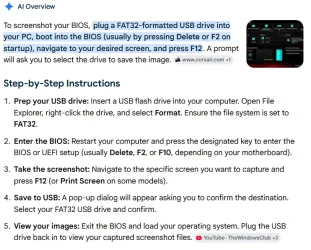
If possible, take pictures with your cell phone of the screens and available options in the BIOS and post them here
Most modern BIOS versions will allow you to take screenshots directly.

Here's the Google AI explanation, I've used this with my Gigabyte BIOS versions on two machines.

1779402429686.webp
 

My Computers

System One System Two

  • OS
    Win 11 Pro 25H2, Build 26200.8524
    Computer type
    PC/Desktop
    Manufacturer/Model
    Home Brew
    CPU
    Intel Core i5 14500
    Motherboard
    Gigabyte B760M G P WIFI
    Memory
    64GB DDR4
    Graphics Card(s)
    GeForce RTX 4060
    Sound Card
    Chipset Realtek
    Monitor(s) Displays
    LG 45" Ultragear, Acer 24" 1080p
    Screen Resolution
    5120x1440, 1920x1080
    Hard Drives
    Crucial P310 2TB 2280 PCIe Gen4 3D NAND NVMe M.2 SSD (O/S)
    Silicon Power 2TB US75 NVMe PCIe Gen4 M.2 2280 SSD (backup)
    Crucial BX500 2TB 3D NAND (2nd backup)
    Seagate 4TB Ironwolf, rotating HDD archive files
    External off-line backup Drives: 2 NVMe 4TB drives in external enclosures
    PSU
    Thermaltake Toughpower GF3 750W
    Case
    LIAN LI LANCOOL 216 E-ATX PC Case
    Cooling
    Lots of fans!
    Keyboard
    Microsoft Comfort Curve 2000
    Mouse
    Logitech G305
    Internet Speed
    Verizon FiOS 1GB
    Browser
    Firefox
    Antivirus
    Malware Bytes & Windows Defender Security
  • Operating System
    Win 11 Pro 25H2, Build 26200.8524
    Computer type
    PC/Desktop
    Manufacturer/Model
    Home Brew
    CPU
    Intel Core i5 14400
    Motherboard
    Gigabyte B760M DS3H AX
    Memory
    32GB DDR5
    Graphics card(s)
    Intel 700 Embedded GPU
    Sound Card
    Realtek Embedded
    Monitor(s) Displays
    27" HP 1080p
    Screen Resolution
    1920x1080
    Hard Drives
    Crucial P310 2TB 2280 PCIe Gen4 eD NAND PCIe SSD
    Samsung EVO 990 2TB NVMe Gen4 SSD
    Samsung 2TB SATA SSD
    PSU
    Thermaltake Smart BM3 650W
    Case
    Okinos Micro ATX Case
    Cooling
    Fans
    Keyboard
    Microsoft Comfort Curve 2000
    Mouse
    Logitech G305
    Internet Speed
    Verizon FiOS 1GB
    Browser
    Firefox
    Antivirus
    Malware Bytes & Windows Defender Security
hi, I need some help please.

I had difficult upgrading from Windows 11 23H2 to Windows 11 25H2. After trying lots of things unsuccessfully (thanks ChatGPT!) I finally tried updating my BIOS to the latest version from my manufacturer, Asus, which was dated March 2024.
I then loaded optimized defaults in the BIOS after which I successfully updated to 25H2 and Windows loaded fine. But I realized Secure Boot was Disabled (it was previously enabled in 23H2).
Every time I enable it now the system crashes on boot. However if I clear the keys it boots with Secure Boot enabled (but shows as or is effectively Off)

First I tried Mosby and it appeared successful but still wouldn't boot, then I found this topic and read all 91 pages. I tried the Check_UEFI-CA2023.ps1 script and received the below output. The formatting error didn't help, but I tried the Update_UEFI-CA2023.ps1 script anyway. It appeared successful in copying the certs but still wouldn't boot after, so I had to clear the keys to get into Windows again. So I'm basically in Setup Mode now but not sure what is going wrong. [...]
post #1808 garlin's PowerShell scripts for updating Secure Boot CA 2023

I'll expose how did I proceed initially. My miniPC should have an Asus design, it's more modern than hottroc's system, although with an older BIOS (2021) that won't be updated.

My update from 23H2 to 24H2 had been painful for a driver problem I wasn't aware of ( How to Fix "What Needs Your Attention" Windows 10 Setup Errors , different context but same exact drivers and same consequences) and for a performance problem associated to a 3rd party Antivirus/Firewall, that I ended up uninstalling as this computer (Celeron J4125) isn't exactly powerful. The updates attempts were lasting 16 hours and failing at the very end, w/o AV/FW it was like 2 hours iirc. I could reinstall the drivers (Windows features actually, currently fixed afaik) afterwards (after doing the 1st CU w/ 24H2).

My update from 24H2 to 25H2 was smooth and quick.

If we only know that the system doesn't boot upon enabling Secure Boot, we cannot know if there's anything to do in the UEFI BIOS keys/options or in Windows. I say this b/c Idk (sorry if it's clearly so) if you have to replace your original PK and install the "Windows OEM Devices" certs kit.

This is my initial check (done in January, NOTICE I DON'T HAVE ANY PROBLEM NOW!!!):

Code:
PS C:\Temporal> powershell -nop -ep bypass -f check_uefi-ca2023.ps1 -Verbose -Audit
Windows 11 25H2 (26200.7623)

Secure Boot: OFF (Audit Report runs as ON)
Virtualization Based Security: ON
BitLocker on (C:) OFF

BIOS Firmware
-------------
    Fanless Mini PC Quieter2
    Version: 10.1
    Date: 2021-07-24

Factory Default UEFI PK Cert
----------------------------
    DO NOT TRUST - AMI Test PK

UEFI PK Cert
------------
    DO NOT TRUST - AMI Test PK
        Platform Key is UNTRUSTED.
        [KEK CA 2023] Update is available from ASUS or Microsoft.

Factory Default UEFI KEK Certs
------------------------------
    Microsoft Corporation KEK CA 2011

UEFI KEK Certs
--------------
    Microsoft Corporation KEK CA 2011

Factory Default UEFI DB Certs
-----------------------------
    Microsoft Corporation UEFI CA 2011
    Microsoft Windows Production PCA 2011

UEFI DB Certs
-------------
    Microsoft Corporation UEFI CA 2011
    Microsoft Windows Production PCA 2011

Factory Default UEFI DBX Certs
------------------------------
    (NONE)
    EFI_CERT_SHA256_GUID Signatures: 77

UEFI DBX Certs
--------------
    (NONE)
    Windows BootMgr SVN is MISSING.
    EFI_CERT_SHA256_GUID Signatures: 272

EFI Files
---------
    Disk 0: Windows Boot Manager [Production PCA 2011] will be ALLOWED.
        bootmgfw.efi File version: 26100.30227

    Registry: WindowsUEFICA2023Capable = 0
        [Windows UEFI CA 2023] not in UEFI DB.

    Disk 0: SkuSiPolicy.p7b (for VBS) is NOT PRESENT.


AUDIT REPORT
============
1.  Secure Boot is DISABLED
2.  [DO NOT TRUST - AMI Test PK] is UNTRUSTED
3.  [Microsoft Corporation KEK 2K CA 2023] is missing from UEFI KEK
4.  [Windows UEFI CA 2023] is missing from UEFI DB
5.  [Microsoft UEFI CA 2023] is missing from UEFI DB
6.  [Microsoft Option ROM UEFI CA 2023] is missing from UEFI DB
7.  [Production PCA 2011] is missing from UEFI DBX
8.  DBX Updates are missing from UEFI DBX
9.  Windows BootMgr SVN is missing from UEFI DBX
10. Windows Boot Manager [Production PCA 2011] is wrong version
11. SkuSiPolicy.p7b (for VBS) is missing


REQUIRED ACTION
===============

MANUAL UPDATE of the BIOS is required.

Enter the BIOS menu, and search for User or Custom Mode option of updating the UEFI PK or KEK keys.
If your BIOS doesn't support this feature, select Setup Mode to clear all certs.

OPTION 1:  To install [UEFI CA 2023] certs WITHOUT REVOKING the [PCA 2011] cert, run the command:

    Update_UEFI-CA2023.ps1


OPTION 2:  To install [UEFI CA 2023] certs and REVOKE the [PCA 2011] cert, run the command:

    Update_UEFI-CA2023.ps1 -Revoke

PS C:\Temporal>

I believe the following I did is this, w/o going to the BIOS first. I was actively reading this thread and I suppose I got a precise plan for my case:

Code:
PS C:\Temporal> .\Update_UEFI-CA2023.ps1 -audit

AUDIT REPORT
============
1.  [Microsoft Corporation KEK 2K CA 2023] missing from UEFI KEK
2.  [Windows UEFI CA 2023] missing from UEFI DB (dbupdate2024.bin)
3.  [Microsoft UEFI CA 2023] missing from UEFI DB (DBUpdate3P2023.bin)
4.  [Microsoft Option ROM UEFI CA 2023] missing from UEFI DB (DBUpdateOROM2023.bin)
5.  [Production PCA 2011] missing from UEFI DBX (DBXUpdate2024.bin)
6.  DBX Updates are missing from UEFI DBX (dbxupdate.bin)
7.  Windows BootMgr SVN is missing from UEFI DBX (DBXUpdateSVN.bin)
8.  Windows Boot Manager [Production PCA 2011] is wrong version
9.  SkuSiPolicy.p7b (for VBS) is missing

PS C:\Temporal> .\Update_UEFI-CA2023.ps1
Downloading "WindowsOEMDevicesPK.der" from GitHub.
Copying "WindowsOEMDevicesPK.der" to EFI.
Downloading "KEKUpdate_ASUS_PK1.bin" from GitHub.
Successfully appended "KEKUpdate_ASUS_PK1.bin" to UEFI KEK.
Successfully appended "dbupdate2024.bin" to UEFI DB.
Successfully appended "DBUpdate3P2023.bin" to UEFI DB.
Successfully appended "DBUpdateOROM2023.bin" to UEFI DB.
Copying EFI boot files.
Archivos de arranque creados correctamente.

REQUIRED ACTION
---------------
Please follow the README_UEFI.TXT instructions, for installing the PK cert from BIOS.

Restart Windows, for UEFI updates to take effect.

PS C:\Temporal>

So I had to replace my PK (notice that I don't know if you actually have to do this...). This wasn't easy for me although this UEFI BIOS is moderately or quite friendly. I have this in a blur, but I believe I spent 1/2 hour trying (unsuccessfully) to append the PK to the KEK variable for lack of practice or knowledge. I recall a message like "deleting the PK will delete all the certs" but I'm quite sure I had to do it before loading WindowsOEMDevicesPK.der as the new PK (again Idk if your original PK is good or not).

This is the following I did in Windows. The 2023 KEK wasn't appended yet (it had been appended successfully by the update script as you can see above, so I suppose that deleting the PK for replacing it was what deleted the KEK). If you don't have to replace your PK this process should be simpler for you, except your more cryptic BIOS and whatever other difficulty.

Code:
PS C:\Temporal> .\Check_UEFI-CA2023.ps1 -verbose -audit
Windows 11 25H2 (26200.7623)

Secure Boot: OFF (Audit Report runs as ON)
Virtualization Based Security: ON
BitLocker on (C:) OFF

BIOS Firmware
-------------
    Fanless Mini PC Quieter2
    Version: 10.1
    Date: 2021-07-24

Factory Default UEFI PK Cert
----------------------------
    DO NOT TRUST - AMI Test PK

UEFI PK Cert
------------
    Windows OEM Devices PK
        [KEK CA 2023] Update is available from Microsoft.

Factory Default UEFI KEK Certs
------------------------------
    Microsoft Corporation KEK CA 2011

UEFI KEK Certs
--------------
    Microsoft Corporation KEK CA 2011

Factory Default UEFI DB Certs
-----------------------------
    Microsoft Corporation UEFI CA 2011
    Microsoft Windows Production PCA 2011

UEFI DB Certs
-------------
    Microsoft Corporation UEFI CA 2011
    Microsoft Windows Production PCA 2011
    Microsoft Option ROM UEFI CA 2023
    Microsoft UEFI CA 2023
    Windows UEFI CA 2023

Factory Default UEFI DBX Certs
------------------------------
    (NONE)
    EFI_CERT_SHA256_GUID Signatures: 77

UEFI DBX Certs
--------------
    (NONE)
    Windows BootMgr SVN is MISSING.
    EFI_CERT_SHA256_GUID Signatures: 272

EFI Files
---------
    Disk 0: Windows Boot Manager [Windows UEFI CA 2023] will be BANNED.
        bootmgfw.efi File version: 26100.30227

    Registry: WindowsUEFICA2023Capable = 2
        [Windows UEFI CA 2023] in UEFI DB, and Windows starting from CA 2023 Boot Manager.

    Disk 0: SkuSiPolicy.p7b (for VBS) is NOT PRESENT.


AUDIT REPORT
============
1.  Secure Boot is DISABLED
2.  [Microsoft Corporation KEK 2K CA 2023] is missing from UEFI KEK
3.  [Production PCA 2011] is missing from UEFI DBX
4.  DBX Updates are missing from UEFI DBX
5.  Windows BootMgr SVN is missing from UEFI DBX
6.  SkuSiPolicy.p7b (for VBS) is missing


REQUIRED ACTION
===============

Run the command:
    Update_UEFI-CA2023.ps1 -Revoke

Finish the UEFI steps to manually add the [KEK CA 2023] cert, if the script provided instructions.

PS C:\Temporal>

Appending the 2023 KEK to the KEK variable in the BIOS was easy, I believe. Following check: Actually I'm not sure I loaded the KEK manually in the BIOS in this stage. I cannot see that the KEK file was copied to the ESP, and the following script output I have conserved is the following check with the KEK in its place. One possibility is that the file was copied anyway and I returned to the BIOS to load it, but another one is that I run the update script again and I didn't conserve its output by forgetfulness or whatever. The previous run of the update script had appended the KEK successfully (I trust its output and I didn't pay attention to this detail while in the BIOS anyway).


Code:
PS C:\Temporal> .\Check_UEFI-CA2023.ps1 -verbose -audit
Windows 11 25H2 (26200.7623)

Secure Boot: OFF (Audit Report runs as ON)
Virtualization Based Security: ON
BitLocker on (C:) OFF

BIOS Firmware
-------------
    Fanless Mini PC Quieter2
    Version: 10.1
    Date: 2021-07-24

Factory Default UEFI PK Cert
----------------------------
    DO NOT TRUST - AMI Test PK

UEFI PK Cert
------------
    Windows OEM Devices PK

Factory Default UEFI KEK Certs
------------------------------
    Microsoft Corporation KEK CA 2011

UEFI KEK Certs
--------------
    Microsoft Corporation KEK CA 2011
    Microsoft Corporation KEK 2K CA 2023

Factory Default UEFI DB Certs
-----------------------------
    Microsoft Corporation UEFI CA 2011
    Microsoft Windows Production PCA 2011

UEFI DB Certs
-------------
    Microsoft Corporation UEFI CA 2011
    Microsoft Windows Production PCA 2011
    Microsoft Option ROM UEFI CA 2023
    Microsoft UEFI CA 2023
    Windows UEFI CA 2023

Factory Default UEFI DBX Certs
------------------------------
    (NONE)
    EFI_CERT_SHA256_GUID Signatures: 77

UEFI DBX Certs
--------------
    (NONE)
    Windows BootMgr SVN is MISSING.
    EFI_CERT_SHA256_GUID Signatures: 272

EFI Files
---------
    Disk 0: Windows Boot Manager [Windows UEFI CA 2023] will be ALLOWED.
        bootmgfw.efi File version: 26100.30227

    Registry: WindowsUEFICA2023Capable = 2
        [Windows UEFI CA 2023] in UEFI DB, and Windows starting from CA 2023 Boot Manager.

    Disk 0: SkuSiPolicy.p7b (for VBS) is NOT PRESENT.


AUDIT REPORT
============
1.  Secure Boot is DISABLED
2.  [Production PCA 2011] is missing from UEFI DBX
3.  DBX Updates are missing from UEFI DBX
4.  Windows BootMgr SVN is missing from UEFI DBX
5.  SkuSiPolicy.p7b (for VBS) is missing


REQUIRED ACTION
===============

To revoke the [PCA 2011] cert, run the commands, run the commands:

    reg add HKEY_LOCAL_MACHINE\SYSTEM\CurrentControlSet\Control\Secureboot /v AvailableUpdates /t REG_DWORD /d 0x282 /f
    powershell Start-ScheduledTask -TaskName "\Microsoft\Windows\PI\Secure-Boot-Update"

To install SkuSiPolicy.p7b, run the command:
    Update_UEFI-CA2023.ps1 -SkuSiPolicy

PS C:\Temporal>

This is already a valid Secure Boot state, although w/o revocations. The final "required action" is to revoke, what I did, although later on I found difficulties with my bootable medias and I did other changes...
 
Last edited:

My Computer

System One

  • OS
    Windows 11
    Manufacturer/Model
    MeLE Quieter 2Q (fanless miniPC)
    CPU
    Celeron J4125 (10th gen)
    Memory
    8GB DDR4
    Monitor(s) Displays
    Samsung SyncMaster T260
    Screen Resolution
    1920x1200
    Hard Drives
    256GB eMMC (Windows)
    2TB USB3 HDD Toshiba (Data)
. . . . . . . . .

This is already a valid Secure Boot state, although w/o revocations. The final "required action" is to revoke, what I did, although later on I found difficulties with my bootable medias and I did other changes...

So, basically:
  1. you deleted all your certs
  2. then you ran Garlin's update which told you to install the PK from the BIOS
  3. you installed "Windows OEM Devices PK" from the BIOS
  4. finally you were able to boot with Secure Boot "On"
If I understood correctly what you dit, then it's what Garlin is telling Hottroc to do...

PS: not trying to downplay what you did, just summarizing your actions...
 
Last edited:

My Computer

System One

  • OS
    Windows 11
So, basically:
  1. you deleted all your certs
  2. then you ran Garlin's update which told you to install the PK from the BIOS
  3. you installed "Windows OEM Devices PK" from the BIOS
  4. finally you were able to boot with Secure Boot "On"
If I understood correctly what you dit, then it's what Garlin is telling Hottroc to do...

PS: not trying to downplay what you did, just summarizing your actions...
Not exact. I used a now very old version of the script (2026-01-18 if it matters). My knowledge wasn't "perfect" and I did erroneous actions, but I believe I only lost time in them.

I got a plan, maybe I asked questions, maybe it was covered in the directions. I read this thread carefully for sure, maybe others too. Call all this "step 0".

The "step 1" wasn't deleting the certs for sure. The step 1 was the first check I've posted. I'm not 100% sure that I learnt the non validity of my PK in that check, maybe I already knew it b/c the "DO NOT TRUST - AMI Test PK" problem was quite in the front, but I conserved some outputs and the following part of my first "Code:" above is the most tangible thing I've got now:

Code:
UEFI PK Cert
------------
    DO NOT TRUST - AMI Test PK
        Platform Key is UNTRUSTED.
        [KEK CA 2023] Update is available from ASUS or Microsoft.

Again, Idk if the hottroc's PK should be replaced. This is one of my points. See hottroc's
post #1866 [dummy text]:

Code:
Factory Default UEFI PK Cert
----------------------------
    ASUSTeK MotherBoard PK Certificate
[dummy text]

It doesn't sound me bad, and there isn't a "Platform Key is UNTRUSTED" like in my case. Idk if you can replace all the PK's, valid and not valid, for the sake of a more uniform process with a cleanly trimmed description.

The step 2 was running the update script (full output above, notice the KEK was successfully appended, but the PK file was only copied to the ESP), whose output ended with:

Code:
REQUIRED ACTION
---------------
Please follow the README_UEFI.TXT instructions, for installing the PK cert from BIOS.

Restart Windows, for UEFI updates to take effect.

So having to replace the PK in the BIOS was fully under control. Idk if hottroc has to do this.

Step 3 was rebooting to the BIOS to manually load the PK. As said I only saw one possible procedure that was deleting the old PK first (what would delete all the certs according to the message I saw, although it only deleted the KEK as you can see in the 3rd "Code:"). I think I have omitted that between my erroneous and fortunately failed attempts to append the PK to the KEK variable and the successful deletion of the PK, there were failed attempts to replace the PK directly (or append, my knowledge wasn't "perfect"), w/o deleting the old PK first.

Step 3 trimmed and not generalizable version: I rebooted to the BIOS, deleted the old PK what deleted the recently appended KEK, and loaded the "Windows OEM Devices PK" that had been recorded in the ESP by the update script as WindowsOEMDevicesPK.der . Idk if hottroc has to replace his PK.

Step 4 was running the check script again to see the result of step 3 and what to do next. The output ended with:

Code:
REQUIRED ACTION
===============

Run the command:
    Update_UEFI-CA2023.ps1 -Revoke

Finish the UEFI steps to manually add the [KEK CA 2023] cert, if the script provided instructions.

Step 5: the KEK obviously goes first. I have edited my previous post to reflect that actually I don't recall if I went to the BIOS again or I run the update script again w/o conserving the output. For whatever method I got it and the following check script output ended with:

Code:
REQUIRED ACTION
===============

To revoke the [PCA 2011] cert, run the commands, run the commands:

    reg add HKEY_LOCAL_MACHINE\SYSTEM\CurrentControlSet\Control\Secureboot /v AvailableUpdates /t REG_DWORD /d 0x282 /f
    powershell Start-ScheduledTask -TaskName "\Microsoft\Windows\PI\Secure-Boot-Update"

To install SkuSiPolicy.p7b, run the command:
    Update_UEFI-CA2023.ps1 -SkuSiPolicy

that are the steps to do the optional (for now) revocations, but the part done is finished.

 
Last edited:

My Computer

System One

  • OS
    Windows 11
    Manufacturer/Model
    MeLE Quieter 2Q (fanless miniPC)
    CPU
    Celeron J4125 (10th gen)
    Memory
    8GB DDR4
    Monitor(s) Displays
    Samsung SyncMaster T260
    Screen Resolution
    1920x1200
    Hard Drives
    256GB eMMC (Windows)
    2TB USB3 HDD Toshiba (Data)
Hi Garlin,

I need some guidance with my Certs. I seem to have a 'stuck' 2023 cert and I have already revoked the 2011 cert. My computer still boots and I have a backup if needed so NOT an emergency.

I received a 1801 alert in event manager this morning after revoking 2011 cert when I rebooted with the following warning.
Updated Secure Boot certificates are available on this device but have not yet been applied to the firmware. Review the published guidance to complete the update and maintain full protection. This device signature information is included here.
DeviceAttributes: BaseBoardManufacturer:ASUSTeK COMPUTER INC.;FirmwareManufacturer:American Megatrends International

2025 Asus Rog Strix laptop with the latest bios applied. VBS and Credential Guard: ON

I had already run: reg add HKEY_LOCAL_MACHINE\SYSTEM\CurrentControlSet\Control\Secureboot /v AvailableUpdates /t REG_DWORD /d 0x4800 /f
powershell Start-ScheduledTask -TaskName "\Microsoft\Windows\PI\Secure-Boot-


PowerShell 7.6.1
PS C:\Windows\System32> cd "C:\Users\Public\Public Scripts\SecureBoot-CA-2023-Updates (latest)"
PS C:\Users\Public\Public Scripts\SecureBoot-CA-2023-Updates (latest)> ./Check_UEFI-CA2023.ps1 -Verbose -Audit
Windows 11 25H2 (26200.8457)

Secure Boot: ON
Virtualization Based Security: ON
BitLocker on (C:) OFF

BIOS Firmware
-------------
ASUSTeK COMPUTER INC. ROG Strix G16 G615LM_G615LM
Version: G615LM.335
Date: 2026-03-19

Factory Default UEFI PK Cert
----------------------------
ASUS Secure Boot PK

UEFI PK Cert
------------
ASUS Secure Boot PK

Factory Default UEFI KEK Certs
------------------------------
Microsoft Corporation KEK CA 2011
Microsoft Corporation KEK 2K CA 2023
ASUS Secure Boot KEK

UEFI KEK Certs
--------------
Microsoft Corporation KEK CA 2011
Microsoft Corporation KEK 2K CA 2023
ASUS Secure Boot KEK

Factory Default UEFI DB Certs
-----------------------------
Microsoft Corporation UEFI CA 2011
Microsoft Windows Production PCA 2011
Microsoft UEFI CA 2023
Windows UEFI CA 2023
ASUS Secure Boot DB

UEFI DB Certs
-------------
Microsoft Corporation UEFI CA 2011
Microsoft Windows Production PCA 2011
Microsoft UEFI CA 2023
Windows UEFI CA 2023
ASUS Secure Boot DB

Factory Default UEFI DBX Certs
------------------------------
(NONE)
EFI_CERT_SHA256_GUID Signatures: 371

UEFI DBX Certs
--------------
Microsoft Windows Production PCA 2011
Windows BootMgr SVN 8.0
EFI_CERT_SHA256_GUID Signatures: 436

UEFI Variables
--------------
Credential Guard: ON

EFI Files
---------
Windows Boot Manager [Windows UEFI CA 2023] is ALLOWED.
\\.\HarddiskVolume1\EFI\Microsoft\Boot\bootmgfw.efi
File Version: 28000.322, SVN 8.0

Registry: "WindowsUEFICA2023Capable" = 2
[Windows UEFI CA 2023] in UEFI DB, and Windows starting from CA 2023 Boot Manager.

[OPTIONAL] SkuSiPolicy.p7b (for VBS) is MISSING.


AUDIT REPORT
============
1. [Microsoft Option ROM UEFI CA 2023] is missing from UEFI DB

[OPTIONAL] SkuSiPolicy.p7b (for VBS) is missing from EFI


REQUIRED ACTION
===============
To install [UEFI CA 2023] certs, run the commands:

reg add HKEY_LOCAL_MACHINE\SYSTEM\CurrentControlSet\Control\Secureboot /v AvailableUpdates /t REG_DWORD /d 0x4800 /f
powershell Start-ScheduledTask -TaskName "\Microsoft\Windows\PI\Secure-Boot-
 

My Computer

System One

  • OS
    Windows 11 & Zorin Pro
    Computer type
    Laptop
    Manufacturer/Model
    Asus Rog Strix G16
    CPU
    Intel® Core™ Ultra 9 Processor 275HX 2.7 GHz
    Motherboard
    AsusteK Computer
    Memory
    32 gb
    Graphics Card(s)
    NVIDIA® GeForce RTX™ 5060 Laptop GPU
    Sound Card
    Realtek High Definition Audio
    Monitor(s) Displays
    Laptop 16 inch
    Screen Resolution
    2560 X 1600
    Hard Drives
    Boot: Samsung 9100 NVME 2 TB Microsoft Storage Controller: Standard NVM Express Driver: Microsoft 6/21/2006. No SATA/AHCI on my motherboard or in bios
    Mouse
    Pad
    Browser
    Google Chrome
    Antivirus
    Microsoft
    Other Info
    Printer: HP Color LaserJet MFP M477dw
I received a 1801 alert in event manager this morning after revoking 2011 cert when I rebooted with the following warning.
Updated Secure Boot certificates are available on this device but have not yet been applied to the firmware.
UEFI DB Certs
-------------
Microsoft Corporation UEFI CA 2011
Microsoft Windows Production PCA 2011
Microsoft UEFI CA 2023
Windows UEFI CA 2023
ASUS Secure Boot DB
Your UEFI is missing the Option ROM. MS technically considers it optional, but the Secure Boot task flags a TPM-WMI event when it's missing. MS's left hand and right hand don't agree with each other.

Run these commands:
Code:
reg add HKEY_LOCAL_MACHINE\SYSTEM\CurrentControlSet\Control\Secureboot /v AvailableUpdates /t REG_DWORD /d 0x800 /f
powershell Start-ScheduledTask -TaskName "\Microsoft\Windows\PI\Secure-Boot-
 

My Computer

System One

  • OS
    Windows 7
Saw that yesterday. They still haven't pushed the current DBXUpdate2024.bin to the repo (it's now two years out of date). The old version has a baseline of SVN 2.0 bundled in the file, and the April 2026 version has SVN 5.0.

Even if you diligently applied the DBXUpdateSVN.bin to get the latest SVN of 8.0, it's still important to keep the GitHub and Windows versions in sync.
 

My Computer

System One

  • OS
    Windows 7
Here's a question that keeps popping up in my head.

Assuming that I have all my computers properly updated and MSC is currently happy with the configuration for Secure Boot and the certs, will MSC be keeping things updated, or will this be an ongoing issue that we have to keep addressing?
 

My Computers

System One System Two

  • OS
    Win 11 Pro 25H2, Build 26200.8524
    Computer type
    PC/Desktop
    Manufacturer/Model
    Home Brew
    CPU
    Intel Core i5 14500
    Motherboard
    Gigabyte B760M G P WIFI
    Memory
    64GB DDR4
    Graphics Card(s)
    GeForce RTX 4060
    Sound Card
    Chipset Realtek
    Monitor(s) Displays
    LG 45" Ultragear, Acer 24" 1080p
    Screen Resolution
    5120x1440, 1920x1080
    Hard Drives
    Crucial P310 2TB 2280 PCIe Gen4 3D NAND NVMe M.2 SSD (O/S)
    Silicon Power 2TB US75 NVMe PCIe Gen4 M.2 2280 SSD (backup)
    Crucial BX500 2TB 3D NAND (2nd backup)
    Seagate 4TB Ironwolf, rotating HDD archive files
    External off-line backup Drives: 2 NVMe 4TB drives in external enclosures
    PSU
    Thermaltake Toughpower GF3 750W
    Case
    LIAN LI LANCOOL 216 E-ATX PC Case
    Cooling
    Lots of fans!
    Keyboard
    Microsoft Comfort Curve 2000
    Mouse
    Logitech G305
    Internet Speed
    Verizon FiOS 1GB
    Browser
    Firefox
    Antivirus
    Malware Bytes & Windows Defender Security
  • Operating System
    Win 11 Pro 25H2, Build 26200.8524
    Computer type
    PC/Desktop
    Manufacturer/Model
    Home Brew
    CPU
    Intel Core i5 14400
    Motherboard
    Gigabyte B760M DS3H AX
    Memory
    32GB DDR5
    Graphics card(s)
    Intel 700 Embedded GPU
    Sound Card
    Realtek Embedded
    Monitor(s) Displays
    27" HP 1080p
    Screen Resolution
    1920x1080
    Hard Drives
    Crucial P310 2TB 2280 PCIe Gen4 eD NAND PCIe SSD
    Samsung EVO 990 2TB NVMe Gen4 SSD
    Samsung 2TB SATA SSD
    PSU
    Thermaltake Smart BM3 650W
    Case
    Okinos Micro ATX Case
    Cooling
    Fans
    Keyboard
    Microsoft Comfort Curve 2000
    Mouse
    Logitech G305
    Internet Speed
    Verizon FiOS 1GB
    Browser
    Firefox
    Antivirus
    Malware Bytes & Windows Defender Security
Here's a question that keeps popping up in my head.

Assuming that I have all my computers properly updated and MSC is currently happy with the configuration for Secure Boot and the certs, will MSC be keeping things updated, or will this be an ongoing issue that we have to keep addressing?
Let's assume you've completed the two CA 2023 hurdles:
1. Successfully installed the CA 2023 certs​
2. Successfully revoked PCA 2011​

Do you need to keep running the check or update scripts? No. There are no more X509 (certs with formal names) to be installed. The process is finished, unless MS finds a future security disaster that requires us to ban CA 2023 and start the whole cycle all over again.

Every month, you might or might not get a new Windows boot manager for security reasons. The Secure Boot task has the responsibility (since it runs every 12 hours), to check for recent boot manager changes and update the SVN. Unless there's a Secure Boot task bug or a malformed update file, there's no reason this process can't run in the background by itself.

The primary certs are only updated once. The only things to change in the future are possibly DBXUpdate.bin (EFI signatures) and the SVN. When I inform people they're done, they should go out and stop worrying about Secure Boot. Well, unless they're making a Macrium boot drive and need to rebuild it because the boot manager changed that month.
 

My Computer

System One

  • OS
    Windows 7

Latest Support Threads

Back
Top Bottom