PS: I have written this w/o seeing the post #1913... I must go out for some hours at least.
I did all my changes with Secure Boot off.
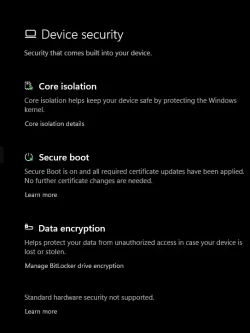
This computer started as Windows 10 in 2021 H4 but I installed Win11 from Windows Update in some few months. I was very busy in that age (I had purchased it b/c I needed a modern OS urgently, its installation was very smooth and quick so I had computer in 2-3 hours from receiving it) so I didn't go to the BIOS right away. At some moment I went to the BIOS, I didn't touch anything and I would swear SB was ON. Before installing the CA2023 certs I went to the BIOS again, found SB off for unknown reason but I left it so for the moment. One of the things I had learnt is that you can run the scripts with SB off, and I judged it safer.
Then I did as described in my posts
#1892 and
#1985. Notice that SB is off even after the last "Code:" of post #1892. I turned it on after that w/o problems.
On Asus Z370 motherboards, the "Windows UEFI" setting enables native UEFI booting and Secure Boot (which is required to run Windows 11). The "Other OS" setting disables Secure Boot, allowing the system to boot older legacy OS setups or Linux distributions that do not have signed bootloaders.
Key Differences
Windows UEFI: Enables Secure Boot. This authenticates the operating system's bootloader, preventing rootkits or unauthorized software from loading at startup. It is required for modern features like Windows 11's TPM 2.0 enforcement.
Other OS: Disables Secure Boot. It is primarily used for Linux distributions that don't support Microsoft's Secure Boot keys, or older legacy Windows (7/8) installations that rely on MBR partitioning and the Compatibility Support Module (CSM).
Which one should you pick?
Select Windows UEFI if you are running Windows 10 or 11 and your drive is formatted with the GPT partition style.
Select Other OS only if you are experiencing boot issues with certain Linux distributions, running an older legacy OS, or if your current Windows installation relies on a legacy MBR drive format.
For a quick and easy guide on how to navigate the BIOS menus to correctly enable UEFI and Secure Boot settings:
I HAVE NO IDEA OF THE VIDEO'S RELEVANCE!!!
But, there're motherboards that do a mix of the modes "UEFI with CSM" and "Legacy BIOS" as only one mode (for this reason, many users believe that CSM and legacy BIOS are just synonyms, and that anything "CSM" is exactly the same thing as anything "legacy BIOS", but this isn't true). Definitely, ANY flavor of UEFI is from a different galaxy or universe from ANY flavor of Legacy BIOS. If you want, you can run (with the keys Win-R) msinfo32.exe and you will see a line "BIOS mode: UEFI". If you had an older OS booting from an MBR disk instead, it would read "BIOS mode: Legacy".
And the BIOS setting? Many mobos have a single setting, named in very diverse ways like "Other OS", that allow to boot either in UEFI mode or in Legacy mode. The mobo decides depending on the boot disk format: GPT -> UEFI and MBR -> Legacy. At this point it wouldn't hurt to go to disk management and see that your disk is GPT. Then what's left in the option "Windows UEFI" vs "Other OS"? Secure Boot. Secure Boot needs these two things (among some others):
- The computer boots in UEFI.
- CSM is off (or the computer cannot do CSM, for more modern computers).
So, instead of sporting a "direct" Secure Boot on/off setting, your mobo can do it indirectly by enabling UEFI with CSM through the "Other OS" setting (valid also for older OS's and Legacy-MBR) and a GPT disk (that either boots in UEFI or it cannot boot, so the mobo chooses UEFI).
What would I do now? (I'm reviewing your screenshots in post #1881):
- Disable PXE unless you're using it (it's likely done in a different screen, and you'd lose your boot options #2 and #3; PXE requires an ad-hoc server and what not, if you don't use it PXE is completely pointless, long ago I enabled it by accident in a very old computer that named it as "LAN Boot ROM" thinking it could make the net faster or whatever, but the boot process got stuck b/c I've never had anything PXE lol, what I learnt years after).
- Load the factory default SB keys. I cannot see how in the screenshots (maybe a submenu of each of PK, KEK, DB and DBX management) but it should be possible. Maybe in the mobo's manual, maybe knowing the mobo's model.
- The computer won't boot with the default SB keys and SB on b/c you don't have the 2023 certs necessary for your newest bootfile, hence disable Secure Boot turning "OS Type" to "Other OS". Boot to Windows.
- Run .\check_UEFI-CA2023.ps1 -verbose -audit . What I want to see is whether you should replace your PK or not. As you can boot in "Other OS" mode that is a flexible mode, I'm hoping CSM isn't being activated and the check script can read the SB stuff. In the 1st check script I did (post #1892):
Code:
Factory Default UEFI PK Cert
----------------------------
    DO NOT TRUST - AMI Test PK

UEFI PK Cert
------------
    DO NOT TRUST - AMI Test PK
        Platform Key is UNTRUSTED.
        [KEK CA 2023] Update is available from ASUS or Microsoft.
The non validity of my PK wasn't indicated in the "Factory Default" section, but in the effective certs section, what means that the PK should be loaded to see its validity. SB was off in that moment. You can do the update process with SB off and turn it on afterwards.