Solved garlin's PowerShell scripts for updating Secure Boot CA 2023


So, basically:
  1. you deleted all your certs
  2. then you ran Garlin's update which told you to install the PK from the BIOS
  3. you installed "Windows OEM Devices PK" from the BIOS
  4. finally you were able to boot with Secure Boot "On"
If I understood correctly what you dit, then it's what Garlin is telling Hottroc to do...

PS: not trying to downplay what you did, just summarizing your actions...
I have done that, but was unable to boot. I didn't manually update the KEK though.
 

My Computer

System One

  • OS
    Windows 11
    Computer type
    PC/Desktop
    Manufacturer/Model
    Asus
C:\Users\Public\Public Scripts\SecureBoot-CA-2023-Updates (latest)> reg add HKEY_LOCAL_MACHINE\SYSTEM\CurrentControlSet\Control\Secureboot /v AvailableUpdates /t REG_DWORD /d 0x800 /f
The operation completed successfully.
PS C:\Users\Public\Public Scripts\SecureBoot-CA-2023-Updates (latest)> powershell Start-ScheduledTask -TaskName "\Microsoft\Windows\PI\Secure-Boot-

I know how to run simple scripts but haven't run any scheduled ones before. Do I have to do any else other than restart a couple times? My certs still seem to be stuck?

Thanks for all your help

Larry
 

My Computer

System One

  • OS
    Windows 11 & Zorin Pro
    Computer type
    Laptop
    Manufacturer/Model
    Asus Rog Strix G16
    CPU
    Intel® Core™ Ultra 9 Processor 275HX 2.7 GHz
    Motherboard
    AsusteK Computer
    Memory
    32 gb
    Graphics Card(s)
    NVIDIA® GeForce RTX™ 5060 Laptop GPU
    Sound Card
    Realtek High Definition Audio
    Monitor(s) Displays
    Laptop 16 inch
    Screen Resolution
    2560 X 1600
    Hard Drives
    Boot: Samsung 9100 NVME 2 TB Microsoft Storage Controller: Standard NVM Express Driver: Microsoft 6/21/2006. No SATA/AHCI on my motherboard or in bios
    Mouse
    Pad
    Browser
    Google Chrome
    Antivirus
    Microsoft
    Other Info
    Printer: HP Color LaserJet MFP M477dw
I have done that, but was unable to boot. I didn't manually update the KEK though.
run Garlin's lastest check script with "-verbose -audit" flags and paste result so we can see your current state
see post #1 for latest version: SecureBoot-CA-2023-Updates.v2026.05.21

And did you do a factory reset before doing does steps ? ("Load Optimized Defaults")
 

My Computer

System One

  • OS
    Windows 11
The primary certs are only updated once. The only things to change in the future are possibly DBXUpdate.bin (EFI signatures) and the SVN. When I inform people they're done, they should go out and stop worrying about Secure Boot. Well, unless they're making a Macrium boot drive and need to rebuild it because the boot manager changed that month.

Concerning the Macrium boot drive, I have Macrium X and all computers have Secure Boot updated and revoke done.
Macrium WinRE still uses CA 2011
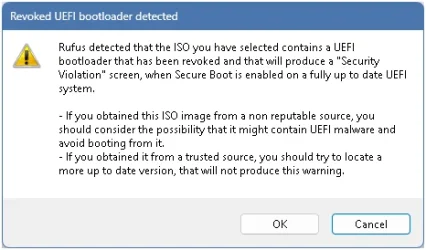
Macrium WinPE uses CA 2023 but Rufus complains about bootloader being revoke, so it obviously fails to boot with an error message saying boot loader using version 7 and minimum is 8.

Rufus_MarcriumX_WinPE_msg.webp

And I did purge Macrium cache to make sure I get fresh builds of both WinRE and WinPE
See "Clear Rescue Media Cache" section at this link: Managing the Boot Media Signing Certificate for Macrium Reflect Rescue Media

I can fix both WinRE / WinPE with bcdboot and they work fine after that
Garlin's update script with "-bootmedia" flag probably also would have fixed them but I did not try

Since I have a supported license, I will open a ticket and get back here with the response...

EDIT: just ran Garlin's update script with "-bootmedia" flag and here is what it says for WinPE Macrium boot disk, the BANNED is probably because of the SVN 2.0.

DVD Drive H: "Rescue"
Windows Boot Manager [Windows UEFI CA 2023] is BANNED.
H:\EFI\Microsoft\Boot\bootmgfw.efi
File Version: 26089.1001, SVN 2.0
 
Last edited:

My Computer

System One

  • OS
    Windows 11
C:\Users\Public\Public Scripts\SecureBoot-CA-2023-Updates (latest)> reg add HKEY_LOCAL_MACHINE\SYSTEM\CurrentControlSet\Control\Secureboot /v AvailableUpdates /t REG_DWORD /d 0x800 /f
The operation completed successfully.
PS C:\Users\Public\Public Scripts\SecureBoot-CA-2023-Updates (latest)> powershell Start-ScheduledTask -TaskName "\Microsoft\Windows\PI\Secure-Boot-

I know how to run simple scripts but haven't run any scheduled ones before. Do I have to do any else other than restart a couple times? My certs still seem to be stuck?
Sometimes the Secure Boot task is "pokey", it's waiting for another pending action before starting its work.

Download the ZIP file from post #1, and run:
Code:
Update-UEFI.bat

That should force install the missing Option ROM cert. Without delay.
 

My Computer

System One

  • OS
    Windows 7
Concerning the Macrium boot drive, I have Macrium X and all computers have Secure Boot updated and revoke done.
Macrium WinRE still uses CA 2011
Macrium WinPE uses CA 2023 but Rufus complains about bootloader being revoke, so it obviously fails to boot with an error message saying boot loader using version 7 and minimum is 8.
And I did purge Macrium cache to make sure I get fresh builds of both WinRE and WinPE

See "Clear Rescue Media Cache" section at this link: Managing the Boot Media Signing Certificate for Macrium Reflect Rescue Media

I can fix both WinRE / WinPE with bcdboot and they work fine after that
Garlin's update script with "-bootmedia" flag probably also would have fixed them but I did not try

Since I have a supported license, I will open a ticket and get back here with the response...
I've outlined the problem before. Macrium (and presumably other vendors) don't have an automated method for detecting the boot manager (and SVN) have changed after a Monthly Update. Therefore it has no awareness that the only thing that needs updating is the boot manager file.

As a paid user, you should instruct the support rep to pass this feedback to their dev team:

1. Macrium should check the current SVN (which they can use the PowerShell Get-SecureBootSVN function), and write that value into the registry.

2. Every time Macrium client starts up, they should compare the cached value against the Get-SecureBootSVN command. If the staged value has changed, they need to copy over the new boot file or inform the user to recreate the boot media.

3. After the boot media's been updated, write the last SVN value into the registry again. So every time the user runs the UI, Macrium is checking on the user's behalf for a new boot manager, and doing what it needs. You shouldn't need anyone's scripts. The product should do the work.

It's that simple. No SpaceX engineers required.
 

My Computer

System One

  • OS
    Windows 7
I've outlined the problem before. Macrium (and presumably other vendors) don't have an automated method for detecting the boot manager (and SVN) have changed after a Monthly Update. Therefore it has no awareness that the only thing that needs updating is the boot manager file.

As a paid user, you should instruct the support rep to pass this feedback to their dev team:

1. Macrium should check the current SVN (which they can use the PowerShell Get-SecureBootSVN function), and write that value into the registry.

2. Every time Macrium client starts up, they should compare the cached value against the Get-SecureBootSVN command. If the staged value has changed, they need to copy over the new boot file or inform the user to recreate the boot media.

3. After the boot media's been updated, write the last SVN value into the registry again. So every time the user runs the UI, Macrium is checking on the user's behalf for a new boot manager, and doing what it needs. You shouldn't need anyone's scripts. The product should do the work.

It's that simple. No SpaceX engineers required.

True, you did mention it before !
I just added the 3 steps to my ticket

I'll see what they respond...
 

My Computer

System One

  • OS
    Windows 11
Let's assume you've completed the two CA 2023 hurdles:
1. Successfully installed the CA 2023 certs​
2. Successfully revoked PCA 2011​

Do you need to keep running the check or update scripts? No. There are no more X509 (certs with formal names) to be installed. The process is finished, unless MS finds a future security disaster that requires us to ban CA 2023 and start the whole cycle all over again.

Every month, you might or might not get a new Windows boot manager for security reasons. The Secure Boot task has the responsibility (since it runs every 12 hours), to check for recent boot manager changes and update the SVN. Unless there's a Secure Boot task bug or a malformed update file, there's no reason this process can't run in the background by itself.

The primary certs are only updated once. The only things to change in the future are possibly DBXUpdate.bin (EFI signatures) and the SVN. When I inform people they're done, they should go out and stop worrying about Secure Boot. Well, unless they're making a Macrium boot drive and need to rebuild it because the boot manager changed that month.
That's what I thought, just wanted to check if I was misunderstanding anything. Thanks again for all you do!
 

My Computers

System One System Two

  • OS
    Win 11 Pro 25H2, Build 26200.8524
    Computer type
    PC/Desktop
    Manufacturer/Model
    Home Brew
    CPU
    Intel Core i5 14500
    Motherboard
    Gigabyte B760M G P WIFI
    Memory
    64GB DDR4
    Graphics Card(s)
    GeForce RTX 4060
    Sound Card
    Chipset Realtek
    Monitor(s) Displays
    LG 45" Ultragear, Acer 24" 1080p
    Screen Resolution
    5120x1440, 1920x1080
    Hard Drives
    Crucial P310 2TB 2280 PCIe Gen4 3D NAND NVMe M.2 SSD (O/S)
    Silicon Power 2TB US75 NVMe PCIe Gen4 M.2 2280 SSD (backup)
    Crucial BX500 2TB 3D NAND (2nd backup)
    Seagate 4TB Ironwolf, rotating HDD archive files
    External off-line backup Drives: 2 NVMe 4TB drives in external enclosures
    PSU
    Thermaltake Toughpower GF3 750W
    Case
    LIAN LI LANCOOL 216 E-ATX PC Case
    Cooling
    Lots of fans!
    Keyboard
    Microsoft Comfort Curve 2000
    Mouse
    Logitech G305
    Internet Speed
    Verizon FiOS 1GB
    Browser
    Firefox
    Antivirus
    Malware Bytes & Windows Defender Security
  • Operating System
    Win 11 Pro 25H2, Build 26200.8524
    Computer type
    PC/Desktop
    Manufacturer/Model
    Home Brew
    CPU
    Intel Core i5 14400
    Motherboard
    Gigabyte B760M DS3H AX
    Memory
    32GB DDR5
    Graphics card(s)
    Intel 700 Embedded GPU
    Sound Card
    Realtek Embedded
    Monitor(s) Displays
    27" HP 1080p
    Screen Resolution
    1920x1080
    Hard Drives
    Crucial P310 2TB 2280 PCIe Gen4 eD NAND PCIe SSD
    Samsung EVO 990 2TB NVMe Gen4 SSD
    Samsung 2TB SATA SSD
    PSU
    Thermaltake Smart BM3 650W
    Case
    Okinos Micro ATX Case
    Cooling
    Fans
    Keyboard
    Microsoft Comfort Curve 2000
    Mouse
    Logitech G305
    Internet Speed
    Verizon FiOS 1GB
    Browser
    Firefox
    Antivirus
    Malware Bytes & Windows Defender Security
Hey! I'd like to know what the missing SVN signatures mean. Do I need to do anything, or will I get them later in June?

Is this optional?
1779502929543.webp
 

My Computer

System One

  • OS
    Windows 11
    Computer type
    PC/Desktop
    Manufacturer/Model
    Asrock b760 pro rs
Hey! I'd like to know what the missing SVN signatures mean. Do I need to do anything, or will I get them later in June?

Normally, SVN's don't get applied until the revocation stage. If want the warnings to disappear (without revoking PCA 2011):
Code:
reg add HKEY_LOCAL_MACHINE\SYSTEM\CurrentControlSet\Control\Secureboot /v AvailableUpdates /t REG_DWORD /d 0x202 /f
powershell Start-ScheduledTask -TaskName "\Microsoft\Windows\PI\Secure-Boot-Update"
 

My Computer

System One

  • OS
    Windows 7
Normally, SVN's don't get applied until the revocation stage. If want the warnings to disappear (without revoking PCA 2011):
Code:
reg add HKEY_LOCAL_MACHINE\SYSTEM\CurrentControlSet\Control\Secureboot /v AvailableUpdates /t REG_DWORD /d 0x202 /f
powershell Start-ScheduledTask -TaskName "\Microsoft\Windows\PI\Secure-Boot-Update"
Thank you! :)
 

My Computer

System One

  • OS
    Windows 11
    Computer type
    PC/Desktop
    Manufacturer/Model
    Asrock b760 pro rs
run Garlin's lastest check script with "-verbose -audit" flags and paste result so we can see your current state
see post #1 for latest version: SecureBoot-CA-2023-Updates.v2026.05.21

And did you do a factory reset before doing does steps ? ("Load Optimized Defaults")

So I had to clear the keys again in order to reboot. Setting boot mode to "Other OS" would also have worked but some advice seems to think that "Windows UEFI" mode without keys is very slightly more secure than "Other OS". I didn't load optimized defaults this time but as I said I tried that previously and it made no difference.

Code:
.\check_UEFI-CA2023.ps1 -Verbose -audit
Windows 11 25H2 (26200.8457)

Secure Boot: OFF (Audit Report runs as ON)
Virtualization Based Security: OFF
BitLocker on (C:) OFF

BIOS Firmware
-------------
    PC Specialist LTD Intel Z370
    Version: 2101
    Date: 2024-01-19

Factory Default UEFI PK Cert
----------------------------
    ASUSTeK MotherBoard PK Certificate

UEFI PK Cert
------------
    (NONE)

Factory Default UEFI KEK Certs
------------------------------
    Microsoft Corporation KEK CA 2011
    Canonical Ltd. Master Certificate Authority
    ASUSTeK MotherBoard KEK Certificate

UEFI KEK Certs
--------------
    (NONE)

Factory Default UEFI DB Certs
-----------------------------
    Microsoft Corporation UEFI CA 2011
    Microsoft Windows Production PCA 2011
    Canonical Ltd. Master Certificate Authority
    ASUSTeK MotherBoard SW Key Certificate
    ASUSTeK Notebook SW Key Certificate

UEFI DB Certs
-------------
    (NONE)

Factory Default UEFI DBX Certs
------------------------------
    (NONE)
    EFI_CERT_SHA256_GUID Signatures: 77

UEFI DBX Certs
--------------
    (NONE)
    Windows BootMgr SVN is MISSING.
    EFI_CERT_SHA256_GUID Signatures: 0

UEFI Variables
--------------
    Credential Guard: ON
    SBAT (Linux only): sbat,1,2025051000 / shim,4 / grub,5 / grub.proxmox,2

EFI Files
---------
    Boot File [Windows UEFI CA 2023] will be UNTRUSTED
        \\.\HarddiskVolume4\EFI\Microsoft\Boot\bootmgfw.efi
        File Version: 28000.326

    Registry: "WindowsUEFICA2023Capable" = 0
        [Windows UEFI CA 2023] not in UEFI DB.


AUDIT REPORT
============
1.  UEFI is in Setup Mode
2.  [Microsoft Corporation KEK 2K CA 2023] is missing from UEFI KEK
3.  [Windows UEFI CA 2023] is missing from UEFI DB
4.  [Microsoft UEFI CA 2023] is missing from UEFI DB
5.  [Microsoft Option ROM UEFI CA 2023] is missing from UEFI DB
6.  [Production PCA 2011] is missing from UEFI DBX
7.  DBX Updates are missing from UEFI DBX
8.  Windows BootMgr SVN is missing from UEFI DBX


REQUIRED ACTION
===============

OPTION 1:  To install [UEFI CA 2023] certs

        Update_UEFI-CA2023.ps1


OPTION 2:  To install [UEFI CA 2023] certs and REVOKE the [PCA 2011] cert

        Update_UEFI-CA2023.ps1 -Revoke
 

My Computer

System One

  • OS
    Windows 11
    Computer type
    PC/Desktop
    Manufacturer/Model
    Asus
So I had to clear the keys again in order to reboot. Setting boot mode to "Other OS" would also have worked but some advice seems to think that "Windows UEFI" mode without keys is very slightly more secure than "Other OS". I didn't load optimized defaults this time but as I said I tried that previously and it made no difference.

Ok so now run Update_UEFI-CA2023.ps1

And if I remember correctly the last time you were in that state, the update script will tell you at the end to load the PK from the BIOS. If I also remember correctly, I think you had loaded the PK "WindowsOEMDevicesPK.der", since in your case your manufacturer, PC Specialist LTD, has not provided MS with a PK.

Then run the check script with "-verbose -audit" again, and hopefully it will tell you that all you need to do is run the update with "-revoke" or wait for MS to do it later.

🤞
 
Last edited:

My Computer

System One

  • OS
    Windows 11
PS: I have written this w/o seeing the post #1913... I must go out for some hours at least.

I did all my changes with Secure Boot off.

This computer started as Windows 10 in 2021 H4 but I installed Win11 from Windows Update in some few months. I was very busy in that age (I had purchased it b/c I needed a modern OS urgently, its installation was very smooth and quick so I had computer in 2-3 hours from receiving it) so I didn't go to the BIOS right away. At some moment I went to the BIOS, I didn't touch anything and I would swear SB was ON. Before installing the CA2023 certs I went to the BIOS again, found SB off for unknown reason but I left it so for the moment. One of the things I had learnt is that you can run the scripts with SB off, and I judged it safer.

Then I did as described in my posts #1892 and #1985. Notice that SB is off even after the last "Code:" of post #1892. I turned it on after that w/o problems.


On Asus Z370 motherboards, the "Windows UEFI" setting enables native UEFI booting and Secure Boot (which is required to run Windows 11). The "Other OS" setting disables Secure Boot, allowing the system to boot older legacy OS setups or Linux distributions that do not have signed bootloaders.

Key Differences

Windows UEFI:
Enables Secure Boot. This authenticates the operating system's bootloader, preventing rootkits or unauthorized software from loading at startup. It is required for modern features like Windows 11's TPM 2.0 enforcement.

Other OS: Disables Secure Boot. It is primarily used for Linux distributions that don't support Microsoft's Secure Boot keys, or older legacy Windows (7/8) installations that rely on MBR partitioning and the Compatibility Support Module (CSM).

Which one should you pick?

Select Windows UEFI
if you are running Windows 10 or 11 and your drive is formatted with the GPT partition style.

Select Other OS only if you are experiencing boot issues with certain Linux distributions, running an older legacy OS, or if your current Windows installation relies on a legacy MBR drive format.

For a quick and easy guide on how to navigate the BIOS menus to correctly enable UEFI and Secure Boot settings:


I HAVE NO IDEA OF THE VIDEO'S RELEVANCE!!!

But, there're motherboards that do a mix of the modes "UEFI with CSM" and "Legacy BIOS" as only one mode (for this reason, many users believe that CSM and legacy BIOS are just synonyms, and that anything "CSM" is exactly the same thing as anything "legacy BIOS", but this isn't true). Definitely, ANY flavor of UEFI is from a different galaxy or universe from ANY flavor of Legacy BIOS. If you want, you can run (with the keys Win-R) msinfo32.exe and you will see a line "BIOS mode: UEFI". If you had an older OS booting from an MBR disk instead, it would read "BIOS mode: Legacy".

And the BIOS setting? Many mobos have a single setting, named in very diverse ways like "Other OS", that allow to boot either in UEFI mode or in Legacy mode. The mobo decides depending on the boot disk format: GPT -> UEFI and MBR -> Legacy. At this point it wouldn't hurt to go to disk management and see that your disk is GPT. Then what's left in the option "Windows UEFI" vs "Other OS"? Secure Boot. Secure Boot needs these two things (among some others):

- The computer boots in UEFI.
- CSM is off (or the computer cannot do CSM, for more modern computers).

So, instead of sporting a "direct" Secure Boot on/off setting, your mobo can do it indirectly by enabling UEFI with CSM through the "Other OS" setting (valid also for older OS's and Legacy-MBR) and a GPT disk (that either boots in UEFI or it cannot boot, so the mobo chooses UEFI).

What would I do now? (I'm reviewing your screenshots in post #1881):

- Disable PXE unless you're using it (it's likely done in a different screen, and you'd lose your boot options #2 and #3; PXE requires an ad-hoc server and what not, if you don't use it PXE is completely pointless, long ago I enabled it by accident in a very old computer that named it as "LAN Boot ROM" thinking it could make the net faster or whatever, but the boot process got stuck b/c I've never had anything PXE lol, what I learnt years after).

- Load the factory default SB keys. I cannot see how in the screenshots (maybe a submenu of each of PK, KEK, DB and DBX management) but it should be possible. Maybe in the mobo's manual, maybe knowing the mobo's model.

- The computer won't boot with the default SB keys and SB on b/c you don't have the 2023 certs necessary for your newest bootfile, hence disable Secure Boot turning "OS Type" to "Other OS". Boot to Windows.

- Run .\check_UEFI-CA2023.ps1 -verbose -audit . What I want to see is whether you should replace your PK or not. As you can boot in "Other OS" mode that is a flexible mode, I'm hoping CSM isn't being activated and the check script can read the SB stuff. In the 1st check script I did (post #1892):

Code:
Factory Default UEFI PK Cert
----------------------------
    DO NOT TRUST - AMI Test PK

UEFI PK Cert
------------
    DO NOT TRUST - AMI Test PK
        Platform Key is UNTRUSTED.
        [KEK CA 2023] Update is available from ASUS or Microsoft.

The non validity of my PK wasn't indicated in the "Factory Default" section, but in the effective certs section, what means that the PK should be loaded to see its validity. SB was off in that moment. You can do the update process with SB off and turn it on afterwards.

 

My Computer

System One

  • OS
    Windows 11
    Manufacturer/Model
    MeLE Quieter 2Q (fanless miniPC)
    CPU
    Celeron J4125 (10th gen)
    Memory
    8GB DDR4
    Monitor(s) Displays
    Samsung SyncMaster T260
    Screen Resolution
    1920x1200
    Hard Drives
    256GB eMMC (Windows)
    2TB USB3 HDD Toshiba (Data)
And if I remember correctly the last time you were in that state, the update script will tell you at the end to load the PK from the BIOS. If I also remember correctly, I think you had loaded the PK "WindowsOEMDevicesPK.der", since in your case your manufacturer, PC Specialist LTD, has not provided MS with a PK.
PC Specialist, much like Micro Center and resellers, bundle other OEM's parts to build a PC. In this case, you would check the actual motherboard board, which determines your BIOS compatibility. PC Specialist heavily leans towards ASUS motherboards.
 

My Computer

System One

  • OS
    Windows 7
For Asus M/Bs, at least for my Asus motherboard, choosing "Windows UEFI mode" and loading the Secure Boot keys will set Secure Boot on.

Setting CSM disabled at the same time gives full Secure Boot coverage. But this necessitates all hardware components in the PC to be Secure Boot compatible.

If even a single component is not Secure Boot compatible, you cannot disable CSM. Otherwise, BIOS cannot complete POST.

In this case, BIOS presents a warning window in red background that CSM must be enabled or put on Auto. It sits there until you do what is asked for.

My gfx card (GTX 1050Ti) is UEFI compatible but not Secure Boot compatible. Therefore, I cannot set CSM disabled for full coverage.
 

My Computers

System One System Two

  • OS
    Windows 11 Pro build 26200.8524
    Computer type
    PC/Desktop
    Manufacturer/Model
    Home Built
    CPU
    Intel i7-4790
    Motherboard
    Asus H97 Pro Gamer with add-on TPM1.2 module
    Memory
    Teams DDR3-1600 4x4 GB
    Graphics Card(s)
    MSI Nvidia GeForce GTX 1050Ti
    Sound Card
    Realtek ALC1150
    Monitor(s) Displays
    Dell P2425D
    Screen Resolution
    2560 by 1440 pixels
    Hard Drives
    Corsair NVMe M.2 Core XT 1000 GB (Windows 11 v.25H2); Samsung SATA Evo 870 500 GB (Windows 11 v.25H2);
    PSU
    Corsair HX850
    Case
    Gigabyte Solo 210
    Cooling
    Zalman CNPS7X Tower
    Keyboard
    Microsoft AIO Wireless (includes touchpad)
    Mouse
    HP S1000 Plus Wireless
    Internet Speed
    500 Mb fiber optic
    Browser
    Chrome; MS Edge
    Antivirus
    Windows Defender
  • Operating System
    MacOS 12 Monterey
    Computer type
    Laptop
    Manufacturer/Model
    Apple Macbook Air
    CPU
    Intel Core i5
    Memory
    8 GB
    Graphics card(s)
    Intel integrated
    Screen Resolution
    1440 by 900 pixels
    Hard Drives
    128 GB
    Keyboard
    Built-in
    Mouse
    Microsoft Wireless
    Internet Speed
    802.11 ac
    Browser
    Chrome; Safari
    Antivirus
    N/A
A success story. I recently installed a fresh Win11 Pro onto a somewhat aging HP ENVY desktop from 2016. Since previously I had use MOSBY to do my key updates, I decided to give the @garlin procedure a try from start to finish. I must say, it was very seamless, the hardest part was figuring out how to configure the BIOS on the machine. The actual Windows part went seamlessly and we're off and running, fully configured and properly booting with Secure Boot.

I just figured a shout out for a super job on these scripts was called for! :-) (y)
 

My Computers

System One System Two

  • OS
    Win 11 Pro 25H2, Build 26200.8524
    Computer type
    PC/Desktop
    Manufacturer/Model
    Home Brew
    CPU
    Intel Core i5 14500
    Motherboard
    Gigabyte B760M G P WIFI
    Memory
    64GB DDR4
    Graphics Card(s)
    GeForce RTX 4060
    Sound Card
    Chipset Realtek
    Monitor(s) Displays
    LG 45" Ultragear, Acer 24" 1080p
    Screen Resolution
    5120x1440, 1920x1080
    Hard Drives
    Crucial P310 2TB 2280 PCIe Gen4 3D NAND NVMe M.2 SSD (O/S)
    Silicon Power 2TB US75 NVMe PCIe Gen4 M.2 2280 SSD (backup)
    Crucial BX500 2TB 3D NAND (2nd backup)
    Seagate 4TB Ironwolf, rotating HDD archive files
    External off-line backup Drives: 2 NVMe 4TB drives in external enclosures
    PSU
    Thermaltake Toughpower GF3 750W
    Case
    LIAN LI LANCOOL 216 E-ATX PC Case
    Cooling
    Lots of fans!
    Keyboard
    Microsoft Comfort Curve 2000
    Mouse
    Logitech G305
    Internet Speed
    Verizon FiOS 1GB
    Browser
    Firefox
    Antivirus
    Malware Bytes & Windows Defender Security
  • Operating System
    Win 11 Pro 25H2, Build 26200.8524
    Computer type
    PC/Desktop
    Manufacturer/Model
    Home Brew
    CPU
    Intel Core i5 14400
    Motherboard
    Gigabyte B760M DS3H AX
    Memory
    32GB DDR5
    Graphics card(s)
    Intel 700 Embedded GPU
    Sound Card
    Realtek Embedded
    Monitor(s) Displays
    27" HP 1080p
    Screen Resolution
    1920x1080
    Hard Drives
    Crucial P310 2TB 2280 PCIe Gen4 eD NAND PCIe SSD
    Samsung EVO 990 2TB NVMe Gen4 SSD
    Samsung 2TB SATA SSD
    PSU
    Thermaltake Smart BM3 650W
    Case
    Okinos Micro ATX Case
    Cooling
    Fans
    Keyboard
    Microsoft Comfort Curve 2000
    Mouse
    Logitech G305
    Internet Speed
    Verizon FiOS 1GB
    Browser
    Firefox
    Antivirus
    Malware Bytes & Windows Defender Security
I was wondering if anyone has encountered this problem with an ACER Extensa 215-32 Laptop, using insydeh20 bios:
(I am trying to help a friend who lives in Fiji and I live on France so the time difference is a challenge!)
He has updated his Bios, to V1.23, hoping it would address the CA 2023 Certificates which it has not!
Secure Boot is now disabled and cannot be enabled in the Bios as all the options are grayed out. He set a Supervisor password but it has made no difference.
Anyone got any knowledge of these machines and the Bios they use?
Thanks very much
SaliesBuzz
 

My Computer

System One

  • OS
    Windows11
    Computer type
    PC/Desktop
    Manufacturer/Model
    Acemagic S1
    CPU
    Intel(R) N97, 2000 Mhz, 4 Core(s), 4 Logical
    Memory
    16Gb
    Graphics Card(s)
    Intel(R) UHD Graphics
    Sound Card
    (Generic USB Audio)
    Monitor(s) Displays
    2
    Screen Resolution
    2560 x 1440 x 59 hertz
    Hard Drives
    Model KPART512GBC2DVT 512Gb
The last BIOS was from August 2023, so it's probably not supported as a factory image.

Reviewing the Bucket Confidence data, some Extensa 215-32 units are grouped under "High Confidence". Which means it may be supported if Acer has already submitted a signed KEK CA 2023 to MS. In order for it to be installed, your friend has to figure out how to enable Secure Boot mode.

Hopefully your friend's laptop belongs to one of these models:
Aspire 3, Aspire EX215-32
Aspire 3, EX215-32
Aspire 3, EX215-32-C7HQ
Aspire 3, EX215-32-C7SA
Aspire 3, EX215-32-C8U0
Aspire 3, EX215-32-C9N6
Aspire 3, Extensa 215-32
Aspire 3, EXTENSA 215-32
Aspire 3, Extensa EX215-32
Extensa 15, EX215-32-C24V
Extensa 15, EX215-32-C7HQ
Extensa 15, EX215-32-C7SA
Extensa 15, EX215-32-P3JP
Extensa 15, Extensa 215-32
Type1Family, Aspier EX215-32
Type1Family, Ex215-32
Type1Family, EX215-32
Type1Family, EX215-32-C7HQ
Type1Family, Extensa 215-32
Type1Family, Extensa EX215-32
 

My Computer

System One

  • OS
    Windows 7
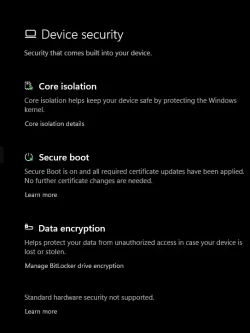
i am just really shocked when i checked windows security . Device secuirty secure boot that its telling me that its all good and everything has been applied on this unsupported The HP Pavilion HPE h8-1360t from 2012
the only thing that concerns me is that i am missing uefi dbx certs. is that a normal thing.
oh i did try to use the dbx something from garlins post . it updated somethig .
but when i tried to do a clean install using rufus with the ca 2023 selected and not selected and a regular iso .
i got a secure boot error "current version 7.0 minium allowed version 8.0 .
tried to direct me to http:// aka.ms/secure-boot-version-viloation for more info .
needless to say i had to clean the keys .
and rerun garlis script to get the 2 images.
I had it all set up in dec of 2025 but my cmos battery decide it was time to go. needless to say untill this week i was with out secure boot enabled yada yada.
If it had not been for garlins help i would still be concered if i would ever get secure boot back. needless to say if the cmos battery dies i am not replacing it.
thank you very much garlin for helpmg me .
 

Attachments

  • Screenshot 2026-05-25 223010.webp
    Screenshot 2026-05-25 223010.webp
    48.8 KB · Views: 2
  • Screenshot 2026-05-25 222525.webp
    Screenshot 2026-05-25 222525.webp
    23.3 KB · Views: 2
  • Screenshot 2026-05-25 225455.webp
    Screenshot 2026-05-25 225455.webp
    31.8 KB · Views: 2
Last edited:

My Computer

System One

  • OS
    WINDOWS 11 WINDOWS 10
    Computer type
    PC/Desktop
    Manufacturer/Model
    HP H8 1360T
    CPU
    Intel(R) Core(TM) i7 -3770K CPU 3.50 GZ 3501 4 CORE
    Motherboard
    PEGATRON 2AD5
    Memory
    32.0 GB (31.9 GB usable)
    Graphics Card(s)
    AMD RADEON TM R5240 INTELL HD GRAPHICS 4600 TIGER 1+1 USB
    Sound Card
    AMD HD . IDT
    Monitor(s) Displays
    AOC WAL MART SPECIAL . HP 2311 IX IPS LED DELL 1708 FP
    Screen Resolution
    1920 X 1080 1600X900 1280X940
    Hard Drives
    1 FAXING S 100 512GB 1 KINGSTON 120 GB SSD 1 X12 SSD 512 GB
    PSU
    300 WATT HP
    Case
    FULL
    Cooling
    ON BOARD FAN
    Keyboard
    LOGITEC K 520 WIRELESS
    Mouse
    LOGITEC M 510 WIRELESS
    Internet Speed
    55 UP 11.2 DOWN
    Browser
    CHROME EDGE
    Antivirus
    WINDOWS SECUIRTY
    Other Info
    NON SUPPORTED HARDWARE FOR WINDOWS 11
Back
Top Bottom