Solved garlin's PowerShell scripts for updating Secure Boot CA 2023


The CA 2023 Secure Boot update process is to be completed in two phases:
1. Adding CA 2023 certs, which allows Windows to switch to the CA 2023 version of the boot file.​
2. Banning CA 2011 cert, which prevenst Windows from using the compromised CA 2011 version of the boot file.​

Currently, everyone should be working through the first phase (adding CA 2023 certs). Security Center gives you the green check mark because you have installed the CA 2023 certs. Since revocation (second phase) is still optional for now, Security Center doesn't consider a lack of revocation as a failure.

Eventually the second phase will be mandatory, and not having banned CA 2011 will result in a different message.

If you have the April 2026 Monthly Update installed, your boot manager should be SVN 8.0 (before April it was SVN 7.0). The SVN reflects MS has replaced the boot manager for security reasons, independently from the CA 2023 migration.

You can always run the update script again. The script will figure out what needs to be done (if anything).
Code:
Update-UEFI.bat
 

My Computer

System One

  • OS
    Windows 7
The CA 2023 Secure Boot update process is to be completed in two phases:
1. Adding CA 2023 certs, which allows Windows to switch to the CA 2023 version of the boot file.​
2. Banning CA 2011 cert, which prevenst Windows from using the compromised CA 2011 version of the boot file.​

Currently, everyone should be working through the first phase (adding CA 2023 certs). Security Center gives you the green check mark because you have installed the CA 2023 certs. Since revocation (second phase) is still optional for now, Security Center doesn't consider a lack of revocation as a failure.

Eventually the second phase will be mandatory, and not having banned CA 2011 will result in a different message.

If you have the April 2026 Monthly Update installed, your boot manager should be SVN 8.0 (before April it was SVN 7.0). The SVN reflects MS has replaced the boot manager for security reasons, independently from the CA 2023 migration.

You can always run the update script again. The script will figure out what needs to be done (if anything).
Code:
Update-UEFI.bat
do u have a link for rhe april 2026 update in case i dont . and is ther a command prompt that will check. since i am so bad running power shell scripts. is svn a reqiurement or a add on. i just dont want to have to clear the keys again. when a new preview bulid comes down since i use upp dump for the iso's
 

My Computer

System One

  • OS
    WINDOWS 11 WINDOWS 10
    Computer type
    PC/Desktop
    Manufacturer/Model
    HP H8 1360T
    CPU
    Intel(R) Core(TM) i7 -3770K CPU 3.50 GZ 3501 4 CORE
    Motherboard
    PEGATRON 2AD5
    Memory
    32.0 GB (31.9 GB usable)
    Graphics Card(s)
    AMD RADEON TM R5240 INTELL HD GRAPHICS 4600 TIGER 1+1 USB
    Sound Card
    AMD HD . IDT
    Monitor(s) Displays
    AOC WAL MART SPECIAL . HP 2311 IX IPS LED DELL 1708 FP
    Screen Resolution
    1920 X 1080 1600X900 1280X940
    Hard Drives
    1 FAXING S 100 512GB 1 KINGSTON 120 GB SSD 1 X12 SSD 512 GB
    PSU
    300 WATT HP
    Case
    FULL
    Cooling
    ON BOARD FAN
    Keyboard
    LOGITEC K 520 WIRELESS
    Mouse
    LOGITEC M 510 WIRELESS
    Internet Speed
    55 UP 11.2 DOWN
    Browser
    CHROME EDGE
    Antivirus
    WINDOWS SECUIRTY
    Other Info
    NON SUPPORTED HARDWARE FOR WINDOWS 11
Under Settings app, check Windows Update for any uninstalled updates.

Secure Boot keys (certs) live in the UEFI's memory, outside of Windows. If you've done the migration, it doesn't matter what version of Windows you run, other than it's compatible with CA 2023. Typically W10 22H2 or later Windows.
 

My Computer

System One

  • OS
    Windows 7
Is this the update i should try KB5082052
 

My Computer

System One

  • OS
    WINDOWS 11 WINDOWS 10
    Computer type
    PC/Desktop
    Manufacturer/Model
    HP H8 1360T
    CPU
    Intel(R) Core(TM) i7 -3770K CPU 3.50 GZ 3501 4 CORE
    Motherboard
    PEGATRON 2AD5
    Memory
    32.0 GB (31.9 GB usable)
    Graphics Card(s)
    AMD RADEON TM R5240 INTELL HD GRAPHICS 4600 TIGER 1+1 USB
    Sound Card
    AMD HD . IDT
    Monitor(s) Displays
    AOC WAL MART SPECIAL . HP 2311 IX IPS LED DELL 1708 FP
    Screen Resolution
    1920 X 1080 1600X900 1280X940
    Hard Drives
    1 FAXING S 100 512GB 1 KINGSTON 120 GB SSD 1 X12 SSD 512 GB
    PSU
    300 WATT HP
    Case
    FULL
    Cooling
    ON BOARD FAN
    Keyboard
    LOGITEC K 520 WIRELESS
    Mouse
    LOGITEC M 510 WIRELESS
    Internet Speed
    55 UP 11.2 DOWN
    Browser
    CHROME EDGE
    Antivirus
    WINDOWS SECUIRTY
    Other Info
    NON SUPPORTED HARDWARE FOR WINDOWS 11
so many choices i dont want the wrong one
 

My Computer

System One

  • OS
    WINDOWS 11 WINDOWS 10
    Computer type
    PC/Desktop
    Manufacturer/Model
    HP H8 1360T
    CPU
    Intel(R) Core(TM) i7 -3770K CPU 3.50 GZ 3501 4 CORE
    Motherboard
    PEGATRON 2AD5
    Memory
    32.0 GB (31.9 GB usable)
    Graphics Card(s)
    AMD RADEON TM R5240 INTELL HD GRAPHICS 4600 TIGER 1+1 USB
    Sound Card
    AMD HD . IDT
    Monitor(s) Displays
    AOC WAL MART SPECIAL . HP 2311 IX IPS LED DELL 1708 FP
    Screen Resolution
    1920 X 1080 1600X900 1280X940
    Hard Drives
    1 FAXING S 100 512GB 1 KINGSTON 120 GB SSD 1 X12 SSD 512 GB
    PSU
    300 WATT HP
    Case
    FULL
    Cooling
    ON BOARD FAN
    Keyboard
    LOGITEC K 520 WIRELESS
    Mouse
    LOGITEC M 510 WIRELESS
    Internet Speed
    55 UP 11.2 DOWN
    Browser
    CHROME EDGE
    Antivirus
    WINDOWS SECUIRTY
    Other Info
    NON SUPPORTED HARDWARE FOR WINDOWS 11
i try to dont normally pay attention . its just when i reboot, they install auto let me check again. nope dont have either of them . the only one it shows is Update for Windows Security platform - KB5007651 (Version 10.0.29573.1002)
 

My Computer

System One

  • OS
    WINDOWS 11 WINDOWS 10
    Computer type
    PC/Desktop
    Manufacturer/Model
    HP H8 1360T
    CPU
    Intel(R) Core(TM) i7 -3770K CPU 3.50 GZ 3501 4 CORE
    Motherboard
    PEGATRON 2AD5
    Memory
    32.0 GB (31.9 GB usable)
    Graphics Card(s)
    AMD RADEON TM R5240 INTELL HD GRAPHICS 4600 TIGER 1+1 USB
    Sound Card
    AMD HD . IDT
    Monitor(s) Displays
    AOC WAL MART SPECIAL . HP 2311 IX IPS LED DELL 1708 FP
    Screen Resolution
    1920 X 1080 1600X900 1280X940
    Hard Drives
    1 FAXING S 100 512GB 1 KINGSTON 120 GB SSD 1 X12 SSD 512 GB
    PSU
    300 WATT HP
    Case
    FULL
    Cooling
    ON BOARD FAN
    Keyboard
    LOGITEC K 520 WIRELESS
    Mouse
    LOGITEC M 510 WIRELESS
    Internet Speed
    55 UP 11.2 DOWN
    Browser
    CHROME EDGE
    Antivirus
    WINDOWS SECUIRTY
    Other Info
    NON SUPPORTED HARDWARE FOR WINDOWS 11
strange neither will work for me
`
 

My Computer

System One

  • OS
    WINDOWS 11 WINDOWS 10
    Computer type
    PC/Desktop
    Manufacturer/Model
    HP H8 1360T
    CPU
    Intel(R) Core(TM) i7 -3770K CPU 3.50 GZ 3501 4 CORE
    Motherboard
    PEGATRON 2AD5
    Memory
    32.0 GB (31.9 GB usable)
    Graphics Card(s)
    AMD RADEON TM R5240 INTELL HD GRAPHICS 4600 TIGER 1+1 USB
    Sound Card
    AMD HD . IDT
    Monitor(s) Displays
    AOC WAL MART SPECIAL . HP 2311 IX IPS LED DELL 1708 FP
    Screen Resolution
    1920 X 1080 1600X900 1280X940
    Hard Drives
    1 FAXING S 100 512GB 1 KINGSTON 120 GB SSD 1 X12 SSD 512 GB
    PSU
    300 WATT HP
    Case
    FULL
    Cooling
    ON BOARD FAN
    Keyboard
    LOGITEC K 520 WIRELESS
    Mouse
    LOGITEC M 510 WIRELESS
    Internet Speed
    55 UP 11.2 DOWN
    Browser
    CHROME EDGE
    Antivirus
    WINDOWS SECUIRTY
    Other Info
    NON SUPPORTED HARDWARE FOR WINDOWS 11
You're on Insider channel (29573). Good luck, I have no idea how often MS updates the SecureBootUpdates folder for Insider.

I suspect some of the Insider builds aren't in sync with the Production channel. You would think MS would update Secure Boot files across all of Windows releases at the same time. But from a random sampling of different Insider ISO's (from UUP dump or direct download), I don't think that's true.

Which is why my check script warns if you're on an Insider build, that I can't guarantee you have the latest boot files. Go blame MS.
 

My Computer

System One

  • OS
    Windows 7
ok one more thing for the night . Please help me step by step in running these power shell commands . where to down load them and how to run them please. i ran them last time by trial and error .
 

My Computer

System One

  • OS
    WINDOWS 11 WINDOWS 10
    Computer type
    PC/Desktop
    Manufacturer/Model
    HP H8 1360T
    CPU
    Intel(R) Core(TM) i7 -3770K CPU 3.50 GZ 3501 4 CORE
    Motherboard
    PEGATRON 2AD5
    Memory
    32.0 GB (31.9 GB usable)
    Graphics Card(s)
    AMD RADEON TM R5240 INTELL HD GRAPHICS 4600 TIGER 1+1 USB
    Sound Card
    AMD HD . IDT
    Monitor(s) Displays
    AOC WAL MART SPECIAL . HP 2311 IX IPS LED DELL 1708 FP
    Screen Resolution
    1920 X 1080 1600X900 1280X940
    Hard Drives
    1 FAXING S 100 512GB 1 KINGSTON 120 GB SSD 1 X12 SSD 512 GB
    PSU
    300 WATT HP
    Case
    FULL
    Cooling
    ON BOARD FAN
    Keyboard
    LOGITEC K 520 WIRELESS
    Mouse
    LOGITEC M 510 WIRELESS
    Internet Speed
    55 UP 11.2 DOWN
    Browser
    CHROME EDGE
    Antivirus
    WINDOWS SECUIRTY
    Other Info
    NON SUPPORTED HARDWARE FOR WINDOWS 11
Some users can't run PowerShell scripts because they have the default security policy which blocks most PowerShell scripts.
Some users will choose a less restrictive policy for running scripts, but that exposes you to potential security risks of a rogue script.

One workaround is using a CMD batch file to call the PS script (on your behalf). This removes the need to change your current security policy. So instead of calling each PS script by name, you substitute the matching batch file in it's place.

Where you see:Run this batch file instead:
Check_UEFI-CA2023.ps1Check-UEFI.bat
Update_UEFI-CA2023.ps1Update-UEFI.bat
Check_DBXUpdate.bin.ps1Check-DBX.bat

Each of the batch files can take the same command-line options as the PS script. For example "Check-UEFI.bat -Verbose".

I don't want to force users to change their execution policy, because it applies to all PS scripts that can be put on the system. So the batch file is an acceptable workaround.
 

My Computer

System One

  • OS
    Windows 7
how do i run them using command prompt. i guess i am just to stupid to understand this. i know who to run .bat how do i convert them to .bat
 

My Computer

System One

  • OS
    WINDOWS 11 WINDOWS 10
    Computer type
    PC/Desktop
    Manufacturer/Model
    HP H8 1360T
    CPU
    Intel(R) Core(TM) i7 -3770K CPU 3.50 GZ 3501 4 CORE
    Motherboard
    PEGATRON 2AD5
    Memory
    32.0 GB (31.9 GB usable)
    Graphics Card(s)
    AMD RADEON TM R5240 INTELL HD GRAPHICS 4600 TIGER 1+1 USB
    Sound Card
    AMD HD . IDT
    Monitor(s) Displays
    AOC WAL MART SPECIAL . HP 2311 IX IPS LED DELL 1708 FP
    Screen Resolution
    1920 X 1080 1600X900 1280X940
    Hard Drives
    1 FAXING S 100 512GB 1 KINGSTON 120 GB SSD 1 X12 SSD 512 GB
    PSU
    300 WATT HP
    Case
    FULL
    Cooling
    ON BOARD FAN
    Keyboard
    LOGITEC K 520 WIRELESS
    Mouse
    LOGITEC M 510 WIRELESS
    Internet Speed
    55 UP 11.2 DOWN
    Browser
    CHROME EDGE
    Antivirus
    WINDOWS SECUIRTY
    Other Info
    NON SUPPORTED HARDWARE FOR WINDOWS 11
The last BIOS was from August 2023, so it's probably not supported as a factory image.

Reviewing the Bucket Confidence data, some Extensa 215-32 units are grouped under "High Confidence". Which means it may be supported if Acer has already submitted a signed KEK CA 2023 to MS. In order for it to be installed, your friend has to figure out how to enable Secure Boot mode.

Hopefully your friend's laptop belongs to one of these models:
Yes, I think he has one of these, (Extensa 215-32), but the problem is that all the options related to Secure Boot are grayed , (greyed in UK English!), out!
Thanks for your help anyway!
 

My Computer

System One

  • OS
    Windows11
    Computer type
    PC/Desktop
    Manufacturer/Model
    Acemagic S1
    CPU
    Intel(R) N97, 2000 Mhz, 4 Core(s), 4 Logical
    Memory
    16Gb
    Graphics Card(s)
    Intel(R) UHD Graphics
    Sound Card
    (Generic USB Audio)
    Monitor(s) Displays
    2
    Screen Resolution
    2560 x 1440 x 59 hertz
    Hard Drives
    Model KPART512GBC2DVT 512Gb
Yes, I think he has one of these, (Extensa 215-32), but the problem is that all the options related to Secure Boot are grayed , (greyed in UK English!), out!
Thanks for your help anyway!
That's funny. In the U.S., we would write "grayed out" but the Internet overwhelming chooses "greyed out" because of UK English speakers. I feel forced to use "grey" fit in :cautious:

Have your friend check if Legacy CSM mode is enabled. You can't have Secure Boot in CSM, it must be UEFI mode.
 

My Computer

System One

  • OS
    Windows 7
how do i run them using command prompt. i guess i am just to stupid to understand this. i know who to run .bat how do i convert them to .bat
The problem is your Admin shell is PowerShell, and not CMD. It doesn't matter which shell is used to run the scripts. But PS has a big difference in terms of requiring a full or relative directory path when calling a script.

Back in the CMD days, if you were inside a folder path and there was a script present, you could do:
Code:
cd \path\folder
script.bat

CMD would naturally search the current folder "\path\folder" for script.bat. When CMD found it, the script would run.

PS has a different security model. If you're in the same folder, PS doesn't want to run the file this way. You have either provide the full folder path, or a relative one. PS wants to know there is no ambiguity, you're not expecting to run a random script -- it's specifically this script file.
Code:
\path\folder\script.bat

cd \path\folder
.\script.bat

1. cd into the folder where the scripts were extracted.
2. Add a leading ".\" in front of the batch file's name. ".\Check-UEFI.bat"
 

My Computer

System One

  • OS
    Windows 7
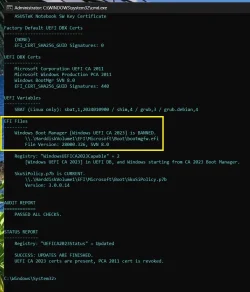
After installing the latest Preview Build 26200.8524 yesterday, I have this:

Windows Boot manager [Windows UEFI CA 2023] is BANNED. But Windows still boots off of CA 2023 certificate.

CA2023.webp
 

My Computers

System One System Two

  • OS
    Windows 11 Pro build 26200.8524
    Computer type
    PC/Desktop
    Manufacturer/Model
    Home Built
    CPU
    Intel i7-4790
    Motherboard
    Asus H97 Pro Gamer with add-on TPM1.2 module
    Memory
    Teams DDR3-1600 4x4 GB
    Graphics Card(s)
    MSI Nvidia GeForce GTX 1050Ti
    Sound Card
    Realtek ALC1150
    Monitor(s) Displays
    Dell P2425D
    Screen Resolution
    2560 by 1440 pixels
    Hard Drives
    Corsair NVMe M.2 Core XT 1000 GB (Windows 11 v.25H2); Samsung SATA Evo 870 500 GB (Windows 11 v.25H2);
    PSU
    Corsair HX850
    Case
    Gigabyte Solo 210
    Cooling
    Zalman CNPS7X Tower
    Keyboard
    Microsoft AIO Wireless (includes touchpad)
    Mouse
    HP S1000 Plus Wireless
    Internet Speed
    500 Mb fiber optic
    Browser
    Chrome; MS Edge
    Antivirus
    Windows Defender
  • Operating System
    MacOS 12 Monterey
    Computer type
    Laptop
    Manufacturer/Model
    Apple Macbook Air
    CPU
    Intel Core i5
    Memory
    8 GB
    Graphics card(s)
    Intel integrated
    Screen Resolution
    1440 by 900 pixels
    Hard Drives
    128 GB
    Keyboard
    Built-in
    Mouse
    Microsoft Wireless
    Internet Speed
    802.11 ac
    Browser
    Chrome; Safari
    Antivirus
    N/A
++++That's funny. In the U.S., we would write "grayed out" but the Internet overwhelming chooses "greyed out" because of UK English speakers. I feel forced to use "grey" fit in :cautious:

Have your friend check if Legacy CSM mode is enabled. You can't have Secure Boot in CSM, it must be UEFI mode.

The last BIOS was from August 2023, so it's probably not supported as a factory image.

Reviewing the Bucket Confidence data, some Extensa 215-32 units are grouped under "High Confidence". Which means it may be supported if Acer has already submitted a signed KEK CA 2023 to MS. In order for it to be installed, your friend has to figure out how to enable Secure Boot mode.
Acer machines have a password that must be first set and then entered to obtain access to Secure Boot.

Here are specifics:
 

My Computer

System One

  • OS
    Windows 11 Pro
    Computer type
    Laptop
    Manufacturer/Model
    Acer TravelMate P215-52
Got an automated update just a moment ago:

This device has updated Secure Boot CA/keys. This device signature information is included here.
DeviceAttributes: BaseBoardManufacturer:MSI;FirmwareManufacturer:American Megatrends Inc.;FirmwareVersion:1.A1_0.4.3;OEMModelBaseBoard:X99A GODLIKE GAMING (MS-7883);OEMManufacturerName:MSI;OSArchitecture:amd64;
BucketId: 73e03340f2bc718554edb3267053f76dd37bfa7b6e1a35f913a29980eefe9c1a
BucketConfidenceLevel: High Confidence
UpdateType: Policy Update (SKU), Windows UEFI CA 2023 (DB), Option ROM CA 2023 (DB), 3P UEFI CA 2023 (DB), KEK 2023, Boot Manager (2023)


So looks like it just does it on it's own now, but just highlighting: this is on an 11 year old mobo with manual key management.
 

My Computer

System One

  • OS
    Windows 10
After installing the latest Preview Build 26200.8524 yesterday, I have this:

Windows Boot manager [Windows UEFI CA 2023] is BANNED. But Windows still boots off of CA 2023 certificate.
how did you update ? windows update or a iso file? what does secure boot say in windows security . i think that means that the primary boot is still using the pca 2011 cert. mine was also showing that . i seen a post some where that if you use rufus to create a iso . it will show that . according to that statement your still booting from a ca 2023 cert . mine showed the same thing till i revoked the 2011 cert. i am not saying everyone go revoke your pca 2011. just what worked for me . heck knowing my luck tmrow i might not even have it lol .
`
 

My Computer

System One

  • OS
    WINDOWS 11 WINDOWS 10
    Computer type
    PC/Desktop
    Manufacturer/Model
    HP H8 1360T
    CPU
    Intel(R) Core(TM) i7 -3770K CPU 3.50 GZ 3501 4 CORE
    Motherboard
    PEGATRON 2AD5
    Memory
    32.0 GB (31.9 GB usable)
    Graphics Card(s)
    AMD RADEON TM R5240 INTELL HD GRAPHICS 4600 TIGER 1+1 USB
    Sound Card
    AMD HD . IDT
    Monitor(s) Displays
    AOC WAL MART SPECIAL . HP 2311 IX IPS LED DELL 1708 FP
    Screen Resolution
    1920 X 1080 1600X900 1280X940
    Hard Drives
    1 FAXING S 100 512GB 1 KINGSTON 120 GB SSD 1 X12 SSD 512 GB
    PSU
    300 WATT HP
    Case
    FULL
    Cooling
    ON BOARD FAN
    Keyboard
    LOGITEC K 520 WIRELESS
    Mouse
    LOGITEC M 510 WIRELESS
    Internet Speed
    55 UP 11.2 DOWN
    Browser
    CHROME EDGE
    Antivirus
    WINDOWS SECUIRTY
    Other Info
    NON SUPPORTED HARDWARE FOR WINDOWS 11
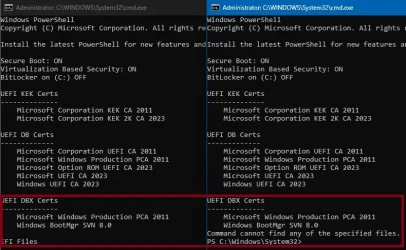
I just tried using 'Check-UEFI.bat' or '.\Check_UEFI-CA2023.ps1' from the latest 'SecureBoot-CA-2023-Updates.v2026.05.21' download and I'm seeing an error that doesn't appear if using an older version?
 

Attachments

  • error.webp
    error.webp
    57.7 KB · Views: 1

My Computer

System One

  • OS
    windows 11 pro
    Computer type
    PC/Desktop
    Manufacturer/Model
    geekom a5 5800h 170W PSU
Back
Top Bottom