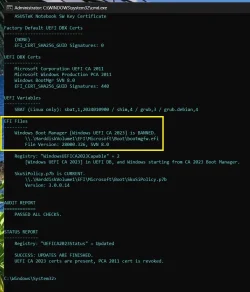
The CA 2023 Secure Boot update process is to be completed in two phases:
Currently, everyone should be working through the first phase (adding CA 2023 certs). Security Center gives you the green check mark because you have installed the CA 2023 certs. Since revocation (second phase) is still optional for now, Security Center doesn't consider a lack of revocation as a failure.
Eventually the second phase will be mandatory, and not having banned CA 2011 will result in a different message.
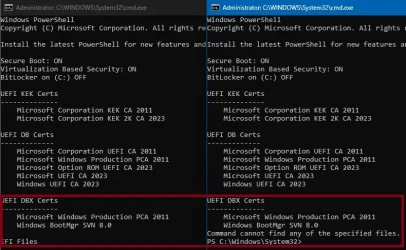
If you have the April 2026 Monthly Update installed, your boot manager should be SVN 8.0 (before April it was SVN 7.0). The SVN reflects MS has replaced the boot manager for security reasons, independently from the CA 2023 migration.
You can always run the update script again. The script will figure out what needs to be done (if anything).
1. Adding CA 2023 certs, which allows Windows to switch to the CA 2023 version of the boot file.
2. Banning CA 2011 cert, which prevenst Windows from using the compromised CA 2011 version of the boot file.
Currently, everyone should be working through the first phase (adding CA 2023 certs). Security Center gives you the green check mark because you have installed the CA 2023 certs. Since revocation (second phase) is still optional for now, Security Center doesn't consider a lack of revocation as a failure.
Eventually the second phase will be mandatory, and not having banned CA 2011 will result in a different message.
If you have the April 2026 Monthly Update installed, your boot manager should be SVN 8.0 (before April it was SVN 7.0). The SVN reflects MS has replaced the boot manager for security reasons, independently from the CA 2023 migration.
You can always run the update script again. The script will figure out what needs to be done (if anything).
Code:
Update-UEFI.batMy Computer
At a glance
Windows 7
- OS
- Windows 7