Solved garlin's PowerShell scripts for updating Secure Boot CA 2023


Hi,

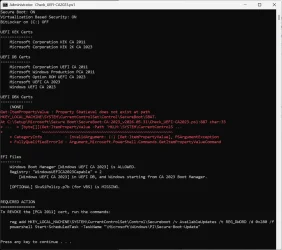
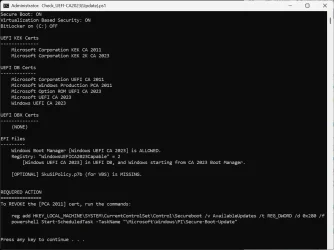
I ran the scripts and i am getting these anyone can help me sort this out please?
Also can someone explain why all these are happening?

OS: Windows 11 Pro 25H2 build 26220.7872
Device: Asus GL504GW

Code:
Secure Boot: ON
Virtualization Based Security: ON
BitLocker on (C:) OFF

UEFI KEK Certs
--------------
    Microsoft Corporation KEK CA 2011

UEFI DB Certs
-------------
    Microsoft Corporation UEFI CA 2011
    Microsoft Windows Production PCA 2011

UEFI DBX Certs
--------------
    (NONE)

EFI Files
---------
    Windows Boot Manager [Production PCA 2011] is BANNED.
    Registry: "WindowsUEFICA2023Capable" = 0
        [Windows UEFI CA 2023] not in UEFI DB.

    [OPTIONAL] SkuSiPolicy.p7b (for VBS) is MISSING.


REQUIRED ACTION
===============

OPTION 1:  DO NOTHING AND WAIT.  Windows will apply the UEFI updates (PC has supported BIOS).

OPTION 2:  To install [UEFI CA 2023] certs WITHOUT REVOKING the [PCA 2011] cert, run the commands:

    reg add HKEY_LOCAL_MACHINE\SYSTEM\CurrentControlSet\Control\Secureboot /v AvailableUpdates /t REG_DWORD /d 0x5944 /f
    powershell Start-ScheduledTask -TaskName "\Microsoft\Windows\PI\Secure-Boot-Update"


OPTION 3:  To install [UEFI CA 2023] certs and REVOKE the [PCA 2011] cert, run the commands:

    reg add HKEY_LOCAL_MACHINE\SYSTEM\CurrentControlSet\Control\Secureboot /v AvailableUpdates /t REG_DWORD /d 0x5bc4 /f
    powershell Start-ScheduledTask -TaskName "\Microsoft\Windows\PI\Secure-Boot-Update"
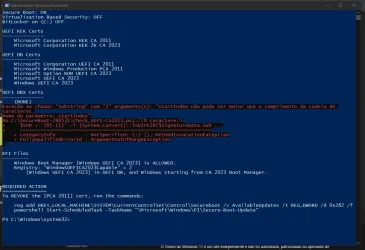
Code:
SUCCESS: Matched 431/431 EFI signatures from "dbxupdate.bin"
FAILED: Missing 3/3 SVN signatures from "DBXUpdate2024.bin"
    Missing [01612B139DD5598843AB1C185C3CB2EB92000002000000000000000000000000] bootmgfw.efi SVN 2.0
    Missing [019D2EF8E827E15841A4884C18ABE2F284000002000000000000000000000000] cdboot.efi SVN 2.0
    Missing [01C2CA99C9FE7F6F4981279E2A8A535976000002000000000000000000000000] wdsmgfw.efi SVN 2.0
FAILED: Missing 3/3 SVN signatures from "DBXUpdateSVN.bin"
    Missing [01612B139DD5598843AB1C185C3CB2EB92000007000000000000000000000000] bootmgfw.efi SVN 7.0
    Missing [019D2EF8E827E15841A4884C18ABE2F284000003000000000000000000000000] cdboot.efi SVN 3.0
    Missing [01C2CA99C9FE7F6F4981279E2A8A535976000003000000000000000000000000] wdsmgfw.efi SVN 3.0
Code:
WARNING: Cannot confirm if W11 25H2 (26220.7872) has the latest files.


AUDIT REPORT
============
1.  [Microsoft Corporation KEK 2K CA 2023] is missing from UEFI KEK
2.  [Windows UEFI CA 2023] is missing from UEFI DB (dbupdate2024.bin)
3.  [Microsoft UEFI CA 2023] is missing from UEFI DB (DBUpdate3P2023.bin)
4.  [Microsoft Option ROM UEFI CA 2023] is missing from UEFI DB (DBUpdateOROM2023.bin)
5.  [Production PCA 2011] is missing from UEFI DBX (DBXUpdate2024.bin)
6.  Windows BootMgr SVN is missing from UEFI DBX (DBXUpdateSVN.bin)
7.  Windows Boot Manager [Production PCA 2011] is wrong version

[OPTIONAL] SkuSiPolicy.p7b (for VBS) is missing from EFI
 
Last edited:

My Computer

System One

  • OS
    Windows 11
    Computer type
    Laptop
    Manufacturer/Model
    Asus
    CPU
    Intel(R) Core(TM) i7-8750H CPU @ 2.20GHz
    Motherboard
    Asus GL504GW
    Memory
    16.0 GB
    Graphics Card(s)
    RTX 2070
I ran the script and i am getting these anyone can help me sort this out please?
OS: Windows 11 Pro 25H2 build 26220.7872
Device: Asus GL504GW
The last BIOS update was 2021. This PC is really unsupported.

Secure Boot: ON
Virtualization Based Security: ON
BitLocker on (C:) OFF

UEFI KEK Certs
--------------
Microsoft Corporation KEK CA 2011

UEFI DB Certs
-------------
Microsoft Corporation UEFI CA 2011
Microsoft Windows Production PCA 2011

UEFI DBX Certs
--------------
(NONE)

EFI Files
---------
Windows Boot Manager [Production PCA 2011] is BANNED.
Registry: "WindowsUEFICA2023Capable" = 0
[Windows UEFI CA 2023] not in UEFI DB.

[OPTIONAL] SkuSiPolicy.p7b (for VBS) is MISSING.


REQUIRED ACTION
===============

OPTION 1: DO NOTHING AND WAIT. Windows will apply the UEFI updates (PC has supported BIOS).
Hmmm. That's an interesting bug, it shouldn't report your current boot manager as BANNED. And the "DO NOTHING AND WAIT" is obviously wrong.

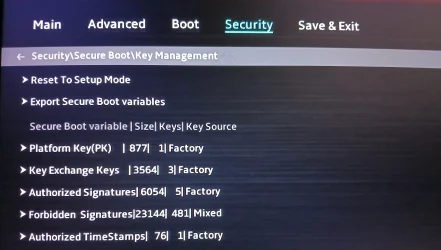
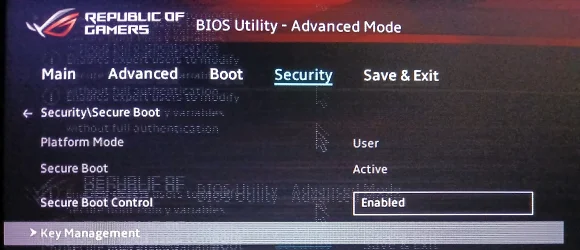
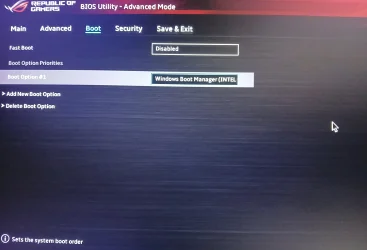
Can you check the BIOS menus, and see if you have an option to switch from Standard to Custom mode? Or if you have manual key enrollment?
 

My Computer

System One

  • OS
    Windows 7
The last BIOS update was 2021. This PC is really unsupported.
So I shouldn't expect this to be fixed?

Hmmm. That's an interesting bug, it shouldn't report your current boot manager as BANNED. And the "DO NOTHING AND WAIT" is obviously wrong.

Can you check the BIOS menus, and see if you have an option to switch from Standard to Custom mode? Or if you have manual key enrollment?
Also, i don't think i can do that i don't see any sort of option.
 

Attachments

  • 20260605_011458.webp
    20260605_011458.webp
    787.6 KB · Views: 1
  • 20260605_011449.webp
    20260605_011449.webp
    1.6 MB · Views: 1
  • 20260605_011415.webp
    20260605_011415.webp
    820.8 KB · Views: 1

My Computer

System One

  • OS
    Windows 11
    Computer type
    Laptop
    Manufacturer/Model
    Asus
    CPU
    Intel(R) Core(TM) i7-8750H CPU @ 2.20GHz
    Motherboard
    Asus GL504GW
    Memory
    16.0 GB
    Graphics Card(s)
    RTX 2070
Under the ">" for Key Exchange Keys, does that option expand to include "Add Key"?
There is a update option does that work?
 

My Computer

System One

  • OS
    Windows 11
    Computer type
    Laptop
    Manufacturer/Model
    Asus
    CPU
    Intel(R) Core(TM) i7-8750H CPU @ 2.20GHz
    Motherboard
    Asus GL504GW
    Memory
    16.0 GB
    Graphics Card(s)
    RTX 2070
1. Confirm BitLocker is not enabled on system drive, and you're not using Windows Hello PIN for logon. Disable both of them if enabled.

2. Run the update script.
Code:
Update-UEFI.bat

This should copy the KEK CA 2023 cert file to the EFI partition under the folder "EFI\Certs".

3. Enter the BIOS menu, select Add Key under KEK. You will have to browse the listed disk volumes, find one with an "EFI" folder. Select the KEK CA 2023 file under the "EFI\Certs" folder.

4. Restart Windows. Run the update script again (same command).

5. Now run the check script.
 

My Computer

System One

  • OS
    Windows 7
1. Confirm BitLocker is not enabled on system drive, and you're not using Windows Hello PIN for logon. Disable both of them if enabled.

2. Run the update script.
Code:
Update-UEFI.bat

This should copy the KEK CA 2023 cert file to the EFI partition under the folder "EFI\Certs".

3. Enter the BIOS menu, select Add Key under KEK. You will have to browse the listed disk volumes, find one with an "EFI" folder. Select the KEK CA 2023 file under the "EFI\Certs" folder.

4. Restart Windows. Run the update script again (same command).

5. Now run the check script.
Sorry i just did another check looks like there is few more options like Details, Export, Update, Append and Delete
Do I still go with these step?
 

My Computer

System One

  • OS
    Windows 11
    Computer type
    Laptop
    Manufacturer/Model
    Asus
    CPU
    Intel(R) Core(TM) i7-8750H CPU @ 2.20GHz
    Motherboard
    Asus GL504GW
    Memory
    16.0 GB
    Graphics Card(s)
    RTX 2070
-> Append
Ok so i ran the script and when I checked certs were already listed in the UEFI

Is it alright now or need to do something for UEFI DBX Certs?

Code:
Secure Boot: ON
Virtualization Based Security: ON
BitLocker on (C:) OFF

UEFI KEK Certs
--------------
    Microsoft Corporation KEK CA 2011
    Microsoft Corporation KEK 2K CA 2023

UEFI DB Certs
-------------
    Microsoft Corporation UEFI CA 2011
    Microsoft Windows Production PCA 2011
    Microsoft Option ROM UEFI CA 2023
    Microsoft UEFI CA 2023
    Windows UEFI CA 2023

UEFI DBX Certs
--------------
    (NONE)

EFI Files
---------
    Windows Boot Manager [Windows UEFI CA 2023] is ALLOWED.
    Registry: "WindowsUEFICA2023Capable" = 2
        [Windows UEFI CA 2023] in UEFI DB, and Windows starting from CA 2023 Boot Manager.

    [OPTIONAL] SkuSiPolicy.p7b (for VBS) is MISSING.


REQUIRED ACTION
===============
To REVOKE the [PCA 2011] cert, run the commands:

    reg add HKEY_LOCAL_MACHINE\SYSTEM\CurrentControlSet\Control\Secureboot /v AvailableUpdates /t REG_DWORD /d 0x280 /f
    powershell Start-ScheduledTask -TaskName "\Microsoft\Windows\PI\Secure-Boot-Update"
Code:
WARNING: Cannot confirm if W11 25H2 (26220.7872) has the latest files.


AUDIT REPORT
============
1.  [Production PCA 2011] is missing from UEFI DBX (DBXUpdate2024.bin)
2.  Windows BootMgr SVN is missing from UEFI DBX (DBXUpdateSVN.bin)

[OPTIONAL] SkuSiPolicy.p7b (for VBS) is missing from EFI
 

My Computer

System One

  • OS
    Windows 11
    Computer type
    Laptop
    Manufacturer/Model
    Asus
    CPU
    Intel(R) Core(TM) i7-8750H CPU @ 2.20GHz
    Motherboard
    Asus GL504GW
    Memory
    16.0 GB
    Graphics Card(s)
    RTX 2070
Is it alright now or need to do something for UEFI DBX Certs?

Run the update script again:
Code:
Update-UEFI.bat -Revoke

WARNING: Cannot confirm if W11 25H2 (26220.7872) has the latest files.
This is an older Insider build (26220.7872), it doesn't have the latest version of the Windows boot manager and SVN.

But for the purpose of Secure Boot updates, your BIOS is done (except for revocation). Whenever you update this PC to a newer Windows, your boot manager will be switched for a later version but all of the underlying certs are in place.
 

My Computer

System One

  • OS
    Windows 7
Run the update script again
What happens if i don't revoke it yet and wait?

This is an older Insider build (26220.7872), it doesn't have the latest version of the Windows boot manager and SVN.

But for the purpose of Secure Boot updates, your BIOS is done (except for revocation). Whenever you update this PC to a newer Windows, your boot manager will be switched for a later version but all of the underlying certs are in place.
I am on Release Preview is there a reason that RP doesn't have that updated boot manager like is it normal?
and if its not is it possible to force it to update?
 

My Computer

System One

  • OS
    Windows 11
    Computer type
    Laptop
    Manufacturer/Model
    Asus
    CPU
    Intel(R) Core(TM) i7-8750H CPU @ 2.20GHz
    Motherboard
    Asus GL504GW
    Memory
    16.0 GB
    Graphics Card(s)
    RTX 2070
What happens if i don't revoke it yet and wait?
There is no announced date for when mandatory revocation will happen. The primary reason for revoking it now is to block UEFI rootkits like Black Lotus.

I am on Release Preview is there a reason that RP doesn't have that updated boot manager like is it normal?
and if its not is it possible to force it to update?
The problem is RP's don't always sync up with the Secure Boot updates that happen on Production Channel.

On paper they should, but reality is otherwise. It's probably not a priority for the Secure Boot team to keep track if the Insider builds are taking their changes. None of this stuff depends on your actual Windows release, it's mostly a HW-based issue except for having the latest boot manager.

MS will release a new boot manager whenever a security hole is fixed. You're on 26220.7872. This channel is up to .8544 (according to UUP dump).
 

My Computer

System One

  • OS
    Windows 7
Back
Top Bottom