Solved garlin's PowerShell scripts for updating Secure Boot CA 2023


Hi,

I ran the scripts and i am getting these anyone can help me sort this out please?
Also can someone explain why all these are happening?

OS: Windows 11 Pro 25H2 build 26220.7872
Device: Asus GL504GW

Code:
Secure Boot: ON
Virtualization Based Security: ON
BitLocker on (C:) OFF

UEFI KEK Certs
--------------
    Microsoft Corporation KEK CA 2011

UEFI DB Certs
-------------
    Microsoft Corporation UEFI CA 2011
    Microsoft Windows Production PCA 2011

UEFI DBX Certs
--------------
    (NONE)

EFI Files
---------
    Windows Boot Manager [Production PCA 2011] is BANNED.
    Registry: "WindowsUEFICA2023Capable" = 0
        [Windows UEFI CA 2023] not in UEFI DB.

    [OPTIONAL] SkuSiPolicy.p7b (for VBS) is MISSING.


REQUIRED ACTION
===============

OPTION 1:  DO NOTHING AND WAIT.  Windows will apply the UEFI updates (PC has supported BIOS).

OPTION 2:  To install [UEFI CA 2023] certs WITHOUT REVOKING the [PCA 2011] cert, run the commands:

    reg add HKEY_LOCAL_MACHINE\SYSTEM\CurrentControlSet\Control\Secureboot /v AvailableUpdates /t REG_DWORD /d 0x5944 /f
    powershell Start-ScheduledTask -TaskName "\Microsoft\Windows\PI\Secure-Boot-Update"


OPTION 3:  To install [UEFI CA 2023] certs and REVOKE the [PCA 2011] cert, run the commands:

    reg add HKEY_LOCAL_MACHINE\SYSTEM\CurrentControlSet\Control\Secureboot /v AvailableUpdates /t REG_DWORD /d 0x5bc4 /f
    powershell Start-ScheduledTask -TaskName "\Microsoft\Windows\PI\Secure-Boot-Update"
Code:
SUCCESS: Matched 431/431 EFI signatures from "dbxupdate.bin"
FAILED: Missing 3/3 SVN signatures from "DBXUpdate2024.bin"
    Missing [01612B139DD5598843AB1C185C3CB2EB92000002000000000000000000000000] bootmgfw.efi SVN 2.0
    Missing [019D2EF8E827E15841A4884C18ABE2F284000002000000000000000000000000] cdboot.efi SVN 2.0
    Missing [01C2CA99C9FE7F6F4981279E2A8A535976000002000000000000000000000000] wdsmgfw.efi SVN 2.0
FAILED: Missing 3/3 SVN signatures from "DBXUpdateSVN.bin"
    Missing [01612B139DD5598843AB1C185C3CB2EB92000007000000000000000000000000] bootmgfw.efi SVN 7.0
    Missing [019D2EF8E827E15841A4884C18ABE2F284000003000000000000000000000000] cdboot.efi SVN 3.0
    Missing [01C2CA99C9FE7F6F4981279E2A8A535976000003000000000000000000000000] wdsmgfw.efi SVN 3.0
Code:
WARNING: Cannot confirm if W11 25H2 (26220.7872) has the latest files.


AUDIT REPORT
============
1.  [Microsoft Corporation KEK 2K CA 2023] is missing from UEFI KEK
2.  [Windows UEFI CA 2023] is missing from UEFI DB (dbupdate2024.bin)
3.  [Microsoft UEFI CA 2023] is missing from UEFI DB (DBUpdate3P2023.bin)
4.  [Microsoft Option ROM UEFI CA 2023] is missing from UEFI DB (DBUpdateOROM2023.bin)
5.  [Production PCA 2011] is missing from UEFI DBX (DBXUpdate2024.bin)
6.  Windows BootMgr SVN is missing from UEFI DBX (DBXUpdateSVN.bin)
7.  Windows Boot Manager [Production PCA 2011] is wrong version

[OPTIONAL] SkuSiPolicy.p7b (for VBS) is missing from EFI
 
Last edited:

My Computer

System One

  • OS
    Windows 11
    Computer type
    Laptop
    Manufacturer/Model
    Asus
    CPU
    Intel(R) Core(TM) i7-8750H CPU @ 2.20GHz
    Motherboard
    Asus GL504GW
    Memory
    16.0 GB
    Graphics Card(s)
    RTX 2070
I ran the script and i am getting these anyone can help me sort this out please?
OS: Windows 11 Pro 25H2 build 26220.7872
Device: Asus GL504GW
The last BIOS update was 2021. This PC is really unsupported.

Secure Boot: ON
Virtualization Based Security: ON
BitLocker on (C:) OFF

UEFI KEK Certs
--------------
Microsoft Corporation KEK CA 2011

UEFI DB Certs
-------------
Microsoft Corporation UEFI CA 2011
Microsoft Windows Production PCA 2011

UEFI DBX Certs
--------------
(NONE)

EFI Files
---------
Windows Boot Manager [Production PCA 2011] is BANNED.
Registry: "WindowsUEFICA2023Capable" = 0
[Windows UEFI CA 2023] not in UEFI DB.

[OPTIONAL] SkuSiPolicy.p7b (for VBS) is MISSING.


REQUIRED ACTION
===============

OPTION 1: DO NOTHING AND WAIT. Windows will apply the UEFI updates (PC has supported BIOS).
Hmmm. That's an interesting bug, it shouldn't report your current boot manager as BANNED. And the "DO NOTHING AND WAIT" is obviously wrong.

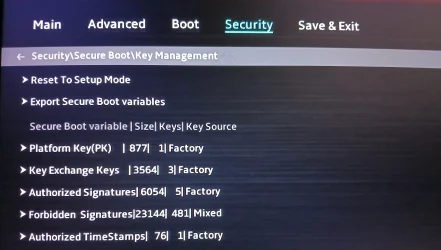
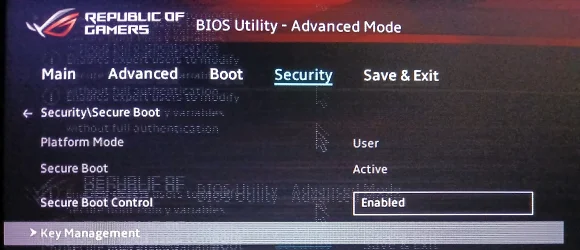
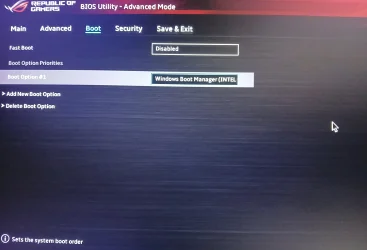
Can you check the BIOS menus, and see if you have an option to switch from Standard to Custom mode? Or if you have manual key enrollment?
 

My Computer

System One

  • OS
    Windows 7
The last BIOS update was 2021. This PC is really unsupported.
So I shouldn't expect this to be fixed?

Hmmm. That's an interesting bug, it shouldn't report your current boot manager as BANNED. And the "DO NOTHING AND WAIT" is obviously wrong.

Can you check the BIOS menus, and see if you have an option to switch from Standard to Custom mode? Or if you have manual key enrollment?
Also, i don't think i can do that i don't see any sort of option.
 

Attachments

  • 20260605_011458.webp
    20260605_011458.webp
    787.6 KB · Views: 1
  • 20260605_011449.webp
    20260605_011449.webp
    1.6 MB · Views: 1
  • 20260605_011415.webp
    20260605_011415.webp
    820.8 KB · Views: 2

My Computer

System One

  • OS
    Windows 11
    Computer type
    Laptop
    Manufacturer/Model
    Asus
    CPU
    Intel(R) Core(TM) i7-8750H CPU @ 2.20GHz
    Motherboard
    Asus GL504GW
    Memory
    16.0 GB
    Graphics Card(s)
    RTX 2070
Under the ">" for Key Exchange Keys, does that option expand to include "Add Key"?
There is a update option does that work?
 

My Computer

System One

  • OS
    Windows 11
    Computer type
    Laptop
    Manufacturer/Model
    Asus
    CPU
    Intel(R) Core(TM) i7-8750H CPU @ 2.20GHz
    Motherboard
    Asus GL504GW
    Memory
    16.0 GB
    Graphics Card(s)
    RTX 2070
1. Confirm BitLocker is not enabled on system drive, and you're not using Windows Hello PIN for logon. Disable both of them if enabled.

2. Run the update script.
Code:
Update-UEFI.bat

This should copy the KEK CA 2023 cert file to the EFI partition under the folder "EFI\Certs".

3. Enter the BIOS menu, select Add Key under KEK. You will have to browse the listed disk volumes, find one with an "EFI" folder. Select the KEK CA 2023 file under the "EFI\Certs" folder.

4. Restart Windows. Run the update script again (same command).

5. Now run the check script.
 

My Computer

System One

  • OS
    Windows 7
1. Confirm BitLocker is not enabled on system drive, and you're not using Windows Hello PIN for logon. Disable both of them if enabled.

2. Run the update script.
Code:
Update-UEFI.bat

This should copy the KEK CA 2023 cert file to the EFI partition under the folder "EFI\Certs".

3. Enter the BIOS menu, select Add Key under KEK. You will have to browse the listed disk volumes, find one with an "EFI" folder. Select the KEK CA 2023 file under the "EFI\Certs" folder.

4. Restart Windows. Run the update script again (same command).

5. Now run the check script.
Sorry i just did another check looks like there is few more options like Details, Export, Update, Append and Delete
Do I still go with these step?
 

My Computer

System One

  • OS
    Windows 11
    Computer type
    Laptop
    Manufacturer/Model
    Asus
    CPU
    Intel(R) Core(TM) i7-8750H CPU @ 2.20GHz
    Motherboard
    Asus GL504GW
    Memory
    16.0 GB
    Graphics Card(s)
    RTX 2070
-> Append
Ok so i ran the script and when I checked certs were already listed in the UEFI

Is it alright now or need to do something for UEFI DBX Certs?

Code:
Secure Boot: ON
Virtualization Based Security: ON
BitLocker on (C:) OFF

UEFI KEK Certs
--------------
    Microsoft Corporation KEK CA 2011
    Microsoft Corporation KEK 2K CA 2023

UEFI DB Certs
-------------
    Microsoft Corporation UEFI CA 2011
    Microsoft Windows Production PCA 2011
    Microsoft Option ROM UEFI CA 2023
    Microsoft UEFI CA 2023
    Windows UEFI CA 2023

UEFI DBX Certs
--------------
    (NONE)

EFI Files
---------
    Windows Boot Manager [Windows UEFI CA 2023] is ALLOWED.
    Registry: "WindowsUEFICA2023Capable" = 2
        [Windows UEFI CA 2023] in UEFI DB, and Windows starting from CA 2023 Boot Manager.

    [OPTIONAL] SkuSiPolicy.p7b (for VBS) is MISSING.


REQUIRED ACTION
===============
To REVOKE the [PCA 2011] cert, run the commands:

    reg add HKEY_LOCAL_MACHINE\SYSTEM\CurrentControlSet\Control\Secureboot /v AvailableUpdates /t REG_DWORD /d 0x280 /f
    powershell Start-ScheduledTask -TaskName "\Microsoft\Windows\PI\Secure-Boot-Update"
Code:
WARNING: Cannot confirm if W11 25H2 (26220.7872) has the latest files.


AUDIT REPORT
============
1.  [Production PCA 2011] is missing from UEFI DBX (DBXUpdate2024.bin)
2.  Windows BootMgr SVN is missing from UEFI DBX (DBXUpdateSVN.bin)

[OPTIONAL] SkuSiPolicy.p7b (for VBS) is missing from EFI
 

My Computer

System One

  • OS
    Windows 11
    Computer type
    Laptop
    Manufacturer/Model
    Asus
    CPU
    Intel(R) Core(TM) i7-8750H CPU @ 2.20GHz
    Motherboard
    Asus GL504GW
    Memory
    16.0 GB
    Graphics Card(s)
    RTX 2070
Is it alright now or need to do something for UEFI DBX Certs?

Run the update script again:
Code:
Update-UEFI.bat -Revoke

WARNING: Cannot confirm if W11 25H2 (26220.7872) has the latest files.
This is an older Insider build (26220.7872), it doesn't have the latest version of the Windows boot manager and SVN.

But for the purpose of Secure Boot updates, your BIOS is done (except for revocation). Whenever you update this PC to a newer Windows, your boot manager will be switched for a later version but all of the underlying certs are in place.
 

My Computer

System One

  • OS
    Windows 7
Run the update script again
What happens if i don't revoke it yet and wait?

This is an older Insider build (26220.7872), it doesn't have the latest version of the Windows boot manager and SVN.

But for the purpose of Secure Boot updates, your BIOS is done (except for revocation). Whenever you update this PC to a newer Windows, your boot manager will be switched for a later version but all of the underlying certs are in place.
I am on Release Preview is there a reason that RP doesn't have that updated boot manager like is it normal?
and if its not is it possible to force it to update?
 

My Computer

System One

  • OS
    Windows 11
    Computer type
    Laptop
    Manufacturer/Model
    Asus
    CPU
    Intel(R) Core(TM) i7-8750H CPU @ 2.20GHz
    Motherboard
    Asus GL504GW
    Memory
    16.0 GB
    Graphics Card(s)
    RTX 2070
What happens if i don't revoke it yet and wait?
There is no announced date for when mandatory revocation will happen. The primary reason for revoking it now is to block UEFI rootkits like Black Lotus.

I am on Release Preview is there a reason that RP doesn't have that updated boot manager like is it normal?
and if its not is it possible to force it to update?
The problem is RP's don't always sync up with the Secure Boot updates that happen on Production Channel.

On paper they should, but reality is otherwise. It's probably not a priority for the Secure Boot team to keep track if the Insider builds are taking their changes. None of this stuff depends on your actual Windows release, it's mostly a HW-based issue except for having the latest boot manager.

MS will release a new boot manager whenever a security hole is fixed. You're on 26220.7872. This channel is up to .8544 (according to UUP dump).
 

My Computer

System One

  • OS
    Windows 7
I have an HP Envy All-In-One Desktop, running Windows 11 24H2 (Build 26100.8457), with 2023 certificates updated via Windows Update (revocations have not been done). I have used your script to check certificates and boot files.

Every time the Secure-Boot-Update task would run, I would see TPM-WMI Event ID 1796, indicating "The Secure Boot update failed to update SBAT with error Unknown HResult Error code: 0x800700c1." Following your instructions in TPM/SBAT Errors, I added the SBAT registry key with an OptOut value of 1. This successfully stopped the Secure-Boot-Update task SBAT error.

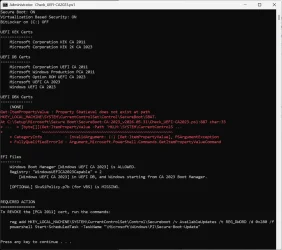
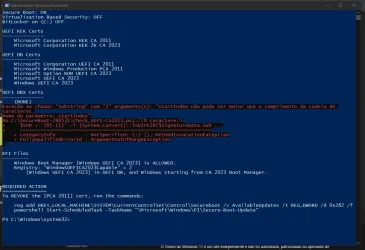
Unfortunately, if I run your check script with this SBAT key in place, I now get the following error:

Code:
Get-ItemPropertyValue : Property SbatLevel does not exist at path
HKEY_LOCAL_MACHINE\SYSTEM\CurrentControlSet\Control\SecureBoot\SBAT.
At C:\Setup\Microsoft\Secure Boot\SecureBoot-CA-2023_v2026.05.31\Check_UEFI-CA2023.ps1:887 char:33
+ ...  = [byte[]](Get-ItemPropertyValue -Path 'HKLM:\SYSTEM\CurrentControlS ...
+                 ~~~~~~~~~~~~~~~~~~~~~~~~~~~~~~~~~~~~~~~~~~~~~~~~~~~~~~~~~
    + CategoryInfo          : InvalidArgument: (:) [Get-ItemPropertyValue], PSArgumentException
    + FullyQualifiedErrorId : Argument,Microsoft.PowerShell.Commands.GetItemPropertyValueCommand

If the SBAT key does not exist, then there is no error returned. If the SBAT key exists, but the SbatLevel property does not exist, an error is returned.

Just passing this on, in case you want to modify your logic to allow for this situation.

My compliments on your amazing work, and tireless support!
 

My Computer

System One

  • OS
    Windows 11 Home 23H2
Every time the Secure-Boot-Update task would run, I would see TPM-WMI Event ID 1796, indicating "The Secure Boot update failed to update SBAT with error Unknown HResult Error code: 0x800700c1." Following your instructions in TPM/SBAT Errors, I added the SBAT registry key with an OptOut value of 1. This successfully stopped the Secure-Boot-Update task SBAT error.

Unfortunately, if I run your check script with this SBAT key in place, I now get the following error:
Can you try this version of the script?
 

Attachments

My Computer

System One

  • OS
    Windows 7
Can you try this version of the script?
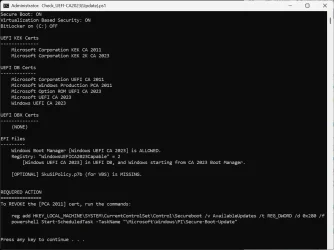
Thanks for the quick update! That has certainly resolved the issue!

To confirm, the first attached image is the output from two days ago (showing the error). The second attached image (Update in the file name) is from running your update in the post above (with no error).

Keep up the great work!
 

Attachments

  • Check_UEFI-CA2023 - 2026-06-03.webp
    Check_UEFI-CA2023 - 2026-06-03.webp
    119.2 KB · Views: 1
  • Check_UEFI-CA2023(Update) - 2026-06-05.webp
    Check_UEFI-CA2023(Update) - 2026-06-05.webp
    79.3 KB · Views: 1

My Computer

System One

  • OS
    Windows 11 Home 23H2
Sometimes you forget the reason why your code was written in a certain way. I had it right, then mistakenly broke it as part of a cleanup effort. Thanks for the confirmation!
 

My Computer

System One

  • OS
    Windows 7

My Computers

System One System Two

  • OS
    Win 11 Pro 25H2, Build 26200.8524
    Computer type
    PC/Desktop
    Manufacturer/Model
    Home Brew
    CPU
    Intel Core i5 14500
    Motherboard
    Gigabyte B760M G P WIFI
    Memory
    64GB DDR4
    Graphics Card(s)
    GeForce RTX 4060
    Sound Card
    Chipset Realtek
    Monitor(s) Displays
    LG 45" Ultragear, Acer 24" 1080p
    Screen Resolution
    5120x1440, 1920x1080
    Hard Drives
    Crucial P310 2TB 2280 PCIe Gen4 3D NAND NVMe M.2 SSD (O/S)
    Silicon Power 2TB US75 NVMe PCIe Gen4 M.2 2280 SSD (backup)
    Crucial BX500 2TB 3D NAND (2nd backup)
    Seagate 4TB Ironwolf, rotating HDD archive files
    External off-line backup Drives: 2 NVMe 4TB drives in external enclosures
    PSU
    Thermaltake Toughpower GF3 750W
    Case
    LIAN LI LANCOOL 216 E-ATX PC Case
    Cooling
    Lots of fans!
    Keyboard
    Microsoft Comfort Curve 2000
    Mouse
    Logitech G305
    Internet Speed
    Verizon FiOS 1GB
    Browser
    Firefox
    Antivirus
    Malware Bytes & Windows Defender Security
  • Operating System
    Win 11 Pro 25H2, Build 26200.8524
    Computer type
    PC/Desktop
    Manufacturer/Model
    Home Brew
    CPU
    Intel Core i5 14400
    Motherboard
    Gigabyte B760M DS3H AX
    Memory
    32GB DDR5
    Graphics card(s)
    Intel 700 Embedded GPU
    Sound Card
    Realtek Embedded
    Monitor(s) Displays
    27" HP 1080p
    Screen Resolution
    1920x1080
    Hard Drives
    Crucial P310 2TB 2280 PCIe Gen4 eD NAND PCIe SSD
    Samsung EVO 990 2TB NVMe Gen4 SSD
    Samsung 2TB SATA SSD
    PSU
    Thermaltake Smart BM3 650W
    Case
    Okinos Micro ATX Case
    Cooling
    Fans
    Keyboard
    Microsoft Comfort Curve 2000
    Mouse
    Logitech G305
    Internet Speed
    Verizon FiOS 1GB
    Browser
    Firefox
    Antivirus
    Malware Bytes & Windows Defender Security

Known issues in this update​

Microsoft is not currently aware of any issues LOL
 

My Computer

System One

  • OS
    Win11 24H2 IOT LTSC / Win11 Pro 25H2
    Computer type
    PC/Desktop
    Manufacturer/Model
    Gigabyte / Asus Home build
    CPU
    AMD Ryzen 7 8700G / AMD Ryzen 7 8700G
    Motherboard
    Gigabyte B650 AORUS ELITE AX V2 / ASUS TUF GAMING B650-PLUS
    Memory
    F5-6000J3636F16GX2-FX5 32GB / Lexar Ares RGB LD5BU016G-R6000GDLA 32GB
    Graphics Card(s)
    internal
    Sound Card
    Realtec
    Monitor(s) Displays
    BenQ 27 L EW2780
    Screen Resolution
    1920x1080
    Hard Drives
    Many M.2's
    Internet Speed
    400 mbs
    Browser
    Vivaldi
    Antivirus
    Eset

Known issues in this update​

Microsoft is not currently aware of any issues LOL
Too many words, it should read...

Microsoft is not currently aware. 🤣
 

My Computers

System One System Two

  • OS
    Win 11 Pro 25H2, Build 26200.8524
    Computer type
    PC/Desktop
    Manufacturer/Model
    Home Brew
    CPU
    Intel Core i5 14500
    Motherboard
    Gigabyte B760M G P WIFI
    Memory
    64GB DDR4
    Graphics Card(s)
    GeForce RTX 4060
    Sound Card
    Chipset Realtek
    Monitor(s) Displays
    LG 45" Ultragear, Acer 24" 1080p
    Screen Resolution
    5120x1440, 1920x1080
    Hard Drives
    Crucial P310 2TB 2280 PCIe Gen4 3D NAND NVMe M.2 SSD (O/S)
    Silicon Power 2TB US75 NVMe PCIe Gen4 M.2 2280 SSD (backup)
    Crucial BX500 2TB 3D NAND (2nd backup)
    Seagate 4TB Ironwolf, rotating HDD archive files
    External off-line backup Drives: 2 NVMe 4TB drives in external enclosures
    PSU
    Thermaltake Toughpower GF3 750W
    Case
    LIAN LI LANCOOL 216 E-ATX PC Case
    Cooling
    Lots of fans!
    Keyboard
    Microsoft Comfort Curve 2000
    Mouse
    Logitech G305
    Internet Speed
    Verizon FiOS 1GB
    Browser
    Firefox
    Antivirus
    Malware Bytes & Windows Defender Security
  • Operating System
    Win 11 Pro 25H2, Build 26200.8524
    Computer type
    PC/Desktop
    Manufacturer/Model
    Home Brew
    CPU
    Intel Core i5 14400
    Motherboard
    Gigabyte B760M DS3H AX
    Memory
    32GB DDR5
    Graphics card(s)
    Intel 700 Embedded GPU
    Sound Card
    Realtek Embedded
    Monitor(s) Displays
    27" HP 1080p
    Screen Resolution
    1920x1080
    Hard Drives
    Crucial P310 2TB 2280 PCIe Gen4 eD NAND PCIe SSD
    Samsung EVO 990 2TB NVMe Gen4 SSD
    Samsung 2TB SATA SSD
    PSU
    Thermaltake Smart BM3 650W
    Case
    Okinos Micro ATX Case
    Cooling
    Fans
    Keyboard
    Microsoft Comfort Curve 2000
    Mouse
    Logitech G305
    Internet Speed
    Verizon FiOS 1GB
    Browser
    Firefox
    Antivirus
    Malware Bytes & Windows Defender Security
Hello, it seems the update process was successful, but when I check I get these error lines in DBX, it seems something is broken in the script. SecureBoot-260531
1780775871128.webp
 

My Computer

System One

  • OS
    Windows 10
    Computer type
    PC/Desktop
    Manufacturer/Model
    MSI/Z97M-G43(MS-7924)
    CPU
    i7-4790K@ 4000MHz
    Motherboard
    MSI Z97M-G43
    Memory
    32GB DDR3 @1600MHZ
    Graphics Card(s)
    XFX RS RX 480 8GB
    Sound Card
    Onboard
    Monitor(s) Displays
    Samsung
    Screen Resolution
    1920x1080
    Hard Drives
    2xSSD 1TB, 2x HDD 1TB
    PSU
    OCZ 700W
    Case
    Corsair Carbide
    Cooling
    Corsair 120mm
    Keyboard
    Philips Mecanic Blue Keys
    Mouse
    Generic
    Internet Speed
    500Mb
    Browser
    Chrome
    Antivirus
    Defender
Back
Top Bottom