Solved garlin's PowerShell scripts for updating Secure Boot CA 2023


Someone at MS just submitted KEK files for (7) Surface models. It's mid-June 2026! Sometimes the factory takes forever to make a new sausage. :sleep:
And Surface is their hardware brand
Hilarious !!!
 

My Computer My Computer

At a glance

Windows 11
OS
Windows 11
Hello,

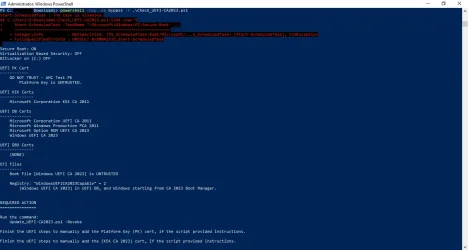
Running an old Dell XPS 8700. Right now, it's Windows 10, but will be upgrading eventually to Windows 11 for compatibility with my main computer. Had some real problems when Microsoft released the Secure Boot update task back in early December (froze the system on every boot until I did a fresh install). Then, when it started running every 11 hours; well, the system files kept getting shredded. I finally disabled the task and started looking at your Powershell scripts. No joy with these, I'm afraid. I get a partial update, but not KEK or PK. I had a couple of questions.
1) I have disabled the Microsoft task. When I run the Update_UEFI-CA2023.ps1 script, it just hangs -- actually the system freezes and I have to do a hard shutdown. I'm pretty sure this is for a different reason (see question #2), but I wanted to double-check that your script would not have issues with the Microsoft Secure-Boot task being disabled in Task Scheduler.

2) The freeze/hang issue has been documented in other forums as being caused by the old NVIDIA graphics cards that these systems came with. Apparently, they are 'signed' with 2011 certificates. I still have to remove the card and test your script again, but wondered if you had any thoughts on this?

Other than that, I agree with the others who have posted. While I have not been able to update, your script has not shredded the system files in the way that the Microsoft task has. And while my system did 'freeze', there was no damage to the system files upon restart after the hard shutdown.

Again, any thoughts on the above would be appreciated.
 

Attachments

  • Check_UEFI-CA2023-Script.webp
    Check_UEFI-CA2023-Script.webp
    58.6 KB · Views: 1
Last edited:

My Computer My Computer

At a glance

Windows 11
OS
Windows 11
Computer type
PC/Desktop
Manufacturer/Model
Dell XPS 8700
1) I have disabled the Microsoft task. When I run the Update_UEFI-CA2023.ps1 script, it just hangs -- actually the system freezes and I have to do a hard shutdown. I'm pretty sure this is for a different reason (see question #2), but I wanted to double-check that your script would not have issues with the Microsoft Secure-Boot task being disabled in Task Scheduler.
For applying the certs and updating the boot manager, my script doesn't need the Secure Boot task. But for enabling the SBAT and UEFI lock on SkuSkiSpolicy, it calls the task since those are reserved security operations that only the task can do.

2) The freeze/hang issue has been documented in other forums as being caused by the old NVIDIA graphics cards that these systems came with. Apparently, they are 'signed' with 2011 certificates. I still have to remove the card and test your script again, but wondered if you had any thoughts on this?
You're probably hitting the very serious bug with your GPU having an older signed ROM, and it's not authorized once CA 2011 is banned. This is a known issue in the NVIDIA community, you will find lots of threads on this exact problem.

There's no real good answer, except to hope someone has figured out how to hack your GPU's ROM to re-sign them. Or you will have to swap out the GPU (unless you're stuck with integrated graphics). It's one of those problems where nobody thought about this possibility 15 years ago.

Everyone was thinking about the motherboard's security, and not considering it for GPU's. If you can't find a workaround from the NVIDIA forums, you're screwed and need to leave Secure Boot disabled. It's not ideal, but you have to balance which is more important to you, running this PC or having less system protection.

 

My Computer My Computer

At a glance

Windows 7
OS
Windows 7
For applying the certs and updating the boot manager, my script doesn't need the Secure Boot task. But for enabling the SBAT and UEFI lock on SkuSkiSpolicy, it calls the task since those are reserved security operations that only the task can do.


You're probably hitting the very serious bug with your GPU having an older signed ROM, and it's not authorized once CA 2011 is banned. This is a known issue in the NVIDIA community, you will find lots of threads on this exact problem.

There's no real good answer, except to hope someone has figured out how to hack your GPU's ROM to re-sign them. Or you will have to swap out the GPU (unless you're stuck with integrated graphics). It's one of those problems where nobody thought about this possibility 15 years ago.

Everyone was thinking about the motherboard's security, and not considering it for GPU's. If you can't find a workaround from the NVIDIA forums, you're screwed and need to leave Secure Boot disabled. It's not ideal, but you have to balance which is more important to you, running this PC or having less system protection.
Thanks for the quick response. Good to know about the SBAT and "UEFI lock". As it turns out, I can run quite comfortably on the Intel i7's graphic, so I'll be trying to maintain the Secure Boot, but remove the graphics card. After I've done that, I'll give your script a go again with the Microsoft task enabled.

Now that I am retired, I hate to throw out stuff that still works, when I have time to keep it humming. I plan to turn the XPS into my 'graphics' machine for creating genealogical pictures and watching my old movies. So, ultimately, it needn't be internet secure, and I can consider going back to the legacy boot instead of UEFI if need be; or consider spending the money on a supported graphics card.

It's all good. Thanks again.
 

My Computer My Computer

At a glance

Windows 11
OS
Windows 11
Computer type
PC/Desktop
Manufacturer/Model
Dell XPS 8700
@garlin Thx for the quick response, for leaving the system in custom mode do I have to leave secure boot disabled? And then once I run the script and it applies the replacement certs, I reboot and turn secure boot back on right?
 

My Computer My Computer

At a glance

Windows 11
OS
Windows 11
Computer type
PC/Desktop
Standard Mode will use the factory defaults, you can't make manual changes and keep it in Standard Mode. Leave it in Custom mode.

You can temporarily leave Secure Boot disabled and restart Windows, so you can run the update & check scripts. If you see the extra certs properly recognized, then you can re-enable Secure Boot. Remember: you can always disable Secure Boot if Windows doesn't boot.
 

My Computer My Computer

At a glance

Windows 7
OS
Windows 7
Successfully removed old certs and SecureBootSVN shows 9.0 for all 3 entries. Running Update -BootMedia reports "No Updates are Required". However Windows complains when booting from the USB with the message "Secure boot version check failed... Current version 7.0, minimum allowed 9.0".

The USB will boot if Secure Boot is turned off in the BIOS, but this is not ideal. Can anything be done to get the USB updated? The same situation happens with some .ISO files on a Ventory USB.
 

My Computer My Computer

At a glance

Windows 11 ProIntel Core Ultra16GBIntel(R) Arc Graphics
OS
Windows 11 Pro
Computer type
Laptop
Manufacturer/Model
ASUS Zenbook 14 OLED
CPU
Intel Core Ultra
Memory
16GB
Graphics Card(s)
Intel(R) Arc Graphics
Sound Card
Realtek High Definition Audio(SST)
Screen Resolution
2880 x 1800
Hard Drives
500 GB NVMe SSD
Internet Speed
1,500Mbps
Browser
Firefox, Edge
Antivirus
Windows Defender
I also have a Dell 8700 it doesn't have TPM 2.0 or 1.2. It has PTT (Platform Trust Technology). I'm leaving mine on Windows 10 and will use it as a local server on my WiFi but not connected to the internet.
 

My Computer My Computer

At a glance

Windows 11 & Zorin ProIntel® Core™ Ultra 9 Processor 275HX 2.7 GHz32 gbNVIDIA® GeForce RTX™ 5060 Laptop GPU
OS
Windows 11 & Zorin Pro
Computer type
Laptop
Manufacturer/Model
Asus Rog Strix G16
CPU
Intel® Core™ Ultra 9 Processor 275HX 2.7 GHz
Motherboard
AsusteK Computer
Memory
32 gb
Graphics Card(s)
NVIDIA® GeForce RTX™ 5060 Laptop GPU
Sound Card
Realtek High Definition Audio
Monitor(s) Displays
Laptop 16 inch
Screen Resolution
2560 X 1600
Hard Drives
Boot: Samsung 9100 NVME 2 TB Microsoft Storage Controller: Standard NVM Express Driver: Microsoft 6/21/2006. No SATA/AHCI on my motherboard or in bios
Mouse
Pad
Browser
Google Chrome
Antivirus
Microsoft
Other Info
Printer: HP Color LaserJet MFP M477dw
Successfully removed old certs and SecureBootSVN shows 9.0 for all 3 entries. Running Update -BootMedia reports "No Updates are Required". However Windows complains when booting from the USB with the message "Secure boot version check failed... Current version 7.0, minimum allowed 9.0".

The USB will boot if Secure Boot is turned off in the BIOS, but this is not ideal. Can anything be done to get the USB updated? The same situation happens with some .ISO files on a Ventory USB.

Run the update script:
Code:
Update-UEFI.bat -BootMedia

The Secure Boot task will handle updating the boot manager after any Monthly Update for Windows itself. But MS doesn't do anything for USB boot media which may have been created before the boot manager was switched. It's just a matter of swapping out the boot file(s) again.

It's annoying that you have to do this, but get used to it. MS is protecting you from security holes.
 

My Computer My Computer

At a glance

Windows 7
OS
Windows 7
me or you?

new one is dated 2026.06.08 (earlier) and has no extras ?

I'm going to have to bail for today - thanks again for your support

Hi garlin

I'm still lost on this verbose check ?
 

My Computer My Computer

At a glance

Win11
OS
Win11
Hi garlin

I'm still lost on this verbose check ?
Hi
Have you ever used cmd.exe, powershell or terminal ?
Just want to know what you are familiar with...
 

My Computer My Computer

At a glance

Windows 11
OS
Windows 11
Hi garlin

I'm still lost on this verbose check ?
The verbose mode is triggered by adding "-Verbose" to the end of whatever you used to run the check script in the first place.

Either:
.\Check_UEFI-CA2023.ps1 -Verbose
.\Check-UEFI.bat -Verbose

Both the GitHub and post #1 version of the ZIP file should have the full set of both .ps1 and .bat scripts.
 

My Computer My Computer

At a glance

Windows 7
OS
Windows 7
The verbose mode is triggered by adding "-Verbose" to the end of whatever you used to run the check script in the first place.

Either:
.\Check_UEFI-CA2023.ps1 -Verbose
.\Check-UEFI.bat -Verbose

Both the GitHub and post #1 version of the ZIP file should have the full set of both .ps1 and .bat scripts.
I think he just double clicked on the bat from explorer and never used cmd or powershell windows on his own
That's what I was trying to figure out with my post

@botus you don't have to feel like an idiot, you just have different knowledge...
 

My Computer My Computer

At a glance

Windows 11
OS
Windows 11
I also have a Dell 8700 it doesn't have TPM 2.0 or 1.2. It has PTT (Platform Trust Technology). I'm leaving mine on Windows 10 and will use it as a local server on my WiFi but not connected to the internet.
Hey there Asus272; like-minded people putting their old tech to good use.
Dell XPS 8700 does not have TPM but I do have the UEFI secure boot enabled on mine.

Not to go too far on this (since this is a thread for the garlin scripts), did you run into the freezing issues due to the Microsoft Secure-Boot Certificate update task? or have you successfully installed the new 2023 certificates somehow?
 

My Computer My Computer

At a glance

Windows 11
OS
Windows 11
Computer type
PC/Desktop
Manufacturer/Model
Dell XPS 8700
Normally, the Secure Boot task shouldn't crash (or freeze) your system because it takes a reboot for the applied changes to take effect. When the certs are applied, extra signed bytes are appended to the existing byte values in the UEFI's NVRAM memory. And the other changes are simple file copies.

It could be:
- You have a defective BIOS chip, and making changes triggers some HW problems. But another identical system doesn't share this problem.

- You have an older BIOS chip, and the extra data is overflowing the limited memory available to store this data. Supposedly this a known problem on some Acer models, but the same engineering problem could be repeated on other PC's using the same chip design.

Most of the time if the cert append fails, Windows returns some error code indicating authentication failure (cert mismatch), or unknown reason. But I haven't any other stories of the update causing a crash while Windows is running. Might be useful to search online if this a documented thing, or you're an unfortunate isolated incident.
 

My Computer My Computer

At a glance

Windows 7
OS
Windows 7
Run the update script:
Code:
Update-UEFI.bat -BootMedia

The Secure Boot task will handle updating the boot manager after any Monthly Update for Windows itself. But MS doesn't do anything for USB boot media which may have been created before the boot manager was switched. It's just a matter of swapping out the boot file(s) again.

It's annoying that you have to do this, but get used to it. MS is protecting you from security holes.
Thanks. I thought that I had done that, but it works now.

How about the updating of .iso boot images on my Ventoy usb?
 

My Computer My Computer

At a glance

Windows 11 ProIntel Core Ultra16GBIntel(R) Arc Graphics
OS
Windows 11 Pro
Computer type
Laptop
Manufacturer/Model
ASUS Zenbook 14 OLED
CPU
Intel Core Ultra
Memory
16GB
Graphics Card(s)
Intel(R) Arc Graphics
Sound Card
Realtek High Definition Audio(SST)
Screen Resolution
2880 x 1800
Hard Drives
500 GB NVMe SSD
Internet Speed
1,500Mbps
Browser
Firefox, Edge
Antivirus
Windows Defender
There are two major points in handling Windows ISO images:

1. Every W10 22H2 or W11 install image has two sets of boot files in the image.
"\Windows\Boot\EFI" contains the legacy CA 2011 boot files, and "\Windows\Boot\EFI_EX" contains the newer CA 2023 boot files.

During install time, Setup will check the current cert status and pick the appropriate folder to copy from. You should use the latest possible image (from MCT or UUP dump), because if you re-install a PC that already finished the CA 2023 migration, your image might have outdated files are blocked by the SVN security restriction.

The SVN is a value provided to indicate what is the lowest version of boot manager allowed to boot. Using an old install image will result in an older boot manager getting copied, and it fails the SVN check. So having an up-to-date image is a must. You can, of course, temporarily disable Secure Boot while installing Windows and choose to deal with updating Windows before re-enabling Secure Boot.

Neither Ventoy or Rufus will advise that your ISO image might be out of date. June 2026 was the last time the boot manager changed. So you should have at least a June image for now. MS might roll out a future boot manager, and you'll have to jump ahead again.

2. When creating any bootable USB media, it must pass Secure Boot checks. This is separate from what's contained in the install image. You can end with various combinations where the boot media passes Secure Boot, but the contained ISO is out of date. Or you have a current ISO, but the boot media fails the check.

We're in a new world where have to keep up, and hopefully some of this awareness gets rolled into Ventoy or other tools. Until then, you can use the check and update scripts in the short term.
 
Last edited:

My Computer My Computer

At a glance

Windows 7
OS
Windows 7
We're in a new world where have to keep up, and hopefully some of this awareness gets rolled into Ventoy or other tools. Until then, you can use the check and update scripts in the short term.

Yes, indeed we are... After each Monthly Update I put in my two USB sticks and first run the PowerShell; Check_UEFI-CA2023 -BootMedia scrip, and if it fails, I run the Update script. It's a new second step routine. I'm sure, kind of, that this will just be a temporary needed action.
 

My Computers My Computers

  • At a glance

    Windows 11 Pro 25H2 26200.8655Intel® Core™ Ultra 7 265 1.8GHz to 5.3GHz (Ar...SK Hynix 32GB DDR5 5600 Desktop RAM UDIMM Non...Dell NVIDIA® GeForce RTX™ 4060 8GB GDDR6 & (i...
    OS
    Windows 11 Pro 25H2 26200.8655
    Computer type
    PC/Desktop
    Manufacturer/Model
    Dell Tower Plus EBT2250, DOB: 06/15/2025
    CPU
    Intel® Core™ Ultra 7 265 1.8GHz to 5.3GHz (Arrow Lake)
    Motherboard
    Dell Inc. 02D3NT A00 (U3E1)
    Memory
    SK Hynix 32GB DDR5 5600 Desktop RAM UDIMM Non-ECC PC5-5600B
    Graphics Card(s)
    Dell NVIDIA® GeForce RTX™ 4060 8GB GDDR6 & (iGPU) Integrated Intel® UHD Graphics
    Sound Card
    Chipset Realtek High-Definition Audio with Dolby Atmos
    Monitor(s) Displays
    Dell Ultra Sharp U2515H 25-Inch Screen LED-Lit
    Screen Resolution
    2560 X 1440
    Hard Drives
    Samsung (NVMe PM9C1a 1024GB) M.2 PCIe NVMe Solid State Drive (OS), with Samsung Piccolo (S4LY022) 6-Core 4 Channel Controller.

    Samsung T7 500GB SSD, USB-C External Drive
    PSU
    Dell 460W
    Case
    Dell Tower Plus EBT 2250
    Cooling
    Fan
    Keyboard
    Dell Wired Keyboard - KB216
    Mouse
    Logitech M510
    Internet Speed
    Intel Killer E3100G 2.5 Gigabit Ethernet Controller
    Browser
    Microsoft Edge
    Antivirus
    Microsoft Windows Security
    Other Info
    The Samsung NVMe PM9C1a 1024GB SSD does not use a Phison NAND controller. Instead, it uses Samsung's in-house developed Piccolo (S4LY022) 6-Core 4 Channel Controller. The PM9C1a utilizes a controller built using Samsung's 5-nanometer process and seventh-generation V-NAND technology. 🤔
  • At a glance

    Windows 11 Pro 25H2 26200.865510th Generation Intel Core i7-10510U Processo...16GB DDR4 RAMNVIDIA® GeForce® MX250 with 2GB GDDR5 graphic...
    Operating System
    Windows 11 Pro 25H2 26200.8655
    Computer type
    Laptop
    Manufacturer/Model
    Dell Inspiron 15 7000 (7591) 2-in-1, DOB: 11/30/2019
    CPU
    10th Generation Intel Core i7-10510U Processor (8MB Cache, up to 4.9 GHz) Comet Lake
    Motherboard
    Dell 0NNW5N
    Memory
    16GB DDR4 RAM
    Graphics card(s)
    NVIDIA® GeForce® MX250 with 2GB GDDR5 graphics memory
    Sound Card
    Chipset Realtek ALC3254 🤔🤣
    Monitor(s) Displays
    Dell 15.6-inch UHD Truelife Touch Narrow Border WVA Display with Active Pen support
    Screen Resolution
    3840 x 2160
    Hard Drives
    Intel NVME 512GB SSD with 32GB Intel Optane Memory, M.2 80mm PCIe 3.0 RAID

    SanDisk 256GB Extreme microSDXC UHS-I Memory Card
    PSU
    Dell 4-Cell Battery, 68 Whr (Integrated), 90 Watt AC Adapter
    Case
    Dell Inspiron 15 7000 2-in-1 (7591)
    Cooling
    Standard Dell Case Fan & Havit HV-F2056 USB Powered (3 Fans) Laptop Cooling Pad.
    Keyboard
    Dell
    Mouse
    Logitech Wireless Mouse M650L
    Internet Speed
    Wireless/Wired connectivity (WiFi 6 - 802.11 ax)
    Browser
    Microsoft Edge
    Antivirus
    Microsoft Windows Security
    Other Info
    From Dell: 512GB NVME Solid State Drive accelerated by 32GB Intel Optane Memory are the fastest as compared to NAND SSDs. Intel Optane H10 with SSD offers speedy storage and accelerates opening your programs.
I think he just double clicked on the bat from explorer and never used cmd or powershell windows on his own
That's what I was trying to figure out with my post

@botus you don't have to feel like an idiot, you just have different knowledge...
exactly - thanks for mind reading

then her car broke down and I had to go rescue.....
 

My Computer My Computer

At a glance

Win11
OS
Win11
Back
Top Bottom