Solved garlin's PowerShell scripts for updating Secure Boot CA 2023


Fixed! And faster, too. Previously, there was a long delay at the start, but now it works quickly.
Thx
 

My Computers My Computers

  • At a glance

    Windows 11 Pro 24H2Intel i7-1260P 12th Gen 4.7GHz32GB DDR4-3200NVIDIA T550 Laptop GPU
    OS
    Windows 11 Pro 24H2
    Computer type
    Laptop
    Manufacturer/Model
    Lenovo P16s Workstation
    CPU
    Intel i7-1260P 12th Gen 4.7GHz
    Memory
    32GB DDR4-3200
    Graphics Card(s)
    NVIDIA T550 Laptop GPU
    Sound Card
    Realtek Audio
    Monitor(s) Displays
    16" Laptop Display
    Screen Resolution
    2560x1600
    Hard Drives
    2TB Samsung M.2 2280 SSD PCIe 4.0 x 4 NVMe
    Mouse
    Logitech MX Anywhere 2s
    Internet Speed
    1000 Mb
    Browser
    Firefox
    Antivirus
    Avast
  • At a glance

    Windows 11 Pro 24H2i7-6820HQ 6th Gen 3.6 GHz32GB DDR4-2133NVIDIA Quadro M2000M Laptop GPU
    Operating System
    Windows 11 Pro 24H2
    Computer type
    Laptop
    Manufacturer/Model
    Lenovo P50 Workstation
    CPU
    i7-6820HQ 6th Gen 3.6 GHz
    Memory
    32GB DDR4-2133
    Graphics card(s)
    NVIDIA Quadro M2000M Laptop GPU
    Sound Card
    Realtek Audio
    Monitor(s) Displays
    15.6" Laptop Display
    Screen Resolution
    1920x1080
    Hard Drives
    2 x 1TB Samsung M.2 2280 SSD PCIe 3.0 x 4 NVMe
    Cooling
    Dual Fan System
    Mouse
    Logitech MX Anywhere 2s
    Internet Speed
    1000 Mb
    Browser
    Firefox
    Antivirus
    Avast
Hello all. I have read all 176 pages on all these subjects and all of you been great on your ideas, fixes, and end results. I truly mean it!
To begin this "I'm truly sorry" to be putting this out there! I'm doing this because I'm at my last resort of what to do so please be and have patience with me. I'm so so cautious of messing with my UEFI/BIOS because I can't afford another computer. I mostly work with spreadsheets and a CAD program. I really need advise what to do and how to do it. Not for work. I just poured a 1/4 bottle of Kahlua into my coffee, so here it goes. I just don't know if I should do the update or just leave as is? I really want to update though. When upgrading to Windows 11, I had to bypass all requirements. Thank you.
I'm in the bios as Administrator and secure keys is custom. This is what I see when I see if I can manually input UEFI files.

SECURE BOOT DATABASE: Installed and Locked.
ENFORCED SECURE BOOT: Enabled.
USER CUSTOMIZED SECURITY: No.
ERASE ALL SECURE BOOT SETTINGS: Disabled. (I can erase.)
This PC could be more risky to update. Acer, Lenovo and Sony use the Insyde BIOS as their reference platform.

Older versions of this BIOS (going back to 2016) may have a hidden HW or BIOS limitation, where trying to manually add certs can trigger a possible "bricking" situation. While the UEFI may have enough NVRAM (in total) to safely add more keys, the specific amount of memory allocated for Secure Boot may be artificially capped. In certain cases, adding new certs will fail and you get truncated data.

This leads to a bricking because the data fails the BIOS's consistency checks. Sometimes you can manage a way to get out, other times it requires reflashing the BIOS to a known good state to recovery. If this PC is important to you, I wouldn't risk it and just leave Secure Boot off. You can always try manual enrollment (it works for a wide range of PC's) but the older Insyde versions are more prone to failure than an older BIOS from AMI.

Typically this requires a new BIOS version, to account for how much memory is available for Secure Boot variables.
 
Last edited:

My Computer My Computer

At a glance

Windows 7
OS
Windows 7
Thank you Garlin for your quick response. because the Insyde bios in Sony Vaio laptops are pretty much imposable to get the password to unlock the bios and there's no way in hell to get a updated bios, I also felt that I would keep the laptop as is, until I find a rock solid way to update UEFI files manually or by using your UEFI pack to update the secure boot files.
I'm not on the internet that much. I use Norton365 and Norton AntiTrack to help what they can.
I know you have put a whole lot of time into helping everyone and giving them the bravery to update their UEFI/bios. Hell, If you told me to just do it wit an idea it would work, I would do it because I fully trust your mind and word, and I don't trust anyone, still at 62!
A great big thanks to all who is making updates possible!
all take care and keep up with the great work.
I will keep reading daily just in a case someone has the same problem I have and they have found a fix!
Bob
 

My Computer My Computer

At a glance

Windows 11 25H2Intel Core i7-3632QM 2.20GHZ / 3.20GHZ8MB DDR3-1600 SDRAM (SODRAM)Intel HD4000
OS
Windows 11 25H2
Computer type
Laptop
Manufacturer/Model
Sony Vaio sve15128cxs
CPU
Intel Core i7-3632QM 2.20GHZ / 3.20GHZ
Motherboard
Sony sve15128cxs Ivy Bridge, Insyde Bios- R0200DS (9/26/2016)
Memory
8MB DDR3-1600 SDRAM (SODRAM)
Graphics Card(s)
Intel HD4000
Hard Drives
HDD Western Digital WDC WD10JPVT-55A1YT0
Cooling
3 fan cooling pad
Mouse
Logitech ERGO
Antivirus
Norton Antivirus
Other Info
Sony doesn’t support anymore and has deleted all firmware and software from their site.
I noticed a few changes in the August 2026 SecureBootUpdates folder:

1. "Windows UEFI CA 2023" cert was always provided as dbupdate2024.bin.
Code:
Subject      : CN=Windows UEFI CA 2023, O=Microsoft Corporation, C=US
Issuer       : CN=Microsoft Root Certificate Authority 2010, O=Microsoft Corporation, L=Redmond, S=Washington, C=US
Thumbprint   : 45A0FA32604773C82433C3B7D59E7466B3AC0C67
FriendlyName :
NotBefore    : 6/13/2023 11:58:29 AM
NotAfter     : 6/13/2035 12:08:29 PM
Extensions   : {System.Security.Cryptography.Oid, System.Security.Cryptography.Oid, System.Security.Cryptography.Oid, System.Security.Cryptography.Oid...}

2. Now it's duplicated in a second file DBUpdate1P2023.bin, or First Party (1P). While the two binary files are not identical, the two certs are the same.
Code:
Subject      : CN=Windows UEFI CA 2023, O=Microsoft Corporation, C=US
Issuer       : CN=Microsoft Root Certificate Authority 2010, O=Microsoft Corporation, L=Redmond, S=Washington, C=US
Thumbprint   : 45A0FA32604773C82433C3B7D59E7466B3AC0C67
FriendlyName :
NotBefore    : 6/13/2023 11:58:29 AM
NotAfter     : 6/13/2035 12:08:29 PM
Extensions   : {System.Security.Cryptography.Oid, System.Security.Cryptography.Oid, System.Security.Cryptography.Oid, System.Security.Cryptography.Oid...}

Presumably it's because the "Microsoft UEFI CA 2023" cert was provided in DBUpdate3P2023.bin (Third Party or 3P). I don't see the practical advantage in duplicating the "Windows UEFI CA 2023" cert, other than the politics of playing nice with non-MS vendors...

3. The legacy versions of the DBX updates are now hidden (since July 2026) inside a new set of CAB files. Except for DBXUpdateLegacy2024.bin (?) You can't even expect MS to stay consistently inconsistent.

The legacy versions have the original DBX format most Secure Boot parsing tools expect, but the newer "MS only" format inserts some timestamp and header block in the middle of the data stream. My scripts can read either file format, so it's not a challenge.

Staying with the inconsistent behavior, dbxupdate.bin (non-legacy format) is provided as one file – but the legacy DBX is split across 3 files. The only difference is the two most recent DBX updates are written as separate files instead of merged with the primary file. Why bother splitting them, then the non-legacy file isn't split? Same content, but more confusion from repacking the files.


Sometimes I don't feel like the best MS people are involved in these projects.
 
Last edited:

My Computer My Computer

At a glance

Windows 7
OS
Windows 7
This PC could be more risky to update. Acer, Lenovo and Sony use the Insyde BIOS as their reference platform.
Toshiba did as well...

On an old L70-A laptop using Insyde BIOS version 1.60 on Windows 11 25H2 (unsupported due to no TPM), I was able to get all but the KEK cert installed, using the @garlin scripts.

There appeared to be no BIOS Secure Boot menu…it was Secure Boot On, or Off.

After some research, I found that entering a Supervisor password in the BIOS revealed a minimal menu.

The only option on the menu was “Clear Secure Boot Keys”.

I ran that, and rebooted.

I expected to see an “Install Default Secure Boot Keys” option on reboot, but the only thing that displayed was that it was in “Setup Mode”.

I then ran @garlin’s update script, and all 2023 certs, including the KEK were successfully installed.
 

My Computer My Computer

At a glance

Windows 11 Pro 25H2
OS
Windows 11 Pro 25H2
Computer type
Laptop
Manufacturer/Model
Toshiba
Hello, can I please have your Toshiba UEFI/Bios version and year?
Did you have this where you can delete certs?
SECURE BOOT DATABASE: INSTALLED AND LOCKED
ENFORCED SECURE BOOT: ENABLED
USER CUSTOMIZED SECURITY: NO

OPTIONS:
ERRASE ALL SECURE BOOT SETTING: (You can enable to erase).

Thank you
 

My Computer My Computer

At a glance

Windows 11 25H2Intel Core i7-3632QM 2.20GHZ / 3.20GHZ8MB DDR3-1600 SDRAM (SODRAM)Intel HD4000
OS
Windows 11 25H2
Computer type
Laptop
Manufacturer/Model
Sony Vaio sve15128cxs
CPU
Intel Core i7-3632QM 2.20GHZ / 3.20GHZ
Motherboard
Sony sve15128cxs Ivy Bridge, Insyde Bios- R0200DS (9/26/2016)
Memory
8MB DDR3-1600 SDRAM (SODRAM)
Graphics Card(s)
Intel HD4000
Hard Drives
HDD Western Digital WDC WD10JPVT-55A1YT0
Cooling
3 fan cooling pad
Mouse
Logitech ERGO
Antivirus
Norton Antivirus
Other Info
Sony doesn’t support anymore and has deleted all firmware and software from their site.
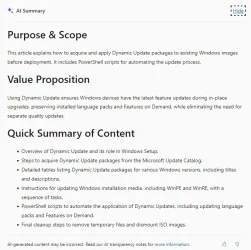
Maybe someone is interested in MS' advices how to update boot media? They wrote a short and concise article and have some scripts for updating WinRE- and WinPE- bootmedia:

1787391046465.webpAI
 

My Computer My Computer

At a glance

W10
OS
W10
The entire set of install media scripts can be boiled down to:

1. Your local copy of WinRE gets updated (normally), so we don't bother changing the boot files. Integrate other languages and exciting add-on's. Macrium has staging folders for holding those types of optional feature packages.

2. WinPE is more likely a boot.wim from an out-of-date ISO, so we copy boot files & boot.stl from your current Windows to boot.wim.

3. Your out-of-date ISO's top folders also need the newer boot files from your current Windows. We should throw in the current boot.stl, so it doesn't blow up Dynamic Setup.

Most of the boot manager copying steps are duplicated in the MS script Make2023BootableMedia.ps1

One thing to note, is none of the MS scripts (or any other scripts I've seen), bother to do a version check. They just assume the Windows host you're running on has the latest boot files (from a recent Monthly Update). It could be you're getting a newer boot manager in the ISO or boot.wim, compared to what you have now. My update script does perform a version check, based on the file's SVN.
 

My Computer My Computer

At a glance

Windows 7
OS
Windows 7
An over-the-top install was performed several days past using:
Download Windows 11 Disk Image (ISO) for x64 devices

It produced the following results:

1 Refusal to boot until Secure Boot had been turned off.

2. A retro-build dating back to March 2026 -- apparent only after I checked the version:
Win11Pro 25H2.26200.8037
March 10, 2026—KB5079473 (OS Builds 26200.8037 and 26100.8037)

3. An old SVN and an old SkuSiPolicy.P7b

Questions are as follows:

1. How best to update SVN and SkuSiPolicy.P7b without turning Secure Boot off?

2. I had expected to see the current August 2026 update in the Microsoft download (since that had been my latest installed update), not March 2026. More to the point, will any older update or older backup (with old SVN or old SkuSiPolicy) create the same no-boot situation if Secure Boot is on?
 
Last edited:

My Computer My Computer

At a glance

Windows 11 Pro
OS
Windows 11 Pro
Computer type
Laptop
Manufacturer/Model
Acer TravelMate P215-52
Geekdom, Usually the ISO from Download Windows 11 Disk Image (ISO) for x64 devices is out-of-date. Use the media creation tool to download an ISO that is up-to-date. Then use rufus at rufus.ie to make an install USB stick and do a clean install from that stick. Afterwards apply the garlin scripts.
 

My Computer My Computer

At a glance

windows 11
OS
windows 11
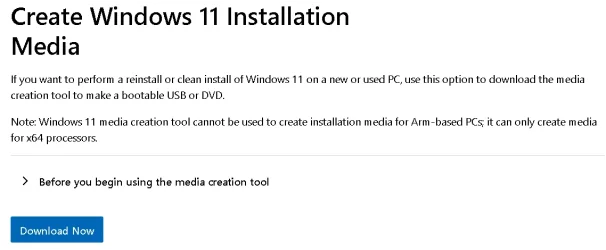
@geekdom just in case you don't know, to have Media Creation Tool (MCT) create an iso for you, go to: Download Windows 11
Probably the same place you went to get the prebuilt ISO, but instead of choosing to download an ISO, use this option instead:

1787409773009.webp
It will download MediaCreationTool.exe.
Use it to create an ISO with the secure boot 2023 compatible files.

If you already know about MCT, then disregard my post...

PS: Don't keep the created ISO after you used it, unless you are building multiple machines in the next few days. In a month if you need it again, reuse MediaCreationTool.exe to create a new one. It's the safest way to always make sure you have the latest for Secure Boot stuf.
 

My Computer My Computer

At a glance

Windows 11
OS
Windows 11
2. I had expected to see the current August 2026 update in the Microsoft download (since that had been my latest installed update), not March 2026. More to the point, will any older update or older backup (with old SVN or old SkuSiPolicy) create the same no-boot situation if Secure Boot is on?
The direct download ISO is almost never up-to-date. It's like the Mad Hatter's clock from Alice in Wonderland, it's occasionally on time!

Download ISO's have always been intended for IT pro's (going back decades). It's presumed they will manually download and apply any Windows updates (as needed) to the install image. This is because they often need strict control over the updates in order to preserve software compatibility for any apps their users depend on. If you update Windows, and something important breaks, that's unacceptable to a business or organization.

Media Creation Tool was designed to help end-users for their needs, and now provides an updated ISO every month. Before W11 25H2, it didn't update every month and instead also followed a confusing "sometimes it's new, but most times it's out of date, and not the same out of date as the download ISO".

Now that the MCT is repositioned as the best tool for getting a fully updated ISO, best time to get a new ISO is about one week after Patch Tuesday. That's when the newest ISO will be offered. It can happen the same Thursday or Friday of Patch Tuesday, but one week's time is a safe bet.
 

My Computer My Computer

At a glance

Windows 7
OS
Windows 7
The direct download ISO is almost never up-to-date. It's like the Mad Hatter's clock from Alice in Wonderland, it's occasionally on time!
We answered at the same time :-)
 

My Computer My Computer

At a glance

Windows 11
OS
Windows 11
Hello, can I please have your Toshiba UEFI/Bios version and year?
BIOS date is 2014.

I posted my BIOS version and Secure Boot options upthread.

None of my options match yours.
 
Last edited:

My Computer My Computer

At a glance

Windows 11 Pro 25H2
OS
Windows 11 Pro 25H2
Computer type
Laptop
Manufacturer/Model
Toshiba
My sister does estate sales and sometimes donates the PCs to me. This particular PC has not been discussed in this thread so I though I would post the succuss story. In order for it to succeed Secure boot had to be enabled when running the scripts.

PS C:\SecureBoot-CA-2023-Updates.v2026.08.21> .\Check_UEFI-CA2023.ps1 -verbose -audit
Windows 11 25H2 (26200.9168)

Secure Boot: ON
Virtualization Based Security: OFF (Audit Report runs as ON)
BitLocker on (C:) OFF

BIOS Firmware
-------------
System manufacturer System Product Name
Version: 2001
Date: 2021-07-13

Factory Default UEFI PK Cert
----------------------------
ASUSTeK MotherBoard PK Certificate

UEFI PK Cert
------------
ASUSTeK MotherBoard PK Certificate

Factory Default UEFI KEK Certs
------------------------------
Microsoft Corporation KEK CA 2011
Canonical Ltd. Master Certificate Authority
ASUSTeK MotherBoard KEK Certificate

UEFI KEK Certs
--------------
Microsoft Corporation KEK CA 2011
Microsoft Corporation KEK 2K CA 2023
Canonical Ltd. Master Certificate Authority
ASUSTeK MotherBoard KEK Certificate

Factory Default UEFI DB Certs
-----------------------------
Microsoft Corporation UEFI CA 2011
Microsoft Windows Production PCA 2011
Canonical Ltd. Master Certificate Authority
ASUSTeK MotherBoard SW Key Certificate
ASUSTeK Notebook SW Key Certificate

UEFI DB Certs
-------------
Microsoft Corporation UEFI CA 2011
Microsoft Windows Production PCA 2011
Microsoft Option ROM UEFI CA 2023
Microsoft UEFI CA 2023
Windows UEFI CA 2023
Canonical Ltd. Master Certificate Authority
ASUSTeK MotherBoard SW Key Certificate
ASUSTeK Notebook SW Key Certificate

Factory Default UEFI DBX Certs
------------------------------
(NONE)
EFI_CERT_SHA256_GUID Signatures: 77

UEFI DBX Certs
--------------
Microsoft Windows Production PCA 2011
Windows BootMgr SVN 9.0
EFI_CERT_SHA256_GUID Signatures: 501

UEFI Variables
--------------
Credential Guard: ON
SBAT (Linux only): sbat,1,2024010900 / shim,4 / grub,3 / grub.debian,4

EFI Files
---------
Windows Boot Manager [Windows UEFI CA 2023] is ALLOWED.
\\.\HarddiskVolume3\EFI\Microsoft\Boot\bootmgfw.efi
File Version: 28000.352, SVN 9.0

Registry: "WindowsUEFICA2023Capable" = 2
[Windows UEFI CA 2023] in UEFI DB, and Windows starting from CA 2023 Boot Manager.

[OPTIONAL] SkuSiPolicy.p7b (for VBS) is MISSING.

AUDIT REPORT
============

[OPTIONAL] SkuSiPolicy.p7b (for VBS) is missing from EFI

STATUS REPORT
-------------
Registry: "UEFICA2023Status" = Updated

SUCCESS: UPDATES ARE FINISHED.
UEFI CA 2023 certs are present, PCA 2011 cert is revoked.

PS C:\SecureBoot-CA-2023-Updates.v2026.08.21>
 

My Computer My Computer

At a glance

win 11Intell Core i7 4900 MQDDR3 16 GB
OS
win 11
Computer type
Laptop
Manufacturer/Model
Dell Precision M4800
CPU
Intell Core i7 4900 MQ
Motherboard
Dell QT3YTY A00
Memory
DDR3 16 GB
BIOS Firmware
-------------
System manufacturer System Product Name
Version: 2001
Date: 2021-07-13
The BIOS doesn't report a proper manufacturer.

UEFI PK Cert
------------
ASUSTeK MotherBoard PK Certificate
There you go, ASUS. ;-)

Some PC's will require you to enable Secure Boot while changes are made, other PC's don't care. You're not going to know until you try updating it. It's a very good point to remember.
 

My Computer My Computer

At a glance

Windows 7
OS
Windows 7
The BIOS doesn't report a proper manufacturer.


There you go, ASUS. ;-)

Some PC's will require you to enable Secure Boot while changes are made, other PC's don't care. You're not going to know until you try updating it. It's a very good point to remember.
The 2001 version BIOS was a Beta version from the ASUS web site and indicated "Support Windows 11 by default, no settings changes required in the UEFI BIOS". MB=PRIME B250M-A
 

My Computer My Computer

At a glance

win 11Intell Core i7 4900 MQDDR3 16 GB
OS
win 11
Computer type
Laptop
Manufacturer/Model
Dell Precision M4800
CPU
Intell Core i7 4900 MQ
Motherboard
Dell QT3YTY A00
Memory
DDR3 16 GB
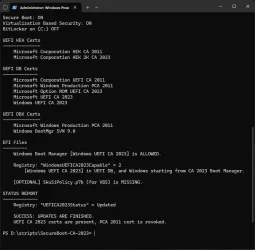
This is my desktop PC after the update listed.

1787426669198.webp
 

My Computers My Computers

  • At a glance

    Windows 11 Pro 25H2Intel Core i9 13900KCorsair Dominator Platinum 64gb 5600MT/s DDR5...Sapphire NITRO+ AMD Radeon RX 7900 XTX Vapor-...
    OS
    Windows 11 Pro 25H2
    Computer type
    PC/Desktop
    Manufacturer/Model
    Homebuilt
    CPU
    Intel Core i9 13900K
    Motherboard
    Asus ProArt Z790 Creator WiFi - Bios 3107
    Memory
    Corsair Dominator Platinum 64gb 5600MT/s DDR5 Dual Channel
    Graphics Card(s)
    Sapphire NITRO+ AMD Radeon RX 7900 XTX Vapor-X 24GB
    Sound Card
    External DAC: Cambridge Audio DACMagic200M - Headphone Amp: Topping L50
    Monitor(s) Displays
    Panasonic MX950 Mini LED 55" TV 120hz
    Screen Resolution
    3840 x 2160 120hz
    Hard Drives
    Samsung 980 Pro 2TB (OS)
    Samsung 980 Pro 1TB (Files)
    Lexar NZ790 4TB
    LaCie d2 Professional 6TB external - USB 3.1
    Seagate Expansion 16TB external - USB 3.2
    Seagate One Touch 18TB external HD - USB 3.0
    PSU
    Corsair RM1200x Shift
    Case
    Corsair RGB Smart Case 5000x (white)
    Cooling
    Corsair iCue H150i Elite Capellix XT
    Keyboard
    Incase Ergonomic USB (Microsoft clone)
    Mouse
    Logitech MX Master 3S
    Internet Speed
    Fibre 900/500 Mbps
    Browser
    Microsoft Edge Chromium
    Antivirus
    Bitdefender Total Security
    Other Info
    AMD Radeon Software & Drivers 26.1.1
    Hasleo Backup Suite
    Dashlane password manager
    Kensington Verimark fingerprint reader
    Logitech Brio 4K webcam
    Orico 10-port powered USB 3.0 hub
  • At a glance

    Windows 11 Pro 25H2Intel® Core™ i9-13900H32GB DDR4-3200 Dual channel*Intel Iris Xᵉ Graphics G7
    Operating System
    Windows 11 Pro 25H2
    Computer type
    Laptop
    Manufacturer/Model
    Asus Vivobook X1605VA
    CPU
    Intel® Core™ i9-13900H
    Motherboard
    Asus X1605VA bios 309
    Memory
    32GB DDR4-3200 Dual channel
    Graphics card(s)
    *Intel Iris Xᵉ Graphics G7
    Sound Card
    Realtek | Intel SST Bluetooth & USB
    Monitor(s) Displays
    16.0-inch, WUXGA 16:10 aspect ratio, IPS-level Panel
    Screen Resolution
    1920 x 1200 60hz
    Hard Drives
    512GB M.2 NVMe™ PCIe® 3.0 SSD
    Mouse
    Logitech MX Ergo Trackball
    Antivirus
    Bitdefender Total Security
    Other Info
    720p Webcam
    WiFi & USB to ethernet
This is my desktop PC after the update listed.
1787428440647.webp

Since you run with VBS on, run the update script with the -SkuSiPolicy option. Reboot.
Run the check script and it should report current.
 

My Computers My Computers

  • At a glance

    Win 11 Pro 25H2 26200.9168Intel® Core™ i7-14700KG.SKILL Ripjaws S5 Series 64GB (2 x 32GB) DDR5ASUS GeForce RTX 4070 Super 12GB
    OS
    Win 11 Pro 25H2 26200.9168
    Computer type
    PC/Desktop
    Manufacturer/Model
    Self Built
    CPU
    Intel® Core™ i7-14700K
    Motherboard
    ASUS TUF Z690-PLUS WIFI (BIOS 4505)
    Memory
    G.SKILL Ripjaws S5 Series 64GB (2 x 32GB) DDR5
    Graphics Card(s)
    ASUS GeForce RTX 4070 Super 12GB
    Sound Card
    Sound Blaster AE-5 Plus
    Monitor(s) Displays
    ASUS TUF Gaming 27" 2K HDR Gaming
    Screen Resolution
    2560 x 1440
    Hard Drives
    Samsung 990 Pro 1TB NVMe (Win 11 25H2)
    SK hynix P41 500GB NVMe
    SK hynix P41 2TB NVMe (x3)
    Crucial P3 Plus 4TB
    PSU
    Corsair RM850x Shift
    Case
    Antec Dark Phantom DP502 FLUX
    Cooling
    Corsair Nautilus 360 RS AIO
    Keyboard
    Logitech MK 320
    Mouse
    Razer Basilisk V3
    Internet Speed
    750Mbs
    Browser
    Firefox
    Antivirus
    Winows Security
    Other Info
    MR 8.1 Home
  • At a glance

    Win 11 Pro 25H2 26200.9168Intel Core i5-1140064 GB DDR4MSI GeForce RTX 3060 Ventus 2X 12GB
    Operating System
    Win 11 Pro 25H2 26200.9168
    Computer type
    PC/Desktop
    Manufacturer/Model
    Self Built
    CPU
    Intel Core i5-11400
    Motherboard
    Asus TUF Gaming Z590 Plus WiFi (BIOS 2803)
    Memory
    64 GB DDR4
    Graphics card(s)
    MSI GeForce RTX 3060 Ventus 2X 12GB
    Sound Card
    SoundBlaster Audigy Fx V2
    Monitor(s) Displays
    Samsung F27T350
    Screen Resolution
    1920x1080
    Hard Drives
    Samsung 980 Pro 1TB
    Samsung 970 EVO Plus 2TB
    Samsung 870 EVO 500GB SSD
    PSU
    Corsair HX750
    Case
    Cougar MX330-G Window
    Cooling
    Thermalright Frozen Edge 240 Black AIO
    Internet Speed
    350Mbps
    Browser
    Firefox
    Antivirus
    Windows Security
  • System Three
    Win 11 Pro 25H2 26200.9168
    ASUS PRIME Z370-P II BIOS 3004 7/12/21
    Intel Core i7-8700 CPU @ 3.20GHz
    32GB DDR4 RAM (4x8)
    iGPU Intel UHD Graphics 630
    Cooler Master Hyper 212
    Mid-Tower Desktop
Well... just in case you have a dual-boot Windows, don't forget to check if the other Windows has been updated too.
 

My Computer My Computer

At a glance

Windows 7
OS
Windows 7
Back
Top Bottom