Solved garlin's PowerShell scripts for updating Secure Boot CA 2023


Try this updated version.
Nailed it. Thanks!

check-uefi -verbose -audit
Windows PowerShell
Copyright (C) Microsoft Corporation. All rights reserved.

Try the new cross-platform PowerShell Crossing into history

Windows 10 22H2 (19045.7663)

Secure Boot: ON
Virtualization Based Security: OFF (Audit Report runs as ON)
BitLocker on (C:) OFF

BIOS Firmware
-------------
3E Education PC by 3E
Version: PHBYT10A.86A.0031.2014.1216.1446
Date: 2014-12-15

Factory Default UEFI PK Cert
----------------------------
ECS

UEFI PK Cert
------------
Windows OEM Devices PK

Factory Default UEFI KEK Certs
------------------------------
Microsoft Corporation KEK CA 2011
ECS

UEFI KEK Certs
--------------
Microsoft Corporation KEK CA 2011
Microsoft Corporation KEK 2K CA 2023
ECS

Factory Default UEFI DB Certs
-----------------------------
Microsoft Corporation UEFI CA 2011
Microsoft Windows Production PCA 2011
ECS

UEFI DB Certs
-------------
Microsoft Corporation UEFI CA 2011
Microsoft Windows Production PCA 2011
Microsoft Option ROM UEFI CA 2023
Microsoft UEFI CA 2023
Windows UEFI CA 2023
ECS

Factory Default UEFI DBX Certs
------------------------------
(NONE)
EFI_CERT_SHA256_GUID Signatures: 0

UEFI DBX Certs
--------------
(NONE)
Windows BootMgr SVN is MISSING.
EFI_CERT_SHA256_GUID Signatures: 94

UEFI Variables
--------------
SBAT (Linux only): sbat,1,2024010900 / shim,4 / grub,3 / grub.debian,4

EFI Files
---------
Windows Boot Manager [Windows UEFI CA 2023] is ALLOWED.
\\.\HarddiskVolume1\EFI\Microsoft\Boot\bootmgfw.efi
File Version: 28000.342, SVN 9.0

Registry: "WindowsUEFICA2023Capable" = 2
[Windows UEFI CA 2023] in UEFI DB, and Windows starting from CA 2023 Boot Manager.

[OPTIONAL] SkuSiPolicy.p7b (for VBS) is MISSING.

AUDIT REPORT
============
1. [Production PCA 2011] is missing from UEFI DBX
2. DBX Updates are missing from UEFI DBX
3. Windows BootMgr SVN is missing from UEFI DBX

[OPTIONAL] SkuSiPolicy.p7b (for VBS) is missing from EFI

REQUIRED ACTION
===============

To REVOKE the [PCA 2011] cert, run the commands:

reg add HKEY_LOCAL_MACHINE\SYSTEM\CurrentControlSet\Control\Secureboot /v AvailableUpdates /t REG_DWORD /d 0x282 /f
powershell Start-ScheduledTask -TaskName "\Microsoft\Windows\PI\Secure-Boot-Update"
 

My Computer My Computer

At a glance

Windows 11
OS
Windows 11
Computer type
PC/Desktop
Nailed it. Thanks!
Turns out yesterday's fix went 180 in the wrong direction.

I fixed "running 32-bit PS on 64-bit Windows" (someone tried that one before), but not "32-bit PS on 32-bit Windows".
 

My Computer My Computer

At a glance

Windows 7
OS
Windows 7
UPDATE: 2026-08-24

1. Issue #129 fix for bcdedit & bcdboot execution path doesn't work on 32-bit Windows

Fixed it for reals on 32-bit Windows 10.
 

My Computer My Computer

At a glance

Windows 7
OS
Windows 7
UPDATE: 2026-08-24

1. Issue #129 fix for bcdedit & bcdboot execution path doesn't work on 32-bit Windows

Fixed it for reals on 32-bit Windows 10.
issue #129
I like even numbers, can someone find a bug so we can get to issue #130 !

Kidding aside, Thanks for your wonderfull support !!!
 

My Computer My Computer

At a glance

Windows 11
OS
Windows 11
MS made the CA 2023 files available on W10 22H2, and that includes the 32-bit release. I imagine some folks are doing the "run 32-bit Windows because it takes up less RAM on a really old PC trick". So yeah, kinda have to support those users.
 

My Computer My Computer

At a glance

Windows 7
OS
Windows 7
Hey Garlin.

I was one of the people who used the script before SkuSiPolicy was optional. This is a causing me a problem, because every time it's changed I have to call my dad and have him manually update this. (he is 74 years old) so it's a slow and complicated process for him.

Is there a safe way to remove this without forcing a boot error? Last time I attempted to remove SkuSiPolicy it couldn't find a bootable device and was unable to get into windows. I think I was able to restart the PC turn secure boot off, go back into windows then re-enable SkuSiPolicy. Restart and then turn secure boot on.

What would be the logical way to remove SkuSiPolicy without having to deal with boot violations.


James.
 

My Computers My Computers

  • At a glance

    Windows 11 ProIntel Core i5-12600K 3.7 GHz 10-Core ProcessorCorsair Vengeance LPX 64 GB (2 x 32 GB) DDR4-...Integrated Intel UHD Graphics 770
    OS
    Windows 11 Pro
    Computer type
    PC/Desktop
    Manufacturer/Model
    Self built PC by me.
    CPU
    Intel Core i5-12600K 3.7 GHz 10-Core Processor
    Motherboard
    Gigabyte B760M H DDR4 Micro ATX LGA1700 Motherboard
    Memory
    Corsair Vengeance LPX 64 GB (2 x 32 GB) DDR4-3200 CL16 Memory
    Graphics Card(s)
    Integrated Intel UHD Graphics 770
    Sound Card
    Realtek
    Monitor(s) Displays
    LG
    Hard Drives
    Samsung 990 Pro 1 TB M.2-2280 PCIe 4.0 X4 NVME Solid State Drive
    Samsung 990 Pro 2 TB M.2-2280 PCIe 4.0 X4 NVME Solid State Drive
    PSU
    NZXT 850w ATX 3.1 Gold Fully Modular Power Supply
    Case
    Thermaltake Versa H25 ATX Mid Tower Case
    Cooling
    CPU Cooler Thermalright Assassin Spirit 120 EVO ARGB (ARGB Disabled) - Case Fans BlackThermalright TL-C12C-S X3 66.17 CFM 120 mm Fans 3-Pack (ARGB disabled)
    Internet Speed
    1 Gbps
    Other Info
    I hate ARGB.
  • At a glance

    Windows 11 Pro
    Operating System
    Windows 11 Pro
    Computer type
    Laptop
    Manufacturer/Model
    Lenovo ThinkBook 14 G2 ITL
What would be the logical way to remove SkuSiPolicy without having to deal with boot violations.
Got caught in same situation...
  1. Disable Secure Boot
  2. Boot to windows and remove SkuSiPolicy.p7b from EFI partition
  3. Enable Secure Boot
  4. Done...
But, you can wait for Garlin to confirm, I did that in a VM so I had no risk ;-)
And BitLocker was not enabled in the VM
 

My Computer My Computer

At a glance

Windows 11
OS
Windows 11
One of the challenges to manually disabling SkuSiPolicy is the presence of an "UEFI lock".

The normal factors for determining enforcement are:
1. Copying SkuSiPolicy.p7b policy file tp the EFI volume.
2. Enabling specific reg entries for VBS settings.

Typically either removing/renaming the policy file, or changing the reg entries is enough to disable SkuSiPolicy. But that also means attackers can simply perform the same steps. An advanced security option is to use a different set of VBS settings and transfer control of the policy out of the registry and move that setting (enforcement on/off) inside the UEFI as a hidden variable.

Now if you try removing SkuSiPolicy from the EFI, it's suddenly unbootable until you disable Secure Boot and reboot twice.

Twice because Windows detects Secure Boot is disabled on the first boot, and decides to clear the UEFI variable. And the second reboot for the change to take effect. Running "Check_UEFI.bat -Verbose" will report "DeviceGuard" under the UEFI variables if the lock is enabled.

Without the UEFI lock, deleting SkuSiPolicy on its own would have worked.
With the UEFI lock, deleting SkuSiPolicy throws an error because Windows can't find the policy file!

In most cases, if you've made some weird mistake, disabling Secure Boot and booting twice in a row is practical voodoo that works to UEFI-based locks for VBS (SkuSiPolicy) and LSASS (Credential Guard).
 

My Computer My Computer

At a glance

Windows 7
OS
Windows 7
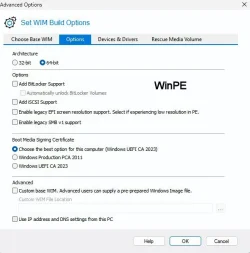
I'm overwhelmed with all of the Macrium Reflect X info... I created a USB Rescue drive using the Choose the best option for this computer (Windows UEFI CA2023) then ran ./Check_BootMedia.ps1 -verbose -audit and got this:

Macrium v10.0.8750
------------------
WinRE Boot Manager [Production PCA 2011] is BANNED.
c:\boot\macrium\WinREFiles\media\EFI\Microsoft\Boot\bootmgfw.efi
File Version: 26100.30227, SVN 7.0

WinPE Boot File [Windows UEFI CA 2023] is BANNED.
c:\boot\macrium\WA11KFiles\media\EFI\Boot\bootx64.efi
File Version: 26100.30227, SVN 7.0

Bootable Media
--------------

USB Drive I: "8 GB"
Windows Boot Manager [Windows UEFI CA 2023] is BANNED.
I:\EFI\Microsoft\Boot\bootmgfw.efi
File Version: 26089.1001, SVN 2.0

Boot File [Windows UEFI CA 2023] is BANNED.
I:\EFI\Boot\bootx64.efi
File Version: 26100.30227, SVN 7.0

boot.wim:1 (WinPE 26100.1)
Boot Manager [Windows UEFI CA 2023] is BANNED.
\Windows\Boot\EFI_EX\bootmgfw_EX.efi
File Version: 26089.1001, SVN 2.0

\Windows\System32\winload.efi will be ALLOWED.
File Version: 26100.1

Then I performed
./Update_UEFI-CA2023.ps1 -bootmedia
Updating WinRE boot media on USB Drive I: "8 GB"
Boot files successfully created.
SUCCESS: NO UPDATES ARE REQUIRED.

Then I performed ./Check_BootMedia.ps1 -verbose -audit again:
Macrium v10.0.8750
------------------
WinRE Boot Manager [Production PCA 2011] is BANNED.
c:\boot\macrium\WinREFiles\media\EFI\Microsoft\Boot\bootmgfw.efi
File Version: 26100.30227, SVN 7.0

WinPE Boot File [Windows UEFI CA 2023] is BANNED.
c:\boot\macrium\WA11KFiles\media\EFI\Boot\bootx64.efi
File Version: 26100.30227, SVN 7.0

Bootable Media
--------------

USB Drive I: "8 GB"
Windows Boot Manager [Windows UEFI CA 2023] is ALLOWED.
I:\EFI\Microsoft\Boot\bootmgfw.efi
File Version: 28000.352, SVN 9.0

Boot File [Windows UEFI CA 2023] is ALLOWED.
I:\EFI\Boot\bootx64.efi
File Version: 28000.352, SVN 9.0

boot.wim:1 (WinPE 26100.1)
Boot Manager [Windows UEFI CA 2023] is BANNED.
\Windows\Boot\EFI_EX\bootmgfw_EX.efi
File Version: 26089.1001, SVN 2.0

\Windows\System32\winload.efi will be ALLOWED.
File Version: 26100.1

I then could boot to the USB stick and all looked ok there... However should I be concerned with the info under Macrium v10.0.8750?
I can tell you that c:\boot\ does not exist and
boot.wim:1 (WinPE 26100.1)
Boot Manager [Windows UEFI CA 2023] is BANNED.
\Windows\Boot\EFI_EX\bootmgfw_EX.efi
File Version: 26089.1001, SVN 2.0
 

My Computer My Computer

At a glance

win 11Intell Core i7 4900 MQDDR3 16 GB
OS
win 11
Computer type
Laptop
Manufacturer/Model
Dell Precision M4800
CPU
Intell Core i7 4900 MQ
Motherboard
Dell QT3YTY A00
Memory
DDR3 16 GB
boot.wim:1 (WinPE 26100.1)
Boot Manager [Windows UEFI CA 2023] is BANNED.
\Windows\Boot\EFI_EX\bootmgfw_EX.efi
File Version: 26089.1001, SVN 2.0

\Windows\System32\winload.efi will be ALLOWED.
File Version: 26100.1
The problem is the WinPE source that Macrium is using for boot.wim is out of date.
You should switch to the WinRE option.

This is my rant about these backup programs, they keep providing WinPE images which are hopelessly obsolete in 2026. Your system's WinRE should be a more current boot.wim source.
 

My Computer My Computer

At a glance

Windows 7
OS
Windows 7
The problem is the WinPE source that Macrium is using for boot.wim is out of date.
You should switch to the WinRE option.

This is my rant about these backup programs, they keep providing WinPE images which are hopelessly obsolete in 2026. Your system's WinRE should be a more current boot.wim source.
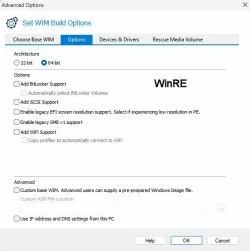
The WinRE option does not have this in the options: Choose the best option for this computer (Windows UEFI CA2023)
 

My Computer My Computer

At a glance

win 11Intell Core i7 4900 MQDDR3 16 GB
OS
win 11
Computer type
Laptop
Manufacturer/Model
Dell Precision M4800
CPU
Intell Core i7 4900 MQ
Motherboard
Dell QT3YTY A00
Memory
DDR3 16 GB
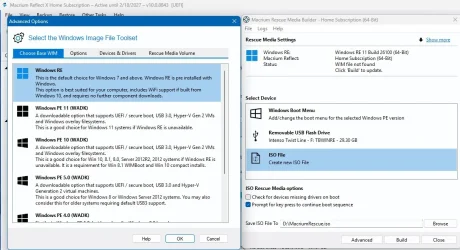
Does your Macrium version have an option for choose a custom WIM?

1. Temporarily disable WinRE
Code:
reagentc /disable

2. From Macirum, choose this file by entering the full path (you can't see it in the file browser because it's hidden):
Code:
C:\Windows\System32\Recovery\winre.wim

3. After it's done importing the WIM, restore WinRE:
Code:
reagentc /enable
 

My Computer My Computer

At a glance

Windows 7
OS
Windows 7
Does your Macrium version have an option for choose a custom WIM?

1. Temporarily disable WinRE
Code:
reagentc /disable

2. From Macirum, choose this file by entering the full path (you can't see it in the file browser because it's hidden):
Code:
C:\Windows\System32\Recovery\winre.wim

3. After it's done importing the WIM, restore WinRE:
Code:
reagentc /enable
Yes to custom WIM and the directory exists, but the file doesn't
 

My Computer My Computer

At a glance

win 11Intell Core i7 4900 MQDDR3 16 GB
OS
win 11
Computer type
Laptop
Manufacturer/Model
Dell Precision M4800
CPU
Intell Core i7 4900 MQ
Motherboard
Dell QT3YTY A00
Memory
DDR3 16 GB
Yes to custom WIM and the directory exists, but the file doesn't
There is only ever one copy of winre.wim. When the recovery environment is enabled it is in the recovery partition. When the recovery environment is disabled it's moved back to C:\Windows\System32\Recovery. That's what step 1. is for.
 

My Computers My Computers

  • At a glance

    Windows 11 HomeAMD Athlon Silver 3050U8GBRadeon Graphics
    OS
    Windows 11 Home
    Computer type
    Laptop
    Manufacturer/Model
    Acer Aspire 3 A315-23-R9VY
    CPU
    AMD Athlon Silver 3050U
    Memory
    8GB
    Graphics Card(s)
    Radeon Graphics
    Monitor(s) Displays
    laptop screen
    Screen Resolution
    1366x768 native resolution, up to 2560x1440 with Radeon Virtual Super Resolution
    Hard Drives
    1TB Samsung EVO 870 SSD (from April 2026: 250GB EVO 850)
    Internet Speed
    150 Mbps
    Browser
    Edge, Firefox
    Antivirus
    Defender
    Other Info
    UPDATE - 11 April 2026: due to lid hinges starting to break up this laptop has been retired from active duty. The OS with all software and files has been migrated to my System Seven in 'Other systems' to carry on as my general purpose 'main machine'.

    I've now clean installed 25H2 and used Garlin's scripts to update Secure Boot to CA 2023 and revoke the PCA 2011 certificates. It's new role is to test secure boot issues.

    Info for 2021-2026:
    fully 'Windows 11 ready' laptop. Windows 10 C: partition migrated from my old unsupported 'main machine' then upgraded to 11. A test migration ran Insider builds for 2 months. When 11 was released on 5th October 2021 it was re-imaged back to 10 and was offered the upgrade in Windows Update on 20th October. Windows Update offered the 22H2 Feature Update on 20th September 2022. It got the 23H2 Feature Update on 4th November 2023 through Windows Update, 24H2 on 3rd October 2024 through Windows Update by setting the Target Release Version for 24H2, and 25H2 on 30th September 2025 through Windows Update by setting the Target Release Version for 25H2.
  • At a glance

    Windows 11 ProIntel® Core™ i5-520M8GB(integrated graphics) Intel HD Graphics
    Operating System
    Windows 11 Pro
    Computer type
    Laptop
    Manufacturer/Model
    Dell Latitude E4310
    CPU
    Intel® Core™ i5-520M
    Motherboard
    0T6M8G
    Memory
    8GB
    Graphics card(s)
    (integrated graphics) Intel HD Graphics
    Screen Resolution
    1366x768
    Hard Drives
    500GB Crucial MX500 SSD
    Browser
    Firefox, Edge
    Antivirus
    Defender
    Other Info
    unsupported machine: Legacy bios, MBR, TPM 1.2, upgraded from W10 to W11 using W10/W11 hybrid install media workaround.

    In-place upgrade to 22H2 using ISO and a workaround.
    Feature Update to 23H2 by manually installing the Enablement Package.
    In-place upgrade to 24H2 using hybrid 23H2/24H2 install media.
    Upgraded to 25H2 by Enablement Package.

    Also running Insider Experimental 263xx and 29xxx builds and Windows 10 as native boot .vhdx.
  • My SYSTEM THREE is a Dell Latitude 5410, i7-10610U, 32GB RAM, 512GB NVMe ssd, supported device running Windows 11 Pro.

    My SYSTEM FOUR was a 2-in-1 convertible Lenovo Yoga 11e (1st gen) type 20DA, Celeron N2930, 8GB RAM, 256GB ssd. Unsupported device. This has now been sold. It has been replaced by my System Eight.

    My SYSTEM FIVE is a Dell Latitude 3190 2-in-1, Pentium Silver N5030, 8GB RAM, 1TB NVMe ssd, supported device running Windows 11 Pro, plus Insider Beta, Experimental 263xx and 29xxx builds (and a few others) as a native boot .vhdx.

    My SYSTEM SIX is a Dell Latitude 5550, Core Ultra 7 165H, 64GB RAM, 1TB NVMe SSD, supported device, Windows 11 Pro, Hyper-V host machine. Updated to 25H2 on 30th September 2025.

    My SYSTEM SEVEN is a Lenovo Thinkpad T580, 1920x1080 touchscreen, Intel Core i7-8650U, 16GB RAM, 512GB NVMe SSD + 2nd 512GB NVMe SSD, a supported device for Windows 11. This is my current general purpose 'main machine'. The installed Windows 11 Home from my System One has been migrated to this machine. As its new home has an existing digital licence for Pro I've been able to upgrade the migrated OS from Home to Pro.

    My SYSTEM EIGHT is a 2-in-1 convertible Lenovo Yoga 11e (5th gen) type 20LN, Celeron N4120, 8GB RAM, 512GB NVMe ssd, a supported device for Windows 11. Currently running Windows 11 Pro, plus Insider Beta, Experimental 263xx and 29xxx builds as native boot vhdx.
The WinRE option does not have this in the options: Choose the best option for this computer (Windows UEFI CA2023)

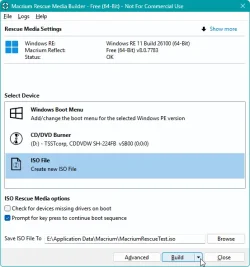
Not sure if this is the same problem, but in Macrium Reflect Free, when choosing to save a Rescue Image as ISO, pressing Ctrl reveals a down arrow on the Build button as below.

save_rescue.webp

Clicking the down arrow reveals a "Force WIM Rebuild" option. Choosing that has worked for me, together with Garlin's script to update the boot media after burning the ISO.
 

My Computer My Computer

At a glance

Windows 11 pro 25h2AMD Ryzen 7 5700G64 GB G.Skill (F4-3200C16Q-64GVK)Integrated into CPU
OS
Windows 11 pro 25h2
Computer type
PC/Desktop
Manufacturer/Model
DIY
CPU
AMD Ryzen 7 5700G
Motherboard
MSI B450M Bazooka, BIOS version 7A38vHJ5 (latest beta as of 2025-09-23)
Memory
64 GB G.Skill (F4-3200C16Q-64GVK)
Graphics Card(s)
Integrated into CPU
Sound Card
Realtek (built into motherboard)
Monitor(s) Displays
Generic HDMI
Screen Resolution
1080p
Hard Drives
System and apps: SK hynix Gold P31 1TB M.2
Data: Toshiba HDWQ140 4TB internal SATA
PSU
Seasonic 400W SS-400FL2 fanless
Case
Fractal Design Define R5
Cooling
Cooler Master Hyper 212 Evo
Keyboard
Lenovo Preferred Pro II Wired External USB Keyboard (4X30M86879)
Mouse
Belkin cheapo corded USB mouse
Internet Speed
300 MBit/sec
Browser
Firefox
Antivirus
Windows Defender

My Computer My Computer

At a glance

Windows 11 Pro
OS
Windows 11 Pro

My Computer My Computer

At a glance

Win11 24H2 IOT LTSC / Win11 Pro 25H2AMD Ryzen 7 8700G / Ryzen 7 8700G / Ryzen 8600GF5-6000J3636F16GX2-FX5 32GB / Lexar Ares RGB ...internal
OS
Win11 24H2 IOT LTSC / Win11 Pro 25H2
Computer type
PC/Desktop
Manufacturer/Model
Gigabyte x2 / Asus = Home builds
CPU
AMD Ryzen 7 8700G / Ryzen 7 8700G / Ryzen 8600G
Motherboard
Gigabyte B650 AORUS ELITE AX V2 / ASUS TUF GAMING B650-PLUS / B650 GAMING X AX V2
Memory
F5-6000J3636F16GX2-FX5 32GB / Lexar Ares RGB LD5BU016G-R6000GDLA 32GB / Kingston FURY Beast 32 GB DDR5-5600
Graphics Card(s)
internal
Sound Card
Realtek
Monitor(s) Displays
BenQ 27 L EW2780
Screen Resolution
1920x1080
Hard Drives
Many M.2's (WD)
PSU
be quiet! Pure Power 13 M 550W
Case
Chieftec HC-10B-OP
Cooling
Gelid Solutions Tranquillo 5, many Noctua's 12x12
Keyboard
Microsoft
Mouse
Cherry
Internet Speed
500 mbs
Browser
Vivaldi
Antivirus
Eset
Other Info
PC builder / repair / Trouble-shooter etc.
Yes, but which WinRE is it pulling from? Their own provided RE, or your host's current RE?
 

My Computer My Computer

At a glance

Windows 7
OS
Windows 7
My Own host's current RE
Same goes for the free version ! There is a CHOICE !
 

My Computer My Computer

At a glance

Win11 24H2 IOT LTSC / Win11 Pro 25H2AMD Ryzen 7 8700G / Ryzen 7 8700G / Ryzen 8600GF5-6000J3636F16GX2-FX5 32GB / Lexar Ares RGB ...internal
OS
Win11 24H2 IOT LTSC / Win11 Pro 25H2
Computer type
PC/Desktop
Manufacturer/Model
Gigabyte x2 / Asus = Home builds
CPU
AMD Ryzen 7 8700G / Ryzen 7 8700G / Ryzen 8600G
Motherboard
Gigabyte B650 AORUS ELITE AX V2 / ASUS TUF GAMING B650-PLUS / B650 GAMING X AX V2
Memory
F5-6000J3636F16GX2-FX5 32GB / Lexar Ares RGB LD5BU016G-R6000GDLA 32GB / Kingston FURY Beast 32 GB DDR5-5600
Graphics Card(s)
internal
Sound Card
Realtek
Monitor(s) Displays
BenQ 27 L EW2780
Screen Resolution
1920x1080
Hard Drives
Many M.2's (WD)
PSU
be quiet! Pure Power 13 M 550W
Case
Chieftec HC-10B-OP
Cooling
Gelid Solutions Tranquillo 5, many Noctua's 12x12
Keyboard
Microsoft
Mouse
Cherry
Internet Speed
500 mbs
Browser
Vivaldi
Antivirus
Eset
Other Info
PC builder / repair / Trouble-shooter etc.
Here is what I do, make an ISO(dummy), then run:

copy C:\Windows\Boot\EFI_EX\bootmgfw_EX.efi c:\boot\macrium\WinREFiles\media\EFI\Boot\bootx64.efi
copy C:\Windows\Boot\EFI_EX\bootmgfw_EX.efi c:\boot\macrium\WinREFiles\media\EFI\Microsoft\Boot\bootmgfw.efi

Make ISO again or write to USB etc. Done
 

My Computer My Computer

At a glance

Win11 24H2 IOT LTSC / Win11 Pro 25H2AMD Ryzen 7 8700G / Ryzen 7 8700G / Ryzen 8600GF5-6000J3636F16GX2-FX5 32GB / Lexar Ares RGB ...internal
OS
Win11 24H2 IOT LTSC / Win11 Pro 25H2
Computer type
PC/Desktop
Manufacturer/Model
Gigabyte x2 / Asus = Home builds
CPU
AMD Ryzen 7 8700G / Ryzen 7 8700G / Ryzen 8600G
Motherboard
Gigabyte B650 AORUS ELITE AX V2 / ASUS TUF GAMING B650-PLUS / B650 GAMING X AX V2
Memory
F5-6000J3636F16GX2-FX5 32GB / Lexar Ares RGB LD5BU016G-R6000GDLA 32GB / Kingston FURY Beast 32 GB DDR5-5600
Graphics Card(s)
internal
Sound Card
Realtek
Monitor(s) Displays
BenQ 27 L EW2780
Screen Resolution
1920x1080
Hard Drives
Many M.2's (WD)
PSU
be quiet! Pure Power 13 M 550W
Case
Chieftec HC-10B-OP
Cooling
Gelid Solutions Tranquillo 5, many Noctua's 12x12
Keyboard
Microsoft
Mouse
Cherry
Internet Speed
500 mbs
Browser
Vivaldi
Antivirus
Eset
Other Info
PC builder / repair / Trouble-shooter etc.

Latest Support Threads

Back
Top Bottom