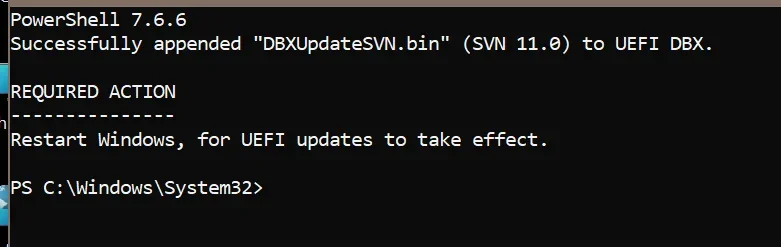
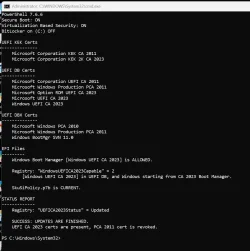
Solved garlin's PowerShell scripts for updating Secure Boot CA 2023


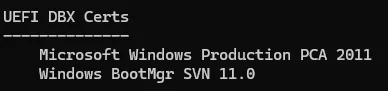
Isn't the DBX Certs the list of the ones that are no longer valid?

Just the certificates, not the SVN. That's just where it's being displayed.
But your SVN is actually no longer valid as we're up to 11.0
1790054803594.webp
 

My Computers My Computers

  • At a glance

    Win 11 Pro 25H2 26200.9550Intel® Core™ i7-14700KG.SKILL Ripjaws S5 Series 64GB (2 x 32GB) DDR5ASUS GeForce RTX 4070 Super 12GB
    OS
    Win 11 Pro 25H2 26200.9550
    Computer type
    PC/Desktop
    Manufacturer/Model
    Self Built
    CPU
    Intel® Core™ i7-14700K
    Motherboard
    ASUS TUF Z690-PLUS WIFI (BIOS 4505)
    Memory
    G.SKILL Ripjaws S5 Series 64GB (2 x 32GB) DDR5
    Graphics Card(s)
    ASUS GeForce RTX 4070 Super 12GB
    Sound Card
    Sound Blaster AE-5 Plus
    Monitor(s) Displays
    ASUS TUF Gaming 27" 2K HDR Gaming
    Screen Resolution
    2560 x 1440
    Hard Drives
    Samsung 990 Pro 1TB NVMe (Win 11 25H2)
    SK hynix P41 500GB NVMe
    SK hynix P41 2TB NVMe (x3)
    Crucial P3 Plus 4TB
    PSU
    Corsair RM850x Shift
    Case
    Antec Dark Phantom DP502 FLUX
    Cooling
    Corsair Nautilus 360 RS AIO
    Keyboard
    Logitech MK 320
    Mouse
    Razer Basilisk V3
    Internet Speed
    750Mbs
    Browser
    Firefox
    Antivirus
    Winows Security
    Other Info
    MR 8.1 Home
  • At a glance

    Win 11 Pro 25H2 26200.9550Intel Core i5-1140064 GB DDR4MSI GeForce RTX 3060 Ventus 2X 12GB
    Operating System
    Win 11 Pro 25H2 26200.9550
    Computer type
    PC/Desktop
    Manufacturer/Model
    Self Built
    CPU
    Intel Core i5-11400
    Motherboard
    Asus TUF Gaming Z590 Plus WiFi (BIOS 2803)
    Memory
    64 GB DDR4
    Graphics card(s)
    MSI GeForce RTX 3060 Ventus 2X 12GB
    Sound Card
    SoundBlaster Audigy Fx V2
    Monitor(s) Displays
    Samsung F27T350
    Screen Resolution
    1920x1080
    Hard Drives
    Samsung 980 Pro 1TB
    Samsung 970 EVO Plus 2TB
    Samsung 870 EVO 500GB SSD
    PSU
    Corsair HX750
    Case
    Cougar MX330-G Window
    Cooling
    Thermalright Frozen Edge 240 Black AIO
    Internet Speed
    350Mbps
    Browser
    Firefox
    Antivirus
    Windows Security
  • System Three
    Win 11 Pro 25H2 26200.9550
    ASUS PRIME Z370-P II BIOS 3004 7/12/21
    Intel Core i7-8700 CPU @ 3.20GHz
    32GB DDR4 RAM (4x8)
    EVGA RTX 2060 (used)
    iGPU Intel UHD Graphics 630 (backup)
    Cooler Master Hyper 212
    Mid-Tower Desktop
Every so often, the latest CU will refresh the "\Windows\System32\SecureBootUpdates" folder.

This folder contains a copy of all the CA 2023 certs (which don't change) and the latest versions of dbxupdate.bin and DBXUpdateSVN.bin. Your Windows will know the boot manager and SVN have changed, because new files have been pushed to \Boot\EFI_EX and SecureBootUpdates folders.

Code:
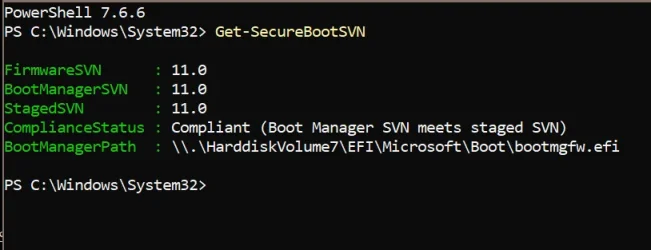
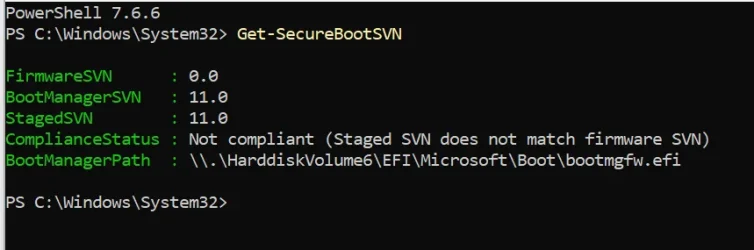
PS C:\Windows\System32> Get-SecureBootSVN

FirmwareSVN      : 11.0
BootManagerSVN   : 11.0
StagedSVN        : 11.0
ComplianceStatus : Compliant (Boot Manager SVN meets staged SVN)
BootManagerPath  : \\.\HarddiskVolume1\EFI\Microsoft\Boot\bootmgfw.ef

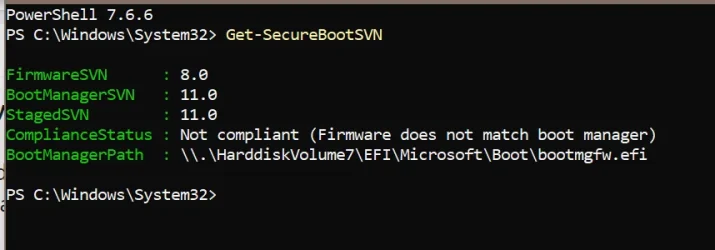
FirmwareSVN -> UEFI's version of the SVN
BootManagerSVN -> EFI boot manager's version of the SVN
StagedSVN -> version from DBXUpdate.bin file

Ideally all 3 SVN's match. But the StagedSVN could be higher than the FirmwareSVN and BootManagerSVN, if the SecureBootUpdate changes have not been pushed to the live system.

If your StagedSVN is still 8.0, something wrong has happened with Windows Update.
April was SVN 8.0, June was SVN 9.0, and September is SVN 11.0

Something doesn't make sense. Either you've correctly installed 26200.9457 and StagedSVN is 11.0. Changes have not been correctly pushed to the UEFI, and the EFI volume. Or your SecureBootUpdates folder is strangely trapped on April's release files.

The final possibility is you're running a really outdated version of the ZIP files, and should download the latest build from post #1.
 

My Computer My Computer

At a glance

Windows 7
OS
Windows 7
Just the certificates, not the SVN. That's just where it's being displayed.
But your SVN is actually no longer valid as we're up to 11.0

View attachment 183702
So how do I get SVN 11.0?
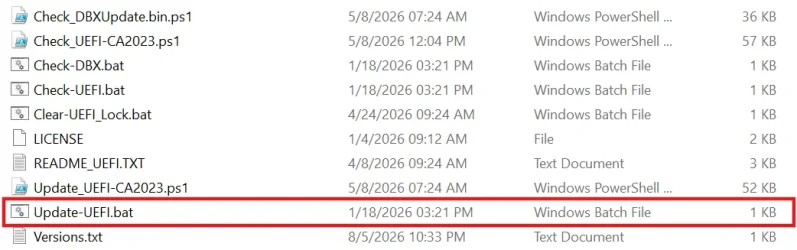
Perhaps my Update-UEFI.bat and all the other scripts need a newer version?

1790055843319.webp
 

My Computer My Computer

At a glance

Windows 11 Pro 25H2Intel I9-9900K64GBNVIDIA RTX 2060
OS
Windows 11 Pro 25H2
Computer type
PC/Desktop
Manufacturer/Model
Dell XPS 8930
CPU
Intel I9-9900K
Memory
64GB
Graphics Card(s)
NVIDIA RTX 2060
Sound Card
NVIDIA High Definition Audio
Monitor(s) Displays
4k Samsung
Screen Resolution
3840 x 2160
Hard Drives
512GB NVMe, ADATA SU 800, 2TB HDD
Every so often, the latest CU will refresh the "\Windows\System32\SecureBootUpdates" folder.

This folder contains a copy of all the CA 2023 certs (which don't change) and the latest versions of dbxupdate.bin and DBXUpdateSVN.bin. Your Windows will know the boot manager and SVN have changed, because new files have been pushed to \Boot\EFI_EX and SecureBootUpdates folders.

Code:
PS C:\Windows\System32> Get-SecureBootSVN

FirmwareSVN      : 11.0
BootManagerSVN   : 11.0
StagedSVN        : 11.0
ComplianceStatus : Compliant (Boot Manager SVN meets staged SVN)
BootManagerPath  : \\.\HarddiskVolume1\EFI\Microsoft\Boot\bootmgfw.ef

FirmwareSVN -> UEFI's version of the SVN
BootManagerSVN -> EFI boot manager's version of the SVN
StagedSVN -> version from DBXUpdate.bin file

Ideally all 3 SVN's match. But the StagedSVN could be higher than the FirmwareSVN and BootManagerSVN, if the SecureBootUpdate changes have not been pushed to the live system.

If your StagedSVN is still 8.0, something wrong has happened with Windows Update.
April was SVN 8.0, June was SVN 9.0, and September is SVN 11.0

Something doesn't make sense. Either you've correctly installed 26200.9457 and StagedSVN is 11.0. Changes have not been correctly pushed to the UEFI, and the EFI volume. Or your SecureBootUpdates folder is strangely trapped on April's release files.

The final possibility is you're running a really outdated version of the ZIP files, and should download the latest build from post #1.
@garlin,
1790056091692.webp
How do I update the FirmwareSVN?

I downloaded the latest zip from post #1. I'll reboot now and see what happened. 😎
Thanks.
1790056616340.webp
 

My Computer My Computer

At a glance

Windows 11 Pro 25H2Intel I9-9900K64GBNVIDIA RTX 2060
OS
Windows 11 Pro 25H2
Computer type
PC/Desktop
Manufacturer/Model
Dell XPS 8930
CPU
Intel I9-9900K
Memory
64GB
Graphics Card(s)
NVIDIA RTX 2060
Sound Card
NVIDIA High Definition Audio
Monitor(s) Displays
4k Samsung
Screen Resolution
3840 x 2160
Hard Drives
512GB NVMe, ADATA SU 800, 2TB HDD
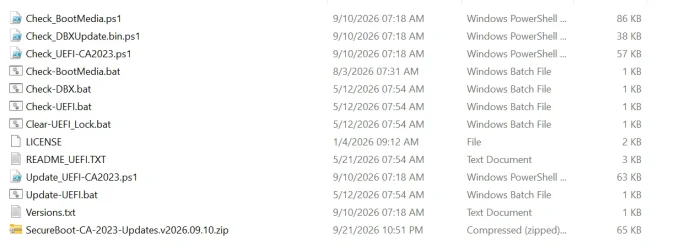
Perhaps my Update-UEFI.bat and all the other scripts need a newer version?

Mine's dated 5/12/206.

1790056549203.webp

Maybe download the latest set v2026.09.10
 

My Computers My Computers

  • At a glance

    Win 11 Pro 25H2 26200.9550Intel® Core™ i7-14700KG.SKILL Ripjaws S5 Series 64GB (2 x 32GB) DDR5ASUS GeForce RTX 4070 Super 12GB
    OS
    Win 11 Pro 25H2 26200.9550
    Computer type
    PC/Desktop
    Manufacturer/Model
    Self Built
    CPU
    Intel® Core™ i7-14700K
    Motherboard
    ASUS TUF Z690-PLUS WIFI (BIOS 4505)
    Memory
    G.SKILL Ripjaws S5 Series 64GB (2 x 32GB) DDR5
    Graphics Card(s)
    ASUS GeForce RTX 4070 Super 12GB
    Sound Card
    Sound Blaster AE-5 Plus
    Monitor(s) Displays
    ASUS TUF Gaming 27" 2K HDR Gaming
    Screen Resolution
    2560 x 1440
    Hard Drives
    Samsung 990 Pro 1TB NVMe (Win 11 25H2)
    SK hynix P41 500GB NVMe
    SK hynix P41 2TB NVMe (x3)
    Crucial P3 Plus 4TB
    PSU
    Corsair RM850x Shift
    Case
    Antec Dark Phantom DP502 FLUX
    Cooling
    Corsair Nautilus 360 RS AIO
    Keyboard
    Logitech MK 320
    Mouse
    Razer Basilisk V3
    Internet Speed
    750Mbs
    Browser
    Firefox
    Antivirus
    Winows Security
    Other Info
    MR 8.1 Home
  • At a glance

    Win 11 Pro 25H2 26200.9550Intel Core i5-1140064 GB DDR4MSI GeForce RTX 3060 Ventus 2X 12GB
    Operating System
    Win 11 Pro 25H2 26200.9550
    Computer type
    PC/Desktop
    Manufacturer/Model
    Self Built
    CPU
    Intel Core i5-11400
    Motherboard
    Asus TUF Gaming Z590 Plus WiFi (BIOS 2803)
    Memory
    64 GB DDR4
    Graphics card(s)
    MSI GeForce RTX 3060 Ventus 2X 12GB
    Sound Card
    SoundBlaster Audigy Fx V2
    Monitor(s) Displays
    Samsung F27T350
    Screen Resolution
    1920x1080
    Hard Drives
    Samsung 980 Pro 1TB
    Samsung 970 EVO Plus 2TB
    Samsung 870 EVO 500GB SSD
    PSU
    Corsair HX750
    Case
    Cougar MX330-G Window
    Cooling
    Thermalright Frozen Edge 240 Black AIO
    Internet Speed
    350Mbps
    Browser
    Firefox
    Antivirus
    Windows Security
  • System Three
    Win 11 Pro 25H2 26200.9550
    ASUS PRIME Z370-P II BIOS 3004 7/12/21
    Intel Core i7-8700 CPU @ 3.20GHz
    32GB DDR4 RAM (4x8)
    EVGA RTX 2060 (used)
    iGPU Intel UHD Graphics 630 (backup)
    Cooler Master Hyper 212
    Mid-Tower Desktop
My Computer My Computer

At a glance

Windows 11 Pro 25H2
OS
Windows 11 Pro 25H2
Computer type
Laptop
Manufacturer/Model
Toshiba
If your copy of the script is from Jan 2026, it probably has a (fixed) bug in not properly treating SVN numbers as versions (instead of a plain string of digits).
 

My Computer My Computer

At a glance

Windows 7
OS
Windows 7
If your copy of the script is from Jan 2026, it probably has a (fixed) bug in not properly treating SVN numbers as versions (instead of a plain string of digits).
@garlin,
Looks better now, thanks. Am I all set now?

1790056898991.webp
1790057008588.webp
 

My Computer My Computer

At a glance

Windows 11 Pro 25H2Intel I9-9900K64GBNVIDIA RTX 2060
OS
Windows 11 Pro 25H2
Computer type
PC/Desktop
Manufacturer/Model
Dell XPS 8930
CPU
Intel I9-9900K
Memory
64GB
Graphics Card(s)
NVIDIA RTX 2060
Sound Card
NVIDIA High Definition Audio
Monitor(s) Displays
4k Samsung
Screen Resolution
3840 x 2160
Hard Drives
512GB NVMe, ADATA SU 800, 2TB HDD
All good.
 

My Computer My Computer

At a glance

Windows 7
OS
Windows 7

My Computer My Computer

At a glance

Windows 11 Pro 25H2Intel I9-9900K64GBNVIDIA RTX 2060
OS
Windows 11 Pro 25H2
Computer type
PC/Desktop
Manufacturer/Model
Dell XPS 8930
CPU
Intel I9-9900K
Memory
64GB
Graphics Card(s)
NVIDIA RTX 2060
Sound Card
NVIDIA High Definition Audio
Monitor(s) Displays
4k Samsung
Screen Resolution
3840 x 2160
Hard Drives
512GB NVMe, ADATA SU 800, 2TB HDD
All good.
Is there a command to update just the firmware SVN on this other machine, which is a DELL XPS 8930 using dual boot with 2 different windows Builds?
1790059674845.webp
 

My Computer My Computer

At a glance

Windows 11 Pro 25H2Intel I9-9900K64GBNVIDIA RTX 2060
OS
Windows 11 Pro 25H2
Computer type
PC/Desktop
Manufacturer/Model
Dell XPS 8930
CPU
Intel I9-9900K
Memory
64GB
Graphics Card(s)
NVIDIA RTX 2060
Sound Card
NVIDIA High Definition Audio
Monitor(s) Displays
4k Samsung
Screen Resolution
3840 x 2160
Hard Drives
512GB NVMe, ADATA SU 800, 2TB HDD
Is there a command to update just the firmware SVN on this other machine, which is a DELL XPS 8930 using dual boot with 2 different windows Builds?
Yes. But you have to be very careful on dual-boot setups.

When Secure Boot is enabled, the UEFI's SVN number is enforced on all Windows images which ask to be booted. If the boot file on any of those disks doesn't meet a minimum SVN version then it's banned.

For example, the FirmwareSVN is 9.0. Boot files with SVN of 9.0 or higher are allowed to boot. Any boot files with SVN of 8.0 or lower (including "none") are banned. This causes a headache if one Windows has a lower SVN than another. The Secure Boot task can run on a later Windows and decide it's time to bump the SVN number because that's what it has as the latest version.

Typically if you're keeping up with the latest builds across different RP or Insider channels, the SVN keeps advancing in parallel. But someone might deliberately have a setup where they keep an older Windows release for a specific reason. The older release risks getting trapped behind because the UEFI enforces the SVN minimum across all boot drives.

You would have to temporarily disable Secure Boot to boot from any release which is behind on the SVN.

To push the DBX SVN by itself, run:
Code:
reg add HKEY_LOCAL_MACHINE\SYSTEM\CurrentControlSet\Control\Secureboot /v AvailableUpdates /t REG_DWORD /d 0x200 /f
Start-ScheduledTask -TaskName "\Microsoft\Windows\PI\Secure-Boot-Update"

Once the DBX's SVN has been bumped up, it's nearly impractical to clear it.

SVN's are disguised as fake EFI hashes in the Secure Boot implementation. You can't just simply go into the Secure Boot menu and pick out the SVN's in the DBX list, and delete individual ones since they're listed as really long hex digits (and the Secure Boot menu might truncate the full label because humans don't deal in long hex numbers).

The Secure Boot implementers didn't put a lot of thought in supporting dual-boot setups when the Windows images are mismatched by release dates.
 

My Computer My Computer

At a glance

Windows 7
OS
Windows 7
Yes. But you have to be very careful on dual-boot setups.

When Secure Boot is enabled, the UEFI's SVN number is enforced on all Windows images which ask to be booted. If the boot file on any of those disks doesn't meet a minimum SVN version then it's banned.

For example, the FirmwareSVN is 9.0. Boot files with SVN of 9.0 or higher are allowed to boot. Any boot files with SVN of 8.0 or lower (including "none") are banned. This causes a headache if one Windows has a lower SVN than another. The Secure Boot task can run on a later Windows and decide it's time to bump the SVN number because that's what it has as the latest version.

Typically if you're keeping up with the latest builds across different RP or Insider channels, the SVN keeps advancing in parallel. But someone might deliberately have a setup where they keep an older Windows release for a specific reason. The older release risks getting trapped behind because the UEFI enforces the SVN minimum across all boot drives.

You would have to temporarily disable Secure Boot to boot from any release which is behind on the SVN.

To push the DBX SVN by itself, run:
Code:
reg add HKEY_LOCAL_MACHINE\SYSTEM\CurrentControlSet\Control\Secureboot /v AvailableUpdates /t REG_DWORD /d 0x200 /f
Start-ScheduledTask -TaskName "\Microsoft\Windows\PI\Secure-Boot-Update"

Once the DBX's SVN has been bumped up, it's nearly impractical to clear it.

SVN's are disguised as fake EFI hashes in the Secure Boot implementation. You can't just simply go into the Secure Boot menu and pick out the SVN's in the DBX list, and delete individual ones since they're listed as really long hex digits (and the Secure Boot menu might truncate the full label because humans don't deal in long hex numbers).

The Secure Boot implementers didn't put a lot of thought in supporting dual-boot setups when the Windows images are mismatched by release dates.
OK, thanks, I'll leave the multiboot machines as they are for now, they boot just fine including the installation media. 🤞
1790061888707.webp
 

My Computer My Computer

At a glance

Windows 11 Pro 25H2Intel I9-9900K64GBNVIDIA RTX 2060
OS
Windows 11 Pro 25H2
Computer type
PC/Desktop
Manufacturer/Model
Dell XPS 8930
CPU
Intel I9-9900K
Memory
64GB
Graphics Card(s)
NVIDIA RTX 2060
Sound Card
NVIDIA High Definition Audio
Monitor(s) Displays
4k Samsung
Screen Resolution
3840 x 2160
Hard Drives
512GB NVMe, ADATA SU 800, 2TB HDD
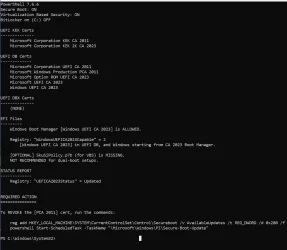
No, it's exactly as expected because you haven't revoked PCA 2011. When you start the revocation process, the SVN is first installed.
Until then, there are no SVN's to match against.
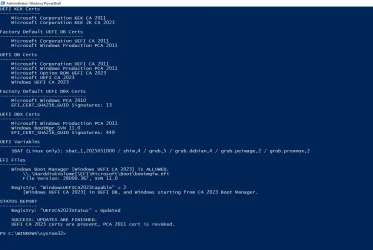
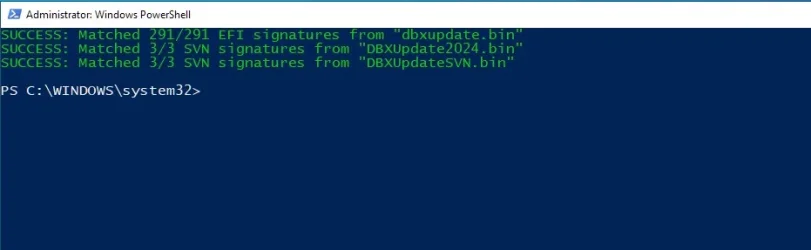
thanks for support, used revoke and got these (y)

Certs after revoke.webp
DBX update after revoke 2011.webp


so that Dell PC seems sorted (although looks like a lot of old 2010 DBX stuff would have been best to discard...)

but after this machine behaved, went to one of my Asus desktop machines this morning and the revoke command wasn't accepted - tried over and again rebooted - it just doesn't like it. Need to run verbose version - but machines are in different locations, will post back with that progress tomorrow
 

My Computer My Computer

At a glance

Win11
OS
Win11
so that Dell PC seems sorted (although looks like a lot of old 2010 DBX stuff would have been best to discard...)
Dell was a early supporter of Secure Boot, because they were one of the first PC vendors to sell Linux systems. They were around when the now deprecated 2010 cert was used, and they always throw that in their factory DBX list.
 

My Computer My Computer

At a glance

Windows 7
OS
Windows 7
I reset everything in the BIOS on the computers.

On the desktop, I had nearly 500 dbx entries. After clearing the dbx in the BIOS and reapplying the dbx entries using your script (command 0x2), the count dropped to around 295.

On the laptop, I didn't have the option to clear only the entriees, or rather, I did, but it required switching to "Custom Mode," and simply switching to Custom Mode without taking further action wipes out all certificates, SVN, and dbx data. So I reapplied everything, the entries dropped to around 350 instead of 501.
 

My Computer My Computer

At a glance

windows 11
OS
windows 11
On some BIOS'es, switching to Custom Mode is the same as running Delete All Keys.

When all keys are deleted, there is no more Platform Key (PK). A number of BIOS'es will interpret having no PK at the moment as being in Custom Mode.
 

My Computer My Computer

At a glance

Windows 7
OS
Windows 7
Okay, thanks for the info.
Yesterday, I switched back to normal mode (non-custom) before reapplying everything. I had known for months that switching to custom mode would wipe everything, but I wanted to test it again.
In my laptop's BIOS, I have the option to save the factory PK key without switching to custom mode. I think I should back it up, just in case a problem arises. This laptop doesn't handle certificates via the BIOS, Microsoft handles the updates...
 

My Computer My Computer

At a glance

windows 11
OS
windows 11
All good.
Dear Garlin,
As you can see below, the FirmwareSVN : 9.0 and the Compliance Status is: Not compliant (Firmware does not match boot manager).
Should I be worried about this, or is it nothing serious?
Thanks in advance.

PS C:\Windows\system32> get-SecureBootSVN
FirmwareSVN : 9.0
BootManagerSVN : 11.0
StagedSVN : 11.0
ComplianceStatus : Not compliant (Firmware does not match boot manager)
BootManagerPath : \\.\HarddiskVolume2\EFI\Microsoft\Boot\bootmgfw.efi
 

My Computer My Computer

At a glance

Windows 11 Home x64 Build 26200.9550 (25H2)Intel® Core™ i7-4750HQ CPU @ 2.00GHz16 GBIntel HD 5200 Integrated Graphics (128 MB); N...
OS
Windows 11 Home x64 Build 26200.9550 (25H2)
Computer type
Laptop
Manufacturer/Model
ASUSTeK COMPUTER INC./N751JX
CPU
Intel® Core™ i7-4750HQ CPU @ 2.00GHz
Motherboard
ASUSTeK Computer INC., BIOS version AMI N751JX.211
Memory
16 GB
Graphics Card(s)
Intel HD 5200 Integrated Graphics (128 MB); NVIDIA GeForce GTX 950M (2 GB);
Sound Card
Realtek High Definition Audio
Internet Speed
250 Mbps
Antivirus
Safe Online (F-Secure)
That means September's Monthly Update provided a newer version of the SVN in the update files, but this value has not been pushed to the UEFI (or you haven't rebooted since the Monthly Update was installed).

1. Run as Admin:
Code:
reg add HKEY_LOCAL_MACHINE\SYSTEM\CurrentControlSet\Control\Secureboot /v AvailableUpdates /t REG_DWORD /d 0x200 /f
powershell Start-ScheduledTask -TaskName "\Microsoft\Windows\PI\Secure-Boot-Update"

2. Restart Windows.
 

My Computer My Computer

At a glance

Windows 7
OS
Windows 7

Latest Support Threads

Back
Top Bottom