Solved garlin's PowerShell scripts for updating Secure Boot CA 2023


Hopefully Someday Macrium Reflect X has an update out that actually fixes Rescue Media Creation and wouldn't need to enter commands after each SVN is updated.

But i'll work on mine again possibly tomorrow, and i will get it sorted fully somehow lol tomorrow for both Desktop PC and Gaming Laptop

And then after that get the Windows USB Stick updated hopefully right after i get the Macrium one working properly hopefully early tomorrow
 

My Computers My Computers

  • At a glance

    Windows 11 Pro 25H2 26200.8894AMD Ryzen 7700X32GB DDR 5 RGB 5600MhzRadeon 7800XT
    OS
    Windows 11 Pro 25H2 26200.8894
    Computer type
    PC/Desktop
    Manufacturer/Model
    PreBuilt
    CPU
    AMD Ryzen 7700X
    Motherboard
    MSI B650 VC WIfi Rev 1.0
    Memory
    32GB DDR 5 RGB 5600Mhz
    Graphics Card(s)
    Radeon 7800XT
    Sound Card
    Onboard Audio
    Monitor(s) Displays
    Asus VG245H
    Screen Resolution
    1920x1080
    Hard Drives
    Samsung 990 Pro 1TB Boot NVMe
    Samsung 990 Pro 2TB Game NVMe


    External
    Western Digital Elements 500GB
    Western Digital My Passport 2TB Blue
    Western Digital My Passport 2TB Red
    Toshiba 2TB in External Enclosure
    Seagate 8TB in External Enclosure
    Seagate 1TB Portable USB 3 External Drive
    Western Digital My Book 8TB (Primary Backup drive)
    Western Digital Black 4TB In External Enclosure
    PSU
    Seasonic Focus GX 750 Watt Power Supply
    Case
    Lian Li Lan Cool 216 ARGB Airflow
    Cooling
    2 160MM Front, 1 140MM Rear Exhaust
    Keyboard
    Logitech G513
    Mouse
    Logitech G502 X
    Internet Speed
    Gigabit 1100Mb/35 Upload
    Browser
    MS Edge Chromium and Bing Search
    Antivirus
    Windows Defender, Malwarebytes Premium
    Other Info
    UEFI, Secure Boot, TPM 2.0, Macrium Reflect X
  • At a glance

    Windows 11 Pro 25H2 26200.8894Ryzen 7 7735HS16GB DDR 5AMD Radeon™ 680M & Radeon 7700S
    Operating System
    Windows 11 Pro 25H2 26200.8894
    Computer type
    Laptop
    Manufacturer/Model
    Asus TUF A16 Advantage Edition FA617NT.A16.R7700
    CPU
    Ryzen 7 7735HS
    Motherboard
    OEM Asus Motherboard
    Memory
    16GB DDR 5
    Graphics card(s)
    AMD Radeon™ 680M & Radeon 7700S
    Sound Card
    Onboard
    Monitor(s) Displays
    16inch FHD 165hz
    Screen Resolution
    1920x1080
    Hard Drives
    512GB NVMe Boot Drive
    Samsung 990 Evo Plus 1TB Game NVMe
    PSU
    Laptop PSU
    Case
    Laptop Case
    Cooling
    OEM Cooling
    Keyboard
    OEM Laptop Keyboard
    Mouse
    Touchpad & G502 Hero
    Internet Speed
    Gigabit 1100 Download/35 Upload
    Browser
    MS Edge with Bing search
    Antivirus
    Windows Defender & Malwarebytes Premium
    Other Info
    Macrium Reflect X
@neldog Please run the check_bootmedia.ps1 -verbose this will reveal the SVN numbers that way we can quit guessing what's missing.

I don't have an easy fix. Something I got from AI help about creating a scratch folder, copying some files for windows boot .
eventually after a few more steps it copies the windows efi file into Hasleo but don't have it all in my head. My notes from the AI are messy. I
am hesitant to share because the steps are out of sequence. I need to sit down and re-write/edit the whole thing.

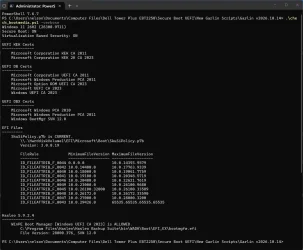
Here it is, (check_bootmedia.ps1 -verbose) At this point I have given up on Hasleo, it shouldn't be this difficult. I am okay moving to another program. At some point, one needs to know when to give up trying to make software work. This, (Hasleo) should work without any user modifications needed.

Thank you and everyone else for all the help.


Screenshot 2026-10-16 082444.webp
 

Attachments

  • Screenshot 2026-10-16 080631.webp
    Screenshot 2026-10-16 080631.webp
    129 KB · Views: 1

My Computers My Computers

  • At a glance

    Windows 11 Pro 26H2 26300.9711Intel® Core™ Ultra 7 265 1.8GHz to 5.3GHz (Ar...SK Hynix 32GB DDR5 5600 Desktop RAM UDIMM Non...Dell NVIDIA® GeForce RTX™ 4060 8GB GDDR6 & (i...
    OS
    Windows 11 Pro 26H2 26300.9711
    Computer type
    PC/Desktop
    Manufacturer/Model
    Dell Tower Plus EBT2250, DOB: 06/15/2025
    CPU
    Intel® Core™ Ultra 7 265 1.8GHz to 5.3GHz (Arrow Lake)
    Motherboard
    Dell Inc. 02D3NT A00 (U3E1)
    Memory
    SK Hynix 32GB DDR5 5600 Desktop RAM UDIMM Non-ECC PC5-5600B
    Graphics Card(s)
    Dell NVIDIA® GeForce RTX™ 4060 8GB GDDR6 & (iGPU) Integrated Intel® UHD Graphics
    Sound Card
    Chipset Realtek High-Definition Audio with Dolby Atmos
    Monitor(s) Displays
    Dell Ultra Sharp U2515H 25-Inch Screen LED-Lit
    Screen Resolution
    2560 X 1440
    Hard Drives
    Samsung (NVMe PM9C1a 1024GB) M.2 PCIe NVMe Solid State Drive (OS), with Samsung Piccolo (S4LY022) 6-Core 4 Channel Controller.

    Samsung T7 500GB SSD, USB-C External Drive
    PSU
    Dell 460W
    Case
    Dell Tower Plus EBT 2250
    Cooling
    Fan
    Keyboard
    Dell Wired Keyboard - KB216
    Mouse
    Logitech M510
    Internet Speed
    Intel Killer E3100G 2.5 Gigabit Ethernet Controller
    Browser
    Microsoft Edge
    Antivirus
    Microsoft Windows Security
  • At a glance

    Windows 11 Pro 26H2 26300.971110th Generation Intel Core i7-10510U Processo...16GB DDR4 RAMNVIDIA® GeForce® MX250 with 2GB GDDR5 graphic...
    Operating System
    Windows 11 Pro 26H2 26300.9711
    Computer type
    Laptop
    Manufacturer/Model
    Dell Inspiron 15 7000 (7591) 2-in-1, DOB: 11/30/2019
    CPU
    10th Generation Intel Core i7-10510U Processor (8MB Cache, up to 4.9 GHz) Comet Lake
    Motherboard
    Dell 0NNW5N
    Memory
    16GB DDR4 RAM
    Graphics card(s)
    NVIDIA® GeForce® MX250 with 2GB GDDR5 graphics memory
    Sound Card
    Chipset Realtek ALC3254
    Monitor(s) Displays
    Dell 15.6-inch UHD Truelife Touch Narrow Border WVA Display with Active Pen support
    Screen Resolution
    3840 x 2160
    Hard Drives
    Intel NVME 512GB SSD with 32GB Intel Optane Memory, M.2 80mm PCIe 3.0 RAID

    SanDisk 256GB Extreme microSDXC UHS-I Memory Card
    PSU
    Dell 4-Cell Battery, 68 Whr (Integrated), 90 Watt AC Adapter
    Case
    Dell Inspiron 15 7000 2-in-1 (7591)
    Cooling
    Standard Dell Case Fan & Havit HV-F2056 USB Powered (3 Fans) Laptop Cooling Pad.
    Keyboard
    Dell
    Mouse
    Logitech Wireless Mouse M650L
    Internet Speed
    Wireless/Wired connectivity (WiFi 6 - 802.11 ax)
    Browser
    Microsoft Edge
    Antivirus
    Microsoft Windows Security
Found something strange that I could not explain.

After running Check-BootMedia.bat and having an HASLEOBS Emergency USB drive (Made with Hasleo Backup Suite v5.9.2.4, the latest. Made with 26300.9550) in my PC it did not see that USB stick that is bootable and contains only 1 bootable partition. I saw other users here that could see this HASLEOBS Emergency disk

I saw this part of the result:
Powershell:
UEFI DBX Certs
--------------
    Microsoft Windows Production PCA 2011
    Windows BootMgr SVN 12.0

EFI Files
---------
    [OPTIONAL] SkuSiPolicy.p7b (for VBS) is MISSING.

Bootable Media
--------------

PS C:\WINDOWS\system32>

So I was searching for a way to interrogate the Boot file and found; there is; (PS as Admin)
Get-SecureBootSVN -BootManagerPath "G:\EFI\Boot\bootx64.efi"
I then got the following result:
Code:
FirmwareSVN      : 12.0
BootManagerSVN   : 11.0
StagedSVN        : 12.0
ComplianceStatus : Not compliant
BootManagerPath  : G:\EFI\Boot\bootx64.efi
That "Not compliant" status got me worried. So I made a new Emergency disk but this time I downloaded the WinPE-image from Microsoft. After inspecting it again I got;
Code:
FirmwareSVN      : 12.0
BootManagerSVN   : 12.0
StagedSVN        : 12.0
ComplianceStatus : Compliant (Boot Manager SVN meets staged SVN)
BootManagerPath  : G:\EFI\Boot\bootx64.efi
OK that is fixed I guess....

I also inspected the boot partition of my C-drive and it gave me the following result;
Code:
Get-SecureBootSVN -BootManagerPath "C:\EFI\Boot\bootx64.efi"

FirmwareSVN      : 12.0
BootManagerSVN   : 0.0
StagedSVN        : 12.0
ComplianceStatus : Not compliant
BootManagerPath  : C:\EFI\Boot\bootx64.efi

It seems this command is using some kind of link to the Boot partition that is not accessible because there is no EFI directory on the C-drive.
I made that partition visible temporary inside explorer using diskpart (again not accessible by explorer but by CMD as Admin) and tried it again: The same result: Not compliant. Strange.....
I investigate the versions of the 2 files inside C:\EFI\Microsoft\Boot directory; bootmgfw.efi and bootmgr.efi. The same: Non compliant.

Found one thing curious; their file sizes.
C:\EFI\Boot\bootx64.efi is 966.644 Bytes. (d.d. 9 Sept.2026) C:\EFI\Microsoft\Boot\bootmgfw.efi is 3.086.680 Bytes. (d.d. 15 Oct.2026, updated yesterday by 26300.9711)
The file G:\EFI\Boot\ bootx64.efi is also 3.086.680 Bytes in size. (d.d. is the date the Emergency disk is created)

I think that that bootx64.efi on the C-drive is just a bootstrap file that calls bootmgfw.efi in reality. Same sizes.
If this is the case why are all the .efi files on the boot partition of the C-drive all Not compliant?

Does anyone have any clue and explain why this is the case. At least you would expect that that Get-SecureBootSVN command showed: "Compliant (Boot Manager SVN meets staged SVN)" but it doesn't......
 
Last edited:

My Computers My Computers

  • At a glance

    Win 11 Pro 26H2 Build 26300.9550, Zorin OS ProIntel® Core™ i7-12700KF 12th Gen. (S1700)32GB DDR5 5600-36 Vengeance (2x16)PCIe4.0 Asus NVIDIA RTX3060Ti
    OS
    Win 11 Pro 26H2 Build 26300.9550, Zorin OS Pro
    Computer type
    PC/Desktop
    Manufacturer/Model
    Self built
    CPU
    Intel® Core™ i7-12700KF 12th Gen. (S1700)
    Motherboard
    ASUS Prime Z690-A, BIOS v4505 (Z690 Intel Chipset)
    Memory
    32GB DDR5 5600-36 Vengeance (2x16)
    Graphics Card(s)
    PCIe4.0 Asus NVIDIA RTX3060Ti
    Sound Card
    Onboard; Realtek
    Monitor(s) Displays
    34" LG 34UC79G-B Curved 21:9 144Hz
    Screen Resolution
    2560x1080 (No HDR)
    Hard Drives
    250Gb Samsung 870PRO NVMe (Win 11 Pro)
    1Tb Samsung 980PRO NVMe
    1Tb Samsung 970EVO NVMe
    2Tb Samsung 990PRO NVMe with heatsink.
    4Tb WDC WD40EZRZ Blue SATA (Int.)
    4Tb WDC WD40EZRZ Blue SATA (Int.)
    3Tb WDC WD30EFRZ Red SATA (Int.)
    256Gb Samsung 840PRO SSD (RHEL 9,5)
    256Gb Samsung 850PRO SSD (Zorin OS Pro 18)
    PSU
    Coolermaster 850W V2 Gold with internal 12cm exaust fan
    Case
    Be-Quiet Pure Base 600.
    Cooling
    3x Be-Quiet! 12/14cm "Silent Wings 4" casefans, 1x Arctic Freezer i35 CPU towerblock with fan.
    Keyboard
    Steelseries APEX 7 keyboard.
    Mouse
    Logitech G-502 Hero
    Internet Speed
    1Gb
    Browser
    Brave
    Antivirus
    F-Secure
    Other Info
    No Noise system.
    256Gb Kingston Travler USB 3.0 drive.
    64Gb Sandisk USB 3.2 drive. (Ventoy)
    8Gb Philips USB 3.0 drive. (Win. Inst.)
    8Gb Philips USB 3.0 drive. (Rescue disk)
    2Tb WD USB 3.0 Passport drive.
    USB Ext. 500Gb WD SATA drive.
    External USB 3.0 C.A. CD/DVD* burner.
  • At a glance

    Windows 11 Pro 26H2Intel® Core™ i7-6700K 6th Gen. (S1151)32Gb DDR4 2400 Corsair Vengeance (4x8)ASUS GeForce GTX1080
    Operating System
    Windows 11 Pro 26H2
    Computer type
    PC/Desktop
    Manufacturer/Model
    Selfbuild
    CPU
    Intel® Core™ i7-6700K 6th Gen. (S1151)
    Motherboard
    ASUS Maximus VIII Ranger (Intel Chipset Z170)
    Memory
    32Gb DDR4 2400 Corsair Vengeance (4x8)
    Graphics card(s)
    ASUS GeForce GTX1080
    Sound Card
    Onboard; Realtek
    Monitor(s) Displays
    LG IPS277L 27" WideLED, IPS
    Screen Resolution
    1920x1080
    Hard Drives
    Samsung 850 Pro SSD
    PSU
    Zalman ZM600-HP with internal exhaust fan. Heatpipes & Modular cables.
    Case
    Cooler Master Aero
    Cooling
    Scythe Mugen 4 dual fan towerblock.
    Keyboard
    Red Dragon
    Mouse
    Red Dragon
    Internet Speed
    1Gb
    Browser
    Brave
    Antivirus
    F-Secure
I think that that bootx64.efi on the C-drive is just a bootstrap file that calls bootmgfw.efi in reality. Same sizes.
If this is the case why are all the .efi files on the boot partition of the C-drive all Not compliant?

The UEFI firmware loads EFI executables (.efi) directly from the FAT32-formatted EFI system partition, not from the Windows partition (C:).

How Windows boots on a UEFI system:
  • \EFI\Microsoft\Boot\bootmgfw.efi is normally launched via a firmware "Windows Boot Manager" boot entry stored in NVRAM.
  • \EFI\Boot\bootx64.efi is the default/fallback boot path defined by the UEFI specification for x64 systems. It is commonly used for booting removable media and as a fallback when normal firmware boot entries are unavailable.

If you want to check the Secure Boot SVN of your installed Windows Boot Manager, simply run Get-SecureBootSVN without specifying a path. This normally checks the boot manager on the actual EFI system partition.

Code:
Get-SecureBootSVN

FirmwareSVN      : 0.0
BootManagerSVN   : 12.0
StagedSVN        : 12.0
ComplianceStatus : Not compliant (Staged SVN does not match firmware SVN)
BootManagerPath  : \\.\HarddiskVolume1\EFI\Microsoft\Boot\bootmgfw.efi
 
Last edited:

My Computers My Computers

  • At a glance

    Windows 11 ProAMD Ryzen 9 9950X3DKingston FURY Beast 64GB (2x32GB) DDR5 6000MT/sASUS TUF Gaming Radeon RX 9070 OC Edition 16G...
    OS
    Windows 11 Pro
    Computer type
    PC/Desktop
    CPU
    AMD Ryzen 9 9950X3D
    Motherboard
    ASRock B650E Taichi Lite
    Memory
    Kingston FURY Beast 64GB (2x32GB) DDR5 6000MT/s
    Graphics Card(s)
    ASUS TUF Gaming Radeon RX 9070 OC Edition 16GB GDDR6
    Hard Drives
    Solidigm P44 Pro 2TB M.2 NVMe SSD
  • At a glance

    Windows 11 HomeIntel Core Ultra 9 275HX64GB (2x 32GB) DDR5-6400NVIDIA GeForce RTX 5080 16GB GDDR7 Laptop GPU
    Operating System
    Windows 11 Home
    Computer type
    Laptop
    Manufacturer/Model
    Lenovo Legion Pro 7i Gen 10 16"
    CPU
    Intel Core Ultra 9 275HX
    Memory
    64GB (2x 32GB) DDR5-6400
    Graphics card(s)
    NVIDIA GeForce RTX 5080 16GB GDDR7 Laptop GPU
    Hard Drives
    2x 1TB M.2 NVMe SSD (SK Hynix)
As I have posted before, I use the Terabyte Unlimited tools to manage partition backups on a monthly cycle. This is after the Tuesday Microsoft Update day.
As we store no data on any, (we have 5), computer on our LAN, (we have NAS Servers to manage that, which backup every day), this is sufficient for us.
As part of that monthly backup regime I use the TBWinRe tool to create a bootable USB drive containing the latest Wim.
When checked with Check_BootMedia.ps1 this reports:

Bootable Media
--------------

USB Drive D: "TBWINRE"
Windows Boot Manager [Windows UEFI CA 2023] is ALLOWED.
D:\EFI\Microsoft\Boot\bootmgfw.efi
File Version: 28000.376, SVN 12.0

boot.wim:1 (WinRE 26100.9711)
Boot Manager [Windows UEFI CA 2023] is ALLOWED.
\Windows\Boot\EFI_EX\bootmgfw_EX.efi
File Version: 28000.376, SVN 12.0

\Windows\System32\winload.efi is ALLOWED.
File Version: 26100.9711

My idea is, that if something goes seriously amiss, I can use the bootable media to boot the system and then restore any partition or all from the compressed archive written by Terabyte's Image for Windows.
I have used this company's products for over 20 years and they have been life savers through disk crashes, major Microsoft cock-ups and user errors etc.

They are not free utilities but are worth every penny in my opinion.
 

My Computer My Computer

At a glance

Windows11Intel(R) N97, 2000 Mhz, 4 Core(s), 4 Logical16GbIntel(R) UHD Graphics
OS
Windows11
Computer type
PC/Desktop
Manufacturer/Model
Acemagic S1
CPU
Intel(R) N97, 2000 Mhz, 4 Core(s), 4 Logical
Memory
16Gb
Graphics Card(s)
Intel(R) UHD Graphics
Sound Card
(Generic USB Audio)
Monitor(s) Displays
2
Screen Resolution
2560 x 1440 x 59 hertz
Hard Drives
Model KPART512GBC2DVT 512Gb
I have used this company's products for over 20 years and they have been life savers through disk crashes, major Microsoft cock-ups and user errors etc.

They are not free utilities but are worth every penny in my opinion.
And home users get 5 installations per purchased licence...

1792165418011.webp

Terabyte Image for Windows
$49.98 US per licence
 

My Computers My Computers

  • At a glance

    Windows 1132GB
    OS
    Windows 11
    Computer type
    PC/Desktop
    Manufacturer/Model
    Dell 3910
    Memory
    32GB
  • At a glance

    Windows 1116GB
    Operating System
    Windows 11
    Computer type
    Tablet
    Manufacturer/Model
    Surface Pro 9
    Memory
    16GB
I’m having an issue with Hasleo bootable USB media, Garlin’s script doesn’t detect them. I’ve tried 3 different USB drives, using 2 front-panel ports, one rear USB 3.0 port, and one rear USB 2.0 port.

However, when I mounted the Hasleo rescue disk ISO, the script detected it. The output confirms everything is fine:
Windows Boot Manager [Windows UEFI CA 2023] is ALLOWED.

boot.wim:1 (WinRE 26100.9711)
Boot Manager [Windows UEFI CA 2023] is ALLOWED.

\Windows\System32\winload.efi is ALLOWED

I’m not sure why the USB drives aren’t being detected. It’s possible that some of the BIOS settings I enabled, which provide protection at the USB port level, are the cause. I’ll look into it later.

Edit: I also tried using earlier versions of the script.
 

My Computer My Computer

At a glance

windows 11
OS
windows 11
If the script isn't detecting your USB drive, add the drive's letter on the command line.

Run either one of these commands:
Code:
.\Check_BootMedia.ps1 E:

.\Check-BootMedia.bat E:
 

My Computer My Computer

At a glance

Windows 7
OS
Windows 7
Thanks, that worked using the USB media letter.
The output is correct, everything is ALLOWED.
 

My Computer My Computer

At a glance

windows 11
OS
windows 11
Well 3rd Attempt to update Macrium Reflect X Boot Media with Win RE option selected in Macrium Reflect X


Code:
PS D:\Scripts\Tools> .\Check_BootMedia.ps1 G:

Security warning
Run only scripts that you trust. While scripts from the internet can be useful, this script can potentially harm your
computer. If you trust this script, use the Unblock-File cmdlet to allow the script to run without this warning
message. Do you want to run D:\Scripts\Tools\Check_BootMedia.ps1?
[D] Do not run  [R] Run once  [S] Suspend  [?] Help (default is "D"): R
Secure Boot: ON
Virtualization Based Security: ON

UEFI KEK Certs
--------------
    Microsoft Corporation KEK CA 2011
    Microsoft Corporation KEK 2K CA 2023

UEFI DB Certs
-------------
    Microsoft Corporation UEFI CA 2011
    Microsoft Windows Production PCA 2011
    Microsoft Option ROM UEFI CA 2023
    Microsoft UEFI CA 2023
    Windows UEFI CA 2023

UEFI DBX Certs
--------------
    Microsoft Windows Production PCA 2011
    Windows BootMgr SVN 12.0

EFI Files
---------
    SkuSiPolicy.p7b is CURRENT.

Image Files
-----------

USB Drive G: "MACRIUM_PE"
    Windows Boot Manager [Windows UEFI CA 2023] is ALLOWED.

    boot.wim:1 (WinRE 26100.9545)
        Boot Manager [Windows UEFI CA 2023] is BANNED.
        winload.efi is BANNED.


What heck am i doing wrong this time? CA 2023 shouldn't be banned as far as i know, yet still isn't properly working right as yet lol.
 

My Computers My Computers

  • At a glance

    Windows 11 Pro 25H2 26200.8894AMD Ryzen 7700X32GB DDR 5 RGB 5600MhzRadeon 7800XT
    OS
    Windows 11 Pro 25H2 26200.8894
    Computer type
    PC/Desktop
    Manufacturer/Model
    PreBuilt
    CPU
    AMD Ryzen 7700X
    Motherboard
    MSI B650 VC WIfi Rev 1.0
    Memory
    32GB DDR 5 RGB 5600Mhz
    Graphics Card(s)
    Radeon 7800XT
    Sound Card
    Onboard Audio
    Monitor(s) Displays
    Asus VG245H
    Screen Resolution
    1920x1080
    Hard Drives
    Samsung 990 Pro 1TB Boot NVMe
    Samsung 990 Pro 2TB Game NVMe


    External
    Western Digital Elements 500GB
    Western Digital My Passport 2TB Blue
    Western Digital My Passport 2TB Red
    Toshiba 2TB in External Enclosure
    Seagate 8TB in External Enclosure
    Seagate 1TB Portable USB 3 External Drive
    Western Digital My Book 8TB (Primary Backup drive)
    Western Digital Black 4TB In External Enclosure
    PSU
    Seasonic Focus GX 750 Watt Power Supply
    Case
    Lian Li Lan Cool 216 ARGB Airflow
    Cooling
    2 160MM Front, 1 140MM Rear Exhaust
    Keyboard
    Logitech G513
    Mouse
    Logitech G502 X
    Internet Speed
    Gigabit 1100Mb/35 Upload
    Browser
    MS Edge Chromium and Bing Search
    Antivirus
    Windows Defender, Malwarebytes Premium
    Other Info
    UEFI, Secure Boot, TPM 2.0, Macrium Reflect X
  • At a glance

    Windows 11 Pro 25H2 26200.8894Ryzen 7 7735HS16GB DDR 5AMD Radeon™ 680M & Radeon 7700S
    Operating System
    Windows 11 Pro 25H2 26200.8894
    Computer type
    Laptop
    Manufacturer/Model
    Asus TUF A16 Advantage Edition FA617NT.A16.R7700
    CPU
    Ryzen 7 7735HS
    Motherboard
    OEM Asus Motherboard
    Memory
    16GB DDR 5
    Graphics card(s)
    AMD Radeon™ 680M & Radeon 7700S
    Sound Card
    Onboard
    Monitor(s) Displays
    16inch FHD 165hz
    Screen Resolution
    1920x1080
    Hard Drives
    512GB NVMe Boot Drive
    Samsung 990 Evo Plus 1TB Game NVMe
    PSU
    Laptop PSU
    Case
    Laptop Case
    Cooling
    OEM Cooling
    Keyboard
    OEM Laptop Keyboard
    Mouse
    Touchpad & G502 Hero
    Internet Speed
    Gigabit 1100 Download/35 Upload
    Browser
    MS Edge with Bing search
    Antivirus
    Windows Defender & Malwarebytes Premium
    Other Info
    Macrium Reflect X

@bikemanAMD run that with the -verbose method will likely show a SVN is not current​


My Computer My Computer

At a glance

Windows 11 Intel i5 10400 HD630 graphics chipi5-1040012 gbHD630 chipset
OS
Windows 11 Intel i5 10400 HD630 graphics chip
Computer type
PC/Desktop
Manufacturer/Model
HP
CPU
i5-10400
Memory
12 gb
Graphics Card(s)
HD630 chipset
Monitor(s) Displays
LG 24inch
Hard Drives
SSD, external usb drive 1tb for files/backups
Keyboard
wireless Logi
Mouse
ms 4000 wireless mouse
Internet Speed
10meg
Browser
Firefox
Antivirus
Defender
Other Info
Win11 Home 26h2 26300.9550 09/30/2026

@bikemanAMD run that with the -verbose method will likely show a SVN is not current​

Results after -verbose method

Code:
PS D:\Scripts\Tools> .\Check_BootMedia.ps1 G: -verbose

Security warning
Run only scripts that you trust. While scripts from the internet can be useful, this script can potentially harm your
computer. If you trust this script, use the Unblock-File cmdlet to allow the script to run without this warning
message. Do you want to run D:\Scripts\Tools\Check_BootMedia.ps1?
[D] Do not run  [R] Run once  [S] Suspend  [?] Help (default is "D"): R
Windows 11 26H2 (26300.9711)
Secure Boot: ON
Virtualization Based Security: ON

UEFI KEK Certs
--------------
    Microsoft Corporation KEK CA 2011
    Microsoft Corporation KEK 2K CA 2023

UEFI DB Certs
-------------
    Microsoft Corporation UEFI CA 2011
    Microsoft Windows Production PCA 2011
    Microsoft Option ROM UEFI CA 2023
    Microsoft UEFI CA 2023
    Windows UEFI CA 2023

UEFI DBX Certs
--------------
    Microsoft Windows Production PCA 2011
    Windows BootMgr SVN 12.0

EFI Files
---------
    SkuSiPolicy.p7b is CURRENT.
        \\.\HarddiskVolume1\EFI\Microsoft\Boot\SkuSiPolicy.p7b
        Version: 3.0.0.19

        FileRule             MinimumFileVersion MaximumFileVersion
        --------             ------------------ ------------------
        ID_FILEATTRIB_F_0044 0.0.0.0            10.0.14393.9579
        ID_FILEATTRIB_F_0042 10.0.14400.0       10.0.17763.9339
        ID_FILEATTRIB_F_0040 10.0.18000.0       10.0.19041.7759
        ID_FILEATTRIB_F_0041 10.0.19100.0       10.0.20348.5719
        ID_FILEATTRIB_F_0046 10.0.20400.0       10.0.22621.7619
        ID_FILEATTRIB_F_0049 10.0.23000.0       10.0.26100.9680
        ID_FILEATTRIB_F_0045 10.0.26100.32000   10.0.26100.33589
        ID_FILEATTRIB_F_0048 10.0.26172.0       10.0.26172.33590
        ID_FILEATTRIB_F_0047 10.0.27000.0       10.0.28000.3200
        ID_FILEATTRIB_F_0043 10.0.29426.0       65535.65535.65535.65535


Image Files
-----------

USB Drive G: "MACRIUM_PE"
    Windows Boot Manager [Windows UEFI CA 2023] is ALLOWED.
        G:\EFI\Microsoft\Boot\bootmgfw.efi
        File Version: 28000.376, SVN 12.0

    boot.wim:1 (WinRE 26100.9545)
        Boot Manager [Windows UEFI CA 2023] is BANNED.
            \Windows\Boot\EFI_EX\bootmgfw_EX.efi
            File Version: 28000.367, SVN 11.0

        \Windows\System32\winload.efi is BANNED.
            File Version: 26100.9545
 

My Computers My Computers

  • At a glance

    Windows 11 Pro 25H2 26200.8894AMD Ryzen 7700X32GB DDR 5 RGB 5600MhzRadeon 7800XT
    OS
    Windows 11 Pro 25H2 26200.8894
    Computer type
    PC/Desktop
    Manufacturer/Model
    PreBuilt
    CPU
    AMD Ryzen 7700X
    Motherboard
    MSI B650 VC WIfi Rev 1.0
    Memory
    32GB DDR 5 RGB 5600Mhz
    Graphics Card(s)
    Radeon 7800XT
    Sound Card
    Onboard Audio
    Monitor(s) Displays
    Asus VG245H
    Screen Resolution
    1920x1080
    Hard Drives
    Samsung 990 Pro 1TB Boot NVMe
    Samsung 990 Pro 2TB Game NVMe


    External
    Western Digital Elements 500GB
    Western Digital My Passport 2TB Blue
    Western Digital My Passport 2TB Red
    Toshiba 2TB in External Enclosure
    Seagate 8TB in External Enclosure
    Seagate 1TB Portable USB 3 External Drive
    Western Digital My Book 8TB (Primary Backup drive)
    Western Digital Black 4TB In External Enclosure
    PSU
    Seasonic Focus GX 750 Watt Power Supply
    Case
    Lian Li Lan Cool 216 ARGB Airflow
    Cooling
    2 160MM Front, 1 140MM Rear Exhaust
    Keyboard
    Logitech G513
    Mouse
    Logitech G502 X
    Internet Speed
    Gigabit 1100Mb/35 Upload
    Browser
    MS Edge Chromium and Bing Search
    Antivirus
    Windows Defender, Malwarebytes Premium
    Other Info
    UEFI, Secure Boot, TPM 2.0, Macrium Reflect X
  • At a glance

    Windows 11 Pro 25H2 26200.8894Ryzen 7 7735HS16GB DDR 5AMD Radeon™ 680M & Radeon 7700S
    Operating System
    Windows 11 Pro 25H2 26200.8894
    Computer type
    Laptop
    Manufacturer/Model
    Asus TUF A16 Advantage Edition FA617NT.A16.R7700
    CPU
    Ryzen 7 7735HS
    Motherboard
    OEM Asus Motherboard
    Memory
    16GB DDR 5
    Graphics card(s)
    AMD Radeon™ 680M & Radeon 7700S
    Sound Card
    Onboard
    Monitor(s) Displays
    16inch FHD 165hz
    Screen Resolution
    1920x1080
    Hard Drives
    512GB NVMe Boot Drive
    Samsung 990 Evo Plus 1TB Game NVMe
    PSU
    Laptop PSU
    Case
    Laptop Case
    Cooling
    OEM Cooling
    Keyboard
    OEM Laptop Keyboard
    Mouse
    Touchpad & G502 Hero
    Internet Speed
    Gigabit 1100 Download/35 Upload
    Browser
    MS Edge with Bing search
    Antivirus
    Windows Defender & Malwarebytes Premium
    Other Info
    Macrium Reflect X
@bikemanAMD Yes that shows your bootmgfw_ex.efi is only at svn 11, needs updated to 12 not sure what to do with winload.efi
 

My Computer My Computer

At a glance

Windows 11 Intel i5 10400 HD630 graphics chipi5-1040012 gbHD630 chipset
OS
Windows 11 Intel i5 10400 HD630 graphics chip
Computer type
PC/Desktop
Manufacturer/Model
HP
CPU
i5-10400
Memory
12 gb
Graphics Card(s)
HD630 chipset
Monitor(s) Displays
LG 24inch
Hard Drives
SSD, external usb drive 1tb for files/backups
Keyboard
wireless Logi
Mouse
ms 4000 wireless mouse
Internet Speed
10meg
Browser
Firefox
Antivirus
Defender
Other Info
Win11 Home 26h2 26300.9550 09/30/2026
@TheVisitor Yeah i don't know either, it worked last month when i updated the SVN and updated the Rescue disk, not sure whats happening this month at all.

But i guess at some point i'll get it all figured out someway

I do get this everytime i run the Update_UEFi-CA2023.ps1 -Bootmedia script, the first time it said it updated the Flash drive successfully supposely

But always asks for a Reboot each time i run it

Windows PowerShell
Copyright (C) Microsoft Corporation. All rights reserved.

SUCCESS: NO UPDATES ARE REQUIRED.

Restart Windows, for pending updates to take effect.

((but what pending update))
 

My Computers My Computers

  • At a glance

    Windows 11 Pro 25H2 26200.8894AMD Ryzen 7700X32GB DDR 5 RGB 5600MhzRadeon 7800XT
    OS
    Windows 11 Pro 25H2 26200.8894
    Computer type
    PC/Desktop
    Manufacturer/Model
    PreBuilt
    CPU
    AMD Ryzen 7700X
    Motherboard
    MSI B650 VC WIfi Rev 1.0
    Memory
    32GB DDR 5 RGB 5600Mhz
    Graphics Card(s)
    Radeon 7800XT
    Sound Card
    Onboard Audio
    Monitor(s) Displays
    Asus VG245H
    Screen Resolution
    1920x1080
    Hard Drives
    Samsung 990 Pro 1TB Boot NVMe
    Samsung 990 Pro 2TB Game NVMe


    External
    Western Digital Elements 500GB
    Western Digital My Passport 2TB Blue
    Western Digital My Passport 2TB Red
    Toshiba 2TB in External Enclosure
    Seagate 8TB in External Enclosure
    Seagate 1TB Portable USB 3 External Drive
    Western Digital My Book 8TB (Primary Backup drive)
    Western Digital Black 4TB In External Enclosure
    PSU
    Seasonic Focus GX 750 Watt Power Supply
    Case
    Lian Li Lan Cool 216 ARGB Airflow
    Cooling
    2 160MM Front, 1 140MM Rear Exhaust
    Keyboard
    Logitech G513
    Mouse
    Logitech G502 X
    Internet Speed
    Gigabit 1100Mb/35 Upload
    Browser
    MS Edge Chromium and Bing Search
    Antivirus
    Windows Defender, Malwarebytes Premium
    Other Info
    UEFI, Secure Boot, TPM 2.0, Macrium Reflect X
  • At a glance

    Windows 11 Pro 25H2 26200.8894Ryzen 7 7735HS16GB DDR 5AMD Radeon™ 680M & Radeon 7700S
    Operating System
    Windows 11 Pro 25H2 26200.8894
    Computer type
    Laptop
    Manufacturer/Model
    Asus TUF A16 Advantage Edition FA617NT.A16.R7700
    CPU
    Ryzen 7 7735HS
    Motherboard
    OEM Asus Motherboard
    Memory
    16GB DDR 5
    Graphics card(s)
    AMD Radeon™ 680M & Radeon 7700S
    Sound Card
    Onboard
    Monitor(s) Displays
    16inch FHD 165hz
    Screen Resolution
    1920x1080
    Hard Drives
    512GB NVMe Boot Drive
    Samsung 990 Evo Plus 1TB Game NVMe
    PSU
    Laptop PSU
    Case
    Laptop Case
    Cooling
    OEM Cooling
    Keyboard
    OEM Laptop Keyboard
    Mouse
    Touchpad & G502 Hero
    Internet Speed
    Gigabit 1100 Download/35 Upload
    Browser
    MS Edge with Bing search
    Antivirus
    Windows Defender & Malwarebytes Premium
    Other Info
    Macrium Reflect X
@TheVisitor Yeah i don't know either, it worked last month when i updated the SVN and updated the Rescue disk, not sure whats happening this month at all.

But i guess at some point i'll get it all figured out someway

I do get this everytime i run the Update_UEFi-CA2023.ps1 -Bootmedia script, the first time it said it updated the Flash drive successfully supposely

But always asks for a Reboot each time i run it

Windows PowerShell
Copyright (C) Microsoft Corporation. All rights reserved.

SUCCESS: NO UPDATES ARE REQUIRED.

Restart Windows, for pending updates to take effect.

((but what pending update))
Run reagentc /info in a Command Prompt or PowerShell window.

The version should be: Windows RE Version: 10.0.26100.9711

If the version is lower, your recovery partition has not updated automatically. This is due to a lack of space, and the fact that Microsoft does not automatically resize the partition or create a new one.
 

My Computer My Computer

At a glance

windows 11
OS
windows 11
@bikemanAMD Yes that shows your bootmgfw_ex.efi is only at svn 11, needs updated to 12 not sure what to do with winload.efi
When winload.efi doesn't pass, you have to two options:

1. Stop using SkuSiPolicy.p7b (any winload.efi will beeligible for booting).
2. Replace boot.wim with a later version of WinRE (rebuild the Macrium or Hasleo USB using the current WinRE as the image source).
 

My Computer My Computer

At a glance

Windows 7
OS
Windows 7
Well i tried to expand my WinRE Partition in the past, didn't work so well. But i can try again if need be on that part

Should i switch to Windows PE version of Macrium Rescue Media? not sure how i'd stop using SkuSiPolicy at all, as always used it thus far, til now having issues

Desktop WinRe Parition size right now is 1.72GB (Healthy Recovery Partition it says in Disk Management area)

Screenshot 2026-10-16 154640.webp
 

My Computers My Computers

  • At a glance

    Windows 11 Pro 25H2 26200.8894AMD Ryzen 7700X32GB DDR 5 RGB 5600MhzRadeon 7800XT
    OS
    Windows 11 Pro 25H2 26200.8894
    Computer type
    PC/Desktop
    Manufacturer/Model
    PreBuilt
    CPU
    AMD Ryzen 7700X
    Motherboard
    MSI B650 VC WIfi Rev 1.0
    Memory
    32GB DDR 5 RGB 5600Mhz
    Graphics Card(s)
    Radeon 7800XT
    Sound Card
    Onboard Audio
    Monitor(s) Displays
    Asus VG245H
    Screen Resolution
    1920x1080
    Hard Drives
    Samsung 990 Pro 1TB Boot NVMe
    Samsung 990 Pro 2TB Game NVMe


    External
    Western Digital Elements 500GB
    Western Digital My Passport 2TB Blue
    Western Digital My Passport 2TB Red
    Toshiba 2TB in External Enclosure
    Seagate 8TB in External Enclosure
    Seagate 1TB Portable USB 3 External Drive
    Western Digital My Book 8TB (Primary Backup drive)
    Western Digital Black 4TB In External Enclosure
    PSU
    Seasonic Focus GX 750 Watt Power Supply
    Case
    Lian Li Lan Cool 216 ARGB Airflow
    Cooling
    2 160MM Front, 1 140MM Rear Exhaust
    Keyboard
    Logitech G513
    Mouse
    Logitech G502 X
    Internet Speed
    Gigabit 1100Mb/35 Upload
    Browser
    MS Edge Chromium and Bing Search
    Antivirus
    Windows Defender, Malwarebytes Premium
    Other Info
    UEFI, Secure Boot, TPM 2.0, Macrium Reflect X
  • At a glance

    Windows 11 Pro 25H2 26200.8894Ryzen 7 7735HS16GB DDR 5AMD Radeon™ 680M & Radeon 7700S
    Operating System
    Windows 11 Pro 25H2 26200.8894
    Computer type
    Laptop
    Manufacturer/Model
    Asus TUF A16 Advantage Edition FA617NT.A16.R7700
    CPU
    Ryzen 7 7735HS
    Motherboard
    OEM Asus Motherboard
    Memory
    16GB DDR 5
    Graphics card(s)
    AMD Radeon™ 680M & Radeon 7700S
    Sound Card
    Onboard
    Monitor(s) Displays
    16inch FHD 165hz
    Screen Resolution
    1920x1080
    Hard Drives
    512GB NVMe Boot Drive
    Samsung 990 Evo Plus 1TB Game NVMe
    PSU
    Laptop PSU
    Case
    Laptop Case
    Cooling
    OEM Cooling
    Keyboard
    OEM Laptop Keyboard
    Mouse
    Touchpad & G502 Hero
    Internet Speed
    Gigabit 1100 Download/35 Upload
    Browser
    MS Edge with Bing search
    Antivirus
    Windows Defender & Malwarebytes Premium
    Other Info
    Macrium Reflect X
hello,
i have my "old" 2016 ASUS PC updated with the 2023 Secure Boot certs --thanks to garlin´s scripts (y)-- except for the revocation of the Microsoft Windows Production PCA 2011 one
-what should i expect when and IF Microsoft make the process in my particular PC on the next Monday 19th? i´m asking because of the parameters found in the REGISTER EDITOR, specially about "Confidence Level: Under Observation - More Data Needed" among others --- see below, please
thanks in advance,
fernando barba
****************************************************

PS C:\windows\system32> C:\Users\fbm\Desktop\Check_UEFI-CA2023.ps1 -Verbose -Audit
W10 IoT ENT LTSC 2021 (19044.7807)
Secure Boot: ON
Virtualization Based Security: ON
BitLocker on (C:) OFF

BIOS Firmware
-------------
ASUSTeK COMPUTER INC. M32CD_A_F_K20CD_K31CD
Version: 1102
Date: 2018-04-12

Factory Default UEFI PK Cert
----------------------------
ASUSTeK MotherBoard PK Certificate

UEFI PK Cert
------------
Windows OEM Devices PK

Factory Default UEFI KEK Certs
------------------------------
Microsoft Corporation KEK CA 2011
Canonical Ltd. Master Certificate Authority
ASUSTeK MotherBoard KEK Certificate

UEFI KEK Certs
--------------
Microsoft Corporation KEK CA 2011
Microsoft Corporation KEK 2K CA 2023

Factory Default UEFI DB Certs
-----------------------------
Microsoft Corporation UEFI CA 2011
Microsoft Windows Production PCA 2011
Canonical Ltd. Master Certificate Authority
ASUSTeK MotherBoard SW Key Certificate
ASUSTeK Notebook SW Key Certificate

UEFI DB Certs
-------------
Microsoft Corporation UEFI CA 2011
Microsoft Windows Production PCA 2011
Microsoft Option ROM UEFI CA 2023
Microsoft UEFI CA 2023
Windows UEFI CA 2023

Factory Default UEFI DBX Certs
------------------------------
(NONE)
EFI_CERT_SHA256_GUID Signatures: 77

UEFI DBX Certs
--------------
(NONE)
Windows BootMgr SVN is MISSING.
EFI_CERT_SHA256_GUID Signatures: 445

UEFI Variables
--------------
SBAT (Linux only): sbat,1,2024010900 / shim,4 / grub,3 / grub.debian,4

EFI Files
---------
Windows Boot Manager [Windows UEFI CA 2023] is ALLOWED.
\\.\HarddiskVolume6\EFI\Microsoft\Boot\bootmgfw.efi
File Version: 28000.376, SVN 12.0

Registry: "WindowsUEFICA2023Capable" = 2
[Windows UEFI CA 2023] in UEFI DB, and Windows starting from CA 2023 Boot Manager.

[OPTIONAL] SkuSiPolicy.p7b (for VBS) is MISSING.

AUDIT REPORT
============
1. [Production PCA 2011] is missing from UEFI DBX
2. Windows BootMgr SVN is missing from UEFI DBX

[OPTIONAL] SkuSiPolicy.p7b (for VBS) is missing from EFI

STATUS REPORT
-------------
Registry: "UEFICA2023Status" = Updated


REQUIRED ACTION
===============

To REVOKE the [PCA 2011] cert, run the commands:

reg add HKEY_LOCAL_MACHINE\SYSTEM\CurrentControlSet\Control\Secureboot /v AvailableUpdates /t REG_DWORD /d 0x280 /f
powershell Start-ScheduledTask -TaskName "\Microsoft\Windows\PI\Secure-Boot-Update"
*************************************************************************************************************************************************


Captura de pantalla (864).webp
 

My Computers My Computers

  • At a glance

    Windows 10 Enterprise IoT LTSCIntel(R) Core(TM) i5-6400 CPU @ 2.70GHz16GBIntel HD Graphics 530 (integrated on Motherbo...
    OS
    Windows 10 Enterprise IoT LTSC
    Computer type
    PC/Desktop
    Manufacturer/Model
    ASUS/ K31CD
    CPU
    Intel(R) Core(TM) i5-6400 CPU @ 2.70GHz
    Memory
    16GB
    Graphics Card(s)
    Intel HD Graphics 530 (integrated on Motherboard)
    Other Info
    BIOS: American Megatrends Inc.
    v. 1102 (12-2018)
  • At a glance

    Windows 10 Enterprise IoT LTSCIntel(R) i5-3230M CPU @ 2.60GHz, 2601 Mhz8GBIntel HD Graphics 4000 (HP) 2047 // MBNVIDIA ...
    Operating System
    Windows 10 Enterprise IoT LTSC
    Computer type
    Laptop
    Manufacturer/Model
    HP ENVY 15 Notebook PC
    CPU
    Intel(R) i5-3230M CPU @ 2.60GHz, 2601 Mhz
    Memory
    8GB
    Graphics card(s)
    Intel HD Graphics 4000 (HP) 2047 // MBNVIDIA GeForce GT 740M (HP)
    Other Info
    BIOS: Insyde F.69, 06/03/2017
Should i switch to Windows PE version of Macrium Rescue Media? not sure how i'd stop using SkuSiPolicy at all, as always used it thus far, til now having issues
Users should stop using WinPE as their source for boot.wim. WinPE requires someone (ie. Macrium) to constantly post updated images and there can be a delay after any Monthly Update that introduces a new boot manager or winload.efi. WinRE as the source image is the way to go.

To disable SkuSiPolicy enforcement:
1. Disable Secure Boot.

2. Run these commands as Admin:
Code:
mountvol S: /s
del S:\EFI\Microsoft\Boot\SkuSiPolicy.p7b

3. Enable Secure Boot.
 

My Computer My Computer

At a glance

Windows 7
OS
Windows 7
1.72 GB is more than enough.
What does reagentc /info show?
 

My Computer My Computer

At a glance

windows 11
OS
windows 11

Latest Support Threads

Latest Tutorials

Back
Top Bottom