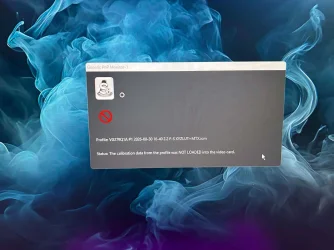
Solved Generic color profile is not to be change?!


ToddeSwe

Member
Local time
8:56 PM
Posts
30
OS
Windows 11
Hi!

Suddenly my win 11 wont load my calibrate profile shown i the screendump. Why and how can i fix it?
I use an older calibrate Spyder 3 or something and software displaycal. It has worked all the time eccept for a week or so...
 

Attachments

  • Klippbordsbild (68).webp
    Klippbordsbild (68).webp
    103.6 KB · Views: 2

My Computer My Computer

At a glance

Windows 11Ryzen 532RTX 4060
OS
Windows 11
Computer type
PC/Desktop
Manufacturer/Model
AMD
CPU
Ryzen 5
Motherboard
MSI
Memory
32
Graphics Card(s)
RTX 4060
Uninstall both spyder and displaycal.
Power off shutdown and restart.
In Terminal[admin],type in ---dism /online /cleanup-image /restorehealth ---and run it.
When completed,type in---sfc /scannow---and continue to run it until a clean report is given.
Decide which app is to be used for calibrating and install and run it.
If the situation is normal,then install the remaing app if needed.
 

My Computer My Computer

At a glance

win 10amd ryzen 5-2600ng skill sniper x 16gbnvidea gtx 1050
OS
win 10
Computer type
PC/Desktop
Manufacturer/Model
home built
CPU
amd ryzen 5-2600
Motherboard
gigabyte b450m-ds3h
Memory
ng skill sniper x 16gb
Graphics Card(s)
nvidea gtx 1050
Monitor(s) Displays
benq fp 92
Hard Drives
samsung 860 evo 500gb m2 ssd
PSU
antec ea550g
Case
nzxt noctis 450
Browser
edge
Uninstall both spyder and displaycal.
Power off shutdown and restart.
In Terminal[admin],type in ---dism /online /cleanup-image /restorehealth ---and run it.
When completed,type in---sfc /scannow---and continue to run it until a clean report is given.
Decide which app is to be used for calibrating and install and run it.
If the situation is normal,then install the remaing app if needed.
Thank you so very much! I am getting a newer version of my calibrator and when it has arrived i will try this.
 

My Computer My Computer

At a glance

Windows 11Ryzen 532RTX 4060
OS
Windows 11
Computer type
PC/Desktop
Manufacturer/Model
AMD
CPU
Ryzen 5
Motherboard
MSI
Memory
32
Graphics Card(s)
RTX 4060
Hi!

Suddenly my win 11 wont load my calibrate profile shown i the screendump. Why and how can i fix it?
I use an older calibrate Spyder 3 or something and software displaycal. It has worked all the time eccept for a week or so...
You can't manually select an ICM/ICC profile in the Color Management control panel?
 

My Computers My Computers

  • At a glance

    Windows 11 26300.9278Amd Threadripper 7970X128GB (4 X 32) G.Skill DDR5 6400 (RDIMM)Gigabyte RTX 4090 OC
    OS
    Windows 11 26300.9278
    Computer type
    PC/Desktop
    Manufacturer/Model
    homebuilt
    CPU
    Amd Threadripper 7970X
    Motherboard
    Gigabyte TRX50 Aero D Rev. 1.0
    Memory
    128GB (4 X 32) G.Skill DDR5 6400 (RDIMM)
    Graphics Card(s)
    Gigabyte RTX 4090 OC
    Sound Card
    none (USB to speakers), Realtek
    Monitor(s) Displays
    Innocn 32" OLED
    Screen Resolution
    3840 X 2160 @ 60Hz
    Hard Drives
    Crucial T700 2TB M.2 NVME SSD
    WD 4TB Blue SATA SSD
    Seagate 18TB IronWolf Pro
    PSU
    BeQuiet! Straight Power 12 1500W
    Case
    Lian Li 011 Dynamic Evo XL
    Cooling
    SilverStone Technology XE360-TR5, with 3 Phanteks T30 fans
    Keyboard
    Cherry KC 500 MX LP (mechanical)
    Mouse
    Logitech M500s (wired)
    Internet Speed
    2000/250 Mbps (down/up)
    Other Info
    xFinity gateway
  • At a glance

    windows 11 26300.9278Intel I9-13900K64GB G.Skill DDR5-6000Gigabyte RTX 3090 ti
    Operating System
    windows 11 26300.9278
    Computer type
    PC/Desktop
    Manufacturer/Model
    homebuilt
    CPU
    Intel I9-13900K
    Motherboard
    Asus RoG Strix Z690-E
    Memory
    64GB G.Skill DDR5-6000
    Graphics card(s)
    Gigabyte RTX 3090 ti
    Sound Card
    built in Realtek
    Monitor(s) Displays
    Philips 27E1N8900 27" OLED
    Screen Resolution
    3840 X 2160 @60Hz
    Hard Drives
    WDC SN850 1TB
    8TB Seagate Ironwolf
    4TB Seagate Ironwolf
    PSU
    eVGA SuperNOVA 1300 GT
    Case
    Lian Li 011 Dynamic Evo
    Cooling
    Corsair iCUE H150i ELITE CAPELLIX Liquid CPU Cooler
    Keyboard
    Cherry Streaming (wired)
    Mouse
    Logitech M500s (wired)
You can't manually select an ICM/ICC profile in the Color Management control panel?
I can select it but not set as default, but npw when i looked the calibrated one is gone as well. :(
 

My Computer My Computer

At a glance

Windows 11Ryzen 532RTX 4060
OS
Windows 11
Computer type
PC/Desktop
Manufacturer/Model
AMD
CPU
Ryzen 5
Motherboard
MSI
Memory
32
Graphics Card(s)
RTX 4060
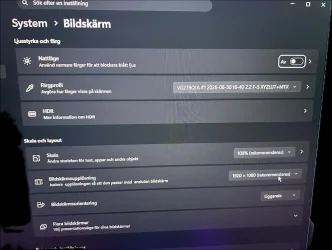
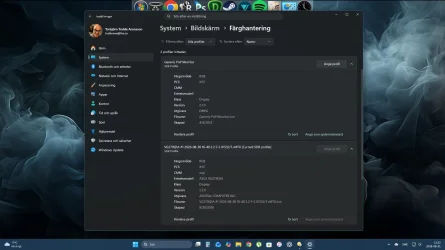
An update to my problem:

Look at the pictures and you will understand what i am telling you. :)
 

Attachments

  • profile not loaded.webp
    profile not loaded.webp
    163.9 KB · Views: 2
  • profile shows up.webp
    profile shows up.webp
    183.5 KB · Views: 2

My Computer My Computer

At a glance

Windows 11Ryzen 532RTX 4060
OS
Windows 11
Computer type
PC/Desktop
Manufacturer/Model
AMD
CPU
Ryzen 5
Motherboard
MSI
Memory
32
Graphics Card(s)
RTX 4060
I can select it but not set as default, but npw when i looked the calibrated one is gone as well. :(
I'm not following this very well.

ICC and ICM profiles are saved in C:\Windows\System32\spool\drivers\color.

You should be able to load any of those using the Color Management control panel. And set a loaded one as default. If you can't do that, I have no idea why.

Warning: Win11 Automatic Color Management forces the monitor gamut to be set to something like sRGB if it is enabled. I disable it to run DisplayCal/Argyll CMS. (My monitor is an OLED, with a wider gamut than sRGB.)
 

My Computers My Computers

  • At a glance

    Windows 11 26300.9278Amd Threadripper 7970X128GB (4 X 32) G.Skill DDR5 6400 (RDIMM)Gigabyte RTX 4090 OC
    OS
    Windows 11 26300.9278
    Computer type
    PC/Desktop
    Manufacturer/Model
    homebuilt
    CPU
    Amd Threadripper 7970X
    Motherboard
    Gigabyte TRX50 Aero D Rev. 1.0
    Memory
    128GB (4 X 32) G.Skill DDR5 6400 (RDIMM)
    Graphics Card(s)
    Gigabyte RTX 4090 OC
    Sound Card
    none (USB to speakers), Realtek
    Monitor(s) Displays
    Innocn 32" OLED
    Screen Resolution
    3840 X 2160 @ 60Hz
    Hard Drives
    Crucial T700 2TB M.2 NVME SSD
    WD 4TB Blue SATA SSD
    Seagate 18TB IronWolf Pro
    PSU
    BeQuiet! Straight Power 12 1500W
    Case
    Lian Li 011 Dynamic Evo XL
    Cooling
    SilverStone Technology XE360-TR5, with 3 Phanteks T30 fans
    Keyboard
    Cherry KC 500 MX LP (mechanical)
    Mouse
    Logitech M500s (wired)
    Internet Speed
    2000/250 Mbps (down/up)
    Other Info
    xFinity gateway
  • At a glance

    windows 11 26300.9278Intel I9-13900K64GB G.Skill DDR5-6000Gigabyte RTX 3090 ti
    Operating System
    windows 11 26300.9278
    Computer type
    PC/Desktop
    Manufacturer/Model
    homebuilt
    CPU
    Intel I9-13900K
    Motherboard
    Asus RoG Strix Z690-E
    Memory
    64GB G.Skill DDR5-6000
    Graphics card(s)
    Gigabyte RTX 3090 ti
    Sound Card
    built in Realtek
    Monitor(s) Displays
    Philips 27E1N8900 27" OLED
    Screen Resolution
    3840 X 2160 @60Hz
    Hard Drives
    WDC SN850 1TB
    8TB Seagate Ironwolf
    4TB Seagate Ironwolf
    PSU
    eVGA SuperNOVA 1300 GT
    Case
    Lian Li 011 Dynamic Evo
    Cooling
    Corsair iCUE H150i ELITE CAPELLIX Liquid CPU Cooler
    Keyboard
    Cherry Streaming (wired)
    Mouse
    Logitech M500s (wired)
System > Display > Colour management
Colour management Automatically manage colour for apps should be off.

Go to Colour Calibration > Display colour > Calibrate display, that will make a profile for test purposes, you can remove it later if you wish.

It maybe labelled something like:
"sRGB display profile with display hardware configuration data derived from calibration (1)"

You should be able to apply & see immediately on using the Set profile button.
Once the Set profile has been selected, Set as system default is greyed out.

The purpose of the test is that you have a working reference profile
Maybe the one you are deriving from your application is somehow not quite right.
I can select it but not set as default, but npw when i looked the calibrated one is gone as well.
 

My Computer My Computer

At a glance

Windows 11
OS
Windows 11
I'm not following this very well.

ICC and ICM profiles are saved in C:\Windows\System32\spool\drivers\color.

You should be able to load any of those using the Color Management control panel. And set a loaded one as default. If you can't do that, I have no idea why.

Warning: Win11 Automatic Color Management forces the monitor gamut to be set to something like sRGB if it is enabled. I disable it to run DisplayCal/Argyll CMS. (My monitor is an OLED, with a wider gamut than sRGB.)

No i can't set it as default. But now it has been selected at startup for a whole 24 hours or a couple of reboots and restarts. As i said before i'm expecting a newer calibrator and when it arrives i will remove everything i have done with the old one i have and give the new one a go.

Thanks for your interest in my problem.
 

My Computer My Computer

At a glance

Windows 11Ryzen 532RTX 4060
OS
Windows 11
Computer type
PC/Desktop
Manufacturer/Model
AMD
CPU
Ryzen 5
Motherboard
MSI
Memory
32
Graphics Card(s)
RTX 4060
System > Display > Colour management
Colour management Automatically manage colour for apps should be off.

Go to Colour Calibration > Display colour > Calibrate display, that will make a profile for test purposes, you can remove it later if you wish.

It maybe labelled something like:
"sRGB display profile with display hardware configuration data derived from calibration (1)"

You should be able to apply & see immediately on using the Set profile button.
Once the Set profile has been selected, Set as system default is greyed out.

The purpose of the test is that you have a working reference profile
Maybe the one you are deriving from your application is somehow not quite right.
I will be back when and if the new one is making this problems as well. Should be somewhere after the 12 of septemper.
 

My Computer My Computer

At a glance

Windows 11Ryzen 532RTX 4060
OS
Windows 11
Computer type
PC/Desktop
Manufacturer/Model
AMD
CPU
Ryzen 5
Motherboard
MSI
Memory
32
Graphics Card(s)
RTX 4060
No i can't set it as default. But now it has been selected at startup for a whole 24 hours or a couple of reboots and restarts. As i said before i'm expecting a newer calibrator and when it arrives i will remove everything i have done with the old one i have and give the new one a go.

Thanks for your interest in my problem.
I don't understand.

If nothing is broken, you should be able to manually choose a profile in Color Management and set it as default. Nothing to do with a colorimeter ("calibrator") or its software.
 

My Computers My Computers

  • At a glance

    Windows 11 26300.9278Amd Threadripper 7970X128GB (4 X 32) G.Skill DDR5 6400 (RDIMM)Gigabyte RTX 4090 OC
    OS
    Windows 11 26300.9278
    Computer type
    PC/Desktop
    Manufacturer/Model
    homebuilt
    CPU
    Amd Threadripper 7970X
    Motherboard
    Gigabyte TRX50 Aero D Rev. 1.0
    Memory
    128GB (4 X 32) G.Skill DDR5 6400 (RDIMM)
    Graphics Card(s)
    Gigabyte RTX 4090 OC
    Sound Card
    none (USB to speakers), Realtek
    Monitor(s) Displays
    Innocn 32" OLED
    Screen Resolution
    3840 X 2160 @ 60Hz
    Hard Drives
    Crucial T700 2TB M.2 NVME SSD
    WD 4TB Blue SATA SSD
    Seagate 18TB IronWolf Pro
    PSU
    BeQuiet! Straight Power 12 1500W
    Case
    Lian Li 011 Dynamic Evo XL
    Cooling
    SilverStone Technology XE360-TR5, with 3 Phanteks T30 fans
    Keyboard
    Cherry KC 500 MX LP (mechanical)
    Mouse
    Logitech M500s (wired)
    Internet Speed
    2000/250 Mbps (down/up)
    Other Info
    xFinity gateway
  • At a glance

    windows 11 26300.9278Intel I9-13900K64GB G.Skill DDR5-6000Gigabyte RTX 3090 ti
    Operating System
    windows 11 26300.9278
    Computer type
    PC/Desktop
    Manufacturer/Model
    homebuilt
    CPU
    Intel I9-13900K
    Motherboard
    Asus RoG Strix Z690-E
    Memory
    64GB G.Skill DDR5-6000
    Graphics card(s)
    Gigabyte RTX 3090 ti
    Sound Card
    built in Realtek
    Monitor(s) Displays
    Philips 27E1N8900 27" OLED
    Screen Resolution
    3840 X 2160 @60Hz
    Hard Drives
    WDC SN850 1TB
    8TB Seagate Ironwolf
    4TB Seagate Ironwolf
    PSU
    eVGA SuperNOVA 1300 GT
    Case
    Lian Li 011 Dynamic Evo
    Cooling
    Corsair iCUE H150i ELITE CAPELLIX Liquid CPU Cooler
    Keyboard
    Cherry Streaming (wired)
    Mouse
    Logitech M500s (wired)
Check HDR: If the "Use HDR" slider is enabled, disable it. Enabling HDR in Windows hardware blocks the graphics card's classic look-up tables (LUTs), disrupting DisplayCAL.
+ DisplayCal and GPUs | DisplayCAL
 

My Computer My Computer

At a glance

Windows 11 Insider Experimental (26H2)Intel Core i5-1140032Gb (DDR4 SDRAM)Intel(R) UHD Graphics 730
OS
Windows 11 Insider Experimental (26H2)
Computer type
PC/Desktop
Manufacturer/Model
Gigabyte Technology Co., Ltd.
CPU
Intel Core i5-11400
Motherboard
Z590 AORUS PRO AX
Memory
32Gb (DDR4 SDRAM)
Graphics Card(s)
Intel(R) UHD Graphics 730
Sound Card
Realtek USB Audio
Monitor(s) Displays
LG 27US500-W 4K UHD UltraFine™
Screen Resolution
3840x2160
Hard Drives
Samsung SSD 980 PRO 1TB
WDC WD7501AALS
PSU
Montech CENTURY, 650W, 80+ Gold
Case
Cougar Airface ECO RGB
Cooling
ID-COOLING SE-224-XTS BLACK
Keyboard
Microsoft SideWinder X6 Keyboard
Mouse
Microsoft SideWinder Mouse
Internet Speed
Internet speed of 1 Gbit/s
Browser
Vivaldi browser
Antivirus
Windows Defender
I've now installed the new calibrator and when i did i found out i had an old Spyder software installe. When i removed it i got rid of the dialoge telling me it can't load the profile. Now it works as before. I can't remember installing this software on my new computer. :)
 

My Computer My Computer

At a glance

Windows 11Ryzen 532RTX 4060
OS
Windows 11
Computer type
PC/Desktop
Manufacturer/Model
AMD
CPU
Ryzen 5
Motherboard
MSI
Memory
32
Graphics Card(s)
RTX 4060
Windows is unreliable in loading the correct profile. I calibrate my display using a Calibrite profiler and installed DisplayCAL for the sole purpose of using the DisplayCAL Profile Loader which ensures my specified profile is always correctly loaded.
 

My Computer My Computer

At a glance

Windows 11 ProCore i7-13700K64 GB Kingston Fury Beast DDR5Gigabyte GeForce RTX 2060 Super Gaming OC 8G
OS
Windows 11 Pro
Computer type
PC/Desktop
Manufacturer/Model
Self build
CPU
Core i7-13700K
Motherboard
Asus TUF Gaming Plus WiFi Z790
Memory
64 GB Kingston Fury Beast DDR5
Graphics Card(s)
Gigabyte GeForce RTX 2060 Super Gaming OC 8G
Sound Card
Realtek S1200A
Monitor(s) Displays
Viewsonic VP2770 & Dell (secondary)
Screen Resolution
2560 x 1440
Hard Drives
Kingston KC3000 2TB NVME SSD & SATA HDDs & SSD
PSU
EVGA SuperNova G2 850W
Case
Nanoxia Deep Silence 1
Cooling
Noctua NH-D14
Keyboard
Microsoft Digital Media Pro
Mouse
Logitech Wireless
Internet Speed
80 Mb / s
Browser
Chrome
Antivirus
Defender, Malwarebytes Free & AdwCleaner

Latest Support Threads

Back
Top Bottom