Solved Get newer version of Windows to stay up to date?


JeffFinnan

Well-known member
Local time
12:15 PM
Posts
107
OS
Windows 11
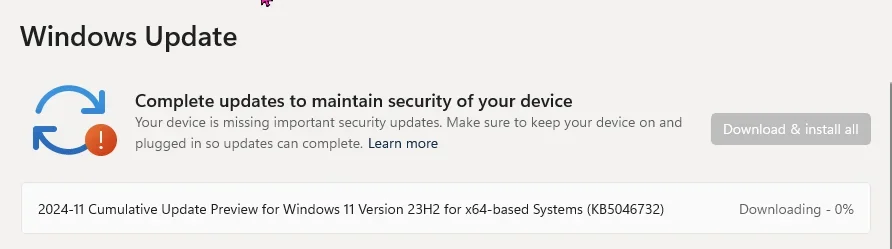
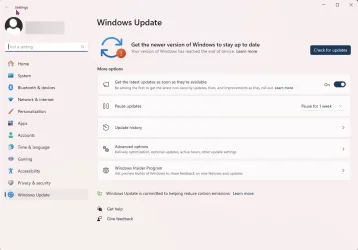
On checking for updates today, I got this unexpected message at the top.

1733497303530.webp

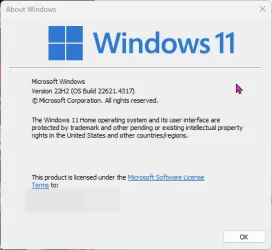
I have
1733497370987.webp
The "learn more" talks about lifecycle: Lifecycle FAQ - Windows

Not sure what to do.

Thanks,
Jeff
 
Windows Build/Version
22H2 (OS Build 22621.4317)

My Computer

System One

  • OS
    Windows 11
    Computer type
    PC/Desktop
    Manufacturer/Model
    Mostly Self Assembled
    CPU
    Intel i9-12900K (3.7Ghz/5.3 Ghz max turbo,16 cores)
    Motherboard
    Asus Z690-P4 D4
    Memory
    128 GB
    Graphics Card(s)
    EVGA GeForce RTX 3070 FTW3
    Hard Drives
    Ssmsung SSD 970 EVO Plus 2TB
    WDC HDD 6TB
    WDC HDD 4 TB
    PSU
    SuperNOVA 850 G5, 850W
    Case
    Phanteks Enthoo Pro ES614P
That is a known problem, recently discussed here:
and here:

Edit: Because your system is on 22H2, the warning is very realistic!
Support for 22H2 has been suspended, you willl not get anymoer safety updates at all from Microsoft!

In this case, you will have to upgrade to 23H2, which is not that difficult.
I will have a look where the routine was mentioned that you can use to enable 23H2 (don't know it by heart).

Here it is:
 
Last edited:

My Computer

System One

  • OS
    Windows 11 Pro 25H2 26200.8457
    Computer type
    PC/Desktop
    Manufacturer/Model
    Build by vendor to my specs
    CPU
    AMD Ryzen 7 5700G
    Motherboard
    MSI PRO B550M-P Gen3
    Memory
    Kingston FURY Beast 2x16GB DIMM DDR4 2666 CL16
    Graphics Card(s)
    MSI GeForce GT 730 2GB LP V1
    Sound Card
    Creative Sound Blaster Audigy FX
    Monitor(s) Displays
    Samsung S24E450F 24"
    Screen Resolution
    1920 x 1080
    Hard Drives
    1. SSD Crucial P5 Plus 500GB PCIe M.2
    2. SSD-SATA Crucial MX500-2TB
    PSU
    Corsair CV650W
    Case
    Cooler Master Silencio S400
    Cooling
    Cooler Master Hyper H412R with Be Quiet Pure Wings 2 PWM BL038 fan
    Keyboard
    Cherry Stream (wired, scissor keys)
    Mouse
    Asus WT465 (wireless)
    Internet Speed
    70 Mbps down / 80 Mbps up
    Browser
    Firefox 130.0
    Antivirus
    F-Secure (Internetprovider version)
    Other Info
    Router: FRITZBox 7490
    Oracle VirtualBox 7 for testing software on Win 10 or 11
Not the same issue, @Kees. OP is on 22H2, which is end of service. OP should do an upgrade/repair with a 23H2 ISO.

Brink's tutorial here
 

My Computer

System One

  • OS
    Windows 11 Pro 25H2
    Computer type
    PC/Desktop
    Manufacturer/Model
    Intel NUC12WSHi7
    CPU
    12th Gen Core i7-1260P
    Motherboard
    NUC12WSBi7
    Memory
    64 GB Micron PC4-25600
    Graphics Card(s)
    Intel Iris Xe Graphics
    Sound Card
    on-board Realtek HD Audio
    Monitor(s) Displays
    Dell U3219Q
    Screen Resolution
    3840 x 2160
    Hard Drives
    Samsung SSD 990 PRO 1TB
    Crucial MX500 2 TB
    Antivirus
    Microsoft Defender
This is the reason MS should force upgrades, like Mac, 99% do not understand it.
I know people, who refused to restart phones to prevent upgrades for years! o_O
 

My Computer

System One

  • OS
    Home26H2Can
    Computer type
    PC/Desktop
    CPU
    AMD Ryzen 5 8600G (07/24)
    Motherboard
    ASROCK B650M-HDV/M.2 (07/24) BIOS 4.21 AGESA ComboAM5 1.3.0.1 (04/26)
    Memory
    2x32GB Kingston FURY DDR5 5600 MHz CL36 @5200 CL36 (07/24)
    Graphics Card(s)
    ASROCK Radeon RX 6600 Challenger D 8G @48FPS (08/24)
    Sound Card
    Creative Sound BlasterX AE-5 Plus (05/24)
    Monitor(s) Displays
    24" Philips 24M1N3200ZS/00 (05/24)
    Screen Resolution
    1920×1080@165Hz via DP1.4
    Hard Drives
    Kingston KC3000 NVMe 2TB (05/24)
    ADATA XPG GAMMIX S11 Pro 512GB (07/19)
    PSU
    Seasonic Core GM 550 Gold (04/24)
    Case
    Fractal Design Define 7 Mini with 3x Noctua NF-P14s/12@555rpm (04/24)
    Cooling
    Noctua NH-U12S with Noctua NF-P12 (04/24)
    Keyboard
    HP Pavilion Wired Keyboard 300 (07/24) + Rabalux 76017 Parker (01/24)
    Mouse
    Logitech M330 Silent Plus (01/26)
    Internet Speed
    500/100 Mbps via RouterOS (05/21) & TCP Optimizer
    Browser
    Edge, Brave for YouTube, LibreWolf for FB
    Antivirus
    NextDNS blocking 1/3 Traffic
    Other Info
    Phone: Motorola Moto G86 (02/26)
    Backup: Hasleo Backup Suite (PreOS)
    Headphones: Sennheiser RS170 (09/10)
    Chair: Huzaro Force 4.4 Grey Mesh (05/24)
    Notifier: Xiaomi Mi Band 9 Milanese (10/24)
    FlexCore USB-C 3.2 Gen 1 (M) to LAN (F) (08/25)
Not the same issue, @Kees. OP is on 22H2, which is end of service. OP should do an upgrade/repair with a 23H2 ISO.
In the meantime that you posted your correction, I had seen my 'error' and corrected it myself.
I had not yet seen your posting at that time...
 

My Computer

System One

  • OS
    Windows 11 Pro 25H2 26200.8457
    Computer type
    PC/Desktop
    Manufacturer/Model
    Build by vendor to my specs
    CPU
    AMD Ryzen 7 5700G
    Motherboard
    MSI PRO B550M-P Gen3
    Memory
    Kingston FURY Beast 2x16GB DIMM DDR4 2666 CL16
    Graphics Card(s)
    MSI GeForce GT 730 2GB LP V1
    Sound Card
    Creative Sound Blaster Audigy FX
    Monitor(s) Displays
    Samsung S24E450F 24"
    Screen Resolution
    1920 x 1080
    Hard Drives
    1. SSD Crucial P5 Plus 500GB PCIe M.2
    2. SSD-SATA Crucial MX500-2TB
    PSU
    Corsair CV650W
    Case
    Cooler Master Silencio S400
    Cooling
    Cooler Master Hyper H412R with Be Quiet Pure Wings 2 PWM BL038 fan
    Keyboard
    Cherry Stream (wired, scissor keys)
    Mouse
    Asus WT465 (wireless)
    Internet Speed
    70 Mbps down / 80 Mbps up
    Browser
    Firefox 130.0
    Antivirus
    F-Secure (Internetprovider version)
    Other Info
    Router: FRITZBox 7490
    Oracle VirtualBox 7 for testing software on Win 10 or 11
This is the reason MS should force upgrades, like Mac, 99% do not understand it.
I know people, who refused to restart phones to prevent upgrades for years! o_O
Microsoft has scared many users over years with flawed and bug-ridden updates that many users do not want to update. They try their best to avoid updating. Compared to Windows XP to Windows 10/11, updating is very different, but still not perfect. If Microsoft would release updates that would not cause so much destruction and problems on user's computers, then people would not mind seeing the updates installing.

Apple with macOS is different. Their updates are pushed. Mac users do not fear watching updates installing with wondering what will not work afterwards or if their system experiences crashes, boot drive failure messages, etc.
 

My Computer

System One

  • OS
    Windows 11 Pro
    Computer type
    Laptop
    Manufacturer/Model
    Dell 16 Plus DB16255
    CPU
    AMD Ryzen AI 7 350 w/ Radeon 860M 50 TOPS
    Motherboard
    Dell 0PKMHG
    Memory
    32GB LPDDR5X 7500 MT/s
    Graphics Card(s)
    AMD Radeon 860M integrated (shared memory)
    Sound Card
    Stereo speakers (2.5 W x 2 = 5 W total peak)/Realtek SounzReal/Dolby Atmos
    Monitor(s) Displays
    Displays: 16" 1920 x 1200 (Full HD+/WUXGA) 300 nits 60Hz *** Samsung - 27” Odyssey FHD IPS 240Hz G-Sync Gaming Monitor
    Screen Resolution
    1920x1080 @ 60Hz
    Hard Drives
    EG6 KIOXIA 1TB NVME
    Case
    Ice Blue
    Cooling
    "dual-fan" or "enhanced" air-cooling system
    Mouse
    Logitech M650 Wireless/Bluetooth
    Internet Speed
    800/600 Fiber
Here it is:
Went without a hitch. After restart got this:
1733510430348.webp

The restart update of this took a lot longer than the initial 23H2 update.

Edition Windows 11 Home
Version 23H2
Installed on ‎9/‎23/‎2022
OS build 22631.4541
Experience Windows Feature Experience Pack 1000.22700.1055.0

Thanks.
 

My Computer

System One

  • OS
    Windows 11
    Computer type
    PC/Desktop
    Manufacturer/Model
    Mostly Self Assembled
    CPU
    Intel i9-12900K (3.7Ghz/5.3 Ghz max turbo,16 cores)
    Motherboard
    Asus Z690-P4 D4
    Memory
    128 GB
    Graphics Card(s)
    EVGA GeForce RTX 3070 FTW3
    Hard Drives
    Ssmsung SSD 970 EVO Plus 2TB
    WDC HDD 6TB
    WDC HDD 4 TB
    PSU
    SuperNOVA 850 G5, 850W
    Case
    Phanteks Enthoo Pro ES614P

Thanks for the (positive) feedback! (y)
 

My Computer

System One

  • OS
    Windows 11 Pro 25H2 26200.8457
    Computer type
    PC/Desktop
    Manufacturer/Model
    Build by vendor to my specs
    CPU
    AMD Ryzen 7 5700G
    Motherboard
    MSI PRO B550M-P Gen3
    Memory
    Kingston FURY Beast 2x16GB DIMM DDR4 2666 CL16
    Graphics Card(s)
    MSI GeForce GT 730 2GB LP V1
    Sound Card
    Creative Sound Blaster Audigy FX
    Monitor(s) Displays
    Samsung S24E450F 24"
    Screen Resolution
    1920 x 1080
    Hard Drives
    1. SSD Crucial P5 Plus 500GB PCIe M.2
    2. SSD-SATA Crucial MX500-2TB
    PSU
    Corsair CV650W
    Case
    Cooler Master Silencio S400
    Cooling
    Cooler Master Hyper H412R with Be Quiet Pure Wings 2 PWM BL038 fan
    Keyboard
    Cherry Stream (wired, scissor keys)
    Mouse
    Asus WT465 (wireless)
    Internet Speed
    70 Mbps down / 80 Mbps up
    Browser
    Firefox 130.0
    Antivirus
    F-Secure (Internetprovider version)
    Other Info
    Router: FRITZBox 7490
    Oracle VirtualBox 7 for testing software on Win 10 or 11
Microsoft has scared many users over years with flawed and bug-ridden updates that many users do not want to update. They try their best to avoid updating. Compared to Windows XP to Windows 10/11, updating is very different, but still not perfect. If Microsoft would release updates that would not cause so much destruction and problems on user's computers, then people would not mind seeing the updates installing.
Been using Windows for a long time (since about Windows 2.0). Way back in the service pack days, I would certainly hesitate to load them when they first came out. Let others work through the issues and such. I really don't recall many problems with Windows 7. 8 was one that I was a bit indecisive about because the changes from 8 and 8.1 were pretty substantial. I don't recall many issues whatsover with Windows 10 and Windows 11 has been solid for me as well. I just got offered the 24h2 update a few days ago on my Beelink mini PC where i run windows 11. I haven't run it yet, and I'll take an image before I do, but i don't really expect any problems.
Apple with macOS is different. Their updates are pushed. Mac users do not fear watching updates installing with wondering what will not work afterwards or if their system experiences crashes, boot drive failure messages, etc.
I also own a couple of Mac's too. And you are right, my experience there has been very solid. I bought a late 2013 Macbook pro that came with Mavericks. I upgraded to Yosemeit, to El Capitan, to Sierra, to High Sierra, to Mojave, to Catalina and finally Big Sur and have never had an issue. Been running that box for 10+ years, without a single format and reinstall.

I have a 2020 Mac mini that with Ventura, and I upgraded to Sonoma. For fun, I decided to wipe it and clean install Sequoia just to go through the process recently....which really was straight forward and easy. Hardest part was finding an old USB keyboard and mouse I could attach, since I usually use a logitech bluetooth keyboard and mouse. All the drivers are included in the install, no third party installs of anything. It's a walled garden for sure, but it certainly made that a simple process.
 

My Computers

System One System Two

  • OS
    Windows 11 Pro
    Computer type
    PC/Desktop
    Manufacturer/Model
    Beelink SEI8
    CPU
    Intel Core i5-8279u
    Motherboard
    AZW SEI
    Memory
    32GB DDR4 2666Mhz
    Graphics Card(s)
    Intel Iris Plus 655
    Sound Card
    Intel SST
    Monitor(s) Displays
    Asus ProArt PA278QV
    Screen Resolution
    2560x1440
    Hard Drives
    512GB NVMe
    PSU
    NA
    Case
    NA
    Cooling
    NA
    Keyboard
    NA
    Mouse
    NA
    Internet Speed
    500/50
    Browser
    Edge
    Antivirus
    Defender
    Other Info
    Mini PC used for testing Windows 11.
  • Operating System
    Windows 10 Pro
    Computer type
    PC/Desktop
    Manufacturer/Model
    Custom
    CPU
    Ryzen 9 5900x
    Motherboard
    Asus Rog Strix X570-E Gaming
    Memory
    64GB DDR4-3600
    Graphics card(s)
    EVGA GeForce 3080 FT3 Ultra
    Sound Card
    Onboard
    Monitor(s) Displays
    ASUS TUF Gaming VG27AQ. ASUS ProArt Display PA278QV 27” WQHD
    Screen Resolution
    2560x1440
    Hard Drives
    2TB WD SN850 PCI-E Gen 4 NVMe
    2TB Sandisk Ultra 2.5" SATA SSD
    PSU
    Seasonic Focus 850
    Case
    Fractal Meshify S2 in White
    Cooling
    Dark Rock Pro CPU cooler, 3 x 140mm case fans
    Keyboard
    Corsiar K65 RGB Lux
    Mouse
    Logitech G9 Laser Mouse
    Internet Speed
    500/50
    Browser
    Chrome
    Antivirus
    Defender.
After manually updating to 23H2, I still get the "get the newer version of Windows to stay up to date" error message. Even though I seem to be up to date (the latest cumulative update did install).

I tried running the update troubleshooter, but of course, that did nothing (if only troubleshooters could magically fix bugs!)
 

My Computer

System One

  • OS
    Windows 11
    Computer type
    PC/Desktop
    Manufacturer/Model
    MSI
After manually updating to 23H2, I still get the "get the newer version of Windows to stay up to date" error message. Even though I seem to be up to date (the latest cumulative update did install).

I tried running the update troubleshooter, but of course, that did nothing (if only troubleshooters could magically fix bugs!)
I found logging out of the account and logging back in removes that message.
 

My Computer

System One

  • OS
    Windows 11 Pro
    Computer type
    Laptop
    Manufacturer/Model
    Dell 16 Plus DB16255
    CPU
    AMD Ryzen AI 7 350 w/ Radeon 860M 50 TOPS
    Motherboard
    Dell 0PKMHG
    Memory
    32GB LPDDR5X 7500 MT/s
    Graphics Card(s)
    AMD Radeon 860M integrated (shared memory)
    Sound Card
    Stereo speakers (2.5 W x 2 = 5 W total peak)/Realtek SounzReal/Dolby Atmos
    Monitor(s) Displays
    Displays: 16" 1920 x 1200 (Full HD+/WUXGA) 300 nits 60Hz *** Samsung - 27” Odyssey FHD IPS 240Hz G-Sync Gaming Monitor
    Screen Resolution
    1920x1080 @ 60Hz
    Hard Drives
    EG6 KIOXIA 1TB NVME
    Case
    Ice Blue
    Cooling
    "dual-fan" or "enhanced" air-cooling system
    Mouse
    Logitech M650 Wireless/Bluetooth
    Internet Speed
    800/600 Fiber
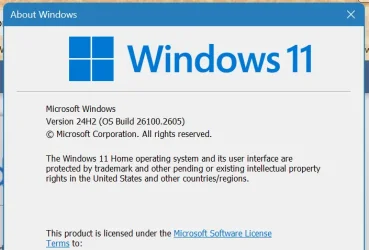
The latest Version of my Win11:

1734210686067.webp
 

My Computers

System One System Two

  • OS
    Win11 Pro RTM Version 24H2 Build 26100.4202
    Computer type
    Laptop
    Manufacturer/Model
    Dell Vostro 3400
    CPU
    Intel Core i5 11th Gen. 2.40GHz
    Memory
    12GB
    Hard Drives
    256GB SSD NVMe M.2
  • Operating System
    Win11 Pro RTM Version 24H2 Build 26100.4202
    Computer type
    PC/Desktop
    Manufacturer/Model
    Dell Vostro 5890
    CPU
    Intel Core i5 10th Gen. 2.90GHz
    Memory
    16GB
    Graphics card(s)
    Onboard, no VGA, using a DisplayPort-to-VGA adapter
    Monitor(s) Displays
    24" Dell
    Hard Drives
    512GB SSD NVMe, 4TB Seagate HDD
    Browser
    Firefox, Edge
    Antivirus
    Windows Defender/Microsoft Security
After manually updating to 23H2, I still get the "get the newer version of Windows to stay up to date" error message. Even though I seem to be up to date (the latest cumulative update did install).

I tried running the update troubleshooter, but of course, that did nothing (if only troubleshooters could magically fix bugs!)

Well, the error message went away on its own after a while (I didn't do anything, and no updates were installed). Go figure.
 

My Computer

System One

  • OS
    Windows 11
    Computer type
    PC/Desktop
    Manufacturer/Model
    MSI
Back
Top Bottom