Hi,
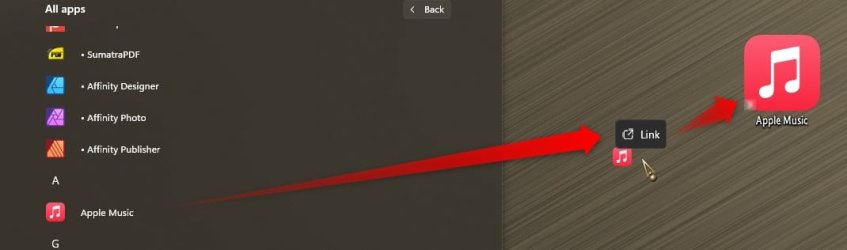
So I had a Windows 10 system and used iTunes for my music. Now I just got a Windows 11 system. So I upgraded iTunes to Apple Music, and the install went fine and it works ok. But, I want the Apple Music icon on my desktop, like I had the iTunes icon on my old system! The Apple Music install does not make that happen. So I wanted to make a shortcut, but could not find the executable file for the app. After some searching, I finally found AppleMusic.exe file in C:\Program Files\WindowsApps\AppleInc.AppleMusicWin_1.1031.15873.0_x64__nzyj5cx40ttqa, and made a shortcut, which worked fine. But, the program does not start when I double-click the icon. In fact, I can not run the app from the File Explorer either. But the same icon is in my apps list, and I can start the app from there just fine.
What could be wrong here, can I really not get the Apple Music icon on my desktop? And yes, I know I can pin it to my taskbar, but I do not want to clutter it with an app I only occasionally use.
Please help.
So I had a Windows 10 system and used iTunes for my music. Now I just got a Windows 11 system. So I upgraded iTunes to Apple Music, and the install went fine and it works ok. But, I want the Apple Music icon on my desktop, like I had the iTunes icon on my old system! The Apple Music install does not make that happen. So I wanted to make a shortcut, but could not find the executable file for the app. After some searching, I finally found AppleMusic.exe file in C:\Program Files\WindowsApps\AppleInc.AppleMusicWin_1.1031.15873.0_x64__nzyj5cx40ttqa, and made a shortcut, which worked fine. But, the program does not start when I double-click the icon. In fact, I can not run the app from the File Explorer either. But the same icon is in my apps list, and I can start the app from there just fine.
What could be wrong here, can I really not get the Apple Music icon on my desktop? And yes, I know I can pin it to my taskbar, but I do not want to clutter it with an app I only occasionally use.
Please help.
- Windows Build/Version
- 23H2, OS Build 22631.3880
My Computer
At a glance
Windows 11
- OS
- Windows 11
- Computer type
- PC/Desktop
- Manufacturer/Model
- Dell/XPS 8960