Had to reset PC, Edge stopped working, reboot gave stop code inaccessible boot device, works again


sdowney717

Well-known member
Member
VIP
Local time
4:19 PM
Posts
1,335
OS
windows 11
It kept cycling thru the stop code, finally gave up and told it to reset PC using download option.
That process actually worked.
Only issue was 2 step authentication for sign into google, phone kept refusing to show the is this you prompt, had to choose another way using keys, THEN OF COURSE in the middle of typing in the key, the notification pooped up. I am signed into google now.

I chose to keep my data, looks like all programs need reinstall. It also got rid of the nag notice on the desktop about how the PC does not meet requirements, so a reset works for that issue. Had to do the trick when originally installing 11 on this more than capable PC.
My SATA drive is a SSD WD Blue, so did it have a problem?
 

My Computer

System One

  • OS
    windows 11
    Computer type
    PC/Desktop
    Manufacturer/Model
    some kind of old ASUS MB
    CPU
    old AMD B95
    Motherboard
    ASUS
    Memory
    8gb
    Hard Drives
    ssd WD 500 gb
It kept cycling thru the stop code, finally gave up and told it to reset PC using download option.
That process actually worked.
Only issue was 2 step authentication for sign into google, phone kept refusing to show the is this you prompt, had to choose another way using keys, THEN OF COURSE in the middle of typing in the key, the notification pooped up. I am signed into google now.

I chose to keep my data, looks like all programs need reinstall. It also got rid of the nag notice on the desktop about how the PC does not meet requirements, so a reset works for that issue. Had to do the trick when originally installing 11 on this more than capable PC.
My SATA drive is a SSD WD Blue, so did it have a problem?
Have you used any tools to analyze the health of your SSD?


My Computers

System One System Two

  • OS
    All Branches but Release
    Computer type
    Laptop
    Manufacturer/Model
    Acer Nitro ANV15-51
    CPU
    AMD Ryzen 7 7735HS 3200-4500 Mhz 8 cores x 2
    Motherboard
    Sportage_RBH
    Memory
    32 GB DDR5
    Graphics Card(s)
    Radeon Graphic / NVIDIA GeForce RTX 4060 8 GB GDDR6
    Sound Card
    AMD/Realtek(R) Audio
    Monitor(s) Displays
    Integrated Monitor (15.3"vis)
    Screen Resolution
    FHD 1920X1080 16:9 144Hz
    Hard Drives
    KINGSTON OM8SEP4512Q-AA 1TB
    Western Digital 256GB
    PSU
    19V DC 6.32 A 120 W
    Cooling
    Dual Fans
    Mouse
    MS Bluetooth
    Internet Speed
    Fiber 1GB Cox -us & 1GB Orange-fr
    Browser
    Edge Canary- Firefox Nightly-Chrome Dev-Chrome Dev
    Antivirus
    Windows Defender
  • Operating System
    Windows 11 Beta
    Computer type
    Laptop
    Manufacturer/Model
    Asus X751BP
    CPU
    AMD A9-9420
    Memory
    8 GB of DDR4
    Graphics card(s)
    AMD Radeon R5
    Screen Resolution
    1600x900
    Hard Drives
    Seagate 1 TB
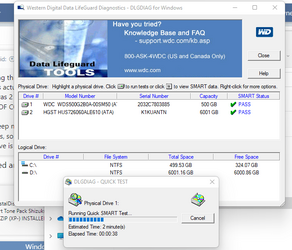
Have you used any tools to analyze the health of your SSD?

looks ok, running now
 

Attachments

  • 1683475582948.png
    1683475582948.png
    51.4 KB · Views: 1

My Computer

System One

  • OS
    windows 11
    Computer type
    PC/Desktop
    Manufacturer/Model
    some kind of old ASUS MB
    CPU
    old AMD B95
    Motherboard
    ASUS
    Memory
    8gb
    Hard Drives
    ssd WD 500 gb
  • Like
Reactions: OAT
Running extended test now
But I figure errors are covered up by drive software, may never show anything.
1683475760457.png
 

My Computer

System One

  • OS
    windows 11
    Computer type
    PC/Desktop
    Manufacturer/Model
    some kind of old ASUS MB
    CPU
    old AMD B95
    Motherboard
    ASUS
    Memory
    8gb
    Hard Drives
    ssd WD 500 gb
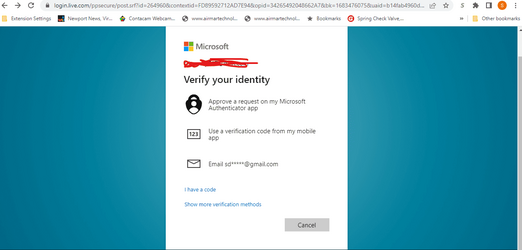
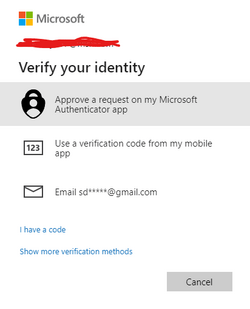
For some reason 'verify your identity' to gmail to get the code never works, gmail never gets an email, have to use phone to login for the browser. Why is that? Had to walk downstairs to retrieve phone to do this
1683476596337.png
 

Attachments

  • 1683476467847.png
    1683476467847.png
    6.6 KB · Views: 0

My Computer

System One

  • OS
    windows 11
    Computer type
    PC/Desktop
    Manufacturer/Model
    some kind of old ASUS MB
    CPU
    old AMD B95
    Motherboard
    ASUS
    Memory
    8gb
    Hard Drives
    ssd WD 500 gb
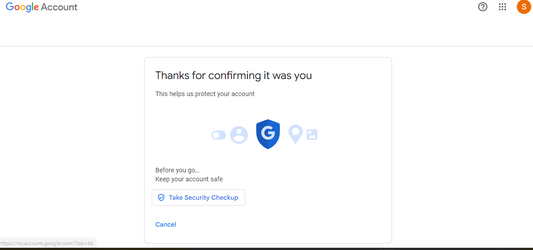
I do get a 'security alert' email in gmail, which if I open says was this you? Click yes it is me, then it says thanks for confirming but still no sign in.
Somehow the login process is breaking down for me.
1683476785654.png
 

My Computer

System One

  • OS
    windows 11
    Computer type
    PC/Desktop
    Manufacturer/Model
    some kind of old ASUS MB
    CPU
    old AMD B95
    Motherboard
    ASUS
    Memory
    8gb
    Hard Drives
    ssd WD 500 gb
Finally got signed in using google authenticator app, it is extremely slow to get a message, minutes slow.
I was trying to sign into Bing on the Chrome Browser. I did all 3 methods, all I know is one finally worked.

When signed into Bing, I rack up reward points which I can spend at Amazon.
 

My Computer

System One

  • OS
    windows 11
    Computer type
    PC/Desktop
    Manufacturer/Model
    some kind of old ASUS MB
    CPU
    old AMD B95
    Motherboard
    ASUS
    Memory
    8gb
    Hard Drives
    ssd WD 500 gb
SSD passed the extended test
1683477373476.png

Info, I use Verizon Phone and use Verizon Fios for the internet, It is a very high speed, so the problem must be someone other than my PC regarding verify identity speed issue, either Verizon or Google. I have done it twice once to login to Edge, and once for Chrome and the process took a long long time to get the authenticator app to pop up the notification prompt. Like request it and 10 minutes later it shows on the phone. in the past this has been almost instantaneous.
 

My Computer

System One

  • OS
    windows 11
    Computer type
    PC/Desktop
    Manufacturer/Model
    some kind of old ASUS MB
    CPU
    old AMD B95
    Motherboard
    ASUS
    Memory
    8gb
    Hard Drives
    ssd WD 500 gb

Latest Support Threads

Back
Top Bottom