
Enigmatico
New member
- Local time
- 7:44 PM
- Posts
- 3
- OS
- Windows
I'm trying to customize the Win + X menu (the Windows Quick Link menu that appears when pressing Win + X or right-clicking the Start button), but I haven't been able to find any method that still works on recent versions of Windows.
I've already tried nearly every well-known solution, including Win + X Menu Editor, Winaero, Hashlnk/HashLink, and several older methods described in forums and tutorials. None of them work anymore.
I also tried creating copies of the original shortcuts and changing their targets to different executables, but Windows either ignores the modified shortcuts or refuses to recognize them.
From what I can tell, Microsoft has changed the way this menu validates its shortcuts, making the older customization methods obsolete.
Does anyone know of a current, reliable way to customize the Win + X menu? Is there any updated tool, new technique, or recent reverse engineering effort that allows adding, removing, or replacing entries in this menu?
I'd really appreciate any recent information or experience with this.
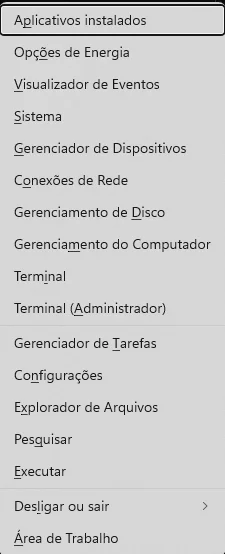
I've already tried nearly every well-known solution, including Win + X Menu Editor, Winaero, Hashlnk/HashLink, and several older methods described in forums and tutorials. None of them work anymore.
I also tried creating copies of the original shortcuts and changing their targets to different executables, but Windows either ignores the modified shortcuts or refuses to recognize them.
From what I can tell, Microsoft has changed the way this menu validates its shortcuts, making the older customization methods obsolete.
Does anyone know of a current, reliable way to customize the Win + X menu? Is there any updated tool, new technique, or recent reverse engineering effort that allows adding, removing, or replacing entries in this menu?
I'd really appreciate any recent information or experience with this.
- Windows Build/Version
- Microsoft Windows 11 Pro - 10.0.26200 N/A compilação 26200
My Computer
At a glance
Windows
- OS
- Windows
- Computer type
- PC/Desktop






