
Has anyone looked at C:\Program Files\WindowsApps?


The problem is that even when you uninstall apps like Weather, store will keep some of their files like Steam does, in case you want to reinstall to save the bandwidth. Some will not even show up, like MSI Center taking 636MB, making backups unnecessarily bigger.
 

Attachments
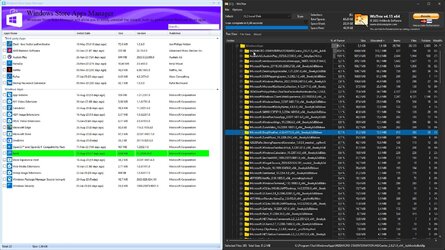
  • capture_08292023_122618.jpg
    capture_08292023_122618.jpg
    330.9 KB · Views: 2

My Computer My Computer

At a glance

Home2FH2CanAMD Ryzen 5 8600G (07/24)2x32GB Kingston FURY DDR5 5600 MHz CL36 @5200...ASROCK Radeon RX 6600 Challenger D 8G @48FPS ...
OS
Home2FH2Can
Computer type
PC/Desktop
CPU
AMD Ryzen 5 8600G (07/24)
Motherboard
ASROCK B650M-HDV/M.2 (07/24) BIOS 4.43 AGESA ComboAM5 1.3.0.1b Patch A (07/26)
Memory
2x32GB Kingston FURY DDR5 5600 MHz CL36 @5200 CL40 (07/24)
Graphics Card(s)
ASROCK Radeon RX 6600 Challenger D 8G @48FPS (08/24)
Sound Card
Creative Sound BlasterX AE-5 Plus (05/24)
Monitor(s) Displays
24" Philips 24M1N3200ZS/00 (05/24)
Screen Resolution
1920×1080@165Hz via DP1.4
Hard Drives
Kingston KC3000 NVMe 2TB (05/24)
ADATA XPG GAMMIX S11 Pro 512GB (07/19)
PSU
Seasonic Core GM 550 Gold (04/24)
Case
Fractal Design Define 7 Mini with 3x Noctua NF-P14s/12@555rpm (04/24)
Cooling
Noctua NH-U12S with Noctua NF-P12 (04/24)
Keyboard
HP Pavilion Wired Keyboard 300 (07/24) + Rabalux 76017 Parker (01/24)
Mouse
Logitech M330 Silent Plus (07/26)
Internet Speed
500/100 Mbps via RouterOS (05/21) & TCP Optimizer
Browser
Edge, Brave for YouTube, LibreWolf for FB
Antivirus
NextDNS blocking 1/3 Traffic
Other Info
Phone: Motorola Moto G86 (02/26)
Backup: Hasleo Backup Suite (PreOS)
Headphones: Sennheiser RS170 (09/10)
Chair: Huzaro Force 4.4 Grey Mesh (05/24)
Notifier: Xiaomi Mi Band 9 Milanese (10/24)
FlexCore USB-C 3.2 Gen 1 (M) to LAN (F) (08/25)
The problem is that even when you uninstall apps like Weather, store will keep some of their files
Not here. Just removed a few packages like weather, widgets, cortana, mail, news, paint and so on, and the folders are 100% removed.
 

My Computer My Computer

At a glance

Windows 11
OS
Windows 11
I tried Revo Uninstaller on my testsystem to uninstall most of the Windows Apps that I don't use (lie X-Box, Mail&Calender,).
Because only there were WindowsApps still all present, on my normal system I did uninstall all I did not want by the method in the startmenu (as described in the link posted by @hdmi in #19). I did that rightaway after I received the new system.

It took me quite a lot of time to do the Revo uninstall, because you can't specify what you want to uninstall and do one uninstall for all, but have to uninstall (and decide to do a cleaning) one by one. At the end I had about 45 MBytes more space on that system drive than before the cleaning. That is not worth choosing another method, even if that would reduce the size of the registry file.

Revo uninstaller is (for uninstalling Windows Apps) using the same method as described here:
Option Four: Uninstall Windows Apps and Android Apps for Current User in PowerShell
Be it that Revo does indeed remove registry files, but asks to agree in removing those and thats something I can't decide if each removing does harm to my system. So I left it like I did, without the use of Revo.

But for other purposes, like uninstalling normal programs, I think Revo is very usefull!
 

My Computer My Computer

At a glance

Windows 11 Pro 25H2AMD Ryzen 7 5700GKingston FURY Beast 2x16GB DIMM DDR4 2666 CL16MSI GeForce GT 730 2GB LP V1
OS
Windows 11 Pro 25H2
Computer type
PC/Desktop
Manufacturer/Model
Build by vendor to my specs
CPU
AMD Ryzen 7 5700G
Motherboard
MSI PRO B550M-P Gen3
Memory
Kingston FURY Beast 2x16GB DIMM DDR4 2666 CL16
Graphics Card(s)
MSI GeForce GT 730 2GB LP V1
Sound Card
Creative Sound Blaster Audigy FX
Monitor(s) Displays
Samsung S24E450F 24"
Screen Resolution
1920 x 1080
Hard Drives
1. SSD Crucial P5 Plus 500GB PCIe M.2
2. SSD-SATA Crucial MX500-2TB
PSU
Corsair CV650W
Case
Cooler Master Silencio S400
Cooling
Cooler Master Hyper H412R with Be Quiet Pure Wings 2 PWM BL038 fan
Keyboard
Cherry Stream (wired, scissor keys)
Mouse
Asus WT465 (wireless)
Internet Speed
70 Mbps down / 80 Mbps up
Browser
Firefox 130.0
Antivirus
F-Secure (Internetprovider version)
Other Info
Router: FRITZBox 7490
Oracle VirtualBox 7 for testing software on Win 10 or 11
@Kees That is outdated just do what I said in my previous post... Has anyone looked at C:\Program Files\WindowsApps? winget is the latest and most safe and easiest way for Windows 11, it internally kinda uses the powershell scripts automatically, you dont need to google them, just use winget uninstall "package name"
 

My Computer My Computer

At a glance

Windows 11
OS
Windows 11
I'll give Revo a try - although I did that about a year or so ago and it ended up taking out some stuff my system needed and I had to do a Windows reinstall. Maybe I made a mistake with Revo, so I'll be careful when I try again.


REVO is a powerful tool, and just like all powerful tools, you need to be careful with it.
Now REVO won't saw off your finger or anything, but it can be just as painful to an operating system, if you're not careful.

Only remove things you "know" are safe to remove.
If you're not sure... do the research.
Find out what the thing you want to remove, does, "before" you eliminate it.

It's just like driving a car... if you can't "see" where you're going... don't drive there. :-)
 

My Computers My Computers

  • At a glance

    Win 11 Home ♦♦♦26200.9168 ♦♦♦♦♦♦♦25H2AMD Ryzen 7 3700XG.Skill (F4-3200C14D-16GTZKW)EVGA RTX 2070 (08G-P4-2171-KR)
    OS
    Win 11 Home ♦♦♦26200.9168 ♦♦♦♦♦♦♦25H2
    Computer type
    PC/Desktop
    Manufacturer/Model
    Built by Ghot® [May 2020]
    CPU
    AMD Ryzen 7 3700X
    Motherboard
    Asus Pro WS X570-ACE (BIOS 5302)
    Memory
    G.Skill (F4-3200C14D-16GTZKW)
    Graphics Card(s)
    EVGA RTX 2070 (08G-P4-2171-KR)
    Sound Card
    Realtek ALC1220P / ALC S1220A
    Monitor(s) Displays
    Dell U3011 30"
    Screen Resolution
    2560 x 1600
    Hard Drives
    2x Samsung 860 EVO 500GB,
    WD 4TB Black FZBX - SATA III,
    WD 8TB Black FZBX - SATA III,
    DRW-24B1ST CD/DVD Burner
    PSU
    PC Power & Cooling 750W Quad EPS12V
    Case
    Cooler Master ATCS 840 Tower
    Cooling
    CM Hyper 212 EVO (push/pull)
    Keyboard
    Ducky DK9008 Shine II Blue LED
    Mouse
    Logitech Optical M-100
    Internet Speed
    300/300
    Browser
    Firefox (latest)
    Antivirus
    Bitdefender Total Security
    Other Info
    Speakers: Klipsch Pro Media 2.1
  • At a glance

    Windows XP Pro 32bit w/SP3AMD Athlon 64 X2 5000+ (OC'd @ 3.2Ghz)TWIN2X2048-6400C4DHX (2 x 1GB, DDR2 800)EVGA 256-P2-N758-TR GeForce 8600GT SSC
    Operating System
    Windows XP Pro 32bit w/SP3
    Computer type
    PC/Desktop
    Manufacturer/Model
    Built by Ghot® (not in use)
    CPU
    AMD Athlon 64 X2 5000+ (OC'd @ 3.2Ghz)
    Motherboard
    ASUS M2N32-SLI Deluxe Wireless Edition
    Memory
    TWIN2X2048-6400C4DHX (2 x 1GB, DDR2 800)
    Graphics card(s)
    EVGA 256-P2-N758-TR GeForce 8600GT SSC
    Sound Card
    Onboard
    Monitor(s) Displays
    ViewSonic G90FB Black 19" Professional (CRT)
    Screen Resolution
    up to 2048 x 1536
    Hard Drives
    WD 36GB 10,000rpm Raptor SATA
    Seagate 80GB 7200rpm SATA
    Lite-On LTR-52246S CD/RW
    Lite-On LH-18A1P CD/DVD Burner
    PSU
    PC Power & Cooling Silencer 750 Quad EPS12V
    Case
    Generic Beige case, 80mm fans
    Cooling
    ZALMAN 9500A 92mm CPU Cooler
    Keyboard
    Logitech Classic Keybooard 200
    Mouse
    Logitech Optical M-BT96a
    Internet Speed
    300/300
    Browser
    Firefox 3.x ??
    Antivirus
    Symantec (Norton)
    Other Info
    Still assembled, still runs. Haven't turned it on for 15 years?
@Kees That is outdated just do what I said in my previous post... Has anyone looked at C:\Program Files\WindowsApps? winget is the latest and most safe and easiest way for Windows 11, it internally kinda uses the powershell scripts automatically, you dont need to google them, just use winget uninstall "package name"
I tested Revo Uninstaller for uninstalling WindowsApps because some members here advised to do so. I did this in my test environment (VirtualBox), not in my real system. I know there are better methods and as I described, I won't use Revo for uninstalling WindowsApps in the real world!

But it was a nice opportunity the learn something about the much commended Revo installer.
 

My Computer My Computer

At a glance

Windows 11 Pro 25H2AMD Ryzen 7 5700GKingston FURY Beast 2x16GB DIMM DDR4 2666 CL16MSI GeForce GT 730 2GB LP V1
OS
Windows 11 Pro 25H2
Computer type
PC/Desktop
Manufacturer/Model
Build by vendor to my specs
CPU
AMD Ryzen 7 5700G
Motherboard
MSI PRO B550M-P Gen3
Memory
Kingston FURY Beast 2x16GB DIMM DDR4 2666 CL16
Graphics Card(s)
MSI GeForce GT 730 2GB LP V1
Sound Card
Creative Sound Blaster Audigy FX
Monitor(s) Displays
Samsung S24E450F 24"
Screen Resolution
1920 x 1080
Hard Drives
1. SSD Crucial P5 Plus 500GB PCIe M.2
2. SSD-SATA Crucial MX500-2TB
PSU
Corsair CV650W
Case
Cooler Master Silencio S400
Cooling
Cooler Master Hyper H412R with Be Quiet Pure Wings 2 PWM BL038 fan
Keyboard
Cherry Stream (wired, scissor keys)
Mouse
Asus WT465 (wireless)
Internet Speed
70 Mbps down / 80 Mbps up
Browser
Firefox 130.0
Antivirus
F-Secure (Internetprovider version)
Other Info
Router: FRITZBox 7490
Oracle VirtualBox 7 for testing software on Win 10 or 11
I used the "Take Ownership" tweak posted here to get control of Program Files/Windows Apps. After doing that I was able to delete things just like they were regular files.
And where is this posted ?
 

My Computer My Computer

At a glance

Win 11 Pro 23H3 Oct 31 202312th Gen Intel(R) Core(TM) i9-12900K32GBRTX 3060 12GB
OS
Win 11 Pro 23H3 Oct 31 2023
Computer type
PC/Desktop
Manufacturer/Model
HP Omen 45L
CPU
12th Gen Intel(R) Core(TM) i9-12900K
Motherboard
HP U3E1 8917
Memory
32GB
Graphics Card(s)
RTX 3060 12GB
Monitor(s) Displays
HP V28 4K (3840x2160@60Hz) HP 2511 (1920x1080@60Hz)
Screen Resolution
3840x2160 1920x1080
Hard Drives
2 SSD
PSU
800
Cooling
Liquid Cryo Chamber
Keyboard
LogiTech
Mouse
LogiTech
Internet Speed
1GB 45
Browser
Firefox
Antivirus
Widows Defender
Other Info
Malewarebytes
Found the Take Ownership file, ran it and it did take care of my problem(s). Was successful in removing the files ~ 5 GB of junk

Thanks to all who added to this endeavor :-)
 

My Computer My Computer

At a glance

Win 11 Pro 23H3 Oct 31 202312th Gen Intel(R) Core(TM) i9-12900K32GBRTX 3060 12GB
OS
Win 11 Pro 23H3 Oct 31 2023
Computer type
PC/Desktop
Manufacturer/Model
HP Omen 45L
CPU
12th Gen Intel(R) Core(TM) i9-12900K
Motherboard
HP U3E1 8917
Memory
32GB
Graphics Card(s)
RTX 3060 12GB
Monitor(s) Displays
HP V28 4K (3840x2160@60Hz) HP 2511 (1920x1080@60Hz)
Screen Resolution
3840x2160 1920x1080
Hard Drives
2 SSD
PSU
800
Cooling
Liquid Cryo Chamber
Keyboard
LogiTech
Mouse
LogiTech
Internet Speed
1GB 45
Browser
Firefox
Antivirus
Widows Defender
Other Info
Malewarebytes
With 350GB+ of applications on my system I could not care less if I have 10GB of Store Apps. I use most of them almost daily anyways. 😂
 

My Computers My Computers

  • At a glance

    Win 11 Pro 25H2 26200.9168 / Linux Mint 22.3Ryzen 7 2700U Pro32GBiGPU Vega 10
    OS
    Win 11 Pro 25H2 26200.9168 / Linux Mint 22.3
    Computer type
    Laptop
    Manufacturer/Model
    Lenovo A485
    CPU
    Ryzen 7 2700U Pro
    Motherboard
    Lenovo (WiFi/BT module upgraded to Intel Wireless-AC-9260)
    Memory
    32GB
    Graphics Card(s)
    iGPU Vega 10
    Sound Card
    Realtek
    Monitor(s) Displays
    14" FHD (built-in) + 14" Lenovo Thinkvision M14t (touch+pen) + 32" Asus PB328
    Screen Resolution
    FHD + FHD + 1440p
    Hard Drives
    Intel 660p m.2 nVME PCIe3.0 x2 512GB
    PSU
    125W(Dock)/65W(Travel Adapter)
    Keyboard
    Thinkpad / Logitech MX Keys
    Mouse
    Logitech MX Master 2S
    Internet Speed
    1/1Gbit
    Browser
    Firefox
    Antivirus
    Windows Defender
    Other Info
    SecureBoot: Enabled
    TPM2.0: Enabled
    AMD-V: Enabled
  • At a glance

    Win 11 Pro 25H2 26200.9267(RP)i7-7700k @4.8GHz32GB 2x16GB 2133MHz CL15EVGA GTX1080Ti FTW 11GB
    Operating System
    Win 11 Pro 25H2 26200.9267(RP)
    Computer type
    PC/Desktop
    Manufacturer/Model
    Custom
    CPU
    i7-7700k @4.8GHz
    Motherboard
    Asus PRIME Z270-A
    Memory
    32GB 2x16GB 2133MHz CL15
    Graphics card(s)
    EVGA GTX1080Ti FTW 11GB
    Sound Card
    Integrated
    Monitor(s) Displays
    32" 10-bit Asus PB328Q
    Screen Resolution
    WQHD 2560x1440
    Hard Drives
    512GB ADATA SX8000NP NVMe PCIe Gen 3 x4
    PSU
    850W
    Case
    Fractal Design Define 7
    Cooling
    Noctua NH-D15 chromax.black
    Keyboard
    Logitech MX Keys
    Mouse
    Logitech MX Master 2S
    Internet Speed
    1/1Gbit
    Browser
    Firefox
    Antivirus
    Windows Defender
    Other Info
    AC WiFi Card
  • Asus U46SV (laptop), i5-2410M, 8GB RAM, 500GB SSD, 750GB HDD, Windows 10. (used as a local Minecraft server and data dump)
Open a cmd.exe as admin and type in the follow:

winget source reset --force
winget source update
winget list

now you can remove all you want with

winget uninstall "package name"
I tried vanilla winget uninstall but it only listed on of several packages I wanted to uninstall. Are you saying the "winget source reset --force" command will force winget to reload from scratch all the resources it can find? If this is the case perhaps it will show everything in the

C:\Program Files\WindowsApps directory.​


My Computer My Computer

At a glance

Win11 ProAMD Ryzen 5 5500U16 GBRadeon 2100
OS
Win11 Pro
Computer type
PC/Desktop
Manufacturer/Model
BeeLink SER Mini
CPU
AMD Ryzen 5 5500U
Motherboard
BeeLink SER
Memory
16 GB
Graphics Card(s)
Radeon 2100
Sound Card
none
Monitor(s) Displays
Primary: Phillips 4K; Secondary: LG 4K
Screen Resolution
Both 3860 x 2160
Hard Drives
C: NVme 500 GB Windows only
D: 128 GB NVme User data + Windows Temp via Junction Link
PSU
External
Case
Mini
Cooling
Internal fan
Keyboard
Logitech Wireless Lighted
Mouse
Kensington ExpertMouse wireless trackball
Internet Speed
500/500
Browser
Brave
Antivirus
Windows Defender
I tried vanilla winget uninstall but it only listed on of several packages I wanted to uninstall. Are you saying the "winget source reset --force" command will force winget to reload from scratch all the resources it can find? If this is the case perhaps it will show everything in the

C:\Program Files\WindowsApps directory.​


As far as Windows apps (UWP apps) are concerned, AFAIK the winget uninstall command is equivalent to the PowerShell command:
Get-AppxPackage name | Remove-AppxPackage
(Substitute name with the exact name of the package.)
That being said, you really don't need to use things like winget or Revo Uninstaller to do simple things like quickly uninstall a bunch of apps that includes apps like Mail and Calender, Bing Weather, Bing News, etc.. You don't even need to use PowerShell for it. Simply going in Windows Settings | Apps already lets you achieve the same, and it (also really...) doesn't take very long for you to achieve it. But anyway. Doing it the easy way is too boring I guess. lol :p
 

My Computers My Computers

  • At a glance

    11 Homei7 13650HX16GB DDR5GeForce RTX 4060 Mobile
    OS
    11 Home
    Computer type
    Laptop
    Manufacturer/Model
    Asus TUF Gaming F16 (2024)
    CPU
    i7 13650HX
    Memory
    16GB DDR5
    Graphics Card(s)
    GeForce RTX 4060 Mobile
    Sound Card
    Eastern Electric MiniMax DAC Supreme; Emotiva UMC-200; Astell & Kern AK240
    Monitor(s) Displays
    Sony Bravia XR-55X90J
    Screen Resolution
    3840×2160
    Hard Drives
    512GB SSD internal
    37TB external
    PSU
    Li-ion
    Cooling
    2× Arc Flow Fans, 4× exhaust vents, 5× heatpipes
    Keyboard
    Logitech K800
    Mouse
    Logitech G402
    Internet Speed
    30Mbit/s up, 500Mbit/s down
    Browser
    FF
    Antivirus
    What's an antivirus?
  • At a glance

    11 Homei5 1135G716GB DDR4Intel Iris Xe
    Operating System
    11 Home
    Computer type
    Laptop
    Manufacturer/Model
    Medion S15450
    CPU
    i5 1135G7
    Memory
    16GB DDR4
    Graphics card(s)
    Intel Iris Xe
    Sound Card
    Eastern Electric MiniMax DAC Supreme; Emotiva UMC-200; Astell & Kern AK240
    Monitor(s) Displays
    Sony Bravia XR-55X90J
    Screen Resolution
    3840×2160
    Hard Drives
    2TB SSD internal
    37TB external
    PSU
    Li-ion
    Keyboard
    Logitech K800
    Mouse
    Logitech G402
    Internet Speed
    30Mbit/s up, 500Mbit/s down
    Browser
    FF
That being said, you really don't need to use things like winget
I hope you dont mean that seriously. What is more easy, more intuitive, more fast to use. type in winget uninstall "package name", or use a 2 line long powershell command you have to google and copy paste because it is so long, and counter intuitive to use you cant memorize it? and like I said also in my post, the winget command internally uses the correct powershell script line. so AGAIN obviously it is way more easier to use winget uninstall. also what you say makes no sense at all, because winget is an internally already installed Windows component by MS, it is not some 3rd party uninstaller like revo.
 

My Computer My Computer

At a glance

Windows 11
OS
Windows 11
I hope you dont mean that seriously. What is more easy, more intuitive, more fast to use. type in winget uninstall "package name", or use a 2 line long powershell command you have to google and copy paste because it is so long, and counter intuitive to use you cant memorize it? and like I said also in my post, the winget command internally uses the correct powershell script line. so AGAIN obviously it is way more easier to use winget uninstall. also what you say makes no sense at all, because winget is an internally already installed Windows component by MS, it is not some 3rd party uninstaller like revo.
You cut off the important part with your quote. To do simple things like uninstall the Weather, you don't have to jump through all these burning hoops if you don't want, and the only thing you had to do to figure this out was just read Brink's tutorial. 🤷‍♂️
 

My Computers My Computers

  • At a glance

    11 Homei7 13650HX16GB DDR5GeForce RTX 4060 Mobile
    OS
    11 Home
    Computer type
    Laptop
    Manufacturer/Model
    Asus TUF Gaming F16 (2024)
    CPU
    i7 13650HX
    Memory
    16GB DDR5
    Graphics Card(s)
    GeForce RTX 4060 Mobile
    Sound Card
    Eastern Electric MiniMax DAC Supreme; Emotiva UMC-200; Astell & Kern AK240
    Monitor(s) Displays
    Sony Bravia XR-55X90J
    Screen Resolution
    3840×2160
    Hard Drives
    512GB SSD internal
    37TB external
    PSU
    Li-ion
    Cooling
    2× Arc Flow Fans, 4× exhaust vents, 5× heatpipes
    Keyboard
    Logitech K800
    Mouse
    Logitech G402
    Internet Speed
    30Mbit/s up, 500Mbit/s down
    Browser
    FF
    Antivirus
    What's an antivirus?
  • At a glance

    11 Homei5 1135G716GB DDR4Intel Iris Xe
    Operating System
    11 Home
    Computer type
    Laptop
    Manufacturer/Model
    Medion S15450
    CPU
    i5 1135G7
    Memory
    16GB DDR4
    Graphics card(s)
    Intel Iris Xe
    Sound Card
    Eastern Electric MiniMax DAC Supreme; Emotiva UMC-200; Astell & Kern AK240
    Monitor(s) Displays
    Sony Bravia XR-55X90J
    Screen Resolution
    3840×2160
    Hard Drives
    2TB SSD internal
    37TB external
    PSU
    Li-ion
    Keyboard
    Logitech K800
    Mouse
    Logitech G402
    Internet Speed
    30Mbit/s up, 500Mbit/s down
    Browser
    FF
You cut off the important part with your quote. To do simple things like uninstall the Weather
No. I DIDNT. Most Windows UWP apps you CANT install via uninstall click as a user, weather is like one of the only where you can.
 

My Computer My Computer

At a glance

Windows 11
OS
Windows 11
I'm afraid to look into mine. That said, I'm only at 35 percent disk use of a 512gig (476gig usable) drive so no sleep lost there.
 

My Computers My Computers

  • At a glance

    Windows 11 Pro 24H2 (Build 26100.4770)Intel Core 9 Ultra 285K64G (4x16) DDR5 Corsair RGB Dominator Platinu...Radeon (XFX Mercury) RX 9070XT OC (with Magne...
    OS
    Windows 11 Pro 24H2 (Build 26100.4770)
    Computer type
    PC/Desktop
    Manufacturer/Model
    Custom built
    CPU
    Intel Core 9 Ultra 285K
    Motherboard
    Gigabyte Aorus Z890 Xtreme AI Top
    Memory
    64G (4x16) DDR5 Corsair RGB Dominator Platinum (6400Mhz)
    Graphics Card(s)
    Radeon (XFX Mercury) RX 9070XT OC (with Magnetic Fans)
    Sound Card
    Onboard (DTS:X® Ultra Audio: ESS ES9280A DAC)
    Monitor(s) Displays
    27-inch Eizo Color Edge - CG2700X
    Screen Resolution
    3840 x 2160
    Hard Drives
    4 Samsung NVM 990 Pro drives: 1TB (OS), 2TB, 2 X 4TB.
    PSU
    Seasonic TX-1300 (1300 Watts)
    Case
    Cooler Master H500M
    Cooling
    Corsair Link Titan 280 RX RGB
    Keyboard
    Logitech Craft
    Mouse
    Logitech MX Master 3S
    Internet Speed
    1TB Download. 512mb Upload
    Browser
    Microsoft Edge Chromium
    Antivirus
    Windows Security
    Other Info
    System used for gaming, photography, music, school.
  • At a glance

    Windows 11 Pro 24H2 (Build 26100.4061)Intel Core i9-9900K32gig (4 x 8) Corsair Dominator Platinum DDR4...Radeon XFX Merc 7900XT (20gig)
    Operating System
    Windows 11 Pro 24H2 (Build 26100.4061)
    Computer type
    PC/Desktop
    Manufacturer/Model
    Custom built
    CPU
    Intel Core i9-9900K
    Motherboard
    Gigabyte Z390 Aorus Xtreme
    Memory
    32gig (4 x 8) Corsair Dominator Platinum DDR4 3600Mhz (B-Die)
    Graphics card(s)
    Radeon XFX Merc 7900XT (20gig)
    Sound Card
    Onboard
    Monitor(s) Displays
    24-Inch NEC PA242W
    Screen Resolution
    2880 x 1800
    Hard Drives
    2 X NVME, 1 X SATA SSD
    PSU
    EVGA Super Nova 1000 P2 (1000 Watt)
    Case
    Phantek Enthoo Luxe
    Cooling
    Corsair H115i Elite AIO Cooler
    Keyboard
    Logitech Keys
    Mouse
    Logitech MX Master 3
    Internet Speed
    1TB Download. 512mb Upload
    Browser
    Microsoft Edge Chromium
    Antivirus
    Windows Security
    Other Info
    Backup System
No. I DIDNT.
Of course you did.
Most Windows UWP apps you CANT install via uninstall click as a user, weather is like one of the only where you can.
If you can't, then it usually means that you probably shouldn't. I already explained why... see my 1st reply to this thread, it's because using PowerShell (or winget, which uses PowerShell so it is equivalent in this regard...) to uninstall certain Windows system apps may appear to be fine, but can still wreak all sorts of havoc later on. The key difference here is in the word "simple"... trying to squeeze out a few dozens of extra megabytes by using PowerShell/winget in this manner just so you can run the risk of causing unwanted behavior, stability issues etc. is for those who want to obsess over the things that are simple, by making them unnecessarily hard. Granted, there can be exceptions to this, as some people really know what they're doing, and why. But what those people are doing, and why, still isn't "simple" by any stretch, so... lol
 

My Computers My Computers

  • At a glance

    11 Homei7 13650HX16GB DDR5GeForce RTX 4060 Mobile
    OS
    11 Home
    Computer type
    Laptop
    Manufacturer/Model
    Asus TUF Gaming F16 (2024)
    CPU
    i7 13650HX
    Memory
    16GB DDR5
    Graphics Card(s)
    GeForce RTX 4060 Mobile
    Sound Card
    Eastern Electric MiniMax DAC Supreme; Emotiva UMC-200; Astell & Kern AK240
    Monitor(s) Displays
    Sony Bravia XR-55X90J
    Screen Resolution
    3840×2160
    Hard Drives
    512GB SSD internal
    37TB external
    PSU
    Li-ion
    Cooling
    2× Arc Flow Fans, 4× exhaust vents, 5× heatpipes
    Keyboard
    Logitech K800
    Mouse
    Logitech G402
    Internet Speed
    30Mbit/s up, 500Mbit/s down
    Browser
    FF
    Antivirus
    What's an antivirus?
  • At a glance

    11 Homei5 1135G716GB DDR4Intel Iris Xe
    Operating System
    11 Home
    Computer type
    Laptop
    Manufacturer/Model
    Medion S15450
    CPU
    i5 1135G7
    Memory
    16GB DDR4
    Graphics card(s)
    Intel Iris Xe
    Sound Card
    Eastern Electric MiniMax DAC Supreme; Emotiva UMC-200; Astell & Kern AK240
    Monitor(s) Displays
    Sony Bravia XR-55X90J
    Screen Resolution
    3840×2160
    Hard Drives
    2TB SSD internal
    37TB external
    PSU
    Li-ion
    Keyboard
    Logitech K800
    Mouse
    Logitech G402
    Internet Speed
    30Mbit/s up, 500Mbit/s down
    Browser
    FF

Latest Support Threads

Back
Top Bottom





