Has WingetUI gone belly up?


Birk

Well-known member
Member
VIP
Local time
11:17 AM
Posts
320
OS
Win11 Pro
I know about Winget but I don't like dealing with command line software. I found out about WingetUI some time ago and used it for a while with good results. But then it stopped working - specifically, it stopped being able to find any software on my system. So I deleted it.

I just installed KB5031455 so I thought I'd try it again. But I get the same results - WingetUI installs fine and runs, bui t fails to locate any software. The log file says Chocolatey failed to find anything. So I guess that's the problem.

Is there a fix available for whatever is broken?
 

My Computer My Computer

At a glance

Win11 ProAMD Ryzen 5 5500U16 GBRadeon 2100
OS
Win11 Pro
Computer type
PC/Desktop
Manufacturer/Model
BeeLink SER Mini
CPU
AMD Ryzen 5 5500U
Motherboard
BeeLink SER
Memory
16 GB
Graphics Card(s)
Radeon 2100
Sound Card
none
Monitor(s) Displays
Primary: Phillips 4K; Secondary: LG 4K
Screen Resolution
Both 3860 x 2160
Hard Drives
C: NVme 500 GB Windows only
D: 128 GB NVme User data + Windows Temp via Junction Link
PSU
External
Case
Mini
Cooling
Internal fan
Keyboard
Logitech Wireless Lighted
Mouse
Kensington ExpertMouse wireless trackball
Internet Speed
500/500
Browser
Brave
Antivirus
Windows Defender
WingetUI is more than just winget, it is Winget, Scoop, Chocolatey, Pip, Npm and .NET Tool, so more features, more trouble.
I know about Winget but I don't like dealing with command line software.
Honestly me neither, but once winget (App Installer) is installed, all you need is to run:
Code:
winget upgrade --all --include-unknown --accept-package-agreements --accept-source-agreements
Windows 11 should be able to backup your apps now (winget and store), but you can use export/import to install them manually.
Code:
winget export -o D:\OneDrive\Setup\winget.txt
winget import -i D:\OneDrive\Setup\winget.txt --accept-package-agreements --accept-source-agreements
 

My Computer My Computer

At a glance

Home26H2CanAMD Ryzen 5 8600G (07/24)2x32GB Kingston FURY DDR5 5600 MHz CL36 @5200...ASROCK Radeon RX 6600 Challenger D 8G @48FPS ...
OS
Home26H2Can
Computer type
PC/Desktop
CPU
AMD Ryzen 5 8600G (07/24)
Motherboard
ASROCK B650M-HDV/M.2 (07/24) BIOS 4.21 AGESA ComboAM5 1.3.0.1 (04/26)
Memory
2x32GB Kingston FURY DDR5 5600 MHz CL36 @5200 CL36 (07/24)
Graphics Card(s)
ASROCK Radeon RX 6600 Challenger D 8G @48FPS (08/24)
Sound Card
Creative Sound BlasterX AE-5 Plus (05/24)
Monitor(s) Displays
24" Philips 24M1N3200ZS/00 (05/24)
Screen Resolution
1920×1080@165Hz via DP1.4
Hard Drives
Kingston KC3000 NVMe 2TB (05/24)
ADATA XPG GAMMIX S11 Pro 512GB (07/19)
PSU
Seasonic Core GM 550 Gold (04/24)
Case
Fractal Design Define 7 Mini with 3x Noctua NF-P14s/12@555rpm (04/24)
Cooling
Noctua NH-U12S with Noctua NF-P12 (04/24)
Keyboard
HP Pavilion Wired Keyboard 300 (07/24) + Rabalux 76017 Parker (01/24)
Mouse
Logitech M330 Silent Plus (01/26)
Internet Speed
500/100 Mbps via RouterOS (05/21) & TCP Optimizer
Browser
Edge, Brave for YouTube, LibreWolf for FB
Antivirus
NextDNS blocking 1/3 Traffic
Other Info
Phone: Motorola Moto G86 (02/26)
Backup: Hasleo Backup Suite (PreOS)
Headphones: Sennheiser RS170 (09/10)
Chair: Huzaro Force 4.4 Grey Mesh (05/24)
Notifier: Xiaomi Mi Band 9 Milanese (10/24)
FlexCore USB-C 3.2 Gen 1 (M) to LAN (F) (08/25)
all you need is to run:
Code:
winget upgrade --all --include-unknown --accept-package-agreements --accept-source-agreements
Yup - I did that and Winget updated just about everything it found. What I liked about WingetUI is it lets you select what you want to update without defaulting to updating everything.
 

My Computer My Computer

At a glance

Win11 ProAMD Ryzen 5 5500U16 GBRadeon 2100
OS
Win11 Pro
Computer type
PC/Desktop
Manufacturer/Model
BeeLink SER Mini
CPU
AMD Ryzen 5 5500U
Motherboard
BeeLink SER
Memory
16 GB
Graphics Card(s)
Radeon 2100
Sound Card
none
Monitor(s) Displays
Primary: Phillips 4K; Secondary: LG 4K
Screen Resolution
Both 3860 x 2160
Hard Drives
C: NVme 500 GB Windows only
D: 128 GB NVme User data + Windows Temp via Junction Link
PSU
External
Case
Mini
Cooling
Internal fan
Keyboard
Logitech Wireless Lighted
Mouse
Kensington ExpertMouse wireless trackball
Internet Speed
500/500
Browser
Brave
Antivirus
Windows Defender
I know about Winget but I don't like dealing with command line software. I found out about WingetUI some time ago and used it for a while with good results. But then it stopped working - specifically, it stopped being able to find any software on my system. So I deleted it.

I just installed KB5031455 so I thought I'd try it again. But I get the same results - WingetUI installs fine and runs, bui t fails to locate any software. The log file says Chocolatey failed to find anything. So I guess that's the problem.

Is there a fix available for whatever is broken?

Hello (I am WingetUI's dev)

There have been issues with Bundled Winget that led to packages not being found or updated.
Can you please check which WingetUI version are you running? Latest version is 2.1.1, but I am aware that some clients are stuck at versions 2.1.0/2.0.3 due to the mentioned winget issues.

Hope this helps!
 

My Computer My Computer

At a glance

Windows 11i7-10700F16GB crucial 2667MHzRadeon RX 580
OS
Windows 11
Computer type
PC/Desktop
Manufacturer/Model
Custom build
CPU
i7-10700F
Motherboard
MSI B560 Torpedo
Memory
16GB crucial 2667MHz
Graphics Card(s)
Radeon RX 580
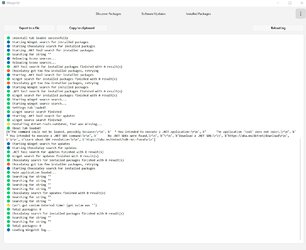
Thanks for your interest - I did get Ver. 2.1.1 and installed it from scratch. AS I noted before it found nothing on my system. The attached screenshot is the log file. Note that is basically says Chocolatey (whatever that is) found nothing. So I'm afraid I have no other info to give you.

If there is anything I can do to help resolve this problem just let me know. Thanks again.2023-10-30_112303.jpg
 

My Computer My Computer

At a glance

Win11 ProAMD Ryzen 5 5500U16 GBRadeon 2100
OS
Win11 Pro
Computer type
PC/Desktop
Manufacturer/Model
BeeLink SER Mini
CPU
AMD Ryzen 5 5500U
Motherboard
BeeLink SER
Memory
16 GB
Graphics Card(s)
Radeon 2100
Sound Card
none
Monitor(s) Displays
Primary: Phillips 4K; Secondary: LG 4K
Screen Resolution
Both 3860 x 2160
Hard Drives
C: NVme 500 GB Windows only
D: 128 GB NVme User data + Windows Temp via Junction Link
PSU
External
Case
Mini
Cooling
Internal fan
Keyboard
Logitech Wireless Lighted
Mouse
Kensington ExpertMouse wireless trackball
Internet Speed
500/500
Browser
Brave
Antivirus
Windows Defender
When you do search for a package on the discover packages tab, do you get any results?
Can you see installed packages on the installed packages tab?

Please post here the "Package Manager logs" from WingetUI
 

My Computer My Computer

At a glance

Windows 11i7-10700F16GB crucial 2667MHzRadeon RX 580
OS
Windows 11
Computer type
PC/Desktop
Manufacturer/Model
Custom build
CPU
i7-10700F
Motherboard
MSI B560 Torpedo
Memory
16GB crucial 2667MHz
Graphics Card(s)
Radeon RX 580
The Discover Packages tab and the Installed Packages tab are blank and don't respond to anything. Here's the text of the Package Managers log:

Outputs from package managers on the current session:
-------dotnet
The command could not be loaded, possibly because:
* You intended to execute a .NET application:
The application 'tool' does not exist.
* You intended to execute a .NET SDK command:
No .NET SDKs were found.
Download a .NET SDK:
Learn about SDK resolution:

---------Winget
Failed when opening source(s); try the 'source reset' command if the problem persists.
An unexpected error occurred while executing the command:
0x8a15000b : The configured source information is corrupt
-------dotnet
The command could not be loaded, possibly because:
* You intended to execute a .NET application:
The application 'tool' does not exist.
* You intended to execute a .NET SDK command:
No .NET SDKs were found.
Download a .NET SDK:
Learn about SDK resolution:

---------Winget
Failed when opening source(s); try the 'source reset' command if the problem persists.
An unexpected error occurred while executing the command:
0x8a15000b : The configured source information is corrupt

---------Chocolatey
Chocolatey v2.2.2

---------Winget
Failed when opening source(s); try the 'source reset' command if the problem persists.
--------dotnet

'dotnet-tools-outdated' is not recognized as an internal or external command,
operable program or batch file.---------Chocolatey
Chocolatey v2.2.2
Outdated Packages
Output is package name | current version | available version | pinned?Chocolatey has determined 0 package(s) are outdated.---------Chocolatey
Chocolatey v2.2.2
0 packages installed.

Did you know Pro / Business automatically syncs with Programs and
Features? Learn more about Package Synchronizer at
 

My Computer My Computer

At a glance

Win11 ProAMD Ryzen 5 5500U16 GBRadeon 2100
OS
Win11 Pro
Computer type
PC/Desktop
Manufacturer/Model
BeeLink SER Mini
CPU
AMD Ryzen 5 5500U
Motherboard
BeeLink SER
Memory
16 GB
Graphics Card(s)
Radeon 2100
Sound Card
none
Monitor(s) Displays
Primary: Phillips 4K; Secondary: LG 4K
Screen Resolution
Both 3860 x 2160
Hard Drives
C: NVme 500 GB Windows only
D: 128 GB NVme User data + Windows Temp via Junction Link
PSU
External
Case
Mini
Cooling
Internal fan
Keyboard
Logitech Wireless Lighted
Mouse
Kensington ExpertMouse wireless trackball
Internet Speed
500/500
Browser
Brave
Antivirus
Windows Defender
Something is off here.
Please try ressrting winget sources by going to WingetUI Settings -> Winget -> Reset Sources

If this does not work, please do uninstall WingetUI, remove a folder named ".wingetui" placed on your user directory and install WingetUI 2.1.1 again.
 

My Computer My Computer

At a glance

Windows 11i7-10700F16GB crucial 2667MHzRadeon RX 580
OS
Windows 11
Computer type
PC/Desktop
Manufacturer/Model
Custom build
CPU
i7-10700F
Motherboard
MSI B560 Torpedo
Memory
16GB crucial 2667MHz
Graphics Card(s)
Radeon RX 580
Interesting...I found the Reset Settings option and that did something - so I searched for a couple of apps that I have installed and it (I'm not sure what the it is) found them. But the main Discover Packages screen is still blank. It used to list all the software on my system.

I liked that list becuase itallowed me to pick only those items that I wanted to update.
 

My Computer My Computer

At a glance

Win11 ProAMD Ryzen 5 5500U16 GBRadeon 2100
OS
Win11 Pro
Computer type
PC/Desktop
Manufacturer/Model
BeeLink SER Mini
CPU
AMD Ryzen 5 5500U
Motherboard
BeeLink SER
Memory
16 GB
Graphics Card(s)
Radeon 2100
Sound Card
none
Monitor(s) Displays
Primary: Phillips 4K; Secondary: LG 4K
Screen Resolution
Both 3860 x 2160
Hard Drives
C: NVme 500 GB Windows only
D: 128 GB NVme User data + Windows Temp via Junction Link
PSU
External
Case
Mini
Cooling
Internal fan
Keyboard
Logitech Wireless Lighted
Mouse
Kensington ExpertMouse wireless trackball
Internet Speed
500/500
Browser
Brave
Antivirus
Windows Defender
Due to changes in package managing infrastructure, as of version 2.1.0 available packages won't be listed anymore. Instead, a query will be required in order for results to show up.
 

My Computer My Computer

At a glance

Windows 11i7-10700F16GB crucial 2667MHzRadeon RX 580
OS
Windows 11
Computer type
PC/Desktop
Manufacturer/Model
Custom build
CPU
i7-10700F
Motherboard
MSI B560 Torpedo
Memory
16GB crucial 2667MHz
Graphics Card(s)
Radeon RX 580
Aha! So to check for an update to a particular program I have I first need to do a search for it. I can live with that since I don't like the idea of a bunch of updates happening for things I don't want to change - or don't know about.
 

My Computer My Computer

At a glance

Win11 ProAMD Ryzen 5 5500U16 GBRadeon 2100
OS
Win11 Pro
Computer type
PC/Desktop
Manufacturer/Model
BeeLink SER Mini
CPU
AMD Ryzen 5 5500U
Motherboard
BeeLink SER
Memory
16 GB
Graphics Card(s)
Radeon 2100
Sound Card
none
Monitor(s) Displays
Primary: Phillips 4K; Secondary: LG 4K
Screen Resolution
Both 3860 x 2160
Hard Drives
C: NVme 500 GB Windows only
D: 128 GB NVme User data + Windows Temp via Junction Link
PSU
External
Case
Mini
Cooling
Internal fan
Keyboard
Logitech Wireless Lighted
Mouse
Kensington ExpertMouse wireless trackball
Internet Speed
500/500
Browser
Brave
Antivirus
Windows Defender

Latest Support Threads

Back
Top Bottom