Hasleo Backup Suite


@Josey Wales - I guess I wanted to try Hasleo Backup Suite and at least found a issue that they could use which will benefit others, let's see how long it takes them to fix this. Hopefully soon since I am trying to migrate to the new 4TB SSD as I don't have enough space for the swap file, hibernation files on the current 1TB drive.
I do not use hibernation, but it is worthwhile to use on a Notebook.
 

My Computers

System One System Two

  • OS
    Windows11 Pro 26200.8524
    Computer type
    PC/Desktop
    Manufacturer/Model
    Dell Alienware Aurora R16
    CPU
    Intel Core i9 14900F (24 -Core, 68 MB Total Cache)
    Motherboard
    Dell Alienware
    Memory
    32GB DDR5
    Graphics Card(s)
    RTX 4080 Super w/581.95
    Sound Card
    Realtec
    Monitor(s) Displays
    Corsair XENEON 32QHD165
    Screen Resolution
    2560 X 1440
    Hard Drives
    1-2TB Samsung 990 Pro PCIe NVMe M2 SSD
    1-4TB Samsung 990 Pro PCIe NVMe M2 SSD
    PSU
    1000 Watt Platinum Dell
    Case
    Alienware
    Cooling
    Liquid Closed Loop
    Keyboard
    Logitech MK270 Wireless Keyboard
    Mouse
    Logitech MK270 Wireless
    Internet Speed
    100Gb's Down-20 Up
    Browser
    Firefox 151.0.2
    Antivirus
    Defender
    Other Info
    Very Quiet And Fast
    CyberPower UPS CP1500PFCLCD
  • Operating System
    PClinuxOS Mate (2025.7)
    Computer type
    PC/Desktop
    Manufacturer/Model
    Intel
    CPU
    13th Gen Inter(R) Core(TM) i3-1315U
    Motherboard
    Intel
    Memory
    64 GB DDR4 @3200 MHz.
    Graphics card(s)
    Internal
    Sound Card
    None
    Monitor(s) Displays
    Dell 2419HGCF
    Screen Resolution
    1920 X 1080
    Hard Drives
    SAMSUNG 980 PRO SSD 2TB, PCIe 4.0 M.2 2280
    PSU
    Chicony 30 Watt
    Case
    Small
    Keyboard
    Dell
    Mouse
    Razor
    Internet Speed
    1GB
    Browser
    Slimjet
I do not use hibernation, but it is worthwhile to use on a Notebook.
I don't either and usually it's when there is a power outage and the battery drains completely. It's just upgrading to 64GB of RAM from 32GB has made all those files bigger as they are all related to the size of physical memory installed.
 

My Computer

System One

  • OS
    WindowsXP/7/8/8.1/10/11,Linux,Android,FreeBSD Unix
    Computer type
    Laptop
    Manufacturer/Model
    Dell XPS 15 9570
    CPU
    Intel® Core™ i7-8750H 8th Gen 2.2Ghz up to 4.1Ghz
    Motherboard
    Dell XPS 15 9570
    Memory
    64GB using 2x32GB CL16 Mushkin redLine modules
    Graphics Card(s)
    Intel UHD 630 & NVIDIA GeForce GTX 1050 Ti with 4GB DDR5
    Sound Card
    Realtek ALC3266-CG
    Monitor(s) Displays
    15.6" 4K Touch UltraHD 3840x2160 made by Sharp
    Screen Resolution
    3840x2160 4K UltraHD
    Hard Drives
    Samsung MZ-V9P4T0B/AM 990 PRO 4TB PCIe®4.0 NVMe™ M.2 SSD was Toshiba KXG60ZNV1T02 NVMe 1TB SSD
    PSU
    Dell XPS 15 9570
    Case
    Dell XPS 15 9570
    Cooling
    Stock
    Keyboard
    Stock
    Mouse
    SwitftPoint ProPoint
    Internet Speed
    Comcast/XFinity 1.44Gbps/42.5Mbps
    Browser
    Microsoft EDGE (Chromium based) & Google Chrome
    Antivirus
    Windows Defender that came with Windows
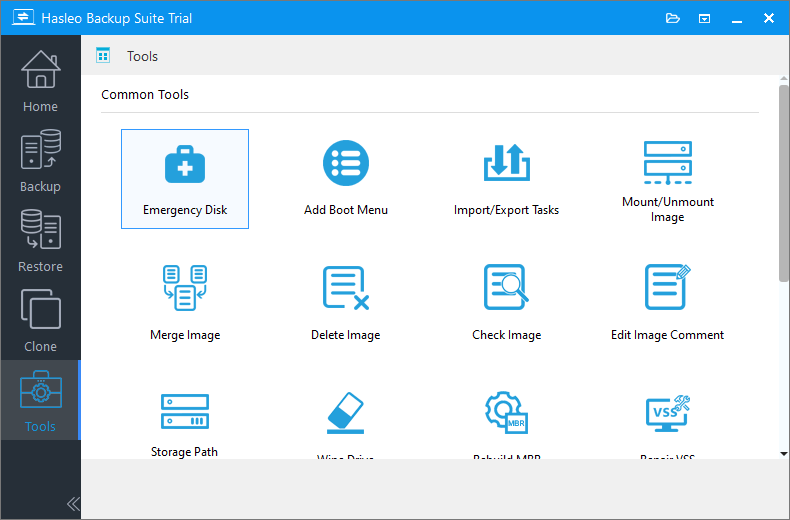
Is it possible to just use the rescue disk to back up and restore without installation?
 

My Computer

System One

  • OS
    Win 7,8.1,10,11, Mint, Kde Plasma, Debian
    Computer type
    Laptop
    Manufacturer/Model
    Dell
    CPU
    Intel(R) Core(TM) i7-6500U CPU @ 2.50GHz
    Memory
    16 GB
    Graphics Card(s)
    Intel(R) HD Graphics 520/Nvidia GeForce 930M
    Sound Card
    Intel(R) Display Audio/RealtekAudio
    Monitor(s) Displays
    Generic Pnp Monitor
    Screen Resolution
    1366 X 768
    Hard Drives
    ST2000LM024-1EJ164
    Keyboard
    Eng (US)
    Mouse
    Sanwa Supply
    Browser
    Firefox
    Antivirus
    Avast One
    Other Info
    Too many laptops with different system specifications.
Is it possible to just use the rescue disk to back up and restore without installation?
According to this:

1754967886566.webp

I would say yes but I will let @Froggie comment on that one since he's the one who has the expert knowledge from using the product

I knew I forgot something, you have to install it first to create the Emergency Disk and then you can uninstall it as @Froggie mentioned below.
 
Last edited:

My Computer

System One

  • OS
    WindowsXP/7/8/8.1/10/11,Linux,Android,FreeBSD Unix
    Computer type
    Laptop
    Manufacturer/Model
    Dell XPS 15 9570
    CPU
    Intel® Core™ i7-8750H 8th Gen 2.2Ghz up to 4.1Ghz
    Motherboard
    Dell XPS 15 9570
    Memory
    64GB using 2x32GB CL16 Mushkin redLine modules
    Graphics Card(s)
    Intel UHD 630 & NVIDIA GeForce GTX 1050 Ti with 4GB DDR5
    Sound Card
    Realtek ALC3266-CG
    Monitor(s) Displays
    15.6" 4K Touch UltraHD 3840x2160 made by Sharp
    Screen Resolution
    3840x2160 4K UltraHD
    Hard Drives
    Samsung MZ-V9P4T0B/AM 990 PRO 4TB PCIe®4.0 NVMe™ M.2 SSD was Toshiba KXG60ZNV1T02 NVMe 1TB SSD
    PSU
    Dell XPS 15 9570
    Case
    Dell XPS 15 9570
    Cooling
    Stock
    Keyboard
    Stock
    Mouse
    SwitftPoint ProPoint
    Internet Speed
    Comcast/XFinity 1.44Gbps/42.5Mbps
    Browser
    Microsoft EDGE (Chromium based) & Google Chrome
    Antivirus
    Windows Defender that came with Windows
Only using the boot-ISOs from all my backuppers !
Macrium, AoMEI, Hasleo and more , these resque-ISOs are all placed on a Ventoy-stick ( bootable)
Start Ventoy and choose your backup/restore ISO............... :giggle:
 

My Computer

System One

  • OS
    Windows11 Pro 25H2
    Computer type
    PC/Desktop
    Manufacturer/Model
    Asus
    CPU
    i7
    Motherboard
    z97k
    Memory
    32GB
    Graphics Card(s)
    nVidia
    Sound Card
    Realtek
    Hard Drives
    3
    Cooling
    air
    Browser
    Edge
    Antivirus
    ESET
If you use vhdx files (physical vhdx) and keep OS decently small with user data, email, multi-media etc on a separate drive or partition then the simplest and easiest way is just to use boring old file explorer to copy the vhdx file(s) to an external device (always have 2 though whatever system you adopt).

One needs to distinguish between system backup, data backup and archive (e.g things like music cd's ripped which don't change once you've done the rip and therefore only need to be backed up once -- again to 2 different devices in case one device fails / gets corrupt etc.

These 3 sets of data types (system, data backup and archive) are very different and need different data strategies. These days much "critical" data such as work documents etc can be stored cheaply on cloud servers -- Microsoft and Google are infinitely less likely to have problems than home users !!

Of course if you are one of those people that store everything on a big windows install system (C) then it's another whole ball game. However even if you DON'T use vhdx files you should still keep the basic windows system (the OS) small and have the rest on another drive / partition.

I used to use acronis - gave that up around 2016, then used macrium free up to V8 with the final patch) for years until they went all subscription and cheap NVME storage became available. Once I learned how to use vhdx files (and it's quite simple really) I just copy the thing with file explorer --easy, works every time and no complex 3rd party software of any kind is required.

I have about 6TB of music backed up on to 2 X 14 TB "classic spinners" copied via DD (I used linux - but file explorer is fine on windows) and the advantage is that no "compression, proprietary formats, encryption" etc is used - you can just access the music as bog standard files / directories as normal files.

But whatever method you chose - if the stuff is important keep 2 separate copies -- AND DO CHECK FROM TIME TO TIME THAT A RESTORE WORKS !!!!.

I've seen so many times on even this Forum where people have backed up data with no error messages reported and then when trying to recover stuff it fails due to either device error, corrupt image or some other nonsense.

Backup software as well as Anti Virus 3rd party software needs to change to suit latter part of C21 rather than still having methodology that worked fine 20 years ago with the hardware that was then available.

(Restoring a vhdx file is simple -- boot up a Windows install / WnPE type of device, get into command mode and simply use the bog standard copy command !!!!).

@pietcorus2

K.I.S.S -- I don't know what you are backing up but having that lot ??????


Cheers
jimbo
 

My Computer

System One

  • OS
    Windows XP,11 Linux Fedora Rawhide pre-release 45
    Computer type
    PC/Desktop
    CPU
    2 X Intel i7
    Screen Resolution
    4KUHD X 2
Is it possible to just use the rescue disk to back up and restore without installation?
No. It needs to be installed to make the Emergency Disk. At that point it may be Uninstalled and the rescue disk may be used off-line.

Of course at that point the rescue disk is nothing more than a manual imager/restorer... very few, if any, LIVE features are available (no scheduling/retention mgmt, LIVE mounting of images for purposes of transferring files, etc.).
 
Last edited:

My Computer

System One

  • OS
    Windows 10, (also 7, 11, Linux <MINT & ZorinOS>)
    Computer type
    PC/Desktop
    Manufacturer/Model
    HP Z2 G5 Workstation
    CPU
    Intel Core i7-10700
    Motherboard
    HP Model# 8751
    Memory
    32gB (DDR4)
    Graphics Card(s)
    Intel UHD Graphics 630
    Sound Card
    Realtek basic audio
    Monitor(s) Displays
    32" (Viewsonic)
    Screen Resolution
    3840 x 2160
    Hard Drives
    (3) NvME SSDs <(1) PCiE v3>, (1) SATA3 SSD
" K.I.S.S -- I don't know what you are backing up but having that lot ?????? "................always make two/three backups with different Backuppers .............if one fails the other will succeed !
btw; safety first !! :wink:
 

My Computer

System One

  • OS
    Windows11 Pro 25H2
    Computer type
    PC/Desktop
    Manufacturer/Model
    Asus
    CPU
    i7
    Motherboard
    z97k
    Memory
    32GB
    Graphics Card(s)
    nVidia
    Sound Card
    Realtek
    Hard Drives
    3
    Cooling
    air
    Browser
    Edge
    Antivirus
    ESET
Only using the boot-ISOs from all my backuppers !
Macrium, AoMEI, Hasleo and more , these resque-ISOs are all placed on a Ventoy-stick ( bootable)
Start Ventoy and choose your backup/restore ISO............... :giggle:

You mean to say I can Hasleo boot rescue without installing the suite?
 

My Computer

System One

  • OS
    Win 7,8.1,10,11, Mint, Kde Plasma, Debian
    Computer type
    Laptop
    Manufacturer/Model
    Dell
    CPU
    Intel(R) Core(TM) i7-6500U CPU @ 2.50GHz
    Memory
    16 GB
    Graphics Card(s)
    Intel(R) HD Graphics 520/Nvidia GeForce 930M
    Sound Card
    Intel(R) Display Audio/RealtekAudio
    Monitor(s) Displays
    Generic Pnp Monitor
    Screen Resolution
    1366 X 768
    Hard Drives
    ST2000LM024-1EJ164
    Keyboard
    Eng (US)
    Mouse
    Sanwa Supply
    Browser
    Firefox
    Antivirus
    Avast One
    Other Info
    Too many laptops with different system specifications.
Only using the boot-ISOs from all my backuppers !
Macrium, AoMEI, Hasleo and more , these resque-ISOs are all placed on a Ventoy-stick ( bootable)
Start Ventoy and choose your backup/restore ISO............... :giggle:

You mean to say I can Hasleo boot rescue without installing the suite?
Yes ! But you have to install these programs first , for making your resque-ISOs
When your ISO is made , no reason for keeping the software on your PC.............. :-)
 

My Computer

System One

  • OS
    Windows11 Pro 25H2
    Computer type
    PC/Desktop
    Manufacturer/Model
    Asus
    CPU
    i7
    Motherboard
    z97k
    Memory
    32GB
    Graphics Card(s)
    nVidia
    Sound Card
    Realtek
    Hard Drives
    3
    Cooling
    air
    Browser
    Edge
    Antivirus
    ESET
Yes ! But you have to install these programs first , for making your resque-ISOs
When your ISO is made , no reason for keeping the software on your PC.............. :-)
Well, one reason is you cannot run Windows whilst making backup.
 

My Computer

System One

  • OS
    Windows 11 Pro + Win11 Canary VM.
    Computer type
    Laptop
    Manufacturer/Model
    ASUS Zenbook 14
    CPU
    I9 13th gen i9-13900H 2.60 GHZ
    Motherboard
    Yep, Laptop has one.
    Memory
    16 GB soldered
    Graphics Card(s)
    Integrated Intel Iris XE
    Sound Card
    Realtek built in
    Monitor(s) Displays
    laptop OLED screen
    Screen Resolution
    2880x1800 touchscreen
    Hard Drives
    1 TB NVME SSD (only weakness is only one slot)
    PSU
    Internal + 65W thunderbolt USB4 charger
    Case
    Yep, got one
    Cooling
    Stella Artois (UK pint cans - 568 ml) - extra cost.
    Keyboard
    Built in UK keybd
    Mouse
    Bluetooth , wireless dongled, wired
    Internet Speed
    900 mbs (ethernet), wifi 6 typical 350-450 mb/s both up and down
    Browser
    Edge
    Antivirus
    Defender
    Other Info
    TPM 2.0, 2xUSB4 thunderbolt, 1xUsb3 (usb a), 1xUsb-c, hdmi out, 3.5 mm audio out/in combo, ASUS backlit trackpad (inc. switchable number pad)

    Macrium Reflect Home V8
    Office 365 Family (6 users each 1TB onedrive space)
    Hyper-V (a vm runs almost as fast as my older laptop)
Well, one reason is you cannot run Windows whilst making backup.
Only making backups with the backup-media ( Ventoy with ISOs ) , running Windows after backup/reboot ........... :-)
 

My Computer

System One

  • OS
    Windows11 Pro 25H2
    Computer type
    PC/Desktop
    Manufacturer/Model
    Asus
    CPU
    i7
    Motherboard
    z97k
    Memory
    32GB
    Graphics Card(s)
    nVidia
    Sound Card
    Realtek
    Hard Drives
    3
    Cooling
    air
    Browser
    Edge
    Antivirus
    ESET
You should be able to resize the partitions when doing the restore from an image backup, so a one step activity for the larger drive and no need for another tool.
You can resize but only within the range of the size of the partition(s) that was backed up. Basically, a example is for the C: drive which I will say is 900GB on a 1TB drive. Even if you restore to a 4TB drive like in my case, you can only make the partition either smaller than 900GB or 900GB maximum. You cannot make the partition any number bigger than 900GB which is what I wanted to do as I wanted I wanted to make it 3TB bigger or 3.9TB's in size. This is from trying Hasleo Backup to restore and playing around with the restored partition layout.
 

My Computer

System One

  • OS
    WindowsXP/7/8/8.1/10/11,Linux,Android,FreeBSD Unix
    Computer type
    Laptop
    Manufacturer/Model
    Dell XPS 15 9570
    CPU
    Intel® Core™ i7-8750H 8th Gen 2.2Ghz up to 4.1Ghz
    Motherboard
    Dell XPS 15 9570
    Memory
    64GB using 2x32GB CL16 Mushkin redLine modules
    Graphics Card(s)
    Intel UHD 630 & NVIDIA GeForce GTX 1050 Ti with 4GB DDR5
    Sound Card
    Realtek ALC3266-CG
    Monitor(s) Displays
    15.6" 4K Touch UltraHD 3840x2160 made by Sharp
    Screen Resolution
    3840x2160 4K UltraHD
    Hard Drives
    Samsung MZ-V9P4T0B/AM 990 PRO 4TB PCIe®4.0 NVMe™ M.2 SSD was Toshiba KXG60ZNV1T02 NVMe 1TB SSD
    PSU
    Dell XPS 15 9570
    Case
    Dell XPS 15 9570
    Cooling
    Stock
    Keyboard
    Stock
    Mouse
    SwitftPoint ProPoint
    Internet Speed
    Comcast/XFinity 1.44Gbps/42.5Mbps
    Browser
    Microsoft EDGE (Chromium based) & Google Chrome
    Antivirus
    Windows Defender that came with Windows
Hasleo has been constantly updating their software. It is version 5.4.22 now. I have been waiting for it to settle down with a fixed version before giving it a try.

Many users have been singing its praises, so it must be good.
 

My Computer

System One

  • OS
    Win 7,8.1,10,11, Mint, Kde Plasma, Debian
    Computer type
    Laptop
    Manufacturer/Model
    Dell
    CPU
    Intel(R) Core(TM) i7-6500U CPU @ 2.50GHz
    Memory
    16 GB
    Graphics Card(s)
    Intel(R) HD Graphics 520/Nvidia GeForce 930M
    Sound Card
    Intel(R) Display Audio/RealtekAudio
    Monitor(s) Displays
    Generic Pnp Monitor
    Screen Resolution
    1366 X 768
    Hard Drives
    ST2000LM024-1EJ164
    Keyboard
    Eng (US)
    Mouse
    Sanwa Supply
    Browser
    Firefox
    Antivirus
    Avast One
    Other Info
    Too many laptops with different system specifications.
Hasleo has been constantly updating their software. It is version 5.4.22 now. I have been waiting for it to settle down with a fixed version before giving it a try.

Many users have been singing its praises, so it must be good.
It's very reliable already.
 

My Computers

System One System Two

  • OS
    Windows 11 Pro
    Computer type
    PC/Desktop
    Manufacturer/Model
    Stigg's Build
    CPU
    Intel Core i9-10900X
    Motherboard
    GIGABYTE X299X DESIGNARE 10G
    Memory
    Corsair 64 GB (4 x 16 GB) CMW64GX4M4C3000C15 Vengeance RGB Pro 3000Mhz DDR4
    Graphics Card(s)
    GIGABYTE GeForce GTX 1660 Super Mini ITX 6 GB OC
    Sound Card
    Realtek ALC1220
    Monitor(s) Displays
    Samsung 27" FHD LED FreeSync Gaming Monitor (LS27F350FHEXXY)
    Screen Resolution
    1920 x 1080
    Hard Drives
    Samsung 970 Pro Series 1TB M.2 2280 NVMe SSD
    Western Digital Red Pro WD8003FFBX-68B9AN0 8 TB, 7200 RPM, SATA-III
    Western Digital Red Pro WD8003FFBX-68B9AN0 8 TB, 7200 RPM, SATA-III
    PSU
    Corsair HX1200 1200W 80 Plus Platinum
    Case
    Fractal Design Define 7 Black Solid Case
    Cooling
    Noctua NH-D15 Chromax Black
    Keyboard
    Razer Ornata V2
    Mouse
    Razer DeathAdder Essential
    Internet Speed
    FTTN 100Mbps / 40Mbps
    Browser
    Mozilla Firefox
    Antivirus
    N/A
    Other Info
    Logitech BRIO 4k Ultra HD USB-C Webcam
  • Operating System
    Windows 10 Pro
    Computer type
    Laptop
    Manufacturer/Model
    ASUS ROG Zephyrus M GM501GS
    CPU
    Core i7-8750H
    Motherboard
    Zephyrus M GM501GS
    Memory
    SK Hynix 32 GB (2 x 16 GB) HMA82GS6CJR8N-VK 16 GB DDR4-2666 DDR4 SDRAM
    Graphics card(s)
    NVIDIA GeForce GTX 1070
    Sound Card
    Realtek ALC294
    Monitor(s) Displays
    AU Optronics B156HAN07.1 [15.6" LCD]
    Screen Resolution
    1920 x 1080
    Hard Drives
    Samsung MZVKW512HMJP-00000 512 GB, PCI-E 3.0 x4
    Samsung SSD 860 QVO 4TB 4 TB, SATA-III
    PSU
    N/A
    Case
    N/A
    Cooling
    N/A
    Keyboard
    PC/AT Enhanced PS2 Keyboard (101/102-Key)
    Mouse
    Razer DeathAdder Essential
    Internet Speed
    FTTN 100Mbps / 40Mbps
    Browser
    Mozilla Firefox
    Antivirus
    N/A
    Other Info
    USB2.0 HD UVC Webcam
How would you rate Hasleo with say Veeam Agent for Microsoft, Stigg?
About the same or better?
 

My Computer

System One

  • OS
    Win 7,8.1,10,11, Mint, Kde Plasma, Debian
    Computer type
    Laptop
    Manufacturer/Model
    Dell
    CPU
    Intel(R) Core(TM) i7-6500U CPU @ 2.50GHz
    Memory
    16 GB
    Graphics Card(s)
    Intel(R) HD Graphics 520/Nvidia GeForce 930M
    Sound Card
    Intel(R) Display Audio/RealtekAudio
    Monitor(s) Displays
    Generic Pnp Monitor
    Screen Resolution
    1366 X 768
    Hard Drives
    ST2000LM024-1EJ164
    Keyboard
    Eng (US)
    Mouse
    Sanwa Supply
    Browser
    Firefox
    Antivirus
    Avast One
    Other Info
    Too many laptops with different system specifications.
How would you rate Hasleo with say Veeam Agent for Microsoft, Stigg?
About the same or better?
I tried it a few years ago on one of my computers, but I didn't keep it for long.
From memory, I didn't like it's interface or design.

I've read a lot of positive comments about it, though.
If you've got it installed and you like it, then try some backups and restores to see if it's reliable and suits you.

With any image application, you first need to be comfortable with using it, and even more importantly, you need to be able to trust it.
 

My Computers

System One System Two

  • OS
    Windows 11 Pro
    Computer type
    PC/Desktop
    Manufacturer/Model
    Stigg's Build
    CPU
    Intel Core i9-10900X
    Motherboard
    GIGABYTE X299X DESIGNARE 10G
    Memory
    Corsair 64 GB (4 x 16 GB) CMW64GX4M4C3000C15 Vengeance RGB Pro 3000Mhz DDR4
    Graphics Card(s)
    GIGABYTE GeForce GTX 1660 Super Mini ITX 6 GB OC
    Sound Card
    Realtek ALC1220
    Monitor(s) Displays
    Samsung 27" FHD LED FreeSync Gaming Monitor (LS27F350FHEXXY)
    Screen Resolution
    1920 x 1080
    Hard Drives
    Samsung 970 Pro Series 1TB M.2 2280 NVMe SSD
    Western Digital Red Pro WD8003FFBX-68B9AN0 8 TB, 7200 RPM, SATA-III
    Western Digital Red Pro WD8003FFBX-68B9AN0 8 TB, 7200 RPM, SATA-III
    PSU
    Corsair HX1200 1200W 80 Plus Platinum
    Case
    Fractal Design Define 7 Black Solid Case
    Cooling
    Noctua NH-D15 Chromax Black
    Keyboard
    Razer Ornata V2
    Mouse
    Razer DeathAdder Essential
    Internet Speed
    FTTN 100Mbps / 40Mbps
    Browser
    Mozilla Firefox
    Antivirus
    N/A
    Other Info
    Logitech BRIO 4k Ultra HD USB-C Webcam
  • Operating System
    Windows 10 Pro
    Computer type
    Laptop
    Manufacturer/Model
    ASUS ROG Zephyrus M GM501GS
    CPU
    Core i7-8750H
    Motherboard
    Zephyrus M GM501GS
    Memory
    SK Hynix 32 GB (2 x 16 GB) HMA82GS6CJR8N-VK 16 GB DDR4-2666 DDR4 SDRAM
    Graphics card(s)
    NVIDIA GeForce GTX 1070
    Sound Card
    Realtek ALC294
    Monitor(s) Displays
    AU Optronics B156HAN07.1 [15.6" LCD]
    Screen Resolution
    1920 x 1080
    Hard Drives
    Samsung MZVKW512HMJP-00000 512 GB, PCI-E 3.0 x4
    Samsung SSD 860 QVO 4TB 4 TB, SATA-III
    PSU
    N/A
    Case
    N/A
    Cooling
    N/A
    Keyboard
    PC/AT Enhanced PS2 Keyboard (101/102-Key)
    Mouse
    Razer DeathAdder Essential
    Internet Speed
    FTTN 100Mbps / 40Mbps
    Browser
    Mozilla Firefox
    Antivirus
    N/A
    Other Info
    USB2.0 HD UVC Webcam
Hasleo also offers free support.
 

My Computers

System One System Two

  • OS
    Windows11 Pro 26200.8524
    Computer type
    PC/Desktop
    Manufacturer/Model
    Dell Alienware Aurora R16
    CPU
    Intel Core i9 14900F (24 -Core, 68 MB Total Cache)
    Motherboard
    Dell Alienware
    Memory
    32GB DDR5
    Graphics Card(s)
    RTX 4080 Super w/581.95
    Sound Card
    Realtec
    Monitor(s) Displays
    Corsair XENEON 32QHD165
    Screen Resolution
    2560 X 1440
    Hard Drives
    1-2TB Samsung 990 Pro PCIe NVMe M2 SSD
    1-4TB Samsung 990 Pro PCIe NVMe M2 SSD
    PSU
    1000 Watt Platinum Dell
    Case
    Alienware
    Cooling
    Liquid Closed Loop
    Keyboard
    Logitech MK270 Wireless Keyboard
    Mouse
    Logitech MK270 Wireless
    Internet Speed
    100Gb's Down-20 Up
    Browser
    Firefox 151.0.2
    Antivirus
    Defender
    Other Info
    Very Quiet And Fast
    CyberPower UPS CP1500PFCLCD
  • Operating System
    PClinuxOS Mate (2025.7)
    Computer type
    PC/Desktop
    Manufacturer/Model
    Intel
    CPU
    13th Gen Inter(R) Core(TM) i3-1315U
    Motherboard
    Intel
    Memory
    64 GB DDR4 @3200 MHz.
    Graphics card(s)
    Internal
    Sound Card
    None
    Monitor(s) Displays
    Dell 2419HGCF
    Screen Resolution
    1920 X 1080
    Hard Drives
    SAMSUNG 980 PRO SSD 2TB, PCIe 4.0 M.2 2280
    PSU
    Chicony 30 Watt
    Case
    Small
    Keyboard
    Dell
    Mouse
    Razor
    Internet Speed
    1GB
    Browser
    Slimjet
It's very reliable already.
Reliable yes but not totally bug free as I have posted about the problem I had.

First, the current released version is unable to backup a unlocked bitlocker DELL Recovery partition as mentioned earlier.
They provided a August 12, 2025 version except that one did not work because that one complained with an error.
Hasleo Backup Suite uses Microsoft's Volume Shadow Copy Service (VSS) technology to implement Windows hot backup/cloning. The error had been
analyzed, Windows returned the error code 0x8004231F (VSS_E_INSUFFICIENT_STORAGE, Insufficient storage available to create either the shadow copy storage file or other shadow copy data.) when Hasleo Backup Suite tries to create snapshot (This is what caused the backup to fail.), which usually means that the storage space allocated for VSS is too small.

This is on a 1TB SSD with 10GB of free space.

A newer Hasleo_Backup_Suite_Free_250815.exe was provided which basically changed it to not use VSS when backing up partitions without drive letters and instead use Direct Disk IO so it does work at least as far as backups are concerned, unfortunately the restore will fail on the same unlocked Bitlocker Dell Recovery partition.

Of course, one has to be curious why the VSS will fail on a 1.06GB unlocked Bitlocker partition when the VSS works without complaining failing and being out of space on a 949.67GB partition which 895,000% larger.

they then provided a August 16, 2025 version which requires doing a new backup and this time it finally works for both the backup and restore but what I noticed was that my Power Plans are all there but it is using a different power plan on the restored 4TB drive after I swapped it.

So it is not without it's issues as in my case, it took 3 fixed versions before everything worked correctly and I can't be the only one who has a Dell machine or any machine for that matter that has a OEM Recovery partition that is hidden.

They have good free support and will fix issues and provide a new version within hours of my reply and they will even followup and ask if you don't respond within a day or so.

My only issue now is I am trying to figure out how to get my C: partition bigger so it can use the free unallocated space.

1755451766786.webp

Normally during the restore process, it would allow one to use the unallocated space as it will add it to the last partition except in my case, the issue is that Hasleo Backup Suite backs up a unlocked Bitlocker encrypted partition as encrypted and restored as encrypted which is what is preventing that function from working. As even Hasleo Support says that the data would be backed up unencrypted as mentioned in this post:

Macrium Reflect X and earlier versions will backup the BitLocker partition as unencrypted and restored as unencrypted which is why it can restore and use all the available space of the target device but of course with Macrium Reflect, one will have to turn BitLocker on and encrypt the drive manually.

1755468843616.webp


When researching BitLocker partitions yesterday, it appears that 100% of all software out there cannot image a encyrpted BitLocker partition, they all require unlocking the partition and will back up as unencrypted. The only way to backup BitLocker encrypted partitions even without recovery keys is to clone the storage device.

 
Last edited:

My Computer

System One

  • OS
    WindowsXP/7/8/8.1/10/11,Linux,Android,FreeBSD Unix
    Computer type
    Laptop
    Manufacturer/Model
    Dell XPS 15 9570
    CPU
    Intel® Core™ i7-8750H 8th Gen 2.2Ghz up to 4.1Ghz
    Motherboard
    Dell XPS 15 9570
    Memory
    64GB using 2x32GB CL16 Mushkin redLine modules
    Graphics Card(s)
    Intel UHD 630 & NVIDIA GeForce GTX 1050 Ti with 4GB DDR5
    Sound Card
    Realtek ALC3266-CG
    Monitor(s) Displays
    15.6" 4K Touch UltraHD 3840x2160 made by Sharp
    Screen Resolution
    3840x2160 4K UltraHD
    Hard Drives
    Samsung MZ-V9P4T0B/AM 990 PRO 4TB PCIe®4.0 NVMe™ M.2 SSD was Toshiba KXG60ZNV1T02 NVMe 1TB SSD
    PSU
    Dell XPS 15 9570
    Case
    Dell XPS 15 9570
    Cooling
    Stock
    Keyboard
    Stock
    Mouse
    SwitftPoint ProPoint
    Internet Speed
    Comcast/XFinity 1.44Gbps/42.5Mbps
    Browser
    Microsoft EDGE (Chromium based) & Google Chrome
    Antivirus
    Windows Defender that came with Windows
Only making backups with the backup-media ( Ventoy with ISOs ) , running Windows after backup/reboot ........... :-)
Ah the old chestnut - not trusting backups made whilst Windows is running.
 
Last edited:

My Computer

System One

  • OS
    Windows 11 Pro + Win11 Canary VM.
    Computer type
    Laptop
    Manufacturer/Model
    ASUS Zenbook 14
    CPU
    I9 13th gen i9-13900H 2.60 GHZ
    Motherboard
    Yep, Laptop has one.
    Memory
    16 GB soldered
    Graphics Card(s)
    Integrated Intel Iris XE
    Sound Card
    Realtek built in
    Monitor(s) Displays
    laptop OLED screen
    Screen Resolution
    2880x1800 touchscreen
    Hard Drives
    1 TB NVME SSD (only weakness is only one slot)
    PSU
    Internal + 65W thunderbolt USB4 charger
    Case
    Yep, got one
    Cooling
    Stella Artois (UK pint cans - 568 ml) - extra cost.
    Keyboard
    Built in UK keybd
    Mouse
    Bluetooth , wireless dongled, wired
    Internet Speed
    900 mbs (ethernet), wifi 6 typical 350-450 mb/s both up and down
    Browser
    Edge
    Antivirus
    Defender
    Other Info
    TPM 2.0, 2xUSB4 thunderbolt, 1xUsb3 (usb a), 1xUsb-c, hdmi out, 3.5 mm audio out/in combo, ASUS backlit trackpad (inc. switchable number pad)

    Macrium Reflect Home V8
    Office 365 Family (6 users each 1TB onedrive space)
    Hyper-V (a vm runs almost as fast as my older laptop)
Back
Top Bottom