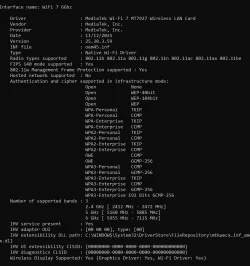
Help fix win 11 WiFi 7 / WiFi 6E long term problem


HyperUltra

Member
Local time
12:10 AM
Posts
6
OS
win 11
Hello Guyyz

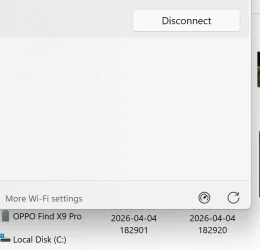
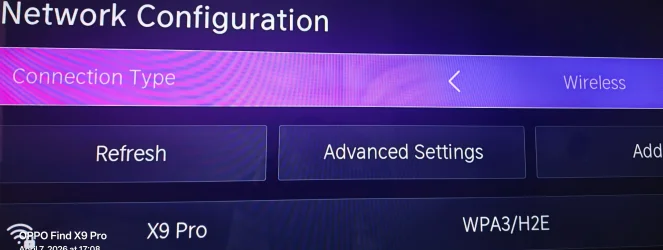
I came here for help as for nearly 2 years it STILL buggers me why on earth Win 11 can't see my smartphone's WiFi 6E 6GHz hotspot
I have TV and TV easily sees my phone why always microsoft must do problems? 🤷‍♂️
Is there way to reslove this ?

Thanks
 

Attachments

  • Screenshot 2026-04-07 205013.webp
    Screenshot 2026-04-07 205013.webp
    17.2 KB · Views: 1
  • Screenshot 2026-04-07 212037.webp
    Screenshot 2026-04-07 212037.webp
    164.1 KB · Views: 2

My Computer

System One

  • OS
    win 11
    Computer type
    Laptop
    Manufacturer/Model
    IIISi
You might mention what kind of smartphone you use. I don't know squat about an Android phone but
I finally discovered how to get my iphone to work as hotspot, maybe not ideally (it won't work connected bluetooth for me) but now the hotspot works every time when I need it as a backup for my regular router wifi.
Bluetooth might work for you. however.

I set up my phone as hotspot in iphone settings. Settings assigns a wireless password.
I installed iTunes on PC. Itunes also installed a driver for my iphone. I connect iphone to PC using usb cable, preferably into a powershare usb port on PC that provides continuous power that keeps my iphone and the hotspot from going dead while in use. (not all USB ports are powershare. Mine is a usb 2.0 marked as a powershare port on my PC case. Your device documentation tells you what you have on that laptop. YMMV using a regular usb port without powershare because I did not try it. My powershare port keeps my iphone charged even when my computer sleeps or is off so my hotspot stays active and phone stays charged.

As soon as I connect on PC end, a notification pops up on my phone asking me to allow PC access.
On PC, iphone is then listed an an available wireless network in the list of networks.
 

My Computers

System One System Two

  • OS
    Windows 11 Pro 25H2 26200.8655
    Computer type
    PC/Desktop
    Manufacturer/Model
    Dell Optiplex 7080
    CPU
    i9-10900 10 core 20 threads
    Motherboard
    DELL 0J37VM
    Memory
    32 gb
    Graphics Card(s)
    none-Intel UHD Graphics 630
    Sound Card
    Integrated Realtek
    Monitor(s) Displays
    Benq 27
    Screen Resolution
    2560x1440
    Hard Drives
    2x1tb Solidigm m.2 nvme /External drives 512gb Samsung m.2 sata+2tb Kingston m2.nvme
    PSU
    500w
    Case
    MT
    Cooling
    Dell Premium
    Keyboard
    Logitech wired
    Mouse
    Logitech wireless
    Internet Speed
    so slow I'm too embarrassed to tell
    Browser
    #1 Edge #2 Firefox
    Antivirus
    Defender+MWB Premium
  • Operating System
    Windows 11 Pro 24H2 26200.8457
    Computer type
    PC/Desktop
    Manufacturer/Model
    Beelink Mini PC SER5
    CPU
    AMD Ryzen 7 6800U
    Memory
    32 gb
    Graphics card(s)
    integrated
    Sound Card
    integrated
    Monitor(s) Displays
    Benq 27
    Screen Resolution
    2560x1440
    Hard Drives
    1TB Crucial nvme
    Keyboard
    Logitech wired
    Mouse
    Logitech wireless
    Internet Speed
    still too embarrassed to tell
    Browser
    Firefox
    Antivirus
    Defender
    Other Info
    System 3 is non compliant Dell 9020 i7-4770/24gb ram Win11 PRO 26200.8457
You might mention what kind of smartphone you use. I don't know squat about an Android phone but
I finally discovered how to get my iphone to work as hotspot, maybe not ideally (it won't work connected bluetooth for me) but now the hotspot works every time when I need it as a backup for my regular router wifi.
Bluetooth might work for you. however.

I set up my phone as hotspot in iphone settings. Settings assigns a wireless password.
I installed iTunes on PC. Itunes also installed a driver for my iphone. I connect iphone to PC using usb cable, preferably into a powershare usb port on PC that provides continuous power that keeps my iphone and the hotspot from going dead while in use. (not all USB ports are powershare. Mine is a usb 2.0 marked as a powershare port on my PC case. Your device documentation tells you what you have on that laptop. YMMV using a regular usb port without powershare because I did not try it. My powershare port keeps my iphone charged even when my computer sleeps or is off so my hotspot stays active and phone stays charged.

As soon as I connect on PC end, a notification pops up on my phone asking me to allow PC access.
On PC, iphone is then listed an an available wireless network in the list of networks.
Hi thanks for reply

Well today we have modern phones but it seems that controversial WiFi 7 /WiFi 6E - 6GHz band is not compatible anymore or cross compatible with windows based and linux based.. or they using different security WPA3 and windows don't understands it... I really trying to solve problem that I can run WiFi 6E smartphones 6Ghz hotspot to mine laptop with WiFi 7 capability.. I don't want any cables or downgrades or bluetooth...

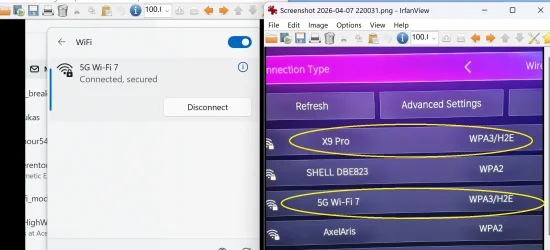
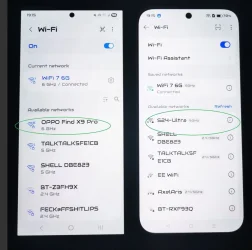
I have latest android smartphone Oppo Find X9 Pro and laptop with either Intel BE200 WiFi 7 6G module and yesterday I have received Mediatek MT7927 WiFi 7 6G module and is currently in... I also have 5G smart WiFi 7 6Ghz router at home and windows sees the router but even router is or can be slightly weird for windows.. I have to sometimes keep refreshing in windows wifi list until router appear even known /already connected before... I thought it would be wifi module issue but since I tried different one problem is the same... But on picture u can see that TV has no problem seeing 6Ghz smartphone and router but windows sees only router not smartphone...
 

Attachments

  • WhatsApp Image 2026-04-08 at 07.15.24.webp
    WhatsApp Image 2026-04-08 at 07.15.24.webp
    44 KB · Views: 1
  • problem-with-connecting-to-win-v0-nxqfsdfs1utg1.webp
    problem-with-connecting-to-win-v0-nxqfsdfs1utg1.webp
    113.3 KB · Views: 1

My Computer

System One

  • OS
    win 11
    Computer type
    Laptop
    Manufacturer/Model
    IIISi
Wish I could help but I've never owned an Android anything. Many people here do, though, so hopefully someone will step in soon to help you.
 

My Computers

System One System Two

  • OS
    Windows 11 Pro 25H2 26200.8655
    Computer type
    PC/Desktop
    Manufacturer/Model
    Dell Optiplex 7080
    CPU
    i9-10900 10 core 20 threads
    Motherboard
    DELL 0J37VM
    Memory
    32 gb
    Graphics Card(s)
    none-Intel UHD Graphics 630
    Sound Card
    Integrated Realtek
    Monitor(s) Displays
    Benq 27
    Screen Resolution
    2560x1440
    Hard Drives
    2x1tb Solidigm m.2 nvme /External drives 512gb Samsung m.2 sata+2tb Kingston m2.nvme
    PSU
    500w
    Case
    MT
    Cooling
    Dell Premium
    Keyboard
    Logitech wired
    Mouse
    Logitech wireless
    Internet Speed
    so slow I'm too embarrassed to tell
    Browser
    #1 Edge #2 Firefox
    Antivirus
    Defender+MWB Premium
  • Operating System
    Windows 11 Pro 24H2 26200.8457
    Computer type
    PC/Desktop
    Manufacturer/Model
    Beelink Mini PC SER5
    CPU
    AMD Ryzen 7 6800U
    Memory
    32 gb
    Graphics card(s)
    integrated
    Sound Card
    integrated
    Monitor(s) Displays
    Benq 27
    Screen Resolution
    2560x1440
    Hard Drives
    1TB Crucial nvme
    Keyboard
    Logitech wired
    Mouse
    Logitech wireless
    Internet Speed
    still too embarrassed to tell
    Browser
    Firefox
    Antivirus
    Defender
    Other Info
    System 3 is non compliant Dell 9020 i7-4770/24gb ram Win11 PRO 26200.8457
1.) You need to fill out your computer specs

2.) What tv model is it?

3.) what smartphone model?

4.) What country are you in? Some have weird laws about 6ghz and not everything is standardized yet

Windows 11 supports 6ghz wifi, windows 10 does not. It is usually a hardware limitation if you have windows 11, not software. (as long as windows is up to date)
 

My Computers

System One System Two

  • OS
    Windows 11 Pro
    Computer type
    PC/Desktop
    Manufacturer/Model
    Custom Built
    CPU
    Ryzen 7 5700 X3D
    Motherboard
    MSI MPG B550 GAMING PLUS
    Memory
    64 GB DDR4 3600mhz Gskill Ripjaws V
    Graphics Card(s)
    RTX 4070 Super , 12GB VRAM Asus EVO Overclock
    Monitor(s) Displays
    Gigabyte M27Q (rev. 2.0) 2560 x 1440 @ 170hz HDR
    Hard Drives
    2TB Samsung nvme ssd
    4TB Western Digital nvme ssd
    PSU
    CORSAIR RMx SHIFT Series™ RM750x 80 PLUS Gold Fully Modular ATX Power Supply
    Case
    CORSAIR 3500X ARGB Mid-Tower ATX PC Case – Black
    Cooling
    ID-COOLING FROSTFLOW X 240 CPU Water Cooler
    Keyboard
    Logitech G213
    Mouse
    Logitech G203
    Internet Speed
    1.2gbps Fiber 😎
  • Operating System
    Chrome OS
    Computer type
    Laptop
    Manufacturer/Model
    HP Chromebook
    CPU
    Intel Pentium Quad Core
    Memory
    4GB LPDDR4
    Monitor(s) Displays
    14 Inch HD SVA anti glare micro edge display
    Hard Drives
    64 GB emmc
1.) You need to fill out your computer specs

2.) What tv model is it?

3.) what smartphone model?

4.) What country are you in? Some have weird laws about 6ghz and not everything is standardized yet

Windows 11 supports 6ghz wifi, windows 10 does not. It is usually a hardware limitation if you have windows 11, not software. (as long as windows is up to date)
1. It's not about laptop specs that will not help you.. laptop has normal wifi 7 and I have wifi 7 router and that works.. windows sees the router..doesnt see phone hotspot...
but if u want to know i have intel be200 wifi 7 module and recently i got mediatek MT7927 but i already mentioned that prev post...
2. Doesn't matter what model is tv.. tv simply supports wifi 6e and sees both wifi 7 router + smartphone's wifi 6e hotspot.. windows doesn't
3.already mentioned in prev post my phone ... it has wifi 7 .. am connected to wifi 7 router..
4. Europe there are no any some weird laws man...
5.That I know since win 11 released 24h2... there is no any HW limitation everything is fine it is poor windows limitation ...
 

My Computer

System One

  • OS
    win 11
    Computer type
    Laptop
    Manufacturer/Model
    IIISi
1. It's not about laptop specs that will not help you.. laptop has normal wifi 7 and I have wifi 7 router and that works.. windows sees the router..doesnt see phone hotspot...
but if u want to know i have intel be200 wifi 7 module and recently i got mediatek MT7927 but i already mentioned that prev post...
2. Doesn't matter what model is tv.. tv simply supports wifi 6e and sees both wifi 7 router + smartphone's wifi 6e hotspot.. windows doesn't
3.already mentioned in prev post my phone ... it has wifi 7 .. am connected to wifi 7 router..
4. Europe there are no any some weird laws man...
5.That I know since win 11 released 24h2... there is no any HW limitation everything is fine it is poor windows limitation ...
1.) Just because something supports wifi 6e or wifi 7 does not mean it supports 6ghz band. But yes that module does support 6ghz band.

2.) it does.

3.) Again wifi 7 means nothing here when talking about the 6ghz band. Whats is the smartphone model?

4.) ok. Except usa and europe do 6ghz band differently. In Europe, only low indoor power frequency's are used.

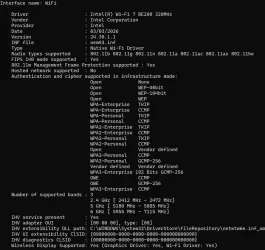
5.) Is windows 11 and wifi drivers up to date? Your screenshots do not show much on the windows side.

6.) When windows fails to connect what happens? Your smartphone has Regional Differences: The availability of 6GHz hotspots can be restricted by regional regulations, with the US having specifically enabled this capability recently, allowing for better performance, while other regions may still be restricted to 5GHz for hotspot sharing. The option might be there, but its possible that when the tv connects its not actually using the 6ghz band
 

My Computers

System One System Two

  • OS
    Windows 11 Pro
    Computer type
    PC/Desktop
    Manufacturer/Model
    Custom Built
    CPU
    Ryzen 7 5700 X3D
    Motherboard
    MSI MPG B550 GAMING PLUS
    Memory
    64 GB DDR4 3600mhz Gskill Ripjaws V
    Graphics Card(s)
    RTX 4070 Super , 12GB VRAM Asus EVO Overclock
    Monitor(s) Displays
    Gigabyte M27Q (rev. 2.0) 2560 x 1440 @ 170hz HDR
    Hard Drives
    2TB Samsung nvme ssd
    4TB Western Digital nvme ssd
    PSU
    CORSAIR RMx SHIFT Series™ RM750x 80 PLUS Gold Fully Modular ATX Power Supply
    Case
    CORSAIR 3500X ARGB Mid-Tower ATX PC Case – Black
    Cooling
    ID-COOLING FROSTFLOW X 240 CPU Water Cooler
    Keyboard
    Logitech G213
    Mouse
    Logitech G203
    Internet Speed
    1.2gbps Fiber 😎
  • Operating System
    Chrome OS
    Computer type
    Laptop
    Manufacturer/Model
    HP Chromebook
    CPU
    Intel Pentium Quad Core
    Memory
    4GB LPDDR4
    Monitor(s) Displays
    14 Inch HD SVA anti glare micro edge display
    Hard Drives
    64 GB emmc
1.) Just because something supports wifi 6e or wifi 7 does not mean it supports 6ghz band. But yes that module does support 6ghz band.

2.) it does.

3.) Again wifi 7 means nothing here when talking about the 6ghz band. Whats is the smartphone model?

4.) ok. Except usa and europe do 6ghz band differently. In Europe, only low indoor power frequency's are used.

5.) Is windows 11 and wifi drivers up to date? Your screenshots do not show much on the windows side.

6.) When windows fails to connect what happens? Your smartphone has Regional Differences: The availability of 6GHz hotspots can be restricted by regional regulations, with the US having specifically enabled this capability recently, allowing for better performance, while other regions may still be restricted to 5GHz for hotspot sharing. The option might be there, but its possible that when the tv connects its not actually using the 6ghz band
1. You not correct, WiFi 6e and Wifi 7 supports ONLY 6Ghz... 6e runs ONLY 6GHz at 160Mhz WPA3 only and 7 runs 6Ghz at 320MHz WPA3 only

2. If I would mention my tv model you would quickly go on internet searching if it supports.. unfort u won't find info that TV supports Wifi 6E as internet websites has no clue and they don't have incorrect specs info.. But nowadays if u ask google AI will confirm that it does supports :) You should already know automatically that TV supports it because IT SEES both router and phone..
If TV wouldn't supports it it would simply not be visible in the WiFi list in TV... and I would have to downgrade Router and phone to poor 5GHz ...ok tv is Hisense 75U8NQTUK

3.Unfortunately u incorrect I explained in 1.

4.Regardles it's working they only banning third world countries..

5.Of course and new drivers are worse.. most of the time old drivers supports more as nowadays they blocking and removing sht in new ones..

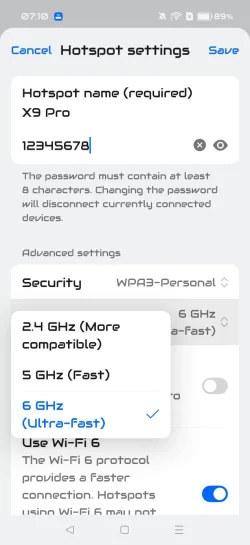
6.Windowns is not failing simply can't see phone's 6Ghz only if I downgrade phone hotspot to 5Ghz windows immediately start seeing phone.. but of course I want 6G.. Router's 6G windows can see strangely .. No my phone is not restricted any shape of form . it is EU Europe version.. OPPO Find X9 Pro - Specifications | OPPO United Kingdom

But this is not about TV I only showed that TV to prove that is capable seeing smartphone WiFi 6E 6G hotspot but poor windows is not.. so suddenly no some restrictions doesn't apply phone -> TV ? If TV wouldn't use WiFi 6E then it would not be able to see Router set at 6G only and Phone set at 6G only :)
 
Last edited:

My Computer

System One

  • OS
    win 11
    Computer type
    Laptop
    Manufacturer/Model
    IIISi
You not correct, WiFi 6e and Wifi 7 supports ONLY 6Ghz... 6e runs ONLY 6GHz at 160Mhz WPA3 only and 7 runs 6Ghz at 320MHz WPA3 only
except that is not true. The speeds yes, (depending on how well implemented the standard) but it is incorrect to say all wifi 6e and 7 support 6ghz band. Not all routers do so.

Wifi 6e and Wifi 7 do not require the 6ghz band in the network specification. It is an optional inclusion. If you simply mean that only the 6ghz band is on wifi 6e and wifi 7 then yes. Perhaps misunderstanding here.

Also, I have seen many times where a phone says it is outputting a certain band, and even though you chose a specific option it does the smart connect equivalent. So you cannot really trust what something like a phone / tv says.

Also,
.Windowns is not failing simply can't see phone's 6Ghz only if I downgrade phone hotspot to 5Ghz windows immediately start seeing phone.. but of course I want 6G.. Router's 6G windows can see strangely .. No my phone is not restricted any shape of form . it is EU Europe version.. OPPO Find X9 Pro - Specifications | OPPO United Kingdom

ok that is good information to know. Europe right now is still trying to figure out laws about 6ghz band. 6ghz band in a fickle beast right now. Also 2x2 mimo will not give you much benefit at all, making wifi 6e and 7 not even worth it.

I honestly wouldn't worry about it.


I understand the tv seems to connect fine and is using it, but it might be different for windows.

5.Of course and new drivers are worse.. most of the time old drivers supports more as nowadays they blocking and removing sht in new ones..
This is definitely not true for an evolving standard. Having up to date drivers in this instance can indeed make a big difference.

now that is actually quite interesting.

Again, this is usually due to either the driver not being up to date, or support not added in yet for that feature, which the comments do point out. Linux works differently.

Windows cannot do anything unless a driver is written for it to utilize the capabilities. Your pointing the finger at windows, but you should instead be pointing it at intel and mediatek. Or you know, your country laws trying to figure out what spectrum is allowed and where.
 
Last edited:

My Computers

System One System Two

  • OS
    Windows 11 Pro
    Computer type
    PC/Desktop
    Manufacturer/Model
    Custom Built
    CPU
    Ryzen 7 5700 X3D
    Motherboard
    MSI MPG B550 GAMING PLUS
    Memory
    64 GB DDR4 3600mhz Gskill Ripjaws V
    Graphics Card(s)
    RTX 4070 Super , 12GB VRAM Asus EVO Overclock
    Monitor(s) Displays
    Gigabyte M27Q (rev. 2.0) 2560 x 1440 @ 170hz HDR
    Hard Drives
    2TB Samsung nvme ssd
    4TB Western Digital nvme ssd
    PSU
    CORSAIR RMx SHIFT Series™ RM750x 80 PLUS Gold Fully Modular ATX Power Supply
    Case
    CORSAIR 3500X ARGB Mid-Tower ATX PC Case – Black
    Cooling
    ID-COOLING FROSTFLOW X 240 CPU Water Cooler
    Keyboard
    Logitech G213
    Mouse
    Logitech G203
    Internet Speed
    1.2gbps Fiber 😎
  • Operating System
    Chrome OS
    Computer type
    Laptop
    Manufacturer/Model
    HP Chromebook
    CPU
    Intel Pentium Quad Core
    Memory
    4GB LPDDR4
    Monitor(s) Displays
    14 Inch HD SVA anti glare micro edge display
    Hard Drives
    64 GB emmc
except that is not true. The speeds yes, (depending on how well implemented the standard) but it is incorrect to say all wifi 6e and 7 support 6ghz band. Not all routers do so.

Wifi 6e and Wifi 7 do not require the 6ghz band in the network specification. It is an optional inclusion. If you simply mean that only the 6ghz band is on wifi 6e and wifi 7 then yes. Perhaps misunderstanding here.

Also, I have seen many times where a phone says it is outputting a certain band, and even though you chose a specific option it does the smart connect equivalent. So you cannot really trust what something like a phone / tv says.

Also,


ok that is good information to know. Europe right now is still trying to figure out laws about 6ghz band. 6ghz band in a fickle beast right now. Also 2x2 mimo will not give you much benefit at all, making wifi 6e and 7 not even worth it.

I honestly wouldn't worry about it.


I understand the tv seems to connect fine and is using it, but it might be different for windows.


This is definitely not true for an evolving standard. Having up to date drivers in this instance can indeed make a big difference.


now that is actually quite interesting.

Again, this is usually due to either the driver not being up to date, or support not added in yet for that feature, which the comments do point out. Linux works differently.

Windows cannot do anything unless a driver is written for it to utilize the capabilities. Your pointing the finger at windows, but you should instead be pointing it at intel and mediatek. Or you know, your country laws trying to figure out what spectrum is allowed and where.
I am sorry but you lacking of wireless networking fundamentals and how are wireless radio proportions labelled .. Or you misled by fake manufacturers who has no clue ... most of them from china... if you want me to call wifi by protocol then no problem.

WiFi wireles radio standards :

a,b,g,n = Wifi 1,2,3,4 but in the past they didn't label them with numbers but with protocols...
WiFi 5 ,6, 6E ,7 are ; ac, ax , be. WiFi 5 was still called ac but later on they started calling it WiFi 5 ...

WiFi 4 = (Max)5Ghz band running at 40Mhz width n protocol
WiFi 5 = (Max)5Ghz band running at 80Mhz width ac protocol
WiFi 6 = (Max)5GHz band running at 160Mhz width ax protocol
WiFi6E =(Max)6GHz band running at 160Mhz width ax protocol
WiFi 7 = (Max)6Ghz band running at 320Mhz width be protocol

If an fake router if is wrongly labelled and has no correct protocol simply doesn't fall to the category of numbering wifi today..
I know that don't require becsue they made it downgradable so backward compatible.. but then wifi protocol changes .. I have only enabled 6Ghz 320Mhz.
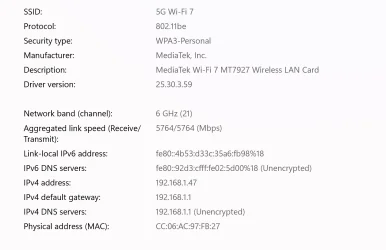
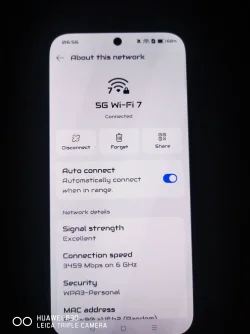
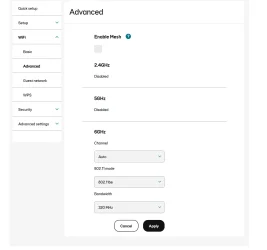
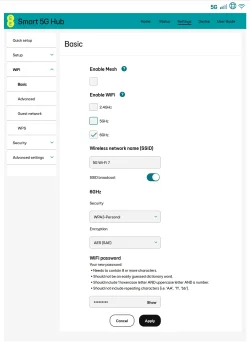
If u saw phones like that connected that means there is mesh or MLO enabled .. I have all disabled and running pure 6Ghz only (see pics)

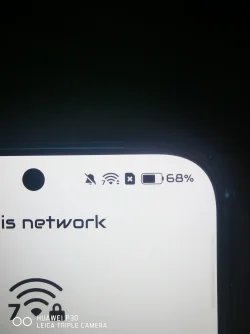
Well 2x2 mimo is for phones and laptops but it is remarkably capable of up to 4,5 to 5Gbps .. and dual antenna is still very impressive.. check pic running 5000Mbps and router is currently upstairs and I am downstairs...
The router has 4x4 antennas .. I have openned it as I need to make external antennas and inside router there are total 25 antennas 20 for all WiFi from 1 to 7 and 5 antennas for 5G mobile internet... EE Unlocked Smart 5G Hub3 HH70C WiFi7 Tri-Band Router White (New)

In reality WiFi 7 total maxed out performance is :

Wi-Fi 7 (IEEE 802.11be) is designed for "Extremely High Throughput" (EHT), offering a theoretical maximum data rate of 46 Gbit/s (or roughly 46.4 Gbps). This is achieved through major technical enhancements, including the use of up to 16x16 antennas/spatial streams.

1. Max Theoretical Speed (46 Gbps)
  • 46 Gbit/s: The theoretical maximum speed is nearly five times faster than Wi-Fi 6/6E (9.6 Gbps).
  • Typical Client Speed: A typical Wi-Fi 7 laptop (using a 2x2 antenna config) can achieve a potential maximum data rate of almost 5.8 Gbps.
    Ezurio +2

2. Max Antennas and Spatial Streams (16x16)
  • Antenna Count: Wi-Fi 7 doubles the maximum spatial streams from 8x8 (Wi-Fi 6) to 16x16 MU-MIMO.

Well Intel now making new drivers and now removed in intel graphic settings no longer possible to configure
No it is not about drivers of an hardware they are all up to date there are of course bugs but this particular problem isn't in drivers it is on purpose..

I have also installed Linux ubuntu-24.04.1 and linux can see 6Ghz phone .. and running nicely at 6.1Ghz
But when I upgraded or updated linux I could no longer be able to connect with 6Ghz band smartphone hotspot.. so only ubuntu 24.04.1 supports it and linux mint 22.1 if u upgrade they added ban or restrictions for unknown reason..
So u see nowadays if u want things up to date they will take featured off..

This particular issue has nothing to do with some laws..but rather strange or cheeky ban from wireless association which they never explained most of the time those who doing laws has not even clue what WiFi association wants from them nor they don't understand it.. so they simply accept manufacturers or inventors requirements ...
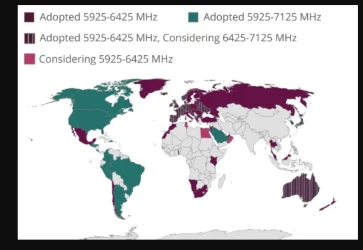
Europe has adopted 6Ghz spectrum from 5925 to 6425 while US has full band 5925 -7125 and europe will be applying rest of the band in future 6425 to 7125 (see pic)

 

Attachments

  • Screenshot 2026-04-11 072404.webp
    Screenshot 2026-04-11 072404.webp
    30.1 KB · Views: 1
  • Screenshot 2026-04-11 070121.webp
    Screenshot 2026-04-11 070121.webp
    64.7 KB · Views: 1
  • IMG_20260411_065632.webp
    IMG_20260411_065632.webp
    1.3 MB · Views: 2
  • IMG_20260411_065623.webp
    IMG_20260411_065623.webp
    170.2 KB · Views: 1
  • Screenshot 2026-04-11 065520.webp
    Screenshot 2026-04-11 065520.webp
    27.4 KB · Views: 1
  • Screenshot 2026-04-11 064054.webp
    Screenshot 2026-04-11 064054.webp
    63.1 KB · Views: 1
  • Screenshot 2026-04-11 073635.webp
    Screenshot 2026-04-11 073635.webp
    49.5 KB · Views: 1
  • Screenshot 2026-04-11 071919.webp
    Screenshot 2026-04-11 071919.webp
    43.6 KB · Views: 0
  • Screenshot 2026-04-07 163741.webp
    Screenshot 2026-04-07 163741.webp
    167.4 KB · Views: 0
  • Screenshot 2026-04-07 163720.webp
    Screenshot 2026-04-07 163720.webp
    184.6 KB · Views: 0
Last edited:

My Computer

System One

  • OS
    win 11
    Computer type
    Laptop
    Manufacturer/Model
    IIISi
Back
Top Bottom