Help getting rid of a System Drive partition in Explorer


idainc

Well-known member
Member
Local time
7:18 PM
Posts
242
OS
windows 11 64
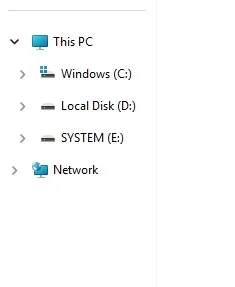
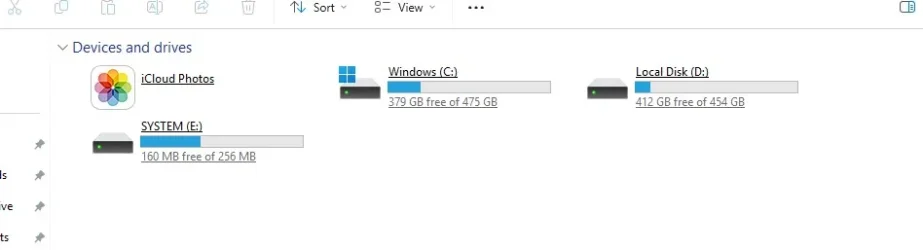
I cloned a drive Reflect. I partitioned the new drive to add a D drive and I am now seeing an E drive in Explorer. I cant figue out how to get rid of (or hide it) as a housekeeping matter. I'm considering doing the whole cloning thing all over again but wanted to see if there was an easier and faster way to fix this. Thanks in advance.
 

Attachments
  • a.webp
    a.webp
    38.4 KB · Views: 1
  • b.webp
    b.webp
    3.8 KB · Views: 1
  • c.webp
    c.webp
    11 KB · Views: 1

My Computer My Computer

At a glance

windows 11 64i7-12700T32 GBNvidia GeForce 1650 / Intel 770
OS
windows 11 64
Computer type
PC/Desktop
Manufacturer/Model
HP
CPU
i7-12700T
Memory
32 GB
Graphics Card(s)
Nvidia GeForce 1650 / Intel 770
Screen Resolution
1920 / 1080
Hard Drives
Samsung 990 Pro 1TB
Case
All in One
Keyboard
USB
Mouse
USB
Internet Speed
600 MBS
Browser
Chrome
Antivirus
MS
Since you have had multiple issues (and threads) with this clone, maybe you need to rethink your strategy.
Personally, I NEVER clone but that's neither here nor there. At the present time do you have both disks installed either internally or with usb?
Since explorer sees drive E but disk management does not, I would first use a third party app like Minitool to see if E is being recognized there before I tried to deal with it using diskpart.
 

My Computers My Computers

  • At a glance

    Windows 11 Pro 25H2 26200.9168i9-10900 10 core 20 threads32 gbnone-Intel UHD Graphics 630
    OS
    Windows 11 Pro 25H2 26200.9168
    Computer type
    PC/Desktop
    Manufacturer/Model
    Dell Optiplex 7080
    CPU
    i9-10900 10 core 20 threads
    Motherboard
    DELL 0J37VM
    Memory
    32 gb
    Graphics Card(s)
    none-Intel UHD Graphics 630
    Sound Card
    Integrated Realtek
    Monitor(s) Displays
    Benq 27
    Screen Resolution
    2560x1440
    Hard Drives
    2x1tb Solidigm m.2 nvme /External drives 512gb Samsung m.2 sata+2tb Kingston m2.nvme
    PSU
    500w
    Case
    MT
    Cooling
    Dell Premium
    Keyboard
    Logitech wired
    Mouse
    Logitech wireless
    Internet Speed
    so slow I'm too embarrassed to tell
    Browser
    #1 Edge #2 Firefox
    Antivirus
    Defender+MWB Premium
  • At a glance

    Windows 11 Pro 24H2 26200.9168AMD Ryzen 7 6800U32 gbintegrated
    Operating System
    Windows 11 Pro 24H2 26200.9168
    Computer type
    PC/Desktop
    Manufacturer/Model
    Beelink Mini PC SER5
    CPU
    AMD Ryzen 7 6800U
    Memory
    32 gb
    Graphics card(s)
    integrated
    Sound Card
    integrated
    Monitor(s) Displays
    Benq 27
    Screen Resolution
    2560x1440
    Hard Drives
    1TB Crucial nvme
    Keyboard
    Logitech wired
    Mouse
    Logitech wireless
    Internet Speed
    still too embarrassed to tell
    Browser
    Firefox
    Antivirus
    Defender
  • System 3 is non compliant Dell 9020 i7-4770/24gb ram Win11 PRO 26200.9168
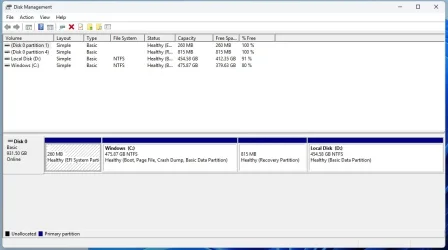
I was able to regedit E our of exolorer. It is an unlettered partition on the drive shown as EFI. During the cloning it was apparently labelled as E but is till the EFI partition. Disk managment sees the EFI partition.

I agree about cloning and wont try it again but it was an easy solution to the upgrade and the remomval of a SATA SSD that was just too slow. THis is an HP All in One and it has some HP software that s usefull. A fresh install is best but at the moment there isnt a need. An although Magician coulndt do the cloning it is now functional.
 

My Computer My Computer

At a glance

windows 11 64i7-12700T32 GBNvidia GeForce 1650 / Intel 770
OS
windows 11 64
Computer type
PC/Desktop
Manufacturer/Model
HP
CPU
i7-12700T
Memory
32 GB
Graphics Card(s)
Nvidia GeForce 1650 / Intel 770
Screen Resolution
1920 / 1080
Hard Drives
Samsung 990 Pro 1TB
Case
All in One
Keyboard
USB
Mouse
USB
Internet Speed
600 MBS
Browser
Chrome
Antivirus
MS
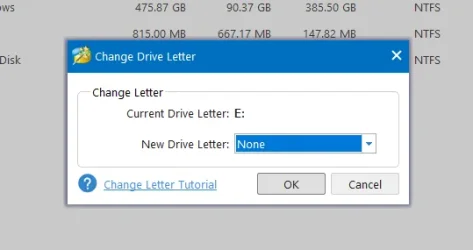
With MiniTool I can change the drive letter back to "none" Disk managment does not show it as having a drive letter. I appreciate your thoughts.
 

Attachments

  • Screenshot 2025-04-19 121115.webp
    Screenshot 2025-04-19 121115.webp
    67.6 KB · Views: 1
  • Screenshot 2025-04-19 121215.webp
    Screenshot 2025-04-19 121215.webp
    11.5 KB · Views: 1

My Computer My Computer

At a glance

windows 11 64i7-12700T32 GBNvidia GeForce 1650 / Intel 770
OS
windows 11 64
Computer type
PC/Desktop
Manufacturer/Model
HP
CPU
i7-12700T
Memory
32 GB
Graphics Card(s)
Nvidia GeForce 1650 / Intel 770
Screen Resolution
1920 / 1080
Hard Drives
Samsung 990 Pro 1TB
Case
All in One
Keyboard
USB
Mouse
USB
Internet Speed
600 MBS
Browser
Chrome
Antivirus
MS
The only time I clone is using hardware drive dock [no computer connected] from the Source drive to a fully wiped/clean/bare same size or larger Destination drive. And before that I run Error Checking followed by Defrag/Optimize on the Source drive to eliminate any errors.
 

My Computers My Computers

  • At a glance

    Win11 Pro RTM Version 24H2 Build 26100.4202Intel Core i5 11th Gen. 2.40GHz12GB
    OS
    Win11 Pro RTM Version 24H2 Build 26100.4202
    Computer type
    Laptop
    Manufacturer/Model
    Dell Vostro 3400
    CPU
    Intel Core i5 11th Gen. 2.40GHz
    Memory
    12GB
    Hard Drives
    256GB SSD NVMe M.2
  • At a glance

    Win11 Pro RTM Version 24H2 Build 26100.4202Intel Core i5 10th Gen. 2.90GHz16GBOnboard, no VGA, using a DisplayPort-to-VGA a...
    Operating System
    Win11 Pro RTM Version 24H2 Build 26100.4202
    Computer type
    PC/Desktop
    Manufacturer/Model
    Dell Vostro 5890
    CPU
    Intel Core i5 10th Gen. 2.90GHz
    Memory
    16GB
    Graphics card(s)
    Onboard, no VGA, using a DisplayPort-to-VGA adapter
    Monitor(s) Displays
    24" Dell
    Hard Drives
    512GB SSD NVMe, 4TB Seagate HDD
    Browser
    Firefox, Edge
    Antivirus
    Windows Defender/Microsoft Security
Thanks. I agree but the lure of faster speed got the better of me. After some searching this kind of error is common in cloning. Any thought on the option of using MiniTool to remomve the drive letter of the EFI partition which shouldnt have one anyway ?
 

My Computer My Computer

At a glance

windows 11 64i7-12700T32 GBNvidia GeForce 1650 / Intel 770
OS
windows 11 64
Computer type
PC/Desktop
Manufacturer/Model
HP
CPU
i7-12700T
Memory
32 GB
Graphics Card(s)
Nvidia GeForce 1650 / Intel 770
Screen Resolution
1920 / 1080
Hard Drives
Samsung 990 Pro 1TB
Case
All in One
Keyboard
USB
Mouse
USB
Internet Speed
600 MBS
Browser
Chrome
Antivirus
MS
I "clone" often. Never a problem if the right tool is used.

Diskgenius ( free version) os migration is superb. Other non os partitions can be included with a couple of clicks

More advanced users could use winntsetup wincopy function ( only for os copy )
 

My Computers My Computers

  • At a glance

    Win7,Win11i7-97002x16gb 3600mhz
    OS
    Win7,Win11
    Computer type
    PC/Desktop
    CPU
    i7-9700
    Motherboard
    gigabyte b365m ds3h
    Memory
    2x16gb 3600mhz
    Monitor(s) Displays
    benq gw2480
    PSU
    bequiet pure power 11 400CM
    Cooling
    cryorig m9i
  • At a glance

    win7,win11i5-84002x8gb 3200
    Operating System
    win7,win11
    Computer type
    PC/Desktop
    CPU
    i5-8400
    Motherboard
    gigabyte b365m ds3h
    Memory
    2x8gb 3200
    PSU
    xfx pro 450
I just removed the drive letter assigned to the EFI partition using MiniTool and it worked like a charm. Mactiurm Reflect added an almost impossible to delete folder on the C Drive clalled Windows Apps ? Uggh. No more cloning.
 

My Computer My Computer

At a glance

windows 11 64i7-12700T32 GBNvidia GeForce 1650 / Intel 770
OS
windows 11 64
Computer type
PC/Desktop
Manufacturer/Model
HP
CPU
i7-12700T
Memory
32 GB
Graphics Card(s)
Nvidia GeForce 1650 / Intel 770
Screen Resolution
1920 / 1080
Hard Drives
Samsung 990 Pro 1TB
Case
All in One
Keyboard
USB
Mouse
USB
Internet Speed
600 MBS
Browser
Chrome
Antivirus
MS
Have you considered Clonezilla? This is a true image copy and it doesn't know or care about what kind of O/S or file system is in use. As long as the target drive is as large or larger than the source drive, you should get a 1:1 copy.
 

My Computers My Computers

  • At a glance

    Win 11 Pro 25H2, Build 26200.9168Intel Core i5 14500, 14th Generation64GB DDR4GeForce RTX 4060
    OS
    Win 11 Pro 25H2, Build 26200.9168
    Computer type
    PC/Desktop
    Manufacturer/Model
    Home Brew
    CPU
    Intel Core i5 14500, 14th Generation
    Motherboard
    Gigabyte B760M G P WIFI
    Memory
    64GB DDR4
    Graphics Card(s)
    GeForce RTX 4060
    Sound Card
    Chipset Realtek
    Monitor(s) Displays
    LG 45" Ultragear & Acer 24" 1080p
    Screen Resolution
    5120x1440 & 1920x1080
    Hard Drives
    Crucial P310 2TB 2280 PCIe Gen4 3D NAND NVMe M.2 SSD (O/S)
    Silicon Power 2TB US75 NVMe PCIe Gen4 M.2 2280 SSD (backup)
    Crucial BX500 2TB 3D NAND (2nd backup)
    Seagate 4TB Ironwolf, rotating HDD archive files
    External off-line backup Drives: 2 NVMe 4TB drives in external enclosures
    PSU
    Thermaltake Toughpower GF3 750W
    Case
    LIAN LI LANCOOL 216 E-ATX PC Case
    Cooling
    Lots of fans!
    Keyboard
    Microsoft Comfort Curve 2000
    Mouse
    Logitech G305
    Internet Speed
    Verizon FiOS 1GB
    Browser
    Firefox
    Antivirus
    Malware Bytes & Windows Defender Security
  • At a glance

    Win 11 Pro 25H2, Build 26200.9168Intel Core i5 1440032GB DDR5Intel 700 Embedded GPU
    Operating System
    Win 11 Pro 25H2, Build 26200.9168
    Computer type
    PC/Desktop
    Manufacturer/Model
    Home Brew
    CPU
    Intel Core i5 14400
    Motherboard
    Gigabyte B760M DS3H AX
    Memory
    32GB DDR5
    Graphics card(s)
    Intel 700 Embedded GPU
    Sound Card
    Realtek Embedded
    Monitor(s) Displays
    27" HP 1080p
    Screen Resolution
    1920x1080
    Hard Drives
    Crucial P310 2TB 2280 PCIe Gen4 eD NAND PCIe SSD
    Samsung EVO 990 2TB NVMe Gen4 SSD
    Samsung 2TB SATA SSD
    PSU
    Thermaltake Smart BM3 650W
    Case
    Okinos Micro ATX Case
    Cooling
    Fans
    Keyboard
    Microsoft Comfort Curve 2000
    Mouse
    Logitech G305
    Internet Speed
    Verizon FiOS 1GB
    Browser
    Firefox
    Antivirus
    Malware Bytes & Windows Defender Security
  • Nimo N171 17" Laptop, (Intel i3-1215U, 16GB RAM, 2TB NVMe, Win11 Pro)
    Acemagic Vista Mini PC V1 (Intel N150, 16GB RAM, 1TB NVMe, Win11 Pro)
    HP ENVY h8-1540t, (24GB RAM, 2TB SSD, 2TB HDD, Win11 Pro)
This is the Default I've been getting when setting up new Notebooks, 3 just this year so far:

1745113050072.webp
 

My Computers My Computers

  • At a glance

    Win11 Pro RTM Version 24H2 Build 26100.4202Intel Core i5 11th Gen. 2.40GHz12GB
    OS
    Win11 Pro RTM Version 24H2 Build 26100.4202
    Computer type
    Laptop
    Manufacturer/Model
    Dell Vostro 3400
    CPU
    Intel Core i5 11th Gen. 2.40GHz
    Memory
    12GB
    Hard Drives
    256GB SSD NVMe M.2
  • At a glance

    Win11 Pro RTM Version 24H2 Build 26100.4202Intel Core i5 10th Gen. 2.90GHz16GBOnboard, no VGA, using a DisplayPort-to-VGA a...
    Operating System
    Win11 Pro RTM Version 24H2 Build 26100.4202
    Computer type
    PC/Desktop
    Manufacturer/Model
    Dell Vostro 5890
    CPU
    Intel Core i5 10th Gen. 2.90GHz
    Memory
    16GB
    Graphics card(s)
    Onboard, no VGA, using a DisplayPort-to-VGA adapter
    Monitor(s) Displays
    24" Dell
    Hard Drives
    512GB SSD NVMe, 4TB Seagate HDD
    Browser
    Firefox, Edge
    Antivirus
    Windows Defender/Microsoft Security

Latest Support Threads

Back
Top Bottom