Help... I've lost my book


Trebo58

Active member
Member
Local time
2:30 AM
Posts
76
OS
Windows 11 Pro X64 Version 25H2 Build 26200.8328
I'm not sure how this has happened, but I noticed it just after a Windows update. (Not blaming update. just noticed it after)

A perfectly healthy 2TB partition has been running as F: Working files for a good 12 months, but then it suddenly disappeared, and instead of being F: Working Files, it became Unallocated with no drive letter.

I am at a breaking point after losing a very important file/folder. You see, over the last five years, due to Covid 19 Pandemic, I have been housebound, as I lost my home and business, and almost my life. I started writing a book, and I have a potential publisher, and this could be my break.
However, the drive that the book is on, you guessed it, was F: Working Files. I have tried almost every recovery program (portable) there is, and they all draw a blank; none of them find any data on the drive.

I can see that the drive is registering as FAT12, from it's orginal NTFS.

How can I recover my data... I won't list every program I have tried. The drive itself is okay, as the partition missing is in the middle of a three-partition 5TB 3.5 drive, and CrystalDiskInfo reports no faults, and the other partitions on either side are working as they should.

Is there any way I can repair the partition? I have tried a couple of suggestions, one of them being (TestDisk), which ran for three solid days, then reported no missing partitions

The drive shows up in Windows Disk Manager, as Unallocated with no drive letter.

If I just use Disk Management and run "New Simple Volume", will I be able to retrieve any of the data?

Thanks
 
Windows Build/Version
Windows 11 25H2 - 26200.9457

My Computer My Computer

At a glance

Windows 11 Pro X64 Version 25H2 Build 26200.8328Core i5-8500 3.00 GHz16 GB
OS
Windows 11 Pro X64 Version 25H2 Build 26200.8328
Computer type
PC/Desktop
Manufacturer/Model
HP
CPU
Core i5-8500 3.00 GHz
Memory
16 GB
Do not do anything yet, until we ask for more information, and/or give direction.
 

My Computer My Computer

At a glance

Windows 11 Pro 25H2
OS
Windows 11 Pro 25H2
Computer type
Laptop
Manufacturer/Model
Toshiba

My Computer My Computer

At a glance

Windows 11 Pro 25H2
OS
Windows 11 Pro 25H2
Computer type
Laptop
Manufacturer/Model
Toshiba
@Trebo58 ... I agree with the post above.. do not do a thing.. if you can, avoid even using the computer if you have a secondary computer or a tablet or a smartphone, while waiting for good steps to take.

I think this might be a case for @jumanji as i know he have some good howto's over at 10forums he might copy paste in here :-)
 

My Computers My Computers

  • At a glance

    Linux: Debian, Kali-linux, Alma, Win:7,10IoT,...i3, i5 and i7 From 2gen to 9th gen... Server ...
    OS
    Linux: Debian, Kali-linux, Alma, Win:7,10IoT,2012R
    Manufacturer/Model
    HP Elitebook 840, AsusX53, Aspire E1-572. AsusUX32A, HP Pro3130mt+3010mt, HP Proliant ML150, 3xCustom-PC, i3, i5, i7
    CPU
    i3, i5 and i7 From 2gen to 9th gen... Server dual Xenon
    Hard Drives
    Sata, M.2, SAS
  • At a glance

    Retro: 2003server.XPpro, Win2000, Win98SE, Wi...Oldest intel 8088 up to P4 dual core
    Operating System
    Retro: 2003server.XPpro, Win2000, Win98SE, Win95, Win3.11, MS-DOS, IBM-DOS
    Manufacturer/Model
    Commodore, AST, Fujitsu, Compaq, etc etc. etc Around 15 desktops and 20 laptops in the collection
    CPU
    Oldest intel 8088 up to P4 dual core
    Hard Drives
    MFM, IDE, SCSI
If I just use Disk Management and run "New Simple Volume", will I be able to retrieve any of the data?
noooooooo do not under any circumstances create a new partition, as trim will screw you over if it is an SSD disk
 

My Computers My Computers

  • At a glance

    Linux: Debian, Kali-linux, Alma, Win:7,10IoT,...i3, i5 and i7 From 2gen to 9th gen... Server ...
    OS
    Linux: Debian, Kali-linux, Alma, Win:7,10IoT,2012R
    Manufacturer/Model
    HP Elitebook 840, AsusX53, Aspire E1-572. AsusUX32A, HP Pro3130mt+3010mt, HP Proliant ML150, 3xCustom-PC, i3, i5, i7
    CPU
    i3, i5 and i7 From 2gen to 9th gen... Server dual Xenon
    Hard Drives
    Sata, M.2, SAS
  • At a glance

    Retro: 2003server.XPpro, Win2000, Win98SE, Wi...Oldest intel 8088 up to P4 dual core
    Operating System
    Retro: 2003server.XPpro, Win2000, Win98SE, Win95, Win3.11, MS-DOS, IBM-DOS
    Manufacturer/Model
    Commodore, AST, Fujitsu, Compaq, etc etc. etc Around 15 desktops and 20 laptops in the collection
    CPU
    Oldest intel 8088 up to P4 dual core
    Hard Drives
    MFM, IDE, SCSI
If I just use Disk Management and run "New Simple Volume", will I be able to retrieve any of the data?
As everyone else has said - do absolutely nothing!!! Wait for @jumanji to join the thread. He is the master of all things 'data recovery'.
 

My Computers My Computers

  • At a glance

    Windows 11 HomeAMD Athlon Silver 3050U8GBRadeon Graphics
    OS
    Windows 11 Home
    Computer type
    Laptop
    Manufacturer/Model
    Acer Aspire 3 A315-23-R9VY
    CPU
    AMD Athlon Silver 3050U
    Memory
    8GB
    Graphics Card(s)
    Radeon Graphics
    Monitor(s) Displays
    laptop screen
    Screen Resolution
    1366x768 native resolution, up to 2560x1440 with Radeon Virtual Super Resolution
    Hard Drives
    1TB Samsung EVO 870 SSD (from April 2026: 250GB EVO 850)
    Internet Speed
    150 Mbps
    Browser
    Edge, Firefox
    Antivirus
    Defender
    Other Info
    UPDATE - 11 April 2026: due to lid hinges starting to break up this laptop has been retired from active duty. The OS with all software and files has been migrated to my System Seven in 'Other systems' to carry on as my general purpose 'main machine'.

    I've now clean installed 25H2 and used Garlin's scripts to update Secure Boot to CA 2023 and revoke the PCA 2011 certificates. It's new role is to test secure boot issues.

    Info for 2021-2026:
    fully 'Windows 11 ready' laptop. Windows 10 C: partition migrated from my old unsupported 'main machine' then upgraded to 11. A test migration ran Insider builds for 2 months. When 11 was released on 5th October 2021 it was re-imaged back to 10 and was offered the upgrade in Windows Update on 20th October. Windows Update offered the 22H2 Feature Update on 20th September 2022. It got the 23H2 Feature Update on 4th November 2023 through Windows Update, 24H2 on 3rd October 2024 through Windows Update by setting the Target Release Version for 24H2, and 25H2 on 30th September 2025 through Windows Update by setting the Target Release Version for 25H2.
  • At a glance

    Windows 11 ProIntel® Core™ i5-520M8GB(integrated graphics) Intel HD Graphics
    Operating System
    Windows 11 Pro
    Computer type
    Laptop
    Manufacturer/Model
    Dell Latitude E4310
    CPU
    Intel® Core™ i5-520M
    Motherboard
    0T6M8G
    Memory
    8GB
    Graphics card(s)
    (integrated graphics) Intel HD Graphics
    Screen Resolution
    1366x768
    Hard Drives
    500GB Crucial MX500 SSD
    Browser
    Firefox, Edge
    Antivirus
    Defender
    Other Info
    unsupported machine: Legacy bios, MBR, TPM 1.2, upgraded from W10 to W11 using W10/W11 hybrid install media workaround.

    In-place upgrade to 22H2 using ISO and a workaround.
    Feature Update to 23H2 by manually installing the Enablement Package.
    In-place upgrade to 24H2 using hybrid 23H2/24H2 install media.
    Upgraded to 25H2 by Enablement Package.

    Also running Insider Experimental 263xx and 29xxx builds and Windows 10 as native boot .vhdx.
  • My SYSTEM THREE is a Dell Latitude 5410, i7-10610U, 32GB RAM, 512GB NVMe ssd, supported device running Windows 11 Pro.

    My SYSTEM FOUR was a 2-in-1 convertible Lenovo Yoga 11e (1st gen) type 20DA, Celeron N2930, 8GB RAM, 256GB ssd. Unsupported device. This has now been sold. It has been replaced by my System Eight.

    My SYSTEM FIVE is a Dell Latitude 3190 2-in-1, Pentium Silver N5030, 8GB RAM, 1TB NVMe ssd, supported device running Windows 11 Pro, plus Insider Beta, Experimental 263xx and 29xxx builds (and a few others) as a native boot .vhdx.

    My SYSTEM SIX is a Dell Latitude 5550, Core Ultra 7 165H, 64GB RAM, 1TB NVMe SSD, supported device, Windows 11 Pro, Hyper-V host machine. Updated to 25H2 on 30th September 2025.

    My SYSTEM SEVEN is a Lenovo Thinkpad T580, 1920x1080 touchscreen, Intel Core i7-8650U, 16GB RAM, 512GB NVMe SSD + 2nd 512GB NVMe SSD, a supported device for Windows 11. This is my current general purpose 'main machine'. The installed Windows 11 Home from my System One has been migrated to this machine. As its new home has an existing digital licence for Pro I've been able to upgrade the migrated OS from Home to Pro.

    My SYSTEM EIGHT is a 2-in-1 convertible Lenovo Yoga 11e (5th gen) type 20LN, Celeron N4120, 8GB RAM, 512GB NVMe ssd, a supported device for Windows 11. Currently running Windows 11 Pro, plus Insider Beta, Experimental 263xx and 29xxx builds as native boot vhdx.
Thank you, Banjoman301, for responding. Sadly, no backup. I used to use a laptop, and everything was backed up on a NAS, but I moved to a desktop and larger drives. Marie SWE only have the desktop and an old Android phone, so I can't avoid using the desktop.
 

My Computer My Computer

At a glance

Windows 11 Pro X64 Version 25H2 Build 26200.8328Core i5-8500 3.00 GHz16 GB
OS
Windows 11 Pro X64 Version 25H2 Build 26200.8328
Computer type
PC/Desktop
Manufacturer/Model
HP
CPU
Core i5-8500 3.00 GHz
Memory
16 GB
Thank you, Banjoman301, for responding. Sadly, no backup. I used to use a laptop, and everything was backed up on a NAS, but I moved to a desktop and larger drives. Marie SWE only have the desktop and an old Android phone, so I can't avoid using the desktop.
as long the drive shows as Unallocated with no drive letter, then the system and trim should not mess with the drive.
I have not used windows for 8 years to more advanced things.. so jumanji is, the Man, the Myth, the Legend here on 10/11forums. :cool:

The recovery tools I'm using is for Linux and also hardware related recovery tools as PC-3000 and DeepSpar.. so i cant help in this thread... I just wanted to stop you from making a BIG mistake by testing things by your own. :-)(y)
 

My Computers My Computers

  • At a glance

    Linux: Debian, Kali-linux, Alma, Win:7,10IoT,...i3, i5 and i7 From 2gen to 9th gen... Server ...
    OS
    Linux: Debian, Kali-linux, Alma, Win:7,10IoT,2012R
    Manufacturer/Model
    HP Elitebook 840, AsusX53, Aspire E1-572. AsusUX32A, HP Pro3130mt+3010mt, HP Proliant ML150, 3xCustom-PC, i3, i5, i7
    CPU
    i3, i5 and i7 From 2gen to 9th gen... Server dual Xenon
    Hard Drives
    Sata, M.2, SAS
  • At a glance

    Retro: 2003server.XPpro, Win2000, Win98SE, Wi...Oldest intel 8088 up to P4 dual core
    Operating System
    Retro: 2003server.XPpro, Win2000, Win98SE, Win95, Win3.11, MS-DOS, IBM-DOS
    Manufacturer/Model
    Commodore, AST, Fujitsu, Compaq, etc etc. etc Around 15 desktops and 20 laptops in the collection
    CPU
    Oldest intel 8088 up to P4 dual core
    Hard Drives
    MFM, IDE, SCSI
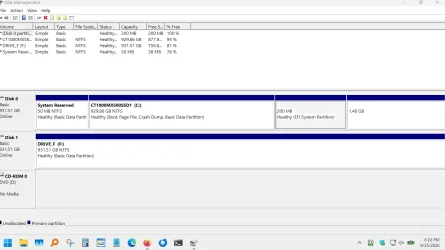
Let's get a picture of your drives...

Right-click on Start, and select Disk Management

Maximize the window when it opens.

Open Snip and Sketch and click on New.

When the "cross" (+ sign) appears, start in the extreme upper left-hand corner of the Disk Management windows, hold down your left-click button, and drag the square all the way to the right, and down to the extreme lower right-hand corner.

Release the left-click button.

Your screen shot will pop up, with a toolbar at the top. Click on the "Save as" icon on the right-hand side of the toolbar. Hover your mouse to see a description of each icon.

When you click on the icon, you will get a "Save as" dialog box, and a default file name of Screenshot...with the date and time it was created as the rest of the file name.

On the left side of the "Save as" dialog box, use the scroll bar to locate "Desktop", select it, and then click Save.
 

My Computer My Computer

At a glance

Windows 11 Pro 25H2
OS
Windows 11 Pro 25H2
Computer type
Laptop
Manufacturer/Model
Toshiba
The next step will be to post the Disk Management screen shot here in your thread...

Create a response, and click the "Attach files" icon in the lower left.

Navigate to the Desktop, where you just saved the screen shot, and select the screen shot file.

Click on the file name to select it and click Open.

You will see a small version of the screen shot just below. There will be a gray "Insert..." button. Click on that.

Another series of gray buttons will display..."Thumbnail" and "Full Image".

For my example, I'll use Thumbnail

Screenshot 2026-09-15 181322.webp

And this is the result.

You can then click "Post reply".
 

My Computer My Computer

At a glance

Windows 11 Pro 25H2
OS
Windows 11 Pro 25H2
Computer type
Laptop
Manufacturer/Model
Toshiba
Back
Top Bottom