- Local time
- 2:43 AM
- Posts
- 76
- OS
- Windows 11 Pro X64 Version 25H2 Build 26200.8328
I'm not sure how this has happened, but I noticed it just after a Windows update. (Not blaming update. just noticed it after)
A perfectly healthy 2TB partition has been running as F: Working files for a good 12 months, but then it suddenly disappeared, and instead of being F: Working Files, it became Unallocated with no drive letter.
I am at a breaking point after losing a very important file/folder. You see, over the last five years, due to Covid 19 Pandemic, I have been housebound, as I lost my home and business, and almost my life. I started writing a book, and I have a potential publisher, and this could be my break.
However, the drive that the book is on, you guessed it, was F: Working Files. I have tried almost every recovery program (portable) there is, and they all draw a blank; none of them find any data on the drive.
I can see that the drive is registering as FAT12, from it's orginal NTFS.
How can I recover my data... I won't list every program I have tried. The drive itself is okay, as the partition missing is in the middle of a three-partition 5TB 3.5 drive, and CrystalDiskInfo reports no faults, and the other partitions on either side are working as they should.
Is there any way I can repair the partition? I have tried a couple of suggestions, one of them being (TestDisk), which ran for three solid days, then reported no missing partitions
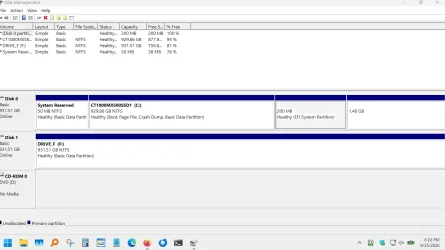
The drive shows up in Windows Disk Manager, as Unallocated with no drive letter.
If I just use Disk Management and run "New Simple Volume", will I be able to retrieve any of the data?
Thanks
A perfectly healthy 2TB partition has been running as F: Working files for a good 12 months, but then it suddenly disappeared, and instead of being F: Working Files, it became Unallocated with no drive letter.
I am at a breaking point after losing a very important file/folder. You see, over the last five years, due to Covid 19 Pandemic, I have been housebound, as I lost my home and business, and almost my life. I started writing a book, and I have a potential publisher, and this could be my break.
However, the drive that the book is on, you guessed it, was F: Working Files. I have tried almost every recovery program (portable) there is, and they all draw a blank; none of them find any data on the drive.
I can see that the drive is registering as FAT12, from it's orginal NTFS.
How can I recover my data... I won't list every program I have tried. The drive itself is okay, as the partition missing is in the middle of a three-partition 5TB 3.5 drive, and CrystalDiskInfo reports no faults, and the other partitions on either side are working as they should.
Is there any way I can repair the partition? I have tried a couple of suggestions, one of them being (TestDisk), which ran for three solid days, then reported no missing partitions
The drive shows up in Windows Disk Manager, as Unallocated with no drive letter.
If I just use Disk Management and run "New Simple Volume", will I be able to retrieve any of the data?
Thanks
- Windows Build/Version
- Windows 11 25H2 - 26200.9457
My Computer
At a glance
Windows 11 Pro X64 Version 25H2 Build 26200.8328Core i5-8500 3.00 GHz16 GB
- OS
- Windows 11 Pro X64 Version 25H2 Build 26200.8328
- Computer type
- PC/Desktop
- Manufacturer/Model
- HP
- CPU
- Core i5-8500 3.00 GHz
- Memory
- 16 GB