

- Local time
- 10:07 PM
- Posts
- 4,564
- OS
- Windows 11 Pro 24H2 (Build 26100.4770)
Not getting any BSOD’s but feel like I have a hardware issue somewhere. Reliability Monitor Certainly says so. I just can't determine what the specific issue is....
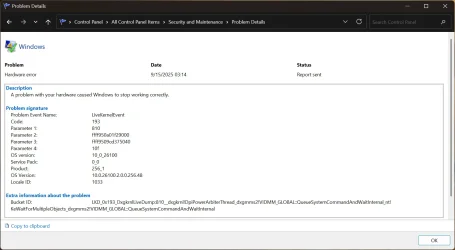
The issues are multiple:
I took the system apart over the weekend to check for bent, broken, or shorted pins / post shorts. Nothing found. At this point in time so I’m at a loss. v2 Log files > here (OneDrive share). Repasted CPU as I removed the cooler to check the CPU for shorts or bent pins. All good there. Also installed the latest BIOS release, yet the issues persist.
This is a custom build only 6 months old. See system specs. All drivers updated.
Note: Currently running with 3 RAM sticks (48gig) as I discovered one of the modules became faulty and wouldn't allow the system to boot. Removing it solved that issue. That was 3 days ago, and I'd hoped that solved the problem (did solve the long BIOS load times), but as of yesterday, Reliability History is still showing "Hardware Error"
Appreciate any help with this.
The issues are multiple:
- Loss of mouse / keyboard functionality when trying to wake PC “if” its sleep
- PC wakes immediately upon attempting to put in Sleep mode.
- PC refuses to sleep, requiring PC shutdown.
- PC failing to power off and instead reboots - Have to turn off Power Supply to keep PC from booting up again.
- Extremely long BIOS load times, sometimes requiring a reboot. Sometimes waiting as long at a few minutes before a BIOS splash screen and onto Windows.
- Sometimes mouse / keyboard loses focus in the BIOS and becomes unresponsive.
I took the system apart over the weekend to check for bent, broken, or shorted pins / post shorts. Nothing found. At this point in time so I’m at a loss. v2 Log files > here (OneDrive share). Repasted CPU as I removed the cooler to check the CPU for shorts or bent pins. All good there. Also installed the latest BIOS release, yet the issues persist.
This is a custom build only 6 months old. See system specs. All drivers updated.
Note: Currently running with 3 RAM sticks (48gig) as I discovered one of the modules became faulty and wouldn't allow the system to boot. Removing it solved that issue. That was 3 days ago, and I'd hoped that solved the problem (did solve the long BIOS load times), but as of yesterday, Reliability History is still showing "Hardware Error"
Appreciate any help with this.
My Computers
-
At a glance
Windows 11 Pro 24H2 (Build 26100.4770)Intel Core 9 Ultra 285K64G (4x16) DDR5 Corsair RGB Dominator Platinu...Radeon (XFX Mercury) RX 9070XT OC (with Magne...- OS
- Windows 11 Pro 24H2 (Build 26100.4770)
- Computer type
- PC/Desktop
- Manufacturer/Model
- Custom built
- CPU
- Intel Core 9 Ultra 285K
- Motherboard
- Gigabyte Aorus Z890 Xtreme AI Top
- Memory
- 64G (4x16) DDR5 Corsair RGB Dominator Platinum (6400Mhz)
- Graphics Card(s)
- Radeon (XFX Mercury) RX 9070XT OC (with Magnetic Fans)
- Sound Card
- Onboard (DTS:X® Ultra Audio: ESS ES9280A DAC)
- Monitor(s) Displays
- 27-inch Eizo Color Edge - CG2700X
- Screen Resolution
- 3840 x 2160
- Hard Drives
- 4 Samsung NVM 990 Pro drives: 1TB (OS), 2TB, 2 X 4TB.
- PSU
- Seasonic TX-1300 (1300 Watts)
- Case
- Cooler Master H500M
- Cooling
- Corsair Link Titan 280 RX RGB
- Keyboard
- Logitech Craft
- Mouse
- Logitech MX Master 3S
- Internet Speed
- 1TB Download. 512mb Upload
- Browser
- Microsoft Edge Chromium
- Antivirus
- Windows Security
- Other Info
- System used for gaming, photography, music, school.
-
At a glance
Windows 11 Pro 24H2 (Build 26100.4061)Intel Core i9-9900K32gig (4 x 8) Corsair Dominator Platinum DDR4...Radeon XFX Merc 7900XT (20gig)- Operating System
- Windows 11 Pro 24H2 (Build 26100.4061)
- Computer type
- PC/Desktop
- Manufacturer/Model
- Custom built
- CPU
- Intel Core i9-9900K
- Motherboard
- Gigabyte Z390 Aorus Xtreme
- Memory
- 32gig (4 x 8) Corsair Dominator Platinum DDR4 3600Mhz (B-Die)
- Graphics card(s)
- Radeon XFX Merc 7900XT (20gig)
- Sound Card
- Onboard
- Monitor(s) Displays
- 24-Inch NEC PA242W
- Screen Resolution
- 2880 x 1800
- Hard Drives
- 2 X NVME, 1 X SATA SSD
- PSU
- EVGA Super Nova 1000 P2 (1000 Watt)
- Case
- Phantek Enthoo Luxe
- Cooling
- Corsair H115i Elite AIO Cooler
- Keyboard
- Logitech Keys
- Mouse
- Logitech MX Master 3
- Internet Speed
- 1TB Download. 512mb Upload
- Browser
- Microsoft Edge Chromium
- Antivirus
- Windows Security
- Other Info
- Backup System






