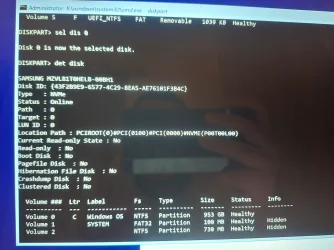
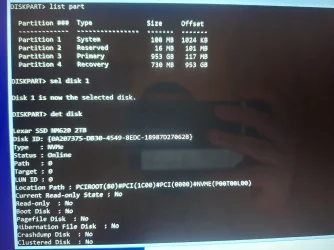
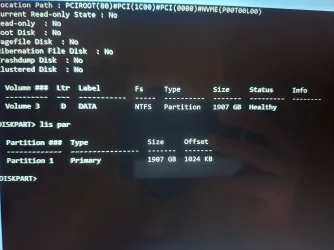
HELP!!! Unable to boot win after efi partition resizing


Really dumb question, where are your image backups? Surely, you did a backup before embarking on this adventure, right?
Well, that ought to make the OP feel better, but your first sentence, before the comma, is correct.
Happy holidays.
 

My Computers

System One System Two

  • OS
    All Branches but Release
    Computer type
    Laptop
    Manufacturer/Model
    Acer Nitro ANV15-51
    CPU
    AMD Ryzen 7 7735HS 3200-4500 Mhz 8 cores x 2
    Motherboard
    Sportage_RBH
    Memory
    32 GB DDR5
    Graphics Card(s)
    Radeon Graphic / NVIDIA GeForce RTX 4060 8 GB GDDR6
    Sound Card
    AMD/Realtek(R) Audio
    Monitor(s) Displays
    Integrated Monitor (15.3"vis)
    Screen Resolution
    FHD 1920X1080 16:9 144Hz
    Hard Drives
    KINGSTON OM8SEP4512Q-AA 1TB
    Western Digital 256GB
    PSU
    19V DC 6.32 A 120 W
    Cooling
    Dual Fans
    Mouse
    MS Bluetooth
    Internet Speed
    Fiber 1GB Cox -us & 1GB Orange-fr
    Browser
    Edge Canary- Firefox Nightly-Chrome Dev-Chrome Dev
    Antivirus
    Windows Defender
  • Operating System
    Windows 11 Beta
    Computer type
    Laptop
    Manufacturer/Model
    Asus X751BP
    CPU
    AMD A9-9420
    Memory
    8 GB of DDR4
    Graphics card(s)
    AMD Radeon R5
    Screen Resolution
    1600x900
    Hard Drives
    Seagate 1 TB
Never too late to impart a little education about backups.
 

My Computers

System One System Two

  • OS
    Win 11 Pro 25H2, Build 26200.8655
    Computer type
    PC/Desktop
    Manufacturer/Model
    Home Brew
    CPU
    Intel Core i5 14500
    Motherboard
    Gigabyte B760M G P WIFI
    Memory
    64GB DDR4
    Graphics Card(s)
    GeForce RTX 4060
    Sound Card
    Chipset Realtek
    Monitor(s) Displays
    LG 45" Ultragear, Acer 24" 1080p
    Screen Resolution
    5120x1440, 1920x1080
    Hard Drives
    Crucial P310 2TB 2280 PCIe Gen4 3D NAND NVMe M.2 SSD (O/S)
    Silicon Power 2TB US75 NVMe PCIe Gen4 M.2 2280 SSD (backup)
    Crucial BX500 2TB 3D NAND (2nd backup)
    Seagate 4TB Ironwolf, rotating HDD archive files
    External off-line backup Drives: 2 NVMe 4TB drives in external enclosures
    PSU
    Thermaltake Toughpower GF3 750W
    Case
    LIAN LI LANCOOL 216 E-ATX PC Case
    Cooling
    Lots of fans!
    Keyboard
    Microsoft Comfort Curve 2000
    Mouse
    Logitech G305
    Internet Speed
    Verizon FiOS 1GB
    Browser
    Firefox
    Antivirus
    Malware Bytes & Windows Defender Security
  • Operating System
    Win 11 Pro 25H2, Build 26200.8524
    Computer type
    PC/Desktop
    Manufacturer/Model
    Home Brew
    CPU
    Intel Core i5 14400
    Motherboard
    Gigabyte B760M DS3H AX
    Memory
    32GB DDR5
    Graphics card(s)
    Intel 700 Embedded GPU
    Sound Card
    Realtek Embedded
    Monitor(s) Displays
    27" HP 1080p
    Screen Resolution
    1920x1080
    Hard Drives
    Crucial P310 2TB 2280 PCIe Gen4 eD NAND PCIe SSD
    Samsung EVO 990 2TB NVMe Gen4 SSD
    Samsung 2TB SATA SSD
    PSU
    Thermaltake Smart BM3 650W
    Case
    Okinos Micro ATX Case
    Cooling
    Fans
    Keyboard
    Microsoft Comfort Curve 2000
    Mouse
    Logitech G305
    Internet Speed
    Verizon FiOS 1GB
    Browser
    Firefox
    Antivirus
    Malware Bytes & Windows Defender Security
  • Sad
Reactions: OAT
I Did but nothing happened

Idk really, i thought chkdsk sosmehow helped as after it the partition got back fs from unknown to ntfs


It fails in last command fails to copy boot files + after reboot now boots to screen saying boot device not found please install an operating system on your device its related to hp, easeus partition manager was supposed to do 3 operations 1st one moving data and it failed after it


Please find a camera or smartphone camera > take pictures > post images or share links


1) Boot to Windows RE > run startup repair > search for srttrail.txt > post a share link
(c:\windows\system32\logfiles\srt\srttrail.txt)


2) Boot to Windows RE > open system restore > post images or share links displaying available restore points


3) Boot to Windows RE > command prompt > type:

notepad

notepad

notepad

(Save these commands with results to notepad > save to a flash drive > move to a working computer > post a share link)

bcdedit /set {default} recoveryenabled No

bcdedit | find "osdevice"

diskpart

lis dis

lis vol

sel dis 0

det dis

lis par

sel dis 1

det dis

lis par


4) Run overnight while sleeping HP UEFI Hardware diagnostics: system > extensive > take pictures > post images or share links displaying the tests performed with results


HP PC Hardware Diagnostics UEFI – v10.8.3.0


Code:
TITLE:  HP PC Hardware Diagnostics UEFI (Win10/11 32/64-bit)
VERSION: 10.8.3.0
DESCRIPTION:
This package provides the HP PC Hardware Diagnostics UEFI version 10.8.3.0 in supported models that are running a supported operating systems.

PURPOSE: Routine
SoftPaq NUMBER: sp165721
EFFECTIVE DATE:  11/06/2025
CATEGORY:  Diagnostic
SSM SUPPORTED:  No
DEVICES SUPPORTED: N/A
PREREQUISITES: None
LANGUAGE(S):
English (US)
 

ENHANCEMENTS:
- Improves Audio Test.
- Improves Memory Test.
- Adds new Qualcomm processor support.
- Improves the HP BIOS Update utility.
FIXES:
- Various bug fixes.
HOW TO USE:
1. Download the file by clicking the Download or Obtain Software button and saving the file to a folder on your hard drive (make a note of the folder where the downloaded file is saved).

2. Double-click the downloaded file and follow the on-screen instructions to unpack the files to C:\SWSETUP\SP165721 or another directory of your choice.

3. Run the setup program from the directory that contains the unpacked softpaq files. Use the -? to list the command line options for the setup program.

NOTE: After double-clicking the downloaded file, select "This program installed correctly" on the Program Compatibility Assistant screen. This message is provided by the protection mechanism of Microsoft Windows.

This installer provides users the option to install to the HDD or a USB drive.
The HP PC Hardware Diagnostics UEFI must be run from a FAT or FAT32 partition with a partition name of "HP_TOOLS" or "EFI".

- If installed to the HDD and the HP_TOOLS or EFI partition is not present, the installer will prompt the user to create the partition.
- If installed to a USB drive, the installer will rename the partition on the USB drive to "HP_TOOLS"
- If installed with a custom image, the user can create the HP_TOOLS partition manually with type FAT32 and name the partition "HP_TOOLS"

Caution
- The HP_TOOLS partition is not protected and can therefore be deleted.
- Backing up the computer using the Windows Complete PC Restore and other backup software does not back up the HP_TOOLS partition.

HP recommends users not place additional data on the HP_TOOLS or EFI partition. Because the partition is not backed up, corruption or failure of the partition will result in loss of all data on the partition, plus loss of UEFI functionality.

For more information, see www.hp.com/go/techcenter/startup

Copyright (c) 2025 HP Development Company, L.P.

 

My Computer

System One

  • OS
    Windows 10
    Computer type
    Laptop
    Manufacturer/Model
    HP
    CPU
    Intel(R) Core(TM) i7-4800MQ CPU @ 2.70GHz
    Motherboard
    Product : 190A Version : KBC Version 94.56
    Memory
    16 GB Total: Manufacturer : Samsung MemoryType : DDR3 FormFactor : SODIMM Capacity : 8GB Speed : 1600
    Graphics Card(s)
    NVIDIA Quadro K3100M; Intel(R) HD Graphics 4600
    Sound Card
    IDT High Definition Audio CODEC; PNP Device ID HDAUDIO\FUNC_01&VEN_111D&DEV_76E0
    Hard Drives
    Model Hitachi HTS727575A9E364
    Antivirus
    Microsoft Defender
    Other Info
    Mobile Workstation
Really dumb question, where are your image backups? Surely, you did a backup before embarking on this adventure, right?
Usually i do things like this without backing up or creating restore pts, thats a lesson to learn
 

My Computer

System One

  • OS
    11
    Computer type
    Laptop
    Manufacturer/Model
    HP
I made a win11 wintogo usb and booted, the old win drive access is denied & have an unlocked lok symbol icon, im using getdataback software & changed its level to level 4 scan & currenty its scanning the drive will take time, will report whene it finishes
 

My Computer

System One

  • OS
    11
    Computer type
    Laptop
    Manufacturer/Model
    HP
Please find a camera or smartphone camera > take pictures > post images or share links


1) Boot to Windows RE > run startup repair > search for srttrail.txt > post a share link
(c:\windows\system32\logfiles\srt\srttrail.txt)


2) Boot to Windows RE > open system restore > post images or share links displaying available restore points


3) Boot to Windows RE > command prompt > type:

notepad

notepad

notepad

(Save these commands with results to notepad > save to a flash drive > move to a working computer > post a share link)

bcdedit /set {default} recoveryenabled No

bcdedit | find "osdevice"

diskpart

lis dis

lis vol

sel dis 0

det dis

lis par

sel dis 1

det dis

lis par


4) Run overnight while sleeping HP UEFI Hardware diagnostics: system > extensive > take pictures > post images or share links displaying the tests performed with results


HP PC Hardware Diagnostics UEFI – v10.8.3.0


Code:
TITLE:  HP PC Hardware Diagnostics UEFI (Win10/11 32/64-bit)
VERSION: 10.8.3.0
DESCRIPTION:
This package provides the HP PC Hardware Diagnostics UEFI version 10.8.3.0 in supported models that are running a supported operating systems.

PURPOSE: Routine
SoftPaq NUMBER: sp165721
EFFECTIVE DATE:  11/06/2025
CATEGORY:  Diagnostic
SSM SUPPORTED:  No
DEVICES SUPPORTED: N/A
PREREQUISITES: None
LANGUAGE(S):
English (US)
 

ENHANCEMENTS:
- Improves Audio Test.
- Improves Memory Test.
- Adds new Qualcomm processor support.
- Improves the HP BIOS Update utility.
FIXES:
- Various bug fixes.
HOW TO USE:
1. Download the file by clicking the Download or Obtain Software button and saving the file to a folder on your hard drive (make a note of the folder where the downloaded file is saved).

2. Double-click the downloaded file and follow the on-screen instructions to unpack the files to C:\SWSETUP\SP165721 or another directory of your choice.

3. Run the setup program from the directory that contains the unpacked softpaq files. Use the -? to list the command line options for the setup program.

NOTE: After double-clicking the downloaded file, select "This program installed correctly" on the Program Compatibility Assistant screen. This message is provided by the protection mechanism of Microsoft Windows.

This installer provides users the option to install to the HDD or a USB drive.
The HP PC Hardware Diagnostics UEFI must be run from a FAT or FAT32 partition with a partition name of "HP_TOOLS" or "EFI".

- If installed to the HDD and the HP_TOOLS or EFI partition is not present, the installer will prompt the user to create the partition.
- If installed to a USB drive, the installer will rename the partition on the USB drive to "HP_TOOLS"
- If installed with a custom image, the user can create the HP_TOOLS partition manually with type FAT32 and name the partition "HP_TOOLS"

Caution
- The HP_TOOLS partition is not protected and can therefore be deleted.
- Backing up the computer using the Windows Complete PC Restore and other backup software does not back up the HP_TOOLS partition.

HP recommends users not place additional data on the HP_TOOLS or EFI partition. Because the partition is not backed up, corruption or failure of the partition will result in loss of all data on the partition, plus loss of UEFI functionality.

For more information, see www.hp.com/go/techcenter/startup

Copyright (c) 2025 HP Development Company, L.P.
1) how to access the srttrial text file ? So i can share it here
2) no sys restore pts avilable as i already had it disabled before in windows
3) saw your post earlier but didnt understand the 3 times notepad command so didnt continue
4) as for hp uefi diagnostics i dont think it have nothing to do with what im currently dealing but can try it
 

My Computer

System One

  • OS
    11
    Computer type
    Laptop
    Manufacturer/Model
    HP
if you put the ssd in another computer, you can copy any files you need, if any. then just re-install win11 and copy those files back.
 

My Computer

System One

  • OS
    Win11
    Computer type
    PC/Desktop
    Manufacturer/Model
    Asus Home built
    CPU
    i9-13900
    Motherboard
    ASUS Strix Z790-H
    Memory
    64 GB
    Graphics Card(s)
    Nvidia RTX 5070 TI OC
    Monitor(s) Displays
    Sony 55"
    Hard Drives
    SSD
    PSU
    850 watt EVGA
    Case
    Cooler Master Haf 932
    Cooling
    CoolerMaster
    Keyboard
    RedDragon
    Mouse
    CoolerMaster
    Internet Speed
    300/300
    Antivirus
    Defender
    Other Info
    VR, Virtual Reality
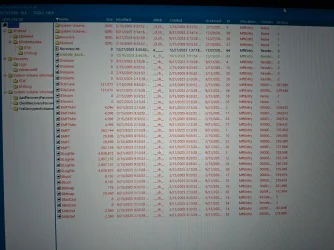
It dispslayed the partitions,

presume you mean diskgenius displays the partitions as they should be , and not as reported by macrium boot media.

tried recover files but nothing

You could try a different data recovery tool such as testdisk, but if DG can't find anything I am not hopeful.

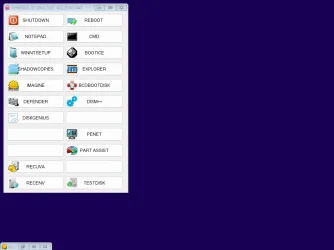
Cant remember what is on DG recovery media does it contain something for screenshots? I have a vague recollection it has a quasi dektop

I make my own pe . Sometimes I do the whole wow support etc. other times I just knock up a simple version in a couple of minutes with a menu that links to several programs including something for screenshots. So I cant remember what is included in the programs own original boot media.
 

My Computers

System One System Two

  • OS
    Win7,Win11
    Computer type
    PC/Desktop
    CPU
    i7-9700
    Motherboard
    gigabyte b365m ds3h
    Memory
    2x16gb 3600mhz
    Monitor(s) Displays
    benq gw2480
    PSU
    bequiet pure power 11 400CM
    Cooling
    cryorig m9i
  • Operating System
    win7,win11
    Computer type
    PC/Desktop
    CPU
    i5-8400
    Motherboard
    gigabyte b365m ds3h
    Memory
    2x8gb 3200
    PSU
    xfx pro 450
1) how to access the srttrial text file ? So i can share it here
2) no sys restore pts avilable as i already had it disabled before in windows
3) saw your post earlier but didnt understand the 3 times notepad command so didnt continue
4) as for hp uefi diagnostics i dont think it have nothing to do with what im currently dealing but can try it


Please post results for:

Code:
bcdedit /set {default} recoveryenabled No

bcdedit | find "osdevice"

diskpart

lis dis

lis vol

sel dis 0

det dis

lis par

sel dis 1

det dis

lis par
 

My Computer

System One

  • OS
    Windows 10
    Computer type
    Laptop
    Manufacturer/Model
    HP
    CPU
    Intel(R) Core(TM) i7-4800MQ CPU @ 2.70GHz
    Motherboard
    Product : 190A Version : KBC Version 94.56
    Memory
    16 GB Total: Manufacturer : Samsung MemoryType : DDR3 FormFactor : SODIMM Capacity : 8GB Speed : 1600
    Graphics Card(s)
    NVIDIA Quadro K3100M; Intel(R) HD Graphics 4600
    Sound Card
    IDT High Definition Audio CODEC; PNP Device ID HDAUDIO\FUNC_01&VEN_111D&DEV_76E0
    Hard Drives
    Model Hitachi HTS727575A9E364
    Antivirus
    Microsoft Defender
    Other Info
    Mobile Workstation
presume you mean diskgenius displays the partitions as they should be , and not as reported by macrium boot media.


You could try a different data recovery tool such as testdisk, but if DG can't find anything I am not hopeful.

Cant remember what is on DG recovery media does it contain something for screenshots? I have a vague recollection it has a quasi dektop

I make my own pe . Sometimes I do the whole wow support etc. other times I just knock up a simple version in a couple of minutes with a menu that links to several programs including something for screenshots. So I cant remember what is included in the programs own original boot media.
Yes dg shows same info as macrium as in the photo above i posted in win installtion menu, but in macrium i press properities it shows 1.65tb total space while the drive is 1tb & used 952gb which is similar to the size of the total size shown in dg,macrium (outside properities) & win installation, this is where made me think that the data might be there but idk
 

My Computer

System One

  • OS
    11
    Computer type
    Laptop
    Manufacturer/Model
    HP
You could try testdisk @jumanji might be able to walk you through it


Captured_002.webp
 

My Computers

System One System Two

  • OS
    Win7,Win11
    Computer type
    PC/Desktop
    CPU
    i7-9700
    Motherboard
    gigabyte b365m ds3h
    Memory
    2x16gb 3600mhz
    Monitor(s) Displays
    benq gw2480
    PSU
    bequiet pure power 11 400CM
    Cooling
    cryorig m9i
  • Operating System
    win7,win11
    Computer type
    PC/Desktop
    CPU
    i5-8400
    Motherboard
    gigabyte b365m ds3h
    Memory
    2x8gb 3200
    PSU
    xfx pro 450
Did people miss he mention bitlocker is activated? If files are recovered will they be readable ?
 

My Computer

System One

  • OS
    Windows 11 Pro
    Computer type
    PC/Desktop
    Manufacturer/Model
    Homemade by me
    CPU
    Intel i5 12600K
    Motherboard
    MSI PRO Z690-A DDR4
    Memory
    G.Skill Ripjaws V DDR4 3600 MHz / PC4-28800 CL16 2x8 GB
    Graphics Card(s)
    Intel® UHD Graphics 770 (iGPU)
    Sound Card
    8-Channel (7.1) HD Audio
    Monitor(s) Displays
    Legion/Lenovo Y25-25
    Screen Resolution
    Full HD 1920 x 1080
    Hard Drives
    WD Black NVMe M.2 500 GB (system drive)
    Case
    Lian-Li
    Keyboard
    Old solid and heavy IBM🙂
    Mouse
    Logitech
    Internet Speed
    1000 mbit
    Antivirus
    Avast free
This is what getdataback pro found, idk if anything is useful
 

Attachments

  • 1000052249.webp
    1000052249.webp
    1.1 MB · Views: 1

My Computer

System One

  • OS
    11
    Computer type
    Laptop
    Manufacturer/Model
    HP
Please post results for:

Code:
bcdedit /set {default} recoveryenabled No

bcdedit | find "osdevice"

diskpart

lis dis

lis vol

sel dis 0

det dis

lis par

sel dis 1

det dis

lis par
 

Attachments

  • 1000052251.webp
    1000052251.webp
    494.5 KB · Views: 2

My Computer

System One

  • OS
    11
    Computer type
    Laptop
    Manufacturer/Model
    HP
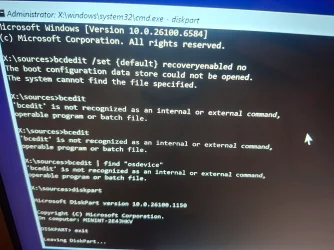
the command was bcdedit (not bcedit).


BCD could not be opened.


My Computer

System One

  • OS
    Windows 10
    Computer type
    Laptop
    Manufacturer/Model
    HP
    CPU
    Intel(R) Core(TM) i7-4800MQ CPU @ 2.70GHz
    Motherboard
    Product : 190A Version : KBC Version 94.56
    Memory
    16 GB Total: Manufacturer : Samsung MemoryType : DDR3 FormFactor : SODIMM Capacity : 8GB Speed : 1600
    Graphics Card(s)
    NVIDIA Quadro K3100M; Intel(R) HD Graphics 4600
    Sound Card
    IDT High Definition Audio CODEC; PNP Device ID HDAUDIO\FUNC_01&VEN_111D&DEV_76E0
    Hard Drives
    Model Hitachi HTS727575A9E364
    Antivirus
    Microsoft Defender
    Other Info
    Mobile Workstation
Yes ik i rewrote it
bcedit | find "osdevice" was typed instead of bcdedit


My Computer

System One

  • OS
    Windows 10
    Computer type
    Laptop
    Manufacturer/Model
    HP
    CPU
    Intel(R) Core(TM) i7-4800MQ CPU @ 2.70GHz
    Motherboard
    Product : 190A Version : KBC Version 94.56
    Memory
    16 GB Total: Manufacturer : Samsung MemoryType : DDR3 FormFactor : SODIMM Capacity : 8GB Speed : 1600
    Graphics Card(s)
    NVIDIA Quadro K3100M; Intel(R) HD Graphics 4600
    Sound Card
    IDT High Definition Audio CODEC; PNP Device ID HDAUDIO\FUNC_01&VEN_111D&DEV_76E0
    Hard Drives
    Model Hitachi HTS727575A9E364
    Antivirus
    Microsoft Defender
    Other Info
    Mobile Workstation
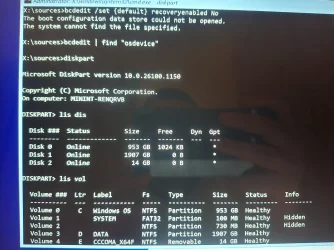
bcedit | find "osdevice" was typed instead of bcdedit


Attachments

  • 1000052256.webp
    1000052256.webp
    488.8 KB · Views: 1
  • 1000052257.webp
    1000052257.webp
    433.7 KB · Views: 1
  • 1000052258.webp
    1000052258.webp
    405.1 KB · Views: 1
  • 1000052259.webp
    1000052259.webp
    346 KB · Views: 1

My Computer

System One

  • OS
    11
    Computer type
    Laptop
    Manufacturer/Model
    HP
I think no hope to get my win drive back, right ?
 

My Computer

System One

  • OS
    11
    Computer type
    Laptop
    Manufacturer/Model
    HP
isn't there a command 'make drive bootable' on many partition software apps? Put the app on a usb drive and point it at C drive, and tell it to make it bootable. it should only over write a small area (I think the area is already designated on ssd drives for that).. If right now the drive is a brick, what would it hurt? Cannot help with bitlocker, I myself have no need for that and never want to use it, I cannot tell others not to. But I will never use that.
 

My Computer

System One

  • OS
    Win11
    Computer type
    PC/Desktop
    Manufacturer/Model
    Asus Home built
    CPU
    i9-13900
    Motherboard
    ASUS Strix Z790-H
    Memory
    64 GB
    Graphics Card(s)
    Nvidia RTX 5070 TI OC
    Monitor(s) Displays
    Sony 55"
    Hard Drives
    SSD
    PSU
    850 watt EVGA
    Case
    Cooler Master Haf 932
    Cooling
    CoolerMaster
    Keyboard
    RedDragon
    Mouse
    CoolerMaster
    Internet Speed
    300/300
    Antivirus
    Defender
    Other Info
    VR, Virtual Reality
Back
Top Bottom