HELP!!! Unable to boot win after efi partition resizing


isn't there a command 'make drive bootable' on many partition software apps? Put the app on a usb drive and point it at C drive, and tell it to make it bootable. it should only over write a small area (I think the area is already designated on ssd drives for that).. If right now the drive is a brick, what would it hurt? Cannot help with bitlocker, I myself have no need for that and never want to use it, I cannot tell others not to. But I will never use that.
idk really, for bitlocker it was open since i bought the device for me i wont have used it
 

My Computer

System One

  • OS
    11
    Computer type
    Laptop
    Manufacturer/Model
    HP
@jumanji may have some comments on testdisk and the getdataback results.
 

My Computer

System One

  • OS
    Windows 10
    Computer type
    Laptop
    Manufacturer/Model
    HP
    CPU
    Intel(R) Core(TM) i7-4800MQ CPU @ 2.70GHz
    Motherboard
    Product : 190A Version : KBC Version 94.56
    Memory
    16 GB Total: Manufacturer : Samsung MemoryType : DDR3 FormFactor : SODIMM Capacity : 8GB Speed : 1600
    Graphics Card(s)
    NVIDIA Quadro K3100M; Intel(R) HD Graphics 4600
    Sound Card
    IDT High Definition Audio CODEC; PNP Device ID HDAUDIO\FUNC_01&VEN_111D&DEV_76E0
    Hard Drives
    Model Hitachi HTS727575A9E364
    Antivirus
    Microsoft Defender
    Other Info
    Mobile Workstation
@jumanji may have some comments on testdisk and the getdataback results.
Yes please, so i know where i stand as i need the lapatop so of there is no hope i will clean install the windows, unfortuantely what to do !?
 

My Computer

System One

  • OS
    11
    Computer type
    Laptop
    Manufacturer/Model
    HP
Learn how to use TestDisk to recover deleted files in this easy-to-follow tutorial. TestDisk is a powerful tool for data recovery, so don't panic if you accidentally delete something important!
 

My Computer

System One

  • OS
    Windows 11
    Computer type
    PC/Desktop
    Manufacturer/Model
    HP Pavilion
    CPU
    AMD Ryzen 7 5700G
    Motherboard
    Erica6
    Memory
    Micron Technology DDR4-3200 16GB
    Graphics Card(s)
    NVIDIA GeForce RTX 3060
    Sound Card
    Realtek ALC671
    Monitor(s) Displays
    Samsung SyncMaster U28E590
    Screen Resolution
    3840 x 2160
    Hard Drives
    SAMSUNG MZVLQ1T0HALB-000H1
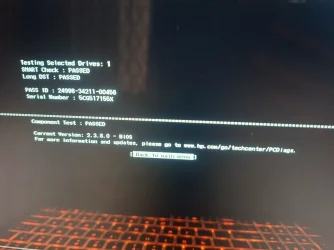
After attempted data recovery please test the drive with the HP UEFI hardware diagnostics (see earlier post).
 

My Computer

System One

  • OS
    Windows 10
    Computer type
    Laptop
    Manufacturer/Model
    HP
    CPU
    Intel(R) Core(TM) i7-4800MQ CPU @ 2.70GHz
    Motherboard
    Product : 190A Version : KBC Version 94.56
    Memory
    16 GB Total: Manufacturer : Samsung MemoryType : DDR3 FormFactor : SODIMM Capacity : 8GB Speed : 1600
    Graphics Card(s)
    NVIDIA Quadro K3100M; Intel(R) HD Graphics 4600
    Sound Card
    IDT High Definition Audio CODEC; PNP Device ID HDAUDIO\FUNC_01&VEN_111D&DEV_76E0
    Hard Drives
    Model Hitachi HTS727575A9E364
    Antivirus
    Microsoft Defender
    Other Info
    Mobile Workstation
You could try testdisk @jumanji might be able to walk you through it

@jumanji may have some comments on testdisk and the getdataback results.
On SIW2's call, I did a qutck run-through this thread, and was shell-shocked to read OP's statement in his post #38 - "also forgot to mention bitlocker is on, think its on since i bought the laptop"
The OP didn't even know that his HP Elite x360 with Windows 11 Home on it encrypts all internal disks/drives - Device encryption- on initial setup with Microsoft Account and he had tried to update BIOS and has crash-landed into this situation.

"One should suspend or disable BitLocker/Device Encryption before a BIOS update because the update changes system security settings, causing BitLocker to fail to recognize the security key (Trusted Platform Module or TPM) and trigger recovery mode, which demands a recovery key or risks data loss/reinstallation. Suspending it allows the update to proceed without this security check interruption, and you can easily re-enable it afterward.

Why it happens:
Security Changes:
BIOS updates modify fundamental hardware security configurations (like TPM settings).
Key Mismatch: BitLocker relies on these hardware settings; a change triggers a security alert, as the system sees an unauthorized modification to its secure environment.
Recovery Mode: The system then asks for the BitLocker recovery key on every boot,
which can be inconvenient or lead to data loss if the key isn't readily available."

The OP had failed to do this and has further manipulated and tried to enlarge the EFI partition.

In this situation no data recovery progaram be it Disk Genius, Getdataback. or TestDisk will help. One has to explore other ways of tackling the issue.
 
Last edited:

My Computers

System One System Two

  • OS
    Windows 11 Pro Version:25H2 OS Build: 26200.8655
    Computer type
    PC/Desktop
    Manufacturer/Model
    Beelink Mini PC Model: SEi12
    CPU
    12th Gen Intel core i5-1235U(Alder
    Motherboard
    SEi (manufactured by AZW)
    Memory
    16*2 (32 GB) DDR 4-3200(1600MHz) Crucial Technology
    Graphics Card(s)
    Intel Iris Xe Graphics (Internal)
    Sound Card
    Internal
    Monitor(s) Displays
    BenQ GW2283
    Screen Resolution
    1920*1080
    Hard Drives
    500GB NVME (Kingston SNV2S500G)
    1TB (Crucial CT1000BX500SSD1)
    PSU
    Power Brick 19V-6.32A , 120.08W
    Keyboard
    Dell KB3322Wi (Wireless)
    Mouse
    Dell WM118t (Wireless)
    Internet Speed
    4G/5G
    Browser
    MS Edge, Chrome
    Antivirus
    Malwarebytes Premium - Subscription
  • Operating System
    Windows 11 Home Version 25H2 Build 26200.8655
    Computer type
    PC/Desktop
    Manufacturer/Model
    Dell Inspiron 3280 AIO 22"
    CPU
    Intel Core i3 8145U
    Motherboard
    Dell inc. 027W48
    Memory
    Intel Optane 16GB module + DDR 4 16GB (Optane disabled.)
    Graphics card(s)
    Intel UHD Graphics 620
    Sound Card
    Internal
    Monitor(s) Displays
    Dell Monitor 22"
    Screen Resolution
    1920x1080
    Hard Drives
    Crucial CT1000BX500SSD1 ; 1000,2 GB
    PSU
    Power Brick
    Case
    All-in one
    Keyboard
    Dell Wireless KM636
    Mouse
    Dell Wireless KM 636
    Internet Speed
    4G
    Browser
    Edge, Chrome
    Antivirus
    Malwarebytes
    Other Info
    Upgraded from Windows 10 Home to Windows 11 Home on 28 Oct 2023
@nightf0x

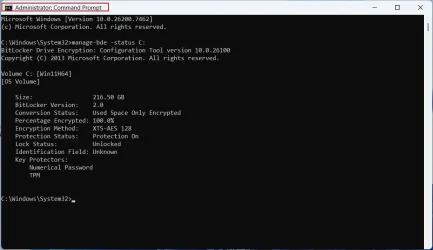
1.On an elevated Command prompt type: manage-bde -status C:

Let us see what it shows. Post the screenshot.

Sample screenshot -my disk29-12-2025 11-42-58.webp


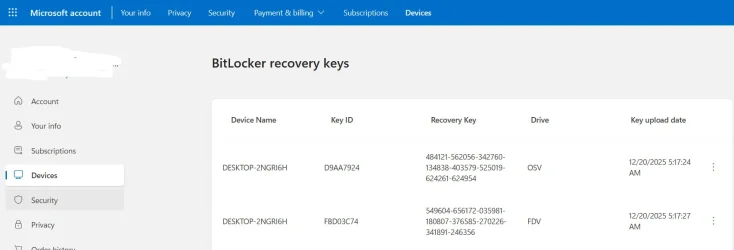
On another PC log into your Microsoft Account > Devices > Info & Support > Manage Recovery Keys
It should show your Device and Recovery keys

How many Drive OSV and drive FDV keys are there?

It will also show the date on which the Keys were saved. In your case the date on which you did the initial setup.

Take a screenshot, save and keep it. Log out from your MS account

Sample screenshot:29-12-2025 12-02-53.webp

HBCD: On another PC and on an empty flash drive create Hiren's BootCD PE x64 (v1.0.8) - ISO Download | Hiren's BootCD PE

On this page USB Booting | Hiren's BootCD PE you will see instructions on creating the flash drive using Rufus. Follow that procedure ( Some hidden parameter has to be activated). You can download the latest version of Rufus here Rufus - Create bootable USB drives the easy way

Boot your faulty PC with the HBCD, take a screenshot of Windows Disk Management and post it.

Note: This is only for information gathering that should help other experts to suggest ways and means of restoring your disk if possible. I hadn't done any project of this sort before and neither am I a Windows system expert. I know what I can do and what I can't :-). There are more capable system experts here .

 
Last edited:

My Computers

System One System Two

  • OS
    Windows 11 Pro Version:25H2 OS Build: 26200.8655
    Computer type
    PC/Desktop
    Manufacturer/Model
    Beelink Mini PC Model: SEi12
    CPU
    12th Gen Intel core i5-1235U(Alder
    Motherboard
    SEi (manufactured by AZW)
    Memory
    16*2 (32 GB) DDR 4-3200(1600MHz) Crucial Technology
    Graphics Card(s)
    Intel Iris Xe Graphics (Internal)
    Sound Card
    Internal
    Monitor(s) Displays
    BenQ GW2283
    Screen Resolution
    1920*1080
    Hard Drives
    500GB NVME (Kingston SNV2S500G)
    1TB (Crucial CT1000BX500SSD1)
    PSU
    Power Brick 19V-6.32A , 120.08W
    Keyboard
    Dell KB3322Wi (Wireless)
    Mouse
    Dell WM118t (Wireless)
    Internet Speed
    4G/5G
    Browser
    MS Edge, Chrome
    Antivirus
    Malwarebytes Premium - Subscription
  • Operating System
    Windows 11 Home Version 25H2 Build 26200.8655
    Computer type
    PC/Desktop
    Manufacturer/Model
    Dell Inspiron 3280 AIO 22"
    CPU
    Intel Core i3 8145U
    Motherboard
    Dell inc. 027W48
    Memory
    Intel Optane 16GB module + DDR 4 16GB (Optane disabled.)
    Graphics card(s)
    Intel UHD Graphics 620
    Sound Card
    Internal
    Monitor(s) Displays
    Dell Monitor 22"
    Screen Resolution
    1920x1080
    Hard Drives
    Crucial CT1000BX500SSD1 ; 1000,2 GB
    PSU
    Power Brick
    Case
    All-in one
    Keyboard
    Dell Wireless KM636
    Mouse
    Dell Wireless KM 636
    Internet Speed
    4G
    Browser
    Edge, Chrome
    Antivirus
    Malwarebytes
    Other Info
    Upgraded from Windows 10 Home to Windows 11 Home on 28 Oct 2023
as i need the lapatop so of there is no hope i will clean install the windows
Then whip out the existing drive, replace it with a new drive and do a clean install, making sure Bitlocker is disabled, and get on with whatever you have to do

Then get an external enclosure for the (problem) drive and work on it from there
 

My Computers

System One System Two

  • OS
    Windows 11 2xH2 (latest update ... forever anal)
    Computer type
    PC/Desktop
    Manufacturer/Model
    HP Slim S01
    CPU
    Intel i5-12400
    Memory
    8GB
    Graphics Card(s)
    NVIDIA GeForce GT730
    Sound Card
    OOBE
    Monitor(s) Displays
    Acer 32"
    Screen Resolution
    1920x1080
    Hard Drives
    512GB KIOXIA NVMe
    1TB SATA SSD
    PSU
    OOBE
    Case
    OOBE
    Cooling
    OOBE
    Keyboard
    BT
    Mouse
    BT
    Browser
    Brave FFox Chrome Opera
    Antivirus
    KIS
  • Operating System
    Windows 11 Pro 2xH2 (latest update ... 4ever anal)
    Computer type
    Laptop
    Manufacturer/Model
    HP Pavillion 15
    CPU
    i7-1165G7 @ 2.80GHz
    Graphics card(s)
    Intel Iris Xe Graphics
    Hard Drives
    Samsung NVMe 512GB
    + numerous/multiple SSD Type C USB enclosures
    Internet Speed
    NBN FTTN 50
    Browser
    Brave
    Antivirus
    KIS
No, not now @idgat. We are actually at the fag end of the process. Once the OP provides the data asked for, me and other experts can analyse and check whether there is any light at the other end of the tunnel and decide whether the disk can be restored.

The other crucial point is that, if he takes the disk out and puts it into an external enclosure, it will totally be impossible to recover the data. If we find that the disk is locked, we won't be able to unlock it for this process of unlocking has to be carried out by the BIOS + TPM in the mother board. (In Device encryption External disks will not be encrypted and not controlled by TPM)
 

My Computers

System One System Two

  • OS
    Windows 11 Pro Version:25H2 OS Build: 26200.8655
    Computer type
    PC/Desktop
    Manufacturer/Model
    Beelink Mini PC Model: SEi12
    CPU
    12th Gen Intel core i5-1235U(Alder
    Motherboard
    SEi (manufactured by AZW)
    Memory
    16*2 (32 GB) DDR 4-3200(1600MHz) Crucial Technology
    Graphics Card(s)
    Intel Iris Xe Graphics (Internal)
    Sound Card
    Internal
    Monitor(s) Displays
    BenQ GW2283
    Screen Resolution
    1920*1080
    Hard Drives
    500GB NVME (Kingston SNV2S500G)
    1TB (Crucial CT1000BX500SSD1)
    PSU
    Power Brick 19V-6.32A , 120.08W
    Keyboard
    Dell KB3322Wi (Wireless)
    Mouse
    Dell WM118t (Wireless)
    Internet Speed
    4G/5G
    Browser
    MS Edge, Chrome
    Antivirus
    Malwarebytes Premium - Subscription
  • Operating System
    Windows 11 Home Version 25H2 Build 26200.8655
    Computer type
    PC/Desktop
    Manufacturer/Model
    Dell Inspiron 3280 AIO 22"
    CPU
    Intel Core i3 8145U
    Motherboard
    Dell inc. 027W48
    Memory
    Intel Optane 16GB module + DDR 4 16GB (Optane disabled.)
    Graphics card(s)
    Intel UHD Graphics 620
    Sound Card
    Internal
    Monitor(s) Displays
    Dell Monitor 22"
    Screen Resolution
    1920x1080
    Hard Drives
    Crucial CT1000BX500SSD1 ; 1000,2 GB
    PSU
    Power Brick
    Case
    All-in one
    Keyboard
    Dell Wireless KM636
    Mouse
    Dell Wireless KM 636
    Internet Speed
    4G
    Browser
    Edge, Chrome
    Antivirus
    Malwarebytes
    Other Info
    Upgraded from Windows 10 Home to Windows 11 Home on 28 Oct 2023
@nightf0x
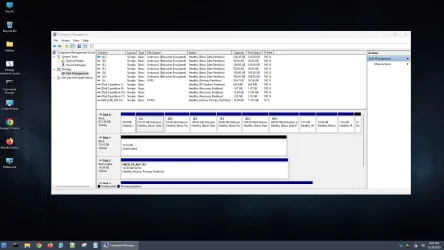
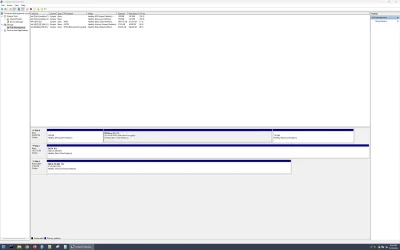
Continuing with my post #87 here is the screenshot of Windows Disk Management taken with HBCD snipping tool and saved to another flash drive.

Capture1.webp

Right click on "This PC"> Manage > Storage -Disk Management. Take the screenshot with Snipping Tool-find it in the Task Bar. By default HBCD will try save it in the Pictures folder. Change the location and save it to the HBCD Flash drive itself so that you can access it in another PC and post it.

Incidentally when I tried to save it to the D: drive which is encrypted, it asked for the Recovery key to unlock it. Though I have the key on file, I chose to save it to another flash drive. This implies that if you find the Key in your Microsoft account and is not corrupted by the botched BIOS update, you should be able to unlock your C: . If successful you should be able to access all your files and copy to an external disk. Let us see if you are lucky.
( Hmmmm.... I have been having this HBCD flash drive for a longtime and update it to newer version whenever a new version is available but this is the first time I used it on my PC and learnt something new.)
 
Last edited:

My Computers

System One System Two

  • OS
    Windows 11 Pro Version:25H2 OS Build: 26200.8655
    Computer type
    PC/Desktop
    Manufacturer/Model
    Beelink Mini PC Model: SEi12
    CPU
    12th Gen Intel core i5-1235U(Alder
    Motherboard
    SEi (manufactured by AZW)
    Memory
    16*2 (32 GB) DDR 4-3200(1600MHz) Crucial Technology
    Graphics Card(s)
    Intel Iris Xe Graphics (Internal)
    Sound Card
    Internal
    Monitor(s) Displays
    BenQ GW2283
    Screen Resolution
    1920*1080
    Hard Drives
    500GB NVME (Kingston SNV2S500G)
    1TB (Crucial CT1000BX500SSD1)
    PSU
    Power Brick 19V-6.32A , 120.08W
    Keyboard
    Dell KB3322Wi (Wireless)
    Mouse
    Dell WM118t (Wireless)
    Internet Speed
    4G/5G
    Browser
    MS Edge, Chrome
    Antivirus
    Malwarebytes Premium - Subscription
  • Operating System
    Windows 11 Home Version 25H2 Build 26200.8655
    Computer type
    PC/Desktop
    Manufacturer/Model
    Dell Inspiron 3280 AIO 22"
    CPU
    Intel Core i3 8145U
    Motherboard
    Dell inc. 027W48
    Memory
    Intel Optane 16GB module + DDR 4 16GB (Optane disabled.)
    Graphics card(s)
    Intel UHD Graphics 620
    Sound Card
    Internal
    Monitor(s) Displays
    Dell Monitor 22"
    Screen Resolution
    1920x1080
    Hard Drives
    Crucial CT1000BX500SSD1 ; 1000,2 GB
    PSU
    Power Brick
    Case
    All-in one
    Keyboard
    Dell Wireless KM636
    Mouse
    Dell Wireless KM 636
    Internet Speed
    4G
    Browser
    Edge, Chrome
    Antivirus
    Malwarebytes
    Other Info
    Upgraded from Windows 10 Home to Windows 11 Home on 28 Oct 2023
On SIW2's call, I did a qutck run-through this thread, and was shell-shocked to read OP's statement in his post #38 - "also forgot to mention bitlocker is on, think its on since i bought the laptop"
The OP didn't even know that his HP Elite x360 with Windows 11 Home on it encrypts all internal disks/drives - Device encryption- on initial setup with Microsoft Account and he had tried to update BIOS and has crash-landed into this situation.

"One should suspend or disable BitLocker/Device Encryption before a BIOS update because the update changes system security settings, causing BitLocker to fail to recognize the security key (Trusted Platform Module or TPM) and trigger recovery mode, which demands a recovery key or risks data loss/reinstallation. Suspending it allows the update to proceed without this security check interruption, and you can easily re-enable it afterward.

Why it happens:
Security Changes:
BIOS updates modify fundamental hardware security configurations (like TPM settings).
Key Mismatch: BitLocker relies on these hardware settings; a change triggers a security alert, as the system sees an unauthorized modification to its secure environment.
Recovery Mode: The system then asks for the BitLocker recovery key on every boot,
which can be inconvenient or lead to data loss if the key isn't readily available."

The OP had failed to do this and has further manipulated and tried to enlarge the EFI partition.

In this situation no data recovery progaram be it Disk Genius, Getdataback. or TestDisk will help. One has to explore other ways of tackling the issue.
i used to update bios before without any issues but this last time it was out of space so i went and resized the efi partition and all this happened
 

My Computer

System One

  • OS
    11
    Computer type
    Laptop
    Manufacturer/Model
    HP
@nightf0x

1.On an elevated Command prompt type: manage-bde -status C:

Let us see what it shows. Post the screenshot.

Sample screenshot -my diskView attachment 158289


On another PC log into your Microsoft Account > Devices > Info & Support > Manage Recovery Keys
It should show your Device and Recovery keys

How many Drive OSV and drive FDV keys are there?

It will also show the date on which the Keys were saved. In your case the date on which you did the initial setup.

Take a screenshot, save and keep it. Log out from your MS account

Sample screenshot:View attachment 158290

HBCD: On another PC and on an empty flash drive create Hiren's BootCD PE x64 (v1.0.8) - ISO Download | Hiren's BootCD PE

On this page USB Booting | Hiren's BootCD PE you will see instructions on creating the flash drive using Rufus. Follow that procedure ( Some hidden parameter has to be activated). You can download the latest version of Rufus here Rufus - Create bootable USB drives the easy way

Boot your faulty PC with the HBCD, take a screenshot of Windows Disk Management and post it.

Note: This is only for information gathering that should help other experts to suggest ways and means of restoring your disk if possible. I hadn't done any project of this sort before and neither am I a Windows system expert. I know what I can do and what I can't :-). There are more capable system experts here .
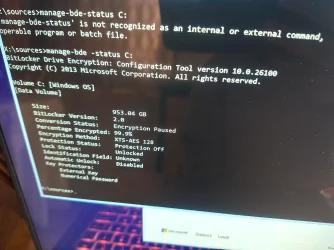
Attached screenshot & in my ms account no any bitlocker recovery keys stored
 

Attachments

  • 1000052674.webp
    1000052674.webp
    417 KB · Views: 1

My Computer

System One

  • OS
    11
    Computer type
    Laptop
    Manufacturer/Model
    HP
After attempted data recovery please test the drive with the HP UEFI hardware diagnostics (see earlier post).
Here it is
 

Attachments

  • 1000052678.webp
    1000052678.webp
    327.5 KB · Views: 1

My Computer

System One

  • OS
    11
    Computer type
    Laptop
    Manufacturer/Model
    HP
@nightf0x
Continuing with my post #87 here is the screenshot of Windows Disk Management taken with HBCD snipping tool and saved to another flash drive.

View attachment 158305

Right click on "This PC"> Manage > Storage -Disk Management. Take the screenshot with Snipping Tool-find it in the Task Bar. By default HBCD will try save it in the Pictures folder. Change the location and save it to the HBCD Flash drive itself so that you can access it in another PC and post it.

Incidentally when I tried to save it to the D: drive which is encrypted, it asked for the Recovery key to unlock it. Though I have the key on file, I chose to save it to another flash drive. This implies that if you find the Key in your Microsoft account and is not corrupted by the botched BIOS update, you should be able to unlock your C: . If successful you should be able to access all your files and copy to an external disk. Let us see if you are lucky.
( Hmmmm.... I have been having this HBCD flash drive for a longtime and update it to newer version whenever a new version is available but this is the first time I used it on my PC and learnt something new.)
Here it is
 

Attachments

  • Capture.webp
    Capture.webp
    96.2 KB · Views: 1

My Computer

System One

  • OS
    11
    Computer type
    Laptop
    Manufacturer/Model
    HP
Do you have BitLocker recovery key?


Follow these steps to turn off BitLocker:

  1. Type the following command, replacing the example numbers with your actual 48-digit recovery key:
  2. manage-bde -unlock c: -rp XXXXXX-XXXXXX-XXXXXX-XXXXXX-XXXXXX-XXXXXX-XXXXXX-XXXXXX
    Note: Your recovery key is 48 digits separated by dashes. Make sure you use the recovery key specific to your device.
  3. Press Enter.
  4. Wait for the message that says Successfully unlocked volume C:.
Now try to recover your files.
 

My Computer

System One

  • OS
    Windows 11
    Computer type
    PC/Desktop
    Manufacturer/Model
    HP Pavilion
    CPU
    AMD Ryzen 7 5700G
    Motherboard
    Erica6
    Memory
    Micron Technology DDR4-3200 16GB
    Graphics Card(s)
    NVIDIA GeForce RTX 3060
    Sound Card
    Realtek ALC671
    Monitor(s) Displays
    Samsung SyncMaster U28E590
    Screen Resolution
    3840 x 2160
    Hard Drives
    SAMSUNG MZVLQ1T0HALB-000H1
Do you have BitLocker recovery key?


Follow these steps to turn off BitLocker:

  1. Type the following command, replacing the example numbers with your actual 48-digit recovery key:
  2. manage-bde -unlock c: -rp XXXXXX-XXXXXX-XXXXXX-XXXXXX-XXXXXX-XXXXXX-XXXXXX-XXXXXX
    Note: Your recovery key is 48 digits separated by dashes. Make sure you use the recovery key specific to your device.
  3. Press Enter.
  4. Wait for the message that says Successfully unlocked volume C:.
Now try to recover your files.
Unfortunately i think no, in my ms account there is nothing stored there, also i want to ask is thats why its showing the drive storage is empty ? As if data is encrypted or something ? Otheriwse it would show the real storage space used & free Or data is gone already
 

My Computer

System One

  • OS
    11
    Computer type
    Laptop
    Manufacturer/Model
    HP
Because of encryption, we can't view and recover files its best to clean-install Windows 11 as the all instructions to boot Windows 11 will fail.
 

My Computer

System One

  • OS
    Windows 11
    Computer type
    PC/Desktop
    Manufacturer/Model
    HP Pavilion
    CPU
    AMD Ryzen 7 5700G
    Motherboard
    Erica6
    Memory
    Micron Technology DDR4-3200 16GB
    Graphics Card(s)
    NVIDIA GeForce RTX 3060
    Sound Card
    Realtek ALC671
    Monitor(s) Displays
    Samsung SyncMaster U28E590
    Screen Resolution
    3840 x 2160
    Hard Drives
    SAMSUNG MZVLQ1T0HALB-000H1
  • Like
Reactions: OAT
Because of encryption, we can't view and recover files its best to clean-install Windows 11 as the all instructions to boot Windows 11 will fail.
Because of encryption its saying storage space is nearly empty ? & Data is still inside ? Or this storage info indicates that data is already gone ?
 

My Computer

System One

  • OS
    11
    Computer type
    Laptop
    Manufacturer/Model
    HP
Because of encryption its saying storage space is nearly empty ? & Data is still inside ? Or this storage info indicates that data is already gone ?
Even if the data is "there", without a recovery key you will not be able to recover it.
 

My Computers

System One System Two

  • OS
    Win 11 Pro 25H2, Build 26200.8655
    Computer type
    PC/Desktop
    Manufacturer/Model
    Home Brew
    CPU
    Intel Core i5 14500
    Motherboard
    Gigabyte B760M G P WIFI
    Memory
    64GB DDR4
    Graphics Card(s)
    GeForce RTX 4060
    Sound Card
    Chipset Realtek
    Monitor(s) Displays
    LG 45" Ultragear, Acer 24" 1080p
    Screen Resolution
    5120x1440, 1920x1080
    Hard Drives
    Crucial P310 2TB 2280 PCIe Gen4 3D NAND NVMe M.2 SSD (O/S)
    Silicon Power 2TB US75 NVMe PCIe Gen4 M.2 2280 SSD (backup)
    Crucial BX500 2TB 3D NAND (2nd backup)
    Seagate 4TB Ironwolf, rotating HDD archive files
    External off-line backup Drives: 2 NVMe 4TB drives in external enclosures
    PSU
    Thermaltake Toughpower GF3 750W
    Case
    LIAN LI LANCOOL 216 E-ATX PC Case
    Cooling
    Lots of fans!
    Keyboard
    Microsoft Comfort Curve 2000
    Mouse
    Logitech G305
    Internet Speed
    Verizon FiOS 1GB
    Browser
    Firefox
    Antivirus
    Malware Bytes & Windows Defender Security
  • Operating System
    Win 11 Pro 25H2, Build 26200.8524
    Computer type
    PC/Desktop
    Manufacturer/Model
    Home Brew
    CPU
    Intel Core i5 14400
    Motherboard
    Gigabyte B760M DS3H AX
    Memory
    32GB DDR5
    Graphics card(s)
    Intel 700 Embedded GPU
    Sound Card
    Realtek Embedded
    Monitor(s) Displays
    27" HP 1080p
    Screen Resolution
    1920x1080
    Hard Drives
    Crucial P310 2TB 2280 PCIe Gen4 eD NAND PCIe SSD
    Samsung EVO 990 2TB NVMe Gen4 SSD
    Samsung 2TB SATA SSD
    PSU
    Thermaltake Smart BM3 650W
    Case
    Okinos Micro ATX Case
    Cooling
    Fans
    Keyboard
    Microsoft Comfort Curve 2000
    Mouse
    Logitech G305
    Internet Speed
    Verizon FiOS 1GB
    Browser
    Firefox
    Antivirus
    Malware Bytes & Windows Defender Security
Even if the data is "there", without a recovery key you will not be able to recover it.
I know, but im asking is the data there or no?, for knowledge im asking, i mean it shows empty but data is encrypted & inside & it shows empty for the corruption happened in the Fs for example or data is not there ? I asked the shop i bought the laptop from if he can retrieve the old owner no. He would have the bitlocker key, hope is low but a trial wont cost me anything
 

My Computer

System One

  • OS
    11
    Computer type
    Laptop
    Manufacturer/Model
    HP
Back
Top Bottom