Help with Microsoft 365


Summer02

Well-known member
Local time
10:57 PM
Posts
59
OS
Windows 11 Pro
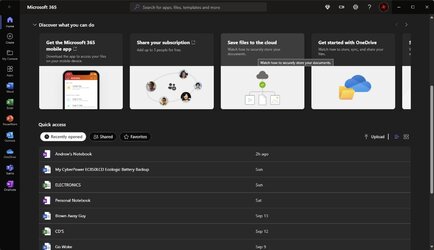
Hi I am using windows 11 and Microsoft 365 it all seems to be working ok but when I open the home page on the Microsoft 365 I get a list of recently opened files for everyone to see I can hide them one by one but I would like them not to be there at all


How do I stop this please
 

My Computer My Computer

At a glance

Windows 11 Proi7-1065G7 CPU @ 1.30GHz 1.50 GHz16.0 GB
OS
Windows 11 Pro
Computer type
Laptop
Manufacturer/Model
HP Envy
CPU
i7-1065G7 CPU @ 1.30GHz 1.50 GHz
Memory
16.0 GB
I use Ofc 2021 instead of 365 so do not know if this same setting exists in 365 but here's what worked for me.
Open Word >Options> Advanced Scroll down and you will see the following setting.
 

Attachments

  • Screenshot 2023-10-04 075738.png
    Screenshot 2023-10-04 075738.png
    33.7 KB · Views: 2

My Computers My Computers

  • At a glance

    Windows 11 Pro 25H2 26200.8655i9-10900 10 core 20 threads32 gbnone-Intel UHD Graphics 630
    OS
    Windows 11 Pro 25H2 26200.8655
    Computer type
    PC/Desktop
    Manufacturer/Model
    Dell Optiplex 7080
    CPU
    i9-10900 10 core 20 threads
    Motherboard
    DELL 0J37VM
    Memory
    32 gb
    Graphics Card(s)
    none-Intel UHD Graphics 630
    Sound Card
    Integrated Realtek
    Monitor(s) Displays
    Benq 27
    Screen Resolution
    2560x1440
    Hard Drives
    2x1tb Solidigm m.2 nvme /External drives 512gb Samsung m.2 sata+2tb Kingston m2.nvme
    PSU
    500w
    Case
    MT
    Cooling
    Dell Premium
    Keyboard
    Logitech wired
    Mouse
    Logitech wireless
    Internet Speed
    so slow I'm too embarrassed to tell
    Browser
    #1 Edge #2 Firefox
    Antivirus
    Defender+MWB Premium
  • At a glance

    Windows 11 Pro 24H2 26200.8457AMD Ryzen 7 6800U32 gbintegrated
    Operating System
    Windows 11 Pro 24H2 26200.8457
    Computer type
    PC/Desktop
    Manufacturer/Model
    Beelink Mini PC SER5
    CPU
    AMD Ryzen 7 6800U
    Memory
    32 gb
    Graphics card(s)
    integrated
    Sound Card
    integrated
    Monitor(s) Displays
    Benq 27
    Screen Resolution
    2560x1440
    Hard Drives
    1TB Crucial nvme
    Keyboard
    Logitech wired
    Mouse
    Logitech wireless
    Internet Speed
    still too embarrassed to tell
    Browser
    Firefox
    Antivirus
    Defender
    Other Info
    System 3 is non compliant Dell 9020 i7-4770/24gb ram Win11 PRO 26200.8457
I previously was using MS Office 2021 Pro Plus, but now using MS 365.
One thing I noticed was that there was more vertical distance between the quick access toolbar buttons and labels of the tab bar(Home, Insert, Preview, Layout, View.....) than it was in Microsoft Office 2021 Pro Plus.
 

My Computer My Computer

At a glance

window 10 version 22H2 (OS Build 19045.6466Intel Core i7 @2.80GHz 57 °C Sandy Bridge 32n...4.00GB Dual-Channel DDR3 @ 665MHz (9-9-9-24)Intel HD Graphics 3000
OS
window 10 version 22H2 (OS Build 19045.6466
Computer type
Laptop
Manufacturer/Model
Dell/E6400
CPU
Intel Core i7 @2.80GHz 57 °C Sandy Bridge 32nm Tech
Motherboard
Dell Inc. 0K0DNP (CPU 1)
Memory
4.00GB Dual-Channel DDR3 @ 665MHz (9-9-9-24)
Graphics Card(s)
Intel HD Graphics 3000
Sound Card
High Definition Audio Device
Monitor(s) Displays
single
Screen Resolution
1366x768 pixels
Hard Drives
WDC WD2500BPVT-75JJ5T0
Keyboard
Device Name Standard PS/2 Keyboard
Mouse
PS/2 Compatible Mouse
Internet Speed
10mb
Browser
ms edge
Antivirus
win defender
Thanks for the info i well get thar a try
 

My Computer My Computer

At a glance

Windows 11 Proi7-1065G7 CPU @ 1.30GHz 1.50 GHz16.0 GB
OS
Windows 11 Pro
Computer type
Laptop
Manufacturer/Model
HP Envy
CPU
i7-1065G7 CPU @ 1.30GHz 1.50 GHz
Memory
16.0 GB
Hi all did not work all files are still visible on home oage
 

My Computer My Computer

At a glance

Windows 11 Proi7-1065G7 CPU @ 1.30GHz 1.50 GHz16.0 GB
OS
Windows 11 Pro
Computer type
Laptop
Manufacturer/Model
HP Envy
CPU
i7-1065G7 CPU @ 1.30GHz 1.50 GHz
Memory
16.0 GB
Hi all did not work all files are still visible on home oage
Are you talking about this "home page"?...

2023-10-05_10-25-15.jpg

If so, per curiosity of your question, I've not found any way to hide those recent files. Honestly though I never use the home page to access anything. I just pin my most used apps to the taskbar and open from there.

That said, if you share your PC, yeah, everyone will see those; however, if each user has his/her own profile, they will only see what they've used, not those of others. Personally, if you're going to share a PC, and want privacy, give each user their own user account - Add Local User Account in Windows 11 Tutorial

And yeah, what @glasskuter shows, will only clear recent for the specific app - Word, Excel, PowerPoint, etc... and does not affect "Home page"
 
Last edited:

My Computers My Computers

  • At a glance

    Windows 11 Pro 24H2 (Build 26100.4770)Intel Core 9 Ultra 285K64G (4x16) DDR5 Corsair RGB Dominator Platinu...Radeon (XFX Mercury) RX 9070XT OC (with Magne...
    OS
    Windows 11 Pro 24H2 (Build 26100.4770)
    Computer type
    PC/Desktop
    Manufacturer/Model
    Custom built
    CPU
    Intel Core 9 Ultra 285K
    Motherboard
    Gigabyte Aorus Z890 Xtreme AI Top
    Memory
    64G (4x16) DDR5 Corsair RGB Dominator Platinum (6400Mhz)
    Graphics Card(s)
    Radeon (XFX Mercury) RX 9070XT OC (with Magnetic Fans)
    Sound Card
    Onboard (DTS:X® Ultra Audio: ESS ES9280A DAC)
    Monitor(s) Displays
    27-inch Eizo Color Edge - CG2700X
    Screen Resolution
    3840 x 2160
    Hard Drives
    4 Samsung NVM 990 Pro drives: 1TB (OS), 2TB, 2 X 4TB.
    PSU
    Seasonic TX-1300 (1300 Watts)
    Case
    Cooler Master H500M
    Cooling
    Corsair Link Titan 280 RX RGB
    Keyboard
    Logitech Craft
    Mouse
    Logitech MX Master 3S
    Internet Speed
    1TB Download. 512mb Upload
    Browser
    Microsoft Edge Chromium
    Antivirus
    Windows Security
    Other Info
    System used for gaming, photography, music, school.
  • At a glance

    Windows 11 Pro 24H2 (Build 26100.4061)Intel Core i9-9900K32gig (4 x 8) Corsair Dominator Platinum DDR4...Radeon XFX Merc 7900XT (20gig)
    Operating System
    Windows 11 Pro 24H2 (Build 26100.4061)
    Computer type
    PC/Desktop
    Manufacturer/Model
    Custom built
    CPU
    Intel Core i9-9900K
    Motherboard
    Gigabyte Z390 Aorus Xtreme
    Memory
    32gig (4 x 8) Corsair Dominator Platinum DDR4 3600Mhz (B-Die)
    Graphics card(s)
    Radeon XFX Merc 7900XT (20gig)
    Sound Card
    Onboard
    Monitor(s) Displays
    24-Inch NEC PA242W
    Screen Resolution
    2880 x 1800
    Hard Drives
    2 X NVME, 1 X SATA SSD
    PSU
    EVGA Super Nova 1000 P2 (1000 Watt)
    Case
    Phantek Enthoo Luxe
    Cooling
    Corsair H115i Elite AIO Cooler
    Keyboard
    Logitech Keys
    Mouse
    Logitech MX Master 3
    Internet Speed
    1TB Download. 512mb Upload
    Browser
    Microsoft Edge Chromium
    Antivirus
    Windows Security
    Other Info
    Backup System
Are you talking about this "home page"?...

View attachment 73109

If so, per curiosity of your question, I've not found any way to hide those recent files. Honestly though I never use the home page to access anything. I just pin my most used apps to the taskbar and open from there.

That said, if you share your PC, yeah, everyone will see those; however, if each user has his/her own profile, they will only see what they've used, not those of others. Personally, if you're going to share a PC, and want privacy, give each user their own user account - Add Local User Account in Windows 11 Tutorial

And yeah, what @glasskuter shows, will only clear recent for the specific app - Word, Excel, PowerPoint, etc... and does not affect "Home page"

Hi yes thats the page thanks for the advice

Its not a big problem and i can live with it but i would like it gone but never mind its not the end of the workd
 

My Computer My Computer

At a glance

Windows 11 Proi7-1065G7 CPU @ 1.30GHz 1.50 GHz16.0 GB
OS
Windows 11 Pro
Computer type
Laptop
Manufacturer/Model
HP Envy
CPU
i7-1065G7 CPU @ 1.30GHz 1.50 GHz
Memory
16.0 GB
Back
Top Bottom