Hide a Windows Update


Levitate11

Well-known member
Power User
VIP
Local time
11:56 PM
Posts
476
OS
Windows 11 Pro 24H2
How do I hide a Win 11 (24H2 26100.4202) Driver update I don't want?

I have update set to Policy #3 - "download, ask to install". It's working properly at the moment. WE've had our differences in the past.

This morning it presented me with three updates. Two of them I wanted (.net security and Defender update). I clicked Install next to each and installed them.

The third is an update for my Intel Graphics. But, I already did that, via Intel, yesterday, at their suggestion, to a newer driver than MS says they want to give. me (Go figure).

1748715894181.webp

I then used the ol' reliable Windows Update Show-Hide program to hide that update. It went through the motions and all went well. But, it still shows in Windows Update as wanting to install.

I've run WinShowHide again and it has nothing to Hide now. I've rebooted a couple times. No matter what, the update sticks around per the graphic above.

I found this thread here Show or Hide Updates in Windows 11 that led to using PowerShell and the PSWindowsUpdate module via this page: Hide Windows Updates with Powershell. But that module wants me to key in a KB number and the driver update has no KB number.

I thought of just grabbing a fresh Restore point, trying to install it and hoping Windows says "You already have it", but I have a couple concerns. One is that it tells me that and still doesn't take it off the list. The other is that it actually tries to do the install and messes up my drivers... and even with the Restore, that seems to often lead to a long day of pain.

I could also disable Driver Updates via Group Policy but I'm guessing that won't work retroactively... and even if it does, I really don't mind a heads up on drivers. I usually get them from the source site, not MS, but I don't mind the notification.

Any suggestions?
 

My Computer My Computer

At a glance

Windows 11 Pro 24H2Intel Ultra 7 155H16gbIntel Arc integrated
OS
Windows 11 Pro 24H2
Computer type
Laptop
Manufacturer/Model
HP
CPU
Intel Ultra 7 155H
Memory
16gb
Graphics Card(s)
Intel Arc integrated
Hard Drives
SSD
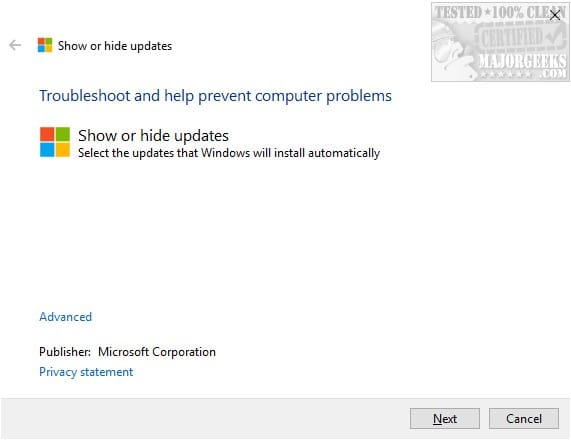
Download the Microsoft Show/Hide Windows Update Tool from Major Geeks:


Then run it to find available updates. Hide (block) the ones you want by checking their boxes. That's it.

PS: Of course you must block the updates before they are installed.
 

My Computers My Computers

  • At a glance

    Windows 11 Pro 23H2 (5699), 25H2 (8655)Mobile DualCore Intel Core 2 Duo T7250, 2000 MHz4GBMobile Intel(R) GMA 4500M (Mobile 4 series)
    OS
    Windows 11 Pro 23H2 (5699), 25H2 (8655)
    Computer type
    Laptop
    Manufacturer/Model
    Acer Extensa 5630EZ
    CPU
    Mobile DualCore Intel Core 2 Duo T7250, 2000 MHz
    Motherboard
    Acer Extensa 5630
    Memory
    4GB
    Graphics Card(s)
    Mobile Intel(R) GMA 4500M (Mobile 4 series)
    Sound Card
    Realtek ALC268 @ Intel 82801IB ICH9 - High Definition Audio Controller
    Monitor(s) Displays
    1
    Screen Resolution
    1280x800
    Hard Drives
    Samsung SSD 850 EVO 250GB SATA Device (250 GB, SATA-III)
    Internet Speed
    VDSL 50 Mbps
    Browser
    MICROSOFT EDGE
    Antivirus
    WINDOWS DEFENDER
    Other Info
    Legacy MBR installation, no TPM, no Secure Boot, no WDDM 2.0 graphics drivers, no SSE4.2, cannot get more unsupported ;) This is only my test laptop. I had installed Windows 11 here before upgrading my main PC. For my main PC I use everyday see my 2nd system specs.
  • At a glance

    Windows 11 Pro v25H2 (build 26200.8655)Intel Core-i7 3770 3.40GHz s1155 (3rd generat...2x Kingston Hyper-X Blu 8GB DDR3-1600GIGABYTE GeForce RTX 3050 WINDFORCE OC V2 6GB...
    Operating System
    Windows 11 Pro v25H2 (build 26200.8655)
    Computer type
    PC/Desktop
    Manufacturer/Model
    Custom-built PC
    CPU
    Intel Core-i7 3770 3.40GHz s1155 (3rd generation)
    Motherboard
    Asus P8H61 s1155 ATX
    Memory
    2x Kingston Hyper-X Blu 8GB DDR3-1600
    Graphics card(s)
    GIGABYTE GeForce RTX 3050 WINDFORCE OC V2 6GB (GV-N3050WF2OCV2-6GD)
    Sound Card
    Realtek HD audio (ALC887)
    Monitor(s) Displays
    Sony Bravia KDL-19L4000 19" LCD TV via VGA
    Screen Resolution
    1440x900 32-bit 60Hz
    Hard Drives
    WD Blue SA510 2.5 1000GB SSD as system disk, Western Digital Caviar Purple 4TB SATA III (WD40PURZ) as second
    PSU
    Thermaltake Litepower RGB 550W Full Wired
    Case
    SUPERCASE MIDI-TOWER
    Cooling
    Deepcool Gamma Archer CPU cooler, 1x 8cm fan at the back
    Keyboard
    Mitsumi 101-key PS/2
    Mouse
    Sunnyline OptiEye PS/2
    Internet Speed
    100Mbps
    Browser
    Microsoft Edge, Mozilla Firefox
    Antivirus
    Microsoft Windows Defender
    Other Info
    Legacy BIOS (MBR) installation, no TPM, no Secure Boot, WDDM 3.0 graphics drivers, WEI score 7.4
  • Like
Reactions: KJW
Download the Microsoft Show/Hide Windows Update Tool from Major Geeks:


Then run it to find available updates. Hide (block) the ones you want by checking their boxes. That's it.

PS: Of course you must block the updates before they are installed.

Already did that... the detail is in my post above. The Update is still showing in Windows Update.
 

My Computer My Computer

At a glance

Windows 11 Pro 24H2Intel Ultra 7 155H16gbIntel Arc integrated
OS
Windows 11 Pro 24H2
Computer type
Laptop
Manufacturer/Model
HP
CPU
Intel Ultra 7 155H
Memory
16gb
Graphics Card(s)
Intel Arc integrated
Hard Drives
SSD
You might want to try this PS script to hide that HWID from WU

I don't know if that will hide an update it's already identified or not.
 

My Computer My Computer

At a glance

Windows 7
OS
Windows 7
You might want to try this PS script to hide that HWID from WU

I don't know if that will hide an update it's already identified or not.

Thanks. I ran it to hide the update... but it didn't affect what's already in the queue. Probably has me covered for the future on that one.
 

My Computer My Computer

At a glance

Windows 11 Pro 24H2Intel Ultra 7 155H16gbIntel Arc integrated
OS
Windows 11 Pro 24H2
Computer type
Laptop
Manufacturer/Model
HP
CPU
Intel Ultra 7 155H
Memory
16gb
Graphics Card(s)
Intel Arc integrated
Hard Drives
SSD
OK, I gave in and installed WAU Manager. After reading about others having similar issues with Driver updates and noting that it's likely Windows will keep torturing me with their bug-ridden, illogical, and convoluted Windows Update process, I gave in.

Ah, that feels better. Why MS can't give us a working interface like Win 7 had or WAU Manager... I'm sure I'll never figure it out.

As the prophecy foretold, WAU Manager Properly found only a new Defender update waiting when I ran it. It also showed the two updates I hid with Win Show/Hide updates as Hidden (One an old Office Update that doesn't actually apply and the other this new but dated Driver MS wants to install). It ignored both, as a properly working program should, and quickly installed the new Defender update.
 

My Computer My Computer

At a glance

Windows 11 Pro 24H2Intel Ultra 7 155H16gbIntel Arc integrated
OS
Windows 11 Pro 24H2
Computer type
Laptop
Manufacturer/Model
HP
CPU
Intel Ultra 7 155H
Memory
16gb
Graphics Card(s)
Intel Arc integrated
Hard Drives
SSD

My Computer My Computer

At a glance

Microsoft Windows 11 HomeIntel Core i5-13490F2 x 16 Patriot Memory (PDP Systems) PSD516G56...GIGABYTE GeForce RTX 4070 WINDFORCE OC 12G (G...
OS
Microsoft Windows 11 Home
Computer type
PC/Desktop
Manufacturer/Model
MSI MS-7D98
CPU
Intel Core i5-13490F
Motherboard
MSI B760 GAMING PLUS WIFI
Memory
2 x 16 Patriot Memory (PDP Systems) PSD516G560081 6400MT (32-37-37-74); 1.35V)
Graphics Card(s)
GIGABYTE GeForce RTX 4070 WINDFORCE OC 12G (GV-N4070WF3OC-12GD)
Sound Card
Bluetooth Аудио
Monitor(s) Displays
INNOCN 15K1F
Screen Resolution
1920 x 1080
Hard Drives
WD_BLACK SN770 250GB
KINGSTON SNV2S1000G (ELFK0S.6)
PSU
Thermaltake Toughpower GF3 1000W
Case
CG560 - DeepCool
Cooling
ID-COOLING SE-224-XTS / 2 x 140Mm Fan - rear and top; 3 x 120Mm - front
Keyboard
Corsair K70 RGB TKL
Mouse
Corsair KATAR PRO XT
Internet Speed
100 Mbps
Browser
Firefox
Antivirus
Microsoft Defender Antivirus
Other Info
https://www.userbenchmark.com/UserRun/66553205

My Computer My Computer

At a glance

Windows 11 Pro 24H2Intel Ultra 7 155H16gbIntel Arc integrated
OS
Windows 11 Pro 24H2
Computer type
Laptop
Manufacturer/Model
HP
CPU
Intel Ultra 7 155H
Memory
16gb
Graphics Card(s)
Intel Arc integrated
Hard Drives
SSD
and quickly installed the new Defender update.

You can ask WAU Manager to check for Defender Updates and auto install, leaving the rest for your inspection. I get a popup at 6:30pm each day saying I am up to date after it checks for & or installs Defender updates. I think that is configerable, interval wise. I haven’t yet tried.

It can also check for software updates.
 

My Computers My Computers

  • At a glance

    Windows 11 Pro 25H2 Build 26200.8655Intel(R) Core(TM) i7-4770K CPU @ 3.50GHz32.0 GB of I forget and the box is in storage.Gigabyte nVidia GeForce GTX 1660 Super OC 6GB
    OS
    Windows 11 Pro 25H2 Build 26200.8655
    Computer type
    PC/Desktop
    Manufacturer/Model
    Sin-built 2013
    CPU
    Intel(R) Core(TM) i7-4770K CPU @ 3.50GHz
    Motherboard
    ASUS ROG Maximus VI Formula
    Memory
    32.0 GB of I forget and the box is in storage.
    Graphics Card(s)
    Gigabyte nVidia GeForce GTX 1660 Super OC 6GB
    Sound Card
    ROG SupremeFX Formula 8-Channel High Definition Audio
    Monitor(s) Displays
    5 x LG 25MS500-B - 1 x 24MK430H-B - 1 x Wacom Pro 22" Touch Screen Tablet
    Screen Resolution
    All over the place
    Hard Drives
    Too many to list. OS on Samsung 1TB 870 QVO SATA
    PSU
    Silverstone 1500
    Case
    NZXT Phantom 820 Full-Tower Case
    Cooling
    Noctua NH-D15 Elite Class Dual Tower CPU Cooler / 6 x EziDIY 120mm / 2 x Corsair 140mm somethings / 1 x 140mm Thermaltake something / 2 x 200mm Corsair.
    Keyboard
    Corsair K95 / Logitech diNovo Edge Wireless
    Mouse
    Logitech: G402 / G502 / Mx Masters / Mx Air Cordless
    Internet Speed
    2000/500Mbps
    Browser
    All sorts
    Antivirus
    Kaspersky Premium
    Other Info
    ㅤㅤㅤㅤㅤㅤㅤㅤㅤㅤㅤㅤㅤㅤㅤㅤㅤㅤㅤㅤㅤㅤㅤㅤㅤㅤㅤㅤㅤㅤㅤㅤㅤㅤㅤㅤㅤㅤㅤㅤ⠀⠀⠀⠀⠀⠀⠀⠀⠀⠀
    TP-Link BE9300 WiFi 7 Bluetooth 5.4 (Archer TBE550E)
    TP-Link TX201 V1 2.5GB Lan

    Grandstream HT812 - VoIP
    ASUS DSL-AX82U - Mesh
    ASUS RT-AC68U - Mesh
    ASUS RT-BE88U Router

    Brother MFC-L2880DW Printer

    I’m on a horse.
  • At a glance

    Windows 11 Pro 25H2 Build 26200.8655 (Wifes)13th Generation Intel® Core™ i5-1340P Process...16GB LPDDR5-52001x Intel® Iris® Xe Graphics
    Operating System
    Windows 11 Pro 25H2 Build 26200.8655 (Wifes)
    Computer type
    Laptop
    Manufacturer/Model
    LENOVO Yoga 7 14IRL8 - Type 82YL
    CPU
    13th Generation Intel® Core™ i5-1340P Processor(Core™ i5-1340P)
    Memory
    16GB LPDDR5-5200
    Graphics card(s)
    1x Intel® Iris® Xe Graphics
    Sound Card
    Optimized with Dolby Atmos®
    Screen Resolution
    QHD 2880 x 1800 OLED
    Hard Drives
    M.2 512 GB SSD PCIe
    Mouse
    Logiteck MX Master 3S
    Internet Speed
    2000/500
    Antivirus
    Defender / Malwarebytes
    Other Info
    …still on a horse.


    Wireless Network: Wi-Fi 6E 2x2 AX; Bluetooth® 5.1 or above
    Ports: 1x 1 Novo button; 2 in 1 Audio Combo jack; Micro SD Card Reader; HDMI 1.4b; 2 x USB Type-C (TBT4)
    USB 3.2 Gen 2 DP 1.4a
    PD 3.0); 1 x USB 3.2 Gen1 Type A
    Camera
    1x 1080P FHD IR/RGB Hybrid with Privacy Shutter and Dual Array Microphone
    Graphics
    1x Intel® Iris® Xe Graphics
    Monitor
    14" WUXGA
    Form Factor
    Convertible Notebook
  • Windows 11 Pro 25H2 Build 26200.8655 (Wifes)

    Yoga 7 2-in-1 14IML9 - Type 83DJ

    Processor: Intel® Core™ Ultra 7 155H Processor(Core™ Ultra 7 155H)

    Memory: 32GB LPD5X-7467

    Hard Drive: 1 TB SSD PCIe

    Wireless Network: 1x Wi-Fi 6E 2x2 AX; Bluetooth® 5.1 or above

    Ports: 1 x HDMI 2.1 TMDS; 1 x Novo Button; 1 x Combo Audio Jack
    2 x USB-C (USB 4.0)
    1 x USB-A 3.2 Gen 1

    Camera: 1080P FHD IR Hybrid with Dual Microphone

    Graphics: Intel® Arc™ Graphics

    Monitor: 14" 2.8K

    ...Where's my horse?
Where is that setting?

I don't remember, but it must be in one of the windows of the driver installation program.

If you install using PowerShell

# -s, --silent Silently install.
# -f, --fresh Forces clean/fresh installation of the driver. Used with the silent installation.

Start-Process -FilePath $extractFolder\Installer.exe -NoNewWindow -ArgumentList "-s --noExtras --report $extractFolder\IntelGFX.log" -Wait
 

My Computer My Computer

At a glance

Microsoft Windows 11 HomeIntel Core i5-13490F2 x 16 Patriot Memory (PDP Systems) PSD516G56...GIGABYTE GeForce RTX 4070 WINDFORCE OC 12G (G...
OS
Microsoft Windows 11 Home
Computer type
PC/Desktop
Manufacturer/Model
MSI MS-7D98
CPU
Intel Core i5-13490F
Motherboard
MSI B760 GAMING PLUS WIFI
Memory
2 x 16 Patriot Memory (PDP Systems) PSD516G560081 6400MT (32-37-37-74); 1.35V)
Graphics Card(s)
GIGABYTE GeForce RTX 4070 WINDFORCE OC 12G (GV-N4070WF3OC-12GD)
Sound Card
Bluetooth Аудио
Monitor(s) Displays
INNOCN 15K1F
Screen Resolution
1920 x 1080
Hard Drives
WD_BLACK SN770 250GB
KINGSTON SNV2S1000G (ELFK0S.6)
PSU
Thermaltake Toughpower GF3 1000W
Case
CG560 - DeepCool
Cooling
ID-COOLING SE-224-XTS / 2 x 140Mm Fan - rear and top; 3 x 120Mm - front
Keyboard
Corsair K70 RGB TKL
Mouse
Corsair KATAR PRO XT
Internet Speed
100 Mbps
Browser
Firefox
Antivirus
Microsoft Defender Antivirus
Other Info
https://www.userbenchmark.com/UserRun/66553205
If you manually download and install latest Intel graphics drivers for your system, Windows update driver will become obsolete. All you have to do is clean Windows update cache and try searching for updates again. Since the driver is obsolete it should disappear from the list. No need to hide it.
 

My Computers My Computers

  • At a glance

    Windows 11 Pro 23H2 (5699), 25H2 (8655)Mobile DualCore Intel Core 2 Duo T7250, 2000 MHz4GBMobile Intel(R) GMA 4500M (Mobile 4 series)
    OS
    Windows 11 Pro 23H2 (5699), 25H2 (8655)
    Computer type
    Laptop
    Manufacturer/Model
    Acer Extensa 5630EZ
    CPU
    Mobile DualCore Intel Core 2 Duo T7250, 2000 MHz
    Motherboard
    Acer Extensa 5630
    Memory
    4GB
    Graphics Card(s)
    Mobile Intel(R) GMA 4500M (Mobile 4 series)
    Sound Card
    Realtek ALC268 @ Intel 82801IB ICH9 - High Definition Audio Controller
    Monitor(s) Displays
    1
    Screen Resolution
    1280x800
    Hard Drives
    Samsung SSD 850 EVO 250GB SATA Device (250 GB, SATA-III)
    Internet Speed
    VDSL 50 Mbps
    Browser
    MICROSOFT EDGE
    Antivirus
    WINDOWS DEFENDER
    Other Info
    Legacy MBR installation, no TPM, no Secure Boot, no WDDM 2.0 graphics drivers, no SSE4.2, cannot get more unsupported ;) This is only my test laptop. I had installed Windows 11 here before upgrading my main PC. For my main PC I use everyday see my 2nd system specs.
  • At a glance

    Windows 11 Pro v25H2 (build 26200.8655)Intel Core-i7 3770 3.40GHz s1155 (3rd generat...2x Kingston Hyper-X Blu 8GB DDR3-1600GIGABYTE GeForce RTX 3050 WINDFORCE OC V2 6GB...
    Operating System
    Windows 11 Pro v25H2 (build 26200.8655)
    Computer type
    PC/Desktop
    Manufacturer/Model
    Custom-built PC
    CPU
    Intel Core-i7 3770 3.40GHz s1155 (3rd generation)
    Motherboard
    Asus P8H61 s1155 ATX
    Memory
    2x Kingston Hyper-X Blu 8GB DDR3-1600
    Graphics card(s)
    GIGABYTE GeForce RTX 3050 WINDFORCE OC V2 6GB (GV-N3050WF2OCV2-6GD)
    Sound Card
    Realtek HD audio (ALC887)
    Monitor(s) Displays
    Sony Bravia KDL-19L4000 19" LCD TV via VGA
    Screen Resolution
    1440x900 32-bit 60Hz
    Hard Drives
    WD Blue SA510 2.5 1000GB SSD as system disk, Western Digital Caviar Purple 4TB SATA III (WD40PURZ) as second
    PSU
    Thermaltake Litepower RGB 550W Full Wired
    Case
    SUPERCASE MIDI-TOWER
    Cooling
    Deepcool Gamma Archer CPU cooler, 1x 8cm fan at the back
    Keyboard
    Mitsumi 101-key PS/2
    Mouse
    Sunnyline OptiEye PS/2
    Internet Speed
    100Mbps
    Browser
    Microsoft Edge, Mozilla Firefox
    Antivirus
    Microsoft Windows Defender
    Other Info
    Legacy BIOS (MBR) installation, no TPM, no Secure Boot, WDDM 3.0 graphics drivers, WEI score 7.4
If you manually download and install latest Intel graphics drivers for your system, Windows update driver will become obsolete. All you have to do is clean Windows update cache and try searching for updates again. Since the driver is obsolete it should disappear from the list. No need to hide it.

Well, I already had the latest driver (later than what Windows was offering), as installed by Intel. I'd assume that's the same as your suggested "manual install" as it's done outside the Windows Update process.

However, I grabbed the second part of your suggestion and ran the new Update Troubleshooter to clear the cache. That appears to have corrected the "Driver in Waiting" issue. Only catch is that I didn't start Windows Update and look before I did that. So, it was possible that it was already cleared through one of the other actions I took, listed above.

But, I'm all set now... and I think I'll just stick with WAU Manager. MS needs to do better design on this horrific Windows Update interface.
 

My Computer My Computer

At a glance

Windows 11 Pro 24H2Intel Ultra 7 155H16gbIntel Arc integrated
OS
Windows 11 Pro 24H2
Computer type
Laptop
Manufacturer/Model
HP
CPU
Intel Ultra 7 155H
Memory
16gb
Graphics Card(s)
Intel Arc integrated
Hard Drives
SSD
Download the Microsoft Show/Hide Windows Update Tool from Major Geeks:


Then run it to find available updates. Hide (block) the ones you want by checking their boxes. That's it.

PS: Of course you must block the updates before they are installed.
Thankyou for Windows Update tool worked ok for me. Windows 11 Pro
 

My Computer My Computer

At a glance

Windows 11 Pro 25Hz Build 26200.8117 64BitAMD Ryzen Ryzen 7 500HDDR4 SDRAM 32Gb 2X 16 Crucial Technology 1600...AMD Radeon Graphics Video Chipset: AMD Radeon...
OS
Windows 11 Pro 25Hz Build 26200.8117 64Bit
Computer type
PC/Desktop
Manufacturer/Model
Trigkey S5 Mini Pc
CPU
AMD Ryzen Ryzen 7 500H
Motherboard
Trigkey S5 Motherboard Chipset: AMD Promontory/Bixby FCH
Memory
DDR4 SDRAM 32Gb 2X 16 Crucial Technology 1600.0 MHz (DDR4-3200 / PC4-25600)
Graphics Card(s)
AMD Radeon Graphics Video Chipset: AMD Radeon Vega AMD Cezanne - Internal GPU [AMD]
Sound Card
ATI/AMD Renoir/Cezanne - Display HD Audio Controller High Definition Audio Codec: RealTek ALC897
Monitor(s) Displays
AOC : AOC2415
Screen Resolution
1920 x 1080 527 x 296 mm, Pixel Clock 148.50 MHz
Hard Drives
NVMe 976,762 MBytes (1024 GB) Drive Model: PCIe SSD
PSU
Not Known
Case
Mini Pc
Cooling
Not Known
Keyboard
Standard PS/2 Keyboard
Mouse
HID-compliant PS/2 Compatible
Internet Speed
Full Fibre 1Gb
Browser
Firefox & Brave
Antivirus
Norton 360 Premium
Other Info
Microsoft Windows 11 Professional (x64) Build 26200.8117 (25H2)
UEFI Boot: Present
Secure Boot: Enabled
Hypervisor-protected Code Integrity (HVCI): Enabled
Too late and not really any help either, but I do have questions. :-)

The third is an update for my Intel Graphics. But, I already did that, via Intel, yesterday, at their suggestion, to a newer driver than MS says they want to give. me (Go figure).
That can also be the case if it is an OEM component and Windows Update, based on the hardware ID (specifically the SUBSYS part, e.g. SUBSYS_XXXX103C -> 103C = HP), pushes what it thinks is a more suitable driver to the machine.
This is particularly annoying with devices that are outside (or hardly receive any) of official support, as they therefore (mostly) do not receive the newer generic drivers.

I’ll have to test myself to see if anything has improved since Windows 10 (has it?), otherwise, rolling back to the newer version can help, or one can use the GPO as garlin already suggested - even though this has its own set of rules and pitfalls.
Garlin’s script looks interesting - I’ll have to take a look. Thanks!

I found this thread here Show or Hide Updates in Windows 11 that led to using PowerShell and the PSWindowsUpdate module via this page: Hide Windows Updates with Powershell. But that module wants me to key in a KB number and the driver update has no KB number.
Aside from that - even though the author in this case is probably very trustworthy - it’s simply shocking how many people apparently trust the PowerShell Gallery (or the winget repo as well) blindly.

MS needs to do better design on this horrific Windows Update interface.
Oh yes - it’s downright outrageous that one can’t achieve this with built-in tools.
Besides Windows Update, there’s also automatic driver installation in the PnP process. It’s just been a nightmare for years.
Microsoft could make it so easy for us - but they simply don’t want to.
In my dreams, there would simply be a registry hive where you could define the exclusions - updates like drivers - zap - and then I woke up.

Download the Microsoft Show/Hide Windows Update Tool from Major Geeks:
What’s the current status of this anyway?
I thought it had been marked as deprecated for quite some time and didn’t really work properly anymore?
Has anyone ever figured out where or how wushowhide.diagcab actually store its exclusions?

When installing the driver from the Intel website, try disabling "Execute a clean installation".
That’s the reason for it - right?
The hope that Windows will leave the manually installed driver alone if one keeps the one pushed by WU in the driver store.

If you manually download and install latest Intel graphics drivers for your system, Windows update driver will become obsolete. All you have to do is clean Windows update cache and try searching for updates again. Since the driver is obsolete it should disappear from the list. No need to hide it.
Do you mean “clean Windows update cache” as in a full WU reset, or something less drastic?

WAU Manager
Since WUMgr (last version from 12/11/2019) and WUMT (04/22/2022) haven’t received updates for a while, it’s probably the best tool currently - right?

Thanks and cheers, Martin
 

My Computer My Computer

At a glance

Win11 22H2
OS
Win11 22H2
In the original Microsoft link (now doesn't work), they stated that Microsoft Windows Update Show/Hide Tool works up to Windows 10 v1903 or something. BS! I have successfully used it in all Windows 10 versions, including the last v22H2 and all Windows 11 versions including 25H2. Yes, there might be a few computers that it throws an error for some reason, but in all others it works OK. There is a warning when running it that this Troubleshooting Tool will be replaced, but just ignore the warning and search for available updates. Than hide (block) the ones you don't want. That's it. WAU Manager works similarly.
 

My Computers My Computers

  • At a glance

    Windows 11 Pro 23H2 (5699), 25H2 (8655)Mobile DualCore Intel Core 2 Duo T7250, 2000 MHz4GBMobile Intel(R) GMA 4500M (Mobile 4 series)
    OS
    Windows 11 Pro 23H2 (5699), 25H2 (8655)
    Computer type
    Laptop
    Manufacturer/Model
    Acer Extensa 5630EZ
    CPU
    Mobile DualCore Intel Core 2 Duo T7250, 2000 MHz
    Motherboard
    Acer Extensa 5630
    Memory
    4GB
    Graphics Card(s)
    Mobile Intel(R) GMA 4500M (Mobile 4 series)
    Sound Card
    Realtek ALC268 @ Intel 82801IB ICH9 - High Definition Audio Controller
    Monitor(s) Displays
    1
    Screen Resolution
    1280x800
    Hard Drives
    Samsung SSD 850 EVO 250GB SATA Device (250 GB, SATA-III)
    Internet Speed
    VDSL 50 Mbps
    Browser
    MICROSOFT EDGE
    Antivirus
    WINDOWS DEFENDER
    Other Info
    Legacy MBR installation, no TPM, no Secure Boot, no WDDM 2.0 graphics drivers, no SSE4.2, cannot get more unsupported ;) This is only my test laptop. I had installed Windows 11 here before upgrading my main PC. For my main PC I use everyday see my 2nd system specs.
  • At a glance

    Windows 11 Pro v25H2 (build 26200.8655)Intel Core-i7 3770 3.40GHz s1155 (3rd generat...2x Kingston Hyper-X Blu 8GB DDR3-1600GIGABYTE GeForce RTX 3050 WINDFORCE OC V2 6GB...
    Operating System
    Windows 11 Pro v25H2 (build 26200.8655)
    Computer type
    PC/Desktop
    Manufacturer/Model
    Custom-built PC
    CPU
    Intel Core-i7 3770 3.40GHz s1155 (3rd generation)
    Motherboard
    Asus P8H61 s1155 ATX
    Memory
    2x Kingston Hyper-X Blu 8GB DDR3-1600
    Graphics card(s)
    GIGABYTE GeForce RTX 3050 WINDFORCE OC V2 6GB (GV-N3050WF2OCV2-6GD)
    Sound Card
    Realtek HD audio (ALC887)
    Monitor(s) Displays
    Sony Bravia KDL-19L4000 19" LCD TV via VGA
    Screen Resolution
    1440x900 32-bit 60Hz
    Hard Drives
    WD Blue SA510 2.5 1000GB SSD as system disk, Western Digital Caviar Purple 4TB SATA III (WD40PURZ) as second
    PSU
    Thermaltake Litepower RGB 550W Full Wired
    Case
    SUPERCASE MIDI-TOWER
    Cooling
    Deepcool Gamma Archer CPU cooler, 1x 8cm fan at the back
    Keyboard
    Mitsumi 101-key PS/2
    Mouse
    Sunnyline OptiEye PS/2
    Internet Speed
    100Mbps
    Browser
    Microsoft Edge, Mozilla Firefox
    Antivirus
    Microsoft Windows Defender
    Other Info
    Legacy BIOS (MBR) installation, no TPM, no Secure Boot, WDDM 3.0 graphics drivers, WEI score 7.4
Back
Top Bottom